Eagle - Vacuum Cleaner FAKIR - Free user manual and instructions
Find the device manual for free Eagle FAKIR in PDF.


User questions about Eagle FAKIR
0 question about this device. Answer the ones you know or ask your own.
Ask a new question about this device
Download the instructions for your Vacuum Cleaner in PDF format for free! Find your manual Eagle - FAKIR and take your electronic device back in hand. On this page are published all the documents necessary for the use of your device. Eagle by FAKIR.
USER MANUAL Eagle FAKIR
natural_image
Black and white photo of a vacuum cleaner with mesh handle and side panel (no visible text or symbols)
Instructions manuel Dry Vacuum Cleaner
1 Güvenlik 3
text_image
1 2 (Res.2)
NOT!
text_image
Diagram of a vacuum cleaner with labeled parts including arm, bulb, and clamp(Res.3)
text_image
Diagram showing a mechanical or electrical component with labeled parts and directional arrows indicating movement or force.(Res.4)

NOTE!
natural_image
Line drawing of a hand inserting a component into a vacuum cleaner's air vent (no text or symbols)(Res.5)
natural_image
Technical line drawing of a mechanical component with a threaded base and flange (no text or symbols)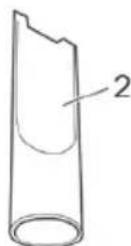
(Res.6)

natural_image
Line drawing of a mechanical component with a cylindrical pipe fitting (no text or symbols)(Res.7)

natural_image
Technical line drawing of a mechanical component assembly (no text or symbols)(Res.8)
text_image
Technical diagram showing a vacuum cleaner with labeled parts and two small components labeled a and b.(Res.11)
natural_image
Diagram of a curved tube with a labeled component (no text or symbols present)(Res.12)
natural_image
Top-down view of a car dashboard with control panel and navigation icons (no text or symbols)(Res.13)
natural_image
Technical line drawing of a robotic vacuum cleaner (no text or symbols)3.4 Nakil ve Saklama
text_image
1 2 (Res.15)natural_image
Line drawing of a car interior showing the dashboard and steering wheel (no text or symbols)(Res.17)
natural_image
Diagram of a hand inserting a component into a device casing (no text or symbols visible)(Res.18)
text_image
Technical diagram of a car air vent with labeled components 1 and 2(Res.19)
natural_image
Line drawing of a car interior showing a hand inserting a filter into the engine compartment (no text or symbols)(Res.21)
natural_image
Illustration of hands holding a rectangular object with two labeled parts (1 and 2), no text or symbols present.(Res.22)
natural_image
Diagram of a hand inserting a filter into a car's air vent (no text or symbols visible)(Res.23)

DIKKAT!
1.1 Operating Manual 18
1.2 The Notices Given 18
1.3 Children 18
1.4 Appropriate Use 19
1.5 Mains connection 20
1.6 If the appliance is defective 20
2 Unpacking and assembling 21
2.1 Unpacking 21
2.2 Using further nozzles (accessories) 22
3 Operation 23
3.1 Vacuum cleaning 23
3.2 Setting the suction power 24
3.3 Switching off and retracting power cord 25
3.4 Transport and storage 25
4 Maintenance 26
4.1 Changing the dust filter bag 26
4.2 Changing filters 27
4.3 Changing the hygienic exhaust filter 27
4.4 Changing the motor protection filter 28
4.5 Cleaning the housing 28
5 Troubleshooting 29
6.1 Cleaning 30
6.2 Liability 30
6.3 Unauthorized Use 30
6.4 Usage Area 31
6.5 CE Declaration of Conformity 31
6.6 Disposal 31
6.7 Dispatch 31
6 After Use 30
1 Safety notes
Thank you for purchasing the Fakir EAGLE Dry Vacuum Cleaner. It was developed and manufactured to work reliably for many years.
1.1 Operating Manual
Read this operating manual carefully before using the appliance.
Keep the operating manual for reference. Include the operating manual if you pass the appliance to third parties. Violations of the operating instructions can lead to severe injuries as well as damages to the appliance. We take no responsibility for damages due to violations of these operating instructions.
1.2 The Notices Given Notices for your safety are especially marked. Always observe these notices to avoid accidents and damages to the appliance.

WARNING!
Warning concerning health hazards describing possible risks of injury.

ATTENTION!
Warning concerning possible dangers to the appliance or other objects.

NOTE!
Highlights tips and information for you.
1.3 Children • Never leave the appliance unattended and use it with special precaution if children or persons who cannot judge dangers are nearby.
- People (including children) who are unable to safely operate the appliance on account of their physical, sensory or mental abilities or their lack of experience or knowledge should only use this appliance under surveillance or instruction of a responsible person. Keep the appliance out of reach of people of these groups.
- Packing-materials are not toys. There is danger of suffocation.
1.4 Appropriate Use • Use the cylinder vacuum cleaner only for cleaning normally soiled floors, rugs and curtains.
- The appliance Is Intended for home use only. It may not be used commercially. Any other use Is considered Inappropriate and Is prohibited.
It is especially forbidden:
• To vacuum-clean:
- Hair, fingers and other parts of the body. They could be sucked in and injured.
- Pieces of clothing (e. g. shoe laces, scarves, etc.). They could be sucked in and cause injuries.
- Water and other liquids, especially moisture from carpet-cleaning agents. Moisture inside the appliance can lead to short-circuiting.
- Toner dust (for laser printers, copying-machines, etc.) There is danger of fire or explosion.
- hot ash, burning cigarettes or matches. This could cause a fire.
- pointed objects such as glass shards, nails, etc. Such objects destroy the filters.
- Plaster, cement, finest drilling-dust, makeup, etc. The filters may clog, causing damage to the appliance.
- The use of the appliance near inflammable or explosive materials. There is danger of fire or explosion.
- Outdoor use There is danger of rain and dirt destroying the appliance.
- Sticking objects into the appliance's openings. It could overheat.
1.5 Mains connection • The appliance runs on electricity, that means there is always danger of electric shock. So please especially observe the following:
- Never touch the plug with wet hands.
- Always pull directly at the plug If you want to disconnect the appliance from the mains. Never pull the mains lead, It might break.
- Take care that the power cord is not bent, pinched, rolled over or gets in contact with heat sources.
- Use only extension cords suited to the power requirements of the appliance.
- Never immerse the appliance in water or other liquids.
- Only operate the appliance if your mains voltage is the same as that indicated on the appliance's nameplate. Wrong voltage can destroy the appliance.
- If the power cord of this appliance is damaged it must be replaced by the manufacturers, their authorised service representative or a similarly qualified person to avoid danger to the user.
1.6 If the appliance is defective
- Never use a defective appliance or operate an appliance with a defective power cord. There is a major risk of injury.
- Refer a defective appliance to an authorised dealer or the Fakir Home Appliances service for repair.
2 Unpacking and assembling
2.1 Unpacking
- Unpack the appliance and all its accessories.
- Check that the contents are complete Information regarding scope of delivery

ATTENTION!
Always transport or ship the appliance in its original packaging to avoid damage. Keep the packaging for such an event. Dispose of no longer needed packaging material according to the applicable regulations of your country.
text_image
1 2 (Fig.2)
NOTE!
Immediately contact your dealer if you damage resulting from transportation.

text_image
Technical diagram of a vacuum cleaner with labeled parts 1, 2, 3, and 4
WARNING!
Only assemble the appliance if it is not connected to the mains. The appliance could be switched on by accident.
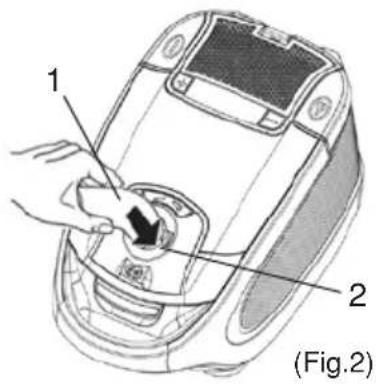
- Insert the end of the suction hose (Fig. 2/1) in the intake opening (Fig. 2/2) into the intake opening of the vacuum cleaner, until it locks with an audible click.
- Insert the handle (Fig. 3/1) into the upper end of the telescopic tube (Fig. 3/2).
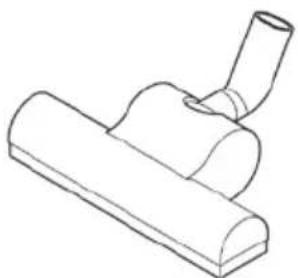
- Attach the floor nozzle (Fig. 3/3) to the bottom end of the telescopic tube (Fig. 3/4).
text_image
1 (Fig.4)
NOTE!
It might be necessary to push a bit harder.
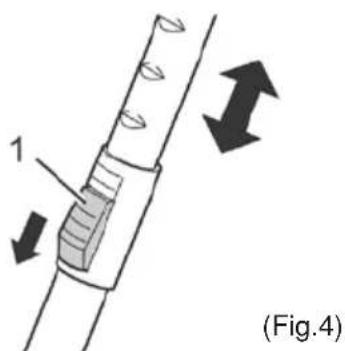
- Adjust the length of the telescopic tube. Press down the release latch on the tube to (Fig. 4/1) do this. Then pull the handle of the telescopic tube to extend (Fig. 3/1) it to your desired length. Let go of the release catch while pulling until it locks in place. You will hear a distinct click.
Your vacuum cleaner is now ready for use.
2.2 Using Further Nozzles Besides the floor nozzle you just attached, you may extend

natural_image
Line drawing of a hand inserting a component into a vacuum cleaner's air vent (no text or symbols)the functions of your vacuum cleaner with other nozzles.
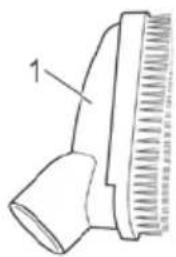
- The combi brush and the crevice nozzle are included in the package as accessories. You can store them in the accessory compartment when not in use. (Fig.5)
- Combi Brush (Fig.6/1)
Use this to remove dust from objects with delicate surfaces (e.g. cupboards and tables)
- Crevice Nozzle (Fig.6/2)
Use this to suck dust out of hard to reach places.

WARNING!
Only attach nozzles when the vacuum cleaner is not connected to the mains. The appliance could be switched on by accident.

natural_image
Technical line drawing of a hairdryer with a textured cap and bulb (no text or symbols)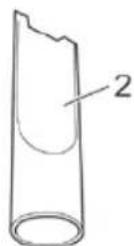
(Fig.6)
natural_image
Line drawing of a mechanical component with a cylindrical shaft and flanged base (no text or symbols)(Fig.7)

natural_image
Technical line drawing of a vacuum cleaner assembly (no text or symbols)(Fig.8)
This is how you attach the nozzles:
- Switch off the vacuum cleaner and pull the plug from the mains socket.
- Pull the attached nozzle off of the telescopic tube.
- Attach the required nozzle to the bottom end of the telescopic tube (Fig.9/1) or if necessary directly to the handle.

ATTENTION!
Using the vacuum cleaner without a nozzle attached increases the danger of accidentally sucking in objects.
- If possible, store nozzles no longer in use on the accessory bracket.
3 Operation
3.1 Vacuum cleaning

WARNING!
Check the vacuum cleaner and the power cord each time before using It. A damaged appliance must not be used. There is danger of injury.

ATTENTION!
Only use the vacuum cleaner with all filters intact, in dry condition and correctly placed. Make sure that the openings of the vacuum cleaner are not clogged.or obstructed. Otherwise the vacuum cleaner might be damaged.

text_image
1 2 (Fig 9)(Fig.9)

NOTE!
Your vacuum cleaner is equipped with a safety switch to prevent overheating. It automatically cuts off the power supply if the motor is overheated. In this case switch off the vacuumcleaner and disconnect it from the mains. Remove the cause of the overheating. Wait for about 45 minutes. After it has cooled off, you may use the vacuum cleaner again.
- Attach the desired nozzle
- cord until the yellow marking is visible (Fig. 9/1)
text_image
Technical diagram of a robotic vacuum cleaner with labeled parts 1 and 2(Fig.10)

WARNING!
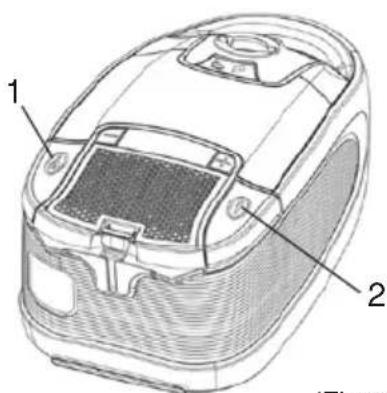
If the red marking shows (Fig. 9/2) retract the cord by pressing the retract button to pull in the cable (Fig. 10/2) up to the yellow mark again. Otherwise the cord might break. There is danger of an electric shock.
- Switch on the vacuum cleaner with the on/off switch (Fig. 10/1).

natural_image
Diagram of a vacuum cleaner with labeled parts (a and b) and part number 1, no readable text or symbols beyond labels
natural_image
Diagram of a curved tube with a labeled component (Fig.12), no text or symbols present.3.2 Setting the suction power
natural_image
Top-down view of a car interior showing dashboard, steering wheel, and camera (no text or symbols)- Set the nozzle switch to "carpet" or "hard floor" according to the floor (Fig. 11) to be cleaned:
- Hard floor (Fig. 11/A) Laminate, tiles, PVC, etc.
- Carpet (Fig. 11/B) Short- and deep-pile carpets, rugs, etc.
- When working with the vacuum cleaner, pull if after you like a sleigh. Follow the respective recommendations of the flooring manufacturers.
NOTICE!
With the bypass vent (Fig. 12/1) you can quickly reduce the suction power if less power is needed, or to release objects accidentally sucked in.
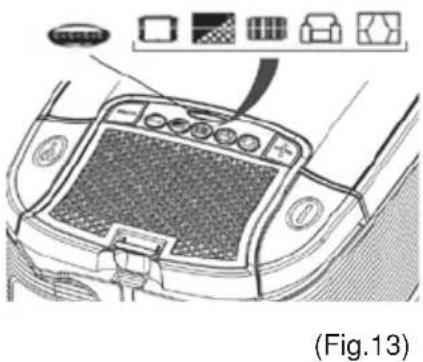
You can adjust the suction power to suit the type of floor being cleaned. Use the symbols on the suction power display as a guideline (Fig. 13/1):
Curtains, textiles (lowest setting)
Upholstery, cushions
High-class carpets, rugs and runners
slightly soiled carpets and hard floors
Heavily soiled carpets and hard floors with coarse dirt (highest setting)
- To set the desired power setting, press the + button or the - button several times until the desired setting lights up on the suction power display.
- + button (Fig. 13/2) increases suction power
-- button (Fig. 13/3) reduces suction power
3.3 Switching off and retracting power cord
natural_image
Line drawing of a small robotic vacuum cleaner (no text or symbols)(Fig.14)
3.4 Transport and storage
text_image
Technical diagram of a vacuum cleaner's internal structure with labeled parts 1 and 2(Fig.15)
text_image
Technical diagram of a vacuum cleaner's side panel with labeled parts 1 and 2(Fig.16)
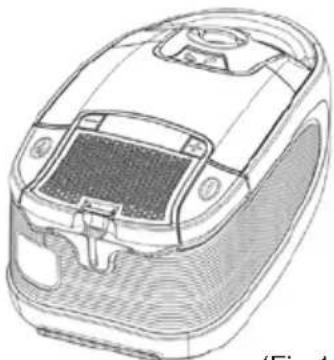
- Switch off the vacuum cleaner with the on/off switch (Fig. 14/1) and pull the plug from the mains socket.
- Keep the plug In your hand.

WARNING!
During retraction the power cord can whip around, become an obstacle or overthrow objects.
- To retract the power cord, push the cord retracting button (Fig. 14/2).
• To transport the vacuum cleaner you can cany it by the handle.
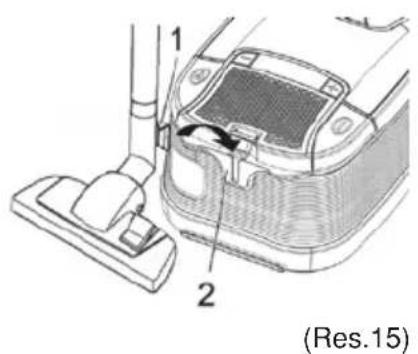
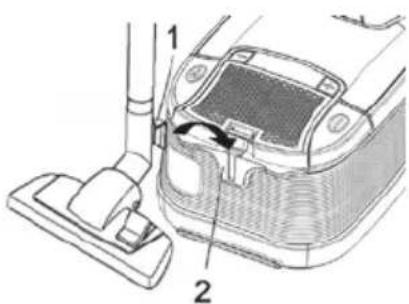
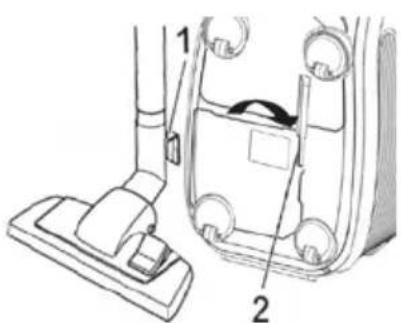
- To store it or when interrupting your work, you can hook the park/storage hook (Fig. 15/1) into the parking (Fig. 15/2) bracket.

WARNING!
During retraction the power cord can whip around, become an When leaving your working-area, switch off the appliance and mind the notices at >Chapter 3.3, "Switching off and retracting power cord".or overthrow objects.
• To store the vacuum cleaner you can hook the park/storage hook (Fig. 16/1) into the storage (Fig. 16/2) bracket on the bottom of the appliance.

ATTENTION
Never store the appliance next to heat sources (e.g. stoves or radiators). Avoid exposing it to direct sunlight. The heat might damage the appliance.
- If you want to store the appliance for a prolonged period, remove the dust filter bag and dispose of it properly. Also clean the filters.
• Always store the appliance in a cool, dry place.
4 Maintenance
4.1 Changing the dust filter bag
natural_image
Line drawing of a car interior showing a hand adjusting the dashboard handle (no text or symbols)(Fig.17)
- Change the dust filter bag at the latest when the electronic dust filter bag change indicator (Fig. 13/1) shows "red" or the suction power has decreased.

When leaving your working-area, switch off the appliance and mind the notices at >Chapter 3.3, "Switching off and retracting power cord". In this way you avoid dust destroying the appliance.
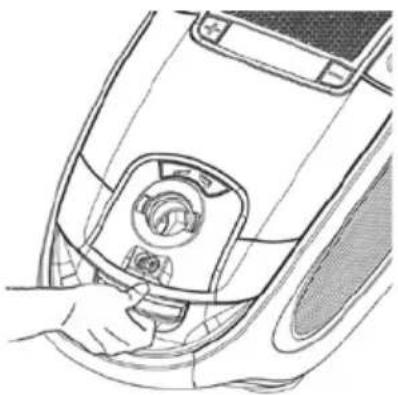
- Open the dust compartment cover by unlatching and subsequently raising it (Fig. 17).
- Raise the dust compartment cover until it locks in the highest position and remains open by itself.

Be careful when removing the dust filter bag so that no dust escapes.
natural_image
Diagram of a hand inserting a component into a car's vent, showing internal parts and a black arrow indicating direction (no text or symbols present)(Fig.18)
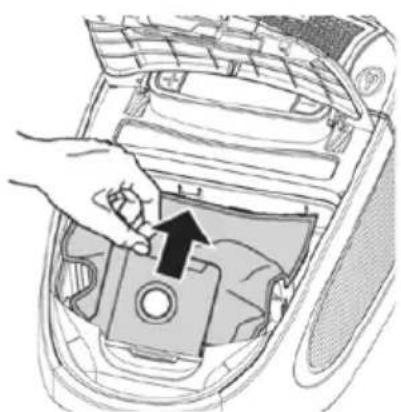
- Pull the dust filter bag up and out of the dust filter holder (Fig. 18).
- Remove any dust that may have collected in the dust compartment.

You can dispose of the dust filter bag with your regular domestic trash if it contains no prohibited waste materials.
- Push the new dust filter bag in the filter bag holder.
- Close the dust compartment cover. It clicks into place audibly.

The dust compartment cover can only be closed with a dust filter bag in place.
4.2 Changing filters
text_image
Technical diagram of a car interior showing labeled components 1 and 2, likely for automotive or electrical installation.(Fig.19)
Your vacuum cleaner is equipped with the following filters:
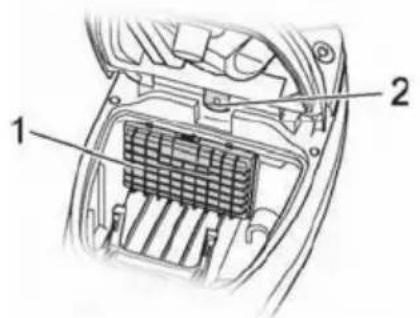
- Motor protection filter (Fig. 19/1) prevents larger particles from destroying the motor in case the dust filter bag is defective.
Changing: Every time you open a new box of dust filter bags, as they always contain a new motor protection filter, but at least every 6 months.
• Hygienic exhaust filter (Fig. 19/2) removes microscopic particles from the exhaust air stream. Changing: every 6 months
The filters can become clogged with time and reduce the appliance's performance. That's why it is important to adhere to the above changing intervals.
Damaged filters must be removed immediately.

ATTENTION
These filters are not washable. The exhaust filter may not be re-used.

NOTICE!
If the motor protection filter is only slightly dirty, it can help to beat out the dust over a dustbin. However, we recommend to change the motor protection filter each time you open a new box of dust >Chapter 6, "Spare parts and disposal") filter bags.
4.3 Changing the hygienic exhaust filter
text_image
1(Fig.20)
-
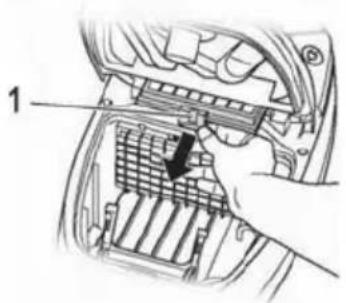
Switch offthe vacuum cleaner and remove the dust filter bag as described in >Chapter4.1, "Changing the dust filter bag", steps 1 thru 4.
-
Remove the exhaust filter (Fig. 20/1).
Unlatch the lock and slightly lift the filter. Now you can pull out the filter towards the front.
-
Insert a new exhaust filter (>Chapter 6, "Spare parts and disposal") and push it down slightly until it locks into the holder.
-
Replace the dust filter bag and close the dust compartment cover. The cover clicks into place audibly.

NOTICE!
Make sure that the exhaust filter is always properly locked into position, otherwise the exhaust air will not be properly filtered.
4.4 Changing the motor protection filter
natural_image
Hand inserting a filter into a car air vent (no text or symbols visible)(Fig.21)

natural_image
Illustration of hands placing a component into a grid on a circular base (no text or symbols)(Fig.22)
4.5 Cleaning the housing
natural_image
Diagram of a hand inserting air filters into a car's air vent (no text or symbols)(Fig.23)
- Switch off the vacuum cleaner and remove the dust filter bag as described in > Chapter 4.1, "Changing the dust filter bag", steps 1 thru 4.
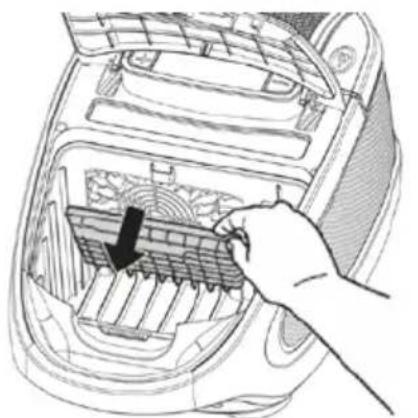
- Remove the filter holder with motor protection filter (Fig. 21/1). Your first flip the filter holder forwards and then pull the filter up and out.
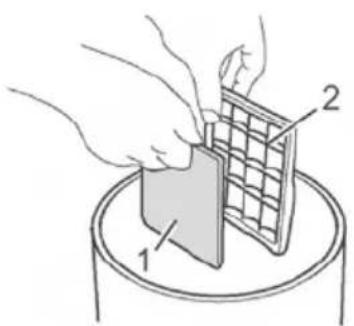
- Remove the motor protection filter (Fig. 22/1) from the filter holder (Fig. 22/2) over a dustbin.
- Clean the filter holder.
- If the new motor protection filter is too large, lay the the old filter onto the new filter mat. Mark the contours and cut the new filter down to size with a pair of scissors.
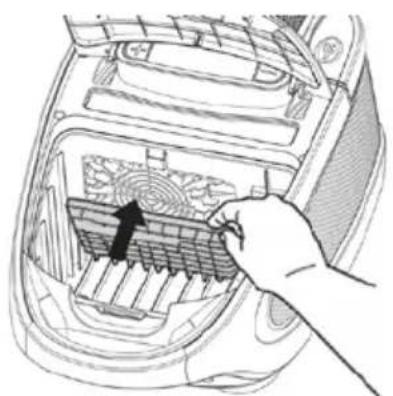
- Insert the new motor protection filter into the filter holder.
- Insert the filter holder with the new filter into its bracket from above and push it down until it audibly locks into place.
- Replace the dust filter bag and close the dust compartment cover. The cover clicks into place audibly.

WARNING!
Always switch off the appliance and disconnect it from the mains before cleaning it t>Chapter3.3, "Switching off and retracting power cord".

ATTENTION
Do not use cleaning or scouring agents or alcohol, as these might damage the appliance.
- Clean the outside of the housing using a slightly damp cloth only.
5 Troubleshooting
WARNING:
Never use a defective appliance. Always switch off the appliance and disconnect it from the mains before starting troubleshooting >Chapter 3.3, "Switching off and retracting power cord".
| Fault | Possible cause | Solution |
| The appliance doesn't run. | The plug is not connected to the mains or the appliance is not switched on. | Insert the plug into a mains socket and switch on the appliance $Chapter 3.1, "Vacuum cleaning". |
| Socket does not carry current. | Test the vacuum cleaner on another socket that you are sure is carrying current. | |
| The power cord is damaged. | Have the cord replaced by the Royal® Appliance Customer Service, addressPage 35, "Warranty". | |
| The cleaning result is unsatisfactory. | The dust filter bag is full or clogged. | Empty/clean the dust filter bag. |
| Nozzle, telescopic tube or suction hose are clogged. | Remove the obstacle. If necessary, use a long wooden stick (e.g. a broomstick) to do this. | |
| The power setting does not fit the flooring. | Set the power to the setting suggested for the flooring,Chapter3.1, "Vacuum cleaning", step 4. | |
| The "carpet/hard floor" switch (Fig. 1/10) is in the wrong position for the particular type of floor. | Set the "carpet/hard floor" switch to the correct position for the (Fig. 1/10) particular type of floor,Chapter3.1, "Vacuum cleaning", step 5. | |
| The attached nozzle does not fit the flooring. | Attach the correct nozzle >Chapter 2.3, "Using further nozzles (accessories)". | |
| The filter is dirty. | Change/clean the respective filterChapter 4.4, "Changing the motor protection filter"or$ Chapter 4.3, "Changing the hygienic exhaust filter". | |
| The appliance makes unusual noises. | Sucked-in objects are obstructing the air stream. | Remove the objects. If necessary, use a long wooden stick (e.g. a broomstick) to do this. |
Cleaning

WARNING!
Switch off the vacuum cleaner and disconnect the plug from the mains socket before cleaning the appliance.
This ensures that the appliance is not switched on unintentionally.

CAUTION!
Do not use cleaning detergents, abrasive agents or alcohol as these will damage the casing.
Only dry-wipe the appliance or clean with a damp cloth. You can also clean the filter chamber with a damp cloth if necessary.
Suction accessories such as the hose, pipes or nozzles should be regularly checked for blockages, cleaned and, washed and dried.
Liability Fakir Elektrikli Ev Aletleri
Dis. Tic. A.Ş. will accept no
liability for damages resulting from failure to comply with the operating instructions. Fakir Elektrikli Ev Aletleri Dış. Tic.
A.Ş. cannot assume any liability in case the appliance is used for other purposes than its intended use or handled, repaired or serviced improperly.
Unauthorized use
The examples of unauthorized use listed here can result in malfunctions, damage to the appliance or personal injury:
This appliance is not designed to be used by persons (including children) with limited physical, sensory or mental capacities or by persons lacking in experience and/or knowledge, unless they are supervised by someone who is responsible for their safety or have received instructions on how to use the appliance. Children should be supervised to ensure that they do not play with the appliance.
Children should be supervised to ensure that they do not play with the appliance. Electric appliances are not toys for children! Therefore, use and store the appliance away from the reach of children. Children do not recognize the danger involved with handling an electric appliance. Do not let the power cord dangle from the appliance.
Keep packaging films away from children - danger of suffocation!
Usage Area
This appliance is suitable for places; home. Do not use appliance for other than intended use and never use this appliance outdoors.
CE Declaration of Conformity
This appliance fulfills the requirements of the Appliance and Product Safety Law (GPSG) and the EU Directives 2004/108/EC "Electromagnetic Compatibility" and 2006/95/EC "Low-Voltage Directive." The appliance bears the CE mark on the rating plate.
Waste disposal If the service life of the device has ended, in particular if functional disturbances occur, make the worn-out device unusable by cutting through the power cable. Dispose of the device according to the environmental regulations applicable in your country. Electrical waste must not be disposed of together with household waste. Bring the worn-out device to a collection center. The packaging of the device consists of recycling-capable materials. Place these, sorted out according to material, in the collectors provided, so that recycling can be carried out on them. For advice on recycling, refer to your local authority or your dealer. Dispose of used dust bag and filters in domestic waste.

Dispatch: Carry the appliance in the original package or a similar, wellpadded package to prevent damage to the appliance.
☐ This product is produced on behalf of Fakir Elektrikli Ev Aletleri Dış Ticaret A.Ş by SUZHOU EUP ELECTRIC CO LTD, 90 JIN SHAN ROAD, NEW DISTRICT, SUZHOU 215011, P.R.CHINA TEL.: 0086-512-68091780.
Technical Specs: Max. 2400W
220/240V 50/60 Hz 10 Years Usage Life
