
SJA9190 - Audio Amplifier PHILIPS - Free user manual and instructions
Find the device manual for free SJA9190 PHILIPS in PDF.


| Product Type | Talking Caller ID Unit |
| Brand | Philips |
| Model | SJA9190 |
| Power Supply | 3 AAA batteries (not included) or optional AC adapter 7.5VDC with negative pin polarity |
| Telephone Connection | Standard RJ11 telephone cord (included); extra jack for connecting a telephone |
| Call Log Capacity | 10 calls (audible review) |
| Volume Settings | 4 levels: low, medium, high, off (adjustable with small key) |
| Languages | English and Spanish (selectable via key combination) |
| Caller ID Announcement | Announces 10-digit number between first and second ring; announces "Number Blocked" or "Number Unknown" when applicable |
| Audible Review | Press big key to hear each call; hold 2 seconds for all new calls |
| Erasing Call Log | Hold big key for 4 seconds to erase all calls |
| Safety Features | Follow safety instructions: avoid water, unstable surfaces, blocked ventilation; unplug before cleaning |
| Cleaning | Use a damp cloth; do not use liquid or aerosol cleaners |
| Battery Care | Insert correctly per polarity; do not mix old/new or different types; dispose properly |
| Warranty | 1-year limited warranty from date of purchase (proof required) |
| Technical Support | Email: accessorysupport@philips.com |
| FCC Compliance | FCC Part 68 (telephone) and Part 15 Class B (radio interference) |
| Country of Origin | Printed in China |
Frequently Asked Questions - SJA9190 PHILIPS
User questions about SJA9190 PHILIPS
0 question about this device. Answer the ones you know or ask your own.
Ask a new question about this device
Download the instructions for your Audio Amplifier in PDF format for free! Find your manual SJA9190 - PHILIPS and take your electronic device back in hand. On this page are published all the documents necessary for the use of your device. SJA9190 by PHILIPS.
USER MANUAL SJA9190 PHILIPS
3 Safety Instructions
6 Introduction
7 Installation
8 Operation
10 Troubleshooting and FAQs
II FCC Information
14 Warranty
15 Technical Support
Safety Instructions
EN
Safety Instructions
When using your telephone equipment, basic safety precautions should always be followed to reduce the risk of fire, electric shock and injury to persons, including the following:
I. Read and understand all instructions.
2. Follow all warnings and instructions marked on the product.
3. Unplug this product from the wall outlet before cleaning. Do not use liquid cleaners or aerosol cleaners; use a damp cloth for cleaning.
4. Do not use this product near water for example, near a bath tub, wash bowl, kitchen sink, or swimming pool, or in a wet basement.
5. Do not place this product on an unstable cart, stand or table, as the product may fall, causing serious damage to the product.
6. Slots and openings in the cabinet and the back or bottom of this product are provided for ventilation (to protect it from overheating) and should not be blocked or covered. The openings should never be blocked by placing this product on a bed, sofa, rug or other similar surface. This product should never be placed near or over a radiator or heat register. This prod-
Safety Instructions
uct should never be placed in a built-in installation unless proper ventilation is provided.
-
This product should be operated only from the type of power source indicated on the marking label. If you are not sure of the type of power supply to your home, consult your dealer or local power company.
-
Do not allow anything to rest on the power cord. Do not place this product where the cord will be abused by people walking on it.
-
Do not overload wall outlets and extension cords, as this can result in the risk of fire or electric shock.
-
Never push objects of any kind into this product through cabinet slots, as they may touch dangerous voltage points or short out parts, resulting in the risk of fire or electric shock. Never spill liquid of any kind on the product.
II. To reduce the risk of electric shock, do not disassemble this product, but take it to a qualified serviceman, when service or repair work is required. Opening or removing covers may expose you to dangerous voltage or other risks. Incorrect reassembly can cause electric shock when this product is subsequently used.
Safety Instructions
EN
-
Unplug this product from the wall outlet and refer servicing to a qualified service personnel under the following conditions: a) when the power supply cord or plug is damaged or frayed; b) if liquid has spilled into the product; c) if the product has been exposed to rain or water; d) if the product does not operate normally when you follow the operating instructions (adjust only those controls that are discussed in the operating instructions, as improper adjustment of other controls may result in damage, often requiring extensive work by a qualified technician to restore the product to normal performance); e) if the product has been dropped or the cabinet has been damaged; f) if the product exhibits a distinct change in performance.
-
Avoid using a telephone (other than a cordless type) during an electrical storm. There may be a remote risk of electric shock from lightning.
- Do not use the telephone to report a gas leak in the vicinity of the leak.
Save these instructions.
Introduction
The SJA9190 lets you know who's calling by announcing the Caller's telephone number when the phone rings, without interrupting what you're doing. If the Caller's telephone number is not available, the unit will announce "Number Unknown." If the Caller has blocked their telephone number, the unit will announce "Number Blocked."
Check the Package Contents
Check the package contents to make sure you have the following items: talking Caller ID unit and telephone line cord.
Care and handling of your batteries
Please read these instructions before installing batteries.
Make sure to insert the batteries properly, following the symbols showing you the correct way to position the positive (+) and negative (-) ends of the batteries.
Replace batteries with the size and type specified by the device's manufacturer. Remove all used batteries from the device at the same time, then replace them with new batteries of
Introduction
EN
the same size and type.
Don't dispose of batteries in a fire—they may rupture or leak.
Don't mix old and new batteries, or mix different types or makes of batteries. This can cause rupture or leakage, resulting in personal injury or property damage.
Installation
Don't give batteries to young children.
Installation
Set up the product by installing three (3) "AAA" batteries inside the battery compartment on the underside of the unit. The unit will also work with a compatible AC Adapter (7.5VDC output with negative pin polarity.)
Plug one end of the telephone cord into the telephone jack on the wall, and the other end into either of the telephone jacks on the back of the unit.
An extra telephone jack is provided on the back of the unit for connecting a telephone or

natural_image
Technical line drawing of a battery pack inside a device casing (no text or symbols)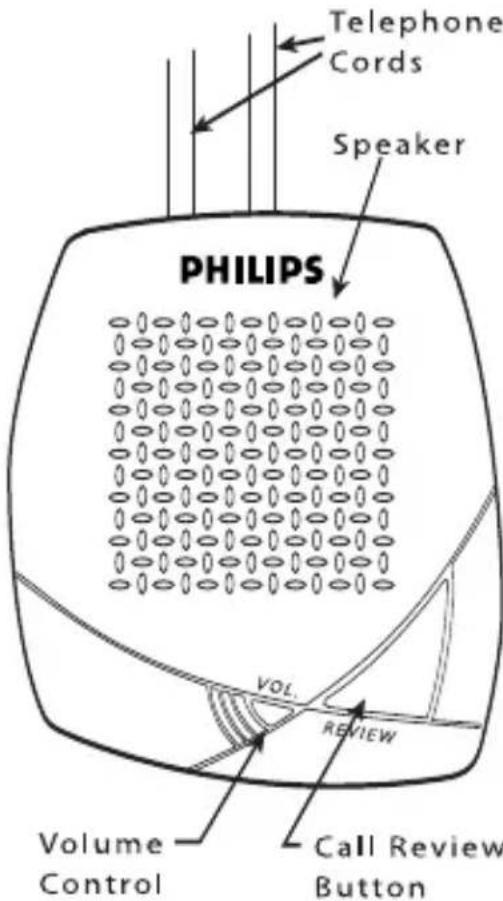
other device at your option.
Screening telephone calls while you're at home
The talking Caller ID works with standard (number-only) and deluxe (name and number) Caller ID service available from your local telephone company.
The unit identifies calls by announcing the Caller's ten-digit telephone number between the first and second ring. If the call is coming from a number that has been blocked, it will announce "Number Blocked." If the telephone number is unidentified, the unit will announce "Number Unknown."
If the phone is still ringing, and you didn't hear the number being announced, just press the big key and it will repeat the number.
Audibly Reviewing Calls
The unit stores the last ten calls in memory for audible review. This is convenient for finding out who called while you were out. There are two ways to perform audible call review:
I. Press the big key to hear the date, time, and telephone number of the most recent call in the log. Subsequent pressing and releasing this key will go further back into the call log and announce information about earlier
Operation
EN
calls. Pressing the big key while an announcement is in process pre-empts the current announcement and goes to the next call. After the final call is announced, the unit beeps. Continued pressing will start back at the top of the log again.
- Hold down the big key for 2-seconds, and it will announce the number of new calls followed by the date, time, and telephone number of every new call in the log. After the final call is announced, the unit beeps.
Language Selection
The unit speaks in English and Spanish. To change the selected language, hold down the small key and momentarily press and release the big key. The unit announces “January” in the selected language.
Erasing Calls
To erase the calls in the audible call log, hold down the big key for 4-seconds. The unit beeps confirming the calls have been erased.
Volume Control
There are four volume settings - low, medium, high, and off. To change the volume, press and release the small key very quickly. You may find it helpful to press the key using the eraser-
EN
Operation
end of a pencil. The key is designed so that it is difficult to change the setting by accident. The unit beeps reflecting the new volume setting. It beeps twice to indicate the volume is turned OFF.
If the volume is set to OFF, incoming calls will not be announced. Calls reviewed while the
Troubleshooting & FAQ
volume is OFF will be announced at medium volume level.
Troubleshooting & FAQs
Having problems? Before contacting PHILIPS or your dealer, check the following list of suggestions. You might be able to solve the problem yourself.
Question:
My unit does not announce anything when the phone rings.
Answers:
Make sure the volume is turned up. To turn up the volume, press the volume control button (small button) with your finger or a pencil eraser until you hear the unit “beep” at the desired volume level. If you hear the unit beep twice, then the volume is off.
Troubleshooting & FAQ
EN
Make sure the batteries are installed properly. The POSITIVE and NEGATIVE ends of the batteries must line up according to the installation diagram inside the battery compartment.
Make sure you have connected the telephone cord between the telephone wall jack and one of the telephone jacks on the back of the unit. Make sure you have subscribed to Caller ID service from your local telephone company.
Wait for the second ring before answering the phone. The Caller ID information is received between the first and second ring.
Make sure you have a fresh set of Alkaline batteries installed, or that you are using the
FCC Regulations
optional AC adapter.
FCC Part 68 and ACTA Information
Your Caller ID unit has been registered with the Federal Communications Commission (FCC), and it complies with the standards set forth in part 68 of the FCC rules. The FCC requires that we provide the following information.
Connection and Use:
The FCC requires you to use a modular telephone jack. This equipment may not be used with party line service or coin-operated telephone lines.
Notification of the Telephone Company
The FCC requires that upon request of your local telephone company you provide the following information: the line to which you will connect the Caller ID unit (your phone number), the Caller ID units FCC registration number and ringer equivalence number (REN) (located on the back of your Caller ID unit), and the USOC jack required (USOC RJ-1 IC or RJ-1 IW). (note: the REN is useful in determining how many devices you may connect to your telephone line and still have all of them ring when someone calls your telephone number. in most, but not all areas, the sum of all RENs should be five or less. contact your local telephone company for more information.)
Problems And Repairs
If your Caller ID unit is malfunctioning, the FCC requires you to completely disconnect it until
FCC Regulations
EN
the problem has been solved. If your Caller ID unit is harming the nationwide telephone network, the telephone company may temporarily discontinue your telephone service. The telephone company will try to notify you before discontinuing service. If advance notice isn't possible, the telephone company will notify you as soon as possible. you'll be given the opportunity to correct the problem, and you'll be informed of your right to file a complaint with the FCC.
Your local telephone company may make changes in facilities, equipment or operations that affect the proper functioning of your Caller ID unit. If such changes are planned, you'll be notified and advised of your right to file a complaint with the FCC.
FCC Part 15 Radio Interference Statement
This equipment has been tested and found to comply with the limits for a class B digital device, pursuant to Part 15 of the FCC Rules. These limits are designed to provide reasonable protection against harmful interference in a residential installation. This equipment generates, uses, and can radiate harmful radio frequency, and if not installed and used in accordance with the instructions, may cause harmful
FCC Regulations
interference to radio communications. However, there is no guarantee that interference will not occur in a particular installation. If this equipment does cause harmful interference to radio or television reception, which can be determined by turning the equipment off and on, the user is encouraged to try to correct the interference by one or more of the following measures: reorient or relocate the receiving antenna; increase the separation between the equipment and receiver; connect the equipment to an outlet on a circuit different from that to
Warranty
which the receiver is connected; consult the dealer or an experienced radio/TV technician for help.
One-Year Limited Warranty
Philips warrants that this product shall be free from defects in material, workmanship and assembly, under normal use, in accordance with the specifications and warnings, for one year from the date of your purchase of this product. This warranty extends only
Warranty
EN
to the original purchaser of the product, and is not transferable. To exercise your rights under this warranty, you must provide proof of purchase in the form of an original sales receipt that shows the product name and the date of purchase. For customer support or to obtain warranty service, please call 919-573-7863. THERE ARE NO OTHER EXPRESS OR IMPLIED WARRANTIES. Philips' liability is limited to repair or, at its sole option, replacement of the product.
Technical Support
Incidental, special and consequential damages are disclaimed where permitted by law. This warranty gives you specific legal rights. You may also have other rights that vary from state to state.
Technical Support
For Technical support send an email with the model number of the product and a detailed description of your problem to:
Email: accessorysupport@philips.com
©2006
Accessories Service Center
Title
Philips
Accessories and Computer Peripherals,
Ledgewood, NJ 07852 USA
Quality assured in USA
Printed in China
SP
Contenido
natural_image
Technical line drawing of a battery pack inside a housing (no text or symbols)Instalación
accessorysupport@philips.com
Impreso en China
SP

Specifications are subject to change without notice Trademarks are property of Philips Accessories and Computer Peripherals 2006© Philips Accessories and Computer Peripherals, Ledgewood, NJ USA
www.philips.com

- Safety Instructions
- Introduction
- Check the Package Contents
- Care and handling of your batteries
- Installation
- Screening telephone calls while you're at home
- Audibly Reviewing Calls
- Operation
- Language Selection
- Erasing Calls
- Volume Control
- EN
- Troubleshooting & FAQ
- Troubleshooting & FAQs
- Question:
- Answers:
- FCC Regulations
- FCC Part 68 and ACTA Information
- Connection and Use:
- Notification of the Telephone Company
- Problems And Repairs
- FCC Part 15 Radio Interference Statement
- Warranty
- One-Year Limited Warranty
- Technical Support
- Title
- SP
- Contenido
- Instalación
Brand : PHILIPS
Model : SJA9190
Category : Audio Amplifier