
SP-C21 - Speaker PIONEER - Free user manual and instructions
Find the device manual for free SP-C21 PIONEER in PDF.


| Product Type | 2-way center speaker with bass reflex port |
| Brand | Pioneer |
| Model | SP-C21 |
| Configuration | 2-way |
| Nominal impedance | 6 ohms |
| Sensitivity | 87 dB (2.83 V) |
| Maximum input power | 130 W |
| Frequency response | 55 Hz – 20 kHz |
| Crossover frequency | 2.5 kHz |
| Magnetic shielding | Yes |
| Dimensions (W × H × D) | 500 × 200 × 220 mm |
| Weight | 7.35 kg |
| Woofer | 13.34 cm (×2) |
| Tweeter | 2.54 cm |
| Power | Passive, to be connected to an amplifier |
| Maintenance | Wipe with a dry or slightly damp cloth (diluted neutral detergent) |
| Safety | Do not exceed maximum power; avoid excessive volumes; do not expose to heat or sunlight |
| Included accessories | Two felt feet for tilting |
| Warranty | 1 year parts and labor (United States and Canada) |
Frequently Asked Questions - SP-C21 PIONEER
User questions about SP-C21 PIONEER
0 question about this device. Answer the ones you know or ask your own.
Ask a new question about this device
Download the instructions for your Speaker in PDF format for free! Find your manual SP-C21 - PIONEER and take your electronic device back in hand. On this page are published all the documents necessary for the use of your device. SP-C21 by PIONEER.
USER MANUAL SP-C21 PIONEER
SP-FS51-LR, SP-BS21-LR & SP-C21

SP-BS21-LR

natural_image
Black vertical tower with four circular patterned circles on each side, no text or symbols presentSP-FS51-LR

SP-C21
IMPORTANT NOTICE: The serial number for the equipment is located on the rear of the product.
Please write this serial number on the warranty sheet and keep it in a secure area for future reference.
BEFORE USE
- Thank you for buying this Pioneer product.
- Please read through this operating guide before using your speaker system to optimize performance. After you have finished reading this operating guide, store it in a safe place for future reference.
- The nominal impedance of this speaker system is 8 ohms. Connect the speaker system to a stereo amplifier with a load impedance rating ranging from 4 to 16 ohms (a model with "4-16Ω" displayed on the speaker output terminals).
- In order to prevent damage to the speaker system resulting from input overload, please observe the following precautions:
- Do not supply power to the speaker system in excess of the maximum permissible input.
- When connecting or disconnecting cables, be sure amplifier power is OFF.
- Do not use excessive amplifier volume if using a graphic equalizer to emphasize high or low frequencies.
www.pioneerelectronics.com
CONNECTING YOUR SYSTEM
IMPORTANT: Make sure all equipment is turned off before making any connections.
Correct wiring of your loudspeakers is essential for achieving the best sound quality. Be careful to ensure proper polarity of connection. We recommend a minimum of 18 gauge for runs up to 25 feet, and thicker for longer runs.
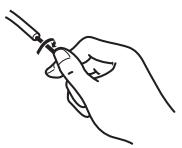
Most loudspeaker cable is coded to ease this task. Typically the ribbed or striped side is connected to the positive (red) terminal. Make sure that the amplifier positive (red) terminal is connected to the loudspeaker positive (red) terminal. Strip off 12 " of insulation from the ends of the cable, twist the bare strands and insert into the binding posts. Take care that no stray strands of wire short across between the terminals.
natural_image
Line drawing of a hand holding a pen or stylus (no text or symbols)1: Strip the cover and twist the strands
natural_image
Technical line drawings of a device with mounting base, front panel, and side panel (no text or symbols)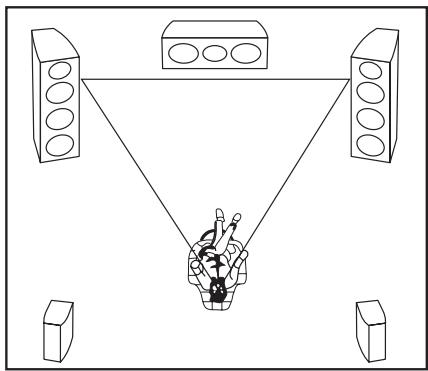
natural_image
Diagram of a person speaking into a microphone at three speakers (no text or symbols present)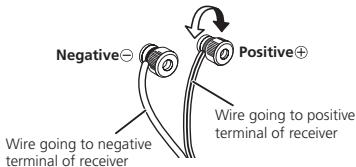
2: Connect each speaker cable (not supplied) to one set of the receiver's speaker output terminals and the speaker input terminals. The red terminal is the positive (+), and the black terminal is the negative (-). Make sure that the receiver positive (red) terminal is connected to the speaker positive (red) terminal.
INSTALLING THE BASE TO THE SP-FS51-LR FLOORSTANDING SPEAKERS
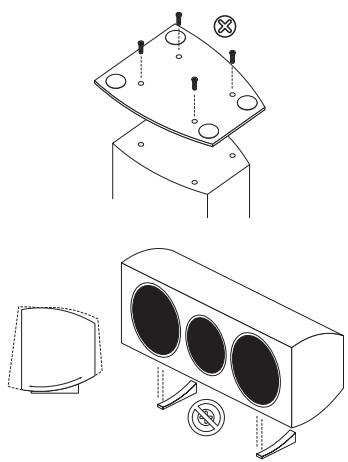
Included in the SP-FS51-LR carton are (2) bases and (8) screws. Attach the base to the bottom of each speaker using (4) screws, as illustrated. (Screwdriver is not included.)
USING FEET WITH THE SP-C21 CENTER-CHANNEL SPEAKER
Included in the SP-C21 carton are (2) feet for the SP-C21 to rest on. Place the feet at the desired location of the speaker. They can be spaced a variety of widths apart for installation flexibility. Once the SP-C21 is placed on the feet, tilt the speaker to the desired angle, depending on the location of the speaker in relation to the desired listening position.
NOTE: Do not use adhesive or screws to attach the feet to the speaker. Doing this will damage the cabinet and void the warranty.
PLACEMENT AND FINE TUNING
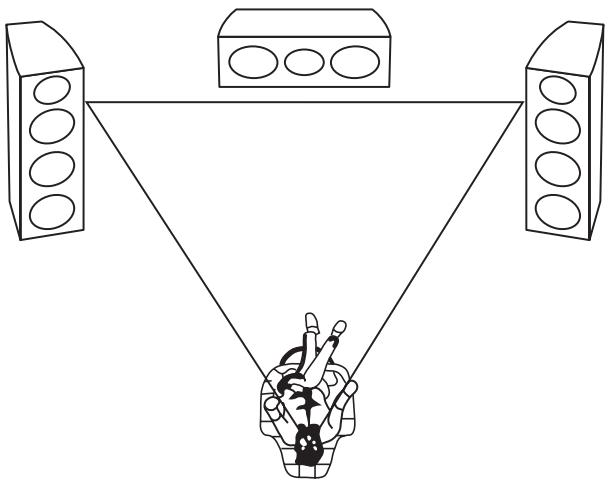
Correct placement is important for maximizing the sound quality of your loudspeaker system. Take time to experiment with positioning according to the guidelines below.
Using the SP-FS51-LR or SP-BS21-LR as Front and Surround Speakers
For best results the tweeter should be positioned near ear level and the loudspeakers separated a distance approximately equal to the listening distance. Angling the loudspeakers inward towards the listener will improve the image stability for non-central listeners. Close proximity to a side or rear wall will enhance the bass performance, although too close (particularly a corner location) and the bass may be unnaturally high and image performance may be degraded. Best results will be obtained when the loudspeaker is placed approximately 2 feet from the wall. If a corner location is unavoidable, try to position the loudspeaker so that the distance to the rear wall is not equal to the distance to the side wall.
Using the SP-C21 as a Center Speaker
The loudspeaker may be positioned above or below the TV. For best results align the front of the loudspeaker with the front of the TV. Due to the well-controlled vertical directivity, it is not normally necessary to vertically aim the loudspeaker towards the listener. If, however, the loudspeaker is placed under the TV and very close to the floor, then tilting upwards may be beneficial.
Follow the instruction for your receiver and set the center channel to NORMAL in Pro logic modes, or SMALL in Dolby and DTS modes. This will ensure that any bass signals encoded in the center channel are redirected to the front speakers or sub-woofer where they will be optimally reproduced. If you have a choice, set the crossover frequency to 100Hz.
It is recommended to use a sound level meter to setup the center channel level from the receiver. Adjust the receiver center volume until the center channel sound level is equal to that from the front left and right loudspeakers. In the absence of a meter, initially set the level of each channel to be identical. All models in the range have sufficiently close sensitivities such that this is a good starting point. Now play a wide selection of movies and listen carefully to the clarity of dialog, particularly in the presence of other effects such as explosions. Adjust the level until the dialog is clearly but naturally presented.
For best results the loudspeakers should be positioned at or above ear level.
natural_image
Diagram of a three-tiered triangular setup with speakers and a person holding a device (no text or symbols)INSTALLATION PRECAUTIONS
- Do not install this speaker system near a stove or other heating appliance, or put it in a place exposed to the sun. Such locations may cause the cabinet to change color and the speaker system to break down.
- Remember that the SP-FS51-LR, SP-BS21-LR, and SP-C21 are quite heavy, so it is dangerous to install them in high places such as on walls or pillars or in other unstable locations unless suitably secured in place.
Pioneer will not be responsible for any accidents or damage that may result from improper installation.
The SP-C21 is magnetically shielded. However, if the speaker system is installed too close to the screen of a television set, color distortion may occur.
If this happens, turn off the power switch of the television set, and turn it on after 15 to 30 minutes. If the problem persists, place the speaker system away from the television set.
CABINET MAINTENANCE
- Use a polishing cloth or dry cloth to wipe off dust and dirt.
- When the cabinet is very dirty, clean with a soft cloth dipped in some neutral cleanser diluted five or six times with water, and then wipe again with a dry cloth. Do not use furniture wax or cleaners.
- Never use thinner, benzine, insecticide sprays and other chemicals on or near the cabinets, since these will corrode the surfaces.
SPECIFICATIONS
| SP-BS21-LR | SP-C21 | SP-FS51-LR | |
| Enclosure | Bass-reflexBookshelf Type | Bass-reflexCenter Channel Type | Bass-reflexFloorstanding Type |
| Configuration | 2-way | 2-way | 3-way |
| Frequency Range | 65 Hz-20 kHz | 55 Hz-20 kHz | 45 Hz-20 kHz |
| Nominal Impedance | 6 Ohms | 6 Ohms | 6 Ohms |
| Sensitivity (2.83 V) | 84 dB | 87 dB | 87 dB |
| Maximum Input Power | 80 W | 130 W | 130 W |
| Cross-Over Frequency | 2 kHz | 2.5 kHz | 2.5 kHz |
| Magnetically Shielded | - | Yes | - |
| Dimensions(W x H x D inch) | 7-1/8" W12-5/8" H8-1/16" D | 19-7/8" W7-7/8" H8-11/16" D | 7-7/8" W31-1/2" H8-11/16" D |
| Weight (each) | 8 lbs 6 oz | 16 lbs 3 oz | 22 lbs 4 oz |
| Woofer | 4" | 5-1/4" (x2) | 5-1/4" (x2) |
| Midrange | - | - | 5-1/4" |
| Tweeter | 1" | 1" | 1" |
Pioneer
PIONEER ELECTRONICS (USA) INC.
PIONEER ELECTRONIQUES DU CANADA, INC.
LIMITED WARRANTY
WARRANTY VALID ONLY IN COUNTRY OF PRODUCT PURCHASE
WARRANTY
Pioneer Electronics (USA) Inc. (PUSA), and Pioneer Electronics Of Canada, Inc. (POC), warrant that products distributed by PUSA in the U.S.A., and by POC in Canada that fail to function properly under normal use due to a manufacturing defect when installed and operated according to the owner's manual enclosed with the unit will be repaired or replaced with a unit of comparable value, at the option of PUSA or POC, without charge to you for parts or actual repair work. Parts supplied under this warranty may be new or rebuilt at the option of PUSA or POC.
THIS LIMITED WARRANTY APPLIES TO THE ORIGINAL OR ANY SUBSEQUENT OWNER OF THIS PIONEER PRODUCT DURING THE WARRANTY PERIOD PROVIDED THE PRODUCT WAS PURCHASED FROM AN AUTHORIZED PIONEER DISTRIBUTOR/DEALER IN THE U.S.A. OR CANADA. YOU WILL BE REQUIRED TO PROVIDE A SALES RECEIPT OR OTHER VALID PROOF OF PURCHASE SHOWING THE DATE OF ORIGINAL PURCHASE OR, IF RENTED, YOUR RENTAL CONTRACT SHOWING THE PLACE AND DATE OF FIRST RENTAL. IN THE EVENT SERVICE IS REQUIRED, THE PRODUCT MUST BE DELIVERED WITHIN THE WARRANTY PERIOD, TRANSPORTATION PREPAID, ONLY FROM WITHIN THE COUNTRY OF PURCHASE AS EXPLAINED IN THIS DOCUMENT. YOU WILL BE RESPONSIBLE FOR REMOVAL AND INSTALLATION OF THE PRODUCT. PUSA OR POC, AS APPROPRIATE, WILL PAY TO RETURN THE REPAIRED OR REPLACEMENT PRODUCT TO YOU WITHIN THE COUNTRY OF PURCHASE.
PRODUCT WARRANTY PERIOD
Parts Labor
Home Audio and Video ....
1 Year 1 Year
Microphones, Headphones, Phono Cartridges and Styluses
90 Days 90 Days
Shorter limited warranty periods apply to some models. Please refer to the limited warranty document enclosed with the product for a definitive statement of the warranty period. The warranty period for retail customers who rent the product commences upon the date product is first put into use (a) during the rental period or (b) retail sale, whichever occurs first.
WHAT IS NOT COVERED
IF THIS PRODUCT WAS PURCHASED FROM AN UNAUTHORIZED DISTRIBUTOR, THERE ARE NO WARRANTIES, EXPRESS OR IMPLIED, INCLUDING THE IMPLIED WARRANTY OF MERCHANTABILITY AND THE IMPLIED WARRANTY OF FITNESS FOR A PARTICULAR PURPOSE AND THIS PRODUCT IS SOLD STRICTLY AS IS AND WITH ALL FAULTS".
PIONEER SHALL NOT BE LIABLE FOR ANY CONSEQUENTIAL AND/OR INCIDENTAL DAMAGES.
PIONEER DOES NOT WARRANT ANY PRODUCT LISTED ABOVE WHEN IT IS USED IN A TRADE OR BUSINESS OR IN ANY INDUSTRIAL OR COMMERCIAL APPLICATION.
THIS WARRANTY DOES NOT APPLY IF THE PRODUCT HAS BEEN SUBJECTED TO POWER IN EXCESS OF ITS PUBLISHED POWER RATING.
THIS WARRANTY DOES NOT COVER TELEVISION OR DISPLAY SCREENS DAMAGED BY STATIC, NON-MOVING, IMAGES APPLIED FOR LENGTHY PERIODS (BURN-IN).
THIS WARRANTY DOES NOT COVER THE CABINET OR ANY APPEARANCE ITEM, USER ATTACHED ANTENNA, ANY DAMAGE TO RECORDS OR RECORDING TAPES OR DISCS, ANY DAMAGE TO THE PRODUCT RESULTING FROM ALTERATIONS, MODIFICATIONS NOT AUTHORIZED IN WRITING BY PIONEER, ACCIDENT, MISUSE OR ABUSE, DAMAGE DUE TO LIGHTNING OR TO POWER SURGES, SUBSEQUENT DAMAGE FROM LEAKING, DAMAGE FROM INOPERATIVE BATTERIES, OR THE USE OF BATTERIES NOT CONFORMING TO THOSE SPECIFIED IN THE OWNER'S MANUAL. THIS WARRANTY DOES NOT COVER THE COST OF PARTS OR LABOR WHICH WOULD BE OTHERWISE PROVIDED WITHOUT CHARGE UNDER THIS WARRANTY OBTAINED FROM ANY SOURCE OTHER THAN A PIONEER AUTHORIZED SERVICE COMPANY OR OTHER DESIGNATED LOCATION. THIS WARRANTY DOES NOT COVER DEFECTS OR DAMAGE CAUSED BY THE USE OF UNAUTHORIZED PARTS OR LABOR OR FROM IMPROPER MAINTENANCE.
ALTERED, DEFACED, OR REMOVED SERIAL NUMBERS VOID THIS ENTIRE WARRANTY
NO OTHER WARRANTIES
IN THE U.S.A. - PIONEER LIMITS ITS OBLIGATIONS UNDER ANY IMPLIED WARRANTIES INCLUDING, BUT NOT LIMITED TO, THE IMPLIED WARRANTIES OF MERCHANTABILITY AND FITNESS FOR A PARTICULAR PURPOSE, TO A PERIOD NOT TO EXCEED THE WARRANTY PERIOD. NO WARRANTIES SHALL APPLY AFTER THE WARRANTY PERIOD. SOME STATES DO NOT ALLOW LIMITATIONS ON HOW LONG AN IMPLIED WARRANTY LASTS AND SOME STATES DO NOT ALLOW THE EXCLUSIONS OR LIMITATIONS OF INCIDENTAL OR CONSEQUENTIAL DAMAGES, SO THE ABOVE LIMITATIONS OR EXCLUSIONS MAY NOT APPLY TO YOU. THIS WARRANTY GIVES YOU SPECIFIC LEGAL RIGHTS AND YOU MAY HAVE OTHER RIGHTS WHICH MAY VARY FROM STATE TO STATE.
IN CANADA - EXCEPT AS EXPRESSLY PROVIDED HEREIN, THERE ARE NO REPRESENTATIONS, WARRANTIES, OBLIGATIONS OR CONDITIONS, IMPLIED, STATUTORY OR OTHERWISE, APPLICABLE TO THIS PRODUCT.
TO OBTAIN SERVICE
PUSA and POC have appointed a number of Authorized Service Companies throughout the U.S.A. and Canada should your product require service. To receive warranty service you need to present your sales receipt or, if rented, your rental contract showing place and date of original owner's transaction. If shipping the unit you will need to package it carefully and send it, transportation prepaid by a traceable, insured method, to an Authorized Service Company. Package the product using adequate padding material to prevent damage in transit. The original container is ideal for this purpose. Include your name, address and telephone number where you can be reached during business hours.
On all complaints and concerns in the U.S.A. call Customer Support at 1-800-421-1404, or, in Canada, call Customer Satisfaction at 1-877-283-5901.
IN THE U.S.A.
For hook-up and operation of your unit or to locate an Authorized Service Company, please call or write:
SERVICE SUPPORT DIVISION
PIONEER ELECTRONICS (USA), INC. P.O. BOX 1760, LONG BEACH, CALIFORNIA 90801 1-800-421-1404 • http://www.pioneerelectronics.com
IN CANADA
For additional information on this warranty, please call or write:
CUSTOMER SATISFACTION GROUP
PIONEER ELECTRONICS OF CANADA, INC. 300 ALLSTATE PARKWAY, MARKHAM, ON L3R 0P2 (905) 479-4411 • 1-877-283-5901 • http://www.pioneerelectronics.ca
DISPUTE RESOLUTION
IN THE U.S.A. - Following our response to any initial request to Customer Support, should a dispute arise between you and Pioneer, Pioneer makes available its Complaint Resolution Program to resolve the dispute. The Complaint Resolution Program is available to you without charge. You are required to use the Complaint Resolution Program before you exercise any rights under, or seek any remedies, created by Title I of the Magnuson-Moss Warranty-Federal Trade Commission Improvement Act, 15 U.S.C. 2301 et seq. To use the Complaint Resolution Program call 1-800-421-1404 and explain to the customer service representative the problem you are experiencing, steps you have taken to have the product repaired during the warranty period and the name of the authorized Distributor/Dealer from whom the Pioneer product was purchased. After the complaint has been explained to the representative, a resolution number will be issued. Within 40 days of receiving your complaint, Pioneer will investigate the dispute and will either: (1) respond to your complaint in writing informing you what action Pioneer will take, and in what time period, to resolve the dispute; or (2) respond to your complaint in writing informing you why it will not take any action. IN CANADA - Call the Customer Satisfaction Manager at (905) 946-7446 to discuss your complaint and to obtain a prompt resolution.
RECORD THE PLACE AND DATE OF PURCHASE FOR FUTURE REFERENCE
Model No.
Serial No.
Purchase Date
Dear Customer,
The Safety of Your Ears is in Your Hands. Get the most out of your equipment by playing it at a safe level – a level that lets the sound come through clearly without annoying blaring or distortion and, most importantly, without affecting your sensitive hearing. Sound can be deceiving. Over time, your hearing “comfort level” adapts to higher volumes of sound, so what sounds “normal” can actually be loud and harmful to your hearing. Guard against this by setting your equipment at a safe level BEFORE your hearing adapts.
ESTABLISH A SAFE LEVEL:
- Set your volume control at a low setting.
- Slowly increase the sound until you can hear it comfortably and clearly, without distortion.
- Once you have established a comfortable sound level, set the dial and leave it there.
BE SURE TO OBSERVE THE FOLLOWING GUIDELINES:
- Do not turn up the volume so high that you can't hear what's around you.
- Use caution or temporarily discontinue use in potentially hazardous situations.
CONNEXION DES ENCEINTES ACOUSTIQUES
natural_image
Line drawing of a hand holding a coiled cable or wire (no text or symbols)natural_image
Technical line drawings of a device with mounting base, front panel, and side panel (no text or symbols)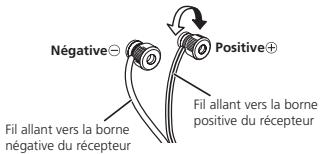
flowchart
graph TD
    A["Speaker with four circles"] --> B["Speaker with two circles"]
    B --> C["Speaker with three circles"]
    C --> D["Speaker with one circle"]
www.pioneerelectronics.com
flowchart
graph TD
    A["Speaker at top"] --> C["Person holding camera"]
    B["Speaker at bottom"] --> C
    D["Speaker at top"] --> C
    E["Speaker at bottom"] --> C
PRÉCAUTIONS D'INSTALLATION
PIONEER ELECTRONICS (USA) INC.
PIONEER ELECTRONIQUES DU CANADA, INC.
GARANTIE LIMITÉE
GARANTIE VALIDE SEULEMENT DANS LE PAYS OU LE PRODUIT A ÉTÉ ACHETÉ
GARANTIE
Microphones, Headphones, Phono Cartridges and Styluses
90 jours
PIONEER ELECTRONICS (USA). INC.
P.O. BOX 1760, LONG BEACH, CALIFORNIA 90801
1-800-421-1404 • http://www.pioneerelectronics.com
AU CANADA
DÉPARTÉMENT DE SERVICE AU CONSOMMATEUR
PIONEER ÉLECTRONIQUES DU CANADA, INC.
300 ALLSTATE PARKWAY, MARKHAM, ON L3R 0P2
(905) 479-4411 • 1-877-283-5901 • http://www.pioneerelectronics.ca
RÈGLEMENT DES CONFLITS
Cher client, chère cliente,
www.pioneerelectronics.com
natural_image
Line drawing of a hand holding a pen or stylus (no text or symbols)natural_image
Technical line drawings of a mechanical device with mounting base, front panel, and side panel (no text or symbols)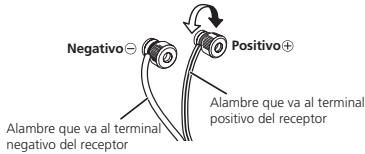
natural_image
Diagram of a person speaking into a microphone at three speakers (no text or symbols present)natural_image
Diagram of a person speaking into a microphone with three speakers on each side (no text or symbols)PIONEER ELECTRONICS (USA) INC.
GARANTÍA LIMITADA
GARANTÍA VÁLIDA ÚNICAMENTE EN EL PAÍS DONDE SE COMPRA EL PRODUCTO
GARANTÍA
PIONEER ELECTRONICS (USA), INC.
P.O. BOX 1760, LONG BEACH, CALIFORNIA 90801
1-800-421-1404 • http://www.pioneerelectronics.com