ESX30 - Coffee maker Mr. Coffee - Free user manual and instructions
Find the device manual for free ESX30 Mr. Coffee in PDF.


User questions about ESX30 Mr. Coffee
0 question about this device. Answer the ones you know or ask your own.
Ask a new question about this device
Download the instructions for your Coffee maker in PDF format for free! Find your manual ESX30 - Mr. Coffee and take your electronic device back in hand. On this page are published all the documents necessary for the use of your device. ESX30 by Mr. Coffee.
USER MANUAL ESX30 Mr. Coffee
When using electrical appliances, basic safety precautions should always be followed to reduce the risk of fire, electric shock and/or injury to persons, including the following:
- Read all instructions before using the coffeemaker.
- Do not touch the coffeemaker's hot surfaces.
- To protect against electric shock, do not immerse the power cord, power plug or coffeemaker in water or other liquid.
- Close adult supervision is necessary when this appliance is used by or near children.
- Turn the coffeemaker off and unplug the power cord from the power source when the coffeemaker or clock are not in use and before cleaning. Allow the coffeemaker parts to cool before putting on or taking off parts and before cleaning the appliance.
- Do not operate any appliance with a damaged cord or plug or operate it after the appliance malfunctions or has been damaged in any manner. Return this appliance only to the nearest authorized service center for examination, repair or adjustment.
- The use of accessory attachments other than MR. COFFEE ^® brand may cause hazards or injuries.
- Do not use outdoors.
- Do not let the power cord hang over the edge of a table or counter or allow it to come in contact with hot surfaces.
- Do not place this appliance on or near a hot gas or electric burner or in a heated oven.
- To disconnect, turn the coffeemaker OFF, then remove the power plug from wall outlet.
- Do not use the coffeemaker for other reasons than its intended use.
- Place the coffeemaker on a hard, flat level surface to avoid interruption of air flow underneath the appliance.
- This coffeemaker is designed for household use only.
Decanter Use and Care
Follow the instructions below to reduce or eliminate the chance of breaking the decanter:
- This decanter is designed for use with your MR. COFFEE® coffeemaker and therefore must never be used on a rangetop or in any oven, including a microwave oven.
- Do not set a hot decanter on a wet or cold surface.
- Do not use a cracked decanter or a decanter having a loose or weakened handle.
- Do not clean the decanter with abrasive cleansers, steel wool pads or other abrasive materials.
- Discard the decanter immediately if it is ever boiled dry.
- Protect the decanter from sharp blows, scratches or rough handling.
Warning: To reduce the risk of fire or electric shock, do not remove any service covers. There are no user serviceable parts inside the coffeemaker. Only authorized personnel should repair the coffeemaker.
Special Cord Set Instructions
-
A short power supply cord is provided to reduce the hazards resulting from becoming entangled in or tripping over a longer cord.
-
An extension cord may be purchased and used if care is exercised in its use.
-
If an extension cord is used, the marked electrical rating of the extension cord must be at least 10 amps and 120 volts. The resulting extended cord must be arranged so that it will not drape over the countertop or tabletop where it can be pulled on by children or tripped over accidentally.
This appliance has a polarized plug (one blade is wider than the other). To reduce the risk of electric shock, this plug will fit in a polarized outlet only one way. If the plug does not fit fully in the outlet, reverse the plug. If it still does not fit, contact a qualified electrician. Do not modify the plug in any way.
natural_image
Illustration of a teapot, a plate of bread, and a coffee mug with steam rising (no text or symbols)SAVE THESE INSTRUCTIONS
Table of Contents
Important Safeguards 2
Decanter Use and Care 3
Special Cord Set Instructions 3
Setting Up Your Coffeemaker 5
Coffeemaker Features 6
Adjusting the Power Cord Length. 7
Setting the Clock 7
Brewing Coffee 8-14
Cleaning the Coffeemaker Before First Use 8
Selecting and Measuring Ground Coffee 8
Adding Water and Ground Coffee 8
Brewing Coffee Now 10
Brewing Coffee Later (Programmable Models Only).... 11
Maintaining Your Coffeemaker 14
Cleaning the Coffeemaker 14
Cleaning the Decanter 15
Service and Maintenance.... 17
Replacement Parts 17
Repairs 17
Questions, Comments and Suggestions 17
Warranty Information 18

Setting Up Your Coffeemaker
Congratulations on the purchase of your new MR. COFFEE® coffeemaker! Please read these instructions carefully before using your new coffeemaker. Proper use, care and maintenance will ensure trouble-free operation and the long life of this appliance. Save these instructions for cleaning and, if necessary, replacement parts information.
Coffeemaker Features
Your new MR. COFFEE ^® coffeemaker has the following features:
• 10-Cup Brewing Capacity
- 1- to 4-Cup Small Quantity Setting – Allows you to set your coffeemaker to brew up to four cups of quality coffee. It also allows you to adjust the strength of your coffee while it is brewing 8 to 10 cups in order to meet your taste preference.
- Cord Storage – Allows you to store extra cord length for a tidy countertop.
- Drip-Free Decanter – Designed to help prevent drips after pouring.
- Ergonomically Designed Handle – Provides comfort, control and confidence when pouring.
- Removable Filter Basket – The filter basket will lift out of socket to allow you to remove a filter and ground coffee before returning back to its socket.
- Lighted ON/OFF Switch – This safety feature reminds you that your coffeemaker is on.
- Non-Stick Warming Plate – This feature prevents the decanter from sticking to the surface of the warming plate.
- Pause 'n Serve – Can't wait for the coffee to finish brewing? The Pause 'n Serve feature allows you up to 30 seconds to pour a cup of coffee while the coffee is still brewing.
- Programmable Controls (Programmable Models Only)
- Clock: The LED clock serves as a handy kitchen clock, and also allows you to set the timer.
- Timer: Would you like to wake up to a fresh pot of coffee? The timer allows you to preset when you would like the coffeemaker to brew your coffee automatically, up to 24 hours in advance.
- Two-Hour Auto Shut-Off: This safety feature keeps your coffee warm for 2 hours after you brew, then automatically turns off.
- Programmable Plus Controls (ESX30 and ESX33 Coffeemakers Only)
- Special Cleaning Cycle: Enables you to easily maintain and clean your coffeemaker.
- Adjustable Temperature Warming Plate: Allows you to vary the temperature that you wish to maintain for your coffee once it has finished brewing.
- Audible Ready Signal: Beeping sound allows you to know when your coffee is done brewing.
Coffeemaker Features
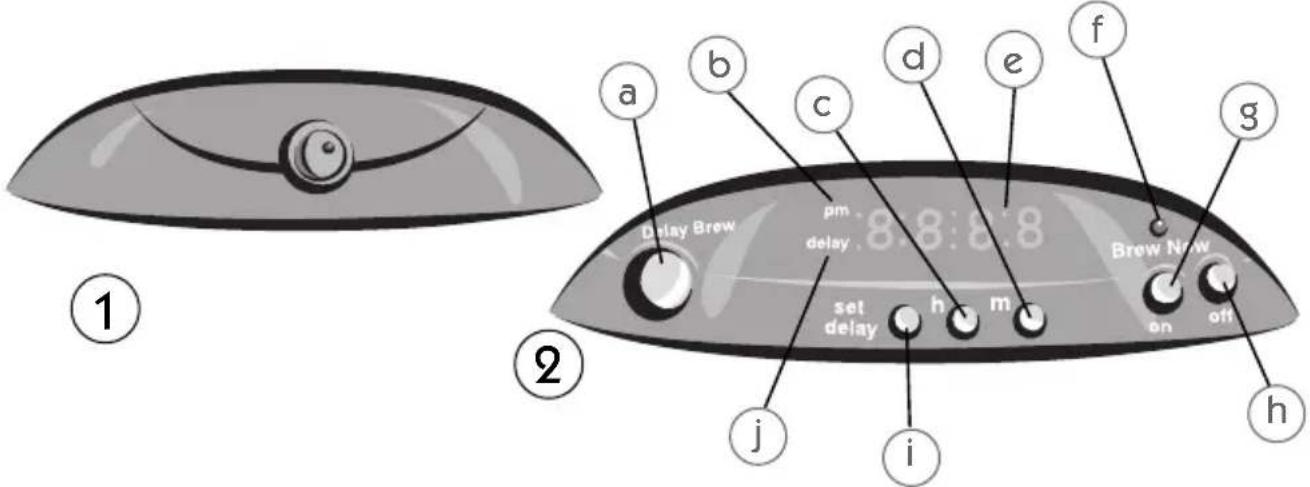
- ON/OFF Switch
- Control Panel (Programmable Models Only)
a. Delay Brew Button
b. PM Indicator
c. Hour Button
d. Minute Button
e. Clock Display
f. On-Off Indicator
g. On Button
h. Off Button
i. Set Delay Button
j. Delay Brew Indicator
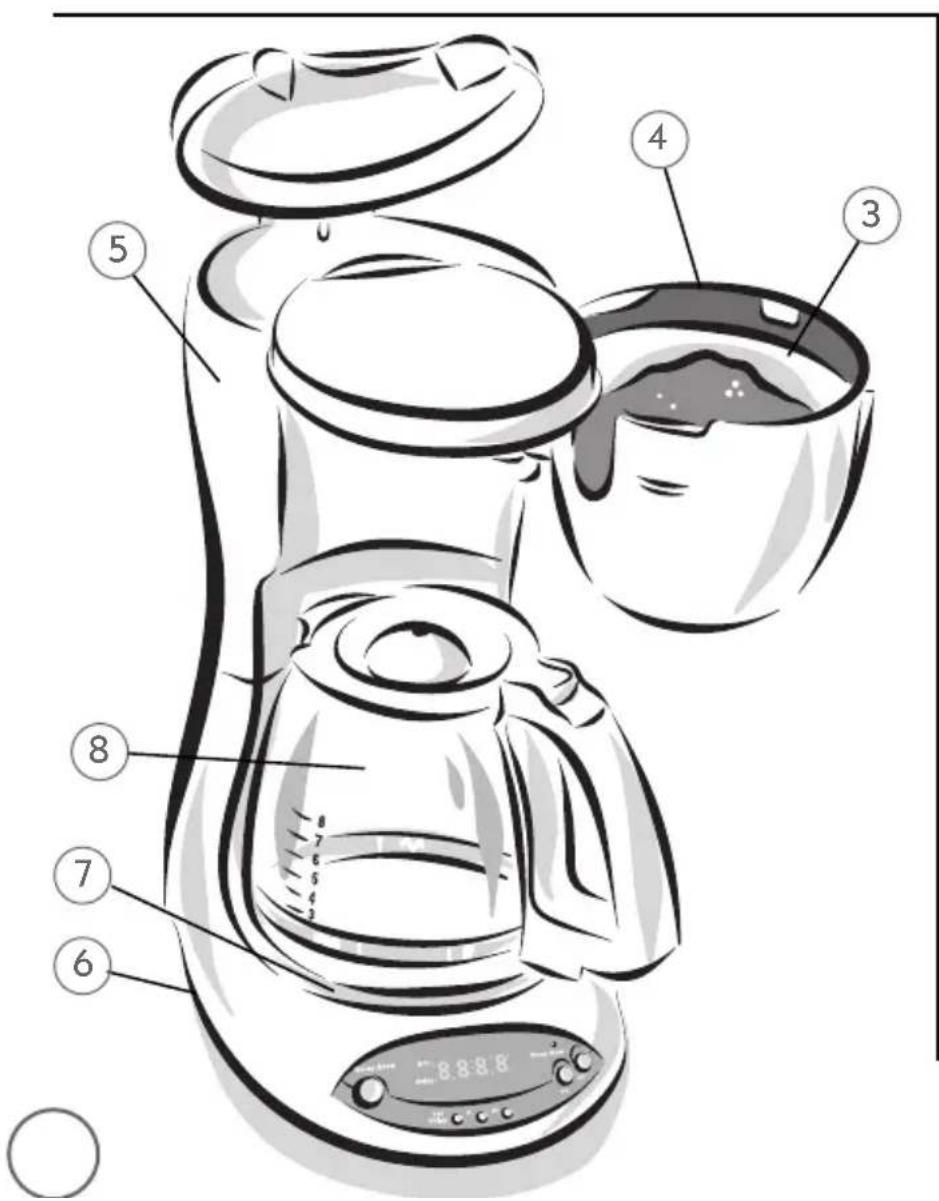
- Removable Filter Insert
- Brew Basket
- Water Reservoir
-
Power Cord
-
Warming Plate
- Decanter
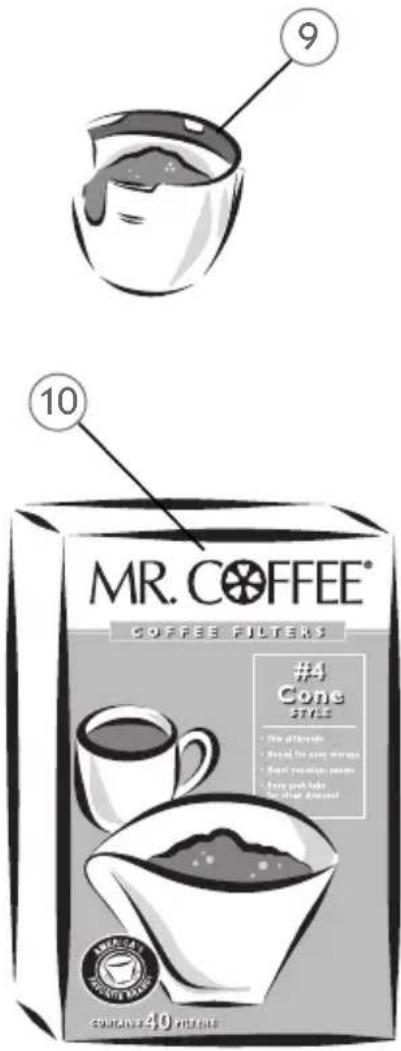
- MR. COFFEE® Brand Permanent Cone Filter (Models ESX30 and ESX33 only)
- MR. COFFEE® Brand 8- to 12-Cup Cone Style Coffee Filters
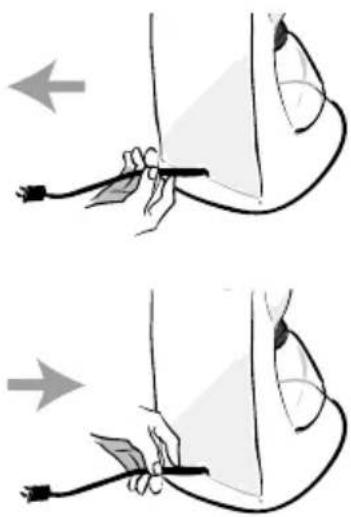
Adjusting the Power Cord Length
You can customize the length of the power cord so that it is the exact length you desire.
To increase the length of the power cord: Grasp the power cord (not the power plug) and gently lift it out of the slot, then pull it away from the coffeemaker.
To decrease the length of the power cord: Grasp the power cord, lift it out of the slot, then feed it into the coffeemaker. Lock the cord in the slot when finished.
Setting the Clock
(Programmable Models Only)
The clock flashes on the control panel to indicate that it has not been set.

You must set the clock if you want to use the DELAY BREW feature.
To set the clock:
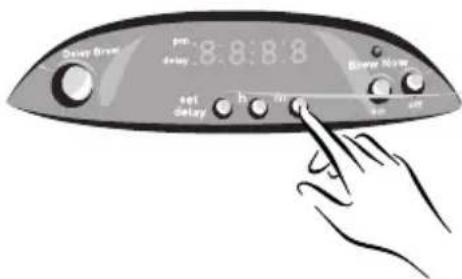
1) Press and hold the HOUR button until the clock displays the correct hour. See Figure A-1. The PM indicator will light to indicate a PM time; if the PM indicator is not lit, the time is AM.
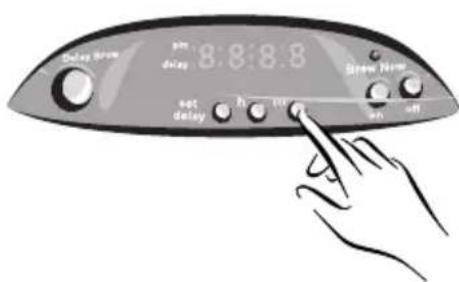
2) Press and hold the MIN. button until the clock displays the correct minute. See Figure B-1. The clock is now set.
natural_image
Illustration showing two-step instructions for using a tool to lift or adjust the nose area (no text or symbols present)FIGURE A-1
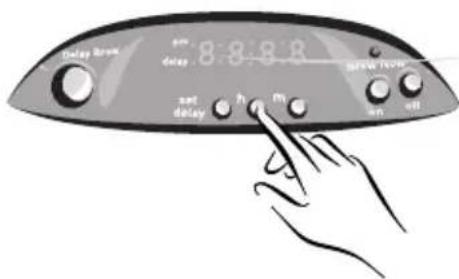
FIGURE B-1
Brewing Coffee
Cleaning the Coffeemaker Before First Use
Follow the steps below under "Adding Water and Ground Coffee" and "Brewing Coffee Now," but do not add coffee grounds.
Selecting and Measuring Ground Coffee
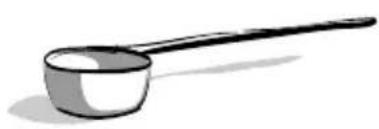
For best results, use coffee ground for use with automatic drip coffeemakers. The amounts shown below are suggested amounts.
| Number of Cups Tablespoons | |
| 12 | 9 |
| 10 7.5 | |
| 8 | 6 |
| 6 | 4.5 |
| 4 | 3 |
| 2 | 1.5 |
| One cup = Five ounces brewed coffee | |
natural_image
Simple line drawing of a ladle or ladle with a long handle and a small bowl (no text or symbols)Adding Water and Ground Coffee
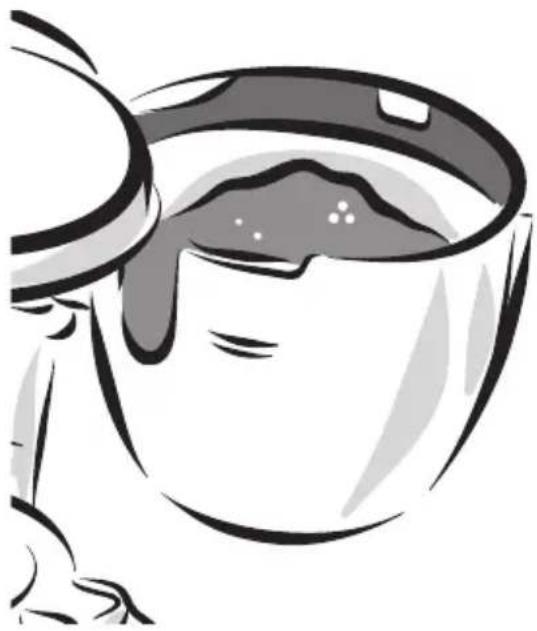
1) Swing open the brew basket and, if desired, lift out the removable filter insert.

If using paper filters, it is important that the sides of the filter fit flush against the sides of the filter insert. If filter collapse occurs, for best results, dampen the filter before placing it in the brew basket and adding ground coffee. Also, for best performance of your filters, be sure to fold the seam at the bottom of the filter and the tab that is located at the top of the filter.
natural_image
Illustration of a cup with liquid, no text or symbols present2) Place a MR. COFFEE ^® brand 8-12 cup paper filter or a MR. COFFEE ^® permanent filter in the filter basket.
3) Add the desired amount of ground coffee to the filter. Gently shake the filter insert to level the ground coffee.
4) Be certain that the filter is centered in the filter insert. Close the brew basket.
natural_image
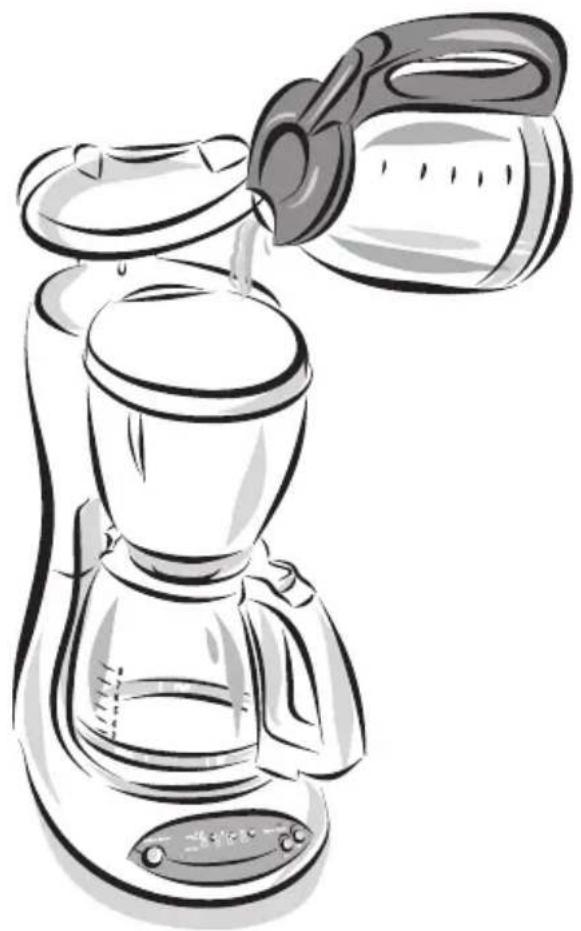
Line drawing of a coffee maker pouring liquid from a kettle (no text or symbols)5) Fill the water reservoir with the desired amount of tap water.
6) Place the decanter on the warming plate.

Make sure the decanter is fully placed on the warming plate or the water and grounds will overflow from the brew basket.
An overflow may cause personal injury or damage to property.
To reduce the risk of damaging the decanter and/or the risk of personal injury, do not add cold water to the decanter if the decanter is already hot. Allow the decanter to cool before using.
Do not brew coffee while the brew basket lid is open.
Brewing Coffee Now
For Switch Models:
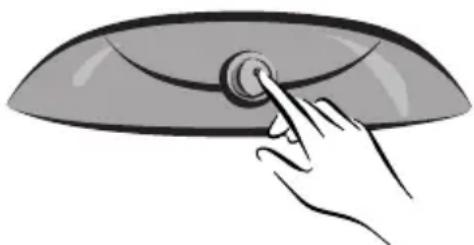
Push the switch so the light illuminates.
This light indicates that the coffeemaker is On and the brew cycle will begin. When the coffee stops flowing, the brew cycle is complete.

natural_image
Simple line drawing of a steaming cup (no text or symbols)While the coffee is brewing, the Pause 'n Serve feature allows you to sneak a cup of coffee from the decanter. REPLACE THE DECANTER ON THE WARMING PLATE WITHIN 30 SECONDS TO PREVENT OVERFLOW AND POSSIBLE INJURY.
To turn Off the coffeemaker, push the switch so the light is no longer illuminated. Your coffeemaker will keep your coffee hot for 2 hours and then automatically shut off (Models ESS10 and ESS11 Switch Coffeemakers only.)

If the brew basket overflows or fails to empty into the decanter, do not open the brew basket. Turn off the coffeemaker. Unplug the coffeemaker and wait for the contents to cool before handling.
natural_image
Illustration of a hand pressing down on a curved object with a circular button (no text or symbols)For Programmable Models:
Push the ON button when ready to start brewing.
Your coffeemaker will keep your coffee hot for 2 hours, then automatically shut off.
To turn the coffeemaker Off, push the OFF button.
Brewing Coffee Later
For Programmable Models:
You must set the time for when you would like the coffeemaker to begin brewing your coffee.
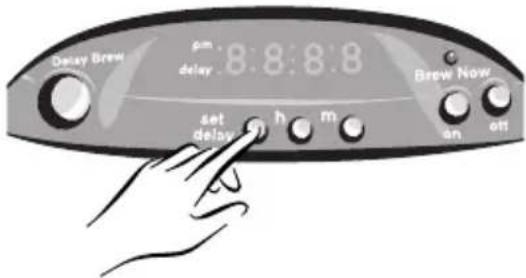
1) While the coffeemaker is off, press and hold the SET DELAY button.
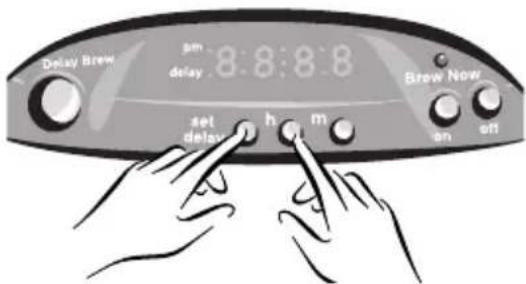
2) While pressing and holding the SET DELAY button, press and hold the HOUR button until the clock displays the hour you desire. The PM indicator will light to indicate a PM time; if the PM indicator is not lit, the time is AM.
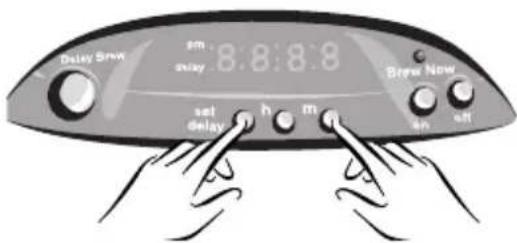
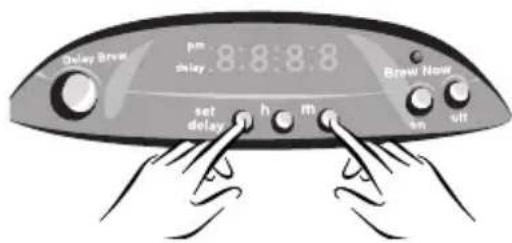
3) While still pressing and holding the SET DELAY button, press and hold the MIN. button until the clock displays the correct minute.
4) Release the SET DELAY button. The DELAY BREW time is now set.
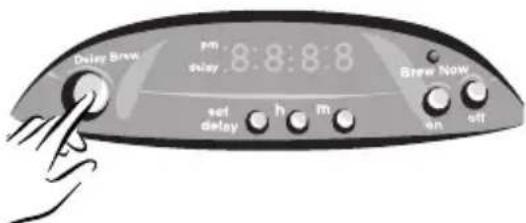
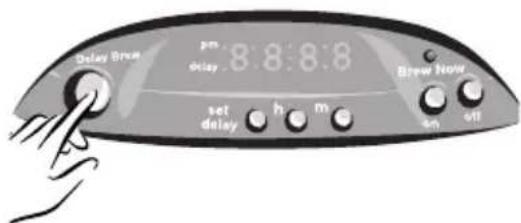
5) Press the DELAY BREW button to activate the DELAY BREW mode.
The DELAY BREW indicator will light. The delay timer is set and the coffeemaker will begin brewing the coffee at the time you selected.

If you want your coffee to brew at the same time the following day, simply add the desired amount of ground coffee, fill the water reservoir and press DELAY BREW.
Important: Resetting Delay Brew at the Pre-Set Time
Due to a safety feature included in this unit, the programmable timer will not automatically brew the next day after its last use. If the Delay Indicator Light in the lower left hand corner of the clock display is not illuminated, then you will need to reset the DELAY BREW feature by pressing the DELAY BREW button.
The programmable timer will not automatically brew the next day if left in the AUTO position after its last use. This is a safety feature. If the OFF indicator light in the lower right hand corner of the clock display is illuminated, reset AUTO BREW by turning the control switch to OFF, then to AUTO. (Models ESX20, ESX23, ESX20D, ESX23D Only)
Setting Clock and Timer
(Programmable Models Only)
Note: You do not have to set your clock before the Coffeemaker will operate. Plug in the power cord, press SELECT once to turn the Coffeemaker on. The ON light will illuminate and the clock will stop flashing, but it will not keep time.
Setting the Clock
- Plug the power cord into your electrical outlet. The clock display will flash until you set the time.
- Alternately press and hold the HOUR and MINUTE buttons until you reach the current time.
- The PM indicator light in the display will illuminate to indicate PM time.
Presetting the Brewing Time
- You must first set the clock to the correct time before setting the desired time for Delay Brew.
- Press the SET/DELAY button, then alternately press the HOUR and MINUTE buttons to set the time you want the Coffeemaker to start brewing. The Delay Indicator Light will flash during this time.
- Press the SET/DELAY button again to turn off the flashing light. If the Delay Indicator Light is not flashing, pressing the HOUR or MINUTE buttons will change the clock time.
Brewing Automatically at the Preset Time
- Follow Steps 1 – 5 in the “Brewing” Section.
- Press the SELECT button. The Delay Indicator Light should illuminate.
- Brewing will begin at the preset time. The coffee will remain hot in the decanter for 2 hours. To keep your coffee hot for an additional 2 hours, press the SELECT button. The ON indicator light should illuminate.
Brewing Coffee
If the clock display is flashing, refer to Section "Setting the Clock" before continuing.
- Open the swing-out brew basket to your left. Insert a MR. COFFEE ^® filter into the removable black inner brew basket.
- Add desired amount of coffee, referring to the Coffee Measurement Chart. Shake lightly to level coffee.
- Be sure the paper filter is centered before closing the brew basket.
- Fill the decanter with cold water to desired capacity as marked on the side of the decanter. (1 cup = 5 oz).
- Pour water into your carafe. Note: For easy and accurate filling, please refer to cup size markings located on the carafe. Pour the water into the water reservoir and then place the empty carafe onto the warmer plate.
- Turn your Coffeemaker switch to ON. When the coffee stops flowing, the brewing cycle is complete.
- Carefully remove the black inner brew basket and discard the used grounds and filter. Rinse the black brew basket and replace. Note: Remove decanter from the warming plate before opening the swivel basket. This will prevent the drip stop valve from catching on the decanter lid.
- To make another pot of coffee, repeat Steps 1 – 7.
- Turn your Coffeemaker off when the decanter is empty.
Warning: To avoid risk of personal injury or damage to property as a result of overflow, be sure the decanter is squarely centered under the brew basket during the brewing cycle. Brewed coffee and grounds, both in brew basket and decanter, are very hot. Handle with care to avoid scalding. If brew basket overflows, or if brew basket fails to drain into decanter during brew cycle, do not open or handle basket. Unplug Coffeemaker and wait for contents to cool before handling.
Brewing 1 – 4 Cups (Models ESX30, ESX33 Only)
If you want to brew 4 cups or less, the 1–4 Cup mode will slow the brewing cycle to ensure optimal saturation of the ground coffee beans.
Note: Use only the proper amount of ground coffee and fill the water reservoir with 4 cups or less of water.
- Press the SELECT button twice.
- The ON and 1 – 4 Cup Indicator Lights should be illuminated.
If you want to brew 4 cups or less at a preset time, follow Steps 1–3 in the “Presetting Your Brewer” section.
- Press the SELECT button twice.
- The ON and 1 – 4 Cup Indicator Lights should be illuminated.
Adjusting the Warmer Plate Temperature
(Models ESX30, ESX33 Only)
After the coffee is brewed, you can keep the coffee at your preferred temperature. Turn the Warmer Temp knob clockwise to increase the temperature, or turn counterclockwise to decrease the temperature. To maintain a constant temperature, you may need to lower the warmer plate temperature as you decrease the amount of coffee in the pot. DO NOT allow the decanter to boil dry. This will damage the decanter.
Audible Indicators (Models ESX30, ESX33 Only)
When the Coffeemaker is finished brewing and your coffee is ready, your Coffeemaker will beep five times.
Just before the Coffeemaker shuts off automatically, it will beep three times. Upon completion of the clean cycle, the Coffeemaker will beep once.
Cleaning
Your Coffeemaker must be cleaned when you begin to notice excessive steaming, the cleaning cycle indicator light is blinking during normal brewing cycles, or the brewing time increases considerably. This condition is caused by a build-up of lime and mineral deposits from your water. If the pumping action stops before all the water has been pumped out of the machine, the appliance requires cleaning.
The frequency of cleaning depends on the hardness of water used. The following table gives a suggested cleaning schedule.
Suggested Cleaning Interval
Type of Water Cleaning Frequency
Soft Water Every 80 Brew Cycles
Hard Water Every 40 Brew Cycles
Your Coffeemaker may be cleaned by using MR. COFFEE® Cleaner or vinegar. MR. COFFEE® Cleaner is available at many retail stores or by calling the MR. COFFEE® Consumer Service Department at 1-800-MR COFFEE (1-800-672-6333).
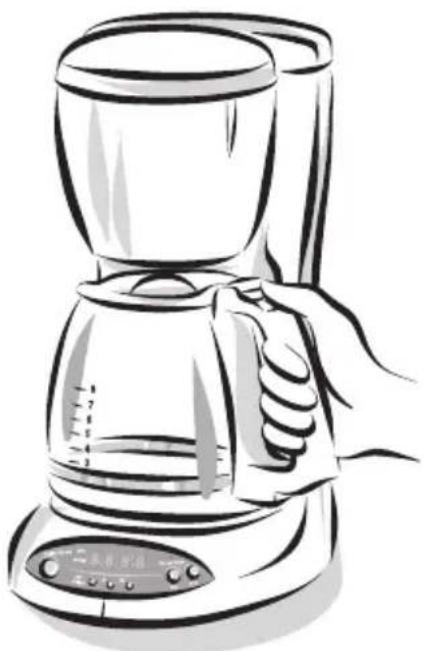
Cleaning the Decanter
Hard water can leave a whitish stain on the decanter. Coffee and tea may then turn this stain brown.
To remove decanter stains:
1) Fill the decanter with a solution of equal parts tap water and vinegar and let the solution stand in the decanter for approximately 20 minutes.
2) Discard the solution and wash and rinse the decanter.

Do not use harsh abrasive cleansers that may scratch the decanter; scratches may cause the decanter to break.
natural_image
Line drawing of a hand holding a clear glass coffee maker (no text or symbols)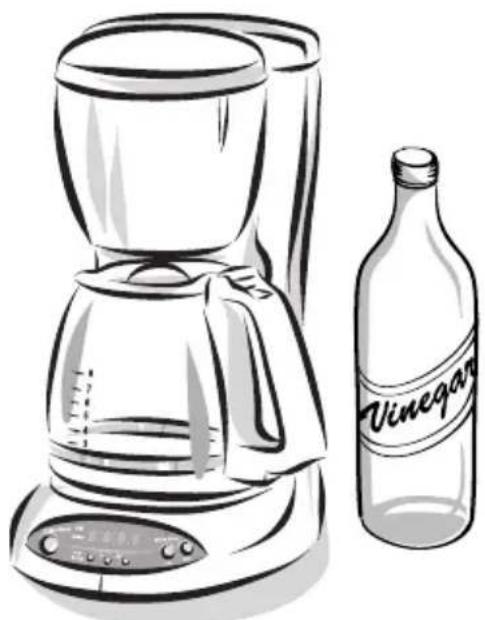
natural_image
Line drawing of a coffee maker and a wine bottle (no text or symbols on the main objects)TROUBLESHOOTING
POTENTIAL PROBLEMS
PROBABLE CAUSE
"ON" LIGHT DOES NOT ILLUMINATE • Unplugged
- Power outage
COFFEE IS NOT BREWING • Unplugged
- Power outage
- The water reservoir is empty; check water window
- The filter basket is not properly inserted
- Carafe lid is not placed all the way on the warming plate
COFFEEMAKER ONLY BREWS WATER • No grounds in filter basket
COFFEEMAKER BREWS SLOWLY • Coffeemaker needs decalcifying
FILTER BASKET OVERFLOWS • The filter basket is not properly inserted
- Carafe is not placed all the way on the warming plate
- Carafe lid not on carafe
- Too many grounds placed in filter
- Carafe was removed from warming plate longer than 30 seconds
BURNING COFFEE SMELL • Empty carafe was left on hot warming plate
• Coffee was spilled on a warming plate
COFFEE IS NOT HOT • Power outage
- The Automatic Shut-Off function has been activated
COFFEE TASTES BAD • Coffee ground other than for automatic-drip Coffeemaker was used
• Ground coffee-to-water ratio was unbalanced
GROUNDS ARE IN COFFEE • Paper filter not properly seated in basket
- Filter overflowed
Questions? You can call us toll-free at 1-800-672-6333.
Service and Maintenance
Replacement Parts
- Filters
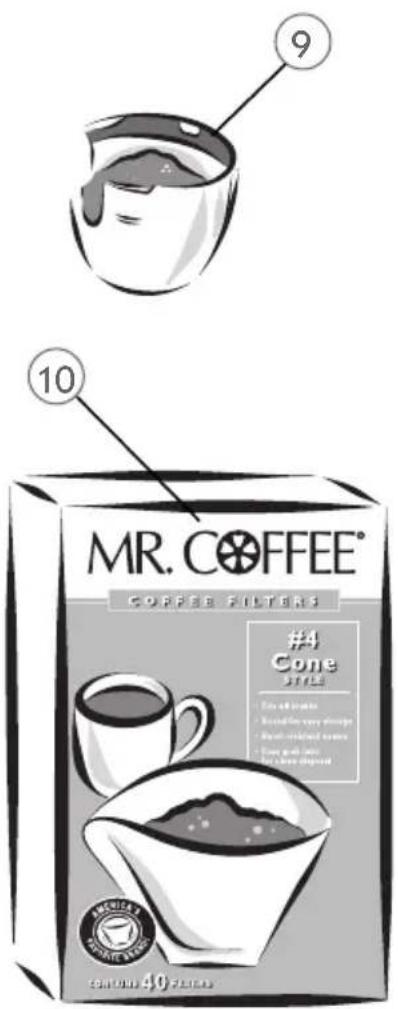
For better tasting coffee and tea, we recommend that you use MR. COFFEE® brand 8-12 cup paper filters or MR. COFFEE® brand permanent filters. These filters are available at most grocery stores.
- Decanters
You can usually purchase a replacement decanter from the store where you purchased your coffeemaker. If you are unable to find a replacement, please call 1-800 MR COFFEE (1-800-672-6333) in the U.S. and Canada for information on where you can find a store that carries replacement decanters.
Repairs
If your coffeemaker requires service, do not return it to the store where you purchased it. All repairs must be made by Sunbeam or by an authorized MR. COFFEE® Service Center. If you live in the U.S. or Canada, please call us at the following toll-free telephone number to find the location of the nearest authorized service center:
1-800 MR COFFEE (1-800-672-6333)
To assist us in serving you, please have the model number (ES10, ES11, ESS10, ESS11, ESX10, ESX11, ESX30, ESX33) and date of purchase available when you call. The model number is stamped on the bottom metal plate of the coffeemaker.
Questions, Comments and Suggestions
We welcome your thoughts; please include your complete name, address and telephone number when you write or e-mail us at:
Consumer Affairs Department
MR. COFFEE
A Product of Sunbeam Corporation
P.O. Box 948389
Maitland, FL 32794-8389
consumeraffairs@consumer.Sunbeam.com
You may also visit our website and discover the secret to brewing the perfect cup of coffee. You'll also find a rich blend of gourmet recipes, entertaining tips and the latest information on MR. COFFEE® products.
www.mrcoffee.com


One-Year Limited Warranty
Sunbeam Products, Inc. ("Sunbeam") warrants that for a period of one year from the date of purchase, this product will be free from defects in material and workmanship. Sunbeam, at its option, will repair or replace this product or any component of the product found to be defective during the warranty period. Replacement will be made with a new or remanufactured product or component. If the product is no longer available, replacement may be made with a similar product of equal or greater value. This is your exclusive warranty.
This warranty is valid for the original retail purchaser from the date of initial retail purchase and is not transferable. Keep the original sales receipt. Proof of purchase is required to obtain warranty performance. Sunbeam dealers, service centers, or retail stores selling Sunbeam products do not have the right to alter modify or in any way change the terms or conditions of this warranty.
This warranty does not cover normal wear of parts or damage resulting from any of the following: negligent use or misuse of the product, use on improper voltage or current, use contrary to the operating instructions, disassembly, repair or alteration by anyone other than Sunbeam or an authorized service center. Further, the warranty does not cover acts of God, such as fire, flood, hurricanes and tornadoes.
Sunbeam shall not be liable for any incidental or consequential damages caused by the breach of any express or implied warranty. Except to the extent prohibited by applicable law, any implied warranty of merchantability or fitness for a particular purpose is limited in duration to the duration of the above warranty. Some states, provinces or jurisdictions do not allow the exclusion or limitation of incidental or consequential damages or limitation on how long an implied warranty lasts, so the above limitations or exclusion may not apply to you. This warranty gives you specific legal rights, and you may also have other rights that vary from state to state or province to province.
How to Obtain Warranty Service
Take the product to an authorized Sunbeam service center. You may obtain a list of service centers and other repair/replacement instructions by calling 800 672-6333 or send an e-mail to Consumeraffairs@consumer.sunbeam.com. Please include name, address, telephone number, product model number and description of the problem.
For products purchased in the United States – SUNBEAM SERVICE CENTER
c/o Warranty Center
117 Industrial Row
Purvis, MS 39475
For products purchased in Canada – SUNBEAM CANADA CORP., LTD.
c/o Service Trek
1351 Matheson Blvd. East, Units 5 & 6
Mississauga, ON L4W 2A1
DO NOT RETURN THIS PRODUCT TO THE PLACE OF PURCHASE
PRECAUCIONES IMPORTANTES
natural_image
Illustration of a pitcher, bread roll, and coffee mug (no text or symbols)CONSERVE ESTAS INSTRUCCIONES
Índice
Precauciones Importantes....19

natural_image
Illustration showing two-step instructions for using a tool to lift or adjust the nose area (no text or symbols present)Ajustando el Reloj
FIGURA B-1
Preparando Café
natural_image
Illustration of a ladle with a long handle and spout (no text or symbols)natural_image
Illustration of a person drinking from a cup with liquid, no text or symbols presentnatural_image
Line drawing of a coffee maker with a lid pouring liquid from a stand (no text or symbols)natural_image
Simple line drawing of a steaming cup (no text or symbols)natural_image
Illustration of a hand pressing a button on a curved object (no text or symbols)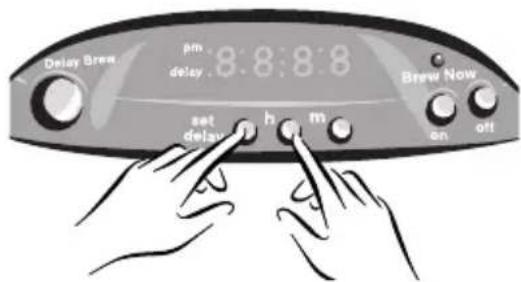

natural_image
Line drawing of a hand holding a clear glass coffee maker with control panel (no text or symbols)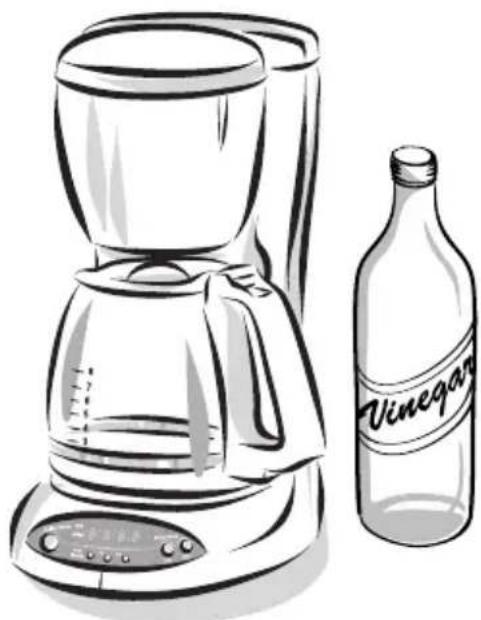
natural_image
Line drawing of a coffee maker and a wine bottle (no text or symbols on the main objects)PROBLEMAS Y SOLUCIONES
Consumer Affairs Department
MR. COFFEE
A Product of Sunbeam Corporation
P.O. Box 948389
Maitland, FL 32794-8389
consumeraffairs@consumer.Sunbeam.com
©2002 Sunbeam Products, Inc. All rights reserved. MR. COFFEE® is a registered trademark of Sunbeam Products, Inc. Distributed by Sunbeam Products, Inc., Boca Raton, Florida 33431.
©2002 Sunbeam Products, Inc. Todos los derechos reservados. MR. COFFEE® es una marca registrada de Sunbeam Products, Inc. Distribuido por Sunbeam Products, Inc., Boca Raton, Florida 33431.