
MR310II - Pregnant JBL - Free user manual and instructions
Find the device manual for free MR310II JBL in PDF.


| Product Type | Tower Loudspeaker |
| Brand | JBL |
| Model | MR310II |
| Series | MR Series |
| Speaker Type | 2-way |
| High-Frequency Driver | 14 mm Titanium Dome Composite |
| Low-Frequency Driver | 10" Nitrile Polymer Fibre Cone |
| Crossover Frequency | 3.5 kHz |
| Frequency Response (-6 dB) | 40 Hz - 20 kHz |
| Sensitivity (1W/1m) | 92 dB |
| Nominal Impedance | 8 ohms |
| Recommended Amplifier Power | 10 - 175 Watts |
| Dimensions (H x W x D) | 36" x 11.75" x 12" (915 x 298 x 305 mm) |
| Weight (each) | 32 lbs (14.5 kg) |
| Enclosure Type | Bass reflex (front ported) |
| Placement | Floor-standing |
| Grille | Removable (except M5) |
| Magnetic Shielding | Yes (for video use) |
| Color | Black |
Frequently Asked Questions - MR310II JBL
User questions about MR310II JBL
0 question about this device. Answer the ones you know or ask your own.
Ask a new question about this device
Download the instructions for your Pregnant in PDF format for free! Find your manual MR310II - JBL and take your electronic device back in hand. On this page are published all the documents necessary for the use of your device. MR310II by JBL.
USER MANUAL MR310II JBL
Congratulations on choosing JBL MR Series Loudspeakers. Their highly accurate, uncolored and balanced sound character will greatly increase your enjoyment of recorded music and movies. JBL speakers are built with careful attention to detail, using only the highest quality materials. They will provide many years of excellent performance.
The MR Series is the result of combining traditional JBL Signature Sound performance values with elegant contemporary appearance.
Maximum Radiating Surface Area:
MR Series transducers utilize new transducer technology by extending the surface area of the cone allowing for a shorter excursion of the driver without sacrificing critical air movement.
Maximum Efficiency: Larger air movement coupled with shorter coil movement allows the MR transducers to be very efficient. See specifications.
Maximum Transducer Control:
Reduces distortion by tightening the control of driver excursion and increasing driver linearity.
Smooth, Accurate, Extended
Response: The MR series transducers, computer-optimized dividing networks, and bass reflex cabinets combine to give clear, crisp, accurate, JBL Signature Sound.
PLACEMENT
Bookshelf Models: For the best stereo reproduction, the two loud-speaker systems should be an equal distance from your listening position and separated so that the angle
between them, at the listening position, is between 40 and 60 degrees (see Fig. 1). For example, if your listening position is 8 to 12 feet (2.5m to 4m) from each speaker, the two systems should be about 8 feet (2.5m) apart. Placing the loudspeakers in corners or against a wall will result in the strongest (not necessarily the most accurate) bass. Except for the M5, all MR Series speakers have their ports in the front so you can place the rear of the speaker up against a wall. In the case of the M5, do not place the speaker closer than 3 inches (75mm) to the wall behind it if possible.
For the best stereo imaging, we recommend that the systems be placed so that the high frequency transducers are positioned approximately at ear level of a seated listener. Every room is different and there are different tastes, so don't hesitate to experiment on your own.
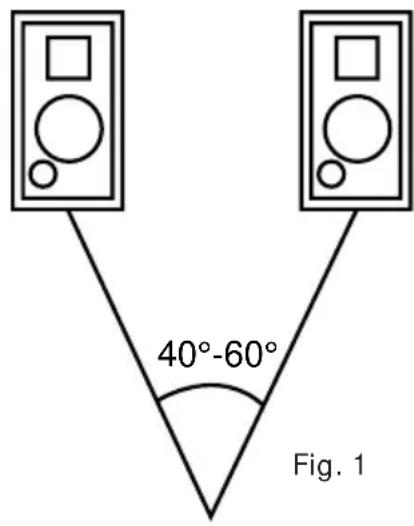
Tower Models: The Tower models cabinet height and driver placement allow for speaker placement directly on the floor. For the best stereo reproduction, the two loudspeaker systems should be an equal distance from your listening position and separated so that the angle between
them, at the listening position, is between 40 and 60 degrees. For example, if your listening position is 8 to 12 feet (2.5m to 4m) from each speaker, the two systems should be about 8 feet (2.5m) apart.
Center Channel Model: As the center channel contains the dialog and other central action sounds, the speaker should be located very close to the Monitor/TV and centered with the Monitor/TV's center line. Place the MR Center directly on top of or directly below the Monitor/TV with the front edge of the speaker grille flush with the edge of the Monitor/TV. You should have your Left and Right speakers within a 2 ft or less height range of your Center Channel for proper sonic performance (see Fig 2).
In Case Color Interference Occurs: The speaker is shielded to work with video applications, however some color interference may be observed on the TV screen depending on the type of your TV set. If color interference is observed, turn your TV off for 15 minutes and move the speaker back about 1" from the front edge of the TV. Turn on TV and recheck. If this is not far enough, move back further and experiment until the interference disappears. You may have to turn the TV off for a few minutes and turn it on again to clear the screen.
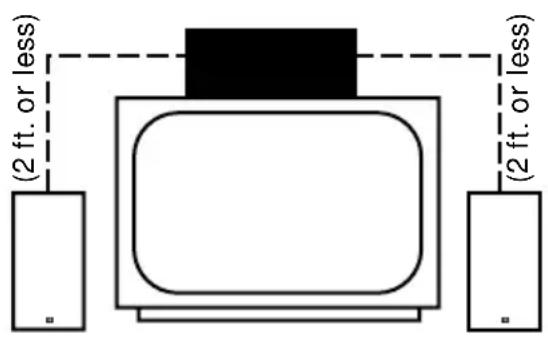
Fig. 2
CONNECTIONS
To connect the loudspeaker systems to the receiver or amplifier, use two-conductor insulated wire. Your JBL dealer can recommend suitable cables, or you can buy wire at most hardware or electronic stores. We recommend #16 AWG wire as a minimum size. If your speaker is more than 30 feet (10m) from your receiver or amplifier, use larger diameter lower gauge wire. Connections are made at the terminals located on the back of the MR Series speakers.
Preparing the Hookup Wire
Carefully plan your wire lengths before cutting any speaker wire. Be sure to allow plenty of extra wire to help hide paths in corners, along baseboards, etc.
- For Left and Right Speakers, first determine the wire length needed between the most distant speaker and the receiver or amplifier.
- Now make the hookup wires for both speakers this length, even if one loudspeaker is much closer to your amplifier than the other. This will help maintain proper signal balance. (For the MR Center, determine the length needed from AV receiver's center channel output to speaker).
- Strip off 38 " of insulation from both ends of each conductor.
- Twist each set of thin wires into a tightly-bunched spiral.
- At this point you need to identify a visual difference between the two conductors of each molded pair of speaker wire. Differentiating marks can be a different color wire (copper or "silver"); a strand of yarn in one conductor; thin, raised ribs on one
part of the outer insulation; or a printed “+” marking on one of the insulators. It does not make any difference which of the two strands of wire go to (+) and (−) on the speakers and amplifier, as long as all speakers used in your system are connected identically. Push down on the button below the terminal and insert the wire through the hole.
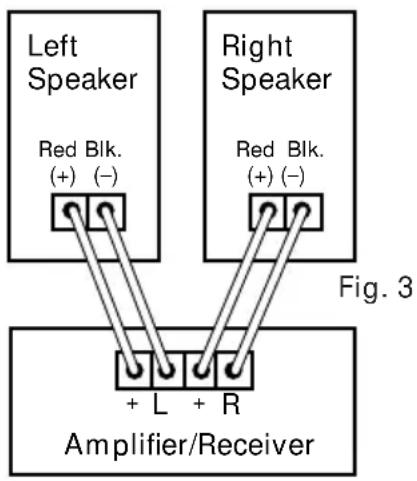
For each channel, the red terminal on all loudspeakers should be connected to the red or (+) speaker connection terminal on the receiver or amplifier, and the black to black or (−) speaker connection terminal (see Fig. 3). Connecting the loudspeakers in this manner ensures that they will be in phase; that is, work together rather than in opposition. This is very important when connecting several speakers together in a Dolby Pro-Logic AV application. Connecting the loudspeakers out of phase will not damage them, but will result in less bass and poor imaging.
When connecting the MR Center or other MR Series speakers to a Dolby Pro-Logic AV receiver, refer to the instructions accompanying your AV component for use of the “test tone” to properly balance the sound output from each speaker. The use of the “test tone” and the controls on your AV receiver will enable you to correctly balance the level (volume) of sound coming from each speaker in your Dolby Pro-Logic application.
Hooking Up Multiple Sets of Speakers
If your receiver has two complete sets of speaker terminals (“A” and “B”), it’s possible to hook up an additional pair of speakers for simultaneous sound in another room. However, some speakers may not be usable as a second pair if you want to play two sets at once. Before hooking up another set of speakers besides your MR Series loudspeakers, check the following:
-
Your amplifier's minimum load impedance.
-
The nominal impedance of the second set of speakers. Both of these specifications are expressed in ohms and both can be found in the owner's manuals which came with your speakers and amp/receiver. The receiver's minimum load impedance is determined by whether or not power ratings are given for 4 ohms. This is because two sets of 8 ohm speakers will present a 4 ohm load to the receiver. The MR speaker, when combined with an 8 ohm speaker, produces an impedance sufficiently close to 4 ohms. For example, the following entry in an amplifier owner's manual...
POWER:
A)100 watts RMS into 8 ohms, both channels driven, 20-20kHz with less than 0.02%THD
B) 160 watts RMS into 4 ohms, both channels driven, 20-20kHz with less than 0.02% THD.
Part B indicates that the amplifier can handle 4-ohm combined impedances created by two sets of speakers.
If only an 8-ohm rating is given, the amp/receiver may or may not be designed to handle 4-ohm combined ratings. Consult the owner's manual of the amp/receiver for clarification.
POWER HANDLING
Thanks to their high efficiency, the JBL MR Series Loudspeakers will produce reasonable volume levels in a room of moderate size with very little amplifier power. However, using a small amplifier to obtain the desired volume listening levels may lead to overdriving the amplifier. This will generate high distortion levels and may cause damage to your loudspeaker. For the best performance, an amplifier should be selected with an output rating that is greater than the maximum power that will be used. This margin of reserve power will ensure that the amplifier will not attempt to deliver more power than its design allows. However, the amplifier's power rating per channel must not exceed the maximum recommended amplifier power for that specific loudspeaker model. Please see the specification section for details. Following these guidelines will provide virtually distortion-free sound reproduction and long loudspeaker life.
TROUBLESHOOTING
The vast majority of new speaker “malfunctions” end up being traced to connections or switch settings. To avoid packing up correctly functioning speakers and sending them off, only to find that they’re not really at fault, check the following tips first, before requesting service.
No sound at all or very faint sound from both speakers
-
Amp/receiver tape monitor button pushed in while using CD, FM or phono inputs.
-
Wrong speaker switch, "A" or "B" speaker output.
- Sound source (CD, cassette deck, turntable) not turned on, not activated, not hooked up or not selected on amp/receiver front panel.
No sound from one speaker
- Balance control turned all the way left or right.
- Speaker wire has become disconnected.
- One of the connections between sound source and amp/receiver is faulty or has become disconnected.
Both speakers play at low volumes but shut off as volume is increased OR sound turns on and off intermittently
A few strands of speaker wire may be shorting out. Recheck the connections. Recheck the impedance of the amp.
Bass is very weak AND/OR sound seems to come from each speaker separately, without creating a stable stereo image between the speakers.
- The polarity (+ & -) of one speaker has been reversed relative to the other. Double check connections.
- Speakers are too far away from back and side walls or too far apart. Experiment again with the speaker placement. If you are still encountering problems, consult your JBL dealer.
Additional Areas to Check When Using an AV Receiver:
No sound at all or very faint sound from the center channel or other speakers
-
Speaker wire has become disconnected.
-
One of the connections between sound source and AV receiver/amp is faulty or has become disconnected.
- AV receiver/amp center channel mode not selected. Please select a mode that activates the center channel.
- Rear/surround information may not be recorded in some scenes and passages.
- AV receiver/amp "audio direct" switch is activated. This switch should be off to activate the 5 speaker surround mode.
- Sound source (VDP, VCR, CD, cassette deck, turntable) not turned on, not activated, not hooked up or not selected on AV receiver/amp front panel.
GENERAL CARE
The grille is held in place by pins near the edges. To remove the grille, grasp it by both top and bottom edges and pull gently. To replace grille, re-position it carefully and press gently at the corners. Do not push on the center area of the grille.
NOTE: The M5 grille is non-removable. Do not attempt to pry the grille from the cabinet as this will void your warranty. The rear panels are removable to allow service personnel access to the driver components if needed.
The loudspeaker cabinet may be cleaned with a slightly damp cloth. To remove dust from the grille cloth, use a vacuum with a brush attachment. Spots may be removed with a commercial spot remover. Do not use any cleaners or solvents on the speaker drivers themselves.
SERVICE
Should your loudspeaker ever need service, return it to the JBL dealer from whom it was purchased.
If purchased outside the United States, contact your local distributor to make arrangements for repair service. Do not return products to the JBL factory without prior authorization.
Specifications MR Center M5 MR25 MR26
| Application | Center | Bookshelf Channel | Bookshelf | Bookshelf |
High Frequency 10mm Ti 2" Paper 10mm Ti 10mm Ti Dome Transducer Composite (Cone) Composite Composite
Midrange Transducer n/a n/a n/a n/a (Nitrile Polymer Fibre Cone)
| Low Frequency Transducer (Nitrile Polymer Fibre Cone) | 2 x 3.5" (Neo Magnet) | 5" | 5" | 6 12 " |
| Crossover Frequency | 4.5kHz | 2.2kHz | 4.5kHz | 4.5kHz |
| Frequency Response (-6 dB) | 80 Hz to 20 kHz | 75 Hz to 70 Hz to 20 kHz | 70 Hz to 55 Hz to 20 kHz | 20 kHz |
| Sensitivity (1 Watt/1 Meter) | 87 dB | 86 dB | 87 dB | 88 dB |
| Nominal Impedance | 8 ohms | 8 ohms | 8 ohms | 8 ohms |
| Recommended Amplifier Power* | 10 to 80 Watts | 10 to 50 Watts | 10 to 75 Watts | 10 to 100 Watts |
| External Dimensions | ||||
| Height | 5 316 " | 11" | 12" | 15" |
| Width | 14 14 " | 6 12 " | 7 12 " | 8 12 " |
| Depth | 6 58 " | 7 14 " | 8 12 " | 10" |
| External Dimensions | ||||
| Height | 132 mm | 280 mm | 305 mm | 381 mm |
| Width | 362 mm | 165 mm | 190 mm | 216 mm |
| Depth | 168 mm | 184 mm | 216 mm | 254 mm |
| Weight (each) | 7 lbs | 7 lbs | 8 lbs | 12 lbs |
| 3.2 kg | 3.2 kg | 3.6 kg | 5.5 kg | |
| Shipping Weight | 10 lbs | 18 lbs | 20 lbs | 28 lbs |
| 4.5 kg | 8.2 kg | 9.1 kg | 12.7 kg | |
* The maximum recommended amplifier power rating will insure proper system headroom to allow for occasional program peaks. We do not recommend sustained operation at these maximum power Levels.
Specifications MR28 MR38 MR308II MR310II
Application Bookshelf Bookshelf Tower Tower
High Frequency 14mm" Ti 14mm Ti 14mm Ti 14mm Ti 14mm Ti Dome Transducer Composite Composite Composite Composite
| Midrange Transducer n/a 6 (Nitrile Polymer Fibre Cone) | ^1/2" | 6^1/2" | 6^1/2" | |
| Low Frequency Transducer (Nitrile Polymer Fibre Cone) | 8" | 8" | 8" | 10" |
| Crossover Frequency | 3.5kHz | 3.5kHz | 3.5kHz | 3.5kHz |
| Frequency Response (-6 dB) | 50 Hz to 20 kHz | 45 Hz to 20 kHz | 42 Hz to 20 kHz | 40 Hz to 20 kHz |
| Sensitivity (1 Watt/1 Meter) | 90 dB | 92 dB | 92 dB | 92 dB |
| Nominal Impedance | 8 ohms | 8 ohms | 8 ohms | 8 ohms |
| Recommended Amplifier Power* | 10 to 125 Watts | 10 to 150 Watts | 10 to 150 Watts | 10 to 175 Watts |
| External Dimensions | ||||
| Height | 19^1/4" | 24" | 32^3/16" | 36" |
| Width | 10" | 10" | 10" | 11^3/4" |
| Depth | 10" | 12" | 12" | 12" |
| External Dimensions | ||||
| Height | 489 mm | 610 mm | 818mm | 915 mm |
| Width | 254 mm | 254 mm | 254 mm | 298 mm |
| Depth | 254 mm | 305 mm | 305 mm | 305 mm |
| Weight (each) | 18 lbs | 25 lbs | 28 lbs | 32 lbs |
| 8.2 kg | 11.3 kg | 12.7 kg | 14.5 kg | |
| Shipping Weight | 40 lbs | 29 lbs | 32 lbs | 36 lbs |
| 18.2 kg | 13.2 kg | 14.5 kg | 16.4 kg | |
* The maximum recommended amplifier power rating will insure proper system headroom to allow for occasional program peaks. We do not recommend sustained operation at these maximum power Levels.
JBL continually strives to improve its products. New materials, production methods and design refinements are introduced into existing models without notice as a routine expression of our design philosophy. For this reason, JBL MR Series Loudspeakers may differ in some respect from their published specifications and descriptions, but will always equal or exceed the original specifications unless otherwise stated.
JBL
250 Crossways Park Drive, Woodbury, NY 11797
8500 Balboa Blvd., Northridge, CA 91329
H A Harman International Company
Part No. 332408-001
Printed in Taiwan
- Maximum Radiating Surface Area:
- Maximum Transducer Control:
- Smooth, Accurate, Extended
- PLACEMENT
- CONNECTIONS
- Preparing the Hookup Wire
- Hooking Up Multiple Sets of Speakers
- POWER:
- POWER HANDLING
- TROUBLESHOOTING
- Additional Areas to Check When Using an AV Receiver:
- GENERAL CARE
- SERVICE
- Specifications MR28 MR38 MR308II MR310II
Brand : JBL
Model : MR310II
Category : Pregnant