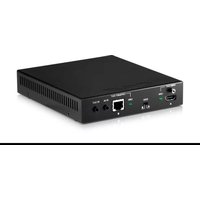
PU-HBTE-ZE - AV Transmitter CYP - Free user manual and instructions
Find the device manual for free PU-HBTE-ZE CYP in PDF.


| Product Type | HDBaseT Zone Extender (AV Transmitter) |
| Model | PU-HBTE-ZE |
| Brand | CYP |
| Video Bandwidth | 10.2 Gbps |
| Supported Resolutions | Up to 4K@60Hz (YUV 4:2:0), 4K@30Hz (RGB 4:4:4), 1080p Full HD, 1920x1200@60Hz |
| Input Ports | 1 x CAT5e/6/7, 1 x IR IN, 1 x LAN, 1 x USB (service only) |
| Output Ports | 1 x HDMI, 1 x CAT5e/6/7, 1 x IR OUT |
| Transmission Distance (CAT5e/6/7) | Up to 100m (1080p), up to 70m (4K@30Hz), up to 100m with CAT6A/7 for 4K@30Hz |
| HDMI Cable Distance | Up to 10m @1080p |
| Audio Support | Dolby TrueHD, Dolby Digital Plus, DTS-HD Master Audio, LPCM up to 192kHz |
| Control | IR (bidirectional), RS-232 pass-through, HDMI CEC, Web GUI/Telnet IP |
| LAN Functionality | 100Mbps Ethernet pass-through to all zones |
| Power over Cable (PoC) | Yes, powers connected receiver via CAT cable |
| Power Supply | 24V DC / 1.25A, included (US/EU standards, CE/FCC/UL certified) |
| Power Consumption | 22.33W (with receiver connected) |
| Dimensions (Jacks Excluded) | 145 mm (W) x 160 mm (D) x 30 mm (H) |
| Dimensions (Jacks Included) | 45 mm (W) x 172.75 mm (D) x 35 mm (H) |
| Weight | 662 g |
| Chassis Material | Metal, black silkscreen |
| ESD Protection | Human body model: ±8kV air-gap, ±4kV contact |
| Operating Temperature | 0°C to 40°C |
| Storage Temperature | -20°C to 60°C |
| Relative Humidity | 20% to 90% RH (non-condensing) |
| Safety Precautions | Do not expose to rain/moisture; use only supplied PSU; do not block vents |
| Maintenance | Keep dry; clean with soft dry cloth; no liquid spill; no object insertion |
| Spare Parts / Repairability | Contact CYP UK for service; no user-serviceable parts; IR cables and PSU available as accessories |
| Package Contents | Main unit, IR Blaster x1, IR Extender x1, 24V DC Power Adaptor, Operation Manual |
Frequently Asked Questions - PU-HBTE-ZE CYP
User questions about PU-HBTE-ZE CYP
0 question about this device. Answer the ones you know or ask your own.
Ask a new question about this device
Download the instructions for your AV Transmitter in PDF format for free! Find your manual PU-HBTE-ZE - CYP and take your electronic device back in hand. On this page are published all the documents necessary for the use of your device. PU-HBTE-ZE by CYP.
USER MANUAL PU-HBTE-ZE CYP
Please read all instructions before attempting to unpack, install or operate this equipment and before connecting the power supply.
Please keep the following in mind as you unpack and install this equipment:
- Always follow basic safety precautions to reduce the risk of fire, electrical shock and injury to persons.
- To prevent fire or shock hazard, do not expose the unit to rain, moisture or install this product near water.
- Never spill liquid of any kind on or into this product.
- Never push an object of any kind into this product through any openings or empty slots in the unit, as you may damage parts inside the unit.
- Do not attach the power supply cabling to building surfaces.
- Use only the supplied power supply unit (PSU). Do not use the PSU if it is damaged.
- Do not allow anything to rest on the power cabling or allow any weight to be placed upon it or any person walk on it.
- To protect the unit from overheating, do not block any vents or openings in the unit housing that provide ventilation and allow for sufficient space for air to circulate around the unit.
REVISION HISTORY
| VERSION NO. DATE DD/MM/YY SUMMARY OF CHANGE | ||
| RDV1 14/04/14 | Preliminary Release | |
| RDV2 03/10/14 | Connection Diagram | |
CONTENTS
- Introduction......1
- Applications......1
- Package Contents ...... 1
- System Requirements......1
- Features....2
- Operation Controls and Functions......3
6.1 Front Panel....3
6.2 Rear Panel....4
6.3 IR Cable Pin Assignment......5
-
Connection Diagram ...... 6
-
Specifications ...... 7
8.1 CAT5e/6/7 Cable Specification .....8
- Acronyms 8
1. INTRODUCTION
The PU-HBTE-ZE HDBaseT Zone extender is designed to allow AV integrators to easily create additional zones for any HDBaseT distribution system whilst enabling the HDBaseT pass-through signal to be extended further over CAT5e/6/7 (up to 100m). This device supports the transmission of video (resolutions up to 1080p Full HD, plus 4K Ultra High Definition, and 1920x1200@60Hz), multi-channel digital audio and control via IR, RS-232 or Web GUI/Telnet IP over a single CAT5e/6/7 cable. The Zone extender allows signals to be transmitted up to 100m from the transmitter device to the Zone extender where the signal can be routed to a local display via the HDMI output. The signal is also transmitted simultaneously via the HDBaseT output enabling it to be distributed up to 100m over CAT5e/6/7 from the zone. The PU-HBTE-ZE Zone extender utilises PoC (Power over Cable) to provide power to the connected Receiver unit, thus no requirement for a PSU on the Receiver end. This device can be cascaded multiple times to create additional zones.
In addition, the LAN functionality provides the ability to add internet connectivity to every zone which is particularly useful when connecting SMART displays.
2. APPLICATIONS
• Household entertainment sharing and control
- Lecture room display and control
• Showroom display and control
- Meeting room presentation and control
• Classroom display and control
3. PACKAGE CONTENTS
- CAT5e/6/7 over HDMI & CAT5e/6/7 with LAN & IR Splitter
- IR Blaster x 1
- IR Extender x 1
• 24V DC Power Adaptor
• Operation Manual
4. SYSTEM REQUIREMENTS
- Source equipment with HDMI over CAT5e/6/7 Transmitter
- Display TV/Monitor with HDMI input connector
• HDMI over CAT5e/6/7 Receivers with industry CAT5e/6/7 cables
5 FEATURES
• Supports uncompressed video/audio up to 10.2Gbps
- Supports resolutions VGA\~WUXGA, 480i\~1080p, 4K UHD@24/25/30Hz (RGB 4:4:4 & YUV 4:2:2), 4K UHD@ 60Hz (YUV 4:2:0), 4K/2K@24/25/30Hz (RGB 4:4:4 & YUV 4:2:2) and 4K/2K@ 60Hz (YUV 4:2:0) dependent upon the output display's EDID settings
• HDMI, HDCP and DVI compliant
- High Definition Audio supported: Dolby TrueHD, Dolby Digital Plus and DTS-HD Master Audio plus LPCM (up to 192kHz)
• Supports RS-232, 2-Way IR, and HDMI CEC control pass through
• Full 5-Play™ Convergence - HDMI, LAN, PoE, & Control (RS-232 & IR)
• Supports 3D signals
• Supports LAN serving to all connected zones
Note:
- This system was tested with CAT6/23AWG cables, results may vary with cables of a different specification.
- Displaying HDMI 4Kx2K resolution require the standard 4Kx2K HDMI cable and display in order for proper image displaying.
This device obtain the last memory function therefore, the device will use last output port's EDID when the output is not connected to 3. a display after power cycling.
The unit will detect HDMI output's EDID when it obtain a 4Kx2K EDID and send out the signal accordingly to other output ports. If the HDMI output is without a 4Kx2K's EDID the unit will detect all output's EDID and send out the signal that all outputs can accept.
6. OPERATION CONTROLS AND FUNCTIONS
6.1 Front Panel

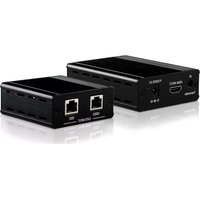
1 SERVICE: This slot is reserved for firmware update only.
2 LAN: Connect to intranet or internet service system for a total sharing rate of 100Mbps within the link of Transmitter.
Warning: DO NOT connect this slot with any of the CAT5e/6/7 port, doing so may trigger a power shot down and ruin the device.
3 CAT5e/6/7 IN & LINK LED: Connect from HDMI over CAT5e/6/7
Transmitter device along with source device for input signal distribution up to 100m. Once the connection is made with active signal the LINK LED will illuminate.
4 POWER LED: Once the power supply is connected the LED will illuminate.
5 DC 24V: Plug the 24V DC power supply into the unit and connect the adaptor to an AC outlet.
6.2 Rear Panel
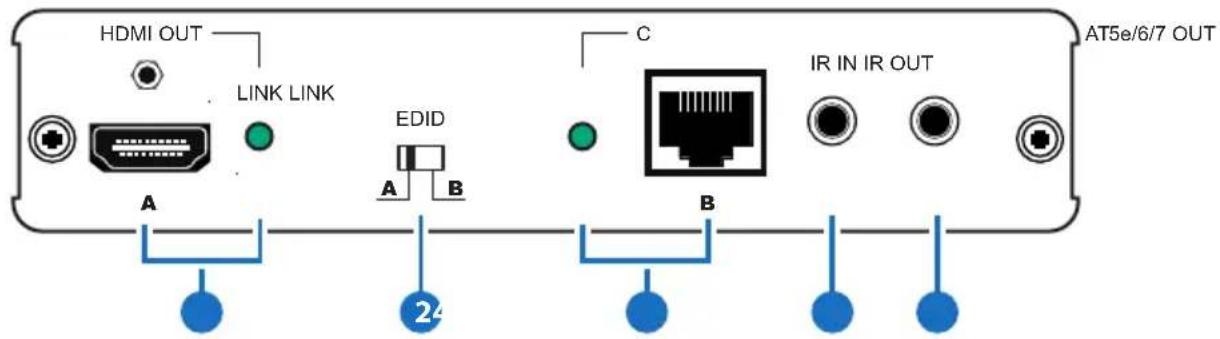
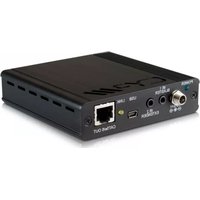
1 HDMI OUT & LINK LED: Connect to HDMI display for instant image display or cascade with another family type Transmitter. The LINK LED will illuminate once and active display signal is detected.
This device obtain the last memory function therefore, the device will use the last output port's EDID when The output port is not connected to a display after power cycling.
2 EDID: Switch to A/B to allows device to output image according to output A/B (A: HDMI, B: CAT OUT) port's EDID. For example, switch to A and both input and output A is connect to 4K2K's equivalence signal, both output A and B will obtain a 4K2K's signal however if output B is not connected with 4K2K's display there will be no image.
3 CAT5e/6/7 OUT & LINK LED: Connect this port to CAT5e/6/7 to HDMI Receiver with CAT5e/6/7 cable along with display to extend the signal up to 100m. Once the connection is made with active signal the LINK LED will illuminate.
4 IR IN: Connect with the supplied IR Extender to receive IR signal from Transmitter side and blast out at Receiver side. Ensure that remote controller being used is within the direct line-of-sight of the IR Extender.
5 IR OUT: Connect with the supplied IR Blaster to blast out the IR signal received from the Receiver side. Place the IR Blaster in direct line-of-sight of the equipment to be controlled.
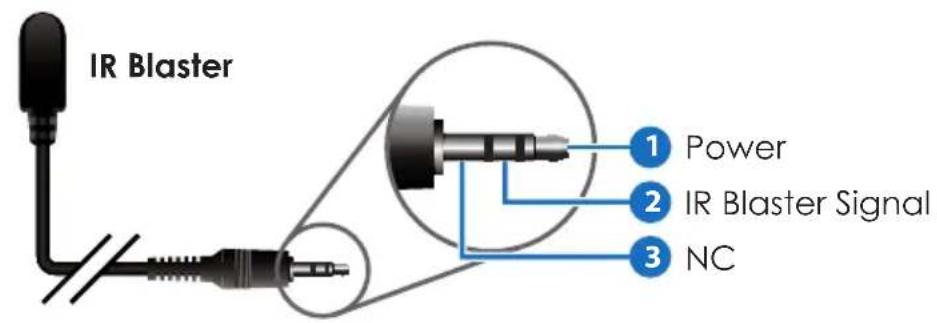
6.3 IR Cable Pin Assignment

7. CONNECTION DIAGRAM
![graph TD A["3D TV/Display"] --> B["3D TV/Display"] B --> C["3D TV/Display"] C --> D["3D TV/Display"] D --> E["3D TV/Display"] E --> F["3D TV/Display"] F --> G["3D TV/Display"] G --> H["3D TV/Display"] H --> I["3D TV/Display"] I --> J["3D TV/Display"] J --> K["3D TV/Display"] K --> L["3D TV/Display"]…](/content/2026/06/1186563/images/507dc5a3bf72f0a1cd148c9f187f91d9901747c0b45946aeb6714ca6403d2ec7.jpg)
8. SPECIFICATIONS
Video Bandwidth 340Mbps/10.2Gbps
Input ports 1 x CAT5e/6/7,
1 x IR IN, 1 x LAN, 1 x USB (Service only)
Output ports 1 x HDMI,
1 x CAT5e/6/7 1 x IR OUT,
Resolution Up to 4Kx2K (3840x2160@24/25/30Hz/4096x
2160@24Hz/4K2K@60Hz YUV_420)
HDMI Input & Output Up to 10m@8 or12-bit 1080p
Cable Distance
CAT5e/6/7 Output Up to 100m
Cable Distance
IR Frequency 30\~50kHz
Power Supply 24V / 1.25A DC (US/EU standards, CE/FCC/
UL certified)
Dimensions 145 mm(W) x 160 mm(D) x 30 mm(H)/
Jacks Excluded
45 mm(W) × 172.75 mm(D) × 35 mm(H)/
Jacks Included
Weight 662g
Chassis Material Metal
Silkscreen Color Black
ESD Protection Human body model:
±8kV (air-gap discharge)
±4kV (contact discharge)
Operating Temperature 0°C \~ 40°C
Storage Temperature -20°C \~ 60°C / -4 °F \~ 140 °F
Relative Humidity 20 \~ 90% RH (non-condensing)
Power Consumption 22.33W/with Receiver connected
8.1 CAT5e/6/7 Cable Specification
| Cable Type | Range | Pixel clock rate | Video Data Rate | Supported Video |
| CAT5e/6/7 | 100 m <= | 225 MHz <=5 | .3Gbps (HD Video) | Up to 1080p, 60 Hz, 36 bits, 3D (data rates lower than 5.3 Gbps or below 225 MHz TMDS clock). |
| 70 m > | 225 MHz > 5.3 | Gbps (Ultra HD Video) | 4K2K, 30Hz video formats | |
| CAT6A/7 100 | 0 m >225 | MHz > 5.3 | Gbps (Ultra HD Video) | 4K2K, 30Hz video formats |
- ACRONYMS
| ACRONYM COMPLETE TERM | |
| 4Kx2K 3840x2160 / 4096x2160 | |
| DTS Digital Theater System | |
| EDID Extended Display Identification Data | |
| HDCP High-bandwidth Digital Content Protection | |
| HDMI High-Definition Multimedia Interface | |
| HDTV High-Definition Television |

CYP (UK) Ltd., Unit 7, Shepperton Business Park, Govett Avenue, Shepperton, Middlesex, TW17 8BA
Tel: +44 (0) 20 3137 9180 | Fax: +44 (0) 20 3137 6279
Email: sales@cypeurope.com
www.cypeurope.com
RDV2


Brand : CYP
Model : PU-HBTE-ZE
Category : AV Transmitter