CB-U300GNA - NAS Vantec - Free user manual and instructions
Find the device manual for free CB-U300GNA Vantec in PDF.


| Product Type | Network Attached Storage (NAS) |
| Brand | Vantec |
| Model | CB-U300GNA |
| Dimensions (L x W x H) | 224 mm x 132 mm x 185 mm |
| Weight | 2.5 kg (5.5 lbs) |
| Power Supply | External AC adapter, 100-240V, 50/60Hz |
| Network Interface | 1 x Gigabit Ethernet (RJ45) |
| USB Ports | 1 x USB 3.0 Type-A (host), 1 x USB 3.0 Type-B (device) |
| Supported Drive Bays | 3 x 3.5" SATA HDD/SSD (hot-swappable) |
| Maximum Storage Capacity | Up to 36 TB (3 x 12 TB drives) |
| RAID Modes | RAID 0, RAID 1, RAID 5, JBOD |
| File System Support | ext4, NTFS, FAT32, HFS+ |
| Supported Protocols | SMB/CIFS, AFP, NFS, FTP |
| Operating System Compatibility | Windows, macOS, Linux |
| Cooling Fan | 1 x 80mm fan (speed adjustable) |
| LED Indicators | Power, LAN, HDD activity per bay |
| Maintenance | Clean with a soft, dry cloth; avoid liquids |
| Safety Precautions | Keep away from water and heat sources; use only supplied power adapter |
| Repairability | No user-serviceable parts; contact technical support for repairs |
Frequently Asked Questions - CB-U300GNA Vantec
User questions about CB-U300GNA Vantec
0 question about this device. Answer the ones you know or ask your own.
Ask a new question about this device
Download the instructions for your NAS in PDF format for free! Find your manual CB-U300GNA - Vantec and take your electronic device back in hand. On this page are published all the documents necessary for the use of your device. CB-U300GNA by Vantec.
USER MANUAL CB-U300GNA Vantec
All brand names and trademarks are properties of their respective owners
www.vantecusa.com
Contents:
Chapter 1: Introduction ...... 3
1.1 Product Introduction ...... 3
1.2 Features .... 3
1.3 System Requirements .... 4
1.4 Package Contents .... 4
Chapter 2: Getting Started .... 5
2.1 Hardware Installation .... 5
2.2 Driver Installation .... 5
2.2.1 Installation for Windows 6
2.2.2 Installation for Mac OS X ...... 6
2.3 Hardware Verify.... 6
2.3.1 Verifying for Windows...... 6
2.3.2 Verifying for Mac OS X.... 8
Chapter 1: Introduction
1.1 Product Introduction
This USB 3.0 to Gigabit Ethernet Adapter add a single RJ-45 Ethernet networking port to a USB enabled (USB 3.0) computer system with link speeds up to 1000 Mbps**. Backwards compatible with USB 2.0 computer system and 10/100 Mbps Ethernet networks, this compact and portable adapter is ideal as a desktop replacement network adapter or laptop accessory.
1.2 Features
- Compliant with Universal Serial Bus 3.0 Specification, Revision 1.0
● Compatible with USB Specification, Revision 2.0
● Supports full duplex operation with IEEE 802.3x flow control and half duplex operation with back-pressure flow control - Compatible with IEEE 802.3, IEEE 802.3u, IEEE 802.3ab
● Supports IEEE 802.3az (Energy Efficient Ethernet)
● Supports crossover detection and auto-correction
● Supports advanced link down power saving when Ethernet cable is unplugged
● Supports Wake-on-LAN
- Upstream port: USB 3.0 type A
- Downstream port: RJ45
● LEDs indicate the status of Power status and Ethernet connection
1.3 System Requirements
- Windows® XP/Vista/7/8 (32/64 bit); Mac OS X 10.6/10.7/10.8
● Available USB 2.0 port (Recommend USB 3.0 port)
1.4 Package Contents
● 1 x USB 3.0 to Gigabit Ethernet Adapter
- 1 x Driver CD
- 1 x User Manual
Chapter 2: Getting Started
2.1 Hardware Installation
- Plug the USB 3.0 to Gigabit Ethernet Adapter directly into an available USB 2.0 port (Recommend USB 3.0 port) on your computer.
- Connect one end of your network cable into the RJ45 port of USB 3.0 to Gigabit Ethernet Adapter.
- Connect the other end of the network cable into an available Ethernet port on your router, switch, or any other networking device.
2.2 Driver Installation
The following section shows you how to install the USB 3.0 to Gigabit Ethernet Adapter driver on different operating systems.
Important! Please install the software, before connecting the USB 3.0 to Gigabit Ethernet adapter to your system.
2.2.1 Installation for Windows
- Insert the provided CD into your disk drive.
- At the Windows Desktop, click Start, then Run.
- Type D:\CB-U300GNA\Windows\Setup.exe, then click OK. (Change D: to match your CD-ROM drive letter)
- Follow the on-screen instructions to complete the installation.
2.2.2 Installation for Mac OS X
- Insert the provided CD into your CD-ROM drive.
- Navigate to "CD-Drive\CB-U300GNA\Mac" folder.
- Double click the “AX88179.dmg” file to launch the installer.
- Follow the instructions on screen to install the driver. After driver installation is complete, you must restart your computer.
2.3 Hardware Verify
2.3.1 Verifying for Windows
- Click on the “Device Manager” tab in the Windows Control Panel.
Start > Control Panel > Device Manager
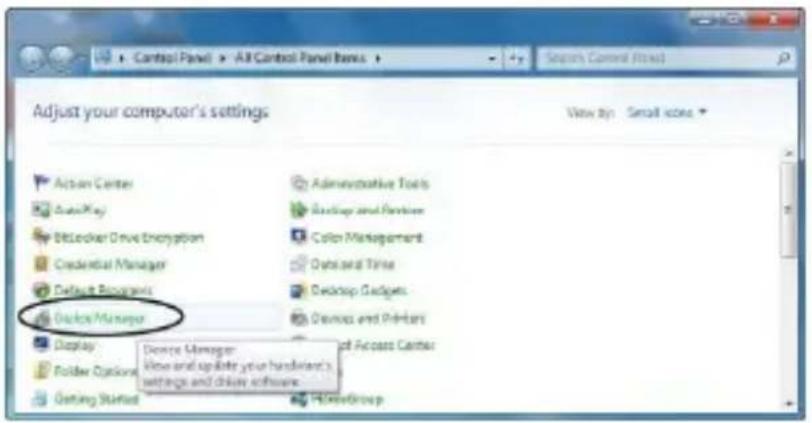
- Entry “Network adapters” item, and you can read “ASIX AX88179 USB 3.0 to Gigabit Ethernet Adapter” in the Device Manager.
Network adapters ASIX AX88179 USB 3.0 to Gigabit Ethernet Adapter
2.3.2 Verifying for Mac OS X
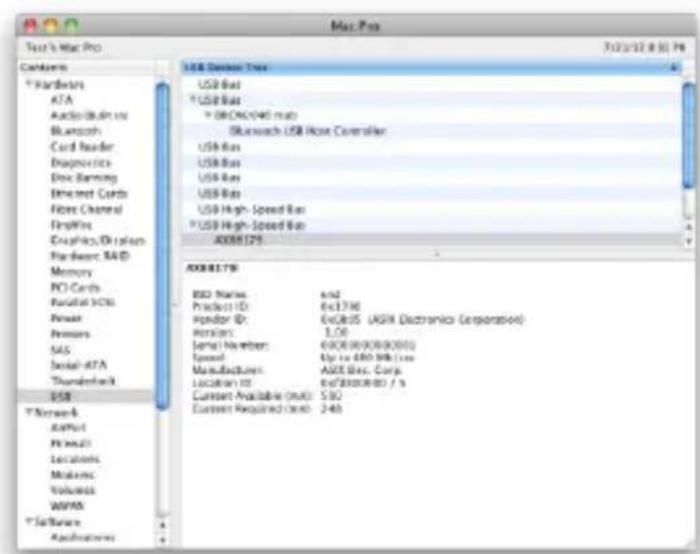
- Choose About this Mac from the Apple menu.
- Click on More Info...
- In the Contents sidebar select USB from the Hardware section.
- Scroll the list to reveal the USB 3.0 to Gigabit Ethernet Adapter information
**Note: The stated transmission rate of this device is 1Gbps. This is the theoretical data rate and actual rate may vary. It is dependent on the PC's OS, hardware, Network traffic, switches, routers and USB traffic/data/capacity on the USB bus.