NexStar NST-D100S2 - NAS Vantec - Free user manual and instructions
Find the device manual for free NexStar NST-D100S2 Vantec in PDF.


| Product Type | Hard Drive Dock (External) |
| Brand | Vantec |
| Model | NST-D100S2 |
| Product Name | NexStar Hard Drive Dock |
| Compatible Drive Types | SATA I/II Hard Drives |
| Supported Drive Sizes | 2.5" and 3.5" |
| Internal Interface | SATA |
| External Interface | USB 2.0 |
| Data Transfer Rate | Up to 480 Mbps |
| Maximum Storage Capacity | Up to 1.5 TB |
| Material | Plastic |
| Dimensions (L x W x H) | 136 x 83 x 87 mm (5.35 x 3.27 x 3.43 in) |
| Weight | Approximately 250 g (8.8 oz) |
| Power Supply | Input: 100-240V AC; Output: 5V/12V DC, 2A |
| Power Consumption | Up to 10W (max) |
| LED Indicators | Blue LED for Power and HDD Activity |
| Plug and Play | Yes (no drivers for Windows ME/2000/XP/Vista, Mac OS 9.0+, Linux 2.4.18+) |
| Eject Button | Yes, for easy drive removal |
| Package Contents | NexStar Hard Drive Dock, USB Cable, Power Adapter, Power Cable, User Manual |
| Warranty | 1 year limited (90 days on parts) |
| System Requirements | Pentium II 350MHz or Mac G3; USB 2.0 port; Windows ME/2000/XP/Vista, Mac OS 8.6+, Linux 2.4.18+ |
| Usage | Add/swap hard drives without opening PC case; ideal for data transfer, backup, and storage expansion |
| Cleaning | Wipe with a soft, dry cloth. Do not use liquid cleaners. |
| Safety | Keep away from liquids and moisture. Use in a well-ventilated area. Avoid dropping. |
| Repairability | No user-serviceable parts. Refer to warranty service for defects. |
Frequently Asked Questions - NexStar NST-D100S2 Vantec
User questions about NexStar NST-D100S2 Vantec
0 question about this device. Answer the ones you know or ask your own.
Ask a new question about this device
Download the instructions for your NAS in PDF format for free! Find your manual NexStar NST-D100S2 - Vantec and take your electronic device back in hand. On this page are published all the documents necessary for the use of your device. NexStar NST-D100S2 by Vantec.
USER MANUAL NexStar NST-D100S2 Vantec
All Registered Trademarks Belong To Their Respected Companies.
Copyright © 2009 Vantec Thermal Technologies. All Right Reserved.
NexStar® HARD DRIVE DOCK
■ Content
Content ....1
- Introduction ...... 2
- System Requirements ...... 2
3.Specifications/Features....3
4.Installation....4 - Removal ....7
6.Driver Installation....9
Windows ME/2000/XP/VISTA 9
Mac OS 9.0 or later ....9
Mac OS 8.6....9 - Warranty....10
NexStar® HARD DRIVE DOCK
1. Introduction
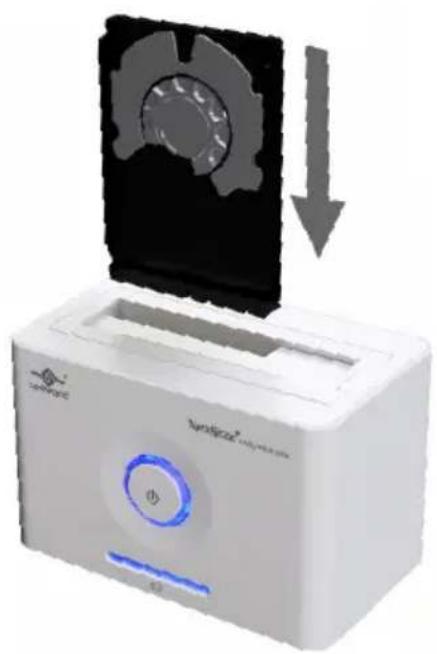
The Vantec NexStar® Hard Drive Dock is a complete and easy way to add or swap hard drives to your computer. It gives you the flexibility of connecting any SATA I/II hard drive to your computer via USB 2.0 connection without opening up your computer case or installing into an enclosure. Simply just insert any 2.5" or 3.5" SATA I/II hard drive into the NexStar® Hard Drive Dock and you are ready to transfer, copy, or backup files. Quick and easy, the Vantec NexStar® Hard Drive Dock is the perfect solution to access your hard drive in seconds.
2. SystemRequirements
■ Intel Pentium II 350 MHz-compatible or Mac G3 processor & greater.
■ Microsoft Windows ME/2000/XP/VISTA or MAC OS 8.6 & greater or Linux Kernel 2.4.18 above.
■ For USB 2.0 speeds, the system must support USB 2.0 specifications
NexStar® HARD DRIVE DOCK
3. Specifications/Features
Features :
■ Install And Access Hard Drive in Seconds.
■ Simple to Use Design; No Need to Add Enclosure or Open Case.
■ Eject Button for Easy Removal of Hard Drive.
■ Supports 2.5"/3.5" SATA I/II Hard Drive Up to 1.5 TB.
■ Add Storage to Any System with USB.
■ Plug & Play.
■ Attractive Blue LED Power & HDD Activity Light.
■ Transfer Rates Up to 480Mbps w/USB 2.0.
Package Includes :
■ NexStar ^® Hard Drive Dock
■ USB Cable
■ Power Adapter
■ Power Cable
■ User Manual
Specifications :
■ Device Support : SATA I/II Hard Drive
■ Device Size : 2.5" or 3.5"
■ Internal Interface : SATA
■ External Interface : USB 2.0
■ Material : Plastic
■ Dimension : 136 x 83 x 87mm
■ HDD Capacity : Up to 1.5TB
■ Power Supply : Dual 5V/12V 2A
NexStar® HARD DRIVE DOCK
4. Installation
- Connect the power adapter to the NexStar*Hard Drive Dock.
- Connect the USB Cable to the NexStar® Hard Drive Dock and attach the other end to your computer.

NexStar®
HARD DRIVE DOCK
- Insert 2.5" or 3.5" SATA hard drive (HDD) into the slot.
natural_image
White portable device with a black cover and blue indicator lights, showing a downward arrow (no text or symbols on the device itself)NexStar®
HARD DRIVE DOCK
3-1. When the eject button is upright, the NexStar ^® Hard Drive Dock is ready for use.

natural_image
White electronic device labeled 'Aeristar' with a blue circular button and antenna, showing a mechanical or electrical component (no readable text beyond branding)NexStar® HARD DRIVE DOCK
5. Removal
Warning, please push power button & turn off unit before removing the hard drive!
- Remove the HDD safely from your computer system.
- Push down the button to eject the HDD.
(Stabilize the HDD with your hand).

natural_image
White electronic device labeled 'NextStar' with a black top and blue control button, showing a downward arrow (no readable text or symbols beyond branding)NexStar® HARD DRIVE DOCK
- Remove the HDD from the Hard Drive Dock.

natural_image
White electronic device labeled 'NetStar' with a black cover and upward arrow, no readable text or symbols beyond the label.NexStar® HARD DRIVE DOCK
6.DriverInstallation

Windows ME/2000/XP/VISTA
No drivers are necessary when using Windows ME/2000/XP/VISTA. If the hard drive does not appear under My Computer, be sure to partition your hard drive.

Mac OS 9.0 or later
No drivers are necessary when using Mac OS 9.0 above. If the hard drive does not appear on the desktop, be sure to partition your hard drive.
Mac OS 8.6
- Unplug the NexStar® Hard Drive Dock if you currently have it connected.
- USB Mass Storage Support 1.3.5 must be installed on your system. If it is not, you can download the USB Mass Storage Support 1.3.5 from the Apple Software Updates website: http://www.apple.com/support.
- Follow the direction associated with the USB Mass Storage Support driver to install.
- Repeat the steps listed under "Connecting the NexStar® Hard Drive Dock to your computer".
NexStar® HARD DRIVE DOCK
7. Warranty
The NexStar® Hard Drive Dock comes with a 1 year limited warranty (90 day parts). If your unit become defective within that time frame, please go to http://www.vantecusa.com for information on how to receive warranty exchange or repair. Cosmetic defects and missing parts are not covered under this warranty. Please check the contents of the unit to make sure you received all parts. Also, check for any cosmetic flaws. If any parts are missing or if there are cosmetic defects, please contact the retailer from which you purchased the unit immediately and ask for a replacement.
Vantec Thermal Technologies
43951 Boscell Rd. Fremont, CA 94538
tel:510-668-0368 fax:510-668-0367
website:www.vantecusa.com
Brand : Vantec
Model : NexStar NST-D100S2
Category : NAS