TWA200 Canteen - Watch TW Steel - Free user manual and instructions
Find the device manual for free TWA200 Canteen TW Steel in PDF.


User questions about TWA200 Canteen TW Steel
0 question about this device. Answer the ones you know or ask your own.
Ask a new question about this device
Download the instructions for your Watch in PDF format for free! Find your manual TWA200 Canteen - TW Steel and take your electronic device back in hand. On this page are published all the documents necessary for the use of your device. TWA200 Canteen by TW Steel.
USER MANUAL TWA200 Canteen TW Steel
natural_image
Two identical white circular shapes on a black background, no text or symbols present.TW STEEL®
BIG IN OVERSIZED WATCHES
CANTEEN AUTOMATIC MANUAL
INSTRUCTIONS FOR USE OF THE TW STEEL CANTEEN AUTOMATIC
The TW Steel Canteen Automatic takes its energy from the movement which your watch makes on your wrist. The longer you wear the watch, the longer it will store the movements in the form of energy.
The maximum reserve amounts to approximately 40 hours. This means that the watch shows the time for up to 40 hours when it is not worn. If you do not wear the watch for some time, or if you start to use the watch again, you can also wind it up by hand to get it started. Do this as follows: unscrew the crowncap anti-clockwise. Turn the small crown clockwise and you wind up the movement.
Remember that a few turns are enough, and do not overwind the watch. Then screw the crowncap on the crown clockwise.
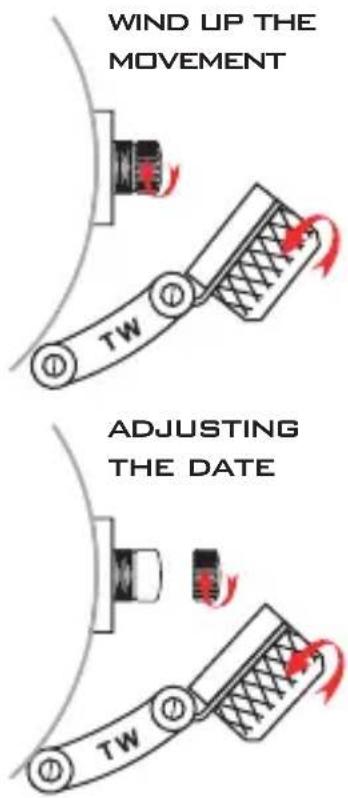
text_image
WIND UP THE MOVEMENT TW ADJUSTING THE DATE TWADJUSTING THE DATE CHANGING THE TIME
The Canteen Automatic has a rapid date adjustment. This rapid adjustment works as follows: You unscrew the crowncap by turning it anti-clockwise. You then pull out the small crown with one click. When you have reached this position, you can move the date by turning it clockwise. Then press the crown towards the case. Next screw the crowncap on the crown by turning it clockwise.
We strongly advise you not to change the date between 22.00 and 02.00h. as it can damage the date mechanism.
You unscrew the crowncap by turning it anti-clockwise. You then pull out the small crown with two clicks. This must be done carefully. By turning the crown, you can now set the desired time (please note that the second hand stops, when you start turning the crown).
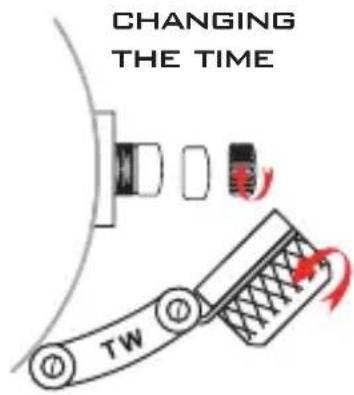
text_image
CHANGING THE TIME TWThen press the crown towards the case and screw the crowncap on the crown by turning it clockwise.
MAINTENANCE
TW Steel uses the best materials and carries out strict controls before the watch leaves the factory.
The way in which you wear or treat your TW Steel will determine whether the appearance of the watch is maintained in the future, or whether it will deteriorate. In order to enjoy wearing your TW Steel as long as possible, we include a number of tips: If the watch comes into contact with hard or corrosive materials, this can cause damage, which, if it occurs regularly, will become clearly visible in the form of scratches.
Your watch should be cleaned with a soft cotton cloth that is not impregnated with any cleaning material. Absolutely no cleaning materials should be used. It is advisable to regularly polish your watch with a soft cotton cloth. The watch is a precision mechanical instrument and should be treated as such. Adjusting the time or date, opening or closing the crown or crowncap, should not be done roughly, but carefully.
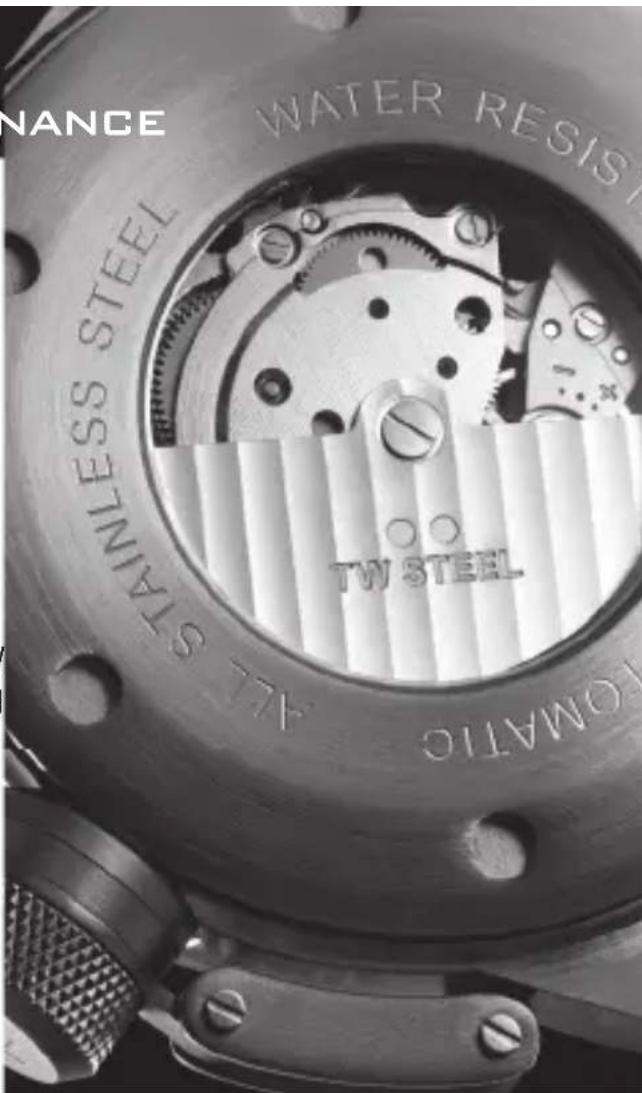
TECHNICAL INFORMATION OF THE CANTEEN AUTOMATIC:MAINTENANCE
• Miyota Automatic movement Cal. 8215 with shock absorber
- 21 jewels
• Reserve energy 40 hours
• Winding component runs on ball bearings with 21.600 A/h
• Date indicated with rapid adjustment
• 10 ATM water resistant
• Case and clasp: solid stainless steel (316L)
• Deviation allowed of app. 20-30 seconds per day
- Deviation can be influenced with the positioning of the watch. You can place the watch:
- 1: date dial side up
- 2: 6 o'clock side up
- 3: 9 o'clock side up
- 4: 3 o'clock side up
Please find out yourself what works best for your watch.