CVSF8BS - Vacuum Cleaner HITACHI - Free user manual and instructions
Find the device manual for free CVSF8BS HITACHI in PDF.


User questions about CVSF8BS HITACHI
0 question about this device. Answer the ones you know or ask your own.
Ask a new question about this device
Download the instructions for your Vacuum Cleaner in PDF format for free! Find your manual CVSF8BS - HITACHI and take your electronic device back in hand. On this page are published all the documents necessary for the use of your device. CVSF8BS by HITACHI.
USER MANUAL CVSF8BS HITACHI
No. 15-12 Nishi Shinbashi, 2-Chome,
Minato - Ku, Tokyo 105-8430, Japan.
Tel: 03 35022111
HITACHI EUROPE LTD,
Whitebrook Park
Lower Cookham Road
Maidenhead
Berkshire
UNITED KINGDOM
Tel: 01628 643000
Fax: 01628 643400
Email: consumer-service@hitachi-eu.com
HITACHI EUROPE GmbH
Munich Office
Dornacher Strasse 3
Email: HSE-DUS.service@hitachi-eu.com
HITACHI EUROPE srl
Via Tommaso Gulli N.39, 20147
Milano, Italia
ITALY
Tel: +39 02 497861
Tel: +39 02 38073415 Servizio Clienti
Fax: +39 02 4878638172
Email: customerservice.italy@hitachi-eu.com
HITACHI EUROPE S.A.S
Lyon Office
B.P. 45, 69671 BRON GEDEX
FRANCE
Tel: 04 72 14 29 70
Fax: 04 72 14 29 99
HITACHI EUROPE LTD (Norway) AB
STRANDVEIEN 18
1366 Lysake
NORWAY
Tel: 67 5190 30
Fax: 67 5190 32
Email: csgnor@hitachi-eu.com
HITACHI EUROPE AB
Neopoli / Niemenkatu 73
FIN-15140 Lahti
FINLAND
Tel:1358 3 8858 271
Fax: +358 3 8858 272
Email: csgnor@hitachi-eu.com
HITACHI EUROPE LTD
Na. Sychrove 975/8
101 27 Praha 10 - Bahdales
CZECH REPUBLIC
Tel: +420 267 212 383
Fax: +420 267 212 385
Email: csgnor@hitachi-ou.com
HITACHI
Inspire the Next
How to use your
HITACHI
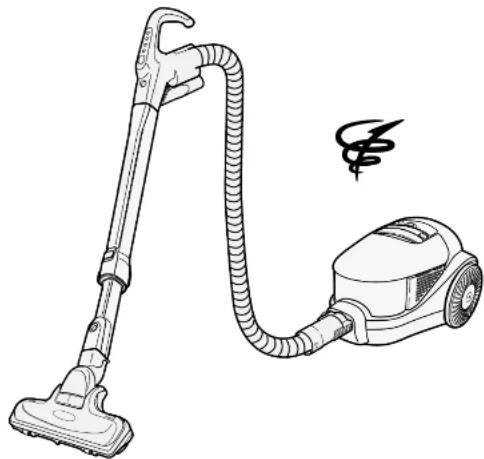
VACUUM CLEANER
MODEL CVSF8BS
natural_image
Line drawing of a vacuum cleaner with coiled tube and handle (no text or symbols)Names of Parts and Preparation
text_image
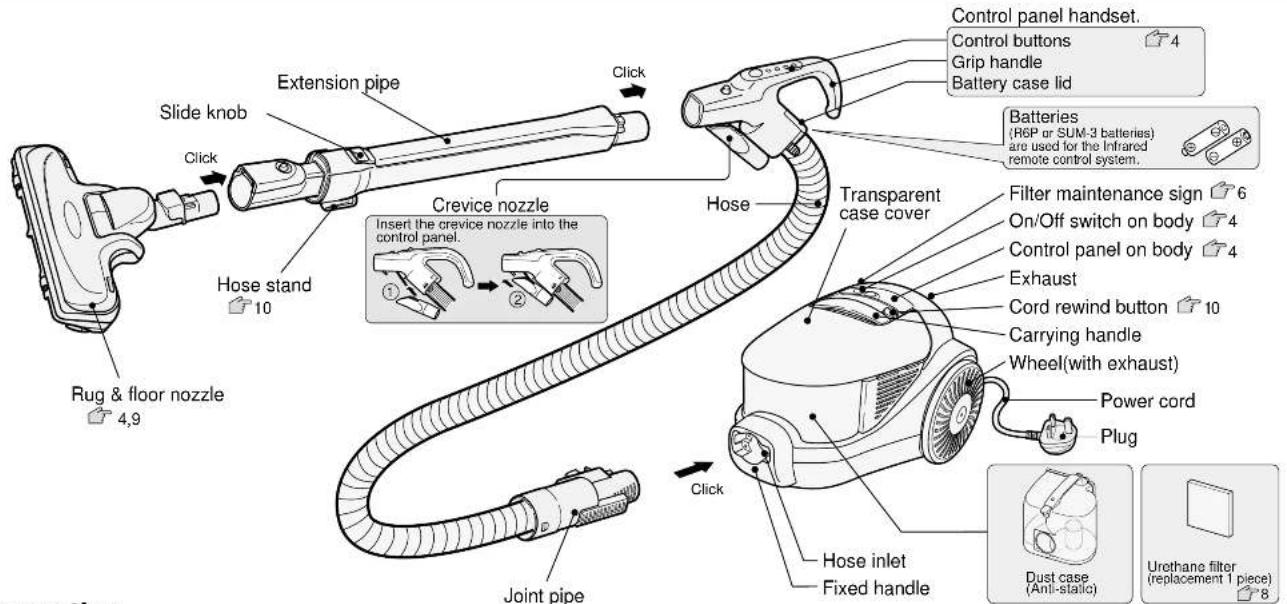
Control panel handset. Control buttons Grip handle Battery case lid Slide knob Click Crevice nozzle Insert the crevice nozzle into the control panel. Hose stand 10 Rug & floor nozzle 4,9 Joint pipe Click Hose Transparent case cover Filter maintenance sign 6 On/Off switch on body 4 Control panel on body 4 Exhaust Cord rewind button 10 Carrying handle Wheel(with exhaust) Power cord Plug Hose inlet Fixed handle Dust case (Anti-static) Urethane filter (replacement 1 piece) 8Preparation
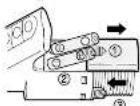
1 How to insert batteries (R6P or SUM-3).
1) Slide and detach the battery case lid while pressing it. 2) Insert two batteries into the case correctly, as illustrated. 3) Replace the battery case lid.
Notes
- Incorrect battery insertion may cause battery (liquid) leakage and or an explosion.
1) Do not use a new and old battery together and different kinds of batteries.
2) If you are not going to use the cleaner for a long time, remove batteries from the cleaner. If liquid leaks from the case, wipe out the liquid and install new batteries.
2 How to attach the hose to the cleaner.
Insert the joint pipe into the suction inlet of the cleaner. When you remove the hose, pull the joint pipe while pressing the button.

3 How to attach the hose, telescopic extension pipe and rug & floor nozzle.
1) Insert the end of extension pipe into the joint pipe with control panel until the button of the stopper ring clicks into the hole. Then attach the rug & floor nozzle to the extension pipe (in same way as the connection of hose and extension pipe).
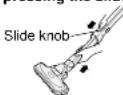
2) Adjust and extend the extension pipe to its desired length while pressing the slide knob.
3) Press the button to remove the extension pipe and rug & floor nozzle.

4 Insert the mains plug into a socket as illustrated.

Caution :
The cleaner should be unplugged from the mains when not in use.
How to Operate
Control panel handset
Battery check
Whenever the operation buttons are pressed, the LED lamp will flash. While the LED is flashing the infrared remote control is available.
- When illumination from the LED lamp becomes weak and you can not easily operate the control panel, the batteries should be replaced.

Infrared remote control transmitter
Operation panel handset (tactile keys)
High switch
Medium switch
Low switch
Off switch
to stop the operation.
Caution :
Be careful not to drop or get the operation panel wet.

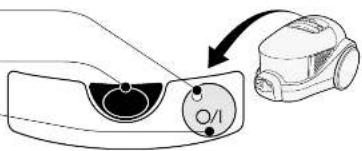
Operation panel on body
During operation, the red LED
is illuminated.
Infrared remote control receiver.
Power On/Off switch
If the batteries in the control panel
handset are weak or exhausted,
the cleaner can still be operated
using the button switch on the L )Whenever you push the button
the mode changes as follows: High -> Off ->High ...
text_image
Diagram showing a car's air vent and airbag component with label 'O/I' indicating air flow directionHow to operate the rug & floor nozzle

natural_image
Line drawing of a vacuum cleaner with a downward arrow indicating motion (no text or symbols)Cleaning corners and narrow placesCleaning
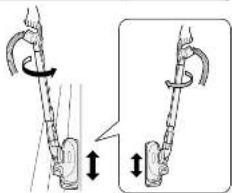
When you twist the operation handle, the direction of rug & floor nozzle can change easily.
text_image
Diagram illustrating a rope knot with directional arrows indicating movement and rotation, showing structural changes.Use the rug & floor nozzle not to float from the floor.
How to Empty the Dust Case
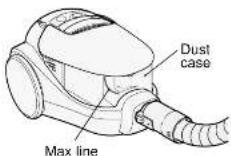
1) Empty the dust case before the dust reaches the max line. If you continue using the cleaner with a full dust case, the suction power will be decreased.
2) Empty the dust case periodically.
3) When emptying the dust case also remove the dust around the filters.
Note
- Before you empty the dust case, be sure to turn off the power and unplug the cleaner from the mains socket.
How to dispose of the dust

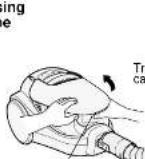
Open the dust case cover while pressing the button of dust case, and lift out the dust case from cleaner body.
Notes
- When you lift out the dust case from cleaner body, be careful not to press the open button of the dust case.
- Do not lift out the dust case from the body while the cleaner is in use.
■ The dust case should be kept upright when removing it from the body to prevent dust spillage.
Button for the dust case

Dust case

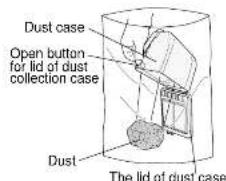
Put the dust case into a big vinyl bag, and press the open button in the bag.
- Turn the dust case downward and push the open button on the lid of the dust case to release dust into a vinyl bag.
- To remove stubborn dust adhesion inside the dust case, pat the side of dust case.
- Dust around the mesh filter and under the mesh filter can be removed with tissue paper and an old toothbrush.
text_image
Dust case Open button for lid of dust collection case Dust The lid of dust case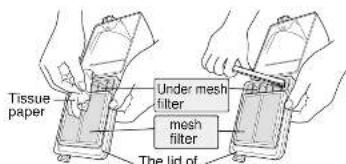
text_image
Tissue paper Under mesh filter mesh filter The lid ofThe nu of dust case
Notes :
- Some types of dust may cause the suction power to become weak before max line is reached, in that case, empty the dust and clean the filters. 7
- If the rug & floor nozzle sucks some sharp items such as pieces of broken glass, pins, take care not to touch them.
How to Empty Dust Case

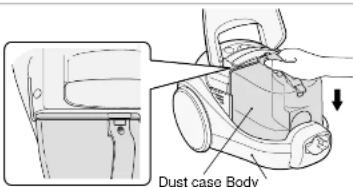
Close the lid of dust case until the button clicks.


Push the dust case into the cleaner body firmly so that there is not a gap between the lid of the dust case and cleaner body.
text_image
Dust case Body
Close the top cover until the button clicks.
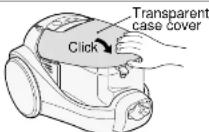
Note
- Please be careful not to be put your fingers between the top cover and dust case.
Maintenance
Warning
Before maintaining, the mains plug should be removed from the mains socket.
Filter maintenance sign
- When suction power is weak, the operation noise level is higher and the filter maintenance sign operates, the dust case should be emptied and the filters cleaned (inside mesh filter and under mesh filter).
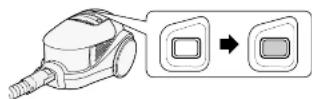
When the orange indicator appears in the window continuously, the cleaner requires emptying. Check the dust indicator by lifting suction tool from the floor and removing the crevice nozzle when it is used.
Note
- If the cleaner is used in such a condition that the orange indicator appears in the window, air to the motor will be reduced and the motor will eventually burn out.
Maintenance
Dust case filters (Required maintenance once a month) (The filters are washable.)

Remove the dust case and empty the dust.


1) Turn the dust case upside-down, press the button with thumb.
2) Remove the cyclone chamber by pulling the base of cyclone chamber with two fingers (the forefinger and the middle finger).
3) Remove the dust around the inside mesh filter. (The mesh filter is washable.)

Open the lid of the dust case and remove the mesh filter, you can wash the mesh filter, urethane filter, black filter and under mesh filter with water.
The base of cyclone chamber
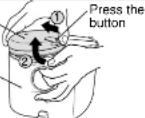
Cyclone chamber

The base of cyclone chamber

Lid of the dust case
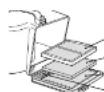
-Mesh filter -Urethane filter -Black filter

Under mesh filter
Black filter
Urethane filter

Return the lid of dust case to the original position until it clicks and put the base of cyclone chamber on the dust case. Align the ▲ mark of the base of cyclone chamber to the ▲ mark of the dust case.

Install the dust case into cleaner body.


Note
- Be sure to set each filter in its correct position firmly, otherwise suction power will be decreased.
HEPA clean filter (Required maintenance once a month) (The HEPA clean filter is not washable.)

Remove the HEPA clean filter from the dust case as shown in the illustration.

Remove dust around HEPA clean filter by patting it gently.

Reinstall the HEPA clean filter into dust case with grips facing the upward.
Notes
- Only pat the filter gently. If you pat it strongly, its shape may be changed and this will cause dust leakage.
- Do not use a brush with hard bristles, it may cause damage to the filter.
- Make sure that the HEPA clean filter is seated correctly. Otherwise you cannot install the dust case correctly. If you use the cleaner without HEPA clean filter, it will eventually cause motor failure.
-
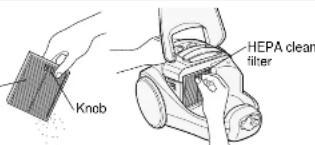
text_image
Knob HEPA clean filterMaintenance
How to wash filters with water
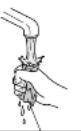
Remove the mesh filter, the urethane filter and the cyclone chamber from the dust case, and wash them with water. After drying the filters completely, fit them in their correct positions and use the cleaner.
Inside mesh filter
- Gently wash the inside mesh filter of cyclone chamber with water and an old toothbrush.

Mesh filter, urethane filter
• Gently wash the mesh filter with water and an old toothbrush.
- Wash and rub the urethane filter well with water until the water is clear, and lay it out flat to dry naturally.
- It can take a long time for the urethane filter to dry up, so please use a replacement one alternately.


Black filter, under mesh filter and dust case
- Gently wash the under mesh filter and black filter with water and an old toothbrush.

Notes :
- After washing the filters with water, please dry up them naturally and install them in their correct positions. Do not use wet filters, as this may damage your cleaner and render it unsafe.
- Do not wash the filters with hard hairbrush, do not wash the mesh filter vigorously, it may damage the filter.
- Do not wash the filters with detergent, bleach, benzene, thinner and alcohol, do not wash them in a washing machine. And also do not dry the filters with hair dryer, otherwise we can not guarantee the cleaner performance and quality.
Notes:
- When suction power is weak, even though all the filters have been cleaned in the dust case and dust has been removed from the HEPA clean filter, the filters will need to be replaced. When you need to replace the filters, these should be purchase from a Hitachi dealer. 12
- Replacement of HEPA clean filter is required every 4 years.
Maintenance for cleaner body
Unplug the cleaner from the mains and wipe the body with a soft cloth slightly moistened with water.
Note :
- Do not wash the cleaner with benzene, thinner and detergent, it may cause colour change and transformation.

Maintenance
Rug & floor nozzle
- The remains of dust around the brush, wheels and the air window of rug & floor nozzle may cause a decrease in suction power. In that case, suck the dust with crevice nozzle.
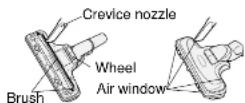
How to wash rug & floor nozzle with water
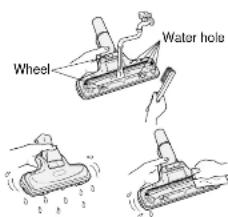
When you wash the rug & floor nozzle with water, be sure to detach it from the extension pipe.
Warning :
Do not wash rug & floor nozzle when connected to cleaner and mains otherwise it may cause an electric shock.
1 Wash rug & floor nozzle with water.
Notes
- Do not wash rug & floor nozzle with detergent and bleach. - Do not wash rug & floor nozzle with hard hairbrush.
2 Turn the rug & floor nozzle downward, and wipe away the water around the brush by shaking the suction head well, up and down.
Notes
- Wipe the brush with soft cloth.
- Do not dry rug & floor nozzle with an electric dryer and a heater.
- Dry rug & floor nozzle completely in the shade.
text_image
Wheel Water holeInfrared Remote Control Handset
There is an infrared transmitter on the handset and a receiver on the body and in most situations the infrared rays will reach the receiver on the body of vacuum cleaner. However, sometimes the infrared rays can not reach the receiver in the following circumstances.
- When your body or hands block the rays between the transmitter and receiver.
- When you operate the cleaner in narrow room, when the handset control panel is inside and the cleaner body is outside the room.
- When you use the cleaner in a room with very high roof.
- When the cleaner is subjected to strong lighting (especially inverter type lighting, infrared rays lamp) or sunshine.
If you can not change the operation on the control panel handset at particular place, try changing the angle.
When you cannot transmit infrared rays to the cleaner, use the on/off switch on cleaner body. 4 The infrared lenses on the handset and body should be kept clean.
In following situations:
Your vacuum cleaner may be affected by infrared remote control handsets for TVs and videos, conversely, your vacuum cleaner may affect your TV and video.
If this happens, do not use your cleaner in the same room when operating you TV or video.

Putting Back Cleaner
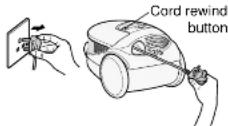
How to rewind the power cord
Rewind the cord while holding the plug and pressing the cord reel button.
(To avoid injury and damage to furniture due to plug whiplash.)
Caution :
In the interest of safety, when you remove the plug from the mains socket, always be sure to hold plug, not the power cord.
Hose stand storage
1) Shorten the length of the extension pipe while pressing the slide knob.
2) Insert the hose stand into the stand supporter.
3) Wind the hose around the extension pipe.
4) Put the hose under the grip handle.

text_image
Hose stand Sland supporter Grip handle Hose Extension pipeNotes
- Do not carry the cleaner in the hose stand storage position.
- Do not store the cleaner with hose near a stove or warm place, it may be damaged due to excessive heat.
Protection Device
Protection Device
When the vacuum cleaner is operated continuously with a full dust case, the cleaner may stop automatically to prevent overheating of the motor.
What to do.
When the protection device operates,
1) Unplug the cleaner from the mains supply.
2) Emply the dust case or remove the obstruction in hose, extension pipe, rug & floor nozzle, and exhaust.
3) Wait for one hour and you can use the cleaner again.
HOW TO MAINTAIN CLEANING EFFICIENCY
- The plug of the power supply cord should be removed from the socket outlet before cleaning the appliance or undertaking maintenance operations.
- The supply cord on this appliance can only be replaced by the use of special tools and if it is damaged the appliance must be returned to the manufacturer or an accredited service agent for repair.
- To clean the cleaner body and attachments, wipe with a soapsuds-soaked cloth. Avoid using alcoholic content liquids.
TO AVOID ACCIDENTS
● Always disconnect cord from electrical outlet before servicing the cleaner.
- Do not pick up matches, fireplace ashes or smoking material with the vacuum cleaner as a possible fire hazard may result.
- Avoid picking up sharp objects. They may damage the vacuum cleaner.
- Do not use the cleaner to pick up wet dirt, and avoid using it in a wet and moist place as moisture may damage the motor and other mechanical parts.
- Do not block the air flow. Any blockages or obstructions to the nozzle, hose, etc. or the exhaust air outlet can cause loss of power and motor overheating.
- Do not run the cleaner over cord. It may damage insulation.
- Avoid cleaning the swich and receptacle parts with wet cloth and splashing water on it as moisture may cause a short circuit.
- Your vacuum cleaner is not a toy. Do not allow children to play with it. Do not leave the vacuum cleaner connected to an electrical outlet unattended.
- Warning: Electric shock could occur if used outdoors or on wet surfaces.
IMPORTANT
The mains lead on this equipment is supplied with a moulded plug incorporating a fuse, the value of which is indicated on the pin face of the plug. Should the fuse need to be replaced, an ASTA or BSI approved BS 1362 fuse must be used of the same rating. If the fuse cover is detachable never use the plug with the cover omitted. If a replacement fuse cover is required, ensure it is of the same colour as that visible on the pin face of the plug. Fuse covers are available from your dealer.
DO NOT cut of the mains plug from this equipment. If the plug fitted is not suitable for the power points in your home or the cable is too short to reach a power point, then obtain an appropriate safety approved extension load or consult your dealer.
Should it be necessary to change the mains plugs, this must be carried out by a competent person, preferably a qualified electrician.
If there is no alternative to cutting off the mains plug, ensure that you dispose of it immediately, having first removed the fuse, to avoid a possible shock hazard by inadvertent connection to the mains supply.
IMPORTANT
The wires in the mains lead are coloured in accordance with the following code:
Blue = Neutral, Brown = Live
As these colours may not correspond with the coloured markings identifying the terminals in your plug, proceed as follows:
The wire coloured BLUE must be connected to the terminal marked with the letter N or coloured BLUE or BLACK. The wire coloured BROWN must be connected to the terminal marked with the letter L or coloured BROWN or RED.
On no account connect either of these wires to the terminal marked E or by the earth symbol ± or coloured green or green and yellow.
This product conforms with the protection requirements of the following council directives: EMC 89/336EEC, LVD 72/23EEC Marking 93/68/EEC.