
MAC MINI SERVER CORE I7 A 2,3 GHZ - Desktop computer APPLE - Free user manual and instructions
Find the device manual for free MAC MINI SERVER CORE I7 A 2,3 GHZ APPLE in PDF.


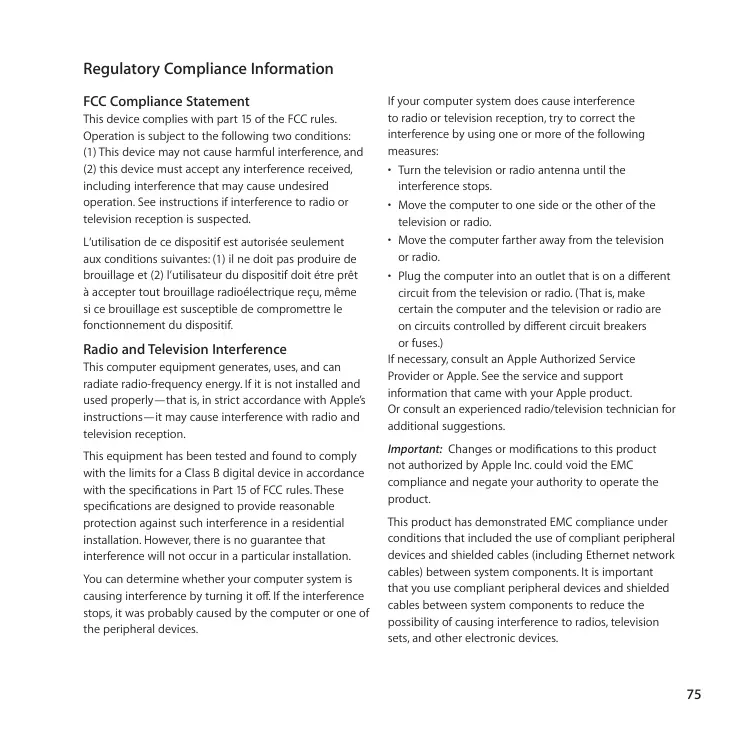

| Product Type | Desktop Server Computer |
| Brand and Model | Apple Mac Mini Server Core i7 2.3 GHz |
| Processor | Intel Core i7 at 2.3 GHz |
| RAM | 2 GB (expandable up to 8 GB) DDR3 1066 MHz |
| Storage | Internal hard drive (no capacity specified in the manual) |
| Network Connectivity | Gigabit Ethernet 10/100/1000 Base-T, Wi-Fi AirPort Extreme, Bluetooth |
| Video Ports | HDMI, Mini DisplayPort |
| USB Ports | 4 high-speed USB 2.0 ports |
| FireWire Port | 1 FireWire 800 port |
| Audio Ports | Optical line/audio input, headphone/optical audio output |
| SD Card Slot | Yes, for SD, SDHC, SDXC cards |
| Infrared Receiver | Built-in, compatible with Apple Remote |
| Operating System | Mac OS X Server |
| Power Supply | 100-240 V AC, 50-60 Hz, power adapter included |
| Dimensions | Approximately 19.7 cm diameter and 3.6 cm height |
| Weight | Approximately 1.37 kg |
| Operating Temperature | 10°C to 35°C |
| Operating Humidity | 5% to 95% non-condensing |
| Maximum Operating Altitude | 3,048 meters |
| Care and Cleaning | Turn off and unplug before cleaning, use a soft, damp, lint-free cloth |
| Safety | Do not block ventilation, avoid moisture, do not open except for memory |
| Spare Parts and Repairability | User-replaceable memory, other repairs by an authorized technician |
| Warranty | 90 days of technical support, 1 year hardware warranty |
| Box Contents | Mac Mini, power cord, HDMI to DVI adapter |
Frequently Asked Questions - MAC MINI SERVER CORE I7 A 2,3 GHZ APPLE
User questions about MAC MINI SERVER CORE I7 A 2,3 GHZ APPLE
0 question about this device. Answer the ones you know or ask your own.
Ask a new question about this device
Download the instructions for your Desktop computer in PDF format for free! Find your manual MAC MINI SERVER CORE I7 A 2,3 GHZ - APPLE and take your electronic device back in hand. On this page are published all the documents necessary for the use of your device. MAC MINI SERVER CORE I7 A 2,3 GHZ by APPLE.
USER MANUAL MAC MINI SERVER CORE I7 A 2,3 GHZ APPLE

Information, Services, and Support
AppleCare Service and Support
www.apple.com/support/contact/phone_contacts.html
Regulatory Compliance Information
FCC Compliance Statement
This device complies with part 15 of the FCC rules.
Operation is subject to the following two conditions:
(1) This device may not cause harmful interference, and (2) this device must accept any interference received, including interference that may cause undesired operation. See instructions if interference to radio or television reception is suspected.
Radio and Television Interference
This computer equipment generates, uses, and can radiate radio-frequency energy. If it is not installed and used properly—that is, in strict accordance with Apple's instructions—it may cause interference with radio and television reception.
This equipment has been tested and found to comply with the limits for a Class B digital device in accordance with the specifications in Part 15 of FCC rules. These specifications are designed to provide reasonable protection against such interference in a residential installation. However, there is no guarantee that interference will not occur in a particular installation.
You can determine whether your computer system is causing interference by turning it off. If the interference stops, it was probably caused by the computer or one of the peripheral devices. If your computer system does cause interference to radio or television reception, try to correct the interference by using one or more of the following measures:
- Turn the television or radio antenna until the interference stops.
- Move the computer to one side or the other of the television or radio.
- Move the computer farther away from the television or radio.
- Plug the computer into an outlet that is on a different circuit from the television or radio. (That is, make certain the computer and the television or radio are on circuits controlled by different circuit breakers or fuses.)
If necessary, consult an Apple Authorized Service Provider or Apple. See the service and support information that came with your Apple product.
Or consult an experienced radio/television technician for additional suggestions.
Important: Changes or modifications to this product not authorized by Apple Inc. could void the EMC compliance and negate your authority to operate the product.
This product has demonstrated EMC compliance under conditions that included the use of compliant peripheral devices and shielded cables (including Ethernet network cables) between system components. It is important that you use compliant peripheral devices and shielded cables between system components to reduce the possibility of causing interference to radios, television sets, and other electronic devices.
Responsible party (contact for FCC matters only):
Apple Inc. Corporate Compliance
1 Infinite Loop, MS 26-A
Cupertino, CA 95014
Location of EMC Number
To view the EMC number for this device, remove the bottom cover and look next to the memory installation illustrations. For help removing the cover, see Chapter 3.
Wireless Radio Use
This device is restricted to indoor use when operating in the 5.15 to 5.25 GHz frequency band.
Exposure to Radio Frequency Energy
The radiated output power of this device is well below the FCC and EU radio frequency exposure limits. However, this device should be operated with a minimum distance of at least 20 cm between its antennas and a person's body, and the antennas used with this transmitter must not be colocated or operated in conjunction with any other antenna or transmitter subject to the conditions of the FCC Grant.
FCC Bluetooth Wireless Compliance
The antenna used with this transmitter must not be colocated or operated in conjunction with any other antenna or transmitter subject to the conditions of the FCC Grant.
Bluetooth Industry Canada Statement
Industry Canada Statement
Complies with the Canadian ICES-003 Class B specifications. This Class B digital apparatus complies with Canadian ICES-003. This device complies with RSS 210 of Industry Canada.
Bluetooth Europe—EU Declaration of Conformity
This wireless device complies with the R&TTE Directive.

Europe—EU Declaration of Conformity
See www.apple.com/euro/compliance.
Russia
ME67
Korea Warning Statements
Singapore Wireless Certification
Complies with
IDA Standards
DB00063
Taiwan Wireless Statements
Warning Statement for Wireless Equipment
Taiwan Class B Statement
Warning Statement for Class B Equipment
NIL
Warning
There is a risk of explosion if the battery is replaced with an incorrect type.
Dispose of used batteries according to the manufacturer's instructions.
VCCI Class B Statement
Voluntary Control Council for Interference by Information Technology Equipment (VCCI)
When connecting your Mac mini to the phone line using an external USB modem, refer to the telecommunications agency information in the documentation that came with your modem.
ENERGY STAR® Compliance
ENERGY STAR
As an ENERGY STAR® partner, Apple has determined that standard configurations of this product meet the ENERGY STAR® guidelines for energy efficiency. The ENERGY STAR® program is a partnership with electronic equipment manufacturers to promote energy-efficient products. Reducing energy consumption of products saves money and helps conserve valuable resources.
This computer is shipped with power management enabled, with the computer set to sleep after 10 minutes of user inactivity. To wake your computer, click the mouse or trackpad button or press any key on the keyboard.
For more information about ENERGY STAR®, visit: www.energystar.gov
Türkiye
Brazil—Disposal Information:

California: The coin cell battery in the optional Apple Remote contains perchlorates. Special handling and disposal may apply. Refer to: www.dtsc.ca.gov/hazardouswaste/perchlorate


- INFORMATION, SERVICES, AND SUPPORT
- APPLECARE SERVICE AND SUPPORT
- REGULATORY COMPLIANCE INFORMATION
- FCC COMPLIANCE STATEMENT
- RADIO AND TELEVISION INTERFERENCE
- LOCATION OF EMC NUMBER
- WIRELESS RADIO USE
- EXPOSURE TO RADIO FREQUENCY ENERGY
- FCC BLUETOOTH WIRELESS COMPLIANCE
- BLUETOOTH INDUSTRY CANADA STATEMENT
- INDUSTRY CANADA STATEMENT
- BLUETOOTH EUROPE—EU DECLARATION OF CONFORMITY
- EUROPE—EU DECLARATION OF CONFORMITY
- RUSSIA
- KOREA WARNING STATEMENTS
- SINGAPORE WIRELESS CERTIFICATION
- TAIWAN WIRELESS STATEMENTS
- WARNING STATEMENT FOR WIRELESS EQUIPMENT
- TAIWAN CLASS B STATEMENT
- VCCI CLASS B STATEMENT
- ENERGY STAR® COMPLIANCE
- TÜRKIYE
- BRAZIL—DISPOSAL INFORMATION
Brand : APPLE
Model : MAC MINI SERVER CORE I7 A 2,3 GHZ
Category : Desktop computer