SSCHD48A2 - Uncategorized Infiniton - Free user manual and instructions
Find the device manual for free SSCHD48A2 Infiniton in PDF.


| Product Type | Chest Freezer |
| Brand | Infiniton |
| Model | SSCHD48A2 |
| Net Capacity | 48 L (approximate) |
| Dimensions (W x D x H) | 55 x 50 x 85 cm |
| Weight | 30 kg |
| Power Supply | 220-240 V, 50 Hz |
| Energy Class | E |
| Climate Class | N-ST |
| Freezing Capacity | 10 kg per 24 h |
| Storage Time | Up to 12 hours |
| Defrost Type | Manual |
| Temperature Control | Mechanical thermostat |
| Interior Light | No |
| Door Lock | Yes |
| Refrigerant | R600a |
| Noise Level | 42 dB |
| Cleaning Instructions | Unplug and clean with soft cloth and mild detergent |
| Replacement Parts | Door seal, basket, thermostat |
| Warranty | 2 years |
Frequently Asked Questions - SSCHD48A2 Infiniton
User questions about SSCHD48A2 Infiniton
0 question about this device. Answer the ones you know or ask your own.
Ask a new question about this device
Download the instructions for your Uncategorized in PDF format for free! Find your manual SSCHD48A2 - Infiniton and take your electronic device back in hand. On this page are published all the documents necessary for the use of your device. SSCHD48A2 by Infiniton.
USER MANUAL SSCHD48A2 Infiniton
natural_image
Illustration of three different air conditioning units with cutaway views, displayed on a patterned surface (no text or symbols visible)SSCHD48A2 ean: 8445639002582
natural_image
Illustration of a worker installing or adjusting an air conditioner on a lift (no text or symbols visible)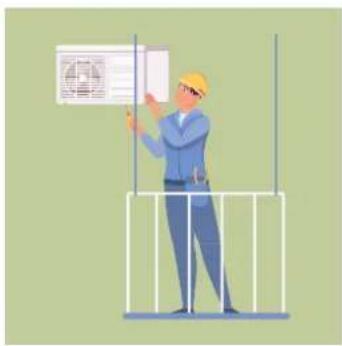
natural_image
Illustration of a worker in a hard hat holding a wall-mounted device (no text or symbols visible)natural_image
Illustration of three workers installing or maintaining a large air conditioner unit, surrounded by greenery and tools (no text or symbols)Índice
Español
natural_image
Symbol of a trash bin with crossed lines indicating no waste or restriction, and a solid rectangle below (no text or labels)natural_image
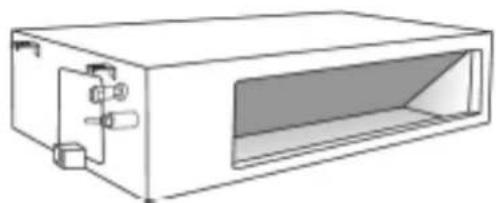
Three technical line drawings of a vacuum air conditioner unit (no text or symbols)Tipo Conductos
natural_image
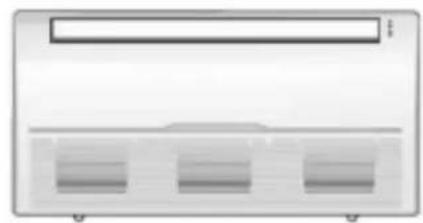
Line drawing of a rectangular electronic device with internal components and a central opening (no text or symbols)Tipo Suelo - Techo
natural_image
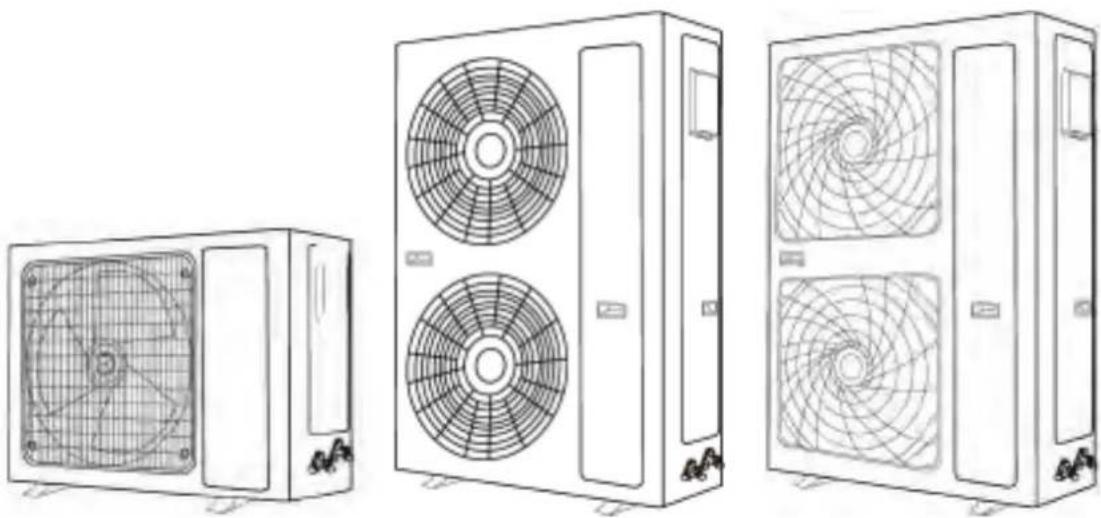
Front view of a server rack unit with three ventilation slots (no text or labels visible)Unidades exteriores
natural_image
Line drawings of three different air conditioning units with fan patterns (no text or symbols)natural_image
Technical line drawing showing two workers assembling a large fan system and a separate air vent assembly (no text or symbols)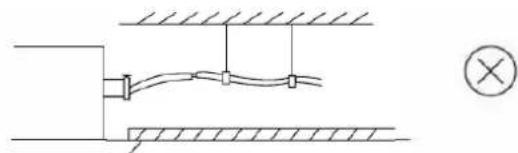
natural_image
Pure electrical circuit lines without any symbolsnatural_image
Two technical line drawings of a device with heat sinks and a handle, shown from different angles (no text or symbols)natural_image
Technical line drawing of a mechanical assembly with no visible text or symbols
natural_image
Technical line drawing of a mechanical assembly with internal components (no text or symbols)natural_image
Technical line drawing of a front-end air conditioner unit with labeled dimensions H and W (no text or symbols beyond labels)| Dimensiones de la unidad exterior en mm. Alto x Ancho x Profundo | Dimensiones de montaje | |
| Distancia A (mm) | Distancia B (mm) | |
| 709(761)x536x280 480 283 | ||
| 730(780)x545x285 540 280 | ||
| 785(845)x550x295 485 280 | ||
| 785(845)x555x300 546 316 | ||
| 800(860)x545x315 545 315 | ||
| 825(880)x655x310 540 335 | ||
| 900(950)x700x350 630 350 | ||
| 970(1045)x803x395 675 410 | ||
| 940(1010)x1325x370 625 364 | ||
| 940(1008)x1366x401 610 388 | ||
natural_image
Mechanical component labeled 'Hebilla' showing a bracket and mounting base (no other text or symbols)natural_image
3D mechanical component diagram showing a bracket with mounting holes and a central hole, labeled with dimension 'h' (no text or symbols beyond the label)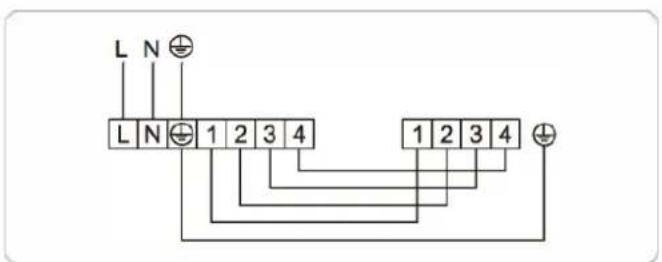
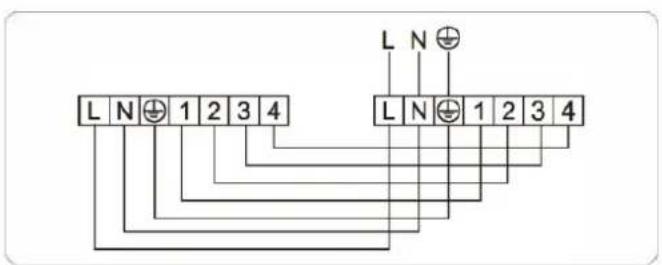
24.000 / 30.000BTU (monofásica)
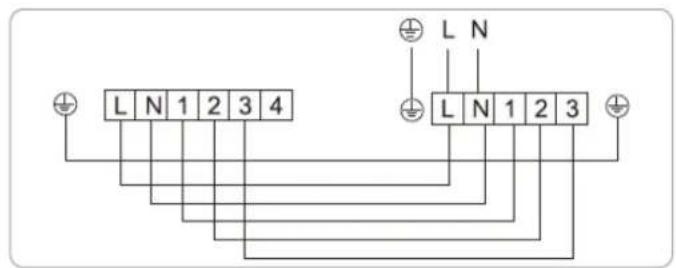
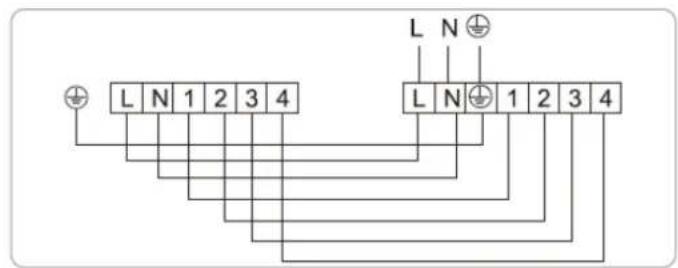
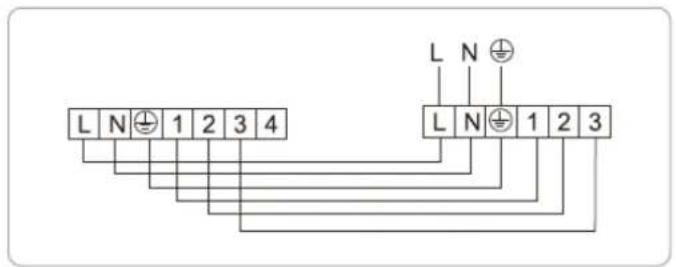
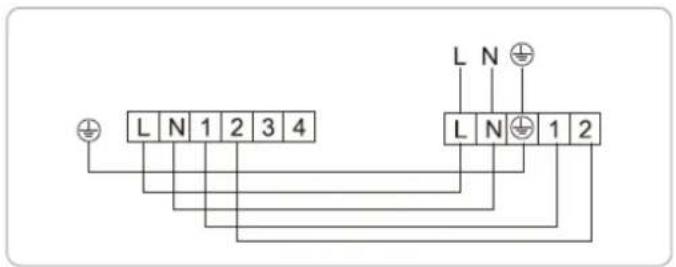
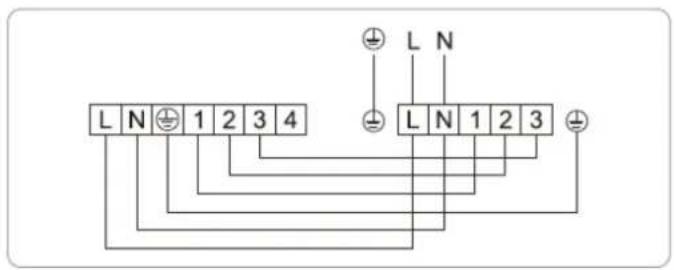
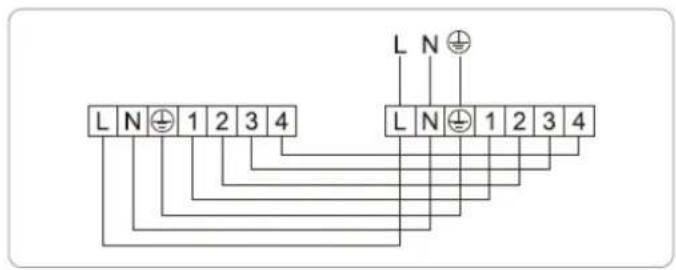
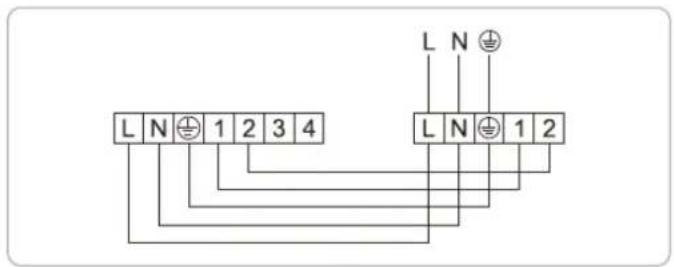
36.000BTU (monofásica)
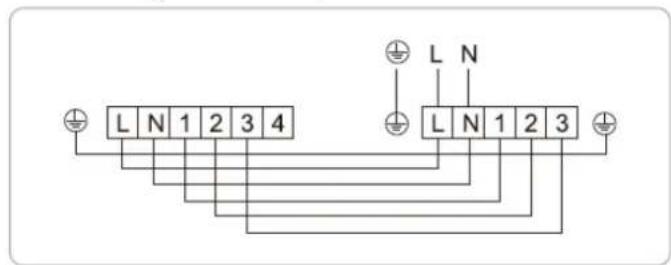
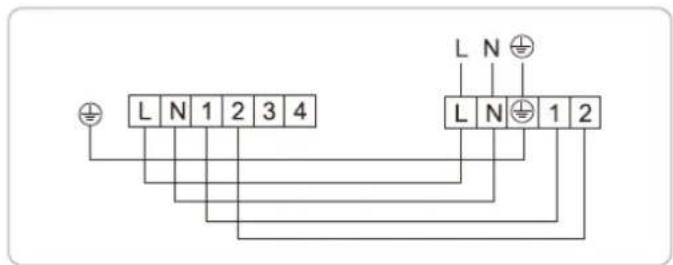
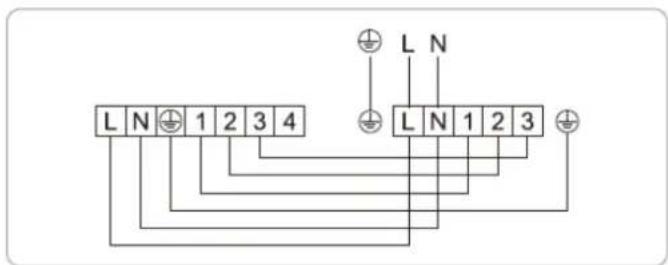
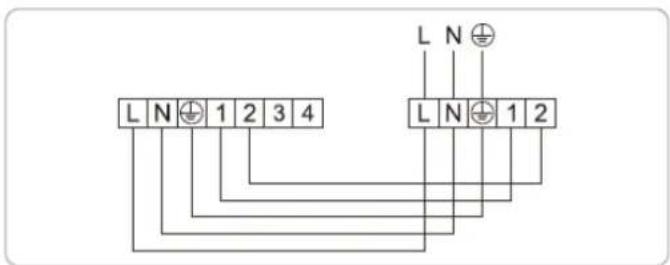
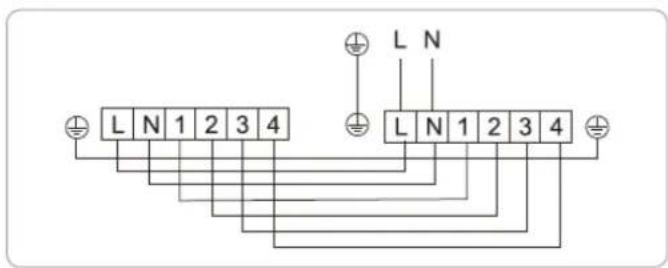
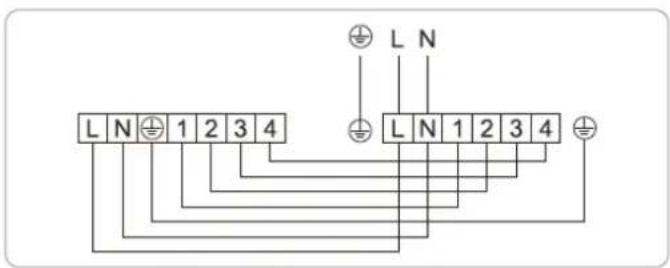
48.000 / 60.000BTU (monofásica)
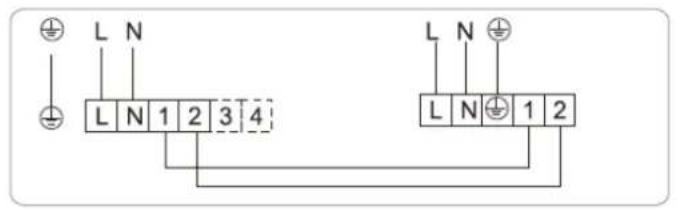
36.000 / 48.000 / 60.000BTU (trifásica)
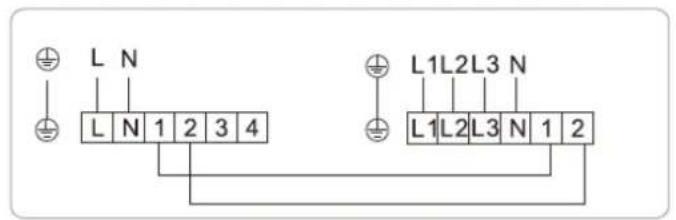
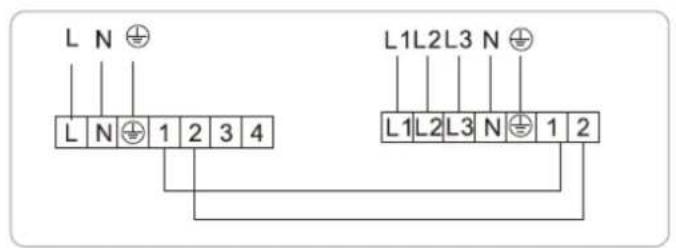
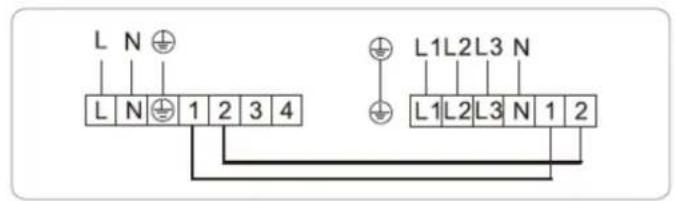
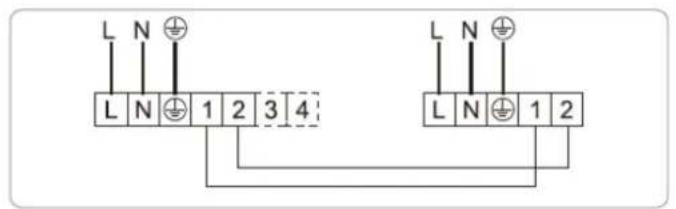
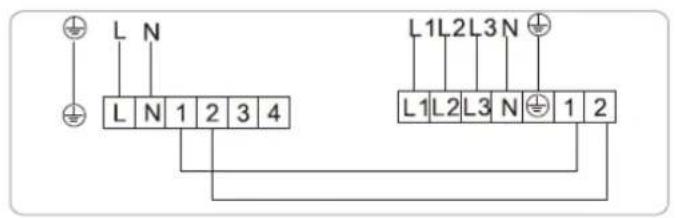
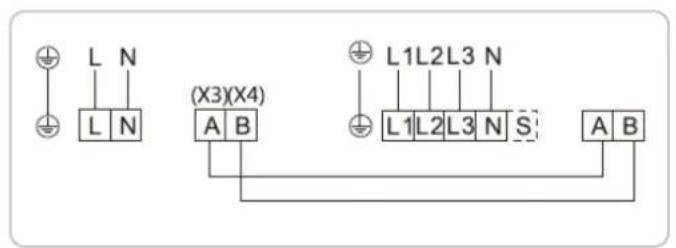
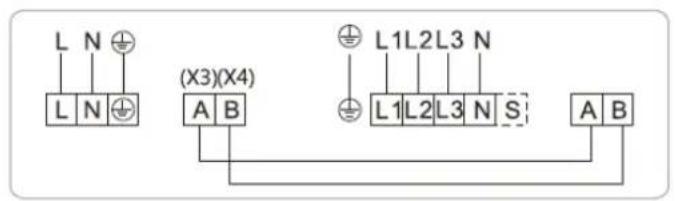
12.000 / 18.000BTU (monofásica)
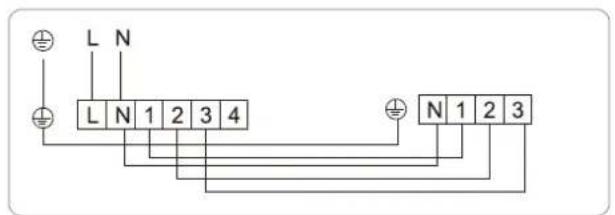
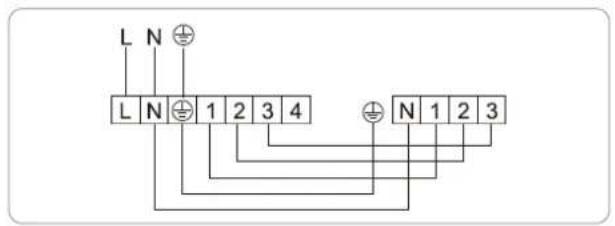
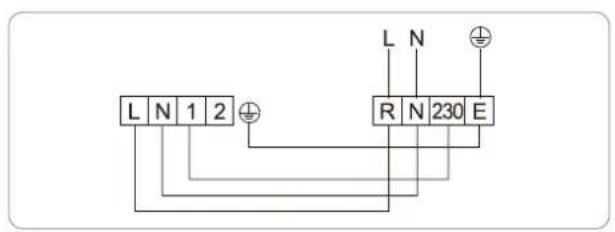
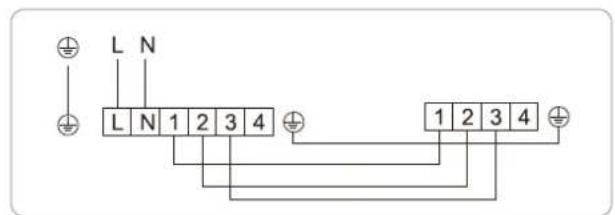
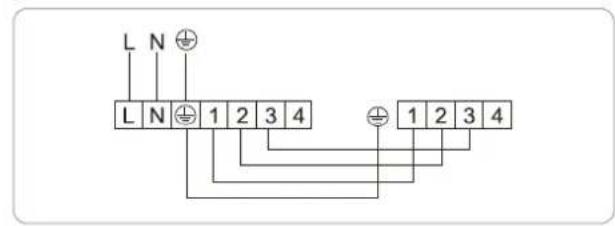
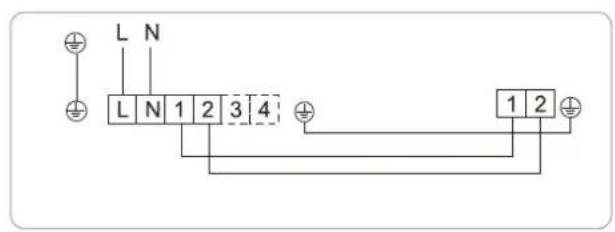
24.000 / 30.000BTU (monofásica)
36.000BTU (monofásica)
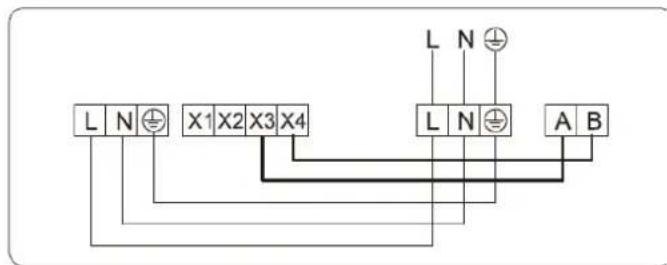
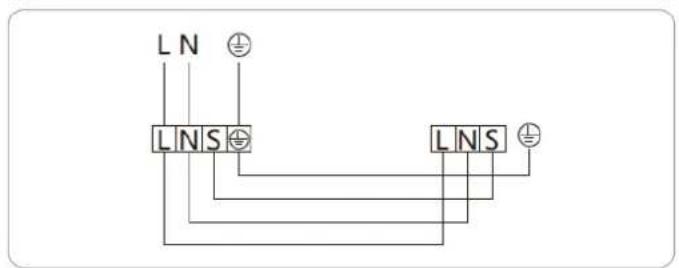
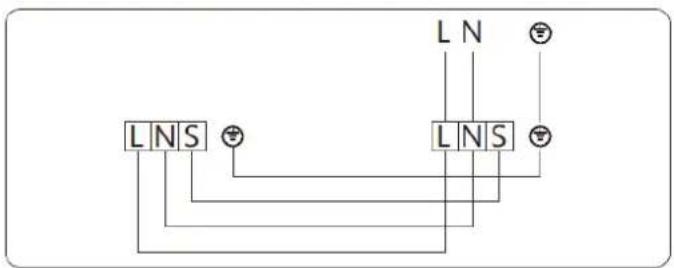
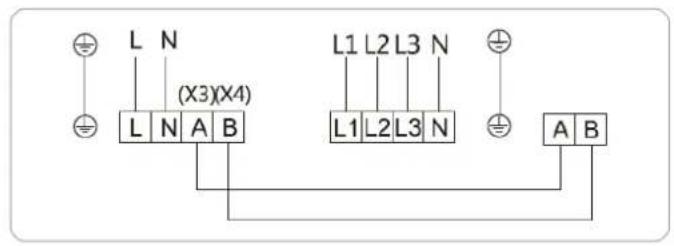
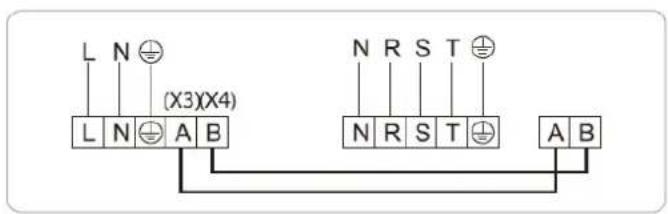
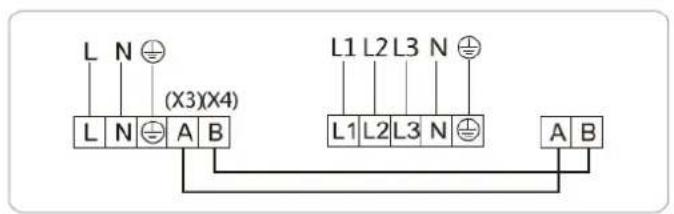
Método de conexión
natural_image
Diagram showing a screwdriver interacting with a device (no text or symbols present)Fig.1
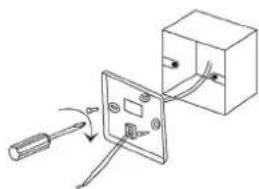
natural_image
Simple line drawing of a cable being inserted into an electrical socket (no text or symbols)Fig.2
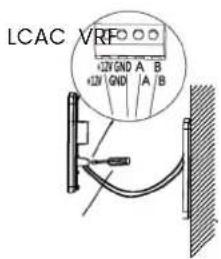
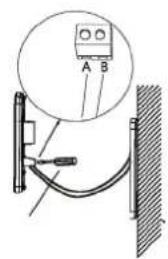
Fig.3
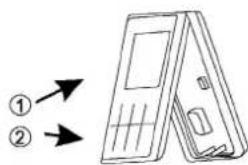
Fig.4
natural_image
Diagram of a hand opening a large panel with a checkered pattern, no text or symbols present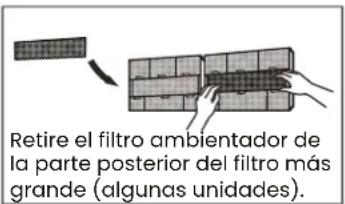
natural_image
Diagram showing a faucet above a grid-patterned rectangular area with a black arrow pointing to it (no text or symbols present)natural_image
Diagram of a 3D grid structure with shaded cells and an angle marker (no text or symbols)
natural_image
Simple line drawing of a house with wavy lines inside, no text or symbols presentnatural_image
Diagram of a device with internal components, no visible text or symbolsAir conditioner DUCTS
Section CONDUCTOS
Before using your new Infiniton product, please read this user manual carefully to learn how to safely and efficiently use the features offered by this device.
Your air conditioning, installed only by professionals
Equipment containing fluorinated gases, such as air conditioners, can only be installed by a professional who is certified to handle this type of gas and who works in an authorised installation company, according to the regulations in force since 2017. In addition, as a buyer, you also have your obligations and possible fines if you fail to comply with them.
natural_image
Illustration of a worker installing or adjusting an air conditioner on a lift (no text or symbols visible)
natural_image
Illustration of a worker in a hard hat installing or adjusting an air conditioner panel on a metal frame (no text or symbols visible)Installation requirements
The sale and handling of equipment containing fluorinated gases that is not hermetically sealed (as is the case of current air conditioning, refrigeration and heat pump systems) is regulated by a 2017 decree (RD 115/2017), which establishes installation requirements and some obligations for the purchaser.
Dual certification for highly polluting appliances
According to the law, this equipment can only be installed by a professional who holds a certificate for handling fluorinated gases and who works in an installation company authorised to install equipment with this type of gas. In other words, a double certification is required:
- As a certified professional for the handling of fluorinated gases.
• As a company authorised for fluorinated gases. - The need to have professionals duly trained and certified in the handling of these systems is mainly due to the fact that they are highly polluting elements.
Infiniton guarantees the professionalism of each and every one of our installers.
The need to have professionals duly trained and certified in the handling of these systems is mainly due to the fact that they are highly polluting elements.
On the website of the Ministry of Industry you can consult the companies that already have F-Gas certification.
The buyer must send the seller, within a maximum period of one year, Annex VI, part B of the 2017 decree (RD 115/2017) signed by him and the installer who has carried out the installation, including the details of the equipment and the certificates of the installer and the authorised company.
natural_image
Illustration of three workers installing or maintaining a large blue air conditioner unit, surrounded by greenery and tools (no text or symbols)| Index | English |
| Safety warnings | 78 |
| Instructions before use | 81 |
| Installation | 88 |
| Operation | 116 |
| Troubleshooting | 132 |
| Cleaning and maintenance | 140 |
An air conditioner is a basic in every home, its features are countless, only that, in addition to those you already know, now also protect your home from viruses, bacteria, smoke and allergens.
What do Infiniton air conditioning filters do to protect you?
Improving the air quality in your home is an obsession for Infiniton's R&D department. Your well-being and that of those around you is important to us. We've created filters that capture smoke, pollen, viruses and bacteria and other allergens and remove them. It's as simple as that, but let us explain the process a little, it's not magic, it's technology!
How it works means that our air conditioning systems are able to neutralise harmful particles to improve the quality of the air you breathe. A process that is carried out by the air conditioner while you watch TV, have dinner or chat with your family. At Infiniton we have declared war against
HUMO

ALÉRGENOS

BACTERIAS
VIRUS

a good night's sleep with sleep mode
During the summer there are nights when it is difficult to fall asleep. Heat, open windows and noise from outside make it more difficult to get a good night's sleep. Infiniton offers you the chance to sleep soundly. The sleep mode is a great invention, through this mode, the air continues to work, but without making any sound during operation. You will no longer have any problems when studying, reading, watching your favourite series or simply enjoying absolute silence. You will also be able to sleep soundly as it offers you the possibility of programming the timer to turn it off when you want. It's that easy!

umidifying action
Excess humidity in the environment can be annoying and harmful to our health, especially for people with asthma or respiratory problems, with the dehumidifier function you won't have to worry about any of this. Create a more comfortable and healthy environment with the Infiniton air conditioner by eliminating dust mites, mould and mildew.
Thorough cleaning with the iClean function
Typically filters are replaced every 18 months to remain effective or at 4000 hours in high pollution sites - that's history! At Infiniton we work with removable air conditioning filters, designed and manufactured to be washable and reusable for life. It's that simple.
Health mode
A smart button that will help you activate the ion function that gives your home a much cleaner and healthier air. It's like having nature in your home. Press the health button and it will fill your home with refreshing ions like those found in parks, forests or waterfalls without leaving your own home. Not all air conditioners are the same, the future is here with Infiniton. We guarantee that the technology we employ will make your home a safe place for your whole family.
WIFI connection
To program your air conditioning to be at the temperature you want before you even get home. You will have the ability to adjust it from a simple app. Your home to your liking.
Your air conditioner according to the size of your room
Depending on the type of house you have and the layout of the house there are several options for air selection. If you do not have a previous installation for the air conditioning ducts in your home, the most recommended solution is to install fixed air conditioners.
When deciding on one model or another, we must know the surface area of the rooms to determine the power of the device and its consumption.
The power of the equipment is determined by the square metres of the room. For example, for a room of 30m2 we will need an appliance of 3000 and 4000 frigories, or 3.48 W/h and 4.65 W/h respectively.
| ROOM TO BE COVERED ( m^2 ) FRIGORIES CALORIES | ||
| Up to 40m^2 | 5.000 Frigorías / h 6.000 kcal/h | |
| Up to 60m^2 | 7.000 Frigorías / h 8.000 kcal/h | |
| Up to 70m^2 | 18.000 Frigorías / h 20.000 kcal/h | |
| Up to 90m^2 | 24.000 Frigorías / h 26.000 kcal/h | |
| Up to 140m^2 | 36.000 Frigorías / h 40.000 kcal/h | |
Which type of air conditioner is most efficient and powerful for your home?
To find out the consumption of the appliance, we will be guided by the energy efficiency label. energy efficiency label:
- Product
- Model
- Energy classification
- Annual energy consumption by geographical area
- Cooling capacity
- SEER:
Seasonal energy efficiency in cooling. This figure compares the energy efficiency of air conditioning systems. The more kilowatts generated per kilowatt consumed, the more efficient an air conditioner is.
When the SEER is greater than 8.5, the air is class A+++ (the most efficient). Conversely, if the SEER is between 3.1 and 3.6, the air is E-class.
-
Heating capacity
-
SCOP:
Seasonal heat energy efficiency. This data compares the energy efficiency between heating systems.
When the SCOP is higher than 5.1, the air is class A+++ (the most efficient). On the other hand, if the SCOP is
On the other hand, if the SCOP is between 2.2 and 2.5, the air is class E.
- Noise level of the indoor and outdoor unit
How do I calculate consumption and power?
We should choose an air conditioner that is efficient because we will consume less energy, save on our electricity bill and take care of the environment.
Consumption can be calculated by dividing the power of the appliance by the SEER code or by the SCOP.
An example for an appliance with a power of 3,500W (3,000 frigories) and a SEER of 5.1:
If we switch on the equipment 4 hours a day during a summer month the cost will be €12.35*, i.e. about €0.10* per hour (*taking the cost per kW/h at €0.15).
3,500 watts/5.1 (SEER)=686 watts/hour.
(0,686kW/h x 0,15€)/1kW = 0,1029€ ; 0,1029€ x 4h x 30days = 12,348€.
To know the power, calculate approximately between 100 and 140 frigories per m2, depending on whether your house is more or less protected from cold and heat.
It also depends on the orientation, North or South, and the number of electronic devices in the room. For example, in a 20 m2 living room facing south, which is located in an area with temperatures that tend to exceed 30°C, you would have to calculate 140 frigories per square metre. The result would be 3250W or 2800 frigories.
Installation
Ensure that the installation of piping is kept to a minimum. The piping should be protected against damage. Refrigerant piping must comply with national gas regulations. Mechanical connections shall be accessible for maintenance. Where mechanical ventilation is required, ventilation openings shall be kept free of obstructions.
obstructions. Where the product is used for disposal, it shall be based on national regulations, processed appropriately. be processed appropriately.
Maintenance
Any person working in or handling a refrigerant circuit shall hold a valid certificate from an industry-accredited assessment authority, authorising his or her competence to handle refrigerants safely in accordance with an industry recognised assessment specification. recognised assessment specification.
Maintenance and repairs requiring the assistance of other qualified personnel shall be carried out under the supervision of a qualified person. be carried out under the supervision of the person competent in the use of flammable refrigerants.
Do not use any means to accelerate the defrosting process or to clean other than those recommended by the manufacturer. recommended by the manufacturer.
The appliance must be stored in a room with no continuously operating sources of ignition (e.g. open flames, open flames, open flames, open flames, open flames, open flames). (e.g. open flames, an operating gas appliance or an operating electric heater). electric heater in operation).
Be very careful that no foreign matter (oil, water, etc.) enters the piping.
In addition, when storing the pipe, securely seal the opening by pinching, taping, etc.
Do not pierce or burn.
Note that refrigerants may be odourless.
All work procedures that affect the safety equipment must only be carried out by competent persons.
The appliance must be stored in a well-ventilated area where the room size corresponds to the specified room area. corresponds to the room area specified for operation. The appliance shall be The appliance shall be stored in such a way that no mechanical damage occurs. The seals shall be tested with a detection equipment with a capacity of 5 g/year refrigerant or higher, with the equipment stopped and running or under at least
operation or under a pressure of at least these shutdown or operating conditions after installation. after installation. Removable gaskets shall NOT be used on the inner side of the unit (a welded gasket could be used).
WARNING! Flammable refrigerant gas RISK OF FIRE HAZARD
PLEASE READ THE MANUAL CAREFULLY BEFORE USING THE PRODUCT.
When a FLAMMABLE REFRIGERANT is used, the appliance installation space requirements and/or ventilation requirements are determined by the amount of mass load(M) used in the appliance, the installation site and the type of site or appliance ventilation..
For models with R32 refrigerant:
The appliance shall be installed, operated and stored in a room With a floor area greater than 4m^2 .
For models with R290 refrigerant, the appliance shall be installed, operated and stored in a room with a floor area greater than 4m^2 :
Units <=9000Btu/h : 13m².
Units >9000Btu/h and <=12000Btu/h: 17m^2 .
Units >12000Btu/h and <=18000Btu/h: 26m² Units >12000Btu/h and <=18000Btu/h:
26m² Units >18000Btu/h and <=18000Btu/h: 26m
Service
Any electrical work required to service the appliance must be carried out by a qualified electrician or competent person.
This product must be serviced by an authorised Service Centre, and only original spare parts must be used.
natural_image
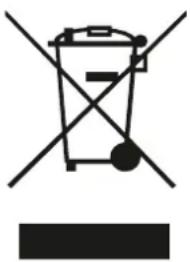
Symbol of a trash bin crossed with a diagonal line and a horizontal bar below (no text or labels)This symbol on the product or on its packaging indicates that this product must not be treated as household waste. Instead, it must be taken to the appropriate collection point for the recycling of electrical and electronic equipment.
By ensuring this product is disposed of correctly, you will help prevent potential negative consequences for the environment and human health, which could otherwise be caused by inappropriate waste handling of this product.
For more detailed information about recycling of this product, please contact your local authorities, your household waste disposal service or the shop where you purchased the product.
Packaging materials
Materials with the symbol container for recycling.

are recyclable. Please dispose of the packaging in a suitable collection
Disposal of the device
Disconnect the plug from the socket.
Cut the power cord and discard it.
Do not disassemble the product other than as described in the user manual. The product must not be disassembled by the user. At the end of its service life, the product must not be disposed of with household waste. Consult your local authorities or your supplier for advice on recycling.
Explanation of the symbols displayed on the indoor unit or outdoor unit
 | WARNING | This symbol indicates that this product uses a flam-mable refrigerant. If the refrigerant leaks and is exposed to an external ignition source, there is a risk of fire. |
 | ATTENTION This symbol indicates that the operating instructions must be read carefully. | |
 | ATTENTION | This symbol indicates that this equipment must be handled by the service technician in accordance with the installation manual. |
 | ATTENTION | This symbol indicates that the service technician must handle this equipment in accordance with the installation manual. |
 | ATTENTION | This symbol indicates that information such as the instruction manual or installation manual is available. |
Important safety instructions for GAS containing devices
Workplace checks.
Before starting work on installations containing flammable refrigerants, safety checks must be carried out to ensure that the risk of fire is minimised. In the case of refrigeration system repair, the following precautions should be taken before carrying out any work on the installation.
Work procedure
Work should be carried out under a controlled procedure to minimise the risk of flammable gases or vapours being present while the work is being carried out.
Work area.
All maintenance personnel and others working in the area must be informed of the nature of the work being carried out. Avoid working in enclosed spaces.
Check for the presence of refrigerant
Before and during work, the area should be checked with a suitable refrigerant detector to ensure that the technician is aware of the existence of potentially toxic or flammable atmospheres. Ensure that the leak detection equipment being used is suitable for use with all applicable refrigerants, i.e. non-sparking, properly sealed or intrinsically safe.
Presence of a fire extinguisher.
If any work is to be carried out on the refrigeration equipment or any part thereof, suitable fire extinguishing equipment must be available. Have a dry powder or CO2 fire extinguisher next to the loading area.
There are no sources of ignition.
No person performing work in connection with a refrigeration system involving exposure of any piping shall use sources of ignition in such a manner as to cause a fire or explosion. All possible sources of ignition, including cigarette smoking, shall be kept sufficiently far away from the installation, repair, removal and disposal site, during which time refrigerant may be released into the surrounding space. Before work is carried out, the area around the equipment must be inspected to ensure that there are no ignition hazards or ignition risks. No smoking" signs shall be posted.
Ventilated area.
Ensure that the area is in the open air or adequately ventilated before accessing the system or performing any hot work. A certain degree of ventilation must be maintained during the work period. Ventilation should safely disperse any refrigerant that is released and preferably expel it outside into the atmosphere.
Checking refrigeration equipment.
When electrical components are replaced, they should be fit for purpose and to the correct specification. The manufacturer's maintenance and service guidelines shall be followed at all times. If in doubt, consult the manufacturer's technical department for assistance. The following controls shall apply to installations using flammable refrigerants.
Checks of electrical devices.
Repair and maintenance of electrical components should include initial safety checks and component inspection procedures. If there is a fault that could compromise safety, no electrical supply should be connected to the circuit until it is satisfactorily resolved. If the fault cannot be corrected immediately, but continued operation is necessary, a suitable temporary solution must be used. This shall be communicated to the owner of the equipment so that all parties are informed.
Initial safety checks shall include:
- that capacitors are discharged: this must be done in a safe manner to avoid the possibility of sparking;
- that no electrical components or wiring are exposed while charging, recovering or purging the system;
- That there is continuity of grounding.
Repair of sealed components.
During repairs to sealed components, all electrical supplies should be disconnected from the equipment being worked on before removing sealed covers, etc. If it is absolutely necessary to have power supply to the equipment during repairs, permanent leak detection must be carried out. This should be done at the most critical point to warn of a potentially dangerous situation.
Particular attention must be paid to the following to ensure that, when working with electrical components, the enclosure is not altered in such a way as to affect the level of protection. For example, damage to cables, excessive number of connections, terminals not made to the original specification, damage to seals, incorrect mounting of bushings, etc.
Ensure that the product is properly assembled.
Ensure that gaskets or sealing materials have not degraded to the point where they are no longer suitable for preventing the ingress of flammable atmospheres. Spare parts must conform to the manufacturer's specifications.
Repair of intrinsically safe components.
Do not apply any permanent inductive or capacitive load to the circuit without ensuring that it will not exceed the permissible voltage and current for the equipment in use.
Intrinsically safe components are the only ones that can be worked on in the presence of a flammable atmosphere. Test apparatus must be in the correct classification.
Replace components only with parts specified by the manufacturer. Other parts may cause ignition of the refrigerant in the atmosphere due to leakage.
Wiring
Check wiring for wear, corrosion, excessive pressure, vibration, sharp edges or any other adverse environmental effects. The check should also take into account the effects of ageing or continuous vibration from sources such as compressors or fans.
Detection of flammable refrigerants.
Under no circumstances should potential ignition sources be used when searching for or detecting refrigerant leaks. A halide torch (or any other detector using an open flame) must not be used.
Extraction and evacuation
When entering the refrigerant circuit for repairs, or for any other purpose, conventional procedures should be used. However, in the case of flammable refrigerants it is important that the procedure is the most appropriate, as combustion is a factor to be taken into account. The following procedure should be followed:
remove the refrigerant
purge the circuit with inert gas
evacuate
purge with inert gas
Open the circuit by cutting or welding
The refrigerant charge shall be recovered in suitable recovery cylinders. For products containing flammable refrigerants, the system must be purged with oxygen-free nitrogen to make the product safe for flammable refrigerants. This process may need to be repeated several times. Compressed air and oxygen should not be used to purge refrigerant systems.
For products containing flammable refrigerants, refrigerant flushing should be performed by breaking the vacuum in the system with oxygen-free nitrogen and continuing to fill until working pressure is reached, then venting to atmosphere and finally lowering to vacuum. This process must be repeated until there is no refrigerant in the system. When the final charge of oxygen-free nitrogen is used, the system must be vented to atmospheric pressure in order to perform the work. This operation is absolutely vital for brazing operations performed on piping.
Make sure that the vacuum pump outlet is not close to any possible source of ignition and that ventilation is available.
Charging procedures
In addition to conventional charging procedures, the following requirements must be followed:
Ensure that you do not contaminate yourself with different refrigerants when using the charging equipment. Hoses or lines should be kept as short as possible to minimise the amount of refrigerant they contain.
Cylinders should be kept in the proper position according to the instructions.
Ensure that the refrigeration system is grounded before charging with refrigerant.
Label the equipment when charging is complete (if not already done).
Great care must be taken not to overcharge the refrigeration system.
Note: Before refilling the system, the system shall be pressure tested with the appropriate purge gas. The system shall be leak tested at the end of charging but before commissioning. A follow-up leak test shall be carried out before leaving the site.
Disassembly
Before carrying out this procedure, it is essential that the technician has a thorough knowledge of the equipment and all its details. It is recommended as good practice that all refrigerants are safely recovered. Before carrying out the task, a sample of oil and refrigerant should be taken in case an analysis is required before reusing the recovered refrigerant. It is essential that electrical power is available before starting the task.
Familiarise yourself with the equipment and its operation.
Electrically isolate the system.
Before attempting the procedure, ensure that technical equipment is available for handling refrigerant cylinders, if necessary;
Pump out the refrigerant system, if possible.
If vacuum is not possible, make a manifold so that refrigerant can be removed from various parts of the system.
Make sure that the cylinder is placed on the scale before recovery.
Start the recovery machine and operate it according to the instructions.
Do not overfill the cylinders (no more than 80% of the liquid charge volume).
Do not exceed the maximum working pressure of the cylinder, even temporarily.
When the cylinders have been correctly filled and the process has been completed, ensure that the cylinders and equipment are removed from the site promptly and that all isolation valves on the equipment are closed.
Recovered refrigerant should not be charged to another refrigeration system unless it has been cleaned and checked.
Labelling
Equipment shall be labelled indicating that it has been decomposed and drained of refrigerant. The label shall be dated and signed. In the case of equipment containing flammable refrigerants, it shall be ensured that there are labels on the equipment indicating that the equipment contains flammable refrigerant.
Recovery
When refrigerant is removed from a system, either for service or for shutdown, it is recommended as good practice that all refrigerants are disposed of safely.
When transferring refrigerant to cylinders, ensure that only suitable refrigerant recovery cylinders are used. Ensure that the correct number of cylinders are available to maintain the total system charge. All cylinders used are designated for the refrigerant recovered and labelled for that refrigerant (i.e. special refrigerant recovery cylinders). Cylinders must be complete with pressure relief valve and associated shut-off valves in good working order. Empty recovery cylinders are evacuated and, if possible, cooled prior to recovery.
Recovery equipment must be in good working order, with a set of equipment instructions at hand, and must be suitable for the recovery of all appropriate refrigerants, including, where appropriate, flammable refrigerants. In addition, a set of calibrated scales in good working order shall be available. Hoses shall be complete with disconnect couplings free of leaks and in good condition. Before using the recovery machine, check that it is in good working order, that it has been properly maintained and that all associated electrical components are sealed to prevent ignition in the event of refrigerant discharge.
Consult the manufacturer if in doubt. Recovered refrigerant shall be returned to the refrigerant supplier at the correct recovery site.
! BEFORE CARRYING OUT ANY ELECTRICAL WORK, READ THESE REGULATIONS
-
All wiring must comply with local and national electrical codes and regulations and must be installed by a licensed electrician.
-
All electrical connections must be made in accordance with the wiring diagram found on the indoor and outdoor unit panels.
-
If there is a serious safety problem with the power supply, stop work immediately. Explain your reasoning to the customer and refuse to install the unit until the safety problem is properly resolved.
-
The power supply voltage must be within 90-110% of the rated voltage. Insufficient power supply may cause malfunction, electric shock or fire.
-
If connecting the power supply to fixed wiring, a surge protector and main power switch must be installed.
-
If power is connected to fixed wiring, a switch or circuit breaker that disconnects all poles and has a contact separation of at least 1/8 inch (3 mm) must be incorporated in the fixed wiring. The qualified technician must use an approved circuit breaker or switch.
-
Connect the unit only to an individual branch circuit outlet. Do not connect another appliance to that outlet.
-
Be sure to ground the air conditioner properly.
-
All wiring must be securely connected. Loose wiring may cause the terminal to overheat, resulting in product malfunction and possible fire.
-
Do not allow the wires to touch or rest against the refrigerant pipe, compressor or any moving parts inside the unit.
-
If the unit has an auxiliary electric heater, it must be installed at least 1 metre away from any combustible material.
-
To avoid receiving an electric shock, never touch electrical components shortly after the power supply has been cut off. After disconnecting the power, always wait 10 minutes or more before touching electrical components.

WARNING!
Before carrying out any electrical or wiring work, disconnect the main power supply to the system.
Step 6: Connecting the signal and power cables
The signal cable enables communication between the indoor and outdoor unit. You must first choose the appropriate wire gauge before preparing it for connection.
Cable types:
- Indoor power cable (if applicable): H05VVV-F
Indoor power cable (if applicable): H05VVV-F or H05V2V2-F
- Outdoor power cable:
H07RN-F
- Signal cable: H07RN-F
Choose the appropriate wire gauge.
The required gauge of power wire, signal wire, fuse, and switch is determined by the maximum current rating of the unit. The maximum current is indicated on the nameplate located on the side panel of the unit. Refer to this nameplate to select the appropriate wire, fuse, or circuit breaker.
Indoor and external units
Note: Installation must be in accordance with the requirements of local and national standards. Installation may be slightly different in different areas.
Indoor units
Cassette
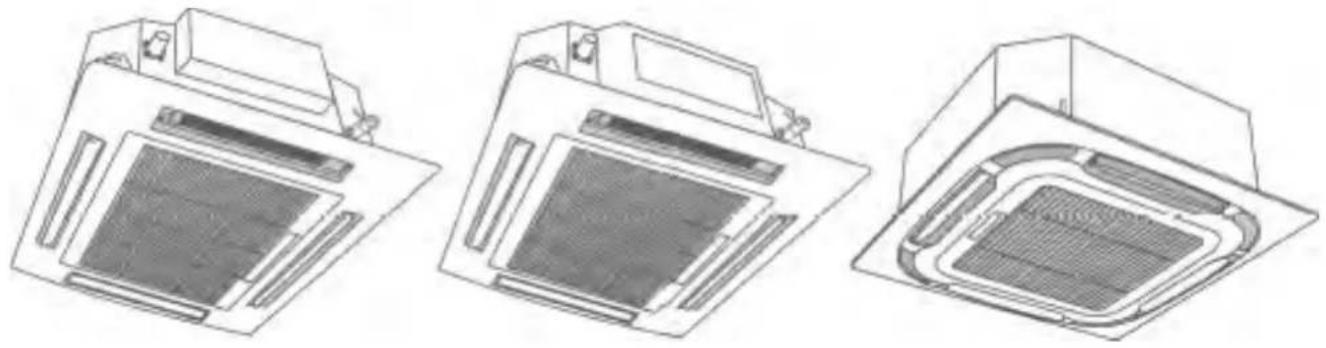
natural_image
Three technical line drawings of a vacuum air conditioner unit (no text or symbols visible)Conducts
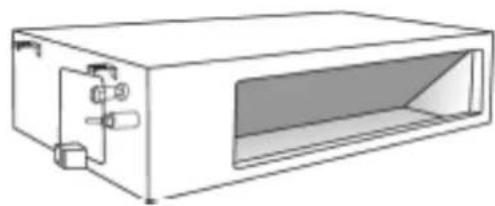
natural_image
Line drawing of a rectangular electronic device with internal components and a recessed opening (no text or symbols)Ceiling - floor
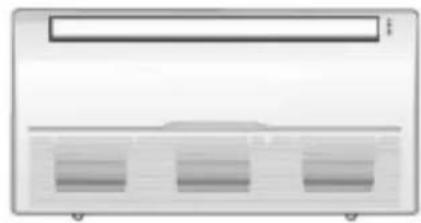
natural_image
Front view of a server rack unit with three ventilation slots (no text or labels visible)External units
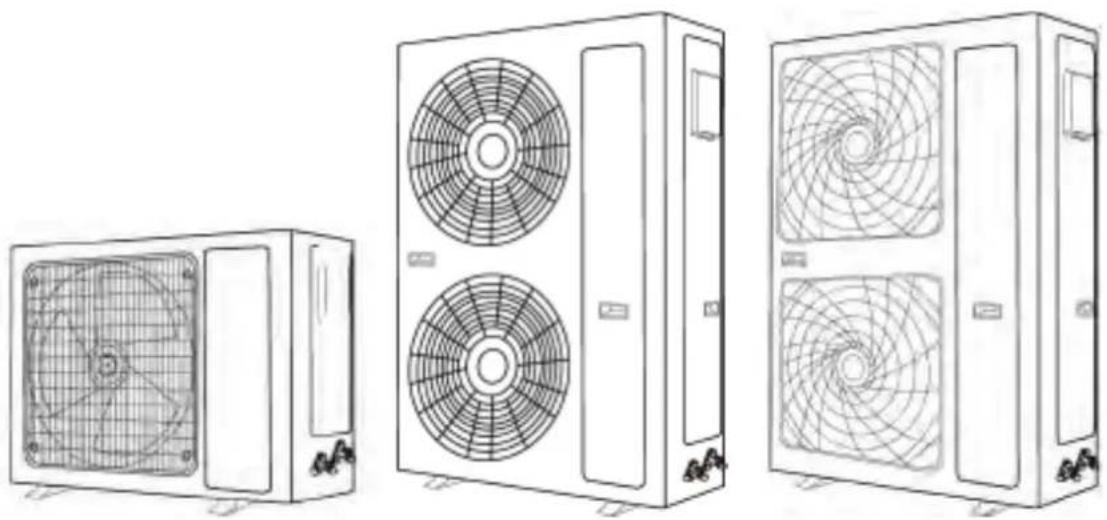
natural_image
Line drawings of three different air conditioning units with fan blades and ventilation patterns (no text or symbols)The illustrations in this manual are for explanatory purposes. The actual shape of your indoor unit may be slightly different. Be guided by the actual shape.
Right installation
Important notes:
- When unpacking, open the carton, remove the packing foam first, and then take out the air conditioner.
- Do not touch the heat exchanger panel at the back of the indoor unit with your hands or any other objects.
- Handle the unit with the handle and side angle, please handle it with care. Do not drop the unit or allow it to fall during transportation.
- When lifting the outdoor unit, please use two straps longer than 8m and insert cushioning material between the straps and the outdoor unit to avoid damaging the casing.
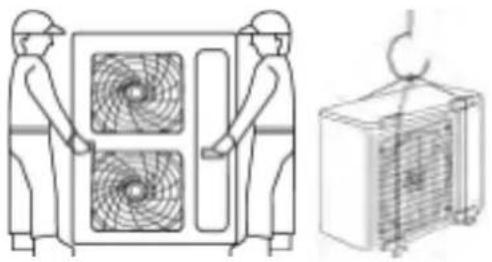
natural_image
Technical line drawing showing two workers operating a large fan system and a separate air conditioner unit (no text or symbols)| Preparing accessories for installation Installation tools | |
| Prior to installation, the following items are not included with the unit, but will be required for installation and should be obtained locally.- Four M12 suspension screws- PVC drain pipe- Connection pipe- Thermal insulation materials (PE, thickness greater than 8 mm) used for the connecting pipe.- Five large and five small connecting tapes- Outdoor power cable and indoor and outdoor connecting cable | In addition to the common tools, the following tools will be required during pipe connection:- Socket spanner (42 N-m, 65 N-m, 100 N-m).- Pipe cutter (for cutting copper pipes)- Coolant cylinder (when extending the pipe, the coolant has to be added)- Nitrogen cylinder (to prevent oxidation and clean the pipe when soldering)- Pressure gauge- Pipe clamp- Welding torch |
Installation drawings
The following installation diagrams are for reference only.
Power supply: single-phase 220-240V,50Hz/60Hz; three-phase 380-415V,3N-,50Hz/60Hz.
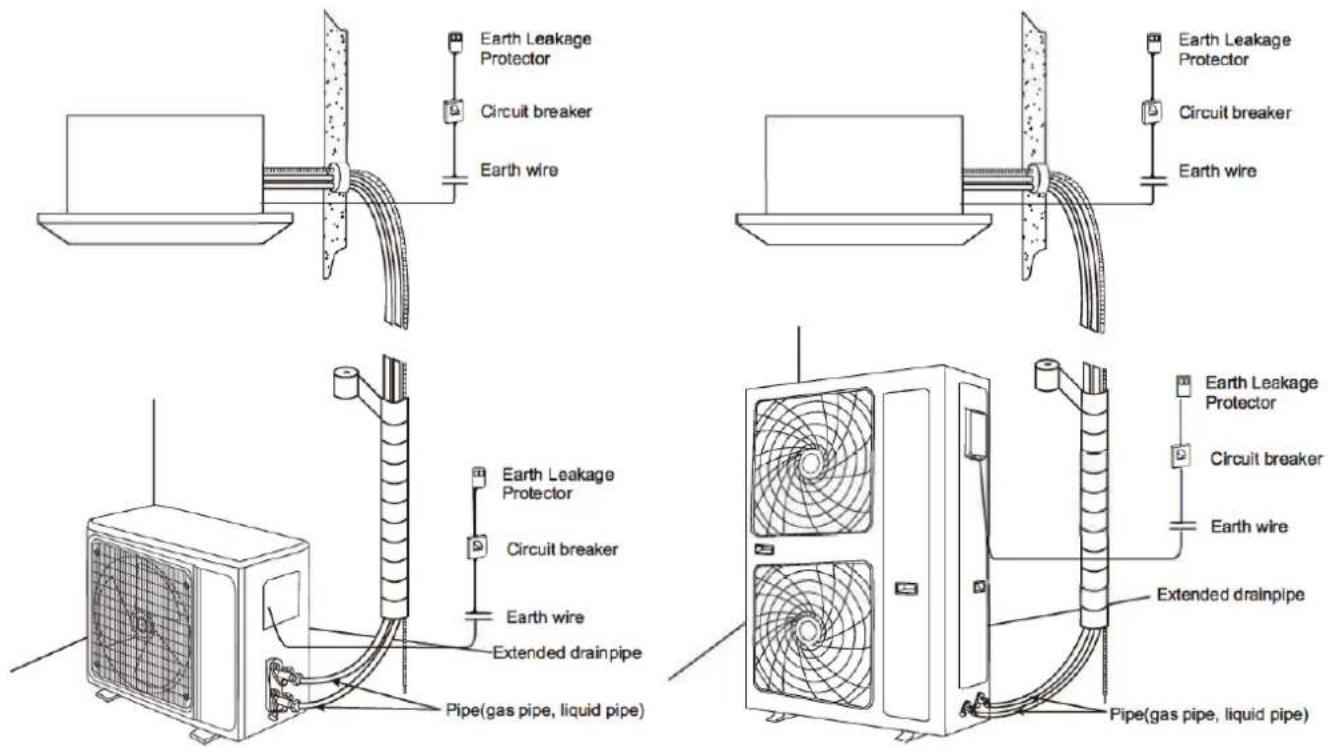
To facilitate maintenance, reserve a place for servicing.
Ensure that the following conditions are met and confirm the position with the customer.
- The position must be such that the air is not obstructed.
- The distance to the wall and obstacles is shown in the drawing below.
- The installation location must be suitable for water drainage (see drain pipe installation for details).
- For the indoor unit with duct, the hanging place should be able to support 4 times the weight of the indoor unit.
There should be no increase in noise and vibration. If it needs to be reinforced, the installation should be carried out after reinforcement (if the reinforcement is poor, the indoor unit will fall down and cause damage).
-
The indoor unit should be away from sources of heat or steam and away from inlets.
-
The position of the indoor unit should be close to the power supply (special line).
-
The position of the indoor unit should allow for easy connection to the outdoor unit.
-
The position of the indoor unit should be kept away from direct sunlight and humidity.
-
The height inside the roof must reach the drainage requirements to ensure the installation of the indoor unit.
-
The unit cannot be installed in the laundry room (it will cause electric shock).
-
Protective barriers should be installed at the inlet and outlet of the indoor unit to prevent any fingers from entering or coming into contact with the high speed fan and the metal fin.
Issues Requiring Attention
The following places should be thoroughly inspected before installation
- In restaurants, kitchens and other eating places, dust, flour, grease, steam and other kitchen products easily adhere to the fan.
kitchen products easily adhere to the indoor fan, heat exchanger and drain pump. This will reduce performance and cause the unit to spray water, leak and may cause the drain pump or other components to fail. Consider the following improvement measures.
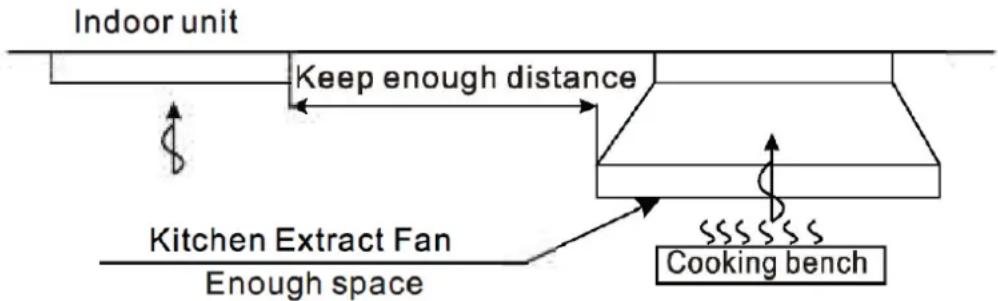
The extraction capacity of the kitchen fan and cooker hood must be large enough to ensure that the oil sufficiently large to ensure that oil, steam, flour and other cooking products are expelled through them and not drawn into the conditioned air. The indoor unit must be far enough away from cooking and food preparation equipment to ensure that cooking products are not drawn into the air conditioning.
The indoor unit must be far enough away from cooking and food preparation equipment to ensure that cooking products are not drawn into the unit.
-
When installing the unit in a factory, make sure that it is located in a place where it will not be contaminated by oil, dust, iron debris or sawdust.
-
Do not install near potential sources of combustible gas.
-
Do not install in locations where corrosive gases and acids are present.
Installation of the CONDUIT type indoor air unit Location of the lifting screw
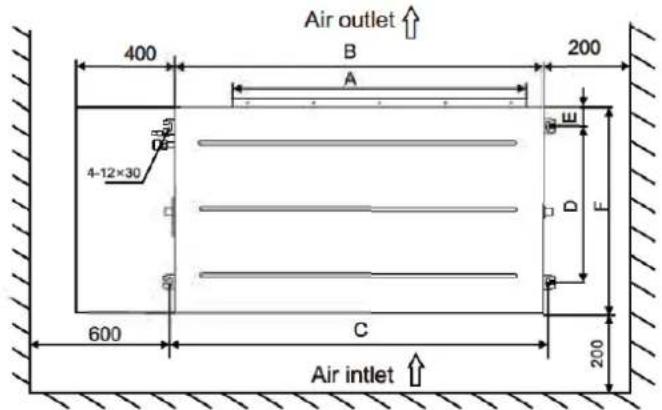
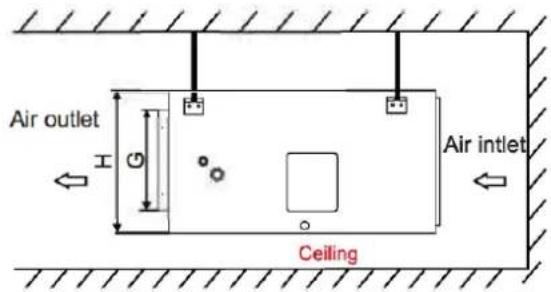
| Packing Size (cm) | A B mm | mm | e mm | D mm | E mm | F mm | G m m | H mm |
| 107*80*36 | 652 | 890 | 927 | 510 | 75 | 700 | 202 | 290 |
| 143*80*36 | 967 | 1250 | 1287 | 510 | 75 | 700 | 185 | 290 |
| 143*80*39 | 967 | 1250 | 1287 | 510 | 75 | 700 | 214 | 320 |
| 158*88*45 | 1117 | 1400 | 1437 | 585 | 75 | 775 | 273 | 380 |
| 93*83*30 | 512 | 700 | 739 | 600 | 52 | 700 | 177 | 245 |
| 123*83*30 | 812 | 1000 | 1039 | 600 | 52 | 700 | 177 | 245 |
| 163*83*30 | 1212 | 1400 | 1439 | 600 | 52 | 700 | 177 | 245 |
| 100.5*58*27.5 | 532 | 700 | 750 | 412 | 23 | 460 | 110 | 200 |
| 130.5*58*27.5 | 832 | 1000 | 1050 | 412 | 23 | 460 | 110 | 200 |
Suspension diagram of the indoor unit
• The screws and nuts must be tightened firmly. If they loosen, the air conditioner may fall off, etc.
- As shown, the indoor unit should be tilted toward the drain hole to facilitate drainage.
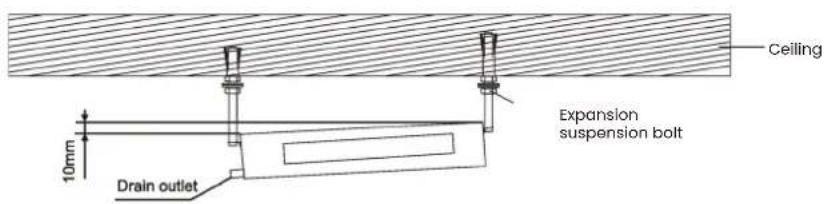
Installation of the assembly
There are two different methods of installing the duct. They are shown below.
Use tarpaulins to connect the indoor unit and the duct to reduce unnecessary vibrations
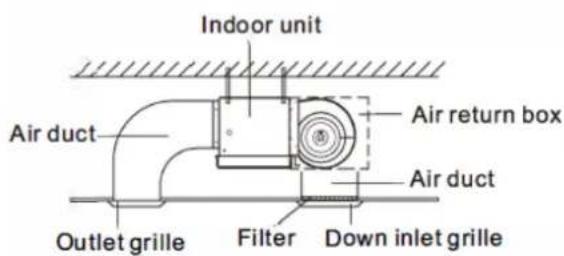
A
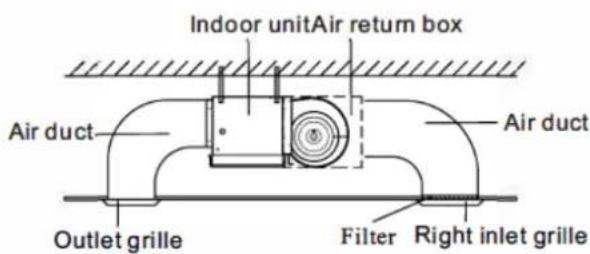
B
Installation of drain pipes
- Drainage pipes must have good insulation measures. Specific measures are as follows
a: Drainage pipes must be securely fastened with the inner water outlet and drain pipe respectively and secured with a washer, as shown in Fig. 1.
b: Wrap the thermal insulation cotton in the drain insulation tube and washer, as shown in Fig. 2.
c: Tighten the sponge with a bandage, as shown in Fig 3-.
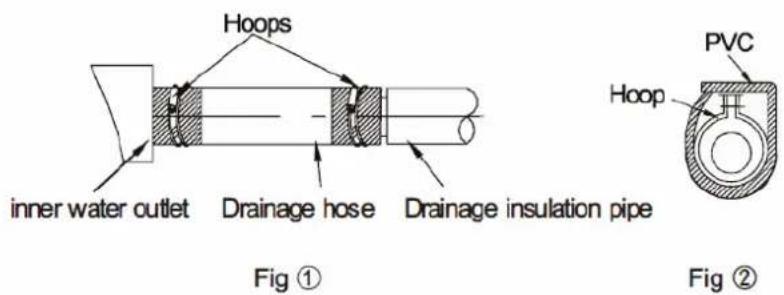
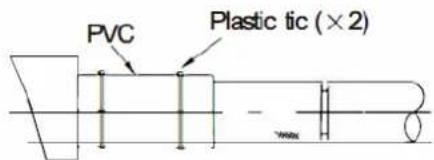
Fig ③
- The drain pipe should have a downward slope (1/50\~1/100).
If the drain pipe is installed up and down or upwards, it will result in water backflow or leakage, etc. - During pipe connection, do not apply too much force to the drainage joint of the indoor unit.
- There is a drain hole on each side of the indoor unit; the unused drain pipe should be closed. be closed.
Note: The drain pipe must be wrapped in thermal insulation material, otherwise it will cause condensation or water droplets.
Thermal insulation material: rubber insulation tube thicker than 8mm.
Installation of the CASSETTE type air indoor unit Select a suitable place for installation.
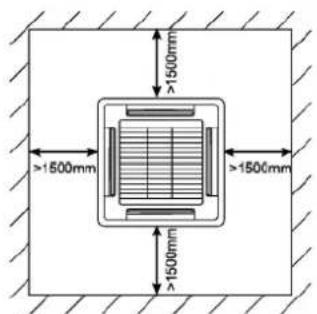
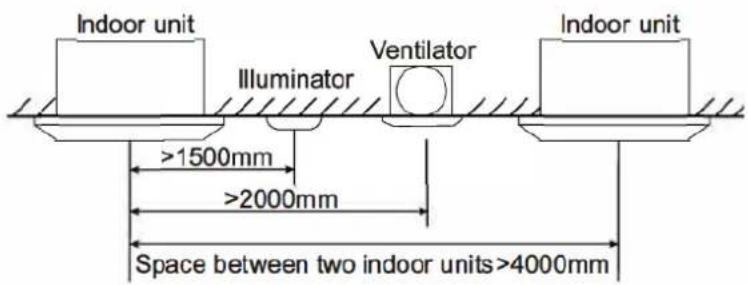
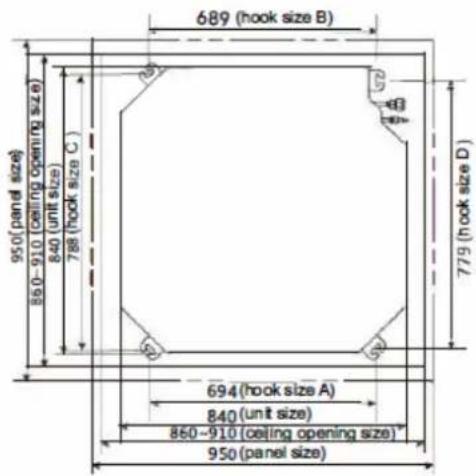
Indoor unit dimensions
The ceiling cassette split air conditioner unit has four kinds of shapes, Fig. A, Fig. B, Fig. C and Fig. D. Please choose the size according to the shape. The actual shape will prevail.
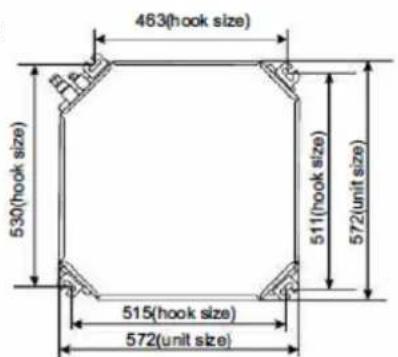
Fig A
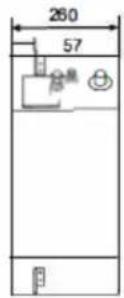
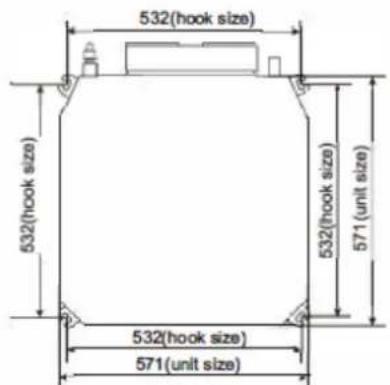
Fig C
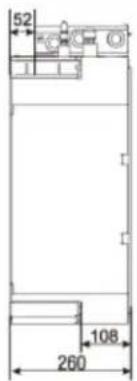
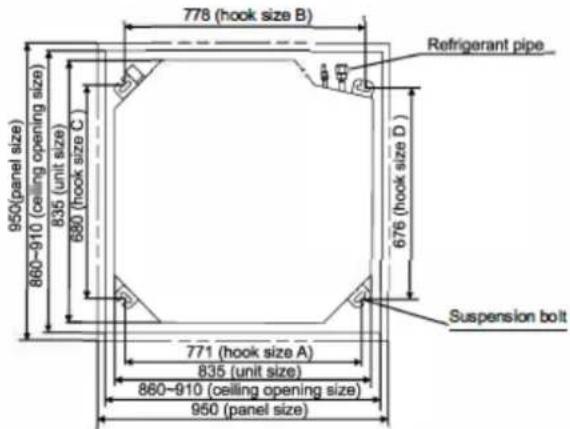
Fig B
Suspension base of the indoor unit
- Selecting the suspension base
The suspension base is a wooden or reinforced concrete frame structure. It must be rm and reliable to support the weight of more than 200 kg and able to withstand vibrations for long periods.
- Attaching the suspension base
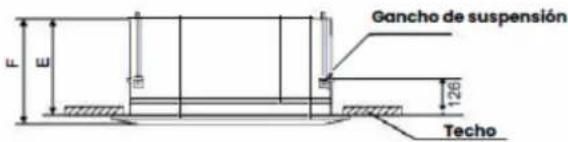
Fix the suspension bolts as shown on the right, either by means of a strut or a wooden bracket. If this unit is installed on a sloped ceiling, a damper block must be installed between the ceiling and the air outlet panel to ensure that the unit is installed on a level surface. Installation is carried out as shown in the drawing below.
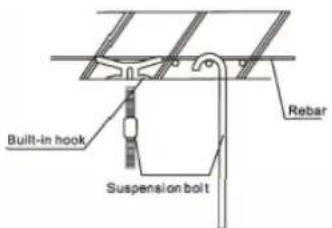
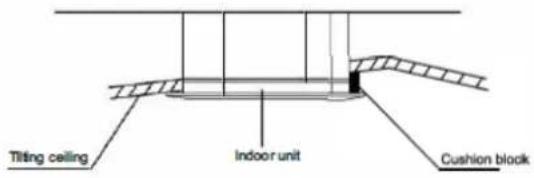
Suspension of the indoor unit
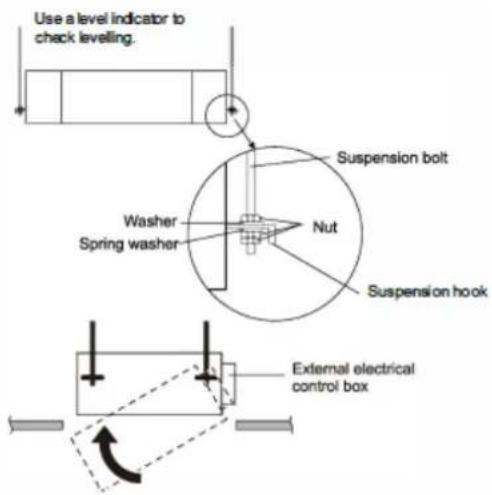
- Adjust the relative position of the suspension hook on the suspension screw. suspension screw.
- Tighten the screw and make sure that the four hooks 2. Tighten the bolt and make sure that the four hooks are in perfect contact with the nuts and washers, and that the unit is firmly and reliably suspended on the hooks.
- Make sure that it is securely fastened and that it does not shake or sway once the unit is installed.
- Make sure that the centre of the indoor unit is aligned with the centre of the ceiling opening.
- The installation of the cassette unit with the external electrical control panel is referred to the following figure. The installation of the cassette unit with the external electrical control panel is referred to the figure below:
Installation of the drain pipe
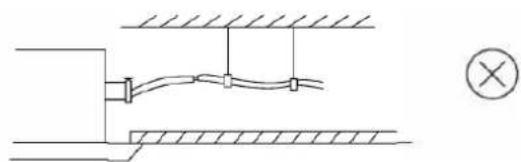
- The drain pipe must be properly insulated to prevent the formation of condensation. It must be installed with a downward slope.
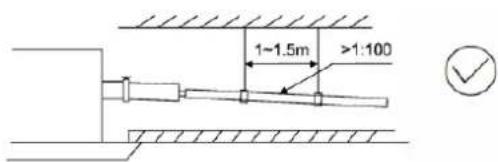
natural_image
Pure electrical circuit lines without any symbolsTo ensure that the water drains properly, the unit must be horizontal or inclined towards the drain pipe when installation is complete.
- The unit has a drain pump that will lift up to 1200mm. However, after the pump stops, the water still in the pipe will drain again and may overflow the drain pan causing a protective shutdown. For this reason, install the drain pipe as shown below:
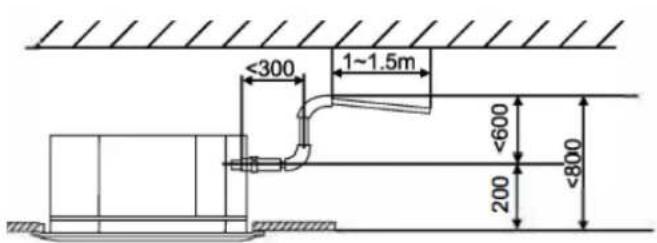
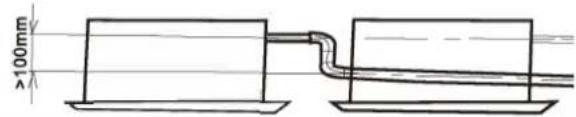
- When several units are drained on a common drain line, the drain line should be installed about 100 mm below the drain outlet of each unit, as shown in the drawing:
Installation of the grille
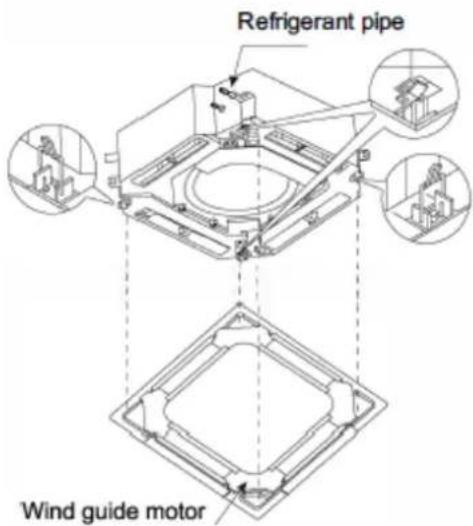
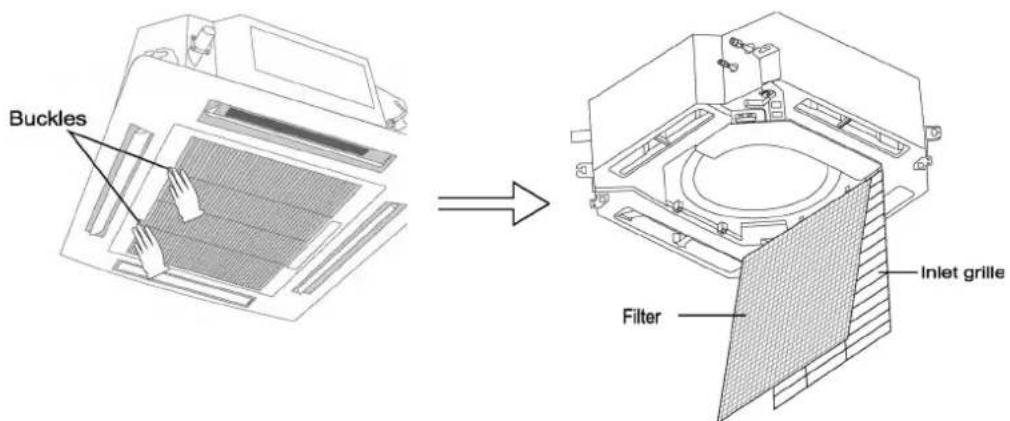
The grille has four clips that attach to the corresponding hooks on the unit. The grille is then secured in position by four screws which are accessed through the four grille side panels. The four connecting screws are located on the inside of the grille inlet panel.
Note: During installation, make sure that the air flap motor of the grille corresponds to the position of the refrigerant pipe inlet on the indoor unit.
Installation of the grille
The grille has four clips that attach to the corresponding hooks on the unit. The grille is then fixed into position by four screws which are accessed through the four grille side panels. The four connecting screws are located on the inside of the grille inlet panel.
Note: During installation, make sure that the air flap motor of the grille corresponds to the position of the refrigerant pipe inlet on the indoor unit.
Installation of the FLOOR-TECHO type air indoor unit Before starting the installation, check the following table.
| Check list Check | |
| Have you carried out a site survey (if necessary)? | |
| Are the control box cover, air filter and suction grille fixed? | |
| Does cold air discharge from the unit during cooling and warm air discharge from the unit during heating? | |
| Have you explained the operation of the air conditioner to the customer by showing the instruction manual? | |
| Have you explained the cooling, heating, dehumidifying and automatic (cooling/heating) function in the instruction manual to the customer? | |
| If you have set the fan speed with the thermostat off, have you explained the set fan speed to the customer? | |
| Did you provide the customer with the operation manual and installation manual? |
In addition to general use, since the points in the instruction manual with the WARNING and CAUTION markings can cause bodily injury and property damage, it is necessary not only to explain these points to the customer but also to have the customer read them. It is also necessary to explain the points of "NO AIR CONDITIONER MALFUNCTION" to the customer and make the customer read them carefully. Select the place of installation
When unpacking and moving the indoor unit after unpacking, do not apply force on the piping (refrigerant and drain).
- Select the installation site that meets the following conditions and obtain the customer's approval.
- Where the hot and cold air is evenly distributed in the room.
- Where there are no obstructions to the air flow.
- Where drainage can be guaranteed.
- Where the lower surface of the ceiling is not inclined.
- Where there is sufficient strength to support the mass of the indoor unit.
- Where sufficient space for installation and maintenance can be guaranteed.
- Where the length of piping between the indoor and outdoor units is within the allowable length (Refer to the installation manual attached to the outdoor unit).
- Where there is no risk of flammable gas leakage.
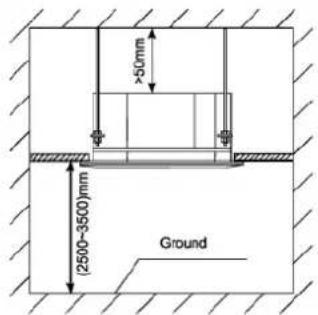
Installation space required (mm)
| hoisting | 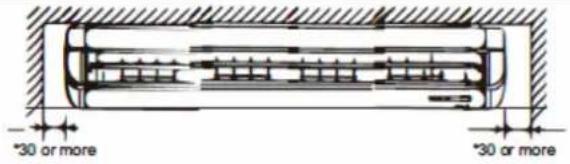 | 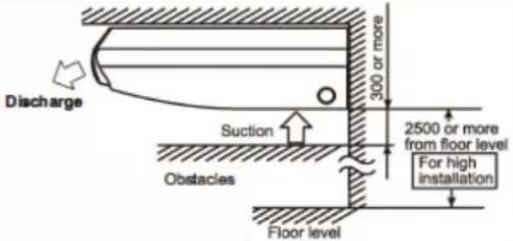 |
| seat loading | 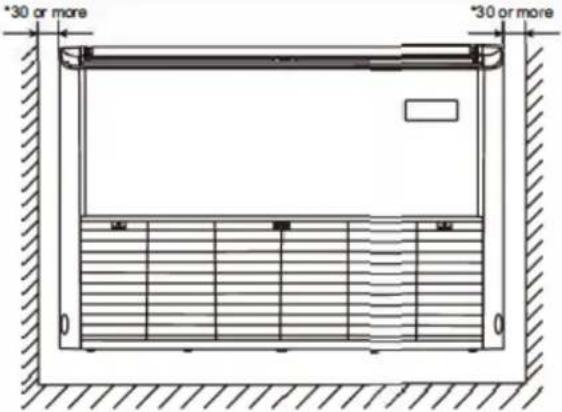 | 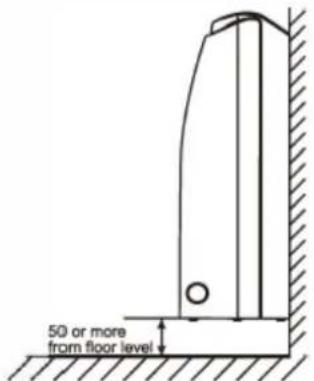 |
NOTE:
Install the indoor and outdoor units at least 1m away from televisions or radios to avoid image interference and noise.
If 200mm or more is guaranteed, it is properly installed. Install the indoor and outdoor units, power wiring, remote controller wiring and signal wiring at least 1m away from TVs or radios to avoid picture interference or noise (Depending on radio waves, a distance of 1m may not be sufficient to eliminate noise).
- Use suspension screws for installation
Investigate whether the installation site can support the mass of the indoor unit, and if necessary, hang the indoor unit with screws after it is reinforced by beams, etc. (Refer to the installation pattern paper for the mounting step).
- Ceiling height
This indoor unit can be installed up to 4.3m for packing size (1675*770*320mm) and up to 3.5m for others.
Please do not pull out the product and the horizontal flap of the air outlet and air inlet.
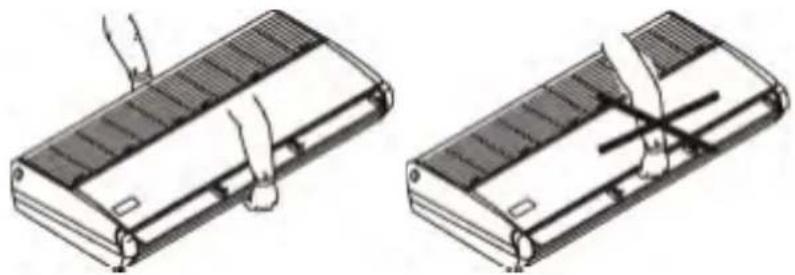
natural_image
Two technical line drawings of a device with heat sinks and a slide, showing hand positioning and assembly (no text or symbols)Do not lift the product or pull it by its cover (right and left). When the cover is bent, it may cause noise.
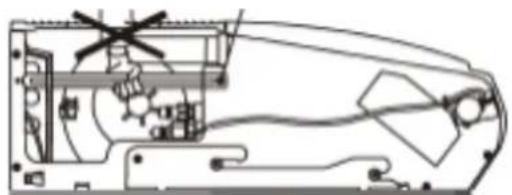
natural_image
Technical line drawing of a mechanical assembly with no visible text or symbols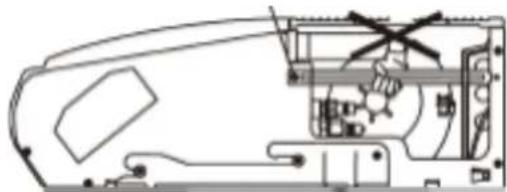
natural_image
Technical line drawing of a mechanical assembly with no visible text or symbols- Prepare before installation or the locations of the indoor unit's suspension screws, pipe outlet holes, drain pipe outlet hole and electrical wiring inlet hole.
electrical wiring entry hole.
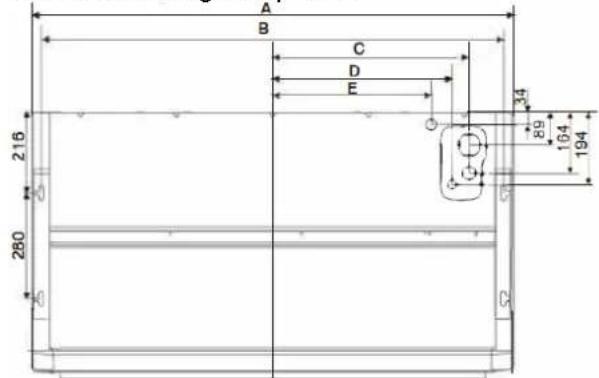
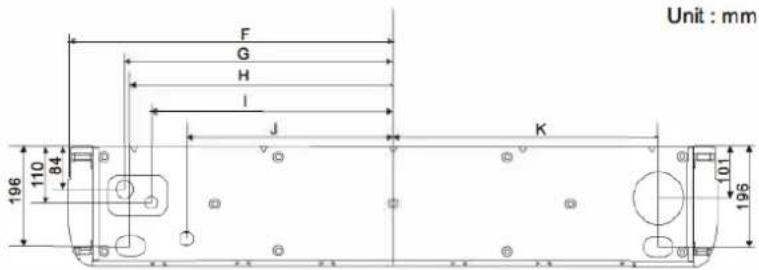
| Packing Size (mm) | A | B | C | D | E | F | G | H | I | J | k |
| 1080*770*325 | 1000 | 948 | 382 | 337 | 282 | 500 | 390 | 378 | 336 | 267 | 382 |
| 1360*770*325 | 1280 | 1228 | 522 | 477 | 422 | 640 | 530 | 518 | 476 | 407 | 522 |
| 1680*770*325 | 1600 | 1548 | 777 | 732 | 692 | 800 | 690 | 678 | 635 | 567 | 682 |
1. Removing parts of the indoor unit
- Slide back the handles of the suction grille (as indicated by the arrow) to open it wide.
- Holding the suction grille open, grasp the handle on the back of the suction grille and, at the same time, pull it
the back of the suction grille and, at the same time, pull it forward to remove it.
- After removing the grille, screw the bottom cover screws as shown.
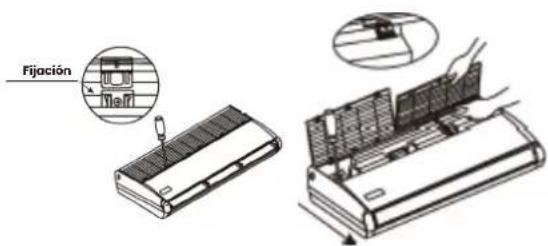
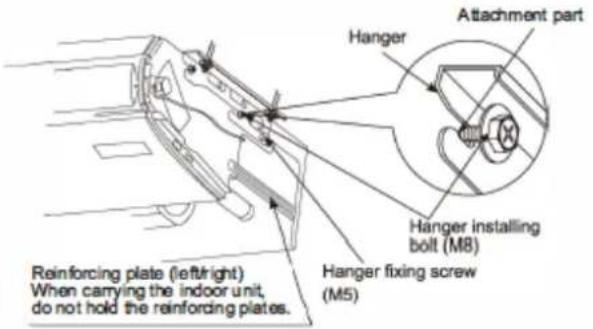
2. Remove the suspension bracket
- Loosen 2 screws to install the bracket on both sides (M8) (4 positions left and right) with 10mm clearance.
- Remove the suspension fixing screw at the rear (M5), pull the suspension backwards (in the direction of the arrow) to remove it.
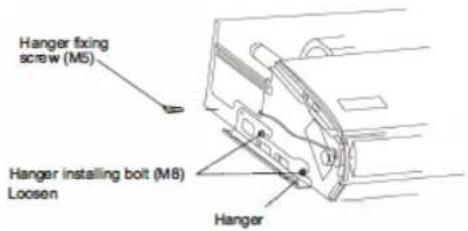
3. Installing the indoor unit
- Lift the indoor unit, slide it from the front, and place the suspension installation screw (M8) securely for temporary suspension.
- Tighten the bracket fixing screws (M5) in 2 positions, which were removed, as they were before. It is necessary to avoid misalignment of the indoor unit.
- Tighten the bracket installation screws (M8) securely in 4 positions.
Ceiling installation
- Selecting the base for the suspension
The suspension base can be a wooden or reinforced concrete structure. It must be firm and reliable to support the weight of more than 200 kg and able to withstand vibrations for long periods.
- Fixing the suspension base
Fix the screws of the suspension base as shown on the right or by means of a steel or wooden bracket.
- Suspending the indoor unit
The indoor unit should be suspended as shown below:
- Adjust the relative positions of the suspension hooks.
- Tighten the nuts and make sure that the hooks are securely connected to the nuts and washers.
- Once the unit is installed, make sure that it is securely fastened and that it does not shake or sway.
Note:
-
To ensure that the drain water drains properly, the unit should be tilted towards the bottom of the unit after installation is complete.
-
Please make sure that the front side is higher, otherwise it may cause the drainage water to come out from the air outlet.
-
Installation of the drain pipe
The drain pipe should be properly insulated to avoid condensation generation.
Pipes should be installed with a downward slope to allow water drainage.
The pipe must not be raised at any point.
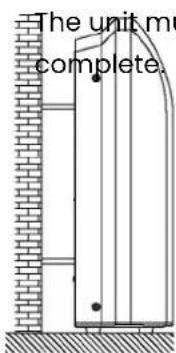
Installation on the ground
The unit must be horizontal or inclined towards the drain pipe when installation is complete.
Installing the outdoor unit
Install the unit according to local codes and regulations, there may be slight differences between different regions.
Step 1: Selecting a good location for installation
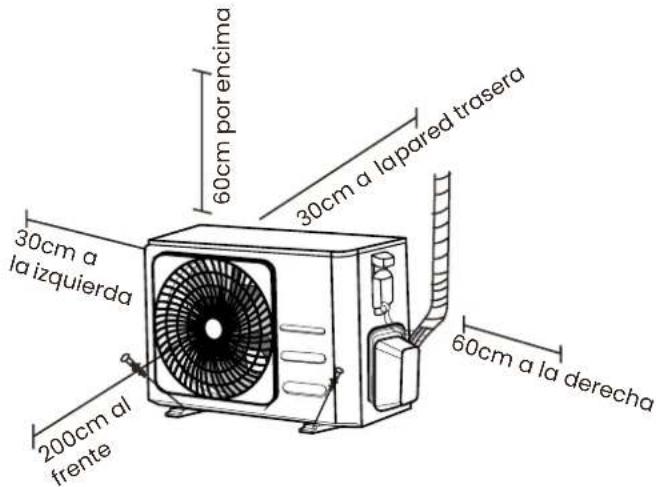
Before installing the outdoor unit, you must choose a suitable location. Below are the requirements that will help you choose a suitable location for the unit.
A suitable installation location has the following characteristics:
Meets all space requirements shown in the installation space requirements above.
Good air circulation and ventilation
Firm and solid - the location can support the unit and will not vibrate.
Noise from the unit will not disturb other people
Ensure that the outdoor unit is protected from prolonged periods of direct sunlight or rain.
When snowfall is expected, take appropriate measures to prevent ice build-up and damage to the coils.
DO NOT install the unit in the following locations:
Near an obstacle that blocks air inlets and outlets.
Near a public street, crowded areas or where noise from the unit may disturb others.
Near animals or plants that may be damaged by the hot air discharge.
Near any source of combustible gas
In a location exposed to large amounts of dust.
In a location exposed to excessive amounts of salt air.
Special considerations for extreme weather conditions extreme weather conditions
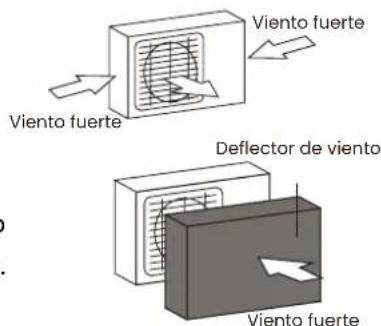
If the unit is exposed to strong winds: Install the unit so that the exhaust fan is at a 90^ angle to the wind direction. If necessary, build a barrier in front of the unit to protect it from extremely strong winds. See illustrations below. If the unit is frequently exposed to heavy rain or snowfall:
Construct a shelter over the unit to protect it from rain or snow. Be careful not to obstruct the airflow around the unit. If the unit is frequently exposed to salty (coastal) air: Use an outdoor unit specially designed to resist corrosion.
Step 2: Install the drainage gasket (heat pump unit only)
Before screwing the outdoor unit in place, you must install the drainage gasket on the bottom of the unit.
Note that there are two different types of drainage gaskets depending on the type of outdoor unit.
If the drainage gasket comes with a rubber seal (see Fig. A), do the following:
- Place the rubber seal on the end of the drain gasket that will be connected to the outdoor unit.
- Insert the drain gasket into the hole in the pan at the base of the unit. 3.
- Turn the drain gasket 90° until it snaps into place facing the front of the unit.
- Attach a drain hose extension (not included) to the drain joint to redirect water from the unit during heating mode.
If the drain joint does not come with a rubber gasket (see Fig. B), do the following:
- Insert the drain gasket into the hole in the pan at the base of the unit. The drain gasket will snap into place.
- Connect a drain hose extension (not included) to the drain joint to redirect the water from the unit during heating mode.
Note: In cold climates, make sure the drain hose is as vertical as possible to ensure rapid drainage of water. If the water drains too slowly, it may freeze in the hose and flood the unit.
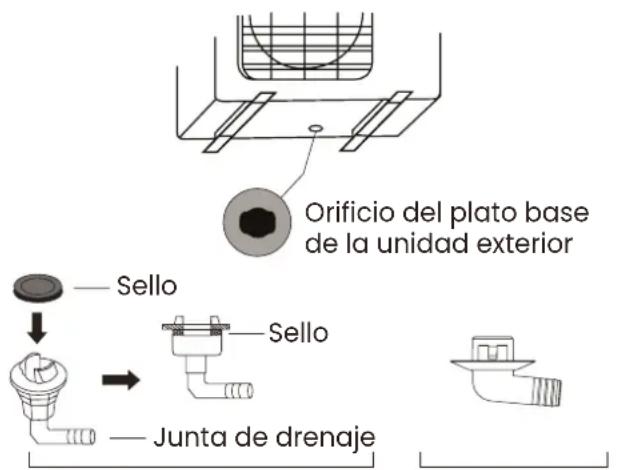
Step 3: Anchoring the outdoor unit
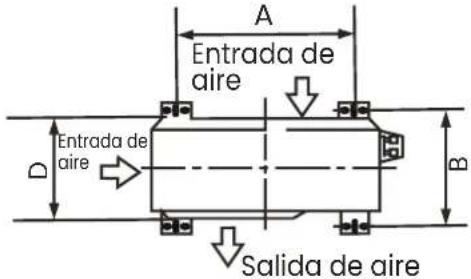
The outdoor unit can be anchored to the floor or to a wall bracket with a bolt (M10). Prepare the installation base of the unit according to the dimensions given below:
natural_image
Technical line drawing of a front-end air conditioner unit with labeled dimensions H and W (no text or symbols beyond labels)| Dimensions of the outdoor unit in mm. H x W x D | Mounting dimensions | |
| Distance A (mm) | Distance B (mm) | |
| 434x681x285 460 292 | ||
| 550x700x270 450 260 | ||
| 550x700x275 450 260 | ||
| 495x720x270 452 255 | ||
| 555x728x300 452 302 | ||
| 555x765x303 452 286 | ||
| 555x770x300 487 298 | ||
| 554x805x330 511 317 | ||
| 554x800x333 514 340 | ||
| 702x845x363 540 350 | ||
| 673x890x342 663 354 | ||
| 810x946x420 673 403 | ||
| 810x946x410 673 403 | ||
If you are installing the unit on the ground or on a concrete pad, do the following:
-
Mark the positions of the four expansion bolts according to the dimension table.
-
Pre-drill holes for the expansion bolts.
-
Place a nut on the end of each expansion bolt.
-
Hammer the expansion bolts into the pre-drilled holes.
-
Remove the nuts from the expansion bolts and place the outdoor unit on the bolts.
-
Place a washer on each expansion bolt and then replace the nuts.
-
Using a spanner, tighten each nut until snug.
Note: If drilling in concrete, eye protection is recommended at all times.
If you are installing the unit on a wall bracket, do the following:
-
Mark the position of the holes in the bracket according to the dimension table.
-
Pre-drill the holes for the expansion bolts.
-
Place a washer and nut on the end of each expansion bolt.
-
Thread the expansion bolts through the holes in the mounting brackets, place the mounting brackets in position and hammer into place.
-
Thread the expansion bolts through the holes in the mounting brackets, place the mounting brackets in position and hammer the expansion bolts into the wall.
-
Check that the mounting brackets are level.
-
Carefully lift the unit and place the mounting feet on the brackets.
-
Screw the unit firmly to the brackets.
-
If permitted, install the unit with rubber gaskets to reduce vibration and noise.
Step 4: Connect the signal and power cables
The outdoor unit terminal block is protected by an electrical wiring cover on the side of the unit. Inside the wiring cover is a complete wiring diagram.

WARNING!
Before carrying out any electrical or wiring work, disconnect the main power supply to the system.
- Prepare the cable for connection.
Select the appropriate cable with reference to "Cable types". Choose the appropriate wire gauge:
The size of power wire, signal wire, fuse and circuit breaker required is determined by the maximum current rating of the unit, which is indicated on the nameplate located on the side panel of the unit
a. Using wire strippers, strip the rubber jacket from both ends of the cable to reveal approximately 40 mm of the inner wires.
b. Strip the insulation from the ends of the wires.
c. Using a crimper, insert the U-bolts into the ends of the wires.
-
Unscrew the electrical wiring cover and remove it.
-
Unscrew the cable clamp from the cable under the terminal strip and position the cable on its side.
-
Connect the cable according to the wiring diagram and screw the U-connector of each cable firmly to its corresponding terminal.
-
After checking that all connections are secure, coil the wires to prevent rainwater from flowing into the terminal.
-
Secure the cable to the unit with the cable clamp.
Screw the cable clamp tightly.
- Insulate unused cables with PVC electrical tape.
Position them so that they do not touch any electrical or metal parts.
- Replace the cable cover on the side of the unit and screw it into place.
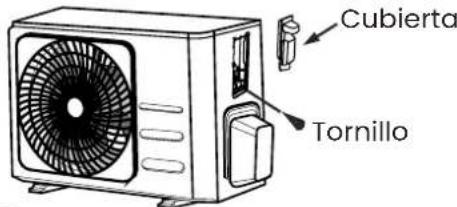
Note: If the cable clamp looks like the following, select the appropriate through hole according to the cable diameter.
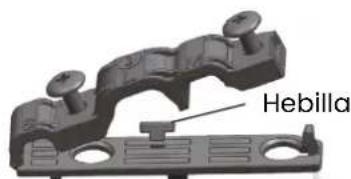
natural_image
3D mechanical component diagram showing a flanged housing with mounting points and a central base (no text or symbols)Checklist before switching on your air conditioner
Fill in the following list of checks to be carried out before switching on your air conditioner for the first time:
| List of checks to be carried out before first use Yes / No | ||
| Electrical safety checks | ||
| Gas leakage check | ||
| Confirm that liquid and gas openings are open | ||
| Verify that the remote control is working properly | ||
| Clean filters | ||
| No electrical leaks | ||
| Unit is properly grounded | ||
| All electrical terminals are properly covered | ||
| Indoor and outdoor units are solidly installed | ||
| No leaks at all piping connection points | ||
| All piping is properly insulated | ||
| Unit performs HEAT function correctly | ||
| Indoor unit louvers rotate properly | ||
| Indoor unit responds to remote control | ||
Below is a detailed explanation of all the checks to be made before switching on your air conditioner, to help you fill in this checklist.
Electrical and gas leakage testing
Before the function test
Only perform the function test after the following steps have been completed:
Electrical safety checks -Confirm that the unit's electrical system is safe and functioning properly.
Gas Leak Check - Check all flare nut connections and confirm that the system does not leak.
Confirm that the gas and liquid valves (high and low pressure) are fully open.
Electrical safety checks
After installation, confirm that all electrical wiring was installed in accordance with local and national regulations and in accordance with the installation manual.
Before the function test
Check the earthing work
Measure the grounding resistance by visual detection and with the grounding resistance tester. The grounding resistance must be less than 0.1 .
Note: This may not be necessary for some locations in North America.
During the function test
Check for Electrical Leakage
During the Run Test, use an electrical probe and a multimeter to perform a complete electrical leakage test.
If electrical leakage is detected, turn off the unit immediately and call a licensed electrician to find and resolve the cause of the leakage..

WARNING! RISK OF ELECTRIC SHOCK
All wiring must comply with local and national electrical codes and must be installed by a licensed electrician.
Gas Leak Checks
There are two different methods for checking for gas leaks.
Soap and water method
Using a soft brush, apply soapy water or liquid detergent to all pipe connection points of the indoor and outdoor unit. The presence of bubbles indicates a leak.
Leak detector method
If using a leak detector, refer to the instruction manual of the device for corresponding operating instructions.
After performing the gas leak check
After confirming that all pipe connection points are NOT leaking, replace the valve cover on the outdoor unit.
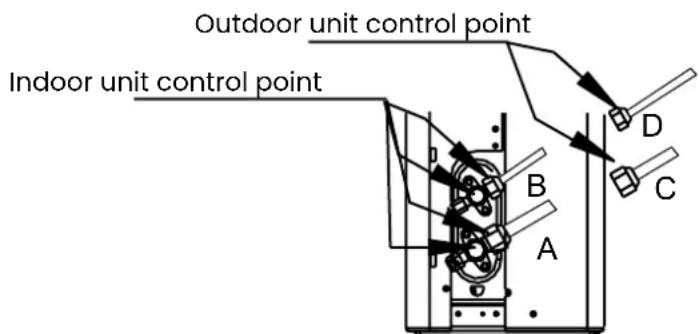
A: Low pressure shut-off valve
B: High pressure shut-off valve
C and D: Indoor unit flare nuts
Wiring installation
- Ensure the following when long pipes are to be welded.
a) Fully install the piping and any welding work before connecting the piping to the unit.
b) Oxygen-free nitrogen should be used inside the pipes to prevent rusting.
-
If there are many joints requiring brazing during installation of long pipes, use an in-line filter. All tubing should be of good quality refrigeration grade dehydrated copper and not normal plumbing grade copper and should be free of moisture, dust or other contaminants.
-
Please purge the tubing with nitrogen or to remove any dust inside before oxidation.
-
Please install the pipe according to the direction of the pipe, and do not repeatedly bend and then straighten a piece of pipe more than 3 times (this will damage the copper). Use a pipe bender to bend the pipe. After preparing a length of pipe, slide the pipe insulation material over it.
-
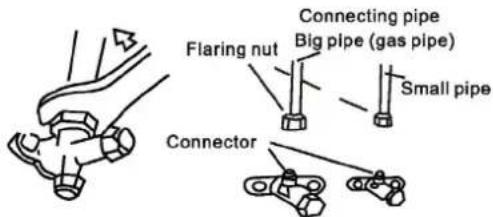
Once the pipe connection is completed, connect the pipe to the indoor unit using the supplied connection connector. Disconnect the valve fixing nut from the indoor unit and place it on the piping facing the indoor unit. Fix the piping as shown in this manual, and after coating both the flare nut and the inside and outside of the flare with a light coat of refrigerant oil, tighten the nut using a wrench to tighten the nut and a spanner to hold the valve on the unit. Always use a wrench with the correct tightening torque and always fasten the indoor unit valve with another spanner. Do not over-tighten or under-tighten the torque. This process is done for both small and large pipes.
-
Connect to the outdoor unit in a similar manner.
-
Once the piping connection is completed, carry out a full tightness test on the piping and make sure that there are no leaks in the piping and connections and that everything is fully insulated.
Thermal insulation and tightness
The copper pipe and the drain pipe must be insulated separately to prevent condensation or water leakage.
-
The copper pipe must be properly insulated using materials designed for insulating air-conditioning pipes and resistant to heat above 120^ C.
-
Issues requiring attention in areas with a very high humidity level:
The air conditioner has been tested in various humidity conditions. However, if it is operated for long periods of time in an environment with a high level of humidity, water droplets will be produced, so the following thermal insulation should be carried out.
a) The indoor unit should be externally insulated with 10-20 mm thick glass fibre.
b) Normal pipe insulation is about 8 mm for pipes.
- Wall sealing:
To prevent rainwater or other foreign bodies from entering the room and air conditioner after installing the pipe and drain pipe, the gap between the hole in the wall and the pipe, drain pipe and electric wire should be sealed with putty, rubber sealant or mastic, or poor performance or leakage will occur. If the outdoor unit is higher than the indoor unit, the pipe should be bent to ensure that the lowest point of the pipe is lower than the hole in the wall to prevent rainwater from entering the room or air conditioner along the piping system.
-
The air outlet connection must be insulated.
-
The air outlet pipes are connected under insulation.
Refrigerant gas pipe connection
The standard length of the refrigerant pipe is 5m. If the distance between inside and outside is greater than this, it will be necessary to extend the pipe.
Refer to the table below for the limitations of each unit in terms of maximum distance and height.
Do not exceed these limits or compressor failure may occur.
Keep the pipe separation length and number of elbows to a minimum and always follow the shortest route for pipe installation.
As pipe length and number of elbows increase, unit performance decreases and energy consumption increases.
| FeaturesModel | Connection diameter of the pipe (mm) | Maximum connection length Maximum | level difference | Maximum number of bends | |||
| Liquid Gas | Liquid Gas Máx. | Long. | |||||
| 12000BTU 6.35 12.7 | 7.94 | 15.88 25 | 10 | 3 | |||
| 18000BTU 6.35 12.7 | 7.94 | 15.88 30 | 20 | 5 | |||
| 24000BTU 9.52 | 15.88 | 9.52 | 19.05 | 50 | 25 | 8 | |
| 30000BTU | 9.52 | 15.88 | 9.52 | 19.05 | 50 | 25 | 8 |
| 36000BTU | 9.52 | 15.88 | 9.52 | 19.05 | 65 | 30 | 8 |
| 42000BTU | 9.52 | 15.88/19.05 | 9.52/12.7 | 19.05/22.2 | 65 | 30 | 8 |
| 48000BTU | 9.52 | 19.05 | 12.7 | 22.2 | 65 | 30 | 10 |
| 60000BTU | 9.52 | 19.05 | 12.7 | 22.2 | 65 | 30 | 10 |
As refrigerant pipe only phosphor copper pipe, deoxidised, seamless, of suitable quality for R410a must be used.
-Requirements for the connection pipe between the indoor unit and the outdoor unit:
-
The machining dimension of the flared pipe section is as shown in the following table;
-
When connecting the flare nut, refrigerant oil should be applied on the flare pipe section (both inner and outer wall), and screw the nut by screwdriver for 3-4 thread steps before finally tightening the nut; 3. The tightening torque is shown in the following table;
-
Carry out the leakage test after completion of installation.
| Pipe diameter | Tightening torque | Machining dimension of flared tube section (mm) | Wide mouth shape | Apply cooling oil |
| 6.35mm | 15-99 N·m | 8.3-8.7 | 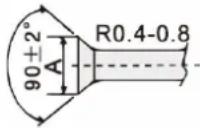 | 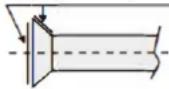 |
| 9.52mm | 35-40 N·m | 12.0-12.4 | ||
| 12.7mm | 50-60 N·m | 15.4-15.8 | ||
| 15.88mm | 62-76 N·m | 18.6-19.0 | ||
| 19.05mm | 98-120 N·m | 22.9-23.3 |
Precautions:
-
Horizontal piping should slope towards the outdoor unit with a slope of 20:1.
-
If there is a height difference between the indoor and outdoor unit, oil traps should be installed in the gas interconnection pipe (large):
When the vertical pipe height difference is less than 5m, an oil trap should be installed at the bottom of the gas pipe (large). When the vertical pipe height difference is more than 5m, an oil trap must be installed at the bottom of the gas pipe (large) and a short ring must be installed at the outlet of the liquid pipe (small) of the indoor unit every 5m:
When the vertical height difference of the connecting gas pipe is less than 5m, but the constant rise distance is too long, an oil trap should be installed on the (large) gas pipe every 10m.
- When the outdoor and indoor units are at the same elevation, it is not necessary to install the oil reservoir elbow and liquid ring, if the horizontal length of the connecting pipe is less than 10m. When the horizontal connecting pipe length is longer than 10m, install an oil sump on the gas pipe (large) every 10m.
Note: This table is for explanatory purposes. An actual installation may differ from this and must take into account the site conditions. When making an oil trap, the radius of the bend should be between 1.5 and 2 times the pipe diameter.
Connecting the pipe and indoor unit
Remove the copper nut from the indoor unit and insert it onto the unflare pipe before making the fitting, align the flare side of the connecting pipe with the indoor unit connector, lightly coat the fitting and nut with refrigerant oil, screw the copper nut onto the indoor unit connector and tighten it (the tightening torque is shown in the table above).
Connecting the piping and outdoor unit
Follow the instructions for flaring the indoor unit as shown in Fig:
Installing the draining pipe
To ensure that the drained water drains properly, the unit must be tilted towards the bottom of the unit after installation is complete.
-
The drain hose must be wrapped with thermal insulation to insulate it properly and prevent ice build-up.
-
The pipe should be installed with a downward slope (>1/1.36) to allow water drainage.
-
The pipe must not be elevated at any point.
Evacuate or flush pipes
Before releasing the refrigerant from the outdoor unit into the pipes and the indoor unit, it is necessary to ensure that there are no foreign objects, water or non-condensing gas in the refrigeration system. For this purpose, it is necessary to evacuate or purge the system:
A dedicated R32 refrigerant pump must be used to make the R32 refrigerant vacuum. Before working on the air conditioner, remove the shut-off valve cap (gas and liquid valves) and be sure to retighten it afterwards (to avoid possible air leakage).
-
To prevent air leakage and spillage, tighten all connection nuts on all pipes.
-
Connect the shut-off valve, the charging hose, the manifold valve and the vacuum pump.
-
Fully open the manifold valve and apply a vacuum for at least 15 minutes and check that the vacuum hose
15 minutes and check that the vacuum gauge on the equipment indicates -0.1 MPa(-76cmHg).
-
After applying vacuum, fully open the shut-off valve with a hex spanner.
-
Check that the internal and external connections are free of air leaks.
Adjusting the refrigerant quantity
When the pipe length exceeds 5m, add refrigerant according to the table below:
| Refrigerant pipe | Refrigerant pipe | Additional charge (Kg/m) | |
| Gas (mm) Liquid (mm) | |||
| Pipe between indoor unit and outdoor unit | 9.52x0.75 6.385x0.75 0.033 | ||
| 12.7x1 6.35x0.75 0.03 | |||
| 15.88x1 9.52x0.75 0.05 | |||
| 19.05x1 9.52x0.75 0.05 | |||
Note:
-
This table is for guidance only.
-
Joints shall not be reused except after re-flaring the pipe.
-
After installation, check that the shut-off valve cover is securely fastened.
-
The pipe thickness is 0.6-1.0, the bearing pressure is 4.2MPa.
-
If the connection pipe is too long, the cooling capacity and stability will decrease. The larger the number of bends, the higher the resistance in the piping system, which will reduce the cooling and heating capacity and even lead to breakage.
This will reduce the cooling and heating capacity and even lead to compressor breakage. If the height difference between the indoor and outdoor unit is more than 5m, an oil sump must be installed in the an oil trap must be installed in the gas pipe every 10m.
- Please add refrigerant according to the liquid piping.
Electrical installation
The interconnection cable connects the indoor and outdoor units. You must first choose the correct cable size before preparing it for connection.
Then choose the minimum cross-section of the power cable and the interconnecting cable.
| Rated product current (A) Nominal section (mm 2) | |
| >3 / ≤ 6 0.75 | |
| >6 / ≤10 1 | |
| >10 / ≤16 1.5 | |
| >16 / ≤25 2.5 | |
| >25 / ≤32 4 | |
| >32 / ≤40 6 | |
The size of the interconnecting cable, power cord, fuse and circuit breaker required is determined by the maximum current of the unit. The maximum current is indicated on the nameplate located on the side panel of the unit.
Refer to this nameplate to select the appropriate cable, fuse or circuit breaker.
Note: The cable core number refers to the detailed wiring diagram attached to the unit you have purchased.
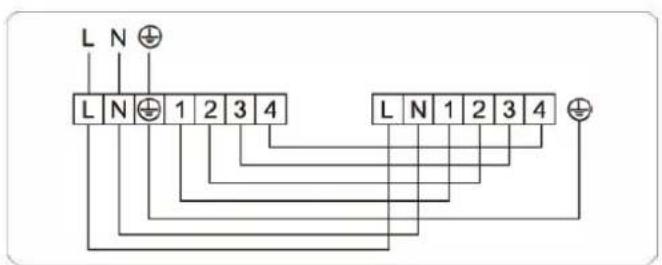
Indoor unit and outdoor unit wiring
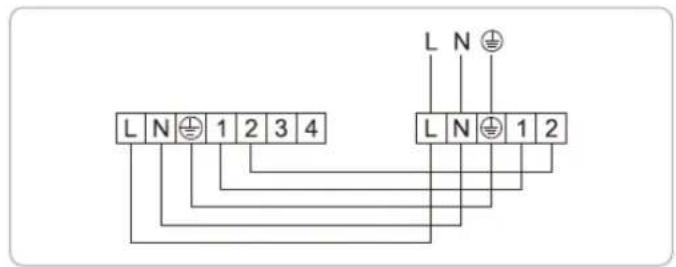
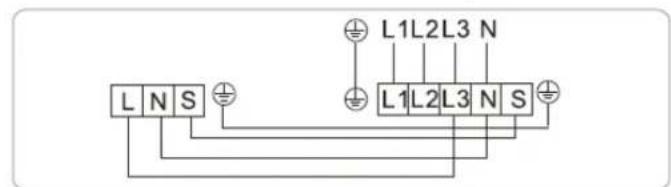
- Some of the indoor and outdoor units have grounding terminals L, which can be powered separately by the indoor and outdoor units.
- The schematic diagram in the instruction manual is for information only, it is specific to the units.
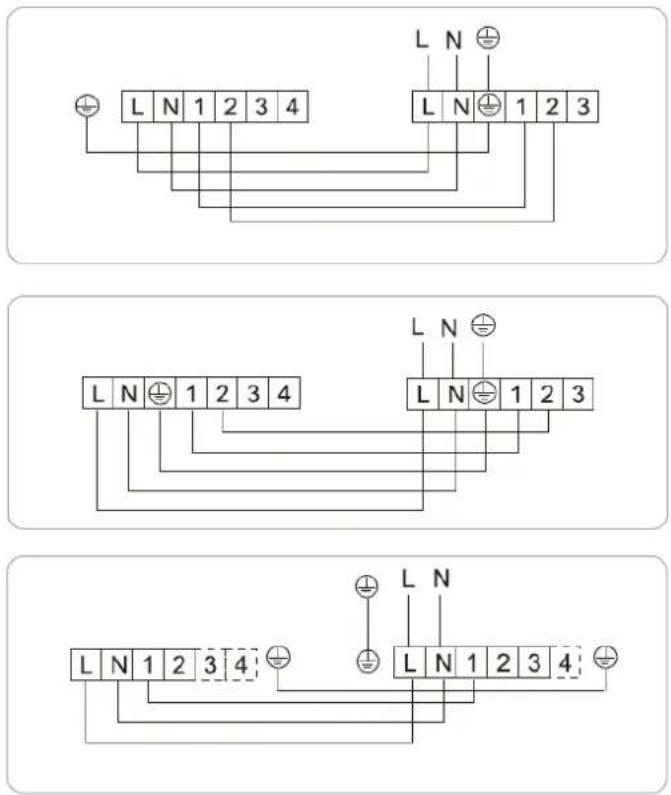
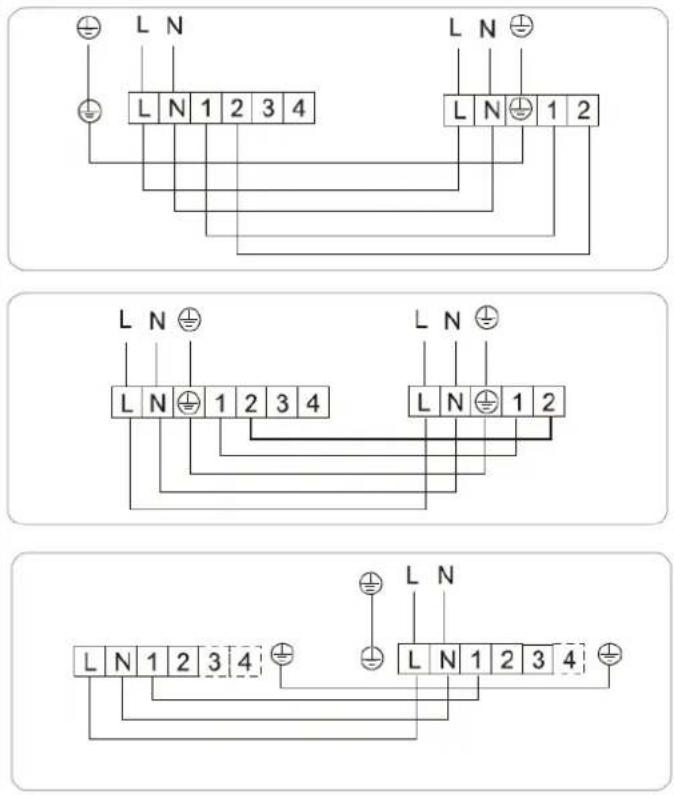
Constant speed heat pump system 12,000 / 18,000BTU (single phase)
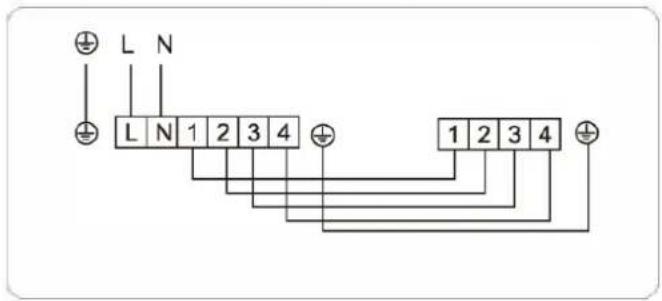
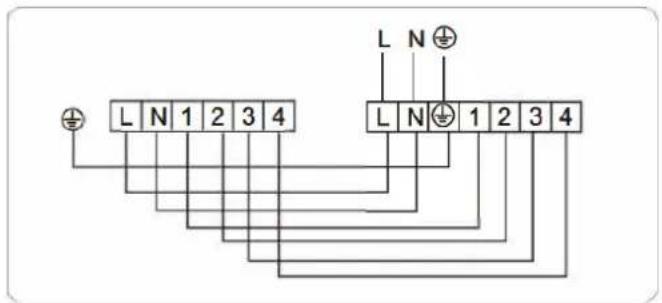
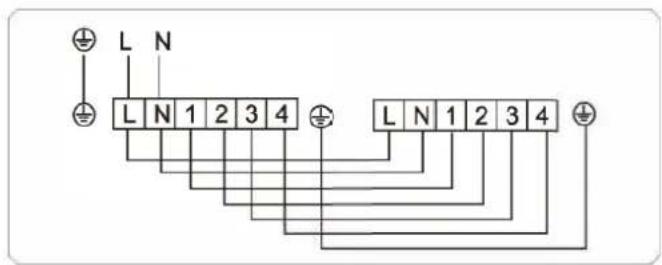
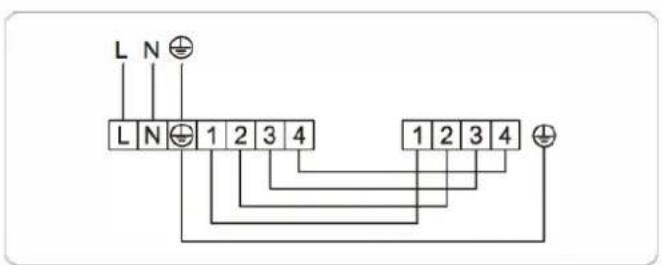
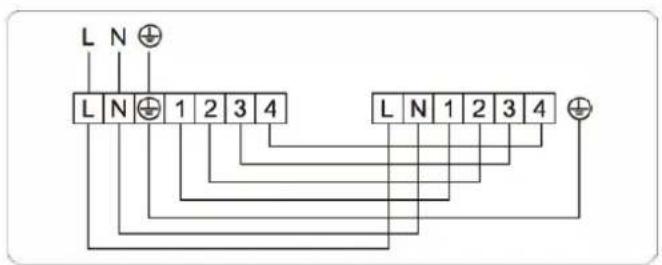
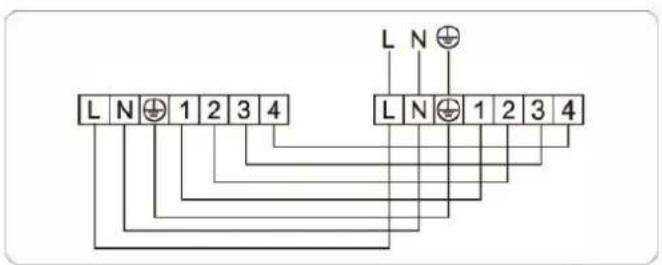
24,000 / 30,000BTU (single phase)
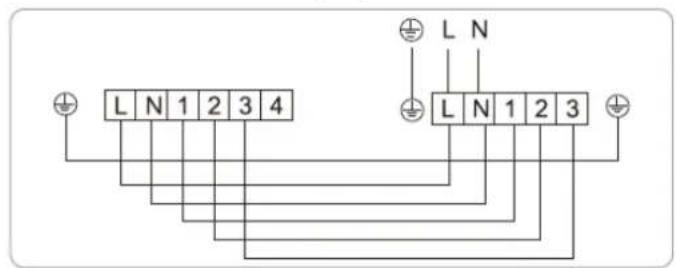
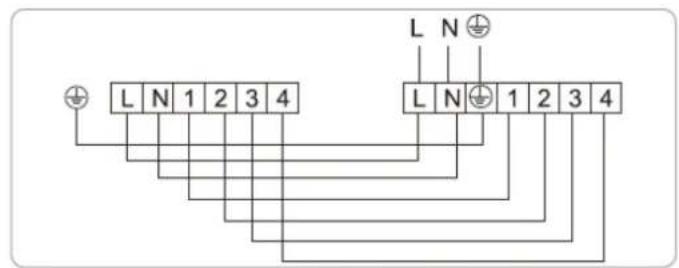
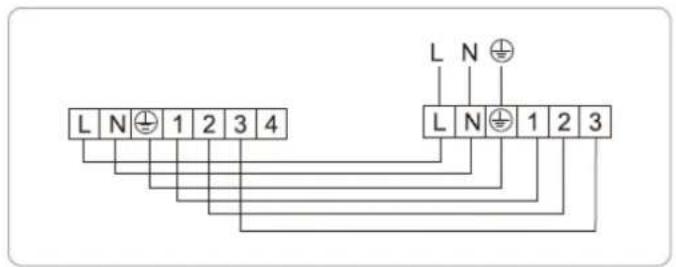
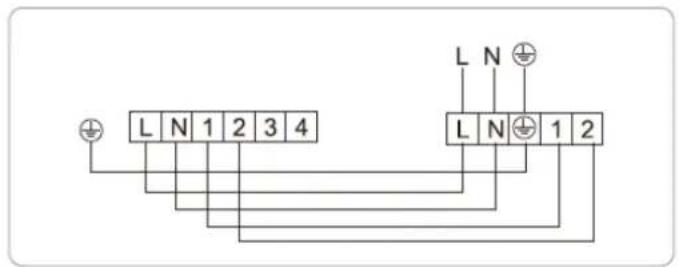
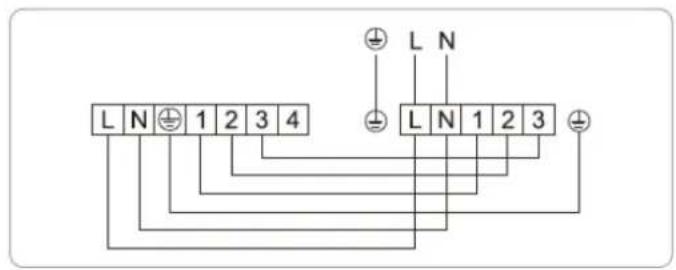
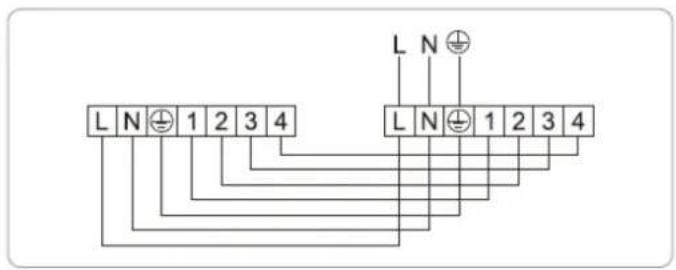
36,000BTU (single phase)
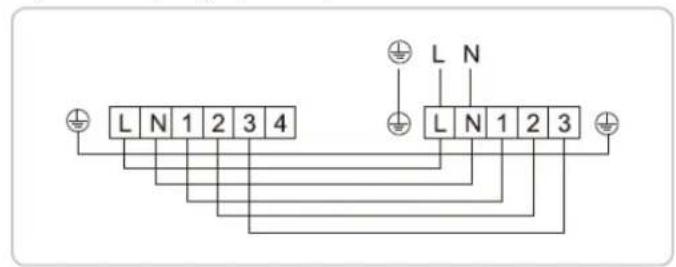
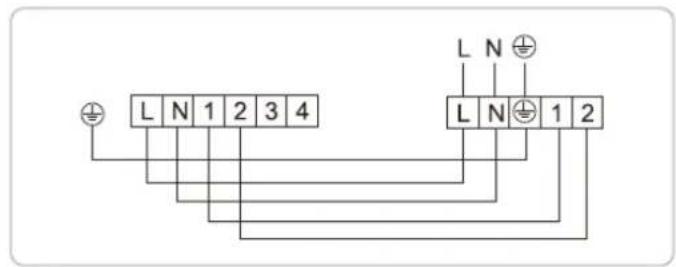
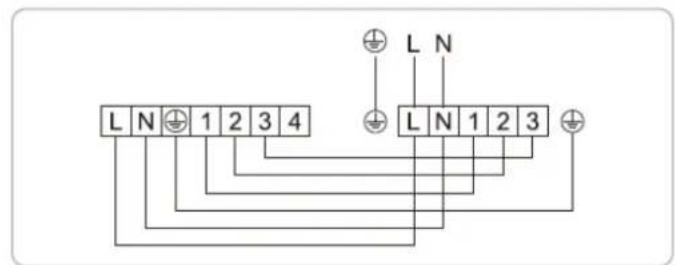
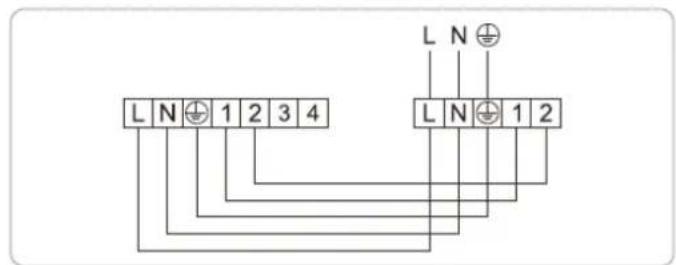
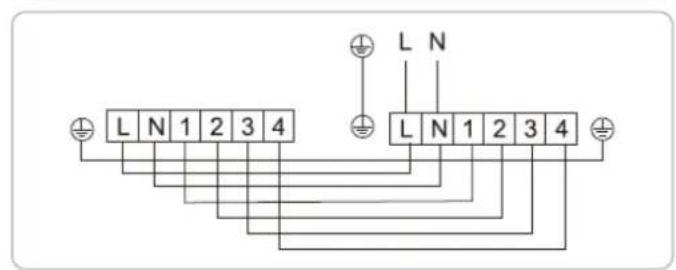
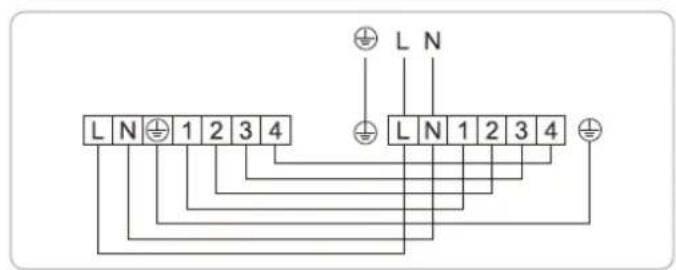
48.000 / 60.000BTU (single-phase)
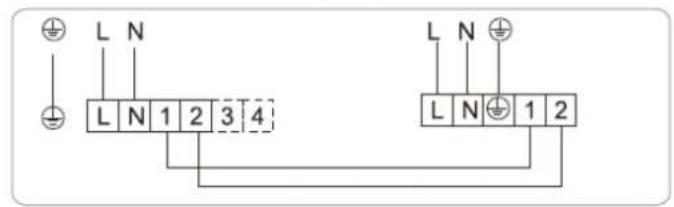
36,000 / 48,000 / 60,000BTU (three-phase)
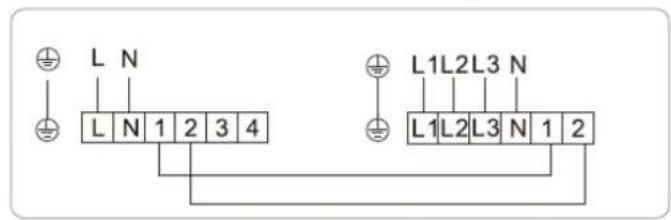
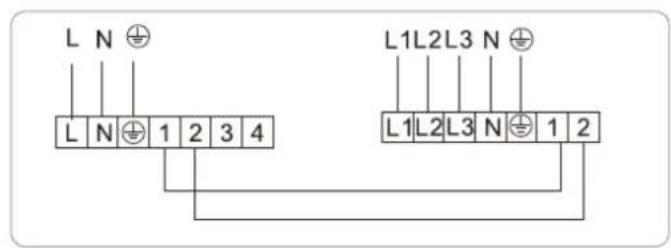
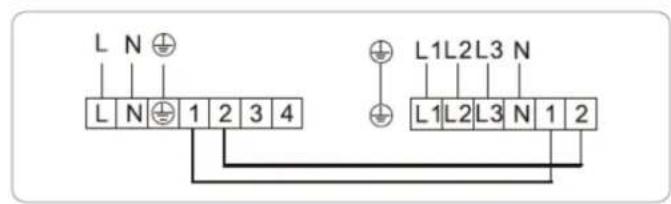
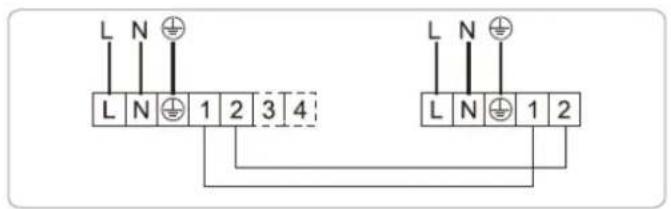
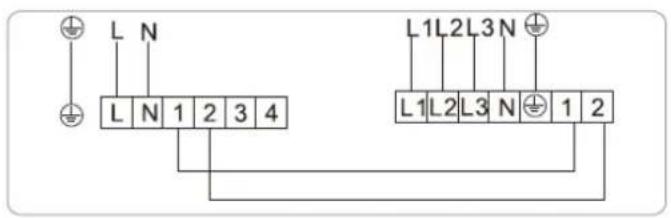
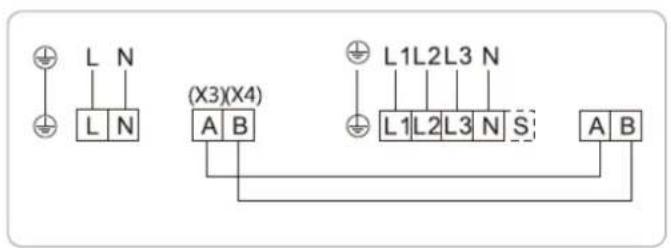
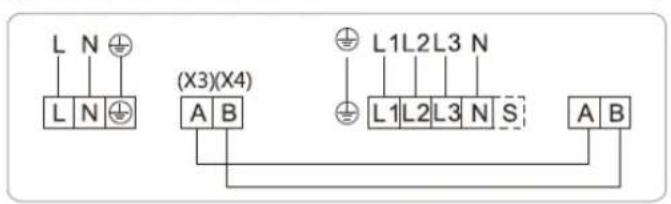
Constant speed cool-only system
3,600 / 4,200 / 4,800 / 6,000BTU (3-phase)
12,000 / 18,000BTU (single phase)
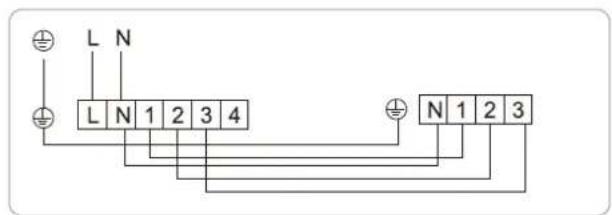
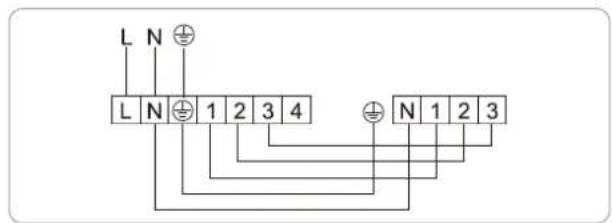
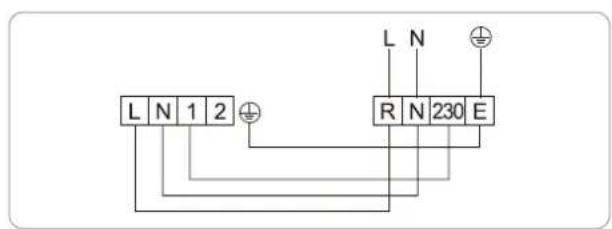
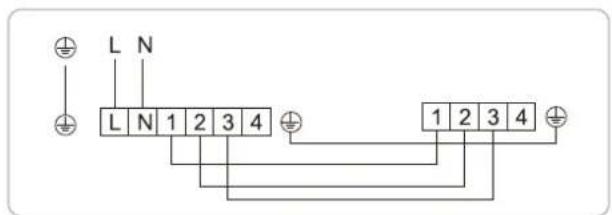
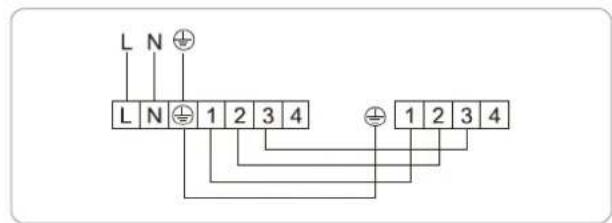
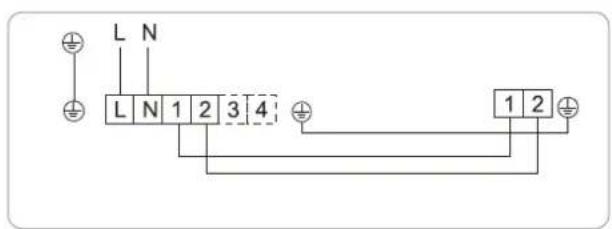
24,000 / 30,000BTU (single-phase)
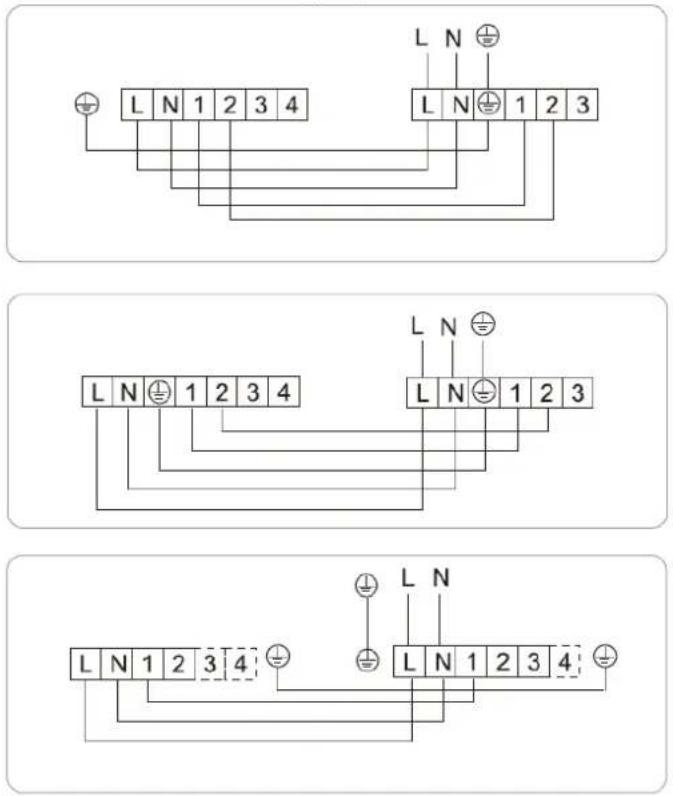
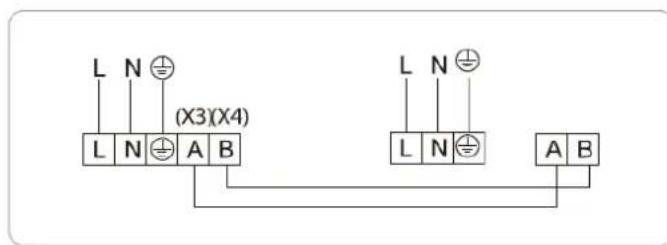
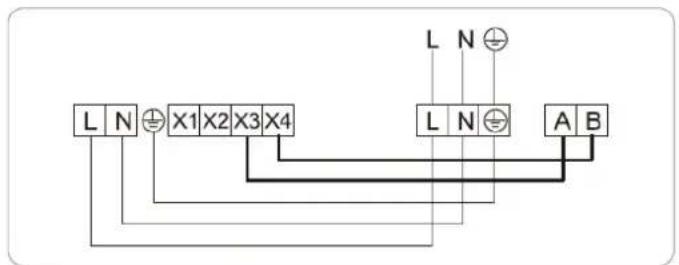
Variable speed systems
12,000 / 60,000BTU (single phase)
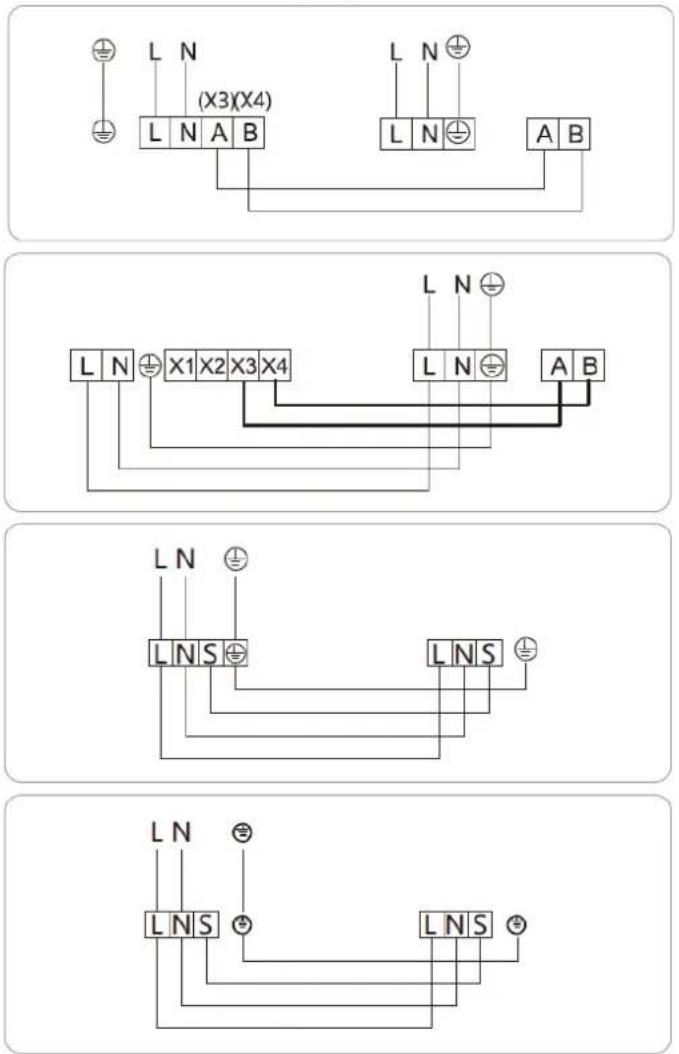
36,000BTU (single-phase)
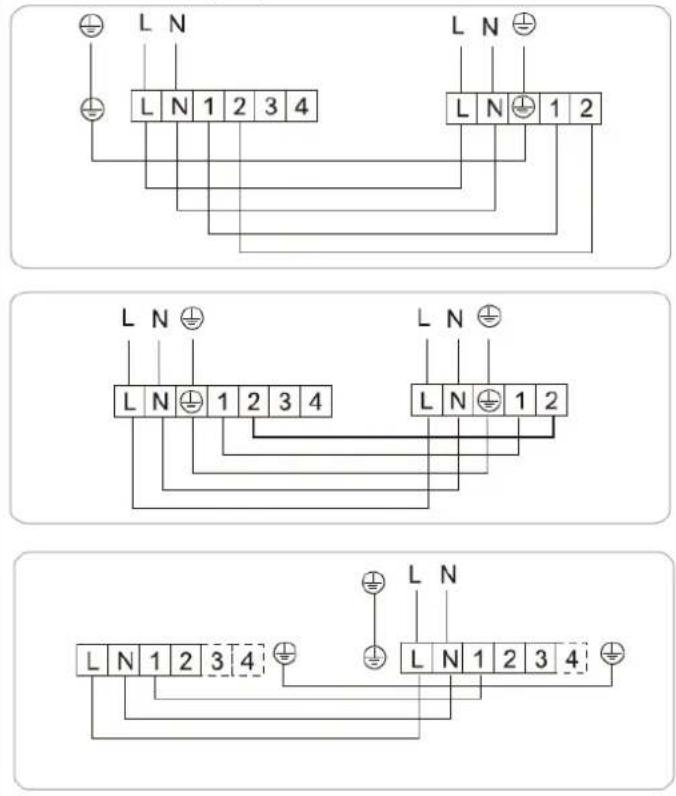
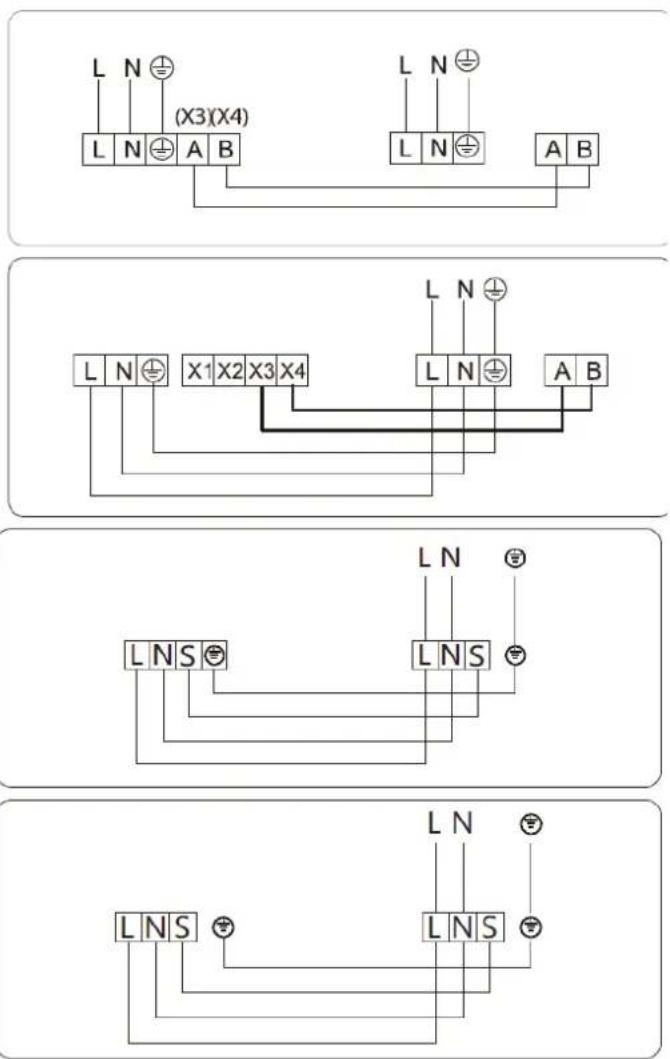
18,000 / 60,000BTU (three-phase)
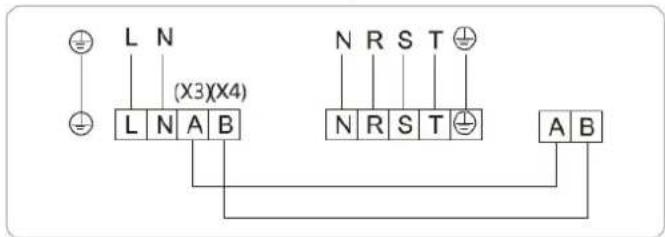
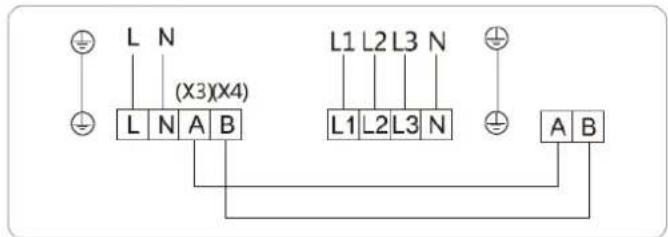
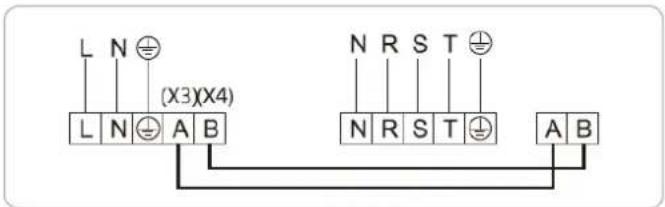
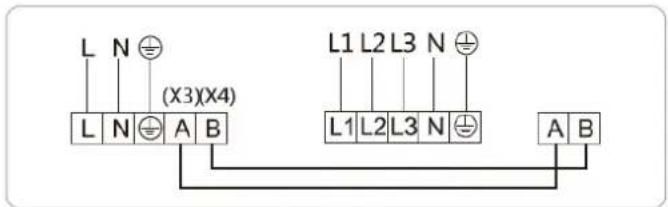
Connection method
To connect the indoor unit
Open the terminal box cover. Connect the wires according to the electrical connection diagram. And check that all wires are connected securely, firmly and correctly.
To connect the outdoor
Open the electrical access panel of the outdoor unit and connect the wires according to the circuit diagram on the back of the access panel. Check that all wires are connected securely and correctly. The earth wire must be connected in the correct place.
Note: The PC board of the outdoor unit whose power supply has phase sequence protection. Please pay attention to it while connecting the power cable.
After all connections have been made and checked, the pipes have been checked for tightness and load and the drain pipes have been checked for tightness, the pipes and cables should be joined as follows.
-
Locate the drain pipe at the bottom together with the control cable.
-
Position the insulated refrigerant pipes at the top.
-
Lay the mains cable on top of these.
-
Tie carefully with adhesive tape.
-
Make sure that the drain pipe is not damaged.
Caution: Do not crush the drain pipe during the joining operation.
Commissioning
These elements must be checked before commissioning.
| List of checks to be carried out Yes / No | ||
| 1. Does the line match the circuit diagram? | ||
| 2. When installing multiple machines at the same time, confirm that the connection lines of the indoor and outdoor units are not mistakenly connected. | ||
| connected by mistake. | ||
| 3. Is the unit properly grounded? | ||
| 4. Is the screw loose in the wire connection? | ||
| 5. Is the insulation value greater than 1Ω? | ||
| 6. Is the pipe size correct? | ||
| 7. Are the gas and liquid lines thermally insulated? | ||
| 8. Are the shut-off valves on the liquid and air side fully opened? | ||
| 9. Has the refrigerant additive charge and the length of the refrigerant piping been recorded? | ||
Steps to follow to start the commissioning process
- Turn on the power supply and select cooling mode as shown in the remote controller section of this manual.
- After the 3 minutes of compressor protection, check that the indoor unit grille is working properly and that both the indoor and outdoor units are working properly without abnormalities. Check that cool air is produced after a short period of time.
- Select heating mode on the remote controller and wait for 5 minutes. Check that the indoor fan starts correctly and that warm air is produced after a short time.
- Select Fan mode on the remote control. Check that the fan operates correctly at all speeds.
- Test the other functions of your remote control as described in the section of this manual.
- Select the cooling mode and check that the vacuum pump is working properly.
- After confirming that the unit is operating properly, turn the unit off and disconnect the power supply.
Functional test
This test may take approximately 30 minutes.
- Turn on the power to the unit.
- Press the ON/OFF button on the remote control to turn it on.
- Press the MODE button to cycle through the following functions, one at a time:
- COOL - Select the lowest possible temperature.
- HEAT - Select the highest possible temperature.
- Allow each function to run for 5 minutes and perform the following checks:
| List of checks to be carried out Approved / Not approved | ||
| No electrical leakage | ||
| Unit is properly grounded | ||
| All electrical terminals are properly covered | ||
| Indoor and outdoor units are solidly installed | ||
| No leaks at all piping connection points Outdoor | (2): | Indoor (2): |
| Water drains properly from drain hose | ||
| All pipes are properly insulated | ||
| The unit performs the COOL function properly. | ||
| The unit performs the HEAT function properly | ||
| The louvers of the indoor unit rotate properly. | ||
| The indoor unit responds to the remote control | ||
Double check the pipe connections
During operation, the pressure in the cooling circuit will increase. This may reveal leaks that were not present during the initial leak check. During the test run, take the time to check all refrigerant pipe connection points for leaks.
Refer to the Gas Leak Check section for instructions.
- Once the function test has been successfully completed and confirm that all items on the Checklist to be Performed have been PASSED, do the following:
a. Using the remote control, return the unit to normal operating temperature.
b. Using duct tape, wrap the indoor refrigerant piping connections that were left uncovered during the indoor unit installation process.
To further optimise the performance of your unit, do the following:
Keep doors and windows closed.
Limit energy consumption by using the TIMER ON and TIMER OFF functions.
OFF TIMER.
Do not block air inlets or outlets.
Regularly inspect and clean the air filters.
Operating temperature
When the air conditioner is operated in a temperature range other than those listed below, certain safety protection functions may be activated and the unit may be disabled.
Inverter type split
| COOL HEAT DRY | |||
| Room temperature | 17°C - 32°C 0°C - 30°C | 10°C - 32°C | |
| Outdoor temperature | 0°C - 50°C | -15°C - 30°C | 0°C - 50°C |
| -15°C - 50°C(For models with low temperature cooling systems). | |||
| 0°C - 52°C(For special tropical models) | 0°C - 52°C(For special tropical models) |
For outdoor units with electric auxiliary heater:
When the outdoor temperature is below 0 °C , we strongly recommend keeping the unit plugged in at all times to ensure continuous trouble-free operation.
Fixed speed type split
| COOL HEAT DRY | |||
| Room temperature | 17°C - 32°C 0°C - 30°C | 10°C - 32°C | |
| Outdoor temperature | 18°C - 43°C | -7°C - 24°C | 11°C - 43°C |
| -7°C - 43°C(For models with low temperature cooling systems). | 18°C - 43°C | ||
| 18°C - 52°C(For special tropical models) | 18°C - 52°C(For special tropical models) |
The relative humidity in the room is below 80%. If the air conditioner operates above this figure, the air conditioner surface may generate condensation. Set the vertical airflow louver to its maximum angle (vertically to the floor) and set the fan mode to HIGH.
Remote control
External buttons Internal buttons
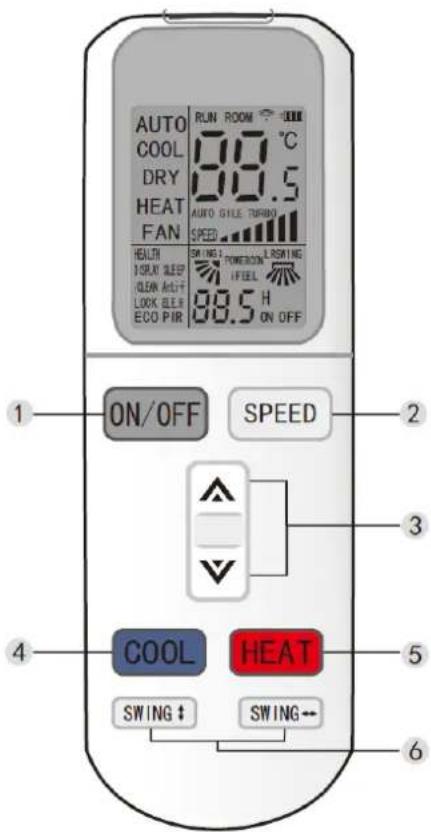
| 1 On / Off |
| 2 Fan speed |
| 3 Increase / Decrease |
| 4 Cooling mode |
| 5 Heating mode |
| 6 Lateral / vertical oscillation |
Note: The external buttons will only work if the cover is securely closed.
Replacing the batteries
- Slide the cover in the direction indicated by the arrow.
- Insert two new batteries in the correct electrical poles (+ and -).
- Replace the cover.
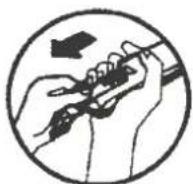
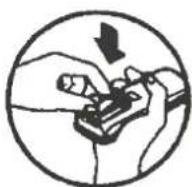
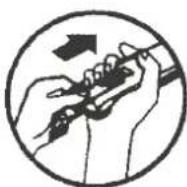
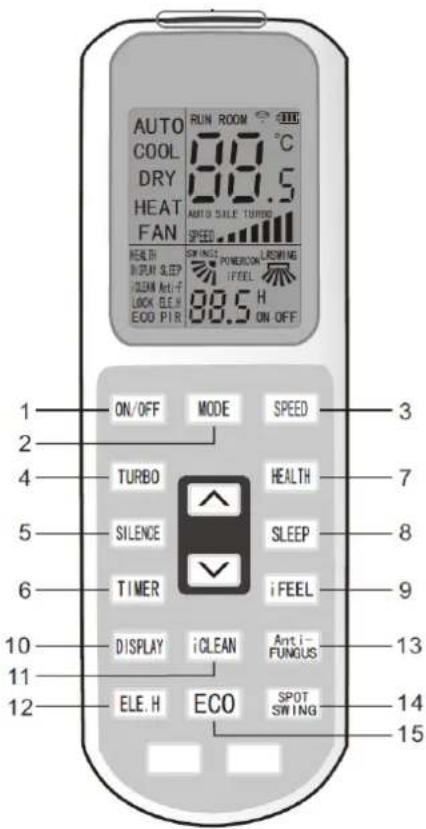
| 1 Power On / Off | |
| 2 Mode Button | |
| 3 Fan speed | |
| 4 Turbo Mode | |
| 5 Mute | |
| 6 Timer | |
| 7 Health Mode | |
| 8 Sleep Mode | |
| 9 iFeel Mode | |
| 10 | Illuminate remote control display |
| 11 | iClean mode |
| 12 | Anti-allergy mode |
| 13 | Heating mode |
| 14 | Directional oscillation |
| 15 | ECO mode |
Note: This manual presents the functions of all remote controls. If you press a button without any reaction, the air conditioner you have purchased may not have this function.
EXTERNAL BUTTONS
Fan mode
- Press the ON/OFF button, the air conditioner starts to operate.
- Press the MODE button, select the operation mode Cooling or Heating.
- Press SPEED button to select fan speed.
You can select the fan speed between LOW, MEDIUM and HIGH. - Press the button again, the air conditioner will stop.
Note: In fan operation mode, it is not possible to adjust the temperature.
Dehumidifier mode
- Press the ON/OFF button, the air conditioner starts to operate.
- Press the MODE button, select the dry operation mode.
- Press UP or DOWN button to adjust the temperature, the temperature can be adjusted with a difference of 1^ C in a range of 16-32^ C.
- Press the SPEED button to select the fan speed. You can select the fan speed from LOW, MEDIUM, HIGH and AUTO.
- Press the button again, the air conditioner stops.
Note: This manual introduces the function for all remote controllers, if you press a button, you may not get any reaction, then the air conditioner you have purchased does not have this function.
1. "ON/OFF" button
* Press this button, and the unit will start or stop, and you can clear the timer or sleep function of the last time.
2. "SPEED" button
* Press this button to change the speed:

3. UP / DOWN" button
* When the button is pressed, the set temperature will increase by 0.5°C. Pressing the button will decrease the set temperature by 0.5°C. * Pressing the button will decrease the set temperature by 0.5°C.
* The temperature will change rapidly by pressing the button continuously and the setting temperature range is from 16°C to 32°C.
4. COOL" button
* Press the "COOL" button, the operation mode is changed to cooling mode.
5. HEAT" button
* Press the HEAT button to change the operation mode to heating mode.
6. SWING" buttons
* Press this button to open the up/down and left/right swing function, press it again to set the flap position.
Press it again to set the flap position.
* The up/down and left/right adjustment is only valid in this mode, so it will not affect the position of the flap in other modes.
* The up/down and left/right oscillation has memory function. It can keep the primary setting when power off and then power on or switch from other modes to the primary mode.
INTERNAL BUTTONS
1. "ON/OFF" button
* Press this button, and the unit will start or stop, and you can clear the timer or sleep function of the last time.
2. "MODE" button
Press this button to switch between the following different modes:

3. "SPEED" button
* Press this button to change the speed:

4. TURBO" button
* Activate or deactivate turbo (turbo characters will appear or disappear) by pressing this button in cooling or heating mode.
* Once activated, the unit will be switched off by default.
* This function cannot be set in auto, dry or fan mode, and the turbo characters will not appear.
5. SILENCE" button
* Activate or deactivate the silence (silence characters will appear or disappear) by pressing this key.
* Once activated, the unit will be muted by default.
6. TIMER" button
* If the unit is on, press this button to deactivate the timer. If the unit is off, press this button to activate the timer.
* Press this button once, the words H ON/OFF will appear and flash. In that case, press UP/DOWN buttons to set the time (press UP/DOWN button to change the timer value quickly), the setting time range is from 0.5 to 24 h; press this button once more to set the time, then the remote controller will send the signal immediately and H ON/OFF will flash.
The remote control will send the signal immediately and H ON/OFF will stop flashing.
* If the time in which the timer button is not pressed in flashing status is longer than 10 seconds, the timer setting will be abandoned.
* If the timer has been set, press this button one more time to exit the timer setting.
7. HEALTH" button
* Press this button to activate or deactivate the health function.
8. SLEEP" button
* Press the SLEEP button, the indoor unit's sleep indicator light will flash.
The air conditioner will operate in sleep mode for 10 hours and exit "SLEEP" mode to return to the previous mode.
The unit will turn off automatically if the programmed time runs out.
Note: Press the MODE or ON/OFF button, to activate or deactivate the SLEEP mode.
9. iFEEL" button
* Press this button to set the iFEEL function.
The LCD will display the actual room temperature when the function is activated and will display the set temperature when the function is cancelled.
* This function will not be valid when the product is in fan mode.
10. DISPLAY" button
* Press the button once on the display to turn off the display, press it again and the LCD will show the room temperature and setting temperature after flashing for 5 seconds.
It is convenient for users who are not used to the dark and it is also convenient to check the room temperature at any time.
11. iCLEAN" button
* When the remote control is turned off, press the "iCLEAN" button to make the unit execute the "iCLEAN" function.
* The purpose of this function is to clean the dust on the evaporator and dry the water inside the evaporator to prevent the evaporator from rotting due to water accumulation and giving off strange smells.
* After setting the "iCLEAN" function, press the "iCLEAN" button or "ON/OFF" button to deactivate the function.
* The cleaning function will stop working after one hour of operation without any operation.
12. ELE.H" button (only for heat pumps)
* In the heating mode, press this button to change the operating mode to supplementary heating.
13. Anti-FUNGUS" button
* The purpose of this function is to dry the inside of the evaporator and prevent it from becoming mouldy due to water accumulation, thus dispersing foreign odours.
* This function is controlled by the remote controller in cooling, dehumidifying and automatic modes, the horizontal air direction rods are set to the initial position for cooling. The air conditioner operates in heating mode (cooling mode only operates in fan mode). The internal fan runs for 3 minutes in weak wind before stopping.
* This function is not factory set. You can set and cancel this function freely. The setting method is as follows: With the air conditioner and the remote controller turned off, point the remote controller at the air conditioner and press the "Anti-FUNGUS" button continuously.
"After five beeps, the alarm will sound again five times, indicating that the function is activated. In case this function has been set, unless the entire air conditioner is turned off or the function is manually cancelled, the air conditioner will have this function by default."
* To cancel the function:
-
With the air conditioner and remote controller off, point the remote controller at the air conditioner and press the "Anti-FUNGUS" button once, After five beeps, the alarm will sound three times, indicating that the function has been cancelled;
-
Turn off the air conditioner completely.
-
SPOT SWING" button
* Press this button to make the horizontal wind direction flaps swing automatically when the desired vertical wind direction is obtained.
* Pressing it again will stop the horizontal flaps at the desired situation.
- ECO" button
* In cooling mode, press this button to operate the unit in the economical operation mode "ECO", which consumes less energy.
* After 8 hours of operation, the unit will turn off automatically, otherwise, press this button once more to turn off the unit.
Note: The unit will turn off automatically if the operating time runs out.
Automatic Mode
- Press the ON/OFF button, the air conditioner will start to operate.
- Press the MODE button, to select the automatic operation mode.
- Press the SPEED button to select the fan speed.
You can select the fan speed from LOW, MEDIUM, HIGH and AUTO. - Press the button again, and the air conditioner will stop.
Cooling/Heating operation mode
- Press the ON/OFF button, the air conditioner will start to operate.
- Press the MODE button, select Cooling or Heating operation mode.
- Press the "UP" or "DOWN" button, adjust the temperature, the temperature can be adjusted within 1°C and with a range of 16–32°C difference.
Press the SPEED button to select the fan speed.
You can select the fan speed from LOW, MEDIUM, HIGH and AUTO.
- Press the button again, and the air conditioner will stop.
Fan operation mode
-
Press the ON/OFF button, and the air conditioner will start to operate.
-
Press the MODE button, select Cooling or Heating operation mode.
-
Press SPEED button to select fan speed.
You can select the fan speed between LOW, MEDIUM and HIGH.
- Press the button again, and the air conditioner will stop.
Note: In this mode, it is not possible to adjust the temperature.
Dehumidifier mode
- Press the ON/OFF button, and the air conditioner will start to operate.
Press the MODE button, to select the dehumidifier operation mode. 3.
- Press the "UP" or "DOWN" button, adjust the temperature, the temperature can be adjusted within 1°C difference in the range of 16-32°C.
Press the "SPEED" button, to select the fan speed.
You can select the fan speed between LOW, MEDIUM, HIGH and AUTO.
- Press the button again, and the air conditioner will stop.
Note: This manual introduces the functions of all remote controllers. If you press a button without any reaction, the air conditioner you have purchased may not have this function.
Wall-mounted remote control
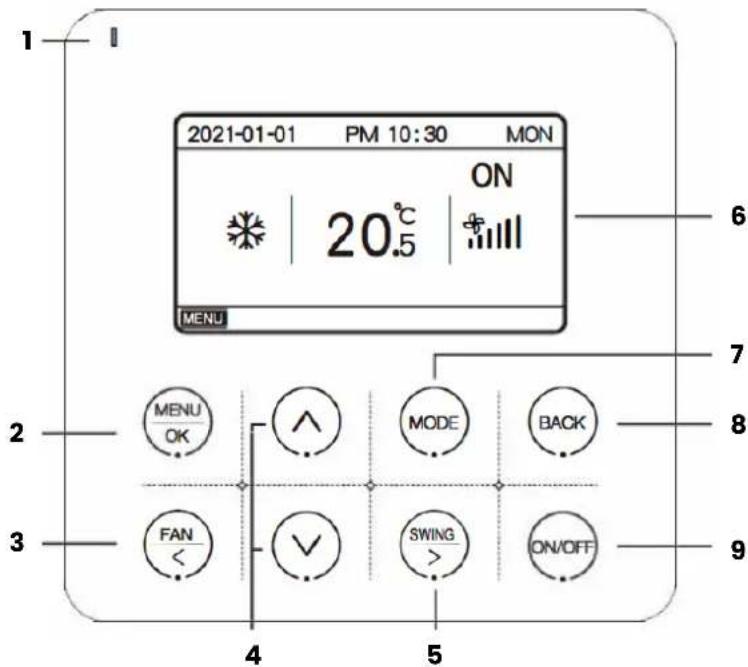
| 1 Indicator light |
| 2 Button to select MENU and OK |
| 3 Fan / Left |
| 4 UP / DOWN buttons |
| 5 Swing / Right |
| 6 LCD display |
| 7 Button to select MODE |
| 8 Back button |
| 9 On / Off |
Note: The product has touch buttons. To ensure the validity of the operation, touch the centre of each button.
Installation
- Turn off the power supply to the indoor unit.
- As shown in Fig.1, use a flathead screwdriver to pry the bottom slot of the thermostat slightly (too much force will damage the circuit board), pry it rotationally to open the back cover.
- As shown in Fig.2, fix the 4 * 20mm screws supplied together with the back cover on the case, then pass the lead wires through the back cover.
- Connect the power supply wiring from the box inside the wall to the connection terminal (check for short circuits).
- After connecting the connection cable to the main controller LCAC as shown in Fig. 4, install the main part of the controller according to the following steps:
1) Push the upper part of the main body into the clip.
2) Use the force of the inclined upper part to install the lower part of the main body (horizontal installation is prohibited, as it is very likely to damage the slot of the structure).
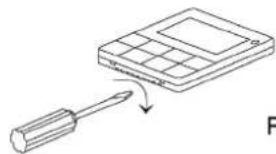
natural_image
Simple line drawing of a screwdriver interacting with a grid device (no text or symbols)Fig.1
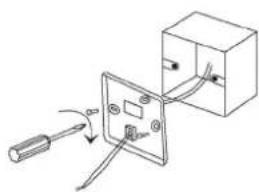
natural_image
Simple line drawing of a switch connected to an electrical outlet (no text or symbols)Fig.2
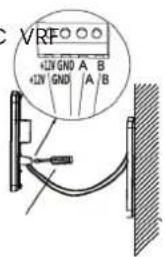
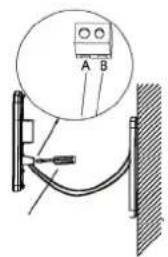
Fig.3
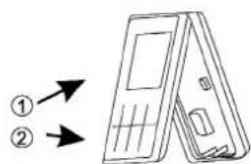
Fig.4
Note: This manual presents the functions of all remote controls. If you press a button without any reaction, the air conditioner you have purchased may not have this function.
Technical specifications
• Supply voltage range: DC 12V;
- Mounting hole spacing: 58–62mm;
- Button: Touch button;
• Humidity: RH20%-RH90%;
• Maximum length of communication line: 1000m;
• Dimensions (W*H*D): 120*120*20mm;
• Temperature setting: 16^ C– 32^ C
 | Cooling mode Fan spe |  |  | ||
 | Heating mode Oscillat |  | er limiter |  | |
 | Dehumidifier Sleep mo |  | er |  | |
 | Fan Anti-allergen |  |  | ||
 | Water heating iClean ( |  | k |  | |
 | Auto mode ECO Mod |  |  |
- Power [On/Off].
Press the [ON/OFF] key to turn the unit on and off.
- Mode Setting
When the unit is in operation, press [MODE/OK Key], and the operation mode will change according to the following order:

flowchart
graph LR
    A["AUTO"] --> B["COOL"]
    B --> C["DRY"]
    C --> D["FAN"]
    D --> E["HEAT"]
    E --> F["Hot water heating"]
    F --> G["AUTO"]
The initial setting temperature for each mode is 24 °C, and there is no automatic temperature and fan setting in FAN mode.
This is only an example, please refer to the actual interfaces shown as final.
- Temperature setting
When the unit is in operation, press "UP" or "DOWN" to increase or decrease the setting temperature by 0.5°C OR 1°C.
- Fan Adjustment
When the unit is operating, press the [FAN/LEFT] key to change the fan speed in the following order:
4.Fan speed
Auto-->Low-->Medium-->High-->Super-high-->Auto.
6 fan speeds:
Auto-->LOW-->Med-Low-->Medium-->Med-High-->High-->Super-high-->Auto
Only Low is available in DRY mode, and there is no Auto setting in FAN mode.
5. Swing Adjustment
When the unit is in operation, press the [SWING/RIGHT] key to enter or cancel the up and down swing. up and down swing.
At the time of starting up and down swing, the swing icon will light up. When it stops, the icon will disappear.
6. Setting functions
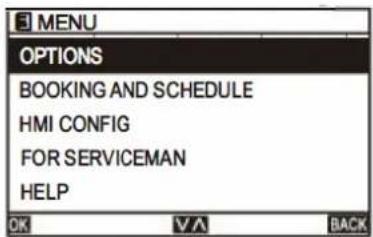
On the home screen, press [MENU/OK] to enter the menu page.
Switch to different submenus by pressing "UP" or "DOWN".
6.1 OPTIONS
6.1.1 SLEEP MODE
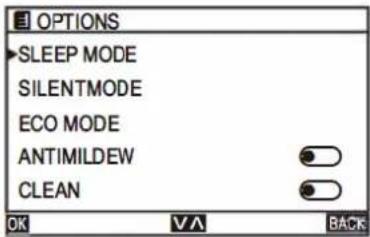
On the MENU page, select OPTIONS and press the [MENU/OK Key] to enter the OPTIONS page.
Switch to the different submenus by pressing "UP" or "DOWN".
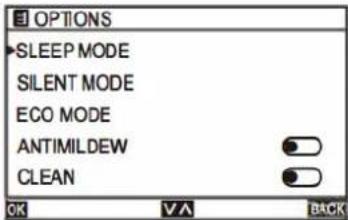
On the OPTIONS page, select SLEEP and press the [MENU/OK] key to enter the SLEEP page.
Switch to the different submenus by pressing "UP" or "DOWN".
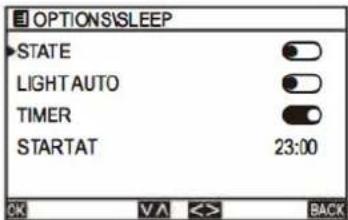
Select STATE and press the "<"or"> " key to activate/deactivate.
Select LIGHT AUTO and press " <"or"> " to activate/deactivate.
Select TIMER and press the "< "or" > "buttons to activate/deactivate.
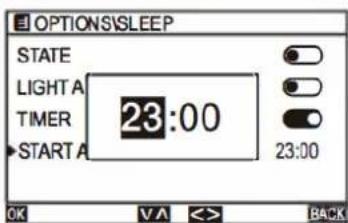
Select START AT and press the [MENU/OK] key to start setting the time. Press the" < "or" > " button to select hour/minute and press the "UP" or "DOWN" button to set the clock.
6.1.2 SILENT mode
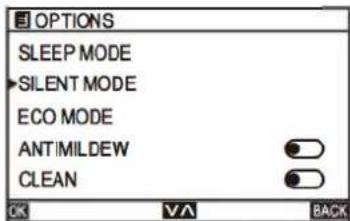
On the OPTIONS page, select SILENT and press the [MENU/OK] key to enter the SILENT page.
Switch to the different submenus by pressing "UP" or "DOWN".
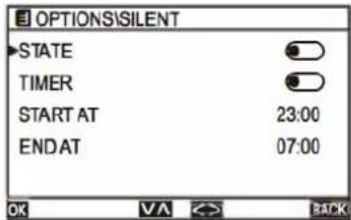
On the SILENT page, select ESTATE and press" < "or " " > " buttons to activate/deactivate.
On the SILENT page, select TIMER and press the" < "or " " > " key to activate/deactivate.
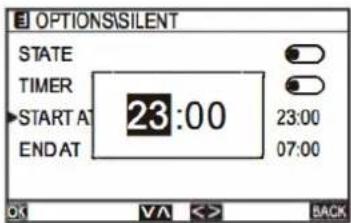
On the SILENT page, select START AT and press the [MENU/OK key] to set the start time. On the SILENT page, select END AT and press the [MENU/OK key] to set the end time. Press the "< "or " >" key to select hour/minute and press the "UP "or "DOWN" key to set the clock.
6.1.3 Modo ECO
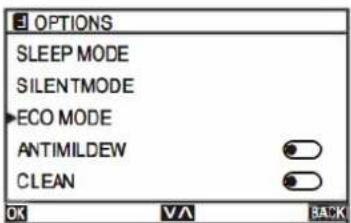
On the OPTIONS page, select ECO and press the [MENU/OK key I to enter the ECO page. Switch to the different submenus by pressing "UP" or "DOWN".
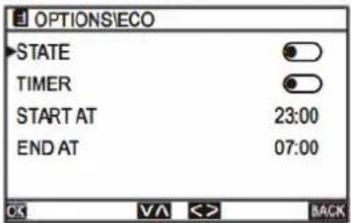
On the ECO page, select ESTATE and press "< "or " >" to activate/deactivate. On the ECO page, select TIMER and press "< "or " " >" to activate/deactivate.
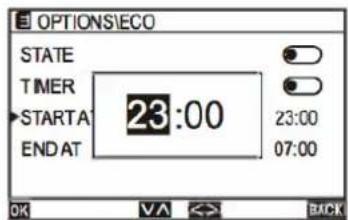
On the ECO page, select START AT and press the [MENU/OK key] to set the start time.
On the ECO page, select END AT and press [MENU/OK key] to set the end time Press" < "or " > " button to select hour/minute and press "UP " or "DOWN" button to set the clock.
6.1.3 ANTIMILDEW Mode
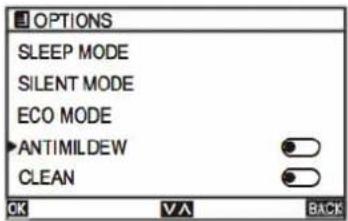
On the OPTIONS page, select ANTI-MILDEW (anti-allergen) and press "<" or ">" button to enable/disable.
6.1.3 Clean Mode
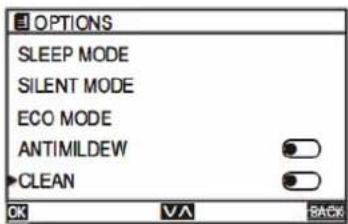
On the OPTIONS page, select CLEAN and press "<" or " > " to activate/deactivate.
6.1.6 Auto Reload
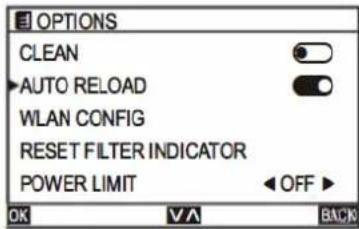
On the OPTIONS page, select AUTO RELOAD and press "<"or ">" to activate/deactivate. enable/disable.
On the OPTIONS page, select WLAN SETUP and press the [MENU/OK] key. Press "<" or ">" to select YES/NO.
6.1.7 WLAN CONNECT
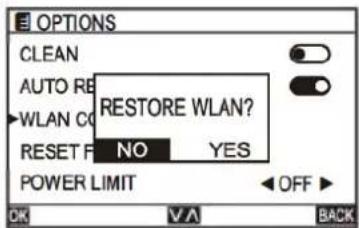
If the indoor unit is not connected to the WLAN module, a message as shown in the figure will appear.
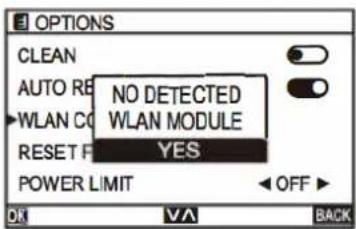
If the WLAN Module is connected correctly, the "WiFi Icon" will appear on the home page.
6.1.8 Reset filter
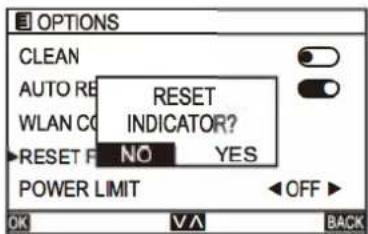
When the "Filter Icon" appears, select RESET FILTER INDICATOR on the OPTIONS page and press the [MENU/OK Key] to reset the indicator.
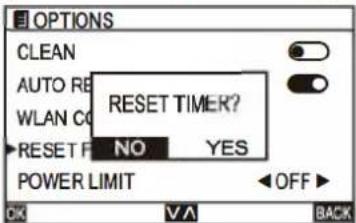
When the "Filter Icon" disappears, select RESET FILTER INDICATOR on the OPTIONS page and press the [MENU/OK Key] to reset the timer. reset the timer.
6.1.9 Power limit
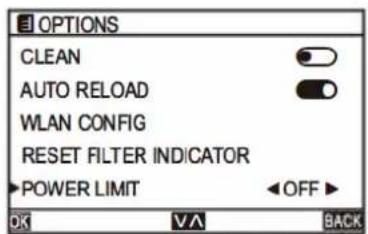
On the OPTIONS page, select POWER LIMIT and press the "<"or"> " key to select the different level according to the following burn:
6.2.1 Schedule temperature
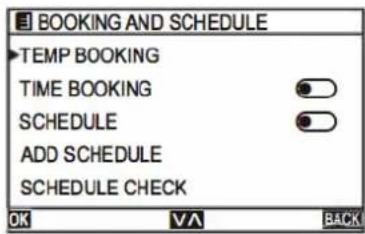
On the MENU page, select BOOKING AND SCHEDULE and press the [MENU/OK] key to enter the BOOKING AND SCHEDULE page.
Switch to another submenu by pressing "UP" or "DOWN".
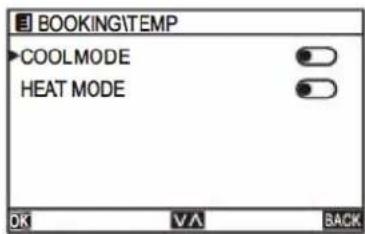
Switch to another submenu by pressing "UP" or "DOWN".
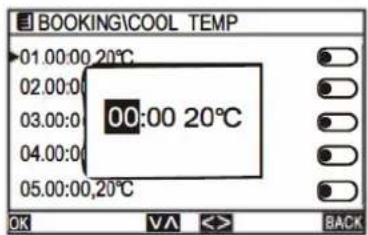
In the TEMP BOOKING page, select COOL MODE and press the [MENU/OK] key to enter the COOL MODE/HEAT MODE page.
Press the "< "or "> " keys to set the temperature and the timer time.
6.2.2 Time booking
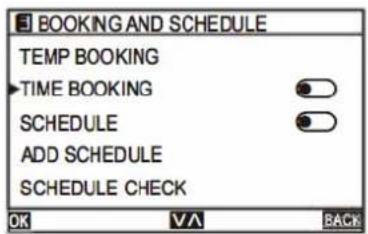
On the BOOKING AND SCHEDULE page, select TIME BOOKING and press the [MENU/OK] key to enter the TIME BOOKING page. Change to another submenu by pressing "UP" or "DOWN".
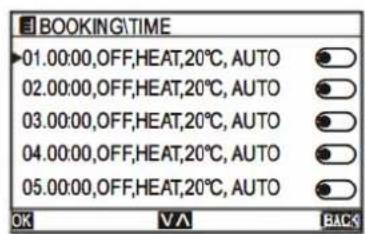
On the TIME BOOKING page, select any one and press the [MENU/OK] key to enter the SETUP page.
Switch to another submenu by pressing "UP" or "DOWN".
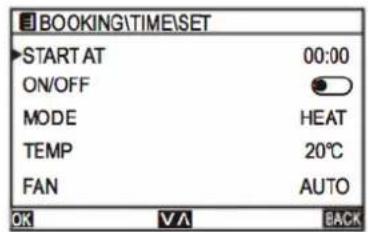
On the SETUP page, select START A and press the [MENU/OK] key to start setting the time. Press "<" or "> " to select hour/minute, and press "UP" or "DOWN" to set the clock.
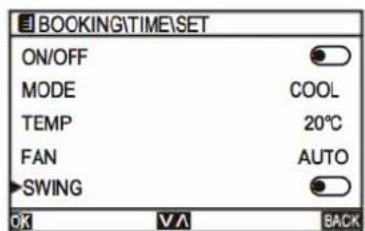
Select ON/OFF and press" <"or " >" buttons to turn on/off the indoor unit.
Select MODE and press " < " or " >" buttons to select the operation mode of the indoor unit.
Select TEMP and press " < " or " >" buttons to adjust the indoor unit temperature.
Select FAN and press " < " or " > " button to adjust the fan speed of the indoor unit.
Select SWING and press the" < "or " > " button to adjust the indoor unit's oscillation.
6.2.3 Schedule
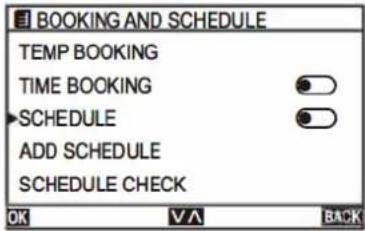
On the BOOKING AND SCHEDULE page, select SCHEDULE and press the [MENU/OK Key] to enter the SCHEDULE page.
Switch to the different submenus by pressing "UP" or "DOWN".
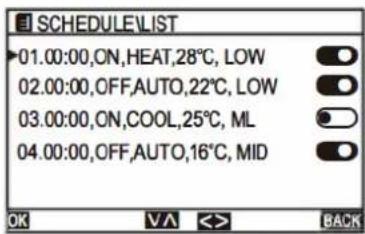
In the SCHEDULE page, select any one and press the [MENU/OK key] to enter the LIST page.
Switch to another submenu by pressing "UP" or "DOWN".
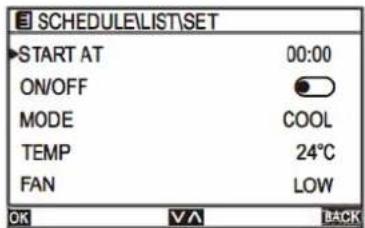
On the LIST page, select any and press the [MENU/OK key] to enter the SET page. Press the "<" or "> " key to select hour/minute and press the "UP" or "DOWN" key to set the clock.
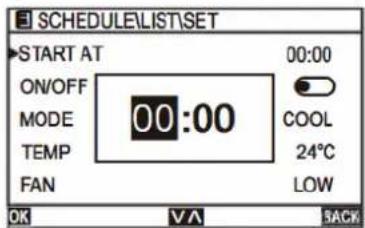
On the SET page, select START ON and press the [MENU/OK key] to start setting the time. Press the "< "or " > "button to select the hour/minute and press the "UP" or "DOWN" button to set the clock.
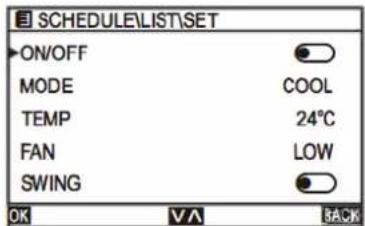
Select ON/OFF and press" < "or " > " buttons to turn on/off the indoor unit. Select MODE and press " < "or " > " button to select the operation mode of the indoor unit to select the operation mode of the indoor unit to select the operation mode of the indoor unit to select the operation mode of the indoor unit.
operation mode of the indoor unit.
Select TEMP and press the "< "or " > " buttons to set the indoor unit temperature.
Select FAN and press " < " or " > " buttons to adjust the fan speed of the in-door unit.
Select ROTATION and press the "< "or " >" buttons to adjust the indoor unit's oscillation.
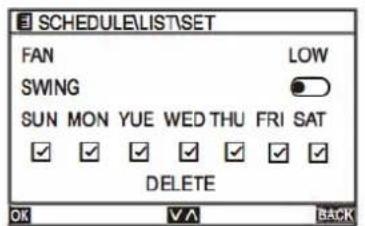
Select WEEK and press the [MENU/OK key] to select. "Check icon" means valid.
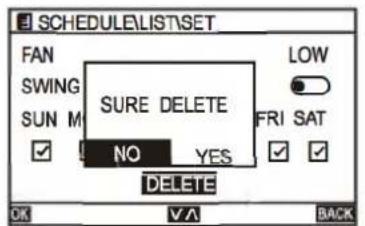
Select CLEAR and press the [MENU/OK key], the following indications will appear.
Press the" < "or" > "keys to select YES/NO.
6.2.4 Add schedule
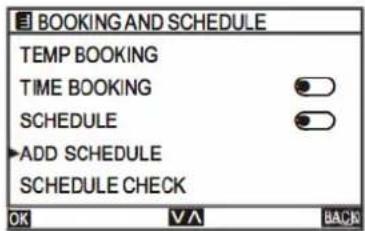
On the BOOKING AND SCHEDULE page, select ADD SCHEDULE and press the [MENU/OK Key] to enter the ADD SCHEDULE page.
Switch to the different submenus by pressing "UP" or "DOWN".
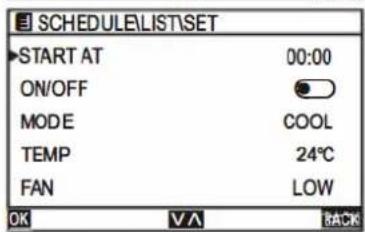
The setting method is the same as the SCHEDULE setting method.
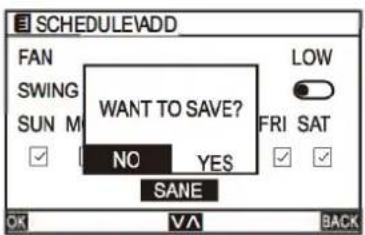
Once the settings have been completed, select SAVE by pressing the "UP" or "DOWN" key and press the [MENU/OK key], the following prompts will appear. If you select YES, the setting will be valid, otherwise it will have no effect.
6.2.5 Schedule check
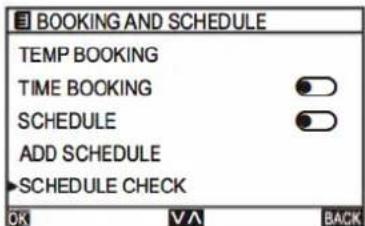
On the BOOKING ANO SCHEDULE page, select SCHEDULE CHECK and press the [MENU/OK Key] to enter the [MENU/OK Key].
[MENU/OK] key to enter the SCHEDULE CHECK page.
Switch to another submenu by pressing "UP" or "DOWN".
![SCHEDULE\CHECK [SUNI] 01.00:00,ON,HEAT,28°C, LOW 02.00:00,OFF,AUTO,22°C, LOW](/content/2026/06/1182211/images/2a4779a85d6d91712fece1179fa3738db3e3d588ff800c022fa48270f5c7e954.jpg)
On the SCHEDULE CHECK page, change the weekly programme by pressing "< "or" >".
The weekly programme is displayed in the title bar, and the page is displayed according to the content of the programme setting.
6.2.6 Exceptional schedule
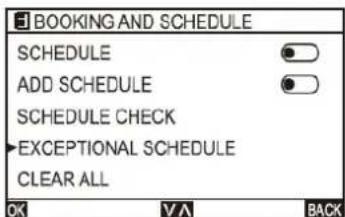
On the BOOKING AND SCHEDULE page, select EXCEPTIONAL and press the [MENU/OK key] to enter the EXCEPTIONAL page.
Switch to another submenu by pressing "UP" or "DOWN".
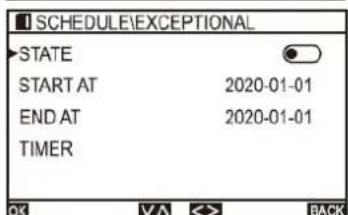
On the EXCEPTIONAL page, select ESTATE and press " < " or " > " to activate/deactivate.
On the EXCEPTIONAL page, select START A and press the [MENU/OK Key] to set the start time.
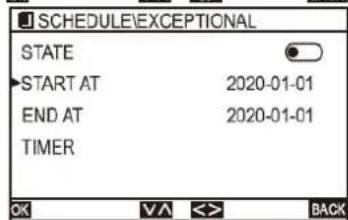
On the EXCEPTIONAL page, select END A and press the [MENU/OK Key] to set the end time.
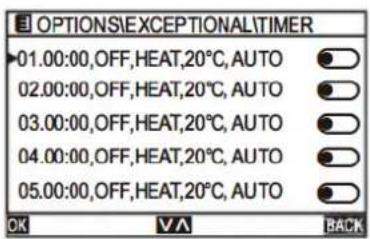
Press "or" >" to select the year/month/day and press "UP" or "DOWN" to adjust the date.
The setting method is the same as for SCHEDULE setting.
6.2.7 Borrar todo
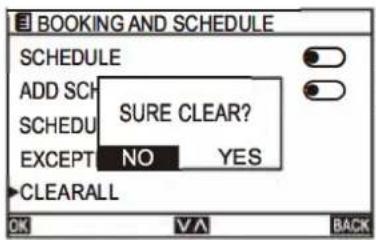
On the BOOKING ANO SCHEDULE page, select CLEAR ALL and press the [MENU/OK key], the following indications will appear.
Press" < "or" > "keys to select YES/NO.
6.3 Config HMI
6.3.1 Clock
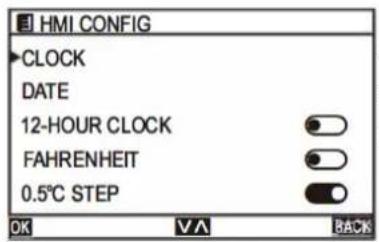
On the MENU page, select HMI CONFIG and press the [MENU/OK key] to enter the HMI CONFIG page.
Switch to the different submenus by pressing "UP" or "DOWN".
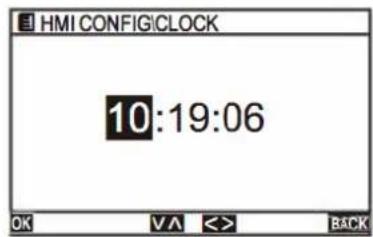
On the HMI CONFIG page, select CLOCK and press the [MENU/OK key] to set the time. Press the "<"or ">keys to select hour/minute/second, and press the "UP" or "DOWN" keys to set the clock.
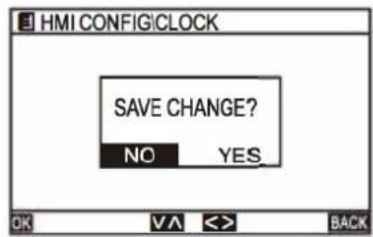
After changing the clock, press the [MENU/OK key], the following indications will appear.
Press the "<" or "> " keys to select YES/NO.
6.3.2 Date
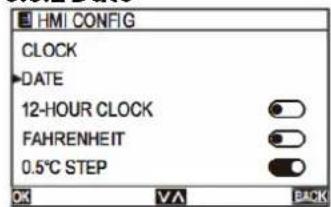
On the HMI CONFIG page, select DATE and press the [MENU/OK key] to enter the DATE page.
Change to another submenu by pressing "UP" or "DOWN".
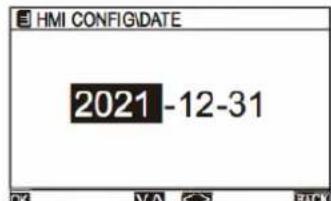
In the DATE page, press the "<"or " >" key to select the year/month/day and press the "UP" or "DOWN" key to set the date.
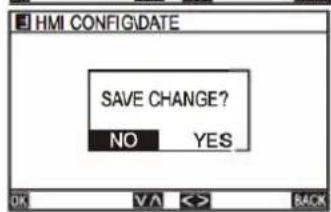
Once the date has been modified, press the [MENU/OK key], the following indications will appear.
Press the "<" or "> " key to select YES/NO.
6.3.3 12 Hour clock
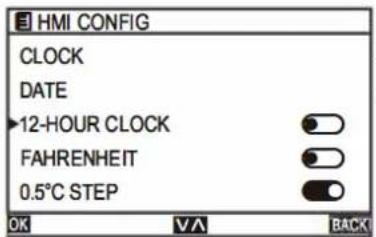
On the HMI CONFIG page, select 12-HOUR CLOCK and press " < " or " >" to activate/deactivate.
6.3.4 Farenheit
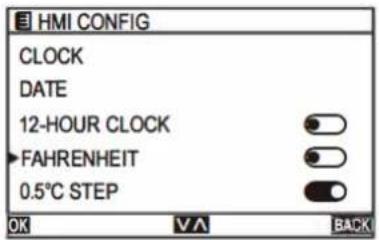
On the HMI CONFIG page, select FAHRENHEIT and press "<." or "> " to activate/deactivate.
6.3.5 0.5°C Step
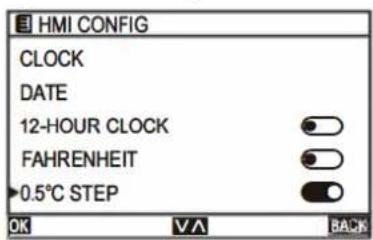
On the HMI CONFIG page, select 0.5°C STEP and press "<." or "> " to activate/deactivate. to activate/deactivate.
6.3.6 Keep light
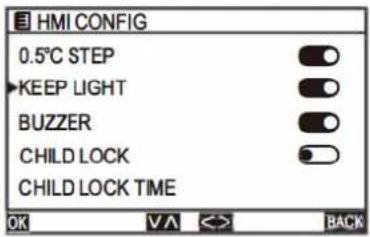
On the HMI CONFIG page, select KEEP LIGHT and press "<." or "> " to activate/deactivate.
6.3.7 Buzzer
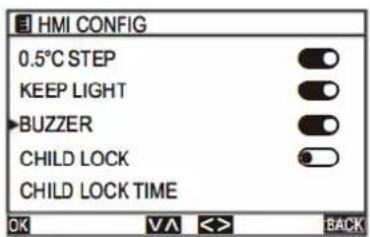
On the HMI CONFIG page, select BUZZER and press "< "or " > " to activate/deactivate.
6.3.8 Child lock
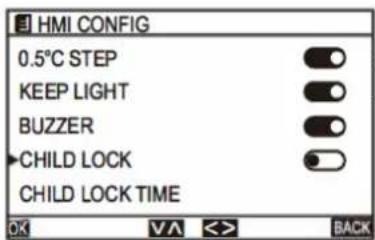
On the HMI CONFIG page, select CHILD LOCK and press "< "or " " >" to activate/deactivate.
6.3.9 Child lock time
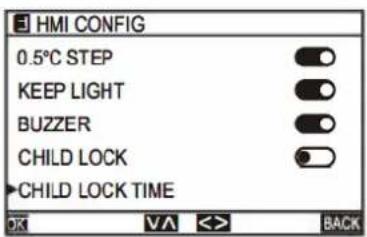
On the HMI CONFIG page, select CHILD LOCK TIME and press "< "or" > " to set the time. The time range is 10-120s (default 60s).
6.4 Access confirmation
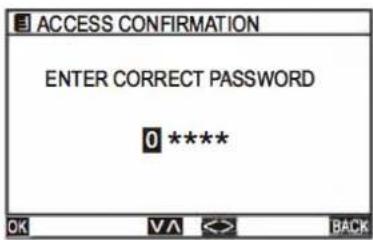
When you enter this mode, you will be prompted for a password, which is exclusive for service.
6.5 Help
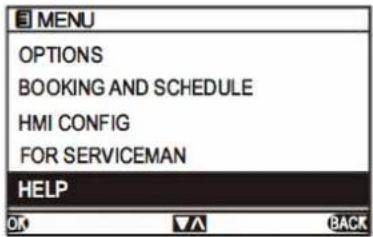
On the MENU page, select HELP and press the [MENU/OK Key] to enter the HELP page.
Whenever there is a problem with the appliance, check if you can solve it by following the tables below. If the problem persists, contact customer service.
Note: Any electrical repairs to this product must comply with local, state, and federal laws. Please contact the Technical Support Center if you have any questions before performing any of the following before performing any of the above steps. Always disconnect the unit from the power supply when opening the unit.
| DESCRIPTION POSSIBLE CAUSE SOLUTION | ||
| Poor cooling • The set temperature may be higherthan the room temperature.Indoor or outdoor unit heat exchan-ger is dirty.The filter is dirty.The air inlet or outlet of either unit is blocked.Doors and windows are openDirect sunlight on either unitToo many heat sources in the room (people, computers, electronics, etc.).Low refrigerant level due to leakage or prolonged use.SILENCE function is activated (optio-nal function). | Reduce the set temperatureClean the affected heat exchangerRemove the filter and clean it according to the instructions.Turn the unit off, remove the obstruction and turn the unit back on.Make sure all doors and windows are clo-sed while the unit is operating.Close windows and curtains during pe-riods of high heat or intense sunshine.Reduce the number of heat sourcesCheck for leaks, reseal if necessary and refill with refrigerant.The SILENCE function may reduce the performance of the product by reducing the frequency of operation. Deactivate the SILENCE function. | |
| Unit does not work • Power failureThe power supply is disconnectedFuse is blown.Remote control batteries are ex-haustedThe 3-minute protection of the unit has been activated.Timer activated | Wait for the power to be restored.Turn on the powerReplace the fuseReplace the batteriesWait three minutes after restarting the unit.Turn off the timer | |
| DESCRIPCIÓN POSIBLE CAUSA SOLUCIÓN | ||
| The unit switches on and off frequently. | There is too much or too little refrigerant in the system.Incompressible gas or moisture has entered the system.Compressor is broken.Voltage is too high or too low | Check for leaks and recharge the system with refrigerant.Evacuate and recharge the system with refrigerant.Replace compressorInstall a manostat to regulate the voltage |
| Poor heating. • The outside temperature | ure is extremely low.Cold air entering through doors and windowsLow refrigerant level due to leakage or prolonged use. | Use an auxiliary heating device.Make sure all doors and windows are closed during use.Check for leaks, reseal if necessary and refill with refrigerant.. |
| The indicator lights are flashing. | The unit can either stop operation or continue to operate safely. If the indicator lights continue to flash or error codes appear, wait about 10 minutes. The problem may resolve itself.If it does not, turn the power off and then on again. Turn the unit back on.If the problem persists, disconnect the power and contact the nearest customer service centre. | |
| The error codeappears and starts withthe following letters on thedisplay of the indoor unitindoor unit:-E(x), P(x), F(x)-EH(xx), EL(xx), EC(xx)-PH(xx), PL(xx), PC(xx) | ||
Error codes on variable speed models
Once the indoor and outdoor units have been turned off due to a fault, the error code will be displayed on the remote controller. In case the protection system is normal, no fault code will be displayed on the indoor unit.
no fault code will be displayed on the indoor unit. Among other things, the remote controller does not send warnings automatically, so it is necessary to press the CHECK button to display the corresponding error codes.corresponding fault codes. The remote control displays the fault codes directly.
Once the faults have been cleared, the indication on the display will disappear automatically.
| ERROR CODE | DESCRIPTION POSSIBLE CAUSE | |
| A1 | Indoor unit room temperature sensor failureDamage to the indoor unit's room temperature sensor.Bad contact of the room temperature sensor in the indoor unit.Damage to the wiring of the indoor unit's room temperature sensor.Damage to the base plate of the indoor unit. | |
| A2 | Indoor evaporator core temperature sensor failureDamage to the indoor unit's temperature sensor.Bad contact of the temperature sensor in the indoor unit.Damage to the indoor unit temperature sensor wiring.Damage to the indoor unit's base plate. | |
| A3 | Indoor unit liquid pipe temperature sensor failureDamage to the indoor unit's liquid pipe temperature sensor.Bad contact of the liquid pipe temperature sensor in the indoor unit.Damage to the wiring of the liquid pipe temperature sensor in the indoor unit.Damage to the main base plate of the indoor unit.Damage to the gas pipe temperature sensor of the indoor unit. | |
| A4 | Failure of indoor unit gas pipe temperature sensor failureDamage to the gas pipe temperature sensor of the indoor unit.Bad contact of the gas pipe temperature sensor in the indoor unit.Damage to the wiring of the indoor unit's gas pipe temperature sensor.Damage to the base plate of the indoor unit. | |
| A5 | Failure during draining. • Switch is disconnected or wiring is damaged.Wrong model parameter settingDrain plugPump damage | |
| A6 | Indoor unit fan motor failure • Low voltagePoor wiringDamage to the base plate of the indoor unitDamage to the motor | |
| A8 | Failure of EEPROM module of indoor unitThe motherboard of the indoor unit is broken.EEPROM module is broken. | |
| CÓDIGO DE ERROR | DESCRIPCIÓN POSIBLE CAUSA | |
| A9 | Communication error between outdoor unit and indoor unit. | • Damage to the base plate of the indoor unit• Damage to the base plate of the outdoor unit• Poor wiring |
| AA | Communication error between the remote controller and the main board of the indoor unit. | • Poor wiring.• Damage to the remote control• Damage to the base plate of the indoor unit. |
| H1 | Pressure gauge failure • System piping | blockage• Pressure gauge failure |
| H4 | Fault in the low pressure gauge. • Lack of coolant | • Shut-off valve not opened |
| C1 | Failure in the low pressure gauge. • Damage to the outdoor unit's room temperature sensor.• Bad contact of the outdoor unit's room temperature sensor.• Damage to the wiring of the outdoor unit's room temperature sensor.• Damage to the outdoor unit's base plate. | |
| C2 | Outdoor unit room temperature sensor failure. | • Damage of defrost temperature sensor in outdoor unit• Bad contact of the outdoor unit defrost temperature sensor.• Damage to the wiring of the outdoor unit defrost temperature sensor.• Damage to the base plate of the outdoor unit. |
| C3 | Outdoor unit defrosting temperature sensor failure Outdoor unit defrosting temperature sensor failure | • Damage to the discharge temperature sensor of the outdoor unit.• Bad contact of outdoor unit outlet temperature sensor.• Damage to the wiring of the outdoor unit outlet temperature sensor.• Damage to the outdoor unit's base plate. |
| C6 | Failure in the output temperature sensor. | • Damage to the outdoor unit's inlet temperature sensor.• Bad contact of the inlet temperature sensor in the outdoor unit.• Damage to the wiring of the outdoor unit's suction temperature sensor.• Damage to the base plate of the outdoor unit. |
| C8 | Failure in the inlet temperature sensor. | • Damage to the outdoor unit's temperature sensor.• Bad contact of the temperature sensor in the outdoor unit.• Damage to the wiring of the outdoor unit temperature sensor.• Damage to the outdoor unit's base plate. |
| ERROR CODE | DESCRIPTION POSSIBLE CAUSE | |
| J2 | Communication error between outdoor unit and indoor unit. | · Damage to the base plate of the indoor unit· Damage to the base plate of the outdoor unit· Poor wiring |
| J3 | Communication error between the controller PCB and the main PCB of the outdoor unit. | · Damage to the outdoor unit controller PCB.· Damage to the main PCB of the outdoor unit.· Faulty wiring |
| J7 | Failure in the EPROM of the outdoor unit. | · Damage on chip |
| E1 | Four-way valve failure · Damage to the | our-way valve· Damage to the four-way valve spool |
| E3 | High discharge temperature protection | · Lack of coolant· Shut-off valve not opened· Damage to the main PCB of the outdoor unit |
| E8 | Failure of indoor unit high temperature protection in cooling model | · Falta de refrigerante· Válvula de cierre no abierta· Daños en el circuito impreso principal de la unidad exterior |
| FH | Low outlet temperature protection · Det | chment of the temperature sensor· Damage to the main PCB of the outdoor unit |
| 31 | INVERTER module protection failure · INVERTER module protection failure | |
| 32 | Compressor drive hardware protection | · Damage to the EE chip on the controller board |
| 33 | Module software protection · Supply voltage | · Supply voltage exceeds limit· Outdoor fan stops at low speed |
| 34 | Outdoor compressor failure · Compressor may not be on | |
| 35 | Electrical overcurrent protection fault | · Excessive unit operating current.· Voltage drops abruptly in operation |
| 36 | Failure in overvoltage or undervoltage protection. | · Excessive input voltage· Lower input voltage |
| 37 | Failure in the modular temperature sensor in the outdoor unit | · Daños en el sensor del módulo IPM del compresor |
| 38 | Compressor power supply failure · Compressor has no power supply | |
| 39 | IPM compressor module sensor damage | · Bad contact between the IPM module of the compressor and the radiator |
| 3H | Outdoor unit fan motor failure · Engine damage | |
| 3C | Power failure in the outdoor unit motor | · Engine reaches high speed |
| 3J | Over voltage on outdoor unit motor. · Low output voltage | |
| 3E | Compressor drive PFC software protection | · Excessive unit operating current.· Voltage drops abruptly in operation |
| ERROR CODE | DESCRIPTION POSSIBLE CAUSE |
| 3F | Compressor drive PFC hardware protection• Damage to PFC circuit components• Damage to reactors |
| 41 | Outdoor DC fan 1PM far-drive protection PCB• Damage to components 1PM of DC fan |
| 99 | Communication error between controller PCB and indoor unit main PCB• Abnormal power supply of fan drive board• Bad contact of the communication line of the fan drive plate• Damage to fan drive plate |
| 9A | Indoor DC fan module temperature protection• Damage to the fan plate |
| 9H | Power failure at indoor unit start up • Damage to the fan motor• High DC motor speed |
| 9C | Indoor unit motor over current protection• Excessive fan motor operating current |
| 9J | Indoor unit motor over voltage and under voltage protection• Excessive input voltage• Lower input voltage |
| 9E | Indoor unit fan 1PM far-drive protection board• Damage to the sensor in the 1PM module of the indoor unit motor |
| 9F | Indoor DC fan EE protection far-drive plate• Damage to the motherboard |
| ERROR CODE | DESCRIP-TION | POSSIBLE CAUSE | POSIBLE CAUSA |
| E0 | Blink 11 times, stop 2 seconds | Refrigerant leakage • Internal compressor protection• System less refrigerant• Reverse failure of the 4-way valve | |
| E1 | Blink 1 time, stop 2 seconds | TA (indoor unit temperature sensor) is abnormal | • Sensor damage• Bad sensor contact |
| E2 | Blink 2 times, stop 2 seconds | TWD (defrosting sensor sensor) is abnormal | • Sensor damage• Bad sensor contact |
| E3 | Blink 3 times, stop 2 seconds | TE(indoor unit coil sensor) is abnormal | • Sensor damage• Bad sensor contact |
| E4 | Blink 4 times, stop 2 seconds | Drainage system failure • Water pump failure• Deterioration of differential switch• Float switch blocked | |
| E5 | Blink 5 times, stop 2 seconds | Communication failure • Communication line sequential error• Bad contact of the communication line | |
| E6 | Blink 6 times, stop 2 seconds | Outdoor protection (phase sequence) | • Power line is out of phase• Power line phase sequence error |
| E7 | Blink 7 times, stop 2 seconds | TL(outdoor condensing temperature sensor) is abnormal | • Sensor damage• Bad sensor contact |
| E8 | Blink 8 times, stop 2 seconds | TP(Discharge temperature sensor) is abnormal | • Sensor damage• Bad sensor contact |
| E9 | Blink 9 times, stop 2 seconds | Low pressure protection. • System with less refrigerant | |
| EA | Blink 10 times, stop 2 seconds | Outdoor protection (Discharge temperature is too high.) | • Action of the external protective device |
| F1 | Blink 5 times, stop 2 seconds | Communication failure between indoor unit and outdoor unit. | • Communication line sequence error• Communication line bad contact |
| F2 | Blink 2 times, stop 2 seconds | Exhaust overtemperature protection. | • Switching failure of the external fan |
| F3 | Blink 3 times, stop 2 seconds | Outdoor fan 1 # is abnormal • Bad connection of the fan connection• Motor damage | |
| F4 | Blink 4 times, stop 2 seconds | Indoor fan is abnormal • Bad connection of the fan connection• Motor damage | |
| F5 | Blink 5 times, stop 2 seconds | Outdoor temperature sensor • Sensor damage• Bad sensor contact | |
| F6 | Flashing 6 times, stop 2 seconds | Compressor over-current protection | • Compressor clogging• Low voltage |
| F7 | Blink 7 times, stop 2 seconds | Abnormal dialling switch • Wrong | dial switch |
| F8 | Blink 8 times, stop 2 seconds | Door power protection • Wiring error | |
| F9 | Blink 9 times, stop 2 seconds | High pressure protection • Condenser clogging• Abnormal operation of the external fan• System clogging |
Note: When the remote control does not receive the correct signals for two consecutive minutes, the unit switches off and displays the corresponding error code. Once communication is re-established.

WARNING! Before servicing or cleaning, the air conditioner must be disconnected from the mains.
Note: The exterior surfaces are susceptible to scratches and abrasions, so please follow the cleaning instructions to achieve the best possible result without damage.
General cleaning
Clean the surface of the device with a soft, damp cloth. Do not use chemical reagents such as alcohol, benzene and petrol, as they may damage the surface of the portable air conditioner.
Cleaning the filters
The filter should be cleaned once every two weeks. If the indoor air quality is poor, it must be washed more frequently or the performance of the appliance will be reduced because the filters may be clogged. Follow the instructions below for cleaning:
Lift the front panel of the indoor unit.
First press the tab on the end of the filter to loosen the clamp, lift it up and then pull it out.
Now pull out the filter.
If your filter has a small air freshener filter, unclip it from the larger filter.
Clean this air freshener filter with a hand hoover.
Clean the large filter with warm soapy water. Be sure to use a mild detergent.
Rinse the filter with fresh water, then squeeze out excess water.
Dry it in a cool, dry place and avoid exposing it to direct sunlight.
When it is dry, put the mbient filter back into the larger filter, then insert it back into the indoor unit.
Close the front panel of the indoor unit.
Note: Do not wash the filter at more than 40^ C or with abrasive and flammable products such as alcohol, gasoline and benzene. The filters should be kept away from heat sources as they may become deformed.
Never switch on the appliance without the filters correctly installed.
Do not touch the air freshener filter (Plasma) for at least 10 minutes after switching off the unit.
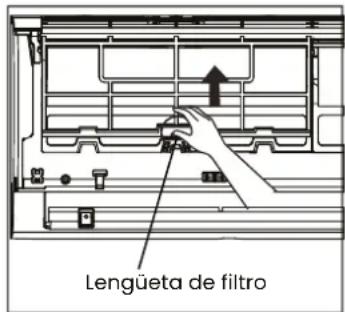
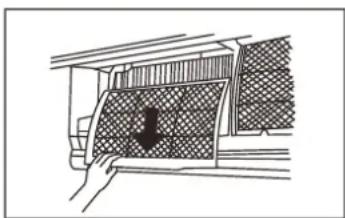
natural_image
Diagram of a hand holding a grid-patterned panel with a black arrow pointing downward (no text or symbols)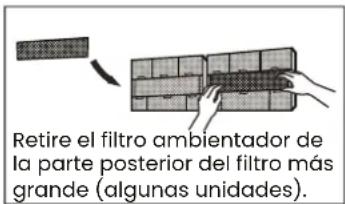
natural_image
Diagram of a bathroom sink with faucet and toothed surface (no text or symbols)- Before changing the filter or cleaning, switch off the unit and disconnect it from the mains.
- When removing the filter, do not touch the metal parts of the unit. The sharp edges of the metal may hurt you.
- Do not use water to clean the inside of the indoor unit. This may damage the insulation and cause electric shock.
- Do not expose the filter to direct sunlight when drying. This may shrink the filter.
Air filter cleaning reminder After 240 hours of use, the indoor unit display will flash "CL". This is a reminder to clean the filter. After 15 seconds, the unit will return to its previous display.
To reset the reminder, press the LED button on your remote control 4 times, or press the MANUAL CONTROL button 3 times. If you do not reset the reminder, the "CL" indicator will flash again when you restart the unit.
Air filter replacement reminder After 2,880 hours of use, the indoor unit display will flash "nF". This is a reminder to replace the filter. After 15 seconds, the unit will return to its previous display.
To reset the reminder, press the LED button on your remote control 4 times, or press the MANUAL CONTROL button 3 times. If you do not reset the reminder, the "nF" indicator will flash again when you restart the unit.
Note: Any maintenance and cleaning of the outdoor unit must be performed by an authorized dealer or an authorized service provider. Any repairs to a unit must be carried out by an authorised dealer or authorised service provider.
Maintenance
If you plan not to use your air conditioner for an extended period of time, do the following:
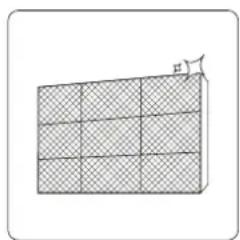
natural_image
Diagram of a 3D rectangular block with grid pattern and a small protrusion labeled 'F' (no text or symbols on the block itself)
natural_image
Simple line drawing of a house with wavy lines inside, enclosed in a rounded square (no text or symbols)natural_image
Diagram of a smartphone internal components (no text or symbols visible)• After long periods of non-use, or before periods of frequent use, do the following:
- Check for damaged cables.
- Clean all filters.
- Check for leaks
- Replace the batteries in the remote control.
- Make sure nothing is blocking the air inlets and outlets.
INFINITON
Ar condicionado CONDUTOS
Seção CONDUCTOS
natural_image
Illustration of a worker installing or adjusting an air conditioner on a lift (no text or symbols visible)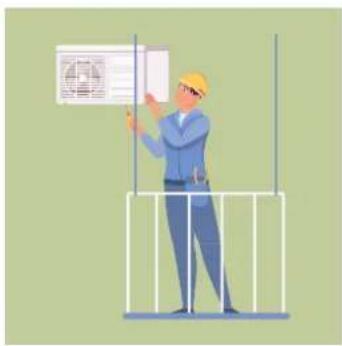
natural_image
Illustration of a worker in a hard hat installing or adjusting a wall-mounted device (no text or symbols visible)natural_image
Illustration of two workers installing a large air conditioner unit with tools and decorative greenery around them (no text or symbols)Índice
Português
natural_image
Three technical line drawings of a micro appliance with internal components, shown from different angles (no text or symbols)Tipo Dutos
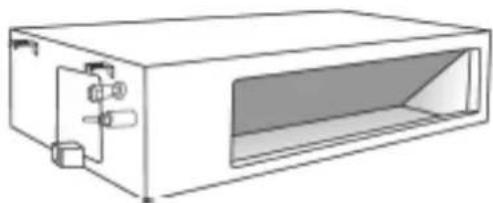
natural_image
Line drawing of a rectangular electronic device with internal components and a recessed opening (no text or symbols)Tipo Piso - Tecto
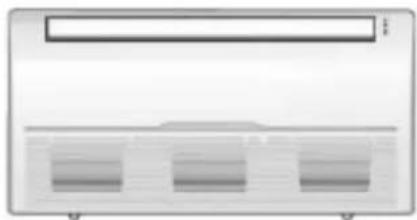
natural_image
Front view of a server rack unit with three ventilation slots (no text or symbols visible)Unidades exteriores
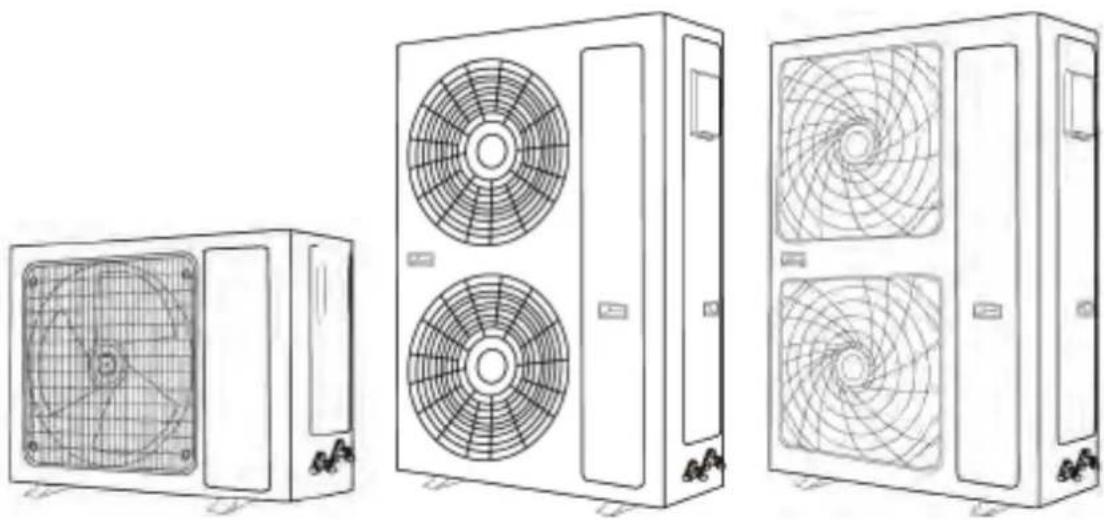
natural_image
Line drawings of three different air conditioning units with fan blades and ventilation patterns (no text or symbols)natural_image
Technical line drawing showing two workers assembling a large fan-shaped panel and a side-view of a cabinet with a coiled cable (no text or symbols)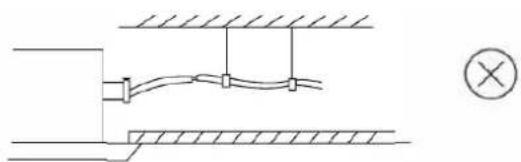
natural_image
Pure electrical circuit lines without any symbolsnatural_image
Two technical line drawings of a device with heat sinks and a slide, showing hand positioning and assembly (no text or symbols)natural_image
Technical line drawing of a mechanical assembly with no visible text or symbols
natural_image
Technical line drawing of a mechanical assembly with no visible text or symbolsnatural_image
Technical line drawing of a mechanical fan or air conditioner unit with dimension labels H and W (no text or symbols on the diagram itself)natural_image
3D mechanical component labeled 'Hebilla' with no other visible text or symbolsnatural_image
3D mechanical component diagram showing a bracket with mounting holes and a central hole, labeled with dimension 'h' (no text or symbols beyond the label)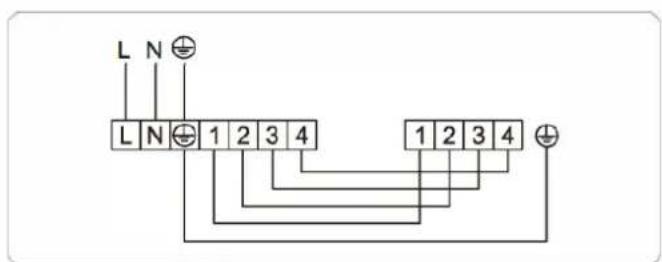
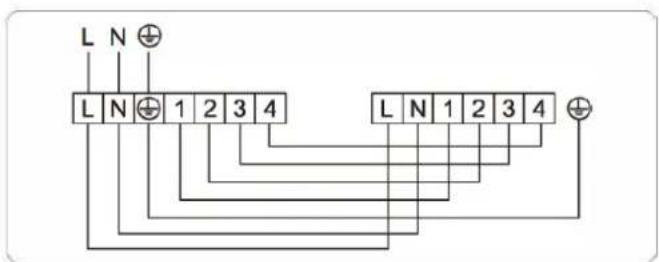
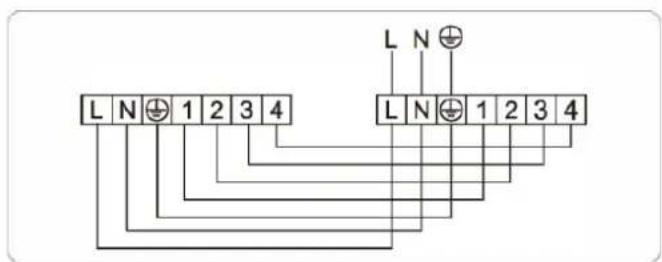
24.000 / 30.000BTU (monofásica)
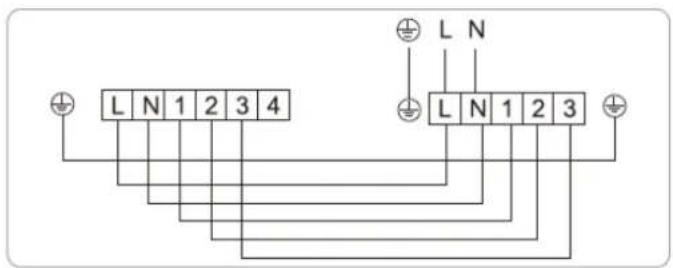
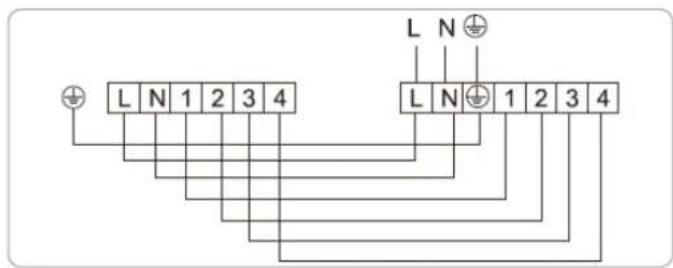
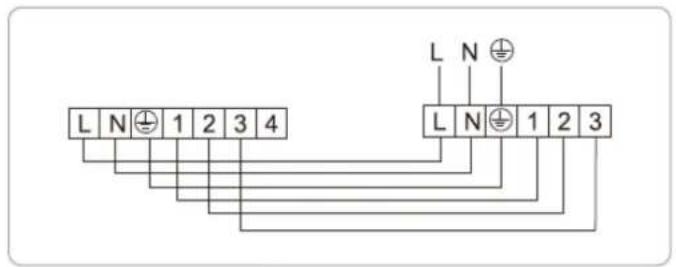
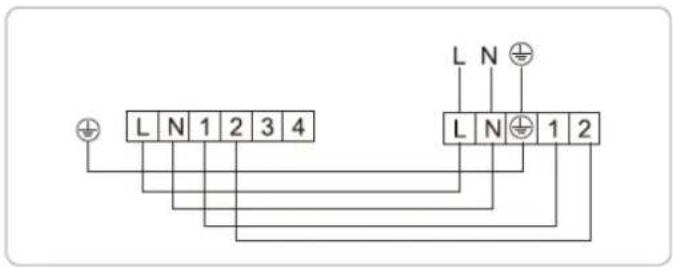
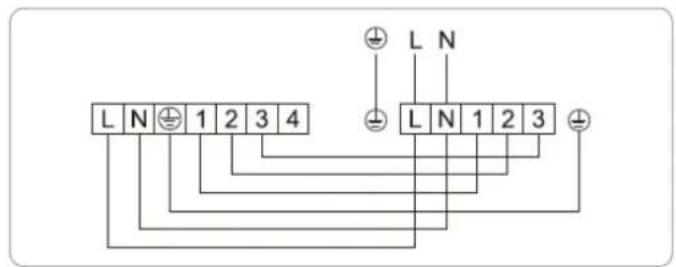
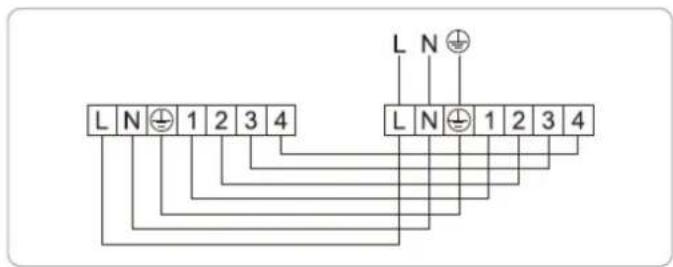
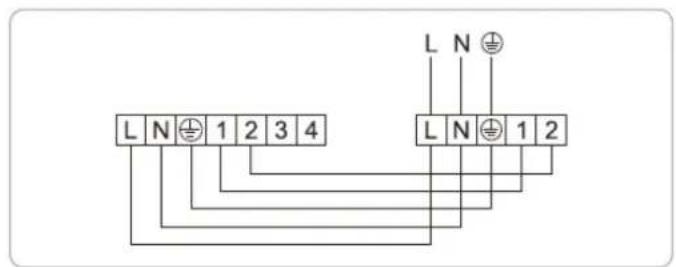

natural_image
Completely blank white image with no visible content, text, or symbols.36.000BTU (monofásica)
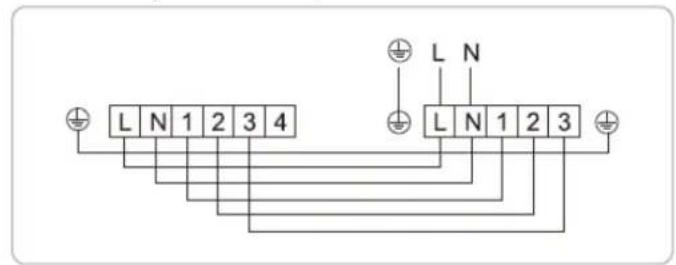
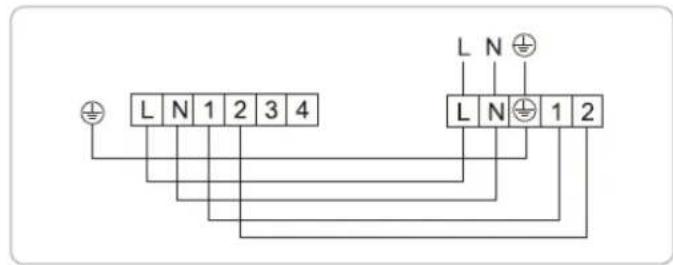
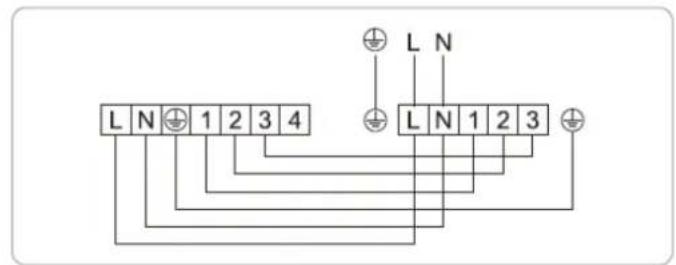
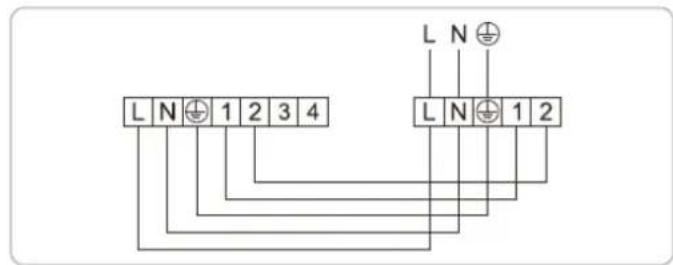
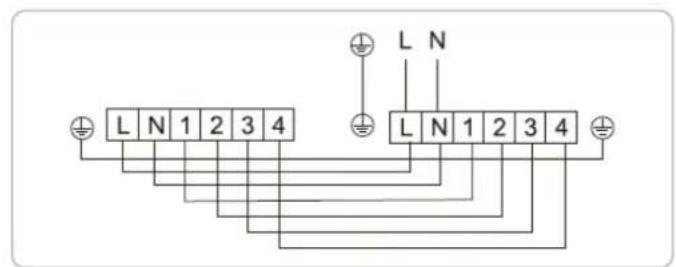
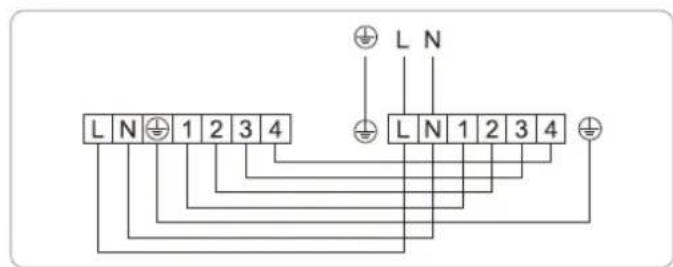
48.000 / 60.000BTU (monofásica)

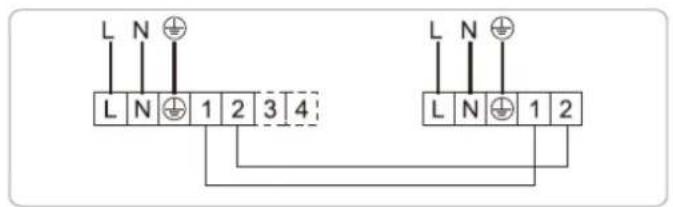
36.000 / 48.000 / 60.000BTU (trifásica)
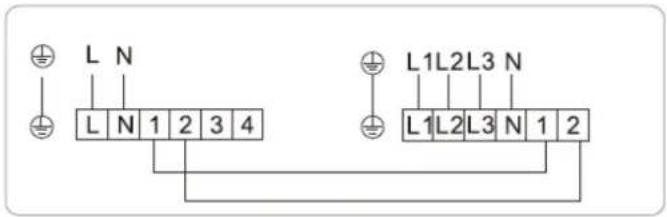
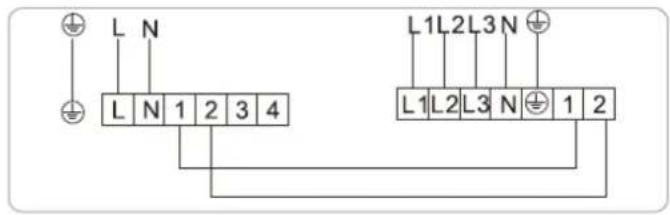
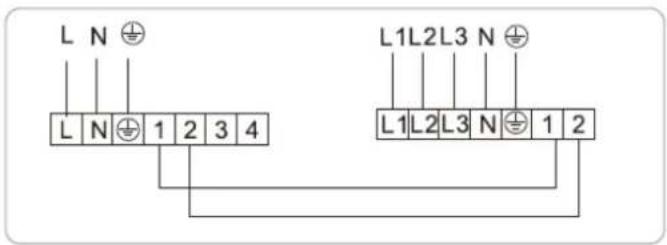
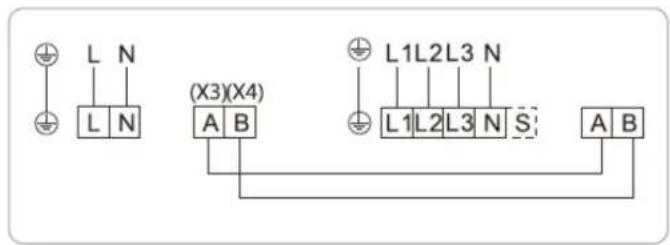
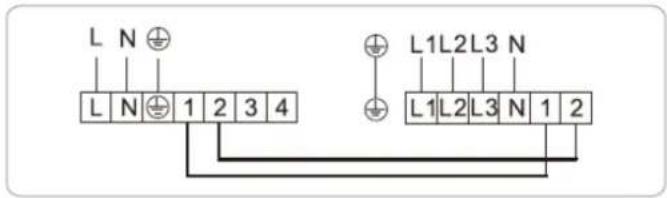
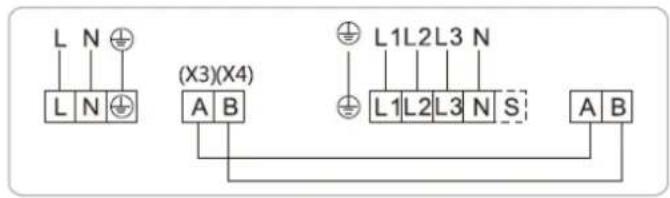
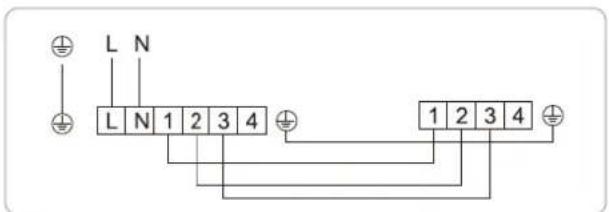
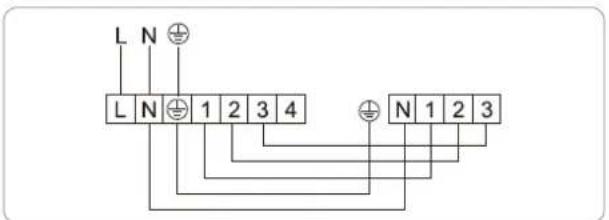
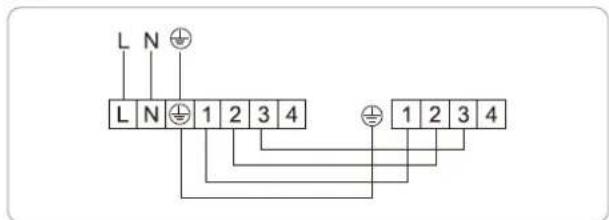
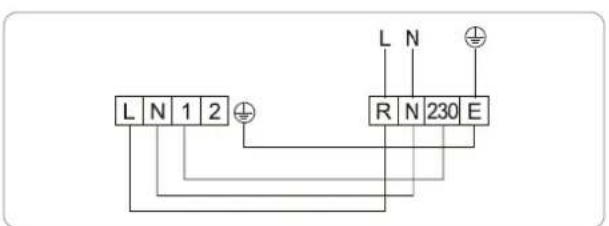
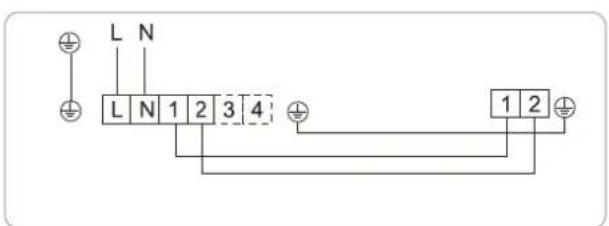
24.000 / 30.000BTU (monofásica)
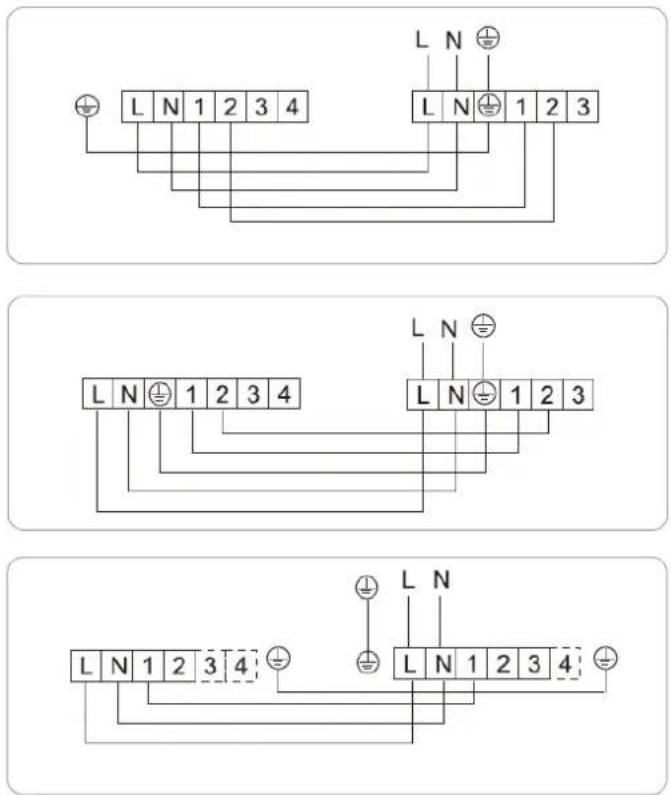
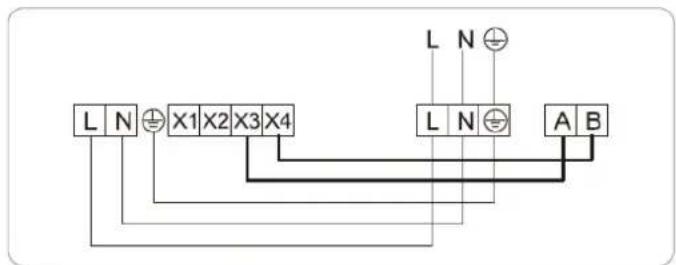
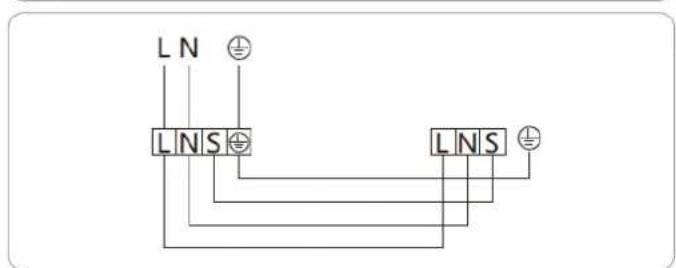
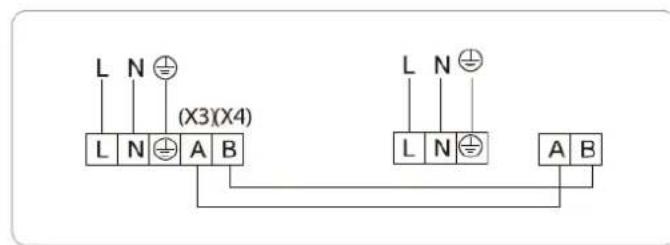
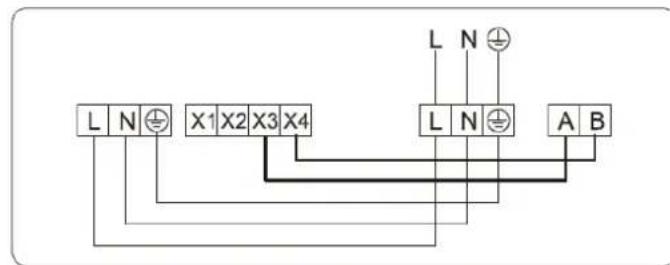
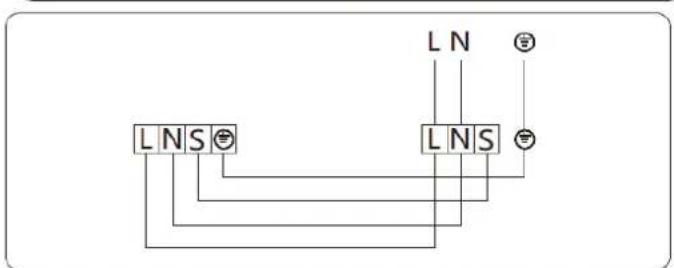
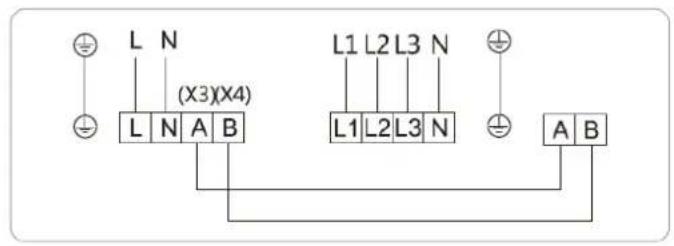
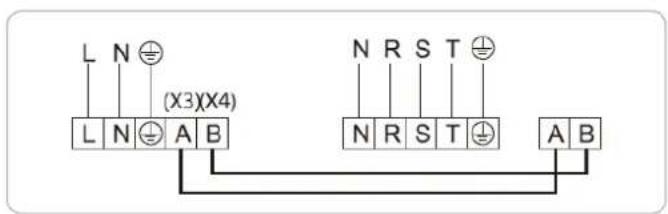
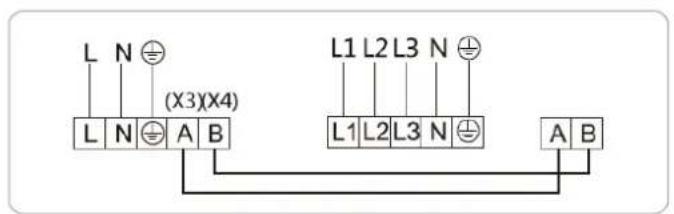
Método de ligação
natural_image
Diagram showing a screwdriver interacting with a device (no text or symbols present)Fig.1
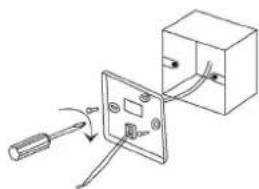
natural_image
Simple line drawing of a cable being inserted into an electrical socket (no text or symbols)Fig.2
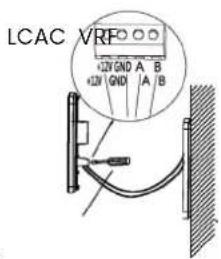
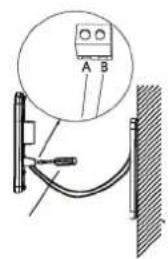
Fig.3
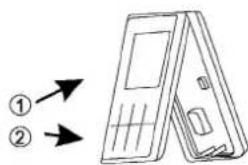
Fig.4
natural_image
Diagram showing a hand pressing down on a patterned panel with a downward arrow (no text or symbols)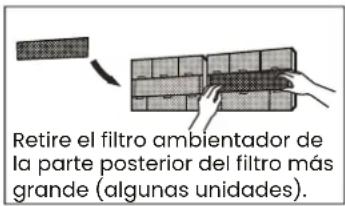
natural_image
Diagram showing a faucet above a grid-patterned rectangular area with a central shaded area and no visible text or symbols.natural_image
Diagram of a 3D grid structure with a small arrow pointing to the top-right corner (no text or symbols)
natural_image
Simple line drawing of a house with wavy lines inside, enclosed in a rounded square frame (no text or symbols)natural_image
Line drawing of a smartphone internal components (no text or symbols)Retire as baterias do controlo remoto
¿Necesitas ayuda?
natural_image
Silhouette icon of a person wearing a headset with a crossed wrench symbol (no text or numbers)
INFINITON