HDCC-02 - Uncategorized Metra - Free user manual and instructions
Find the device manual for free HDCC-02 Metra in PDF.


User questions about HDCC-02 Metra
0 question about this device. Answer the ones you know or ask your own.
Ask a new question about this device
Download the instructions for your Uncategorized in PDF format for free! Find your manual HDCC-02 - Metra and take your electronic device back in hand. On this page are published all the documents necessary for the use of your device. HDCC-02 by Metra.
USER MANUAL HDCC-02 Metra
natural_image
Collection of automotive electrical connector modules including inverter, USB port, and various wiring (no text or symbols visible)INTERFACE FEATURES
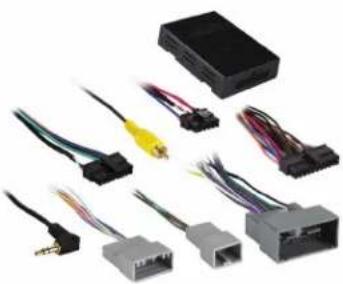
• HDCC-02 interface
- HDCC-02 harness
APPLICATIONS
Honda
Civic 2014-2015
CR-V 2015
Honda LaneWatch Camera Retention 2014-2015
INTERFACE FEATURES
- Provides accessory power (10-amp)
- Provides NAV outputs (parking brake, reverse, speed sense)
• Pre-wired ASWC-1 harness (ASWC-1 sold separately) - Retains the factory backup camera
• Retains the LaneWatch camera - Retains ability to change factory clock and date*
- Retains the factory AUX-IN jack
- Can be used in non-amplified, or amplified models
- Retains balance and fade
- Micro-B USB updatable
* Excluding LX and NAV models
TABLE OF CONTENTS
Connections
- For models without a factory amp ....2
- For models with a factory amp ....3
Installation 4
Programming 4
Extra settings 5
TOOLS & INSTALLATION ACCESSORIES REQUIRED
- Crimping tool and connectors, or solder gun, solder, and heat shrink • Tape • Wire cutter
- Zip ties
Product Info

CONNECTIONS
For models without a factory amp:
From the HDCC-02 harness to the aftermarket radio
Main harness:
- Connect the Black wire to the ground wire.
- Connect the Yellow wire to the battery wire.
- Connect the Red wire to the accessory wire.
For the following (8) connections, cut off the RCA jacks to expose the speaker wire inside.
- Connect the White wire to the left front positive speaker output.
- Connect the White/Black wire to the left front negative speaker output.
- Connect the Gray wire to the right front positive speaker output.
- Connect the Gray/Black wire to the right front negative speaker output.
- Connect the Green wire to the left rear positive speaker output.
- Connect the Green/Black wire to the left rear negative speaker output.
- Connect the Purple wire to the right rear positive speaker output.
- Connect the Purple/Black wire to the right rear negative speaker output.
16-pin harness:
- Connect the Orange/White wire to the illumination wire.
The following (3) wires are for aftermarket multimedia/navigation radios that require these wires:
- Connect the Light Green wire to the parking brake wire (if applicable).
- Connect the Blue/Pink wire to the speed sense wire (if applicable).
- Connect the Green/Purple wire to the reverse wire (if applicable).
- Connect the Yellow RCA jack to the backup camera input.
Note: This RCA jack is used to retain the backup camera as well as the LaneWatch camera.
- Connect the White and Red RCA jacks to the audio AUX-IN jacks (if applicable).
8-pin harness:
- Disregard the White RCA jack, it will not be used in this application.
12-pin pre-wired ASWC-1 harness & 3.5mm jack:
- This harness and 3.5mm jack is to be used along with the optional ASWC-1 (sold separately) to retain steering wheel audio controls. If the ASWC-1 is not being used, disregard this harness. If it will be used, refer to the vehicle specific ASWC-1 instruction from Axxess Interfaces for radio connections and programming. Disregard the harness that comes with the ASWC-1.
- The Gray/Blue wire will only be used in vehicles equipped with Bluetooth. Connect this wire to the Yellow wire in pin-15 from the 32-pin harness in the factory Bluetooth module.
Bluetooth module location:
Civic - Behind glovebox
CR-V - In dash, under radio
Continue to Installation
CONNECTIONS
For models with a factory amp:
From the HDCC-02 harness to the aftermarket radio
Main harness:
- Connect the Black wire to the ground wire.
- Connect the Yellow wire to the battery wire.
- Connect the Red wire to the accessory wire.
- Connect the Blue/White wire to the amp turn-on wire.
- Connect the White RCA jack to the front left RCA output.
- Connect the Gray RCA jack to the front right RCA output.
- Connect the Green RCA jack to the rear left RCA output.
- Connect the Purple RCA jack to the rear right RCA output.
16-pin harness:
- Connect the Orange/White wire to the illumination wire.
The following (3) wires are for aftermarket multimedia/navigation radios that require these wires:
- Connect the Light Green wire to the parking brake wire (if applicable).
- Connect the Blue/Pink wire to the speed sense wire (if applicable).
- Connect the Green/Purple wire to the reverse wire (if applicable).
- Connect the Yellow RCA jack to the backup camera input.
Note: This RCA jack is used to retain the backup camera as well as the LaneWatch camera.
- Connect the White and Red RCA jacks to the audio AUX-IN jacks (if applicable).
8-pin harness:
- Connect the White RCA jack to the subwoofer output jack.
12-pin pre-wired ASWC-1 harness & 3.5mm jack:
- This harness and 3.5mm jack is to be used along with the optional ASWC-1 (sold separately) to retain steering wheel audio controls. If the ASWC-1 is not being used, disregard this harness. If it will be used, refer to the vehicle specific ASWC-1 instruction from Axxess Interfaces for radio connections and programming. Disregard the harness that comes with the ASWC-1.
- The Gray/Blue wire will only be used in vehicles equipped with Bluetooth. Connect this wire to the Yellow wire in pin-15 from the 32-pin harness in the factory Bluetooth module.
Bluetooth module location:
Civic - Behind glovebox
CR-V - In dash, under radio
Continue to Installation
INSTALLATIONPROGRAMMING
- Connect the HDCC-02 harness to the HDCC-02 interface, and then to the wiring harness in the vehicle.
- Turn the key (or push-to-start button) to the ignition position and wait until the radio comes on.
Note: If the radio doesn't come on within 60 seconds, turn the key to the off position, disconnect the interface, check all connections, reconnect the interface, and then try again.
- Turn the key to the off position, and then to the accessory position. Test all functions of the installation for proper operation, before reassembling the dash.
EXTRA SETTINGS
LaneWatch settings:
Note: The LaneWatch button is located on the left side of the steering wheel, on the stalk.
- Press and hold the LaneWatch button for 15 seconds to toggle right turn signal triggering on or off. If on, press and hold the button again for 15 seconds to toggle it off. Likewise if off. The hi-beam indicator will flash 1 time if off; 2 times if on.
Note: Right turn signal triggering is default on.
CAUTION! The following step should only be performed by an authorized Honda technician. Once this procedure has been started, you cannot back out of it.
- Press and hold the LaneWatch button for 50 seconds to begin the LaneWatch aiming procedure. The hi-beam indicator will flash 3 times. At this point the display will also show an image of the LaneWatch camera feed, with instructions on what to do--a Honda authorized technician will know what to do from here.
Note: While accessing LaneWatch aiming the right turn signal triggering will be toggled after 15 seconds has passed, so the hi-beam indicator will flash before the 50 second mark is reached. The technician will have to ignore that and continue holding the button until the 50 second mark is reached to aim the camera.
Clock and date settings:
Note: This section refers to the buttons on the left side of the steering wheel.
Note: If no button is pressed for 15 seconds, this process will end.
- Activate the analog clock on the top screen.
- Press and hold the "Source" button for 15 seconds until the hi-beam indicator blinks twice, and then let go.
- Press and release the "Seek-Up" and "Seek-Down" buttons to toggle between minutes, hours, days, months, and year.
- Once a choice is selected, press and release the "Volume-Up" or "Volume-Down" buttons to adjust the settings.
- While changing the hour, press the "Source" button to toggle between 12 and 24 hour formats
- Wait 15 seconds for the process to end.
Having difficulties? We're here to help.

ur Tech Support line at: 386-257-1187
Or via email at:
techsupport@metra-autosound.com
Tech Support Hours (Eastern Standard Time)
Monday - Friday: 9:00 AM - 7:00 PM
Saturday: 10:00 AM - 7:00 PM
Sunday: 10:00 AM - 4:00 PM

KNOWLEDGE IS POWER
Enhance your installation and fabrication skills by enrolling in the most recognized and respected mobile electronics school in our industry. Log onto www.installerinstitute.com or call 800-354-6782 for more information and take steps toward a better tomorrow.

Metra recommends MECP certified technicians
natural_image
Collection of automotive electrical connector modules including inverter, USB port, and various wiring (no text or symbols visible)COMPONENTES DE LA INTERFASE
- Interfase HDCC-02
• Arnés HDCC-02
APLICACIONES
Honda
Civic 2014-2015
CR-V 2015
Móvil (Mobile Electronics
Certification Program, MECP).