
EMAC - Desktop computer APPLE - Free user manual and instructions
Find the device manual for free EMAC APPLE in PDF.


| Product type | All-in-one desktop computer |
| Processor | PowerPC G4 |
| Operating system | Mac OS X (Mac OS 9 installable separately) |
| RAM | 256 MB DDR-SDRAM (expandable up to 1 GB) |
| Optical drive | CD-ROM, Combo DVD-ROM/CD-RW, or SuperDrive DVD±RW/DL depending on model |
| Display | Built-in 17-inch CRT display |
| USB ports | 3 high-speed USB 2.0 ports + 2 USB 1.1 ports on keyboard |
| FireWire ports | 2 FireWire 400 ports |
| Ethernet | 10/100 Base-T Ethernet with auto-detection |
| Modem | Internal 56K v.92 modem (on some models) |
| Video output | VGA, composite, and S-Video port (via optional adapters) |
| Wireless networking | AirPort Extreme (optional compatible card) |
| Bluetooth | Built-in Bluetooth module (optional) |
| Power supply | 100-240 V AC, 50-60 Hz |
| Dimensions (approx.) | 35.6 x 24.4 x 29.4 cm |
| Weight (approx.) | 10.5 kg |
| Maintenance | Clean with a soft, damp cloth; unplug before cleaning |
| Security | Use a security cable; follow electrical safety instructions |
| User-replaceable parts | Memory, AirPort Extreme card, internal battery |
| Environment | ENERGY STAR compliant; battery must be recycled per local regulations |
Frequently Asked Questions - EMAC APPLE
User questions about EMAC APPLE
0 question about this device. Answer the ones you know or ask your own.
Ask a new question about this device
Download the instructions for your Desktop computer in PDF format for free! Find your manual EMAC - APPLE and take your electronic device back in hand. On this page are published all the documents necessary for the use of your device. EMAC by APPLE.
USER MANUAL EMAC APPLE
Apple Computer, Inc.
Trois ports USB (Universal Serial Bus) 2.0
Port Modem (son le modele)
Communications Regulation Information
FCC Compliance Statement
This device complies with part 15 of the FCC rules. Operation is subject to the following two conditions: (1) This device may not cause harmful interference, and (2) this device must accept any interference received, including interference that may cause undesired operation. See instructions if interference to radio or television reception is suspected.
Radio and Television Interference
This computer equipment generates, uses, and can radiate radio-frequency energy. If it is not installed and used properly—that is, in strict accordance with Apple's instructions—it may cause interference with radio and television reception.
This equipment has been tested and found to comply with the limits for a Class B digital device in accordance with the specifications in Part 15 of FCC rules. These specifications are designed to provide reasonable protection against such interference in a residential installation. However, there is no guarantee that interference will not occur in a particular installation.
You can determine whether your computer system is causing interference by turning it off. If the interference stops, it was probably caused by the computer or one of the peripheral devices.
If your computer system does cause interference to radio or television reception, try to correct the interference by using one or more of the following measures:
- Turn the television or radio antenna until the interference stops.
- Move the computer to one side or the other of the television or radio.
- Move the computer farther away from the television or radio.
- Plug the computer into an outlet that is on a different circuit from the television or radio. (That is, make certain the computer and the television or radio are on circuits controlled by different circuit breakers or fuses.)
If necessary, consult an Apple-authorized service provider or Apple. See the service and support information that came with your Apple product. Or, consult an experienced radio/television technician for additional suggestions.
Changes or modifications to this product not authorized by Apple Computer, Inc., could void the EMC compliance and negate your authority to operate the product.
This product has demonstrated EMC compliance under conditions that included the use of compliant peripheral devices and shielded cables between system components. It is important that you use compliant peripheral devices and shielded cables (including Ethernet network cables) between system components to reduce the possibility of causing interference to radios, television sets, and other electronic devices.
FCC Bluetooth Wireless Compliance
The antenna used with this transmitter must not be colocated or operated in conjunction with any other antenna or transmitter subject to the conditions of the FCC Grant.
Bluetooth Industry Canada Statement
This Class B device meets all requirements of the Canadian interference-causing equipment regulations.
Bluetooth Europe—EU Declaration of Conformity
This wireless device complies with the specifications EN 300 328, EN 301-489, and EN 60950 following the provisions of the R&TTE Directive.
Industry Canada Statement
This Class B device meets all requirements of the Canadian interference-causing equipment regulations.
Warning: Making adjustments or performing procedures other than those specified in your equipment's manual may result in hazardous radiation exposure.
Do not attempt to disassemble the cabinet containing the laser. The laser beam used in this product is harmful to the eyes. The use of optical instruments, such as magnifying lenses, with this product increases the potential hazard to your eyes. For your safety, have this equipment serviced only by an Apple-authorized service provider.
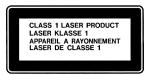
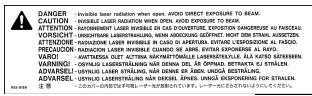
Because of the optical disc drive in your computer, your computer is a Class 1 laser product. The Class 1 label, located in a user-accessible area, indicates that the drive meets minimum safety requirements. A service warning label is located in a service-accessible area. The labels on your product may differ slightly from the ones shown here.
Exposure to Radio Frequency Energy
The radiated output power of the optional AirPort Extreme Card is far below the FCC radio frequency exposure limits. Nevertheless, it is advised to use the wireless equipment in such a manner that the potential for human contact during normal operation is minimized.
It also complies with the Canadian ICES-003 Class B Specification.
Taiwan Statement
產品名稱:滑鼠
型號:M5769
As an ENERGY STAR® partner, Apple has determined that standard configurations of this product meet the ENERGY STAR® guidelines for energy efficiency. The ENERGY STAR® program is a partnership with office product equipment manufacturers to promote energy-efficiency. Reducing energy consumption of office products saves money and reduces pollution by eliminating wasted energy.
Computer Disposal
Recycle or dispose of your eMac according to your local environmental laws, regulations, and guidelines for electrical and electronic equipment.
For information about Apple's recycling program, go to www.apple.com/environment/summary.html
Information You Need in the United States
The internal modem complies with Part 68 of the FCC rules. On the back of this equipment is a label that contains, among other information, the FCC registration number and ringer equivalence number (REN). If requested, provide this information to your telephone company.
- Ringer equivalence number (REN): 0.1B The REN is useful to determine the quantity of devices you may connect to your telephone lines and still have all those devices ring when your telephone number is called. In most, but not all areas, the sum of the RENs of all devices connected to one line should not exceed five (5.0). To be certain of the number of devices you may connect to your line, as determined by the REN, you should contact your local telephone company to determine the maximum REN for your calling area.
- Telephone jack type: USOC, RJ-11 An FCC-compliant telephone cord and modular plug are provided with this equipment. This equipment is designed to be connected to the telephone network or premises wiring using a compatible modular jack that complies with Part 68 rules. See the installation instructions for details.
Telephone Line Problems
If your telephone doesn't work, there may be a problem with your telephone line. Disconnect the modem to see if the problem goes away. If it doesn't, report the problem either to your local telephone company or to your company's telecommunications people.
If disconnecting the modem eliminates the problem, the modem itself may need service. See the service and support information that came with your Apple product for instructions on how to contact Apple or an Apple-authorized service provider for assistance.
If you do not disconnect your modem when it is adversely affecting the telephone line, the telephone company has the right to disconnect your service temporarily until you correct the problem. The
telephone company will notify you as soon as possible. Also, you will be informed of your right to file a complaint with the FCC.
The telephone company may make changes in its facilities, equipment, operations, or procedures that could affect the operation of your equipment. If this happens, the telephone company will provide advance notice in order for you to make the necessary modifications to maintain uninterrupted service.
The internal modem will not work with party lines, cannot be connected to a coin-operated telephone, and may not work with a private branch exchange (PBX).
Telephone Consumer Protection Act
The Telephone Consumer Protection Act of 1991 makes it unlawful for any person to use a computer or other electronic device to send any message via a telephone fax machine unless such message clearly contains, in a margin at the top or bottom of each transmitted page or on the first page of the transmission, the date and time it was sent and an identification of the business or other entity, or individual sending the message and the telephone number of the sending machine of such business, entity, or individual.
Information You Need in Canada
The Industry Canada (IC) label identifies certified equipment. This certification means that the equipment meets certain telecommunications network protective, operational, and safety requirements. The Department does not guarantee the equipment will operate to a user's satisfaction.
Before installing this equipment, make sure that you are permitted to connect to the facilities of the local telecommunications company. Be sure you use an acceptable method of connection to install the equipment. In some cases, you may extend the company's internal wiring for single-line individual service by means of a certified telephone extension cord. Be aware, however, that compliance with these conditions may not prevent degradation of service in some situations.
Repairs to certified equipment should be made by an authorized Canadian maintenance facility designated by the supplier. Any equipment malfunctions or repairs or alterations that you make to this equipment may cause the telecommunications company to request that you disconnect the equipment.
In Canada, contact Apple at: 7495 Birchmount Road, Markham, Ontario, L3R 5G2, 800-263-3394
Warning: Users should ensure for their own protection that the electrical ground connections of the power utility, telephone lines, and internal metallic water pipe system, if present, are connected together. This precaution may be particularly important in rural areas.
Users should not attempt to make such connections themselves, but should contact the appropriate electric inspection authority or electrician.
- Load number:0.1 The load number (LN) assigned to each terminal device denotes the percentage of the total load to be connected to the telephone loop that is used by the device, to prevent overloading. The termination of a loop may consist of any combination of devices, subject only to the requirement that the sum of the load numbers of all devices does not exceed 100.
Telephone jack type: CA-11
7495 Birchmount Road
Markham, Ontario
Canada L3R 5G2
Service clientèle d'Apple Canada: 800-263-3394
Information You Need in the United Kingdom
This terminal equipment is intended for direct connection to the analogue Public Switched Telecommunications Network and is approved for use within the United Kingdom with the following features:
Modem facility
- Autocalling facility
- Autoanswer facility
DTMF signaling
Operation in the absence of proceed indication or upon detection of proceed indication
This product is in conformity with relevant regulatory standards following the provisions of European Council Directives 73/23/EEC (Low Voltage Directive) and 89/336/EEC amended by 92/31/EEC (EMC Directive).
Information You Need in Australia
All telecommunications devices are required to be labelled as complying to the Australian telecommunications standards, ensuring the health and safety of the operator and the integrity of the Australian telecommunications network. To provide compliance with the Australian Communications Authority's technical standards, please ensure that the following AT commands are maintained:
ATBO (ITU/CCITT operation)
- AT&G0 (no guard tone)
- AT&P1 (33/66 pulse dial make/break ratio)
- ATS0 = 0 or ATS0 = 1 (no answer or answer greater than one ring)
- ATS6 = 95 (DTMF period between 70–255 ms)
ATS11 = 95 (DTMF period between 70–255 ms)
For calls that are automatically generated, a total of three call attempts are allowed to a telephone number, with a minimum period between calls of 2 seconds. If the call does not connect after three attempts, 30 minutes must expire before automatic redialing may be initiated. Failure to set the modem (and any associated communications software) to the above settings may result in the modem being non-compliant with Australian telecommunications standards. Under these circumstances a user could be subject to significant penalties under the Telecommunications Act 1997.
This modem must be properly secured in order for you to use it. Telecommunications network voltages exist inside the computer and the telecommunications line connection must be removed before opening the computer.
Information You Need in New Zealand
This modem is fully approved to operate on the New Zealand telecommunications network under Telepermit number PTC 211/04/002. All telecommunications devices are required to hold a Telepermit and be labelled accordingly with the approved Telepermit number to comply with the New Zealand telecommunications standards, ensuring the health and safety of the operator and the integrity of the New Zealand telecommunications network. To ensure compliance, all calls that are automatically generated should not make more than 10 call attempts to the same number within any 30 minute period with a minimum period between calls of 30 seconds.
Failure to adhere to these standards may result in the modem being non-compliant with New Zealand Telecom standards. Under these circumstances a user could be subject to significant penalties.
Important: The grant of a Telepermit for any item of terminal equipment indicates that only Telecom has accepted that the item complies with minimum conditions for connection to its network. It indicates no endorsement of the product by Telecom, nor does it provide any sort of warranty. Above all, it provides no assurance that any item will work correctly in all respects with another item of Tele permitted equipment of a different make or model, nor does it imply that any product is compatible with all of Telecom's network services.
- Trois ports USB (Universal Serial Bus) 2.0
- Port Modem (son le modele)
- Communications Regulation Information
- FCC Compliance Statement
- Radio and Television Interference
- Bluetooth Industry Canada Statement
- Bluetooth Europe—EU Declaration of Conformity
- Industry Canada Statement
- Exposure to Radio Frequency Energy
- Taiwan Statement
- Computer Disposal
- Information You Need in the United States
- Telephone Line Problems
- Telephone Consumer Protection Act
- Information You Need in Canada
- Information You Need in the United Kingdom
- Information You Need in Australia
- Information You Need in New Zealand
Brand : APPLE
Model : EMAC
Category : Desktop computer