RB-STROMPI2 - Alimentation ordinateur Joy-It - Free user manual and instructions
Find the device manual for free RB-STROMPI2 Joy-It in PDF.


| Product Type | Switching Power Supply for Single-Board Computers |
| Brand | Joy-It |
| Model | RB-STROMPI2 |
| Input Voltage | 100-240V AC, 50/60Hz |
| Output Voltage | 5V DC |
| Output Current | 2.5A |
| Power | 12.5W |
| Connector Type | Micro USB |
| Dimensions (L x W x H) | 60 x 30 x 30 mm |
| Weight | 50 g |
| Cable Length | 1.5 m |
| Color | Black |
| Material | Plastic casing |
| Protections | Overvoltage, overcurrent, short circuit |
| LED Indicator | Yes (Power on) |
| Compatibility | Raspberry Pi 2/3/4, similar boards |
| Operating Temperature | 0°C to 40°C |
| Certifications | CE, RoHS |
| Maintenance | Wipe with dry cloth; do not use liquids |
| Repairability | Non-repairable, no spare parts available |
Frequently Asked Questions - RB-STROMPI2 Joy-It
User questions about RB-STROMPI2 Joy-It
0 question about this device. Answer the ones you know or ask your own.
Ask a new question about this device
Download the instructions for your Alimentation ordinateur in PDF format for free! Find your manual RB-STROMPI2 - Joy-It and take your electronic device back in hand. On this page are published all the documents necessary for the use of your device. RB-STROMPI2 by Joy-It.
USER MANUAL RB-STROMPI2 Joy-It
natural_image
Green electronic circuit board with various components and a green battery labeled 'GREENCELL' (Extra Heavy Duty) connected to its side, no readable text or symbols on the main components.1. GENERAL INFORMATION
Dear customer,
thank you for choosing our product. In the following, we will show what you should note at the commissioning and during the usage.
Should you encounter any unexpected problems during use, please do not hesitate to contact us.
The StromPi 2 expansionboard is the new development of the Joy-IT power solution. Not only, the voltage range is increased from 6 to 61 V to connect for example bigger / more batteries or power supplies.
Therefore, the StromPi 2 board provides now up to 3 A current to supply greater projects with enough power. Moreover, the reset-function for the Raspberry Pi is now integrated which extends the USV-function of the StromPi practically.
Through the new super-flat construction and connection, the StromPi 2 fits in many cases and new application areas. The StromPi 2 allows to connect your Raspberry Pi with an arbitrary voltage source with a voltage range from 6 to 61 V so that you have new possibilities to applicate the Raspberry Pi (car, ship, truck, industrial plant etc.). Furthermore, the Raspberry Pi receives optionally an upgrade of the USB outputs to a high power USB output to operate power-intensive devices for examples USB-hard disks without any restrictions.
The integrated USV-function enables the safeguarding of critical applications against power failures. Via software for the Raspberry Pi, it is possible to monitor the USV-function and to mail different reports via e-mail in case of a failure. Due to the used efficient solution for switching regulators, it allows the Raspberry Pi to operate as a portable device via a battery.
useful expansion of the USV-mode: After the Raspberry is shut down at a power failure by the StromPi, the new reset- function restarts the Raspberry Pi automatically if the main voltage source is available again.
intended use: The expansion board to connect a compatible single board computer (e.g. Raspberry Pi) with a voltage source from 6 to 61 V so it can operate with this power.
warning: At a heavy load, the StromPi can heat up. Do not touch the board during use to prevent burn injuries - enable a solid air supply to exclude the overheating of the device.
2. PIN ASSIGNMENT

text_image
1. mode switch (USV | Wide) T - PIN JOY-iC high-power USB output Data input (for high- power USB output) and current output microUSB (5 V) voltage input (primary) 2. mode switch GPIO - port reset - switch wide-range (6 - 61 V) voltage input (secondary) StrmPI v2.03. OPERATING MODES
The StromPi 2 has 2 operating modes UPS and Wide operation which are explained in the following.
UPS-mode
The UPS-mode operates especially battery-saving. The wide range voltage source is only charged in standby with 20 - 80 μA. This standby power consumption is very low so that the maintenance cycles of possible bypass batteries / batteries can be accordingly long.
For one year of a standby operation, this circuit takes for example from 175 mAh to 700 mAh out of the wide range voltage source.
For example a standard 3200 mAh LiPo-battery with 7.2 V would be theoretically existent ( if the self-discharge, environment effects like weather conditions, temperature and quality of the battery are excluded) 2500 mAh for the bypass operation - after 1 year of service life. (This is a theoretical statement to show how low the power consumption is. The real capacity of batteries is influenced by many different factors.)
This low standby power results that the wide-range assembly is only activated if the power supply of the microUSB with the marking "IN" fails.

natural_image
Close-up of a green printed circuit board with connectors and components (no readable text or symbols)In such a case the StromPi switches seamlessly to the wide range voltage source like for example a connected battery. The power which is needed during the switching, will be buffered by the StromPi.
The disadvantage is that if the StromPi 2 is in the UPS-mode, it can only start with the above-named microUSB-input „IN“.
Wide-mode
In the „WIDE“-mode, the StromPi 2 can be started and operated by the microUSB-input via the common microUSB power supply as well as by the wide range voltage input which is for voltage sources with a voltage from 6 to 61 V.
This function is useful for application areas like for example vehicles (car, truck, ship) or for the mobil operation with a battery.
The voltage source from the microUSB input is thereby preferred so that at a failure it can be switched seamlessly to the wide range voltage source. This mode is recommended for the direct operation of a wide range voltage source - we recommend for battery-backed systems the above-named USV-mode. Also if the StromPi is operated via microUSB, it consumes approx. 3 to 7 mA from the wide range voltage source; this complies with approx. the thousandfold of the power consumption in the USV-mode.
We recommend the usage of a switch in the wide-mode in order that in case of a non-utilisation for example in a car, so that the battery will not be emptied.
Switching between USV & Wide-mode
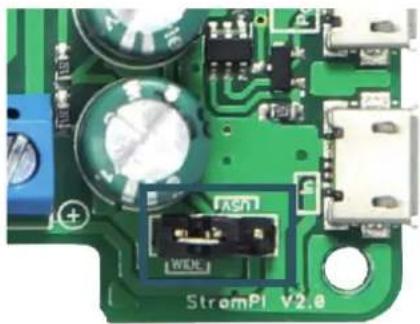
Both operating modes can be selected via jumpers on the upper side of the board - Please note the markings on the board.
natural_image
Close-up of a green printed circuit board with electronic components and connectors (no readable text or symbols)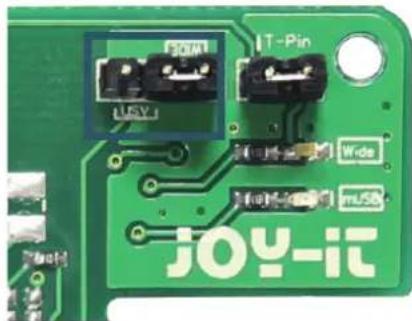
natural_image
Close-up of a green printed circuit board with labeled components (no readable text or symbols beyond labels)Both jumpers must be reconnected in case of a mode change!
High-power-USB
One of the biggest disadvantages of the Raspberry Pi is that the USB outputs do not have a high power. So the operation of a USB hard drive is not possible for example the application of a media center or a NAS.
With the StromPi 2, you have the opportunity to expand the Raspberry Pi with a high-power USB connection and to enable a higher power output of the remaining USB-ports.
For that, you must connect to the second microUSB-port which is marked as “Data IN, Power OUT” a common microUSB-cable - connect the other side of the cable with a free USB-port at the Raspberry Pi.

natural_image
Close-up of a green printed circuit board with various electronic components and connectors (no visible text or symbols)Thereby, the USB-Port of the StromPi 2 is connected with the Raspberry Pi and can supply this way the Raspberry Pi depending on the voltage source with up to 3 A current. Even the remaining USB-ports of the Raspberry Pi have the opportunity to obtain more power.
voltage monitoring
At the StromPi board, a testpoint is marked with "T-PIN". With this, the status of the StromPi can be transferred to the Raspberry Pi.
By default, the StromPi is connected with the GPIO21 of the Raspberry Pi via a jumper. If you want to use the GPIO21 for other application, you can make it available again through removing the jumpers. Via a pin-connector-cable, the T-PIN can be connected with another free GPIO-pin from the Raspberry Pi.

text_image
USB T-Pin Wide USB JOY-itWith our software, you can get a e-mail notification if the StromPi switches to the battery-mode or it shuts itself down to save critical data against an abrupt system crash for instance.
You can find this software in the download area on our website. https://joy-it.net/en/products/RB-StromPi2
Reset-circuit
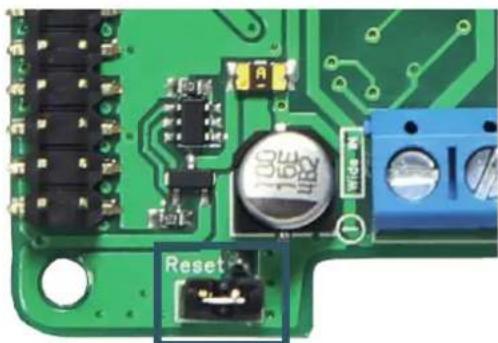
One of the upgrades in comparison of the predecessor is the installed reset-circuit from the StromPi 2. This allows the automatic booting of the Raspberry Pi if the interrupted microUSB main voltage source is restored. That is helpful during the operation of the USV-mode.
If you want to switch more often between the voltage sources (e.g. battery → power supply → battery → etc.), you can deactivate the reset-function by removing the jumper.
natural_image
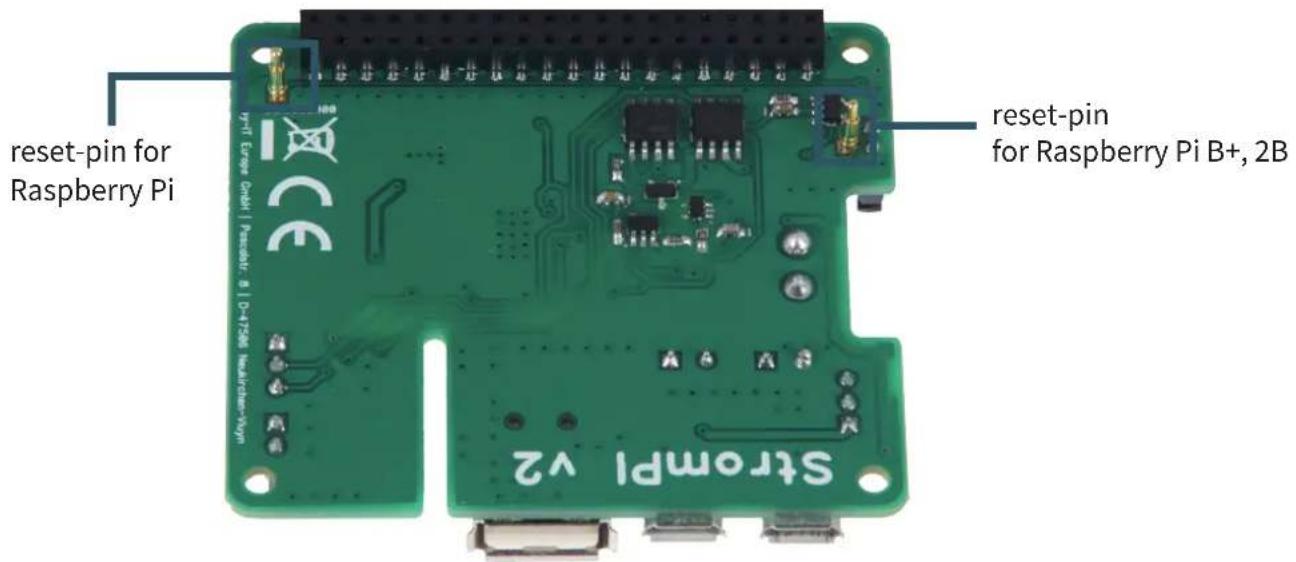
Close-up of a green printed circuit board with electronic components and a labeled 'Reset' button (no readable text beyond label)The position of the reset-area is different between the older models of the Raspberry Pi like B+, 2B and the Raspberry Pi 3. For this case The StromPi has 2 reset-pins on the underside.
text_image
reset-pin for Raspberry Pi reset-pin for Raspberry Pi B+, 2B STROMPI v2The reset-pin of the StromPi for the Raspberry Pi is isolated by default because it would cause shorts on the elder models!
Raspberry Pi 3
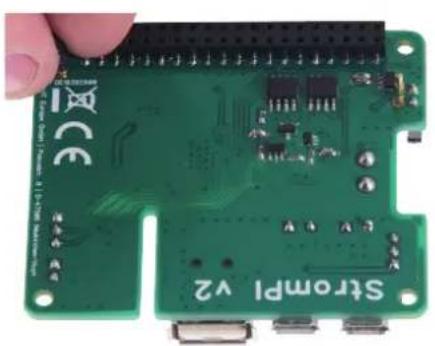
If you want to use the reset-function on the Raspberry Pi, you must remove the isolation of the reset-pin for the Raspberry Pi 3.
The reset-pin for the old models can be ignored because it will not touch any components.
natural_image
Close-up of a green Raspberry Pi board with visible components and connectors (no readable text or symbols)
natural_image
Green printed circuit board with visible components and connectors (no readable text or symbols)If you want to use the StromPi after that on an elder model, you must absolutely isolate this pin again. The Raspberry Pi and the StromPi can otherwise be damaged.
Raspberry Pi B+ / 2B
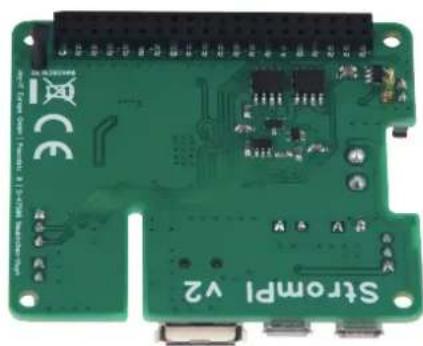
The pin for elder models is already free and the pin for the Raspberry Pi 3 is isolated by default so that you can pin on the StromPi directly.
natural_image
Green Raspberry Pi 2 board with visible circuitry and connectors (no readable text or symbols)Wide range voltage input
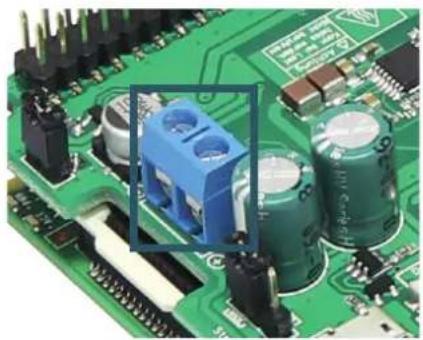
You can now connect at the marked port arbitrary voltage sources like for example power supplies, batteries or vehicle onboard supply.
This must be in a switched on condition in a range from 6 to 61 V - Please pay attention to the polarity to avoid damage to the Raspberry Pi and the StromPi.
natural_image
Close-up of a green printed circuit board with various electronic components and capacitors (no visible text or symbols)Alternatively, the StromPi can be operated by the microUSB-port which is on the topside. This port is marked with "IN".

natural_image
Close-up of a green printed circuit board with multiple connectors and components (no readable text or symbols)4. FURTHER INFORMATIONS
Our information and redemption obligation according to the electro-law (ElektroG)
Symbol on electrical and electronic products :
This crossed-out bin means that electrical and electronic products do not belong into the household waste. You must hand over your old appliance to a registration office. Before you can hand over the old appliance, you must remove used batteries and accumulators which are not enclosed by the device.
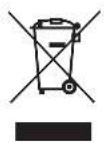
Return options :
As the end user, you can hand over with the purchase of a new device your old appliance (which has essentially the same functions as the new one) free of charge for disposal. Small devices which do not have outer dimensions greater than 25 cm can be submitted independently of the purchase of a new product in normal household quantities.
Possibility of restitution at our company location during our opening hours :
Simac GmbH, Pascalstr. 8, D-47506 Neukirchen-Vluyn
possibility of restitution nearby :
We send you a parcel stamp with which you can send us your old appliance free of charge. For this possibility, you must contact us via e-mail at service@joy-it.net or via telephone.
information about packaging:
Please package your old appliance safe during transport. Should you not have a suitable packaging material or you do not want to use your own material, you can contact us and we will send you an appropriate package.

5. SUPPORT
If any questions remain open or problems arise after your purchase, we are available by e-mail, telephone and with a ticket support system to answer these.
E-Mail: service@joy-it.net
Ticket-System: http://support.joy-it.net
Telephone: +49 (0)2845 98469 - 66 (10 - 17 o'clock)
For further information visit our website:
www.joy-it.net
6. CE CONFORMITY DECLARATION
We the manufacturer, JOY-IT Europe GmbH declare, that the product RB-StromPi2 in accordance with the regulations for use match basic requirements of the following Guidelines:
EMC-Guideline 2014/30/EU (AMV) 6 2011/65/EU (Rohs).
The following stated standards were used for the evaluation of the device.
EN 55022: 2010 + AC2011
EN 55024: 2010
JOY-IT Europe GmbH, Pascalstr. 8, 47506 Neukirchen-Vluyn
