COM-ZY12PDG - Uncategorized Joy-It - Free user manual and instructions
Find the device manual for free COM-ZY12PDG Joy-It in PDF.


User questions about COM-ZY12PDG Joy-It
0 question about this device. Answer the ones you know or ask your own.
Ask a new question about this device
Download the instructions for your Uncategorized in PDF format for free! Find your manual COM-ZY12PDG - Joy-It and take your electronic device back in hand. On this page are published all the documents necessary for the use of your device. COM-ZY12PDG by Joy-It.
USER MANUAL COM-ZY12PDG Joy-It
natural_image
Close-up of a black printed circuit board with various electronic components and connectors (no readable text or symbols)1. GENERAL INFORMATION
Dear customer,
Thank you for purchasing our product. In the following, we will show you which things should be noted during the use.
Should you encounter any unexpected problems, do not hesitate to contact us.
When using the module, make sure to use a sufficient cable cross-section.
To use the module as intended, you need a USB-PD-capable power supply unit.
2. INTERFACE

text_image
TRIG CC2 CC1 - + Trigger pin CC2 CC1 Ground V_BUS USB Type-C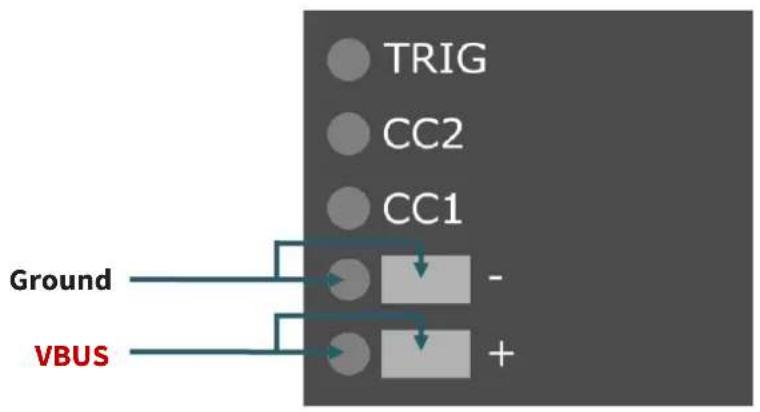
flowchart
graph TD
    A["TRIG"] --> B["Ground"]
    C["CC2"] --> D["+"]
    E["CC1"] --> F["-"]
    G["VBUS"] --> H["Ground"]
    I["Ground"] --> J["VBUS"]
The trigger pin on the board has the same function as the button. By setting the pin LOW, pressing the button is simulated.
3. OPERATION
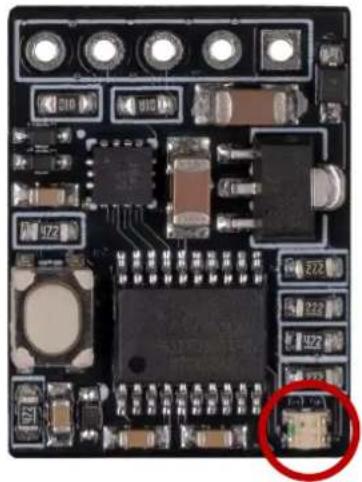
Connect your USB-PD trigger module to a USB-PD compatible power supply using the interface explained above. The free solder pads on the back of the board are used to connect the load. These modules provide you with different voltage modes, which are indicated by the LED.
| Colour Voltage mode | |
| 5 V | |
| 9 V | |
| 12 V | |
| 15 V | |
| 20 V | |
| Maximum possible voltage of the power supply | |
| Runs through all modes (one per second) | |
natural_image
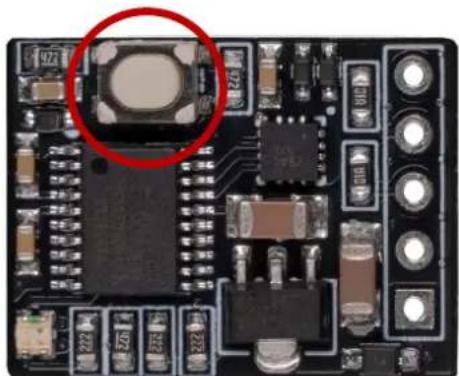
Close-up of a printed circuit board with electronic components and a highlighted component (no readable text or symbols)To set the modes as default, first plug the board into your power supply while holding down the button on the board. Now the LED will start flashing colourfully. Now you can select the desired mode using the button. Now press and hold the button to confirm your selection. Finally, disconnect the power supply from the module and then reconnect it so that the module now starts directly in this mode.
natural_image
Close-up of a black electronic circuit board with visible components and a red circle highlighting a component (no readable text or symbols)4. SONSTIGE INFORMATIONEN
Our Information and Take-back Obligations according to the Electrical and Electronic Equipment Act (ElektroG)
Symbol on Electrical and Electronic Products:

This crossed-out bin means that electrical and electronic products do not belong into the household waste. You must hand over your old appliance to a registration place. Before you can hand over the old appliance, you must remove used batteries and replacement batteries which are not enclosed by the device.
Return Options:
As the end user, you can hand over your old appliance (which has essentially the same functions as the new one bought with us) free of charge for disposal with the purchase of a new device.
Small devices, which do not have outer dimensions bigger than 25 cm can be handed in for disposal independently of the purchase of a new product in normal household quantities.
1. Possibility of return at our company location during our opening hours
Simac Electronics Handel GmbH, Pascalstr. 8, D-47506 Neukirchen-Vluyn
2. Possibility of return nearby
We will send you a parcel stamp with which you can send us your old appliance free of charge. For this possibility, please contact us via e-mail at service@joy-it.net or via telephone.
Information about Package:
Please package your old appliance safe for transport. Should you not have suitable packaging material or you do not want to use your own material, you can contact us and we will send you an appropriate package.
5. SUPPORT
If any questions remained open or problems may arise after your purchase, we are available by e-mail, telephone and ticket support system to answer these.
E-Mail: service@joy-it.net
Ticket-system: http://support.joy-it.net
Telephone: +49 (0)2845 98469 - 66 (10 - 17 o'clock)
For further information visit our website:
www.joy-it.net