
LUX TX500B - Vacuum Cleaner AEG-ELECTROLUX - Free user manual and instructions
Find the device manual for free LUX TX500B AEG-ELECTROLUX in PDF.


| Product type | Canister vacuum with bag |
| Brand | AEG-ELECTROLUX |
| Model | LUX TX500B |
| Maximum power | 2200 W |
| Floor type | Hard floors and carpets |
| Bag capacity | 3.5 L |
| Filtration | Washable HEPA 13 filter |
| Noise level | 72 dB(A) |
| Cable length | 8 m |
| Operating range | 10 m |
| Included accessories | Long crevice nozzle, furniture brush, slot nozzle |
| Weight | 5.2 kg |
| Dimensions (L x W x H) | 400 x 280 x 250 mm |
| Power supply | 220-240 V, 50-60 Hz |
| Main features | Adjustable power, automatic shut-off in case of overheating, bag full indicator |
| Maintenance and cleaning | Washable filter, disposable bag to be replaced regularly |
| Safety | Thermal protection, double electrical insulation |
| Spare parts and repairability | Bag, filter, belt available online |
| General information | 2-year warranty, made in Europe |
Frequently Asked Questions - LUX TX500B AEG-ELECTROLUX
User questions about LUX TX500B AEG-ELECTROLUX
0 question about this device. Answer the ones you know or ask your own.
Ask a new question about this device
Download the instructions for your Vacuum Cleaner in PDF format for free! Find your manual LUX TX500B - AEG-ELECTROLUX and take your electronic device back in hand. On this page are published all the documents necessary for the use of your device. LUX TX500B by AEG-ELECTROLUX.
USER MANUAL LUX TX500B AEG-ELECTROLUX
INSTALLATION AND OPERATING INSTRUCTIONS

TX500b SERIES
SMART TEMP® ELECTRONIC THERMOSTAT
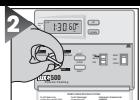
Set Day & Time
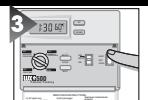
Choose Heat or Cool
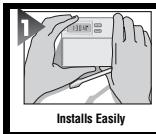
Easy as 1-2-3

Complete, Easy To Read Programming And Installation Instructions
LUX PRODUCTS CORPORATION · Mt. Laurel, New Jersey 08054, USA
WARNING: Use Energizer® or DURACELL® Alkaline Batteries Only.
Enerizer® is a registered trademark of Eveready Battery Company, Inc. DURACELL® is a registered trademark of The Gillette Company, Inc.
52016
IMPORTANT!

Thank you for your confidence in our product. To obtain the best results from your investment, please read this manual and acquaint yourself with your purchase before installing your new thermostat. Then follow the installation procedures, one step at a time. This will save you time and minimize the chance of damaging the thermostat and the systems it controls. These instructions may contain information beyond that required for your particular installation. Please save for future reference.
FEATURES
- The TX500 can be used with most 24 volt gas, oil or electric heating and air conditioning systems or gas millivolt heating systems. It cannot be used with 120 volt heating systems or heat pumps. Ask your dealer for other LUX thermostats to control those systems.
- The TX500 is programmable. There are four programming periods per day. Each period can be programmed separately.
- You can use the built-in time/temperature programs, or alter them to suit your schedule. The TX500 provides separate programming for weekdays and weekends — for both heating and cooling. You can override the programmed temperatures for as little as one programming period or for an entire vacation.
- In cool weather, when the system switch is set to HEAT, the TX500 will maintain cooler "set back" room temperatures to save energy. It will then change to warmer "comfort" settings - all automatically, at specified times during the day.
- In warm weather, when the system switch is set to COOL, the TX500 will maintain warmer "set back" room temperatures to save energy. It will then change to cooler "comfort" settings - all automatically, at specified times during the day.
- A large liquid crystal display shows time, day of the week, and room and set temperatures.
- 5/2 Minute Selectable Minimum Run/Off Time for Short Cycle/Compressor Protection.
- Two Energizer® or DURACELL® "AA" alkaline batteries (not included) are used to retain your time and temperature programs.
WARNING: Use Energizer® or DURACELL® Alkaline Batteries Only.
C
A
U
T
1
0
N
- Your thermostat is a precision instrument. Please handle it with care.
- Turn off electricity to the appliance before installing or servicing thermostat or any part of the system.
Do not turn electricity back on until work is completed. - Do not short (jumper) across electric terminals at control on furnace or air conditioner to test the system. This will damage the thermostat and void your warranty.
- All wiring must conform to local codes and ordinances.
- This thermostat is designed for use with 24 volt and millivolt systems. The thermostat should be limited to a maximum of 1.0 amps; higher amperage may cause damage to the thermostat. If you are in doubt, call your utility company.
INSTALLATION
Please read all instructions carefully before beginning installation.
TOOLS REQUIRED
1 Phillips screwdriver (small)
Drill with 3 / 16 -in.4.8mm)bit
THERMOSTAT LOCATION
On replacement installations, mount the new thermostat in place of the old one unless the conditions listed below suggest otherwise.
On new installations, follow the guidelines listed below.
CAUTION
To avoid electrical shock and to prevent damage to the furnace, air conditioner, and thermostat, disconnect the power supply before beginning work. This can be done at the fuse box, at the circuit breaker, or at the appliance.
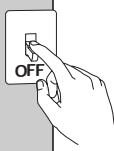
- Locate the thermostat on an inside wall, about 5 ft. (1.5m) above the floor, and in a room that is used often.
- Do not install it where there are unusual heating conditions, such as: in direct sunlight; near a lamp, radio, television, radiator, register, or fireplace; near hot water pipes in a wall; near a stove on the other side of a wall.
- Do not locate in unusual cooling conditions, such as: on a wall separating an unheated room; or in a draft from a stairwell, door, or window.
- Do not locate in a damp area. This can lead to corrosion that will shorten thermostat life.
- Do not locate where air circulation is poor, such as: in a corner or an alcove; or behind an open door.
- Do not install the unit until all construction work and painting has been completed.
- This thermostat does not require leveling.
REMOVING THE OLD THERMOSTAT
Switch electricity to the furnace and air conditioner OFF; then proceed with the following steps.
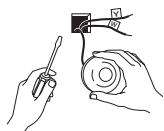
- Remove cover from old thermostat. Most are snap-on types and simply pull off. Some have locking screws on the side. These must be loosened.
CAUTION
Read instructions carefully before removing any wiring from existing thermostat. Wires must be labeled before they are removed. When removing wires from their terminals, ignore the color of the wires since these may not comply with the standard.
- Note the letters printed near the terminals. Attach labels (enclosed) to each wire for identification. Remove and label wires one at a time. Make sure the wires do not fall back inside the wall.
- Loosen all screws on the old thermostat and remove it from the wall.
MOUNTING THETX500 ON THE WALL
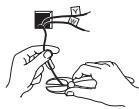
- Strip insulation 3/8 in. (9.5mm) from wire ends and clean off any corrosion.
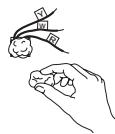
-
Fill wall opening with non-combustible insulation to prevent drafts from affecting the thermostat.
-
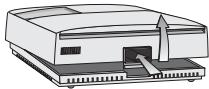
Press up on the button on bottom of thermostat and swing the body away from the base and up to remove the body from the base.
CAUTION Be careful not to drop the body or disturb electronic parts. Leave the cover closed while the body is being removed from the base.
NOTE
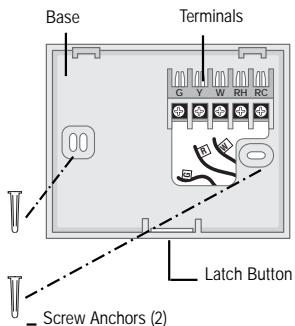
If you are mounting the base to a soft material like plasterboard or if you are using the old mounting holes, the screws may not hold. Drill a 3/16-in. (4.8mm) hole at each screw location, and insert the plastic anchors provided. Then mount the base as described.
ATTACHING WIRES
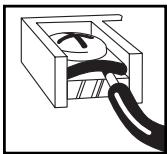
- Hold the base against the wall, with the wires coming through wherever it is convenient for wiring. Route the wires to below the terminal block. Position the base for best appearance (to hide any marks from an old thermostat). Attach the base to the wall with the two screws provided.
C A U T I O N
Do not allow wires to touch each other or parts on thermostat. Wires must be trapped between black spacer and brass terminal. Also, be sure to tighten securely all 5 electrical terminal screws.
WIRING DIAGRAMS
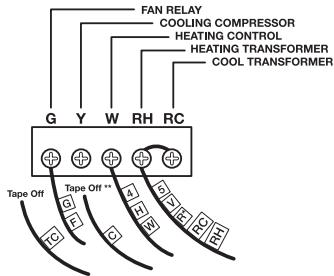
Heating Systems
- If replacing a Honeywell TM-11, tape off wire "R"; connect wire "B" to terminal "RH."
**If replacing a Honeywell thermostat with a clock wire "C," tape off wire "C"
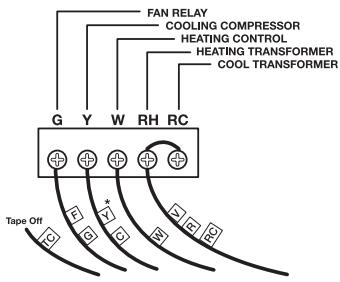
Heating/Cooling Systems
4- or 5-Wire with One Transformer
- If both Y and C wire are present, tape off "C" wire.
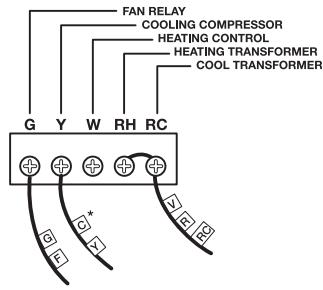
Cooling Systems
- If both Y and C wire are present, tape off "C" wire.
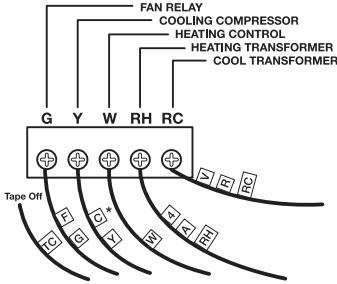
Heating/Cooling Systems
5-or 6-Wire with Two Transformers
- If both Y and C wire are present, tape off "C" wire.
These diagrams are provided for new installations or unreferenced wires.
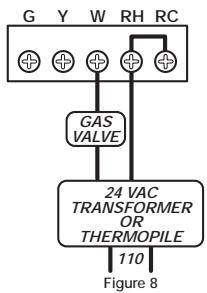
TYPICAL HOOKUP FOR 2-WIRE 24V HEATING SYSTEM AND MILLIVOLT SYSTEM
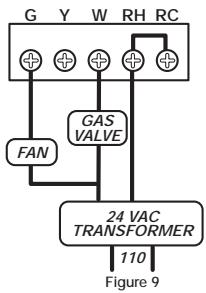
TYPICAL HOOKUP FOR 3-WIRE HEAT SYSTEM IF THIRD WIRE IS FAN WIRE
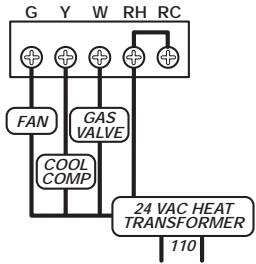
TYPICAL COOLING AND HEATING SYSTEM (4-WIRE)
Figure 10
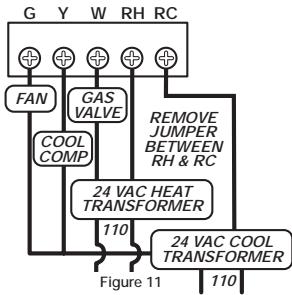
TYPICAL COOLING AND HEATING SYSTEM (5-WIRE)
INSTALLING BATTERIES/ MAINTENANCE
The TX500 requires two new Energizer® or DURACELL® "AA" size alkaline batteries to operate your furnace and retain its programming in memory. Replace the batteries when the LO BATT indicator appears in the display or at least once a year.
NOTE
If you have an electric system and the blower does not operate after installation, find the electric/gas heat selector on the back of the body. Move the selector to the ELEC position.
- Remove fresh batteries from their carton.
- Remove body of thermostat as described at bottom of first column.
- Remove the used batteries.
- Install two new Energizer® or DURACELL® "AA" size alkaline batteries in the battery compartment. Observe the polarity marking shown in the compartment. Place body back on wall.
- Place the body back on the wall. Hook the top of the body onto the base, swing the body down and snap the body onto the base.
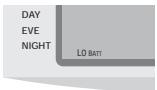
REPLACE BATTERIES WHEN INDICATOR APPEARS
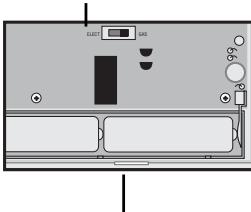
Heat Selector
Battery Compartment
WARNING: Use Energizer® or DURACELL® Alkaline Batteries Only.
Installation is now complete. Be sure to turn the power back on to your heating and/or air conditioning system. If this is the first time you are installing batteries, the thermostat will display "SUN 12:00 AM" Within 90 seconds the thermostat will begin to display the room temperature alternately with the time. To correct the display, see "Setting the TIME and DAY," after you set the programs.
NOTE
When replacing batteries, you have approximately 1 minute before programs are lost.
TECHNICAL ASSISTANCE
If you have any problems installing or using this thermostat, please carefully and thoroughly review the instruction manual. If you require assistance, please contact our Technical Assistance Department at 856-234-8803 during regular business hours between 8:00AM and 4:30PM Eastern Standard Time, Monday through Friday. You can also receive technical assistance online anytime day or night at http://www.luxproducts.com. Our web site offers you answers to the most common technical questions, and also permits you to email your questions to our technical support staff at your convenience.
WARRANTY
Limited Warranty: If this unit fails because of defects in materials or workmanship within three years of date of original purchase, LUX Products Corporation will, at its option, repair or replace it. This warranty does not cover damage by accident, misuse, or failure to follow installation instructions. Implied warranties are limited in duration to three years from date of original purchase. Some states do not allow limitations on how long an implied warranty lasts, so the above limitation may not apply to you. Please return malfunctioning or defective units to the participating retailer from which purchase was made, along with proof of purchase. Please refer to "TECHNICAL ASSISTANCE" before returning thermostat. Purchaser assumes all risks and liability for incidental and consequential damage resulting from installation and use of this unit. Some states do not allow the exclusion of incidental or consequential damages, so the above exclusion may not apply to you. This warranty gives you specific legal rights and you may also have other rights which vary from state to state. Applicable in the U.S.A. only.
OPERATION
This thermostat is "armchair programmable." You can make any program or setting changes with the thermostat body off or on the wall thermostat base.
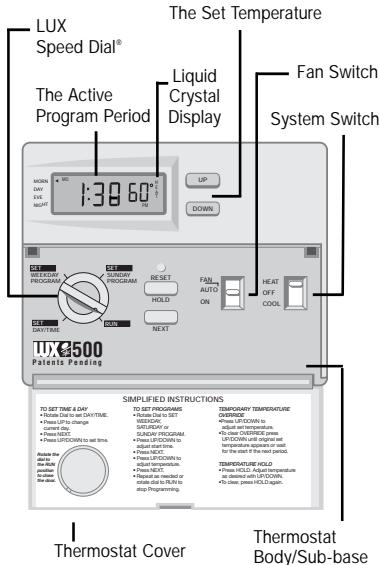
The TX500 alternately displays the current time and the room temperature. It also displays the day of the week and the currently active control program that is controlling the temperature: MORN, DAY, EVE, or NIGHT.
The set point temperature will appear in the right side of the display. In the winter, set the system switch to HEAT to control your heating system. In the summer, set the switch to COOL to control your air conditioner. In spring and fall or when windows are open, you can set the system switch OFF.
Setting the FAN switch to AUTO automatically runs your system's fan during heating and cooling. Setting the FAN switch to ON runs your system's fan continuously even without heating or cooling.
N O T E
The FAN switch works only if your system provides a wire for the TX500's "G" terminal.
THE BUILT-IN ENERGY STAR® PROGRAMS
Push in the RESET key. This sets the built-in heating and cooling programs. To review the built-in programs, rotate the dial to SET WEEKDAY PROGRAM or SET WEEKEND PROGRAM.
You can use the built-in programs as shown, or change them as you wish. Each day is divided into four periods. Each period has its own starting time and temperature.
| PERIOD | HEAT | COOL | |
| WEEKDAYS preprograms | MORN | 6:00 AM 70° | 6:00 AM 78° |
| DAY | 8:00 AM 62° | 8:00 AM 85° | |
| EVE | 6:00 PM 70° | 6:00 PM 78° | |
| NIGHT | 10:00 PM 62° | 10:00 PM 82° | |
| SAT & SUN preprograms | MORN | 6:00 AM 70° | 6:00 AM 78° |
| DAY | 8:00 AM 62° | 8:00 AM 85° | |
| EVE | 6:00 PM 70° | 6:00 PM 78° | |
| NIGHT | 10:00 PM 62° | 10:00PM 82° |
The dial must be in the RUN position to close the door.
PROGRAMMING THE TX500
You can change any of the preset times and/or temperatures to suit your schedules for the weekday and weekend programs. Each day is divided into four periods: Morning, Day, Evening, and Night. Each period is programmed for HEAT and for COOL.
A blank programming chart is provided below for you to record your temperature settings in that chart.

Select HEAT to program the TX500 for controlling your heater.
OR Select COOL to program the TX500 for controlling your air conditioner.
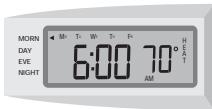
Rotate dial to SET WEEKDAY PROGRAM. To program the WEEKEND, rotate the dial to SET WEEKEND PROGRAM. With dial on SET WEEKDAY PROGRAM, you will see this display.


To move

To progr
To move
To change the start time for MORN.
temperature.
To change the temp. setting for MORN.
DAY
To change start time for DAY.
temperature.
To change the temp. setting for DAY.
EVE


To program temperature.

To move to NIGHT.

To program temperature.

te dial to RUN position tostart the programs.
SETTING THE TIME AND DAY
C A U T I O N
The TX500 is protected against normal static electric discharges. However, in extremely dry weather you should touch another metal object before the TX500 to avoid potential loss of programs.
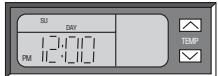
Open the drop down door on the front of the thermostat. Rotate the dial to the SET DAY/TIME position. You should see the display pictured above with a flag pointing to a day of the week flashing. When you are finished setting the day and time, rotate the dial to RUN to return to normal operation or to another position to continue programming.

To change current day

To set current time. The time (e.g."12:00 AM") will be flashing.

To change the current time.

TEMPERATURE OVERRIDE AND TEMPERATURE HOLD
These features let you change the current Set Temperature without changing the programs stored in your thermostat's memory.
TEMPORARY TEMPERATURE OVERRIDE
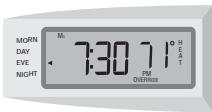


- Press UP/DOWN to change the current temperature setting. The OVERRIDE indicator appears on display.
- The Override feature will be automatically canceled at the start of the next program period.
- To cancel OVERRIDE prior to next program period press UP/DOWN until original set temperature appears. OVERRIDE indicator will disappear from display.
VACATION TEMPERATURE HOLD
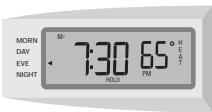

- Press HOLD. Adjust temperature as desired with UP/DOWN.
- Temperature setting will not change even after next program period begins.
- To clear, press HOLD again.
ADVANCED FEATURES
TEMPERATURE SWING
A thermostat works by turning your heating or cooling system on and off whenever the room temperature varies a certain number of degrees from the set-point temperature. This variation is the "swing."
Your system should cycle on about 3 to 6 times per hour. A smaller swing number increases the number of cycles, so room temperature is more constant. A larger swing number decreases the number of cycles, to save energy in most cases.
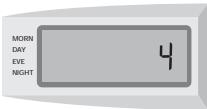
SWING SETTINGS
Dial must be in the run position


Press together


To changeswing

Press to set.
5 MIN/2 MIN MINIMUM ON/OFF TIME
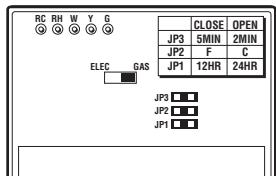
Your thermostat has an internal timer built in to protect your compressor. The timer forces a minimum on/off time of 5 minutes. You may change this minimum on/off time to 2 minutes. To accomplish this, place the jumper labeled JP3 over both pins. You must press the small reset button on the face of the thermostat for the changes to take effect.
CHANGING FROM ^ F TO ^ C AND A 12HR CLOCK TO A 24HR CLOCK
WARNING: Making these changes will require you to reset
the thermostat. Copy any of your customized programs onto the chart below. This will be your reference to reenter the programs afterwards.
- Located at the top center of the thermostat are two jumpers - C/F and 12/24.
- To change to Celsius - remove jumper - C/F.
To change to a 24HR clock - remove jumper- 24/12H.
- Press the reset key on the front of the thermostat for changes to take effect.
- Reprogram as necessary.
PROGRAMMING CHART
| DAY | PERIOD | HEAT | COOL | ||
| TIME | TEMP. | TIME | TEMP. | ||
| MON. THRU FRI. | MORN | ||||
| DAY | |||||
| EVE | |||||
| NIGHT | |||||
| SAT. and SUN. | MORN | ||||
| DAY | |||||
| EVE | |||||
| NIGHT | |||||
- INSTALLATION AND OPERATING INSTRUCTIONS
- TX500b SERIES
- SMART TEMP® ELECTRONIC THERMOSTAT
- Easy as 1-2-3
- IMPORTANT!
- FEATURES
- WARNING: Use Energizer® or DURACELL® Alkaline Batteries Only.
- INSTALLATION
- CAUTION
- REMOVING THE OLD THERMOSTAT
- NOTE
- ATTACHING WIRES
- WIRING DIAGRAMS
- INSTALLING BATTERIES/ MAINTENANCE
- TECHNICAL ASSISTANCE
- WARRANTY
- OPERATION
- N O T E
- THE BUILT-IN ENERGY STAR® PROGRAMS
- PROGRAMMING THE TX500
- SETTING THE TIME AND DAY
- TEMPERATURE OVERRIDE AND TEMPERATURE HOLD
- TEMPORARY TEMPERATURE OVERRIDE
- VACATION TEMPERATURE HOLD
- ADVANCED FEATURES
- TEMPERATURE SWING
- MIN/2 MIN MINIMUM ON/OFF TIME
- CHANGING FROM ° F TO ° C AND A 12HR CLOCK TO A 24HR CLOCK
- PROGRAMMING CHART
Brand : AEG-ELECTROLUX
Model : LUX TX500B
Category : Vacuum Cleaner