EX14 - Security Camera BOSCH - Free user manual and instructions
Find the device manual for free EX14 BOSCH in PDF.


User questions about EX14 BOSCH
0 question about this device. Answer the ones you know or ask your own.
Ask a new question about this device
Download the instructions for your Security Camera in PDF format for free! Find your manual EX14 - BOSCH and take your electronic device back in hand. On this page are published all the documents necessary for the use of your device. EX14 by BOSCH.
USER MANUAL EX14 BOSCH
INSTALLATION INSTRUCTIONS
EX14/14N
All Environment Camera
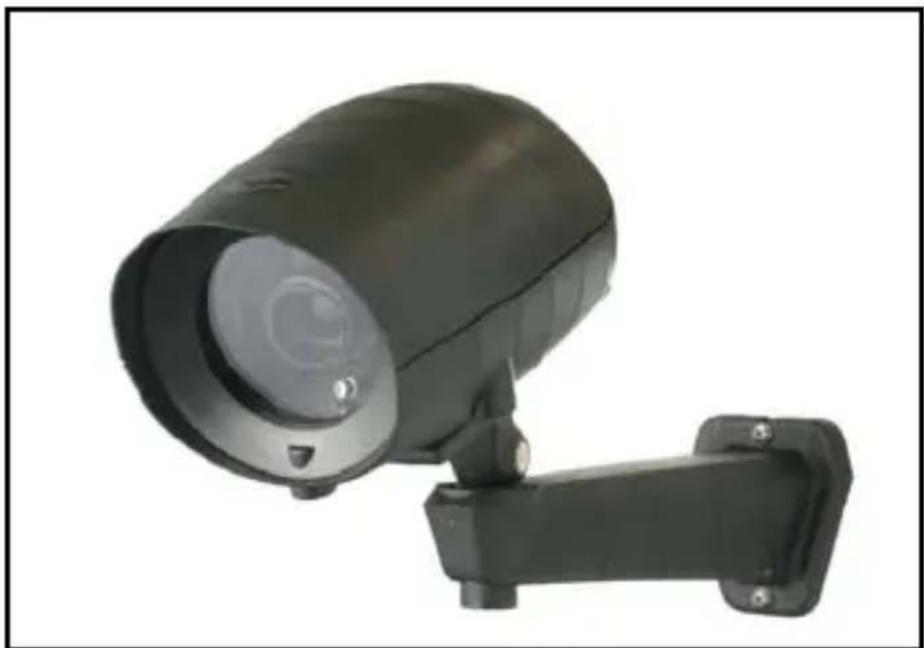
natural_image
Black security camera with mounted sensor and wall-mounted cable (no visible text or symbols)MAN-14-04
IMPORTANT SAFETY INSTRUCTIONS
- Read these instructions.
- Keep this instruction.
- Heed all warnings.
- Follow all instructions.
- Do not use this apparatus near water.
- Clean only with dry cloth.
-
Do not block any ventilation openings. Install in accordance with manufacturer instructions.
-
Do not install near any heat sources such as radiators, heat registers, stoves or other apparatus (including amplifiers) that produce heat.
-
Do not defeat the safety purpose of the polarized or grounding-type plug. A polarized plug has two blades with one wider than the other. A grounding type plug has two blades and a third grounding prong. The wide blade or the third prong is provided for your safety. If the provided plug does not fit into your outlet, consult an electrician for replacement of the obsolete outlet.
-
Protect the power cord from being walked on or pinched particularly at plugs, convenience receptacles, and the power where they exit from the apparatus.
- Only use attachments/accessories specified by the manufacturer.
- Use only with the cart, stand, tripod, bracket, or table specified by the manufacturer, or sold with the apparatus. When a cart is used, use caution when moving the cart/apparatus combination to avoid injury from tip-over.
- Unplug this apparatus during lightning storms or when unused for long periods of time.
- Refer all servicing to qualified service personnel. Servicing is required when the apparatus has been damaged in a way, such as power-supply cord or plug is damaged, liquid has been spilled or objects have fallen into the apparatus, the apparatus has been exposed to rain or moisture, does not operate normally, or has been dropped.

IMPORTANT
For best results, please read this Instruction Booklet prior to installing the EX14 camera.
WARNING!
CSA Certified / UL Listed CLASS 2 power adaptors must be used in order to comply with electrical safety standards.

EU Directives covered by this declaration:
72/9/EC Low Voltage Directives
89/336/EEC Electromagnetic Compatibility Directive
Only qualified personnel shall install any surveillance product.
Bosch Security Systems, Inc. will not be responsible for injuries or damages resulting from the improper installation or use of any product sold by Bosch Security Systems, Inc their agents, distributors or dealers.
NOTE: This equipment has been tested and found to comply with the limits for a digital device, pursuant to part 15 of the FCC rules. These limits are designed to provide reasonable protection against harmful interference in a residential installation. As part of its' normal operation this device can generate radio frequency energy and if not installed and used in accordance with the installation manual may cause interference to radio communications. However, there is no guarantee that interference will not occur on a particular installation. If the device does cause interference to radio or television reception the user is encouraged to try to correct the interference by one or more of the following measures:
1) Fit Ferrite beads on all cable to and from the power supply box, within the box walls.
2) Route the composite cable between the camera and the power supply in steel conduit piping over the entire run of the cable up to and including connection to a deep conduit base fitted under the camera and a conduit fitting adaptor in the wall of the PSU box.
3) Contact BOSCH Service Center for further advice.
INDEX - EX14/14N
Page
Description....1
Unpacking....2
Parts List....2
Items Required for Installation....2
Initial Preparations....3
Guidelines....3
Section 1. Camera Mounting......4
Section 2. Camera I/O Connections......9
Section 3. Input Power Connections......10
Section 4. Camera/LED Adjustments.....12
Section 5. Troubleshooting Guide .....15
Section 6. General Specifications......18
DESCRIPTION
The EX14 All Environment Camera consists of a two-piece injection molded watertight housing with a tough polycarbonate viewing window. This compact camera meets IP66 ratings for applications wherever environmentally sealed CCD cameras are required. The camera is especially suited for wash down applications in food processing and industrial clean-room installations.
The EX14 can be ordered in monochrome or color versions, featuring varifocal and auto-iris IR-optimized lenses. A rigid nylon mounting bracket is also included with the camera.
A voltage regulator circuit allows for 12V dc or 24V ac operation and a range in between. It also provides protection from voltage surge, transient spikes, and reverse voltage.
The EX14N comes with integrated Infra-Red illumination to permit imaging in 0 Lux conditions
The EX14 is available in several models to meet individual requirements or specific needs.
See the Light. Get the Picture. ^TM
UNPACKING
Care should be taken when unpacking the shipped unit. Check the parts list and confirm all items have been located. Inspect the equipment thoroughly to ensure nothing was damaged in transit.
Contact BOSCH Service Center if a problem is noted, see the rear page of this booklet for contact numbers.
PARTS LIST (items supplied with unit)
• EX14 Camera or EX14N integrated infraRed
- Two Allen Keys
• One Mounting Bolt
- Nylon Mounting Bracket(supplied with camera)
• Installation Instructions booklet
ITEMS REQUIRED FOR INSTALLATION
(not supplied with unit)
- mounting hardware & tools
INITIAL PREPARATIONS
- The camera's voltage regulator board (VRB) accepts an input voltage of either 12Vdc or 24Vac, and a range in-between, from a regulated power supply.
- The VRB automatically switches between ac or dc inputs, therefore no internal wiring changes are necessary to accommodate these input voltages.
- Determine the optimum location for the camera.
Section 1: Camera Mounting - All cameras have been tested prior to shipment.
GUIDELINES
The installation of the EX14 Camera is shown in Sections 1 to 4 listed below.
It is important that these steps are followed in sequence:
- Camera Mounting
- Camera I/O Connections
- Input Power Connections
- Camera/LED Array Adjustments
1. CAMERA MOUNTING

Caution: Install the mounting bracket with the appropriate screws or drywall anchors to suit the mounting surface. Select a suitable location that is protected from accidental damage or tampering, and environmental conditions that could exceed the camera's general specifications.
See page 18.

Caution: Ensure the selected location is protected from falling objects, accidental contact with moving objects, and unintentional interference from personnel. Follow all applicable building codes.

The following installation guidelines must be followed:
- Locate the camera such that it cannot be easily interfered with, either intentionally or accidentally.
- Select a mounting surface capable of supporting the combined weight of the camera and its mounting hardware under all expected conditions of vibration and temperature.
- Secure all cabling.
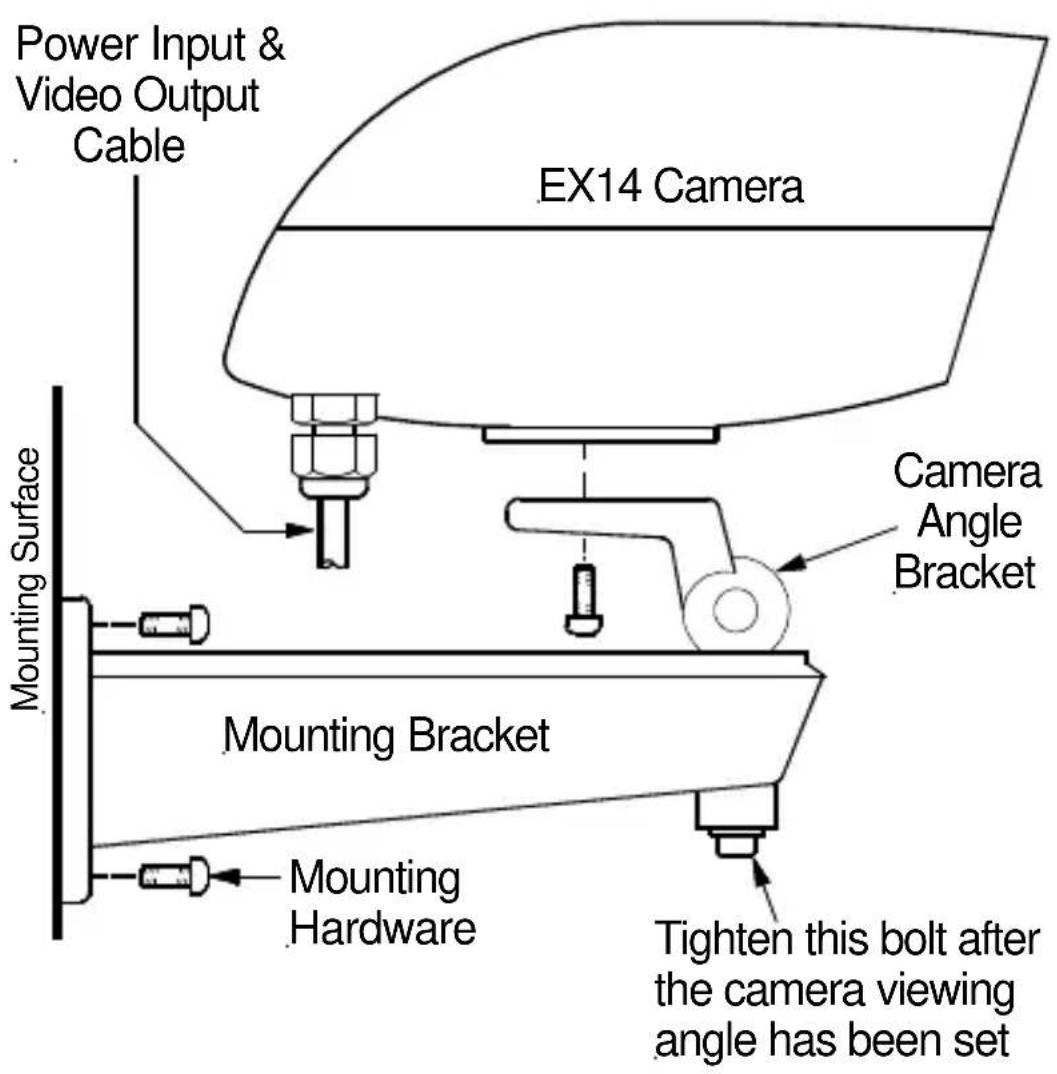
FIGURE 1 – 1 Camera and Bracket – Mounting Details
Warning: this apparatus must be securely attached to the wall or ceiling in accordance with installation instructions. Failure to follow installation instructions may results in injury/death.
Select a suitable location that protects the camera from accidental damage, tampering and environmental conditions exceeding the specifications of the camera to be mounted.
Caution: Ensure the selected location is protected from falling objects, accidental contact with moving objects and unintentional interference from personnel. Follow all applicable building codes.
The following installation guidelines must be followed:
- Locate the bracket such that it cannot be easily interfered with, either intentionally or accidentally.
- Select a smooth, flat mounting surface to ensure proper sealing. The surface must also be capable of supporting the combined weight of the camera and mounting hardware under all expected conditions of vibration and temperature.
- Secure all cabling.
• Installation should only be performed by skilled personnel
Hardware required:
- For wall mount:
-
10 x 2" Round Head Bolt, Qty = 2
-
14 " Flat Washer, Qty = 2
Tools required:
- Drill
- Stud Finder
- 5/32" Drill Bit
-
2 Screwdriver
Mounting instructions for wall and ceiling mount:
Camera is intended to be securely mounted to a wall using the mounting bracket supplied with the enclosure. Camera has been evaluated for wall mounting using the following wood screws secured into a 2x4 stud under 12 drywall. Wood screws:
- wood screws with washer, #10, 2" long
- flat washer.
Camera has not been evaluated for safety requirements using other mounting kits.
Installation (Wall Mount)
- Locate stud in the wall and mark outside edges of stud.
-
Using wall mount bracket as a template, align the mounting hole with the center of the stud.
-
Marking the point on the wall in the center of the hole where mounting screw will be positioned.
- Remove the wall mount bracket and using a 5/32" drill bit, drill a pilot hole at the marked point.
- Align the ceiling/wall mount bracket mounting hole with the hole drilled in the ceiling/wall
- Using a socket and driver, secure the ceiling/wall mount bracket by screwing the #10 screw with washer securely into the stud.
- Use second #10 screw and washer to secure the remaining mounting holes.
- Installation is complete.
2. CAMERA I/O CONNECTIONS
Connect the Power Input (ac or dc) to the camera as shown below. Wires are not polarity dependent. Connect the Video Out BNC connector to a monitor.
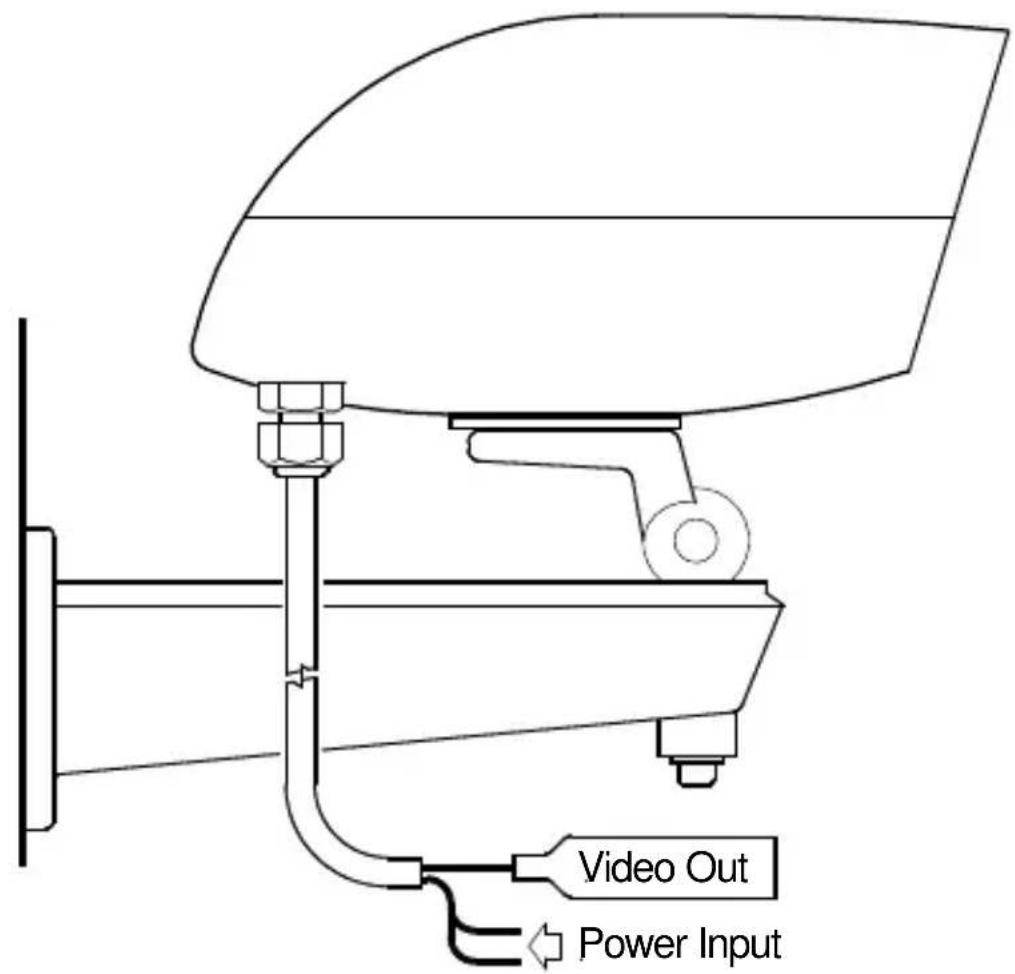
Figure 2 – 1 Camera I/O Connections
3. INPUT POWER CONNECTIONS
The camera unit is pre-connected with an electrically isolated power board for 24Vac or 12V dc operation with no wiring change or wiring polarity. See Figure 3-1.
Note:
Input voltage is 12VDC to 24VDC for DC input. The AC input range is 12VAC to 24VAC.
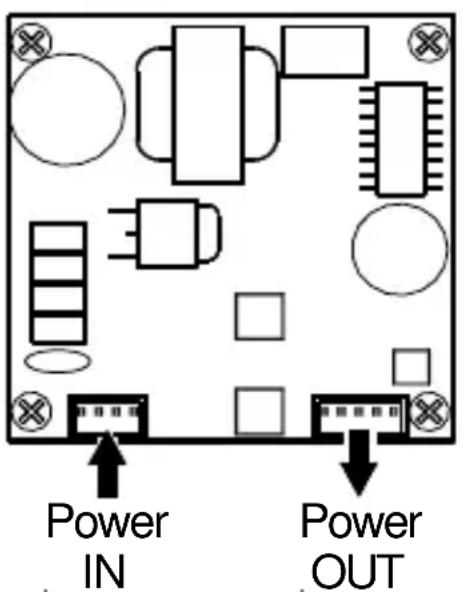
FIGURE 3 - 1
12VDC or 24VAC
Electrically Isolated Board
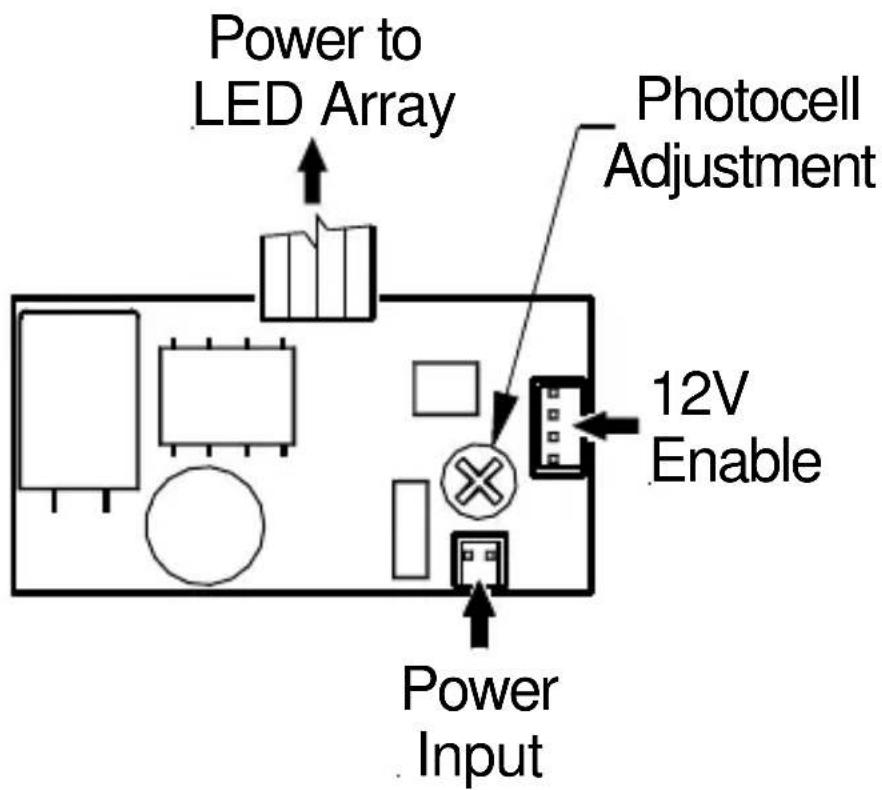
FIGURE 3 – 2 LED Array Power Board
4. CAMERA/ LED ARRAY ADJUSTMENTS
Focus and Zoom Adjustments
Loosen and tilt back the camera's top cover to access the lens for adjustment.
Step 3.1 - Loosen the lens setscrews
for focus/zoom adjustments.
See Figure 4-1 on page 13.
Step 3.2 - The setscrew for N is used for image focus.
Step 3.3 - The setscrew for T W
is used for telephoto or wide-angle settings.
Step 3.4 - Re-tighten the setscrews after focus adjustments have been completed.
The LED Array brightness has been set at the factory before shipment.
For photocell brightness adjustment refer to
Figure 3-2 on page 11.
Loosen this set-screw for Focus Adjustment
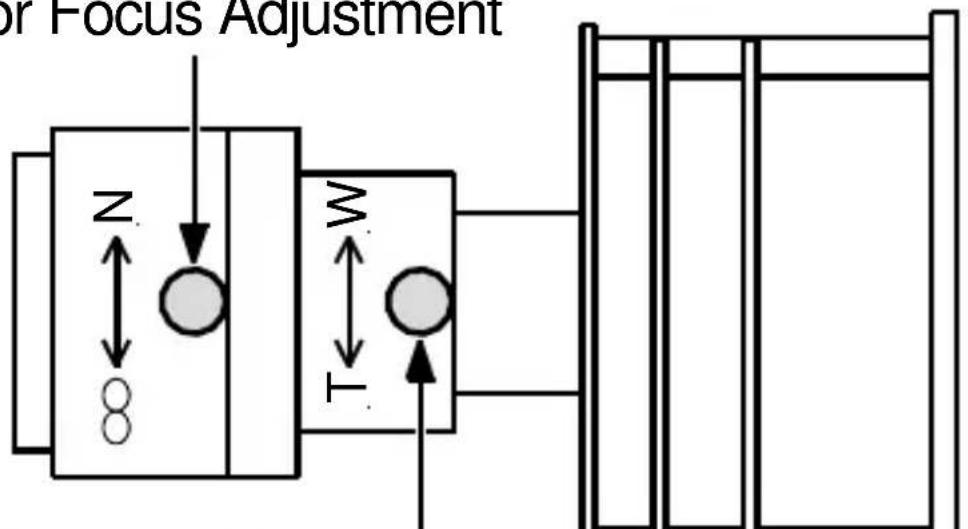
Loosen this set-screw for Telephoto or Wide Angle Adjustment
FIGURE 4 - 1
Focus and Zoom Adjustments

Use a Neutral Density filter or Infra-Red Pass filter to cover the lens during focusing to simulate low light conditions on scene for correct 24-hour focusing. For camera with vari-focal lens, the camera should be focused with the lens iris fully opened to simulate the worst possible depth of field. Using a Neutral Density filter or Infra-Red Pass filter will ensure the iris is fully open for correct setup and adjustment.
Note that statement above is applicable only for Day/Night or IR version cameras.
5. TROUBLESHOOTING GUIDE
| PROBLEM | POSSIBLE CAUSE | LIKELY SOLUTION |
| No Video 1. | Power Supply:-Connections....-Voltage Range... | Check input power connections at the cable leads.Check for loose wires.If connected to DC, check input voltage range of 12 – 24V.If connected to AC, check input voltage range of 12 – 24V.Measure the voltage and current at the Input Power Cable.The current should be >.02A and <1.0A. |
| No Video (cont'd.) | 2. Video Connections | Determine if wiring polarity at “Video Connector” terminal block is correct. Check the cable and BNC connector.If still no video, connect the camera directly to the monitor. Check the video signal. If okay, the problem is with the interconnections. If still no video, contact BOSCH Service Center. See rear page of this manual for contact information. |
| Poor Picture Snowy Image | Poor Video Signal16 | Ensure the video cable is correctly matched and terminated with 75 ohms at each end. Make sure the video cables are similar types. |
| Poor Picture | ||
| Snowy Image (cont'd.) | Noisy Power Supply | Check connections. Relocate or replace the power supply. |
| Horizontal Scan Lines, Rolling Up or Down | Ground Looping on video cable | Check the coax cable shield is not touching ground, e.g. at couplings. Check video polarity. |
| Negative, scrambled, or faded image | Low voltage | Check voltage at the input power cable. Must be >10.5V dc or >12V ac. |
6. GENERAL SPECIFICATIONS
Power Consumption:
EX14 2W(max.) Vdc and Vac
EX14N 5.3W(max.) Vdc and Vac
Input Voltage: 12 - 24 Vdc,
12 - 24Vac,
i s o l a t e d
Enclosure (housing): ABS/Nylon
(sealed
Viewing Window: Tempered Glass
Dimensions:
H: 3.35" (85mm)
W: 3.35" (85mm)
L: 7.10" (180mm)
Weight:
0.7kg (1.5 lbs.)
Subject To Change Without Notice.
Notes:
Notes:
Notes:
Americas
Bosch Security Systems, Inc.
850 Greenfield Road
Lancaster, Pennsylvania 17601
USA
Telephone+1 888-289-0096
Fax +1 585-223-9180
Email: security.sales@us.bosch.com
www.boschsecurity.us
Europe, Middle East, Africa:
Bosch Security Systems B.V.
P.O. Box 80002
5600 JB Eindhoven,
The Netherlands
Phone: +31 40 2577 284
Fax: +31 40 2577 330
emea.securitysystems@bosch.com
www.boschsecurity.com
Asia-Pacific:
Bosch Security Systems Pte Ltd
38C Jalan Pemimpin
Singapore 577180
Phone: +65 6319 3450
Fax: +65 6319 3499
apr.securitysystems@bosch.com
www.boschsecurity.com