Dinion KBE-498V75 - Security Camera BOSCH - Free user manual and instructions
Find the device manual for free Dinion KBE-498V75 BOSCH in PDF.


User questions about Dinion KBE-498V75 BOSCH
0 question about this device. Answer the ones you know or ask your own.
Ask a new question about this device
Download the instructions for your Security Camera in PDF format for free! Find your manual Dinion KBE-498V75 - BOSCH and take your electronic device back in hand. On this page are published all the documents necessary for the use of your device. Dinion KBE-498V75 by BOSCH.
USER MANUAL Dinion KBE-498V75 BOSCH
natural_image
White electronic device with exposed internal wiring and external cable, no visible text or symbolsKBE and KBN Series
Prepackaged Cameras

BOSCH
en Instruction Manual
Table of Contents
| 1 | S | a | f | e | t | y | 1 |
1.1 Important Safety Instructions 1
1.2 Safety Precautions 4
1.3 Important Notices 5
1.4 Customer Support and Service 13
| 2 Unpacking | 15 |
| 2.1 Parts List | 15 |
| 3 Description | 15 |
| 3.1 Model Summary | 15 |
| 4 Installation | 16 |
| 4.1 Operating Voltage | 16 |
| 4.2 Preparing the Unit | 16 |
| 4.3 Preparing the Mount | 16 |
| 4.4 Housing | 16 |
| 4.5 Line Power and Video Signal Connection | 16 |
| 4.6 Connections for U Suffix, F Suffix, and N Suffix | 17 |
4.6.1 U (Twisted Pair) Suffix Connections 17
4.6.2 Wiring Do's 18
4.6.3 Wiring Don'ts 18
4.6.4 F (Fiber Optic) Suffix Connections 19
4.6.5 N (Network) Suffix Connections 21
| 5 Camera Lens Adjustment | 23 |
| 6 Sunshield | 24 |
| 7 Model Numbers and System Specifications | 24 |
iv en | Table of Contents KBE and KBN Series
1 S a f e t y
1.1 Important Safety Instructions
Read, follow, and retain for future reference all of the following safety instructions. Heed all warnings on the unit and in the operating instructions before operating the unit.
-
Cleaning - Unplug the unit from the outlet before cleaning. Follow any instructions provided with the unit. Generally, using a dry cloth for cleaning is sufficient, but a moist fluff-free cloth or leather shammy may also be used. Do not use liquid cleaners or aerosol cleaners.
-
Heat Sources · Do not install the unit near any heat sources such as radiators, heaters, stoves, or other equipment (including amplifiers) that produce heat.
-
Ventilation - Any openings in the unit enclosure are provided for ventilation to prevent overheating and ensure reliable operation. Do not block or cover these openings. Do not place the unit in an enclosure unless proper ventilation is provided, or the manufacturer's instructions have been adhered to.
-
Water - Do not use this unit near water, for example near a bathtub, washbowl, sink, laundry basket, in a damp or wet basement, near a swimming pool, in an outdoor installation, or in any area classified as a wet location. To reduce the risk of fire or electrical shock, do not expose this unit to rain or moisture.
-
Object and liquid entry - Never push objects of any kind into this unit through openings as they may touch dangerous voltage points or short-out parts that could result in a fire or electrical shock. Never spill liquid of any kind on the unit. Do not place objects filled with liquids, such as vases or cups, on the unit.
-
Lightning - For added protection during a lightning storm, or when leaving this unit unattended and unused for long periods, unplug the unit from the wall outlet and disconnect the cable system. This will prevent damage to
the unit from lightning and power line surges.
-
Controls adjustment - Adjust only those controls specified in the operating instructions. Improper adjustment of other controls may cause damage to the unit. Use of controls or adjustments, or performance of procedures other than those specified, may result in hazardous radiation exposure.
-
Overloading - Do not overload outlets and extension cords. This can cause fire or electrical shock.
-
Power cord and plug protection - Protect the plug and power cord from foot traffic, being pinched by items placed upon or against them at electrical outlets, and its exit from the unit. For units intended to operate with 230 VAC, 50 Hz, the input and output power cord must comply with the latest versions of IEC Publication 227 or IEC Publication 245.
-
Power disconnect · Units with or without ON/OFF switches have power supplied to the unit whenever the power cord is inserted into the power source; however, the unit is operational only when the ON/OFF switch is in the ON position. The power cord is the main power disconnect device for switching off the voltage for all units.
-
Power sources · Operate the unit only from the type of power source indicated on the label. Before proceeding, be sure to disconnect the power from the cable to be installed into the unit.
- For battery powered units, refer to the operating instructions.
- For external power supplied units, use only the recommended or approved power supplies.
- For limited power source units, this power source must comply with EN60950. Substitutions may damage the unit or cause fire or shock.
- For 24 VAC units, voltage applied to the unit's power input should not exceed ± 10% , or 28 VAC. User-supplied wiring must comply with local electrical codes (Class 2 power levels). Do not ground the
supply at the terminals or at the unit's power supply terminals.
- If unsure of the type of power supply to use, contact your dealer or local power company.
-
Servicing - Do not attempt to service this unit yourself. Opening or removing covers may expose you to dangerous voltage or other hazards. Refer all servicing to qualified service personnel.
-
Damage requiring service - Unplug the unit from the main AC power source and refer servicing to qualified service personnel when any damage to the equipment has occurred, such as:
-
the power supply cord or plug is damaged;
- exposure to moisture, water, and/or inclement weather (rain, snow, etc.);
– liquid has been spilled in or on the equipment; - an object has fallen into the unit;
- unit has been dropped or the unit cabinet is damaged;
- unit exhibits a distinct change in performance;
-
unit does not operate normally when the user correctly follows the operating instructions.
-
Replacement parts - Be sure the service technician uses replacement parts specified by the manufacturer, or that have the same characteristics as the original parts. Unauthorized substitutions may cause fire, electrical shock, or other hazards.
-
Safety check - Safety checks should be performed upon completion of service or repairs to the unit to ensure proper operating condition.
-
Installation · Install in accordance with the manufacturer's instructions and in accordance with applicable local codes.
-
Attachments, changes or modifications · Only use attachments/accessories specified by the manufacturer. Any change or modification of the equipment, not expressly approved by Bosch, could void the warranty or, in the case of an authorization agreement, authority to operate the equipment.
4 en | Safety KBE and KBN Series
1.2 Safety Precautions

DANGER! High Risk:
This symbol indicates an imminently hazardous situation such as “Dangerous Voltage” inside the product.
If not avoided, this will result in an electrical shock, serious bodily injury, or death.

WARNING! Medium Risk:
Indicates a potentially hazardous situation.
If not avoided, this could result in serious bodily injury or death.

CAUTION! Medium Risk:
Indicates a potentially hazardous situation.
If not avoided, this may result in minor or moderate injury.
Alerts the user to important instructions accompanying the unit.
CAUTION! Low risk: (without safety alert symbol)
Indicates a potentially hazardous situation.
If not avoided, this may result in property damage or risk of damage to the unit.

NOTICE!
This symbol indicates information or a company policy that relates directly or indirectly to the safety of personnel or protection of property.
1.3 Important Notices

Accessories · Do not place this unit on an unstable stand, tripod, bracket, or mount. The unit may fall, causing serious injury and/or serious damage to the unit. Use only with the cart, stand, tripod, bracket, or table specified by the manufacturer. When a cart is used, use caution and care when moving the cart/apparatus combination to avoid injury from tip-over. Quick stops, excessive force, or uneven surfaces may cause the cart/unit combination to overturn. Mount the unit per the manufacturer's instructions.
All-pole power switch - Incorporate an all-pole power switch, with a contact separation of at least 3 mm in each pole, into the electrical installation of the building.
If it is needed to open the housing for servicing and/or other activities, use this all-pole switch as the main disconnect device for switching off the voltage to the unit.
Camera grounding - For mounting the camera in potentially damp environments, ensure to ground the system using the ground connection of the power supply connector (see section: Connecting external power supply).
Camera lens · An assembled camera lens in the outdoor housing must comply and be tested in accordance with UL/IEC60950. Any output or signal lines from the camera must be SELV or Limited Power Source. For safety reasons the environmental specification of the camera lens assembly must be within the environmental specification of -10 °C (14 °F) to 50 °C (122 °F).
Camera signal · Protect the cable with a primary protector if the camera signal is beyond 140 feet, in accordance with NEC800 (CEC Section 60).

CAUTION!
Class I Laser Product
Invisible laser radiation when open. Avoid exposure to beam.
Coax grounding:
- Ground the cable system if connecting an outside cable system to the unit.
- Connect outdoor equipment to the unit's inputs only after this unit has had its grounding plug connected to a grounded outlet or its ground terminal is properly connected to a ground source.
- Disconnect the unit's input connectors from outdoor equipment before disconnecting the grounding plug or grounding terminal.
– Follow proper safety precautions such as grounding for any outdoor device connected to this unit.
U.S.A. models only - Section 810 of the National Electrical Code, ANSI/NFPA No.70, provides information regarding proper grounding of the mount and supporting structure, grounding of the coax to a discharge unit, size of grounding conductors, location of discharge unit, connection to grounding electrodes, and requirements for the grounding electrode.

NOTICE!
This device is intended for use in public areas only. U.S. federal law strictly prohibits surreptitious recording of oral communications.
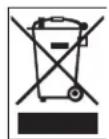
Your Bosch product was developed and manufactured with high-quality material and components that can be recycled and reused. This symbol means that electronic and electrical appliances, which have reached the end of their working life, must be collected and disposed of separately from household waste material. Separate collecting systems are usually in place for disused electronic and electrical products. Please dispose of these units at an environmentally compatible recycling facility, per European Directive 2002/96/EC.
Environmental statement · Bosch has a strong commitment towards the environment. This unit has been designed to respect the environment as much as possible.
Electrostatic-sensitive device - Use proper CMOS/MOS-FET handling precautions to avoid electrostatic discharge.
NOTE: Wear required grounded wrist straps and observe proper ESD safety precautions when handling the electrostatic-sensitive printed circuit boards.
Fuse rating - For security protection of the device, the branch circuit protection must be secured with a maximum fuse rating of 16A. This must be in accordance with NEC800 (CEC Section 60).
Grounding and polarization - This unit may be equipped with a polarized alternating current line plug (a plug with one blade wider than the other blade). This safety feature allows the plug to fit into the power outlet in only one way. If unable to insert the plug fully into the outlet, contact a locally certified electrician to replace the obsolete outlet. Do not defeat the safety purpose of the polarized plug.
Alternately, this unit may be equipped with a 3-pole grounding plug (a plug with a third pin for earth grounding). This safety feature allows the plug to fit into a grounded power outlet only. If unable to insert the plug into the outlet, contact a locally certified electrician to replace the obsolete outlet. Do not defeat the safety purpose of the grounding plug.
Moving - Disconnect the power before moving the unit. Move the unit with care. Excessive force or shock may damage the unit and the hard disk drives.
Outdoor signals - The installation for outdoor signals, especially regarding clearance from power and lightning conductors and transient protection, must be in accordance with NEC725 and NEC800 (CEC Rule 16-224 and CEC Section 60).
Permanently connected equipment - Incorporate a readily accessible disconnect device in the building installation wiring. Pluggable equipment - Install the socket outlet near the equipment so it is easily accessible.
PoE - Never supply power via the Ethernet connection (PoE) when power is already supplied via the power connector.
Power disconnect - Units have power supplied whenever the power cord is inserted into the power source. The power cord is the main power disconnect for all units.
Power lines · Do not locate the camera near overhead power lines, power circuits, or electrical lights, nor where it may contact such power lines, circuits, or lights.
SELV
All the input/output ports are Safety Extra Low Voltage (SELV) circuits. SELV circuits should only be connected to other SELV circuits.
Because the ISDN circuits are treated like telephone-network voltage, avoid connecting the SELV circuit to the Telephone Network Voltage (TNV) circuits.
Video loss · Video loss is inherent to digital video recording; therefore, Bosch Security Systems cannot be held liable for any damage that results from missing video information. To minimize the risk of lost digital information, Bosch Security Systems recommends multiple, redundant recording systems, and a procedure to back up all analog and digital information.

NOTICE!
This is a class A product. In a domestic environment this product may cause radio interference, in which case the user may be required to take adequate measures.
FCC & ICES INFORMATION
This device complies with part 15 of the FCC Rules. Operation is subject to the following conditions:
- this device may not cause harmful interference, and
- this device must accept any interference received,
including interference that may cause undesired operation.
Note
This equipment has been tested and found to comply with the limits for a Class A digital device, pursuant to Part 15 of the FCC Rules and ICES-003 of Industry Canada. These limits are designed to provide reasonable protection against harmful interference when the equipment is operated in a commercial environment. This equipment generates, uses, and radiates radio frequency energy and, if not installed and used in accordance with the instruction manual, may cause harmful interference to radio communications. Operation of this equipment in a residential area is likely to cause harmful interference, in which case the user will be required to correct the interference at his expense.
Intentional or unintentional modifications, not expressly approved by the party responsible for compliance, shall not be made. Any such modifications could void the user's authority to operate the equipment. If necessary, the user should consult the dealer or an experienced radio/television technician for corrective action.
The user may find the following booklet, prepared by the Federal Communications Commission, helpful: How to Identify and Resolve Radio-TV Interference Problems. This booklet is available from the U.S. Government Printing Office, Washington, DC 20402, Stock No. 004-000-00345-4.
INFORMATIONS FCC ET ICES
Underwriter Laboratories Inc. ("UL") has not tested the performance or reliability of the security or signaling aspects of this product. UL has only tested fire, shock and/or casualty hazards as outlined in UP's Standard(s) for Safety for Closed Circuit Television Equipment, UL 2044. UL Certification does not cover the performance or reliability of the security or signaling aspects of this product.
UL MAKES NO REPRESENTATIONS, WARRANTIES, OR CERTIFICATIONS WHATSOEVER REGARDING THE PERFORMANCE OR RELIABILITY OF ANY SECURITY OR SIGNALING RELATED FUNCTIONS OF THIS PRODUCT.
Disclaimer
Underwriter Laboratories Inc. (“UL”) has not tested the performance or reliability of the security or signaling aspects of this product. UL has only tested fire, shock and/or casualty hazards as outlined in UP’s Standard(s) for Safety for Information Technology Equipment, UL 60950-1. UL Certification does not cover the performance or reliability of the security or signaling aspects of this product.
UL MAKES NO REPRESENTATIONS, WARRANTIES, OR CERTIFICATIONS WHATSOEVER REGARDING THE PERFORMANCE OR RELIABILITY OF ANY SECURITY OR SIGNALING-RELATED FUNCTIONS OF THIS PRODUCT.
Copyright
This user guide is the intellectual property of Bosch Security Systems and is protected by copyright. All rights reserved.
Trademarks
All hardware and software product names used in this document are likely to be registered trademarks and must be treated accordingly.

NOTICE!
This user guide has been compiled with great care and the information it contains has been thoroughly verified. The text was complete and correct at the time of printing. The ongoing development of the products may mean that the content of the user guide can change without notice. Bosch Security Systems accepts no liability for damage resulting directly or indirectly from faults, incompleteness or discrepancies between the user guide and the product described.
More information
For additional information, please contact the Bosch Security Systems location nearest you or visit our web site at www.boschsecuritysystems.com
1.4 Customer Support and Service
If this unit needs service, contact the nearest Bosch Security Systems Service Center for authorization to return and shipping instructions.
Service Centers
USA
Telephone: 800-366-2283 or 585-340-4162
Fax: 800-366-1329
Email: cctv.repair@us.bosch.com
Customer Service
Telephone: 888-289-0096
Fax: 585-223-9180
Email: security.sales@us.bosch.com
Technical Support
Telephone: 800-326-1450
Fax: 585-223-3508 or 717-735-6560
Email: technical.support@us.bosch.com
Repair Center
Telephone: 585-421-4220
Fax: 585-223-9180 or 717-735-6561
Email: security.repair@us.bosch.com
Canada
Telephone: 514-738-2434
Fax: 514-738-8480
Europe, Middle East & Asia Pacific Region
Telephone: 44 (0) 1495 274558
Fax: 44 (0) 1495 274280
Email: rmahelpdesk@solectron.com
More information
For additional information, please contact your Bosch Security
Systems representative or visit our web site at
www.boschsecurity.com
14 en | Safety KBE and KBN Series
2 U n p a c k i n
This electronic equipment should be unpacked and handled carefully. If an item appears to have been damaged in shipment, notify the shipper immediately.
Verify that all the parts listed in the Parts List below are included. If any items are missing, notify your Bosch Security Systems Sales or Customer Service Representative.
The original packing carton is the safest container in which to transport the unit and must be used if returning the unit for service. Save it for possible future use.
2.1 Parts List
| Quantity Item |
| 1 Unit (verify package model number ordered) |
| 1 Feed-through mount |
| 1 Instruction booklet packet |
Refer to Section 7 Model Numbers and System Specifications, page 24, for a detailed list of the Camera, Lens, Housing, and Feed-through Mount model numbers included with the various package model numbers.
3 D e s c r i p t
The KBE and KBN Series are complete camera packages that include a camera and lens pre-wired into a housing. A feed-through wall mount is also provided, as well as a sunshield on outdoor packages.
3.1 Model Summary
Refer to Section 7 Model Numbers and System Specifications, page 24 for the resolution, lens, and system specifications for the various package models.
4 Installation

WARNING! This installation should be made by a qualified service person and conform to all local codes.
4.1 Operating Voltage
All Recommended operating voltage is 24 VAC, 60 Hz.
4.2 Preparing the Unit
Remove the mount and the housing assembly from the carton.
4.3 Preparing the Mount
Prepare and secure the mount to the wall or mounting surface as described in the LTC 9215/00 Installation Manual included in the Instruction Booklet Packet.
4.4 Housing
Feed the cabling from the housing foot through the mount. Attach the housing to the mount using the two (2) 1/4-20 screws and washers provided in the hardware kit. For additional information, see the LTC 9215/00 Mount Installation Manual and UHO-HBGS-10 Series Housing Installation Manual.
4.5 Line Power and Video Signal Connection
The external video coax cable is equipped with a female BNC connector for transmission of video. Route and connect video cable to the BNC connector. The external power cable is provided to allow for necessary stripping/preparation by the installer. For additional information, see the Installation Manuals included in the Instruction Booklet Packet.
| Color Connection |
| Green Ground |
| White 24 V |
| Black 24 V |
4.6 Connections for U Suffix, F Suffix, and N Suffix
The connections for models containing fiber optic, network, or twisted pair interfaces are covered as follows:
4.6.1 U (Twisted Pair) Suffix Connections
These models include an unshielded twisted pair transmitter added to the standard construction.
- Make all power connections in accordance with the KBE and KBN Series Instruction Manual.
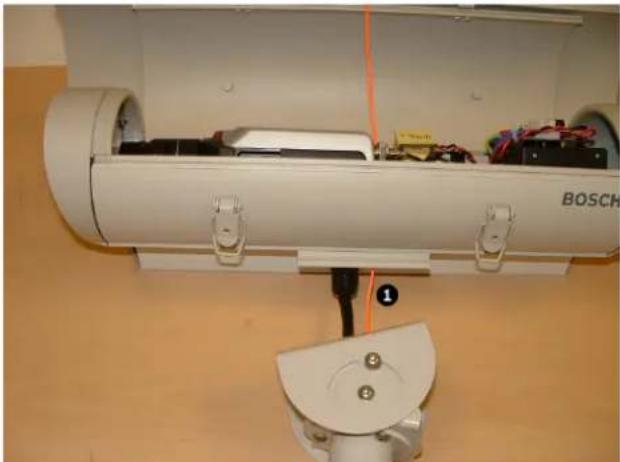
- Pass the supplied orange string through the mounting foot of the camera housing and the furnished mount. See Figure 4.2 on page 19. A fitting may be used in the mounting foot if desired.
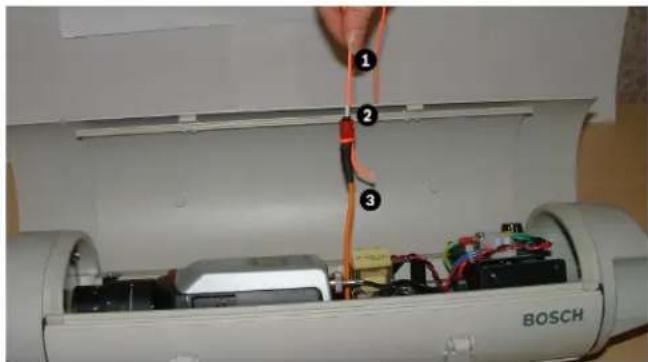
- Attach the end of the string to the unshielded twisted pair (UTP) video cable and pull it through the mount and the unused hole in the mounting foot of the camera housing as shown in Figure 4.3 on page 20.
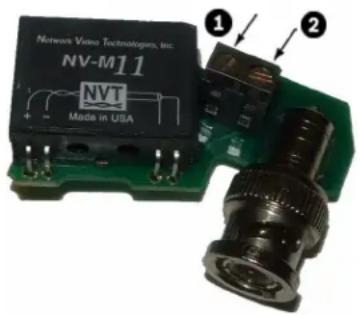
- Connect the UTP video cable to the the -VID+ pins on UTP transmitter. Observe polarity; the video connection is polarity-sensitive.
text_image
Network Video Technologies, Inc. NV-M11 NVT Made in USA ① ②Figure 4.1 Connect the UTP Cable to the Transmitter
| Reference | Description |
| 1 Negative | (-) terminal for twisted pair video lead |
| 2 Positive | (+) terminal for twisted pair video lead |
-
Seal the hole in the mounting foot of the camera housing with RTV or an equivalent seal. If a fitting was used in the mounting foot, apply the seal around the UTP cable before tightening the fitting to prevent slippage.
-
Attach the housing to the mount in accordance with the KBE and KBN Series Instruction Manual.
4.6.2 Wiring Do's
-
Use point to point unshielded twisted pair wire, 24 AWG or thicker, stranded or solid, Category 2, 3, 4, or 5.
-
The video signal may coexist in the same wire bundle as other video, telephone, data, control signals, or low voltage power.
-
Measure the wire distance. Use only receivers designed for that distance.
-
Make sure the pair of wires carrying the video signal is sent as a twisted pair, not a split pair.
4.6.3 Wiring Don'ts
-
DO NOT USE SHIELDED TWISTED PAIR WIRE, as this will severely degrade the distance performance. Short runs may be used with some signal degradation. Multi-pair wire with an overall shield is OK.
-
DO NOT USE UNTWISTED WIRE, as this will reduce the inherent immunity to interference.
-
DO NOT allow your installation to have bridge / taps, loading coils, talk-battery, or MOV type protectors. Bridge taps refer to a twisted pair connected to two twisted pairs (such as an extension phone). Bridge taps cause reflections as the signal propagates, resulting in ghosts in the image.
-
If the phone company is providing the cable runs between buildings, make sure it is dry copper (i.e. it should have none of the following: dial tone, 48 V, loading coils, bridge taps, switching, or long paths to the phone company's central office and back).
-
Due to near-end cross talk, DO NOT send a transmit and receive signal in the same wire bundle. Exceptions: Less
than 1000 ft. (304.8 m), or Category 5 cable up to 609.6 m (2000 ft).
- For safety, never put signals in the same conduit as high voltage wiring.
4.6.4 F (Fiber Optic) Suffix Connections
These models include a fiber optic transmitter added to the standard construction.
-
Make all power connections in accordance with the KBE and KBN Series Instruction Manual.
-
Pass the supplied orange string through the mounting foot of the camera housing and the furnished mount. Note that a fitting is not used in the mounting foot when a terminated fiber optic cable is used.
natural_image
Close-up of a white Bosch airship with visible wiring and components, mounted on a wooden surface (no text or symbols)Figure 4.2 Pass the String through the Mount
| Reference Description |
| 1 Orange string |
- Attach the end of the string to the fiber optic video cable and pull it through the mount and the unused hole in the mounting foot of the camera housing.
text_image
Close-up of a Bosch air conditioner unit with labeled components and wiring, showing part 1 being inserted into the chamber.Figure 4.3 Pull the Fiber Optic Cable
| Reference Description |
| 1 Orange string |
| 2 ST/RJ-45 connector |
| 3 Fiber optic video cable/UTP/CAT5 cable |
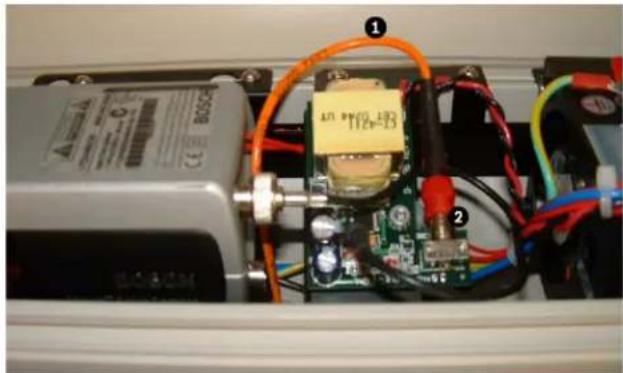
- Connect the fiber optic cable to the fiber optic video connector on the fiber optic transmitter.

CAUTION! Make sure that the bend radius of the fiber optic cable is in accordance with the cable manufacturer's specifications when dressing the fiber optic cable.
natural_image
Interior view of an electronic device with visible wiring, components, and a central circuit board (no readable text or symbols)Figure 4.4 Connect the Fiber Optic Cable to the Transmitter
| Reference | Description |
| 1 | Fiber optic cable |
| 2 | Video connector on fiber optic transmitter |
-
If an unterminated fiber optic cable is being used, a fitting may be used in the mounting foot of the camera housing. The fiber optic cable should be terminated with an ST connector in accordance with the connector manufacturer's recommendations.
-
Seal the hole in the mounting foot of the camera housing with RTV or an equivalent seal. If a fitting was used in the mounting foot along with an unterminated fiber optic cable, apply the seal around the optical cable before tightening the fitting, to prevent slippage. A split rubber sleeve (not supplied) may be used for this purpose.

natural_image
Close-up of a white electrical outlet with a black cable and orange cable inserted, no visible text or symbolsFigure 4.5 Seal the Hole in the Housing Foot
| Reference Description | |
| 1 | S e |
a I
w i t
- Attach the housing to the mount in accordance with the KBE and KBN Series Instruction Manual.
22 en | Installation KBE and KBN Series
4.6.5 N (Network) Suffix Connections
These models include an IP-based camera that enables network video and configuration capabilities.
- Make all power connections in accordance with the KBE and KBN Series Instruction Manual.

CAUTION! Never supply power via the Ethernet connection (PoE) when power is supplied via the power connector.
- Connect the camera to a 10/100 Base-T network (Figure 4.6).
- Use a shielded UTP Category 5 cable with RJ-45 connectors.

text_image
UTP Cut 5 R140Figure 4.6 Network Connection
- Power can be supplied one of two ways: 24 VAC power connection (factory configured), or via the Ethernet cable compliant with the Power-over-Ethernet (IEEE 802.3af) standard.

WARNING! If connecting to a PoE LAN switch remove the separate AC power connections from the camera.

natural_image
Electrical wiring and components inside a control panel (no readable text or symbols)Figure 4.7 Power Wire Connection
| Reference | Description |
| 1 | P o |
w e
r t e
- Pass the supplied orange string through the mounting foot of the camera housing and the furnished mount. See
Figure 4.2. A fitting may be used in the mounting foot if desired.
-
Attach the end of the string to the Cat5/Cat6 cable and pull it through the mount and the unused hole in the mounting foot of the camera housing. See Figure 4.3.
-
Connect the Cat5 / Cat6 cable to the network connector on the back of the camera. See Figure 4.4.
-
If an unterminated Cat5/Cat6 cable is being used, a fitting may be used in the mounting foot of the camera housing. The network cable should be terminated with an RJ-45 connector in accordance with the connector manufacturer's recommendations.
-
Seal the hole in the mounting foot of the camera housing with RTV or an equivalent seal. See Figure 4.5. If a fitting was used in the mounting foot, apply the seal around the network cable before tightening the fitting, to prevent slippage. A split rubber sleeve (not supplied) may be used for this purpose.
5 Camera Lens Adjustment
The camera and lens come factory configured and ready for operation. If custom setup is required, see the camera Installation Instructions included in the Instruction Booklet Packet.

natural_image
Interior view of an electrical enclosure showing a Bosch motor and wiring (no visible text or symbols)Figure 5.1 Removing the Bracket
6 Sunshield
A sunshield is provided with the outdoor packages.
7 Model Numbers and System Specifications
| Model No. Camera Lens Housing Mount Res. Lens System | |||||||
| MONOCHROME 1/3 in. STANDARD RESOLUTION | |||||||
| KBN-335V28-20 | LTC0335/20 | LTC3364/50 | LTC9480/00 | LTC9215/00S | 380 | 2.8-10 mmVari-focal | Indoor,Monochrome EIA,24 VAC, 60 Hz |
| KBE-335V28-20 | LTC0335/20 | LTC3364/50 | UHO-HBGS-10 | LTC9215/00 | 380 | 2.8-10 mmVari-focal | Outdoor,Monochrome EIA,24 VAC, 60 Hz |
| KBN-335V55-20 | LTC0335/20 | LTC3374/50 | LTC9480/00 | LTC9215/00S | 380 | 5-50 mmVari-focal | Indoor,Monochrome EIA,24 VAC, 60 Hz |
| KBE-335V55-20 | LTC0335/20 | LTC3374/50 | UHO-HBGS-10 | LTC9215/00 | 380 | 5-50 mmVari-focal | Outdoor,Monochrome EIA,24 VAC, 60 Hz |
| MONOCHROME 1/3 in. HIGH RESOLUTION | |||||||
| KBN-355V28-20 | LTC0355/20 | LTC3364/50 | LTC9480/00 | LTC9215/00S | 570 | 2.8-10 mmVari-focal | Indoor,Monochrome EIA,24 VAC, 60 Hz |
| KBE-355V28-20 | LTC0355/20 | LTC3364/50 | UHO-HBGS-10 | LTC9215/00 | 570 | 2.8-10 mmVari-focal | Outdoor,Monochrome EIA,24 VAC, 60 Hz |
| KBN-355V55-20 | LTC0355/20 | LTC3374/50 | LTC9480/00 | LTC9215/00S | 570 | 5-50 mmVari-focal | Indoor,Monochrome EIA,24 VAC, 60 Hz |
| KBE-355V55-20 | LTC0355/20 | LTC3374/50 | UHO-HBGS-10 | LTC9215/00 | 570 | 5-50 mmVari-focal | Outdoor,Monochrome EIA,24 VAC, 60 Hz |
| MONOCHROME 1/3 in. HIGH RESOLUTION SENSITIVITY | |||||||
| KBN-385V28-20 | LTC0385/20 | LTC3364/50 | LTC9480/00 | LTC9215/00S | 570 | 2.8-10 mmVari-focal | Indoor,Monochrome EIA,24 VAC, 60 Hz |
| KBE-385V28-20 | LTC0385/20 | LTC3364/50 | UHO-HBGS-10 | LTC9215/00 | 570 | 2.8-10 mmVari-focal | Outdoor,Monochrome EIA,24 VAC, 60 Hz |
| KBE-385V28-20F | LTC0385/20 | LTC3364/50 | UHO-HBGS-10 | LTC9215/00 | 570 | 2.8-10 mmVari-focal | Outdoor,Monochrome EIA,24 VAC, 60 Hz,with Fiber |
| KBE-385V28-20U | LTC0385/20 | LTC3364/50 | UHO-HBGS-10 | LTC9215/00 | 570 | 2.8-10 mmVari-focal | Outdoor,Monochrome EIA,24 VAC, 60 Hz,with UTP |
26 en | Sunshield KBE and KBN Series
| Model No. | Camera Lens Housing Mount | Res. Lens | System | ||||
| KBN-385V55-20 | LTC0385/20 | LTC3374/50 | LTC9480/00 | LTC9215/00S | 570 | 5-50 mmVari-focal | Indoor,Monochrome EIA,24 VAC, 60 Hz |
| KBE-385V55-20 | LTC0385/20 | LTC3374/50 | UHO-HBGS-10 | LTC9215/00 | 570 | 5-50 mmVari-focal | Outdoor,Monochrome EIA,24 VAC, 60 Hz |
| KBE-385V55-20F | LTC0385/20 | LTC3374/50 | UHO-HBGS-10 | LTC9215/00 | 570 | 5-50 mmVari-focal | Outdoor,Monochrome EIA,24 VAC, 60 Hz,with Fiber |
| KBE-385V55-20U | LTC0385/20 | LTC3374/50 | UHO-HBGS-10 | LTC9215/00 | 570 | 5-50 mmVari-focal | Outdoor,Monochrome EIA,24 VAC, 60 Hz,with UTP |
| 1/2 in. HIGH RESOLUTION, HIGH SENSITIVITY | |||||||
| KBE-510V75-20 | LTC0510/20 | LTC3274/41 | UHO-HBGS-10 | LTC9215/00 | 570 | 7.5-75mmVari-focal | Outdoor,Monochrome EIA,24 VAC, 60 Hz |
| KBE-510V75-20F | LTC0510/20 | LTC3274/41 | UHO-HBGS-10 | LTC9215/00 | 570 | 7.5-75mmVari-focal | Outdoor,Monochrome EIA,24 VAC, 60 Hz,with Fiber |
| KBE-510V75-20U | LTC0510/20 | LTC3274/41 | UHO-HBGS-10 | LTC9215/00 | 570 | 7.5-75mmVari-focal | Outdoor,Monochrome EIA,24 VAC, 60 Hz,with UTP |
| KBE-510V41-20 | LTC0510/20 | LTC3764/20 | UHO-HBGS-10 | LTC9215/00 | 570 | 4.0-12mmVari-focal | Outdoor,Monochrome EIA,24 VAC, 60 Hz |
| KBE-510V41-20F | LTC0510/20 | LTC3764/20 | UHO-HBGS-10 | LTC9215/00 | 570 | 4.0-12mmVari-focal | Outdoor,Monochrome EIA,24 VAC, 60 Hz,with Fiber |
| KBE-510V41-20U | LTC0510/20 | LTC3764/20 | UHO-HBGS-10 | LTC9215/00 | 570 | 4.0-12mmVari-focal | Outdoor,Monochrome EIA,24 VAC, 60 Hz,with UTP |
| COLOR 1/3 in. STANDARD RESOLUTION | |||||||
| KBN-435V28-20 | LTC0435/20 | LTC3364/50 | LTC9480/00 | LTC9215/00S | 330 | 2.8-10 mmVari-focal | Indoor, ColorNTSC, 24 VAC, 60 Hz |
| KBE-435V28-20 | LTC0435/20 | LTC3364/50 | UHO-HBGS-10 | LTC9215/00 | 330 | 2.8-10 mmVari-focal | Outdoor, ColorNTSC, 24 VAC,60 Hz |
KBE and KBN Series Sunshield | en 27
| Model No. | Camera Lens Housing Mount Res. Lens | System | |||||
| KBN-435V55-20 | LTC0435/20 | LTC3374/50 | LTC9480/00 | LTC9215/00S | 330 | 5-50 mmVari-focal | Indoor, ColorNTSC, 24 VAC,60 Hz |
| KBE-435V55-20 | LTC0435/20 | LTC3374/50 | UHO-HBGS-10 | LTC9215/00 | 330 | 5-50 mmVari-focal | Outdoor, ColorNTSC, 24 VAC,60 Hz |
| 1/3 in. HIGH RESOLUTION | |||||||
| KBN-455V28-20 | LTC0455/21 | LTC3364/50 | LTC9480/00 | LTC9215/00S | 540 | 2.8-10 mmVari-focal | Indoor, ColorNTSC, 24 VAC,60 Hz |
| KBE-455V28-20 | LTC0455/21 | LTC3364/50 | UHO-HBGS-10 | LTC9215/00 | 540 | 2.8-10 mmVari-focal | Outdoor, ColorNTSC, 24 VAC,60 Hz |
| KBN-455V55-20 | LTC0455/21 | LTC3374/50 | LTC9480/00 | LTC9215/00S | 540 | 5-50 mmVari-focal | Indoor, ColorNTSC, 24 VAC,60 Hz |
| KBE-455V55-20 | LTC0455/21 | LTC3374/50 | UHO-HBGS-10 | LTC9215/00 | 540 | 5-50 mmVari-focal | Outdoor, ColorNTSC, 24 VAC,60 Hz |
| 1/3 in., HIGH RESOLUTION, HIGH SENSITIVITY | |||||||
| KBN-485V28-20 | LTC0485/21 | LTC3364/50 | LTC9480/00 | LTC9215/00S | 540 | 2.8-10 mmVari-focal | Indoor, ColorNTSC, 24 VAC,60 Hz |
| KBE-485V28-20 | LTC0485/21 | LTC3364/50 | UHO-HBGS-10 | LTC9215/00 | 540 | 2.8-10 mmVari-focal | Outdoor, ColorNTSC, 24 VAC,60 Hz |
| KBE-485V28-20F | LTC0485/21 | LTC3364/50 | UHO-HBGS-10 | LTC9215/00 | 540 | 2.8-10 mmVari-focal | Outdoor, ColorNTSC, 24 VAC,60 Hz, with Fiber |
| KBE-485V28-20U | LTC0485/21 | LTC3364/50 | UHO-HBGS-10 | LTC9215/00 | 540 | 2.8-10 mmVari-focal | Outdoor, ColorNTSC, 24 VAC,60 Hz, with UTP |
| KBN-485V55-20 | LTC0485/21 | LTC3374/50 | LTC9480/00 | LTC9215/00S | 540 | 5-50 mmVari-focal | Indoor, ColorNTSC, 24 VAC,60 Hz |
| KBE-485V55-20 | LTC0485/21 | LTC3374/50 | UHO-HBGS-10 | LTC9215/00 | 540 | 5-50 mmVari-focal | Outdoor, ColorNTSC, 24 VAC,60 Hz |
| KBE-485V55-20F | LTC0485/21 | LTC3374/50 | UHO-HBGS-10 | LTC9215/00 | 540 | 5-50 mmVari-focal | Outdoor, ColorNTSC, 24 VAC,60 Hz, with Fiber |
| KBE-485V55-20U | LTC0485/21 | LTC3374/50 | UHO-HBGS-10 | LTC9215/00 | 540 | 5-50 mmVari-focal | Outdoor, ColorNTSC, 24 VAC,60 Hz, with UTP |
28 en | Sunshield KBE and KBN Series
| Model No. | Camera Lens Housing Mount Res. Lens | System | |||||
| 1/2 in. HIGH RESOLUTION, HIGH SENSITIVITY | |||||||
| KBE-610V75-20 | LTC0610/21 | LTC3274/41 | UHO-HBGS-10 | LTC9215/00 | 540 | 7.5-75mmVari-focal | Outdoor, ColorNTSC, 24 VAC,60 Hz |
| KBE-610V75-20F | LTC0610/21 | LTC3274/41 | UHO-HBGS-10 | LTC9215/00 | 540 | 7.5-75mmVari-focal | Outdoor, ColorNTSC, 24 VAC,60 Hz, with Fiber |
| KBE-610V75-20U | LTC0610/21 | LTC3274/41 | UHO-HBGS-10 | LTC9215/00 | 540 | 7.5-75mmVari-focal | Outdoor, ColorNTSC, 24 VAC,60 Hz, with UTP |
| KBE-610V41-20 | LTC0610/21 | LTC3764/20 | UHO-HBGS-10 | LTC9215/00 | 540 | 4-12 mmVari-focal,IRCorrected | Outdoor, ColorNTSC, 24 VAC,60 Hz |
| KBE-610V41-20F | LTC0610/21 | LTC3764/20 | UHO-HBGS-10 | LTC9215/00 | 540 | 4-12 mmVari-focal,IRCorrected | Outdoor, ColorNTSC, 24 VAC,60 Hz, with Fiber |
| KBE-610V41-20U | LTC0610/21 | LTC3764/20 | UHO-HBGS-10 | LTC9215/00 | 540 | 4-12 mmVari-focal,IRCorrected | Outdoor, ColorNTSC, 24 VAC,60 Hz, with UTP |
| DAY/NIGHT 1/3 in. HIGH RESOLUTION | |||||||
| KBN-495V28-20 | LTC0495/21 | LTC3664/40 | LTC9480/00 | LTC9215/00S | 540 | 2.8-11 mmVari-focal,IRCorrected | Indoor, Day/NightNTSC, 24 VAC,60 Hz |
| KBE-495V28-20 | LTC0495/21 | LTC3664/40 | UHO-HBGS-10 | LTC9215/00 | 540 | 2.8-11 mmVari-focal,IRCorrected | Outdoor, Day/Night NTSC,24 VAC, 60 Hz |
| KBE-495V28-20F | LTC0495/21 | LTC3664/40 | UHO-HBGS-10 | LTC9215/00 | 540 | 2.8-11 mmVari-focal,IRCorrected | Outdoor, Day/Night NTSC,24 VAC, 60 Hz,with Fiber |
| KBE-495V28-20U | LTC0495/21 | LTC3664/40 | UHO-HBGS-10 | LTC9215/00 | 540 | 2.8-11 mmVari-focal,IRCorrected | Outdoor, Day/Night NTSC,24 VAC, 60 Hz,with UTP |
| KBN-495V75-20 | LTC0495/21 | LTC3674/20 | LTC9480/00 | LTC9215/00S | 540 | 7.5-50 mmVari-focal,IRCorrected | Indoor, Day/NightNTSC, 24 VAC,60 Hz |
| KBE-495V75-20 | LTC0495/21 | LTC3674/20 | UHO-HBGS-10 | LTC9215/00 | 540 | 7.5-50 mmVari-focal,IRCorrected | Outdoor, Day/Night NTSC,24 VAC, 60 Hz |
| KBE-495V75-20F | LTC0495/21 | LTC3674/20 | UHO-HBGS-10 | LTC9215/00 | 540 | 7.5-50 mmVari-focal,IRCorrected | Outdoor, Day/Night NTSC,24 VAC, 60 Hz,with Fiber |
| KBE-495V75-20U | LTC0495/21 | LTC3674/20 | UHO-HBGS-10 | LTC9215/00 | 540 | 7.5-50 mmVari-focal,IRCorrected | Outdoor, Day/Night NTSC,24 VAC, 60 Hz,with UTP |
| DAY/NIGHT 1/2 in. HIGH RESOLUTION | |||||||
| KBE-620V14-20 | LTC0620/21 | LTC3774/30 | UHO-HBGS-10 | LTC9215/00 | 540 | 10-40 mmVari-focal,IRCorrected | Outdoor, Day/Night NTSC,24 VAC, 60 Hz |
| KBE-620V14-20F | LTC0620/21 | LTC3774/30 | UHO-HBGS-10 | LTC9215/00 | 540 | 10-40 mmVari-focal,IRCorrected | Outdoor, Day/Night NTSC,24 VAC, 60 Hz,with Fiber |
| KBE-620V14-20U | LTC0620/21 | LTC3774/30 | UHO-HBGS-10 | LTC9215/00 | 540 | 10-40 mmVari-focal,IRCorrected | Outdoor, Day/Night NTSC,24 VAC, 60 Hz,with UTP |
| KBE-620V41-20 | LTC0620/21 | LTC3764/20 | UHO-HBGS-10 | LTC9215/00 | 540 | 4-12 mmVari-focal,IRCorrected | Outdoor, Day/Night NTSC,24 VAC, 60 Hz |
| KBE-620V41-20F | LTC0620/21 | LTC3764/20 | UHO-HBGS-10 | LTC9215/00 | 540 | 4-12 mmVari-focal,IRCorrected | Outdoor, Day/Night NTSC,24 VAC, 60 Hz,with Fiber |
| KBE-620V41-20U | LTC0620/21 | LTC3764/20 | UHO-HBGS-10 | LTC9215/00 | 540 | 4-12 mmVari-focal,IRCorrected | Outdoor, Day/Night NTSC,24 VAC, 60 Hz,with UTP |
| IP, COLOR 1/3 in. HIGH RESOLUTION | |||||||
| KBE-455V28-20N | NWC-0455-20P | LTC3364/50 | UHO-HBGS-10 | LTC9215/00 | 540 | 2.8-10 mmVari-focal | Outdoor, Color IPNTSC, 24 VAC,60 Hz |
| KBE-455V55-20N | NWC-0455-20P | LTC3374/50 | UHO-HBGS-10 | LTC9215/00 | 540 | 5-50 mmVari-focal | Outdoor, Color IPNTSC, 24 VAC,60 Hz |
| IP, DAY/NIGHT 1/3 in. HIGH RESOLUTION | |||||||
| KBE-495V28-20N | NWC-0495-20P | LTC3664/40 | UHO-HBGS-10 | LTC9215/00 | 540 | 2.8-11 mmVari-focal,IRCorrected | Outdoor, IP, Day/Night NTSC,24 VAC, 60 Hz |
| KBE-495V75-20N | NWC-0495-20P | LTC3674/20 | UHO-HBGS-10 | LTC9215/00 | 540 | 7.5-50 mmVari-focal,IRCorrected | Outdoor, IP, Day/Night NTSC,24 VAC, 60 Hz |
30 en | Sunshield KBE and KBN Series
Bosch Security Systems, Inc.
850 Greenfield Road
Lancaster, PA 17601
USA
Telephone +1 888.289.0096
Fax +1 717.735.6565
www.bosch-securitysystems.com
© 2007 Bosch Security Systems, Inc., F01U078718 | 2.0 | 2008.01
Data subject to change.