T7400F - Tumble drier Cylinda - Free user manual and instructions
Find the device manual for free T7400F Cylinda in PDF.


User questions about T7400F Cylinda
0 question about this device. Answer the ones you know or ask your own.
Ask a new question about this device
Download the instructions for your Tumble drier in PDF format for free! Find your manual T7400F - Cylinda and take your electronic device back in hand. On this page are published all the documents necessary for the use of your device. T7400F by Cylinda.
USER MANUAL T7400F Cylinda
natural_image
Simple line drawing of a kitchen appliance with oven, refrigerator, and washing machine (no text or symbols)T7400F
Innehåll
Introduktion .... 3
Snabbguide 4
Allmänt

natural_image
Line drawing of a washing machine with a door open and a lid partially visible (no text or symbols)
INFORMATION!
natural_image
Simple line drawing of a washing machine with a circular vent and rectangular base (no text or symbols)Friståendeapparat
Torktumlarenkanplacerasbredvidentvättmaskin.
5
natural_image
Illustration showing a hand holding a tool inside a circular device and a close-up of a mechanical component with a curved arrow indicating motion (no text or symbols)1
Öppnaluckanhelt.
natural_image
Diagram showing a mechanical assembly with a tool inserted into a circular component, before and after a process (no text or symbols present)2
Lossaskruvarnaochtabortluckan.
natural_image
Two identical diagrams showing a screwdriver inserted into a circular component, with no text or symbols present.3
natural_image
Diagram showing a hand holding a circular object with directional arrows indicating rotation or movement (no text or symbols)4
natural_image
Two circular diagrams showing a screwdriver inserted into a ring, with no text or symbols present.5
natural_image
Diagram showing two configurations of a washing machine with a valve and a cross symbol indicating a switch or fixture (no text or labels present)Väljarum

INFORMATION!
natural_image
Diagram of a washing machine connected to a wall-mounted fan, with an inset showing a rack-mounted fan (no text or symbols present)natural_image
Diagram of a washing machine connected to a wall-mounted washing machine, with a magnified inset showing the mechanical component (no text or symbols present)
INFORMATION!
Tvättensomskatorkasitorktumlarenskacentrifugerasiminst1000v/min.Högre centrifugeringshastigheterspararenergiochreducerartorktiden.

INFORMATION!
natural_image
Front view of a computer monitor with control buttons and a circular button (no text or symbols)Slåpå
Tryckpåpå/av-knappen.
Avstängning
Tryckpåpå/av-knappen.
natural_image
Front view of a computer monitor with control buttons and a play button (no text or symbols)natural_image
Diagram of a mechanical component with concentric rings and a central shaded area, showing rotational motion (no text or symbols)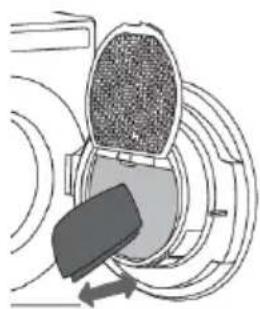
natural_image
Diagram of a mechanical component with concentric circular layers and directional arrows, no visible text or symbols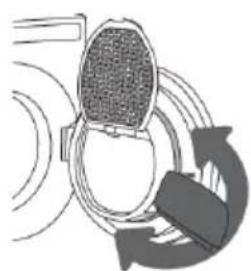
natural_image
Diagram of a device with a mesh head and circular components, no visible text or symbols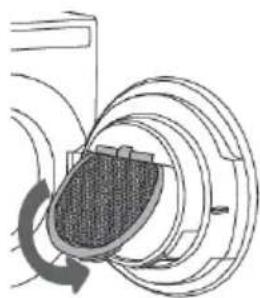
natural_image
Diagram of a mechanical or electrical component with concentric rings and a central shaded area, no visible text or symbols.1
Lyftlocketövernätfiltret.
2
natural_image
Simple line drawing of a curved surface with arrows pointing to a point, no text or symbols present5
natural_image
Line drawing of a simple washing machine with front panel and side door (no text or symbols)
INFORMATION!
natural_image
Line drawing of a front-loading washing machine with its side door open, showing internal components (no text or symbols)
WARNING!
Installation and connection 57
57
Advices before drying 69
69
Drying process, step by step 72
72
Settings 76
76
Cleaning and maintenance 78
78
Errors – what to do? 81
81
Service 84
84
Technical information 85
85
Program chart 86
86
Disposal 87
87
Introduction
DearCylindacustomer!
WelcometothefamilyofCylindacustomers.
Wehopethatyouwillhavemanyyearsofusefromyournewmachine.
Themachinehasmanyfeatures.Tomakethemostofitsfunctions,werecommendthatyoureadthe operatinginstructionsbeforeusingthemachine.Theoperatinginstructionsincludeinformationon howyoucanhelpprotecttheenvironment.
The following symbols are used throughout the manual and they have the following meanings:

INFORMATION!
Information, advice, tip, or recommendation

WARNING!
Warning-general danger

ELECTRICSHOCK!
Warning-dangerofelectricshock

HOTSURFACE!
Warning-dangerofhotsurface

DANGEROFFIRE!
Warning-dangeroffire
Originalinstructions
Quickguide

- Sortthefabrics Sortthefabricbytypeandbyhowheavilysoiledthelaundryis. Observethedryingsymbolsonthelaundrylabels.Closethe zippers,hook-and-loopfastenersandbuttons.
- SwitchonthemainON/OFFswitch
- Openthedryerdoorandinsertthelaundry. Beforedoingso,makesurethedrumisempty.
- Choosethedryingprogram Turntheprogramselectorknobtothedesireddryingprogram.
- Choosetheprogramsettings Programsettingscanbesetforsomeprograms.Seechapter: SETTINGS
- ClosethedryerdoorandpresstheStart/PauseBUTTON. Anticipateddryingtime,inhoursandminutes,willbeindicated onthedisplay.
- Endofprogram Openthedoorandremovethelaundryfromthedryer. Cleanthefilters.Seechapter"CLEANINGANDMAINTENANCE". Closethedoor. Switchoffthemainon/offswitch. Unplugthedryerpowercordfromthepoweroutlet(unlessyou haveatumbledryerwitha3phaseconnection)
Safetyprecautions

General

Pleasereadtheinstructionmanualandsaveitforfuture reference.
- Pleasedonotusethetumbledryerifyouhavenotread andunderstoodtheseinstructionsorusefirst.
- Failuretoobservetheinstructionsforuseorinappropriate useofthetumbledryermayresultindamagetothelaundry orappliance,orinjurytotheuser.
- Instructionsforuseareavailableonourwebsiteat www.cylinda.se.
- Applianceisintendedtobeusedinanareaopentothe public.
- Beforeconnectingthedryertothepowermains, pleaseread carefullytheinstructionsforusethatdescribethdryerand itscorrectandsafeuse.Theinstructionsapplytoseveral appliancetypesormodels;thus,settingsorequipmentmay bedescribedhereinwhichisnotavailableinyourdryer.
-
Leaveanyrepairsandsimilartasksonthedryertoanexpert. Unprofessionalrepairmayresultinanaccidentormajor malfunction.
-
Afterinstallation,thedryershouldstandstillfortwohours beforeitisconnectedtothepowermains.
- Atleasttwopersonsarerequiredtoinstallthetumbledryer ontopofawashingmachine.
- Thedryershallnotbeconnectedtothepowermainsusinganextensioncord.
- Donotconnectthetumbledryertoanelectricaloutlet intendedforanelectricshaverorhairdryer.

WARNING!
Ifthepowercordisdamaged,ithastobereplaced by themanufacturer,anauthorizedservicetechnician,ora similarlyqualifiedperson,inordertoavoidanyhazards.

WARNING!
Theapplianceshallnotbesuppliedthroughanexternal switchingdevice,suchasatimer,orconnectedtoa circuitthatisregularlyswitchedonandoffbyautility.
- Afterthedryingprocess,unplugthedryerpowercord fromthepoweroutlet.
If you have atumbled dryer with a 3-phase connection, do not pull the plug out of the power outlet.
- Theapplianceshallbedisconnectedfromthepowersource duringservicingandreplacementofparts.Removalofthe plughastobesuch,thatanoperatorcancheck,fromany ofthepointstowhichhehasaccessthattheplugremains removed.
- Incaseofincorrectapplianceconnection,incorrectuse,or servicingbyanunauthorizedperson,theusershallbearthe costofanydamage.
- Airinthedryerenvironmentshouldnotcontainindustparticles. Theairwherethedryerisinstalledshouldbethoroughly ventilatedtopreventreverseflowofgasesreleasedfromthe gasapplianceswithopenfire(e.g.fireplaces).
- Donotevacuata theairfromthedryerthroughchannelsused forappliancesordevicesthatusenaturalgasorotherfuels fortheiroperation(onlyappliestotheevacuationdryer).
- Cleanthedoornetfilteraftereachdryingcycle.
- Donotdryunwashedlaundryinthedryer.
- Laundrystainedwithoil,acetone,alcohol,oilderivatives, stainremovers,turpentine,wax,andwaxremoversshould bewashedinawashingmachinewithhotwaterand detergentbeforeitisdriedinthedryer.
- Clothingthatincludeslatex,rubberparts,showerandbathing caps,andlaundryorcoverswithrubberfoamshallnotbedriedinthedryer.
- Uselaundryconditionersorsimilarproductsincompliance withmanufacturer'sinstructions.
- Donotuseanysolvents, abrasivecleaners, glasscleaners, orall-purposecleaners.
- Donotplacethedryerbehindlockableorslidingdoor,or doorwithahingeontheoppositesideofthedryerdoor hinge.Installthedryerinsuchwaythatthedoorcanalways befreelyopened.
- Neverblocktheairvents.
- Donotplacethedryeronacarpetwithlongfibresasthis mayimpedeaircirculation.
- Theairintheroomwherethedryerisinstalledmaynot containindustparticles.
- Makesurethefibresdonotaccumulatearoundthedryer.
• DANGEROFFIRE!
Removeallobjectssuchaslightersandmatchesfrom thepockets.
- Afterinstallation, waitfor24hoursbeforeusingtheappliance. Ifthedryerhastobelaiddownoneofthesidesduring transportorservicing, placeitwithitsleftside, viewingfrom theappliancefront, downwards(onlyappliestodryerswith aheatpump).
- Theapplianceshallnotbeincontactwithawalloradjacent furniture.
- Ifthedryerisconnectedtoanairexhaustsystemalready usedforanotherappliance,anon-returnvalvemustbe installed.Reverseflowintothedryercoulddamagethe appliance,andthenon-returnvalvepreventssuchreverse flow(onlyappliestotheevacuationdryer).
- Afloatwillswitchchofftheapplianceifthecondensedwater pipeiscloggedorifthereisariskofooverflowingofthe condensedwateraccumulatedinthecondensedwatertank (onlyappliestotheevacuationdryer).
- Ifyouwishtomovethedryerorstoreitinanon-heatedroom duringwinter,itisessentialthatyoufirstemptythe condensedwatertank(onlyappliestothecondenserdryers and dryerswithaheatpump).
- Maximumdryingcapacityinkgisindicatedontherating plate.
Safety
• DANGEROFFIRE!
Onlyusethedryertodrylaundrythatwaswashedwith water.Donotdryanylaundrythatwaswashedorcleaned withflammablecleanersorsubstances(suchasgasoline, trichloroethyleneetc.)asthismayresultinanexplosion.
- If you have cleaned your clothes with industrial cleaners or chemicals substances, donot dry them in the dryer.
- Iftheairexhausthoseisconnectedtoanopeninginthewall, influxofcoolairmaybepreventedbyinstallingaventilation grille.(Onlyappliestoevacuationdryer.).
-
Theairexhausthosheshallnotbeconnectedtoanactive chimneyusedtoevacuatesmokeorwastegases;intoa shaftintendedforventilatingroomswithcombustion equipment;orintoachimneyusedbythirdparties.Ifsmoke orwastegasesreturntotheroomwherethedryerisinstalled, thereisadangerofpoisoning(onlyappliestoevacuation dryer).
-
Thedryerisprotectedwithanautomaticswitch-offsystem incaseofoverheating.Thesystemswitchesofftheheater ifthetemperatureistoohigh(onlyappliestoevacuationand condenserdryer).
- Ifthenetfilterisclogged, the automaticheaterswitch-off device can be triggered. See chapter "CLEANING AND MAINTENANCE" (only appliestoevacuation and condenser dryer).
• HOTSURFACE!
WARNING!Thebackofthedryermaygetveryhot duringoperation.Waitforthedryertocooldown completelybeforetouchingitsbackside.(Observe theinstructionsinthechapter"INSTALLATIONAND CONNECTION")
• HOTSURFACE!
Neverstopadryingcycleordonotopenthedoorbefore theendoftheprogram.Ifyoudosoforanyreason,be carefulwhentakingthelaundryfromthedrumasitcan stillbeveryhotandthereisariskofburning.
Quicklyremovethelaundryfromthedrumandspreadit toallowittocooldownasquicklyaspossible.
Childsafety
- Donotallowthechildrentoplaywiththedryer.
-
Preventyourchildrenandpetsfromenteringthedryerdrum.
-
Beforeclosingthedryerdoorandrunningtheprogram,make surethereisnothingexceptlaundryinthedrum(e.g.ifa childclimbedintothedryerdrumandclosedthedoorfrom theinside).
- Activatethechildlock.Seechapter:SETTINGS
- Donotletchildrenyoungerthanthreeyearstocome nearthedryer, unless they are under constant supervision.
- Thedryerismadeincompliancewithallrelevantsafety standards. This dryermaybeusedbychildrenaged8years and aboveandbypersonswithreducedphysical,sensory ormentalcapabilitiesorlackofexperienceandknowledge, butonlyiftheyaresupervisedduringtheuseofthe appliance,iftheyhavebeenprovidedrelevantinstructions regardingsafeuseofthedryer,andiftheyunderstandthe hazardsofinappropriateuse.Makesurechildrendonotplay withtheappliance.Makesurethechildrendonotcleanthe dryerorperformanymaintenancetaskswithoutsupervision.
SAVETHESEINSTRUCTIONSFORFUTUREREFERENCE!
Dryerdescription
- Mainswitch(ON/OFF)
2.Programselectorknob - Display
- Programselectorbuttons
- Button(start/pause)
- Ratingplate within information about the dryer (onthe inside of the drying machinedoor)
- QRandAUIDcode(ontheinsideofthedryingmachinedoor)
8.Dryerdoor
9.Doornetfilter
10.Airexhausthoseopening
Beforeusingtheapplianceforthefirsttime
Packaging
Removeallpackaging.
Pleasesortthematerialsincompliancewithlocalrecommendations(seechapter"Disposal").
Cleaning
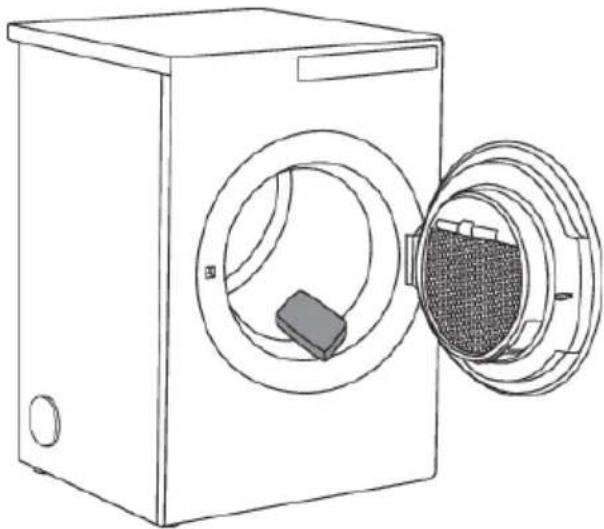
Disconnectthedryerfromthepowermainsandopenthedoortowardsyou.Beforeusingthedryer forthefirsttime,cleanthedryerdrumusingasoftdampcottonclothandwater.
Inthecaseofa3phaseconnectionoftheappliance,switchoffthemainsocketswitch.
natural_image
Line drawing of a washing machine with an open door and internal compartments (no text or symbols)
INFORMATION!
Noprogramcanbestartedwhilethedoorisopen.
Choosingthelanguage
Whenthedryerisconnected(seechapter"Installationandconnection")andswitchedonforthefirst time,choosethepreferredlanguage.
For further drying process, see chapter "DRYING PROCESS, STEP BY STEP".

INFORMATION!
When your unthedryer for the first time, or if the dryer has been out of use for a long time, slight hitting noisemay appear. This is normal and it will disappear after a few drying cycles.
Installationandconnection
Dryerplacement
Thedryercanbeeitherfreestandingorinstalledontopofawashingmachine.

INFORMATION!
Atleasttwopersonsarerequiredtoinstallthetumbledryerontopofawashingmachine.
Thedryeremitsheat. Therefore, donotplaceitinaverysmallroom, asthedryingprocess maybe longerduetolimitedamountofambientair.

INFORMATION!
Donotplacethedryerinaroomwheretemperaturecandropbelow0°C,asthemachinemay notoperatecorrectlyatsuchlowtemperatures,orfreeze,whichinturncanresultindamageto themachine.
Foroptimumdryeroperation, installitinaroomwithadequateventilationandatemperature between15°Cand25°C.

WARNING!
Donotplacethedryerbehindlockableorslidingdoor, ordoorwithahingeontheoppositeside ofthedryerdoorhinge.Installthedryerinsuchwaythatthedoorcanalwaysbefreelyopened.

INFORMATION!
Neverblocktheairvents.

WARNING!
Donotplacethedryeronacarpetwithlongfibresasthismayimpedeaircirculation.

INFORMATION!
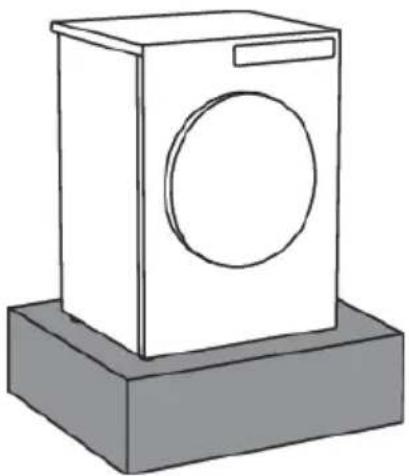
If the appliance is installed on a plinthor as similar structure, then the appliance must be fixed to it, to avoid the riskoffalling. Original accessories are available for this purpose, complete with fixing instructions.
natural_image
Simple line drawing of a washing machine with a circular vent and rectangular base (no text or symbols)Free-standing appliance
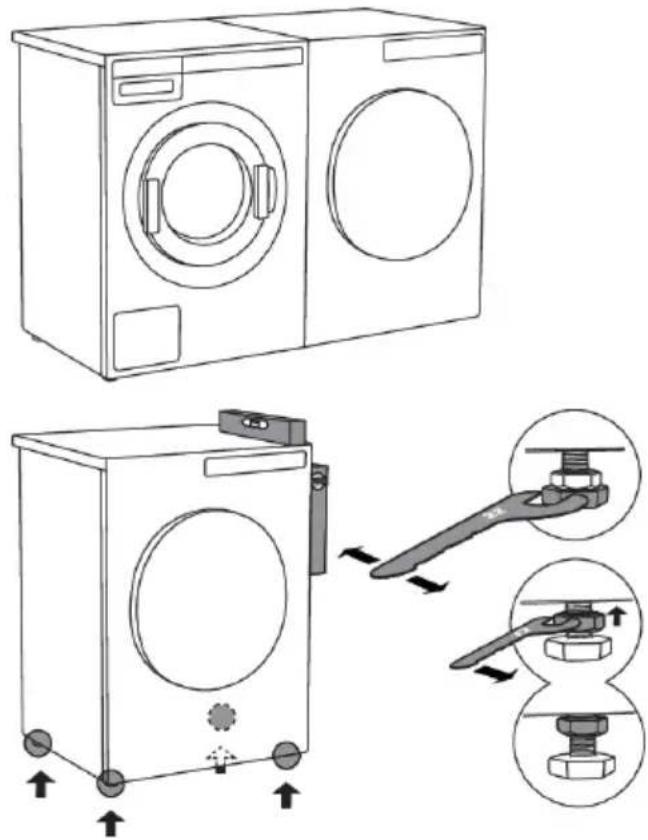
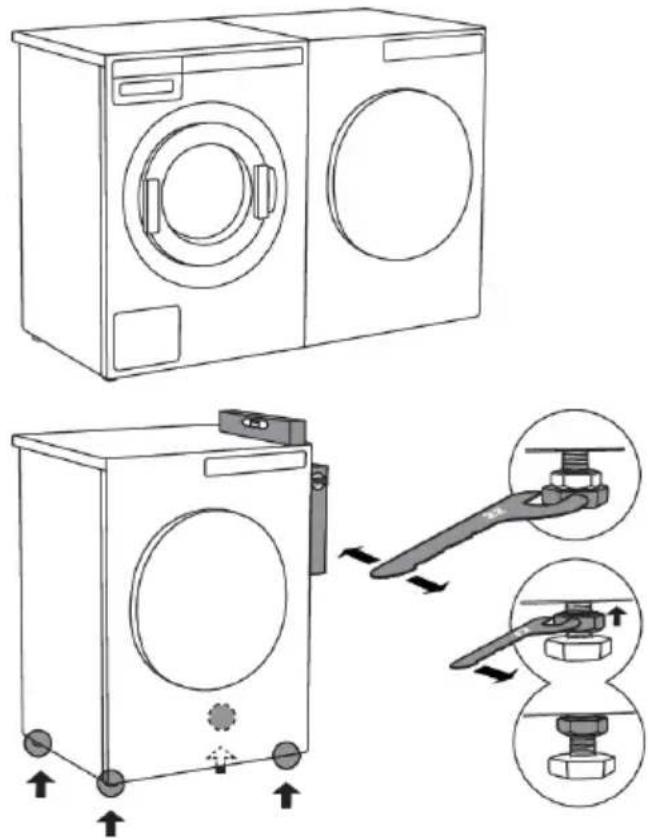
Thedryermaybeplacedadjacenttoawashing machine.
If the friction between the dryer feet and the floor is not sufficient, the dryermay moved during operation. Toprevents sliding, use anon-slimerator install the supplied vacuum feet onto both front feet.
Placethedryersothatitisstable.Useaspirit leveltolevelthedryerinlongitudinalandtraverse directionbyrotatingtheadjustablefeetusinga No.22spanner(max.15mm).Then,firmlytighten thejamnuts(counternuts)byrotatingthemtowardstheappliancebottomusingaNo.17 spanner.↑
Clearancearoundthedryerforoptimumoperation
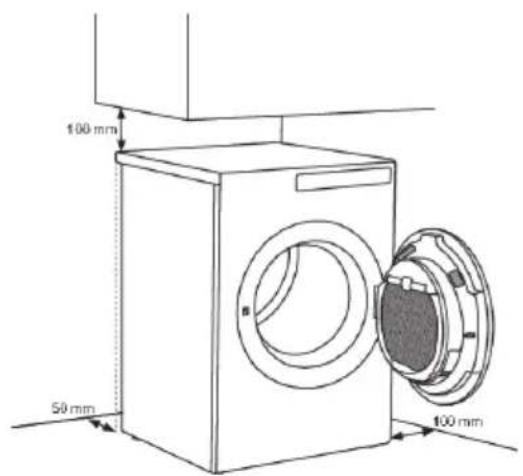

INFORMATION!
Theapplianceshallnotbeincontactwith awalloradjacentfurniture.Foroptimum dryeroperation,observetheclearancefrom thewallasshowninFig.
Openingthedryerdoor(topview)
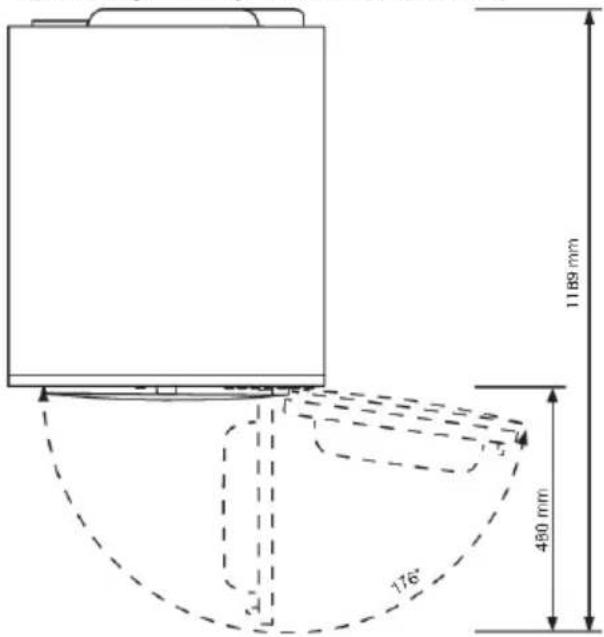
Stackingontopofawashingmachine
Tostackthedryerontopofawashingmachine,usetheextravacuumfeetandthetippingguard (A+B),suppliedinthecardboardboxinthedryerdrum.TippingguardpartBisdesignedtofiton CYLINDAwashingmachinesanditmaybehardorimpossibletomountonappliancesofotherbrands. Ifthewashingmachineanddryerarenotofmatchingdimensionsorifyouhaveinstalledahidden helperbetweenthetwoappliances,thenbindingplatesareavailableasoptionalaccessoriesatthe service center (... available only for HH (accessory Hidden Helpers) and TD75 stacked on top of WM80 orWM85;notintendedforanyothercombinations).
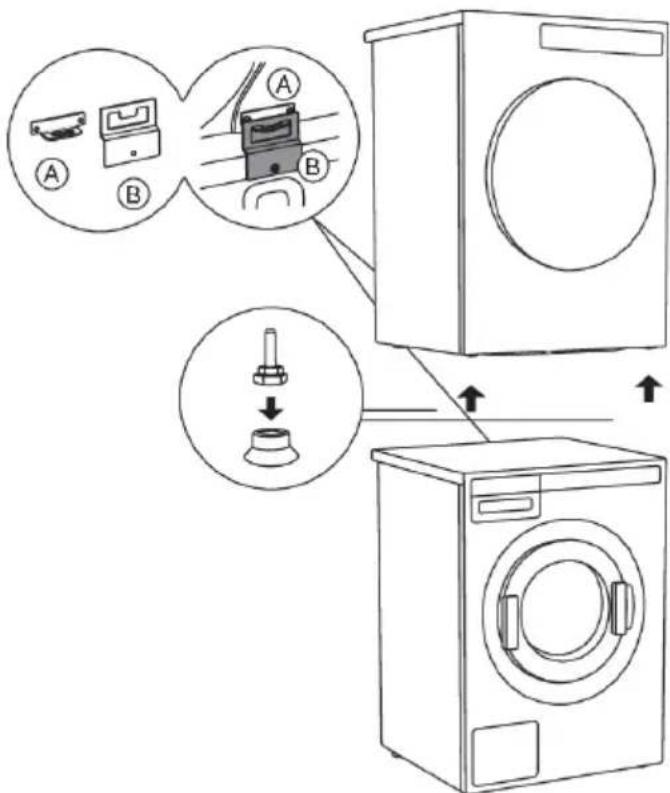
AllCYLINDAwashingmachinescanbeartheweightofthedryer.

INFORMATION!
Washingmachineonwhichyouwishtoinstallthedryermustbeabletobeartheweightofthe dryer(seewashingmachine'sratingplateortechnicalinformation).
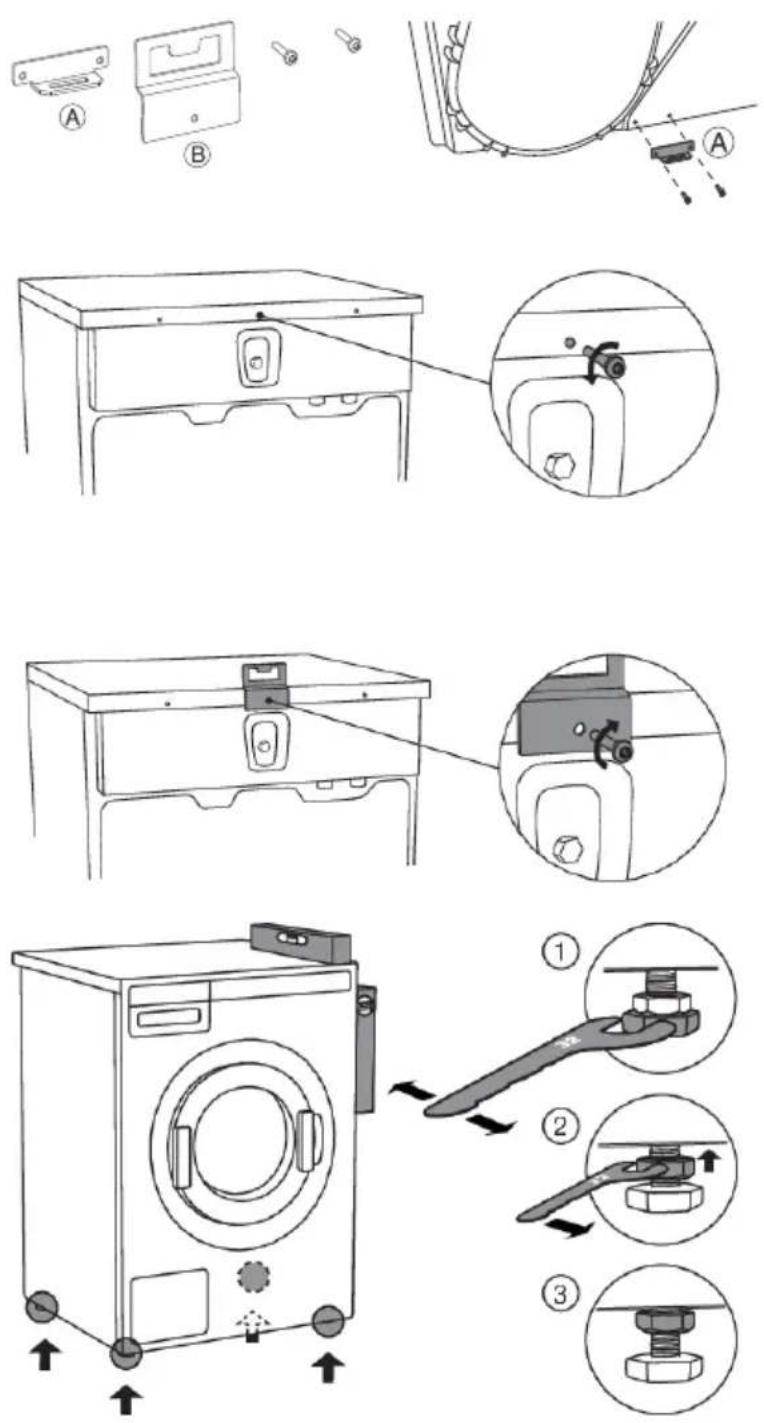
Howtostackadryerontothewashingmachine(CYLINDA):
Thereisacardboardboxinthedryerdrum, containingthevacuumfeetandthetippingguard.
1
Thetippingguardconsistsoftwo metalparts(A+B).
UsetwoscrewstoattachtheApartto thebackofthedryer.
2
Undothescrewonthebacksideof thewashingmachine.
3
Usethescrewtoattachthetipping guard(Bpart)tothebackofthe washingmachine.
4
Levelthewashingmachinesothatit isstable.
-
Levelthewashingmachineinlongitudinalandtraversedirectionby rotatingtheadjustablefeetusing aNo.32spanner.Thefeetallow levellingby+/-1cm.
-
Afteradjustingtheheightofthe feet, firmlytightenthejamnuts (counternuts)usingaspannerNo 17, byturningthemtowardsthe bottomofthewashingmachine.
-
Tightenthejamnuts(counternuts).

Tablecontinuedfromlastpage
5
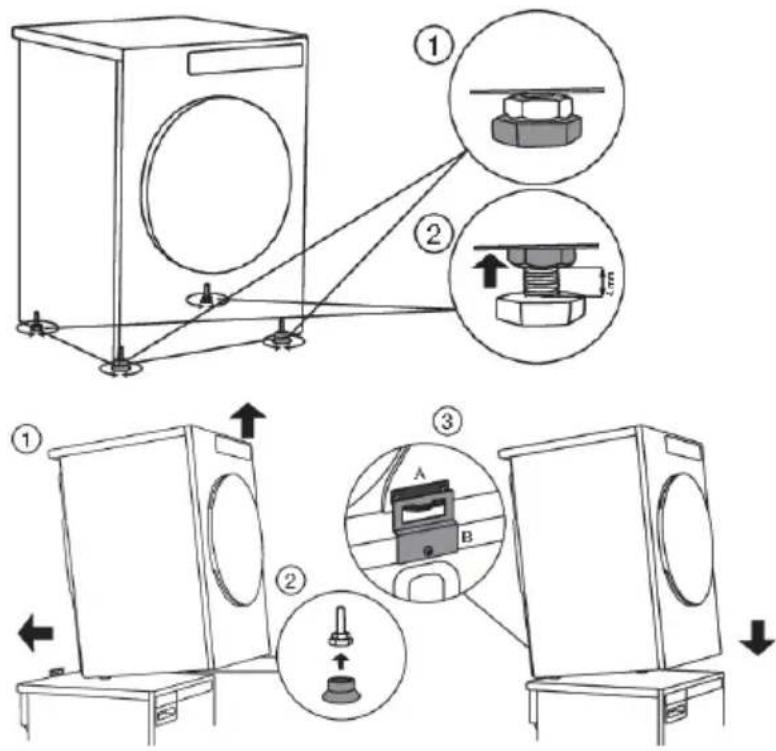
Setthedryerfeet:
- Tightenthefronttwofeetallthe wayin.
- Undothebackfeetby3.5turnsor 5mm;then,fastenthejamnuts towardsthebottomoftheappliance.↑
6
Placethedryerontothewashingmachine:
- Liftthefrontpartofthedryerby5 to10cm.
- Attach the vacuum feet onto the front feet of the dryer.
- Pushthedryerintothetipping guard(sothattheBpartisinserted intotheApart)andreleaseit(See figureonpreviouspage).

INFORMATION!
Makesurethetippingguardis "locked"!
Changingthedooropeningdirection
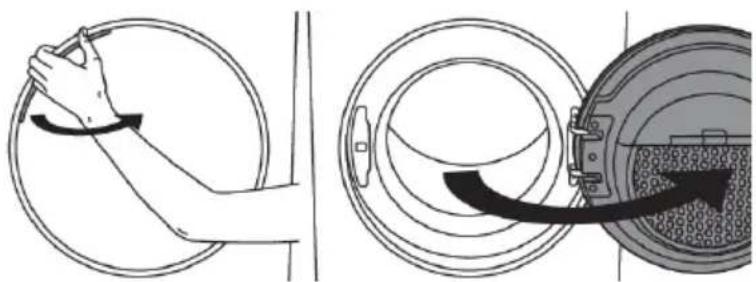
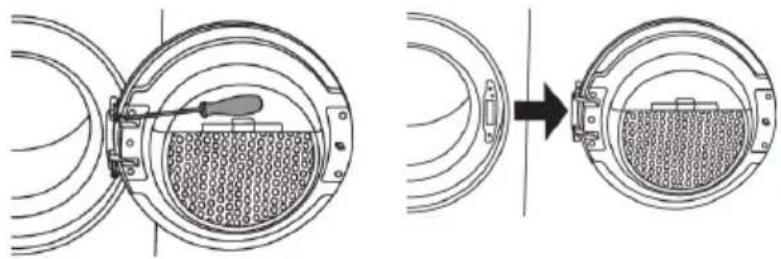
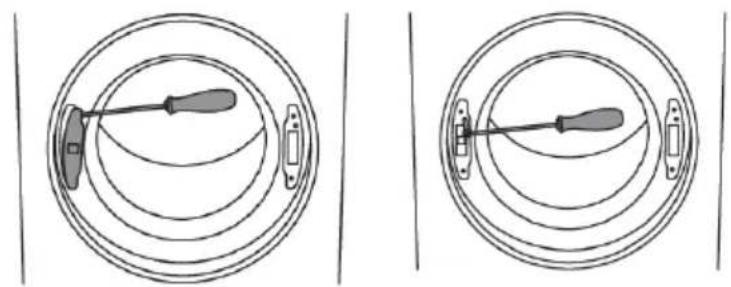
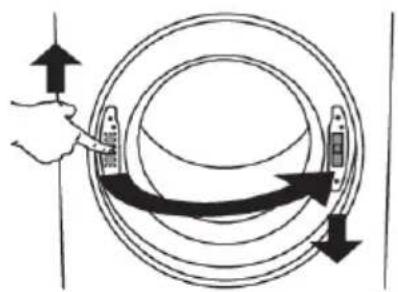
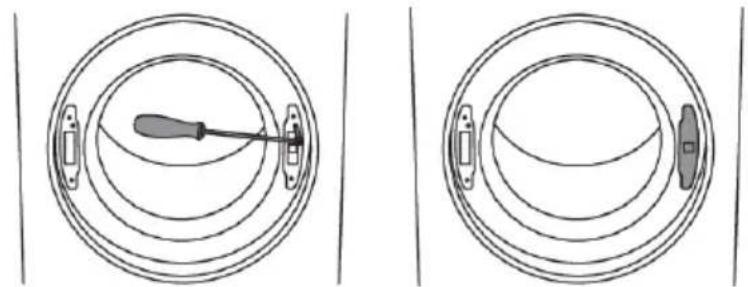
Tochangethedirectionofdooropening,proceedasfollows:
natural_image
Illustration showing a hand holding a tool inside a circular device and a close-up of a mechanical component with a curved arrow indicating motion (no text or symbols)1
Openthedoorfully.
natural_image
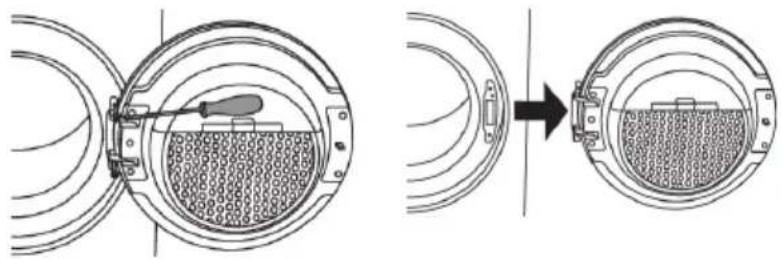
Diagram showing a mechanical assembly with a tool inserted into a circular component, before and after a process (no text or symbols present)2
Undothescrewsandremovethedoor.
natural_image
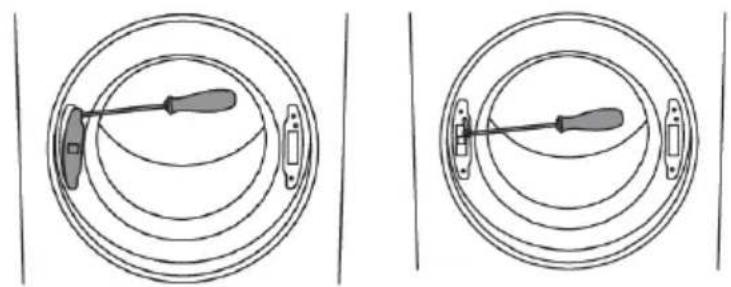
Two identical diagrams showing a screwdriver inserted into concentric circular channels, no text or symbols present.3
Useascrewdrivertoremovethedoor lockcoverandundothescrewonthe doorlock.
natural_image
Diagram showing a hand holding a circular object with directional arrows indicating rotation or movement (no text or symbols)4
Pushthedoorlockupwardsandremoveit.Moveittotheothersideand pushhitdownwards.
natural_image
Two circular diagrams showing a screwdriver inserted into a ring, with no text or symbols present.5
Fastenthescrewonthedoorlock. Replacethedorlockcover.
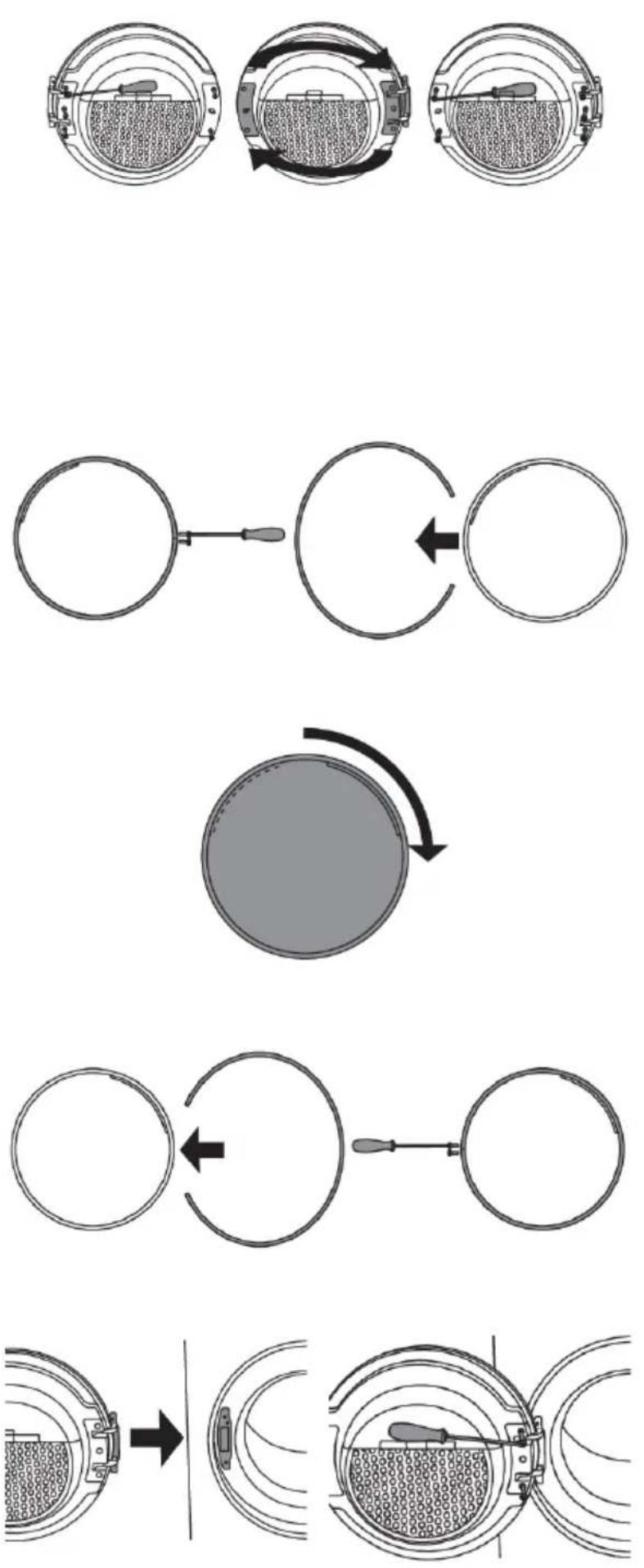
6
Undothedoorhingeassembly(left) andthedoorlatchassembly(right), switchtheirpositions, andreplace the screws (doorhingeassembly tothe right-handside, doorlatchassembly tothe left-handside).

INFORMATION!
Useascrewdrivertoremovethe plasticpartmoreeasily.
7
Undothedoorringandremoveittemporarily.
8
Rotatethedoorcoverby90°sothat thesignindicatingtheopeningofthe doorisontheotherside.
9
Rotatethedoorringby180°, installit ontothedoor, and fastenit with screws.
10
Installthedoortothefrontandscrew thedoor.
Evacuationofhumidair
Usethesuppliedairexhausthosetoconveythehumidairfromthedryeristroughanopening (ventilationsystem, windowetc.).
Connectingtheairexhausthosetothedryer
The dryerallowsthreepossibilitiesforairevacuation:ontherear,ontheright,andontheleftside. Upondelivery,theopeningonthebackisopenandaconnectionfittingisinstalledonit(1).
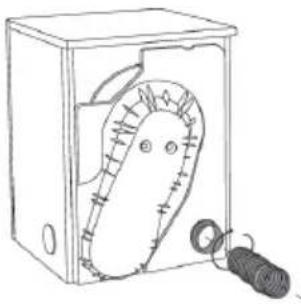
natural_image
Simple line drawing of a box with a handle and a small cylindrical object inside (no text or symbols)Installation:
Sideopeningsarecoveredwithtwo caps. Themachinecomessupplied withanairexhausthose(3)andtwo clamps(2).
Fittingtheairexhausthosetoanotheropening:
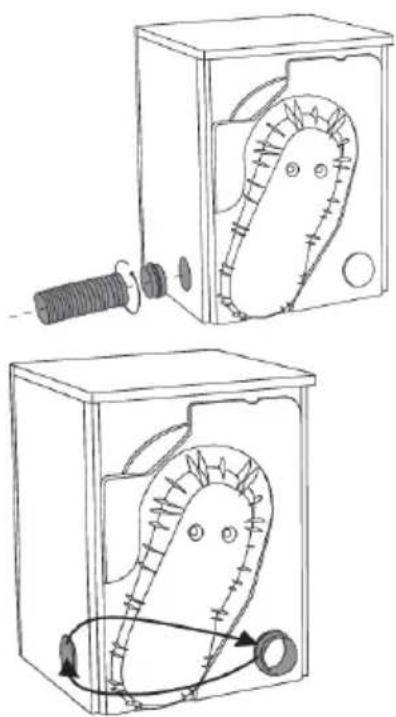
natural_image
Two technical diagrams showing a mechanical device inside a box, with no visible text or symbols.Sliptheexhausthose(3)overtheconnectionfitting(1)andfastenitwithaclamp(2).
Insteadofontherearopening,theair exhausthosecanbefittedonone of thesideopenings.
- Movetheconnectionfittingfromthe rearopening(1)tothesideopening. Then,connecttheairexhausthoseand secureitwithaclamp(2).
Useacaptoclosetheopeningonthe backofthedryer.
Connectingtheairexhausthosetoaventilationduct
Theairexhausthoses should be rounded in shortest and straightest possible way to the ventilation system opening (airevacuation duct). Use a clamp to attach theairexhausthoseto the ventilation opening. If theairexhaust those istoolong, cut toll length. The distance between the dryer and the arevacuation opening (ventilation opening, window) may not exceed 3 metres. Otherwise, moisture could accumulate in theairexhaust those. Allelbow should be at an angle that is equal to or smaller than 90^ .
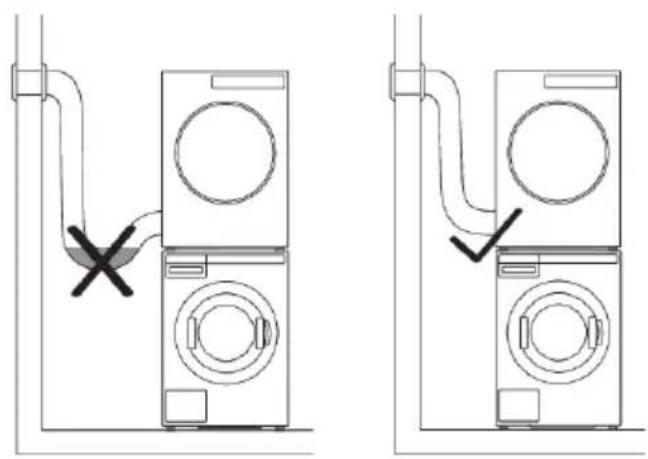
natural_image
Diagram showing two configurations of a washing machine with a valve and a cross symbol indicating a switch or fixture (no text or labels present)Selectingtheroom

INFORMATION!
Donotevacuatetheairfromthedryer throughchannelsusedforappliancesor devicesthatusenaturalgasorotherfuels fortheiroperation.
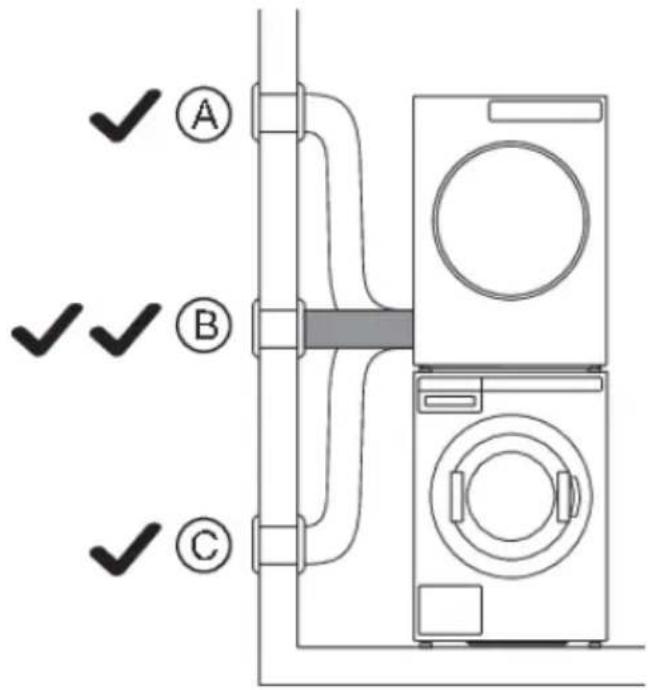
Placetheapplianceinathoroughlyventilated roomwithawindoworventilationfan.Ifpossible, connecttheairexhaustohesothatithasno inclination,upwards(A)ordownwards(C),but ratherstraight(B).
Extraequipment
natural_image
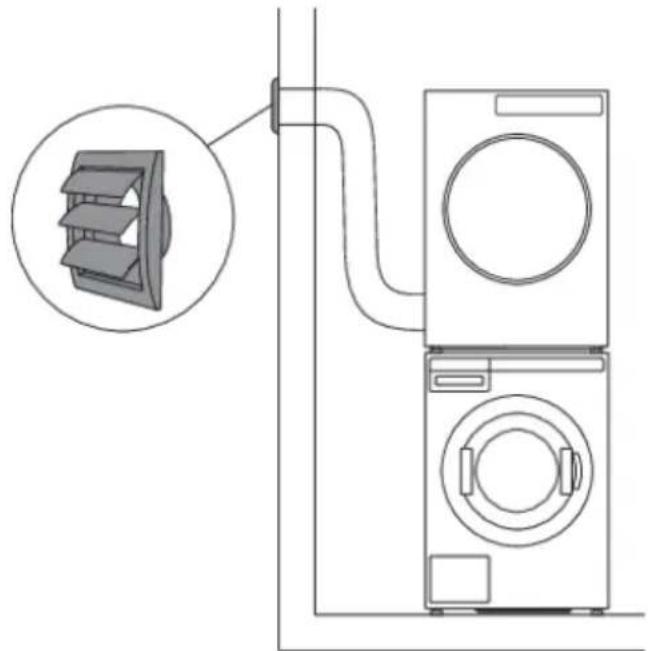
Diagram of a washing machine connected to a wall-mounted fan, showing internal components and wiring (no text or labels)If theairexhausthoseisconnectedtoanopening inthewall, influxofcoolairmaybeprevented by installingaventilationgrille.
natural_image
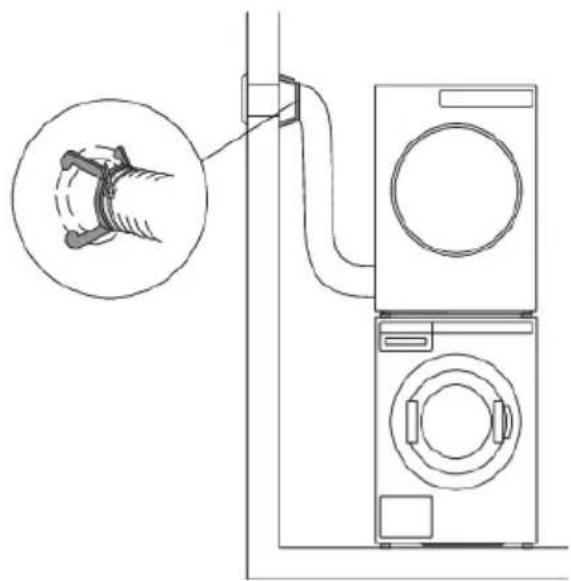
Diagram of a washing machine connected to a wall-mounted washing machine, with a magnified inset showing the mechanical component (no text or symbols present)If there is only one ventilation opening in the room, an airlock should be installed.
Thisextraequipmentcanbepurchasedfromyourseller.

INFORMATION!
Pleaseavoid:
•excessivelylongventilationsystems;
- multipleelbowsorturnsoftheairexhausthose;
•sharpelbowsorturnsoftheairexhausthose.
Allthreemayreducetheventilationsystemefficiency,extendthedryingtime,andincreasepower consumption.
Connectingtothepowermains

ELECTRICSHOCK!
Afterinstallation, the dryers should stand still for two hours before it is connected to the power mains.
Connect the appliancetoanearthedpoweroutlet. After installation, the wall outlet should be freely accessible. The outlet should be fitted with an earth contact (in compliance with therelevant regulations).
If you have atumbled dryer with a 3 phase connection, the connection must be carried out by a qualified and authorized specialist.
Connectionupondelivery
TYPE: TDXX.XXXXX MODEL: XXXXXX.X
Art.No.:XXXXXX/XX Ser.No.:XXXXXXXX

IPX4 XX Hz
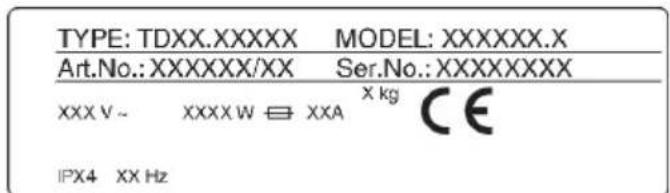
Informationaboutyourdryerisindicatedontherating(type)plate.
UsethetypeAdifferentialcurrentprotectionswitch.

WARNING!
Thedryershallnotbeconnectedtothepowermainsusinganextensioncord.

INFORMATION!
Donotconnectthetumbledryertoanelectricaloutletintendedforanelectricshaverorhair dryer.

INFORMATION!
Anyrepairandmaintenancepertainingtosafetyorperformanceshouldbedonebytrained experts.
Advicesbeforedrying
Thischapterincludesseveraladvicesonhowtopreparethelaundryfromdrying.
Laundrysorting
Sortthelaundryaccordingto:
•type,
- fabricthickness.
Forthemostevendrying,makesurethelaundryismadeofasimilarmaterial.
Clothing
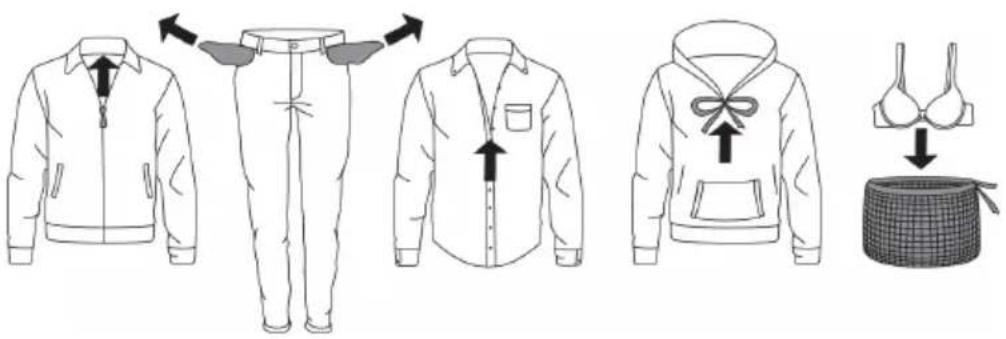
- Closethebuttons, zips, andhook-and-loopfasteners, so that they donot damagethefabric.
2.Turnthepocketsinsideout. - Placevery sensitive clothes in a special-purpose laundry bag.
(Thespecialpurposelaundrybagisavailableleasanoptionalaccessoryingeneralstores.)

INFORMATION!
Laundrytobedriedinthedryershouldbespunataminimumof1000rpm.Higherspinning speedswillsaveenergyandcutdryingtime.

INFORMATION!
If you decide dry only on large item, were recommend drying it separately from smaller items of laundry.
Laundrysymbols
Observethelaundrysymbols.
Textilemaintenancesymbols:
| Washing | ||
| DelicateNormal | ||
| Max.washingtemperature90°C | ||
| Max.washingtemperature60°C | ||
| Max.washingtemperature40°C | ||
| Max.washingtemperature30°C | ||
| Handwashonly | ||
| Donotwash | ||
Tablecontinuedfromlastpage
| △ Bleaching | |
| △ | Bleachingincoolwater |
| ⊗ | Bleachingnotallowed |
| ○ Drycleaning | |
| A | Drycleaningwithallagents |
| P | PerchloroethyleneR11,R113,petroleum |
| F | Drycleaninginkerosene,purealcohol,andR113 |
| ⊗ | Drycleaningnotallowed |
| □ Ironing | |
| — | Ironingwithahotironwithamaximumtemperatureof200°C |
| — | Ironingwithahotironwithamaximumtemperatureof150°C |
| — | Ironingwithawarmironwithamaximumtemperatureof110°C |
| ⊗ | Ironingnotallowed |
| □ Naturaldrying | |
| — | Dryingonaflatsurface |
| ■■ | Dryingwithoutpriorspinning |
| □ | Dryingonaclotheslineorahanger |
| ○ Tumbledrying | |
| ● | Dryingathightemperatures |
| ● | Dryingatlowtemperatures |
| ⊗ | Tumbledryingnotallowed |
Materials(fabrics)suitablefordryinginatumbledryer


Materialissuitablefortumbledrying.Clothesdriedinatumbledryerwillbesofterand
lighterthanair-driedclothes.

INFORMATION!
The dryer does not cause any considerable wear of the fabric. The lint collected in the lint filter consists of dust and fabric fragments collected during the use of the laundry.
Materials(fabrics)thatmaynotbedriedinatumbledryer

Thissymbolmeansthatthematerialisnotsuitablefordryinginatumbledryer.
Nevertumbledrythefollowing:
- clothingthatwaschemicallycleaned(ordry-cleaned)athome,
- foam,
- glassfibres.
Dryingprocess,stepbystep
STEP1:Sortthefabrics
Seechapter"Advicesbeforedrying"
STEP2: Turnonthemainswitch.

natural_image
Front view of a computer monitor with control buttons and a blank screen (no text or symbols)Turningon
Presstheon/offbutton.
Switchingoff
Presstheon/offbutton.
STEP3: Openthedryerdoorandinsertthelaundry.
Openthedryerdoortowardsyou.
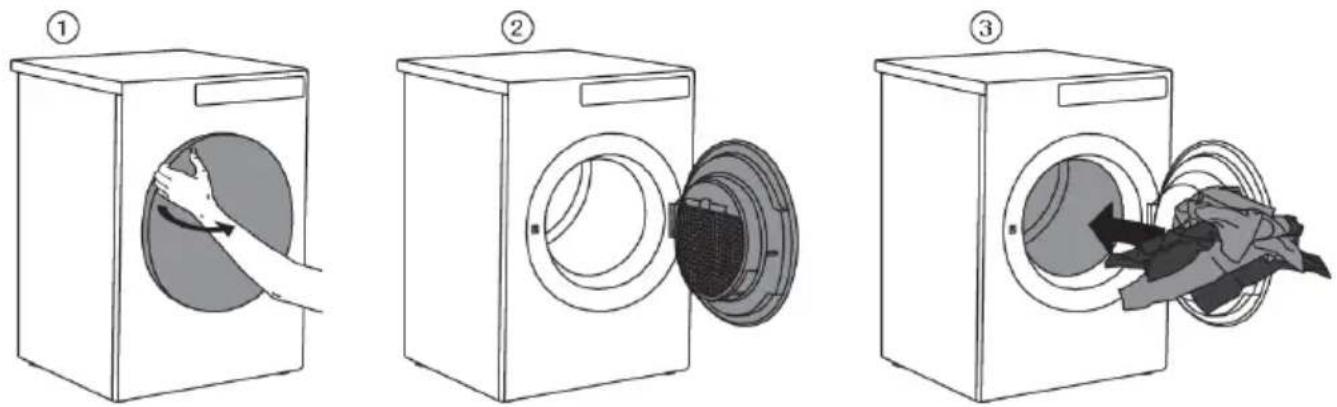
Placethelaundryintotheemptydryerdrum.Makesuretherearen'tanyotherobjectsamongthe laundry,suchadetergentball.
Suchobjectscouldmeltandcausedamagetothedryeroryourlaundry.
Donotoverloadthedrum!(Seeprogramtableandobserveyournominalloadasindicatedonthe ratingplate.)
Ifthedryerdrumisoverloaded,thelaundrywillbemorewrinkledandperhapsunevenlydried.
STEP4: Choosethedryingprogram.
Choosetheprogrambyrotatingtheprogramselectorknobineitherdirection.Confirmtheprogram selectionbypassingthebuttonundertheprogram.

natural_image
Front view of a remote control panel with a circular button and directional arrows (no text or symbols)Select the program based on the type and remaining moisture of the laundry you wish today.
Anticipatedprogramdurationisindicatedonthedisplay.
Choosebetweenthefollowingprograms:
(owner/distributorcanchangeparametersandrenametheprogram)
| Programe(factoryde-faultprogram) | kg* | DescriptionMx | |
| + | Normaltemp | 8AUTODEXTIBA,ogramfornon-sensitivecottonlaundry.After drying,itwillbecompletelydryandreadytobestoredin thecupboard. | |
| ▲ | Normaltemp | 8AUTODERYsprogramfornon-sensitivecottonlaundry.After drying,itwillbecompletelydryandreadytobestoredin thecupboard. | |
| ☀ | Normaltemp | 8AUTODENDRP,agramfornon-sensitivecottonlaundryofapproximatelythesamethickness.Afterdrying,itwillbedry. | |
| ☀ | Lowtemp | 8AUTODENDRP,agramforcottonlaundryofapproximatelythe samethickness.Afterdrying,itwillbedry. | |
| ☎ | Normaltemp | 8AUTODEANSP,Programforcottonlaundry.Afterdrying,hand ironingisrequired. | |
| ☎ | Normaltemp | 8AUTODENDRP,Programforcottonlaundry.Afterdrying,machine ironingisrequired. | |
| ☒ | Normaltemp | 3,5MIXDBYprogramisusedforsyntheticormixedfibrefabrics,suchasmulti-functionalsportclothes.Afterdrying,ironing isnotrequired. | |
| ☒ | Normaltemp | 3,5MIXDBYProgramisusedforsyntheticormixedfibrefabrics.Afterdrying,ironingisrequired. | |
| ☒ | Normaltemp | 4TIME60Ilewillstopwhensettimeisreached.Thetimeprogram issuitableforsmallloads. | |
| ☒ | Normaltemp | 4TIME60Ilewillstopwhensettimeisreached.Thetimeprogram issuitableforsmallloads. | |
| ☒ | Normaltemp | 4TIME60Ilewillstopwhensettimeisreached.Thetimeprogram issuitableforsmallloads. | |
| ☒ | Normaltemp | 4TIME60Ilewillstopwhensettimeisreached.Thetimeprogram issuitablefORSmallloads. | |
| ☒ | Normaltemp | 4TIME60Ilewillstopwhensettimeisreached.Thetimeprogram issuitableforsmallloads. | |
*Max.kgdryload

INFORMATION!
If your laundry is not dried to the desired dryness level, use amoresuitable programme.
STEP5: Choosing the program settings
Using the program settings, the drying program can be further adjusted to your wishes. See chapter: SETTINGS.
Onlyapplianceowner/distributormaychangethesettings!
Someprogramsettingsmaynotbeavailableforyourselectedprogram.
DelayStart
In the submenu of these selected program, you can set the start delay when you want the drying program to start after a certain time (from 1 hour to 100 hours, from the time you press the Start / Pause button). The estimated time until the end of drying will be displayed.
Usetheprogramselectorknobtosetfrom1hto100hoursin1-hoursteps.
Pressthebuttonundertheselectedtime/durationtoconfirmthesetting.
Press the Startbutton to start. When the countdown reaches zero, the selected drying program will startautomatically.
Tocancelthestartdelay, pressthebuttonCancel.
ThenpresstheStartbuttontostarttheprogram.
During the count downtothedelayed start, the display will switch off after 5 minutes.
Usetheprogramselectorknoborpressanybutton,toreactivateit.Thecountdowntothestartofthe dryingcyclewillbedisplayed.
Displaywillswitchon1minutebeforethestartofthedryingcycle.
Afterthecountdown, dryingtimewillbeindicatedonthedisplayunit.
STEP6: Closethedoorandstartthedryingprocess.
ClosethedryerdoorandpresstheStart/Pausebutton.

natural_image
Front view of a computer monitor interface with control buttons and a play button (no text or symbols)Start(pressedbriefly-start/resume)
II Pause(shortpressofthebutton-pause)
Stop(pressandholdfor3seconds-stoporcancel)
Remainingtime
Depending on these selected program and load, anticipated drying time will be displayed in hours and minutes.
Actualdryingtimewilldependontheselectedprogram,load,typeoflaundry,spinningrateetc.
Actualdryingtimemaybelongerorshorterthaninitiallydisplayed.
Pausing, stopping or changing the program
Topauseaprogram, briefly press the Start/Pause button.
Toresumetheprogram, presstheStart/Pausebuttonagain.
Thedryingprogrammayalsobepausedbyopeningthedryerdoor.
Toresumetheprogramme, simplyclosethedoorandpresstheStart/Pausebutton.
Tostopandcancelthedryingprogram, presstheStart/Pausebuttonandholditfor3seconds.
Theselectedprogramwillbestoppedandthecoolingstagewillbegin.Coolingtimedependsonthe selectedprogram.
Onlyafterthecoolingiscomplete,canyousetheprogramselectorknobtoselectanewprogram andpresstheStart/Pausebutton.

WARNING!
Thefinaldryingcycleincludesacoolingdownstagewithoutheateroperation.Itmakessurethe laundryisofsuitabletemperatureattheendoftheprogramandthatitcanbetakenfromthe dryerwithouttriskoftouchhotclothes.
AdryingprogramcanbepausedusingtheON/OFFbutton.
Thetumbledryerwillswitchoff.
STEP7:Endofprogram
Aftertheendofthedryingprogram, the display will indicate that the drying has been finished.
If you have selected the "anti-crease" option, the dryer will continue to operate after the end of the drying cycle.
Openthedoortowardsyouandremovethelaundryfromthedryer.
Cleanthenetfilterinthedoor(seechapter"Cleaningandmaintenance").
Makesurethedryerdrumisempty,thenclosethedoor.
5minutesaftertheendoftheprogramorlastactivation, thedisplaywillswitchofftostandbymode inordertosavepower.
ThedisplaywilllightupagainifyoupresstheON/OFFbuttonoropenthedryerdoor.

INFORMATION!
Aftereachdryingcycle,cleanthenetfilterinthedoor.Seechapter"Cleaningandmaintenance".

HOTSURFACE!
Acloggednetfiltermayresultinactivationoftheautomaticoverheatingswitch-offdevice.Clean thefilter, waitforthemachinetocooldown, and tryrunningitagain. If the dryer still failstostart, callaservicetechnician.

WARNING!
Afterthedryingprocess,unplugthedryerpowercordfromthepoweroutlet.
If you have atumbled dryer with a 3-phase connection, donot pull the plug out of the power outlet.
Settings
Onlyapplianceowner/distributormaychangethesettings!
(owner/distributorshouldcheckServicemanual)
| DescriptionSettingOndisplay | ||
| On/OffCleaningthefilter | ||
| door | 0-->10Cleaningthedoorfilterinthe | |
| (step10)10-->100Cleaningofwate | ||
| Drain/TankCondensedwater | ||
| On/OffPaymentsystem | ||
| On/OffHeater2activation | ||
| Changeprogram | Oneachprogram(someset- tingscannotbesetonsome programs) | Bychangingsettingsitispos- sibletocreateandcustomize yourownprogram. Programcanberenamed! |
| •Extradry | 0-->3 | |
| •Anti-crease | Switchingoff,(1h-->4h) | |
| •Saveprogram | Overrideexisting/Saveasnew | |
| Timeprogram | ||
| •Timeprogram80min | 20-->240min | |
| •Timeprogram60min | 20-->240min | |
| •Timeprogram40min | 20-->240min | |
| •Timeprogram20min | 20-->240min | |
| •Saveprogram | Overrideexisting/Saveasnew | |
| On/OffChildLock | ||
| Programmes |  | Selectedprogramwillbeshown ondisplay |
| SetLanguage | Selectyourlanguage-press thebuttonundertheflag | •Selectlanguage:byrotating theprogramselectorknob •Confirmlanguage:bypress-ingbuttonunderthecountry flag |
Tablecontinuedfromlastpage
| DescriptionSettingOndisplay | ||
| tionYoucanselectupto5lan- | (from0to5)On/OffTemporarylangguages,whichwillbeavailableinthemainmenu. | |
| 0-->5Soundsetting | ||
| Displaysettings: | ||
| •Brightness | 1-->5 | |
| •Displaythelogo | On/Off | |
| Normal/NostandbyStandbymode | ||
| On/OffDetailedview | ||
| On/OffDemomode | ||
| 1h-->100hOn/OffStartdelay | ||
| Time/IconTime/Iconmode | ||
| 0-->xxxIDmachine | ||
| WiFisettings | ByturningWiFimoduleOn,theenergyconsumptionwillin-creaseinstandbymode. |
SOUNDS
(dependingonthemodel)

INFORMATION!
In the initial stage of drying during drying, the compressor and the pump may cause noise which, however, does not affect the dryer operation.
Hummingsound: this is the sound of the compressor unit. The level of noised depends on the program and the drying stage.
Whirringsound:fromtimetotime, thecompressorunitisventilated.
Pumpingorliquidflowingsound: thepumpispumpingthecondensateintothecondensatetank.
Clickingsound: clickingnoiseiscausedbyautomaticcleaningoftheheatexchanger(compressor).
Rustlingwatersound: can be heard during automatic cleaning.
Rattlingsound: can be heard during drying if laundry has any hard parts (buttons, zippers etc.)
Cleaningandmaintenance

INFORMATION!
Beforecleaning, makesuretoswitchofftheapplianceanddisconnectitfromthepowermains (unplugthepowercordfromtheoutlet).
Cleaningthedoornetfilterinthedoor
Beforecleaning, makesuretoswitchofftheapplianceanddisconnectitfromthepowermains(unplug thepowercordfromtheoutlet).
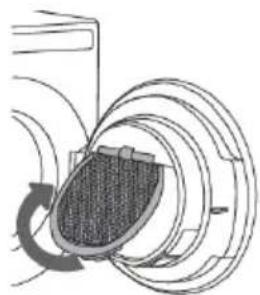
natural_image
Diagram of a mechanical or electrical component with concentric circular layers and a central shaded area, no visible text or symbols.1
Liftthenetfiltercover.
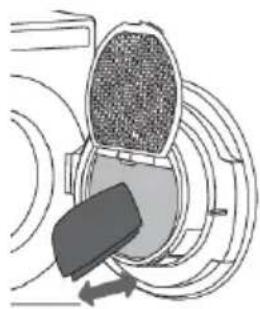
natural_image
Diagram of a mechanical component with concentric circular layers and directional arrows (no text or symbols)2
Byhandoraclothdragthenetfiltertoremove theliningoffibersandthreads.

NOTE!
The doornetfilter may feel quiteloose when cleaning/removing fibers and threads. This is normal because of largenet filter are in combination with high working temperatures insidethetumbledryer.
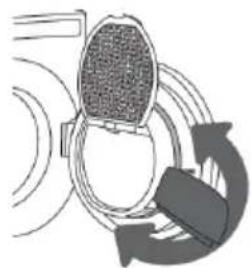
natural_image
Diagram of a device emitting sound waves, showing a circular component and a curved arrow indicating rotation (no text or symbols)3
If necessary, clean thenet filter housing and door gasket as well.
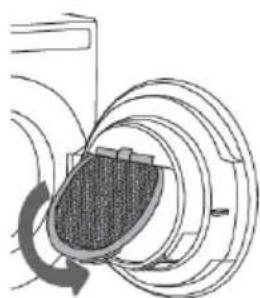
natural_image
Diagram of a mechanical or electrical component with concentric rings and a central shaded area, no visible text or symbols.4
Closethenetfiltercover.
Tablecontinuedfromlastpage
natural_image
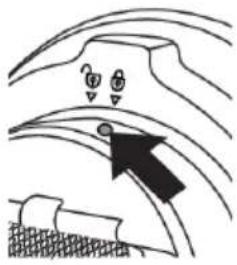
Simple line drawing of a curved surface with a black arrow pointing to a small object, no text or symbols present.5
Ifitisnecessarytocleanthenetfilterfromthe back,unscrewthescrewandturnthefilterfrom thelockedtotheunlockedposition.Pulloutthe entirefilterunitandcleanitthoroughly,andreturn thefilterunittoitsoriginalpositionaftercleaning. Turnthefilterfromtheunlockedtothelocked positionandtightenthescrew.

INFORMATION!
Makesureyoudonotpinchyourfingerswiththefiltercover.

INFORMATION!
Cleanthedoornetfilteraftereachdryingcycle.

INFORMATION!
Neveroperatewithoutadoornetfilterorifthedoornetfilterisdamaged.
Cleaningtheapplianceexterior
Clean the appliance exterior and the display unit using a soft damp cotton cloth and water. Do not usesolventsorabrasivecleanersthatcoulddamagetheappliance(pleaseobservethe recommendationsandwarningsprovidedbythemanufacturersofthecleaningagents).
Wipeallpartsofthedryerwithasoftclothuntildry.

INFORMATION!
Keep the area around the dryer clean and cool. Dust, heat, and humidity will extend the drying time.
natural_image
Line drawing of a simple washing machine with front panel and side door (no text or symbols)
INFORMATION!
Always disconnect the dryer from the power mains before cleaning.
Inthecaseofa3phaseconnectionoftheappliance,switchoffthemainsocketswitch.
Errors-whattodo?
Disturbancesfromtheenvironment(e.g.thepowergrid)mayresultinvariouserrorreports(see Troubleshootingtable).Insuchcase:
- Switch off the appliance, wait for 1 minute, switch the appliance back on, and repeat the drying program.
- If the error persists, call an authorized service center.
- You will be able to solve most of the problems in appliance operation by yourself (see below Troubleshootingtable).
- Repairsmayonlybecarriedoutbyanadequatelytrainedperson.
- Repair or any warranty claim resulting from incorrect connection or use of the dryer shall not be covered by the warranty. In such cases, the cost of repair shall be charged to the user.

INFORMATION!
Thewarrantydoesnotcovertheerrorsofailuresresultingfromdisturbancesfromtheenvironment (lightningstrike,powergridfailures,naturaldisastersetc.).
| Whattodo?CauseProblem/error | ||
| Themachine willnotstart. | on. | •Checkwhetherthemainswitchison.Themainswitchisr |
| There is no voltage in the power outlet.•Checkifthepowercordplug | • Check the fuse.iscorrectlyinsertedintothepoweroutlet. | |
| Thereis voltageinthe outlet,butthe drumdoes notspin... Thedryer doesnot work. | cordancewiththeinstructions. | •Re-readtheinstructionsforuseagain.Programwasnot |
| •Checkifthedoorisclosedproperly.Doormightbeopen. | ||
| Thecondensatetankisfull(only appliestocondensationdryer andthedryerwithaheatpump). | •Emptythecondensatetank(seesection "CLEANINGANDMAINTENANCE") (onlyappliestocondensationdryerand thedryerwithaheatpump). | |
| Delayedstartmightbeactivated. | •TocanceltheDelayedStartoption, press5theSkipbutton. | |
| Themachine stopsoperatingcompletelyduring aprogram. | •Thedoornetfiltermaybe clogged.Asaresult,thetemperatureinthedryerrises,whichin turncausesoverheating,andthe dryerswitchesoff. | •Cleanthedoornetfilter(seechapter "CLEANINGANDMAINTENANCE").•Waitforthemachinetocooldown,and tryrunningitagain.Ifthedryerstillfails tostart,callservicecentre. |
Tablecontinuedfromlastpage
| Whattodo?CauseProblem/error | ||
| Laundrynot driedordryingtakestoolong. | Filtersarenotclean. | •Cleanthefilters(seechapter"CLEAN-INGANDMAINTENANCE"). |
| Dryerisplacedinaclosedroom; roomthatistooocold;orroom thatistoosmallandtheair overheatsasaresult.•Checkifthetemperatureintheroom wherethedryerisinstalledistoohigh ortoolow. | •Makesurethereisadequatesupplyof freshairtothedryer;forexample,open thedoorand/orwindow. | |
| Laundrywasnotsufficiently wrungorspun. | •Iftheloadisstillwetaftercompleted dryingcycle,anappropriatedryingprogramshouldberunagain(aftercleaning filters). | |
| Amountoflaundrydriedinthe applianceistoolargeorinsuffi-cient. | •Useasuitableprogramoreextrafunc-tions. | |
| •Laundry(suchasbedding)gets tangledintolargeballs. | •Closethebuttonszippersonthe laundrybeforedrying.Selectasuitable program.•Afterthedryingprocess,loosenthe laundryandselectanadditionaldrying program(e.g.timeddryingprogram). | |
| Unevenly driedlaundry. | Laundryofvaryingtypesand thickness,andexcessiveamount oflaundry. | •Makesureyouhavesortedthelaundry bytypeandthickness,whetheryou haveaddedasuitableamountoflaun-drytothedrum,andwhetheryouhave selectedasuitableprogram. |
| Aslighthitting noiseap-pears. | Ifthedryerisoutofusefora longperiodoftime,thesame pointsofload-bearingelements orcomponentsareunderstress foralongtime,causingtempor-arydeformation. | •Thenoisewillsubsidewithoutanyinter-vention. |
| Thedoor opensduring drying. | muchlaundryinthedrum). | •Reducetheamountoflaundry.Excessiveload |
Failuredisplay
Incaseofafailurewhileaprogramisinprogress,therelevantErrorXisindicatedonthedisplayunit.
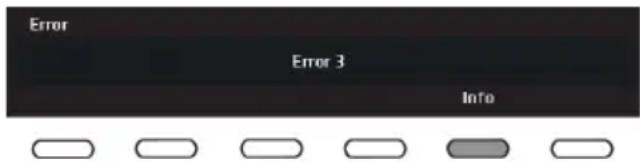
PressandholdtheINFObuttontodisplaythe errordescription.
Switchoffthedryerandturnitbackon.
Errorsindicatedonthedisplayunit(dependingonthemodel)mayincludethefollowing:
| Whatodo?ErrorindicationonthedisplayProble | ||
| Controlunitfailure.E0 | Controlunitfailure. Callservicecentre. | |
| Thermistorerror.E1 | Temperaturesensorfailure. Callservicecentre. | |
| Communicationerror.E2 | Communicationerror. Callservicecentre. | |
| Relayfailure.E6 | Controlunitfailure. Callservicecentre. | |
| Doorfailure.E7 | Controlunitfailure. Callservicecentre. | |
| Buttonfailure.E8 | Controlunitfailure. Callservicecentre. | |
| E9 | patible. | Callservicecentre.PB/Ulsoftwareversionsarenotc |
| Callservicecentre.EADBScommunicationerror.E1 | ||
| Callservicecentre.Motorcommunicationerror.E11 |
INFORMATIONbefore, during, and after the program (depending on the model)
| Whattodo?Errorindicationonthedisplay | |
| EN: Please close the door before pressing start. | Closethedryerdoorbeforestartingorresuming theprogram. |
| EN:Optionnotavailable atthisphaseofcycle. | Thisoptionisnotavailable.Selectanoptionthat isstillavailable. |
| EN:Cyclewasinterruptedbypowerfailure.Pleaseresume. | Press the Start/Pause button to restart or resume theprogram. |
| N:Cleandoorfilter. | Seechapter"CLEANINGANDMAINTENANCE". |
| EN: Child lock is on. Press buttons for 3 sec to unlock. | See chapter "SETTINGS". |
Service
Beforecallingaservicetechnician
See the chapters "Troubleshooting and "Cleaning and maintenance" and see if you can resolve the problemyourself.
Whenyoucontactaservicecentre, pleasestatethemodel(1), type(2), andserialnumber(3) of your dryer.
Model,type,andserialnumberareindicatedontherating(type)platelocatedontheinteriorsideof thedryerdoor.
QRandAUIDcodearelocatedontheinsideofthedryingmachinedooraswell.
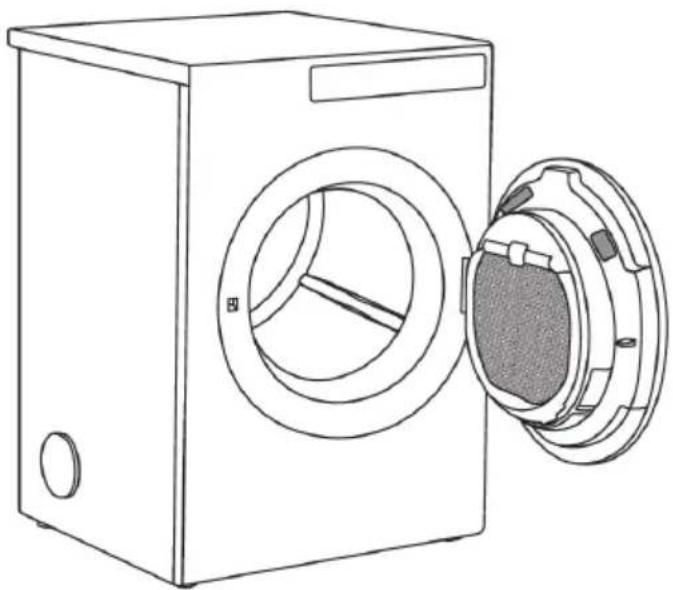
natural_image
Line drawing of a front-loading washing machine with its side panel open, showing the door and vent (no text or symbols)
WARNING!
Incaseofafailure, only use approved spare parts by authorized manufacturers.

WARNING!
Repairoranywarrantyclaimresultingfromincorrectconnectionoruseofthedryershallnotbe coveredbythewarranty.Insuchcases,thecostsofrepairshallbechargedtotheuser.
Kontaktadress
CylindaService
0771-252500
Dubetalarendastlokaltelefontaxa
www.cylinda.se
Technicalinformation
Technicalinformation
| 850mmHeight | |
| 595mmWidth | |
| 769mmDepth | |
| 43kgWeight(net) | |
| 145lDrumvolume | |
| SeeratingplateMaximumdryingload | |
| SeeratingplateRatedpower | |
| StainlesssteelDrummaterial | |
| Housingmaterial | Hot-dipgalvanizedandpowdercoatedsheetmetal, orstainlesssteelsheet. |
Programchart
Thetableindicate the power consumption and time values for drying of fast batch of laundry with various loads and afterspinning at various rates, consistently with the EN61121.
The following requirements apply to the consumption value specified below.
| roomtemperatureInletairtemperature | |
| 50–60%Inletairhumidity | |
| Wouldcreateanambiguitywith2020181Dryingtemperature |
T7400F
| AurRogSpinningspeed (rpm) | Powerconsumption,ap-proximately (kWh)* | Programduration,approximately (min)* | |
| Normaltemp | ⊖ | 804,751400AUTOEXTRA,DRY,NORMAL | |
| Normaltemp | ⊖ | 704,141400AUTONORMAL | |
| Normaltemp | ⊖ | 563,801400AUTONORMAL | |
| ⊖ | 684,621000 | ||
| Lowtemp | ⊖ | 903,751400AUTONORMAL | |
| Normaltemp | ⊖ | 533,451400AUTOHANDIR( | |
| Normaltemp | ⊖ | 452,721400AUTOMACHIN | |
| ⊖ | 523,401000 | ||
| ⊖ | 301,701200MIXDRY | ||
| ⊖ | 201,301000MIXIRON |
| ⊖ | fullload(8kg) |
| ⊖ | partialload |
* Duetodeviationsintermsoftypeandamountoflaundry,spinning,powersupplyoscillation,and environmenttemperatureandhumidity,thevaluesmeasuredattheusermaydifferfromtheonestated inthetable.
Disposal
Disposal/recyclingofpackaging
Ourproductpackagingismadeofenvironmentallyfriendlymaterialsthatcanberecycled, disposedof,ordestroyedwithoutanyhazardtotheenvironment.Tothisend,packagingmaterials arelabelledappropriately.
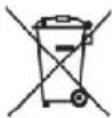
Thesymbolontheproductoritspackagingindicatesthattheproductshouldnotbetreatedasnormal householdwaste.Taketheproducttoanauthorizedcollectioncentreforwasteelectricandelectronic equipmentprocessing.
Whendisposingofanappliance,attheendofitsusefullife,removeallpowercordsanddestroythe doorlatchandswitchtopreventthedoorfromlockingorlatching(childsafety).
Correctdisposaloftheproductwillhelppreventanynegativeeffectsontheenvironmentandhealth ofpeoplewhichcouldoccurincaseofincorrectproductremoval. Fordetailedinformationonremoval andprocessingoftheproduct,pleasecontacttherelevantauthorityinchargeofwastemanagement, yourwastedisposalservice,orthestorewhereyouboughttheproduct.
Service
Vi har service i hela Sverige/ Nationwide service in Sweden
Besök www.cylinda.se / Visit www.cylinda.se
Ring 0771-25 25 00 (endast lokaltaxa) / Call 0771-25 25 00
Uppge / Declare
Maskintyp / Model code
Serienummer / Serial number
Inköpsdatum / Purchase date
Problembeskrivning / Problem description