YNP-25 - Digital piano YAMAHA - Free user manual and instructions
Find the device manual for free YNP-25 YAMAHA in PDF.


| Brand | YAMAHA |
| Model | YNP-25 |
| Product type | Digital Piano |
| Keyboard | 76 keys (Graded Touch) |
| Sound source | AWM Stereo Sampling |
| Maximum polyphony | 32 notes |
| Number of voices | 10 |
| Effects | Reverb (Room, Hall 1, Hall 2, Stage, Off) |
| Main functions | Duo, Metronome, Transposition, Tuning, Touch Sensitivity (Hard/Medium/Soft/Fixed) |
| Pedal | SUSTAIN jack (optional pedal, half-damper with FC3) |
| Demo songs | 10 Voice Demo Songs, 10 Preset Piano Songs |
| MIDI | IN/OUT, Local On/Off, Program Change On/Off, Control Change On/Off |
| Connectors | MIDI IN/OUT, PHONES/OUTPUT, DC IN 12V, SUSTAIN |
| Amplifiers | 6 W + 6 W |
| Speakers | (12 cm × 6 cm) × 2 |
| Dimensions (W × D × H) | 1,244 mm × 259 mm × 100 mm |
| Weight | 5.4 kg |
| Power supply | AC adapter PA-5D/PA-150 or 6 AA batteries (alkaline recommended) |
| Power consumption | 20 W |
| Included accessories | Owner's Manual, music stand |
| Care and cleaning | Use a soft, dry cloth. Do not use thinners, solvents, or chemical cleaners. |
| Safety | Use only the specified adapter. Do not expose to rain or moisture. Do not open the instrument (no user-serviceable parts inside). |
| Spare parts and repairability | The instrument contains no user-serviceable parts. Contact qualified Yamaha personnel for service. |
| General information | Portable digital piano from the NP series. Warranty: 90 days labor, 1 year parts (USA). Manufactured by Yamaha Corporation. |
Frequently Asked Questions - YNP-25 YAMAHA
User questions about YNP-25 YAMAHA
0 question about this device. Answer the ones you know or ask your own.
Ask a new question about this device
Download the instructions for your Digital piano in PDF format for free! Find your manual YNP-25 - YAMAHA and take your electronic device back in hand. On this page are published all the documents necessary for the use of your device. YNP-25 by YAMAHA.
USER MANUAL YNP-25 YAMAHA
This product utilizes batteries or an external power supply (adapter). DO NOT connect this product to any power supply or adapter other than one described in the manual, on the name plate, or specifically recommended by Yamaha.
WARNING: Do not place this product in a position where anyone could walk on, trip over, or roll anything over power or connecting cords of any kind. The use of an extension cord is not recommended! If you must use an extension cord, the minimum wire size for a 25' cord (or less) is 18 AWG. NOTE: The smaller the AWG number, the larger the current handling capacity. For longer extension cords, consult a local electrician.
This product should be used only with the components supplied or; a cart, rack, or stand that is recommended by Yamaha. If a cart, etc., is used, please observe all safety markings and instructions that accompany the accessory product.
SPECIFICATIONS SUBJECT TO CHANGE:
The information contained in this manual is believed to be correct at the time of printing. However, Yamaha reserves the right to change or modify any of the specifications without notice or obligation to update existing units.
This product, either alone or in combination with an amplifier and headphones or speaker/s, may be capable of producing sound levels that could cause permanent hearing loss. DO NOT operate for long periods of time at a high volume level or at a level that is uncomfortable. If you experience any hearing loss or ringing in the ears, you should consult an audiologist.
IMPORTANT: The louder the sound, the shorter the time period before damage occurs.
Some Yamaha products may have benches and / or accessory mounting fixtures that are either supplied with the product or as optional accessories. Some of these items are designed to be dealer assembled or installed. Please make sure that benches are stable and any optional fixtures (where applicable) are well secured BEFORE using.
Benches supplied by Yamaha are designed for seating only. No other uses are recommended.
NOTICE:
Service charges incurred due to a lack of knowledge relating to how a function or effect works (when the unit is operating as designed) are not covered by the manufacturer's warranty, and are therefore the owners responsibility. Please study this manual carefully and consult your dealer before requesting service.
ENVIRONMENTAL ISSUES:
Yamaha strives to produce products that are both user safe and environmentally friendly. We sincerely believe that our products and the production methods used to produce them, meet these goals. In keeping with both the letter and the spirit of the law, we want you to be aware of the following:
Battery Notice:
This product MAY contain a small non-rechargeable battery which (if applicable) is soldered in place. The average life span of this type of battery is approximately five years. When replacement becomes necessary, contact a qualified service representative to perform the replacement.
This product may also use "household" type batteries. Some of these may be rechargeable. Make sure that the battery being charged is a rechargeable type and that the charger is intended for the battery being charged.
When installing batteries, do not mix batteries with new, or with batteries of a different type. Batteries MUST be installed correctly. Mismatches or incorrect installation may result in overheating and battery case rupture.
Warning:
Do not attempt to disassemble, or incinerate any battery. Keep all batteries away from children. Dispose of used batteries promptly and as regulated by the laws in your area. Note: Check with any retailer of household type batteries in your area for battery disposal information.
Disposal Notice:
Should this product become damaged beyond repair, or for some reason its useful life is considered to be at an end, please observe all local, state, and federal regulations that relate to the disposal of products that contain lead, batteries, plastics, etc. If your dealer is unable to assist you, please contact Yamaha directly.
NAME PLATE LOCATION:
The name plate is located on the bottom of the product. The model number, serial number, power requirements, etc., are located on this plate. You should record the model number, serial number, and the date of purchase in the spaces provided below and retain this manual as a permanent record of your purchase.
Model
Serial No.
Purchase Date
92-BP (bottom)
PLEASE KEEP THIS MANUAL
FCC INFORMATION (U.S.A.)
- IMPORTANT NOTICE: DO NOT MODIFY THIS UNIT! This product, when installed as indicated in the instructions contained in this manual, meets FCC requirements. Modifications not expressly approved by Yamaha may void your authority, granted by the FCC, to use the product.
- IMPORTANT: When connecting this product to accessories and/ or another product use only high quality shielded cables. Cable/s supplied with this product MUST be used. Follow all installation instructions. Failure to follow instructions could void your FCC authorization to use this product in the USA.
- NOTE: This product has been tested and found to comply with the requirements listed in FCC Regulations, Part 15 for Class "B" digital devices. Compliance with these requirements provides a reasonable level of assurance that your use of this product in a residential environment will not result in harmful interference with other electronic devices. This equipment generates/uses radio frequencies and, if not installed and used according to the instructions found in the users manual, may cause interference harmful to the operation of other electronic devices. Compliance with FCC regulations does
not guarantee that interference will not occur in all installations. If this product is found to be the source of interference, which can be determined by turning the unit "OFF" and "ON", please try to eliminate the problem by using one of the following measures:
Relocate either this product or the device that is being affected by the interference.
Utilize power outlets that are on different branch (circuit breaker or fuse) circuits or install AC line filter/s.
In the case of radio or TV interference, relocate/reorient the antenna. If the antenna lead-in is 300 ohm ribbon lead, change the lead-in to co-axial type cable.
If these corrective measures do not produce satisfactory results, please contact the local retailer authorized to distribute this type of product. If you can not locate the appropriate retailer, please contact Yamaha Corporation of America, Electronic Service Division, 6600 Orangethorpe Ave, Buena Park, CA90620
The above statements apply ONLY to those products distributed by Yamaha Corporation of America or its subsidiaries.
- This applies only to products distributed by YAMAHA CORPORATION OF AMERICA.
(class B)
OBSERVERA!
IMPORTANT NOTICE FOR THE UNITED KINGDOM Connecting the Plug and Cord
IMPORTANT. The wires in this mains lead are coloured in accordance with the following code:
BLUE : NEUTRAL
BROWN : LIVE
As the colours of the wires in the mains lead of this apparatus may not correspond with the coloured makings identifying the terminals in your plug proceed as follows:
The wire which is coloured BLUE must be connected to the terminal which is marked with the letter N or coloured BLACK.
The wire which is coloured BROWN must be connected to the terminal which is marked with the letter L or coloured RED.
Making sure that neither core is connected to the earth terminal of the three pin plug.
- This applies only to products distributed by Yamaha-Kemble Music (U.K.) Ltd.
(2 wires)
PRECAUTIONS
PLEASE READ CAREFULLY BEFORE PROCEEDING
- Please keep this manual in a safe place for future reference.

WARNING
Always follow the basic precautions listed below to avoid the possibility of serious injury or even death from electrical shock, short-circuiting, damages, fire or other hazards. These precautions include, but are not limited to, the following:
Power supply/AC power adaptor
- Only use the voltage specified as correct for the instrument. The required voltage is printed on the name plate of the instrument.
- Use the specified adaptor (PA-5D, PA-150 or an equivalent recommended by Yamaha) only. Using the wrong adaptor can result in damage to the instrument or overheating.
- Check the electric plug periodically and remove any dirt or dust which may have accumulated on it.
- Do not place the AC adaptor cord near heat sources such as heaters or radiators, and do not excessively bend or otherwise damage the cord, place heavy objects on it, or place it in a position where anyone could walk on, trip over, or roll anything over it.
Do not open
- Do not open the instrument or attempt to disassemble the internal parts or modify them in any way. The instrument contains no user-serviceable parts. If it should appear to be malfunctioning, discontinue use immediately and have it inspected by qualified Yamaha service personnel.
Water warning
- Do not expose the instrument to rain, use it near water or in damp or wet conditions, or place containers on it containing liquids which might spill into any openings. If any liquid such as water seeps into the instrument, turn off the power immediately and unplug the power cord from the AC outlet. Then have the instrument inspected by qualified Yamaha service personnel.
- Never insert or remove an electric plug with wet hands.
Fire warning
- Do not put burning items, such as candles, on the unit.
A burning item may fall over and cause a fire.
If you notice any abnormality
- If the AC adaptor cord or plug becomes frayed or damaged, or if there is a sudden loss of sound during use of the instrument, or if any unusual smells or smoke should appear to be caused by it, immediately turn off the power switch, disconnect the adaptor plug from the outlet, and have the instrument inspected by qualified Yamaha service personnel.

CAUTION
Always follow the basic precautions listed below to avoid the possibility of physical injury to you or others, or damage to the instrument or other property. These precautions include, but are not limited to, the following:
Power supply/AC power adaptor
- When removing the electric plug from the instrument or an outlet, always hold the plug itself and not the cord.
- Unplug the AC power adaptor when not using the instrument, or during electrical storms.
- Do not connect the instrument to an electrical outlet using a multiple-connector. Doing so can result in lower sound quality, or possibly cause overheating in the outlet.
Battery
- Always make sure all batteries are inserted in conformity with the +/- polarity markings. Failure to do so might result in overheating, fire, or battery fluid leakage.
- Always replace all batteries at the same time. Do not use new batteries together with old ones. Also, do not mix battery types, such as alkaline batteries with manganese batteries, or batteries from different makers, or different types of batteries from the same maker, since this can cause overheating, fire, or battery fluid leakage.
-
Do not dispose of batteries in fire.
-
Do not attempt to recharge batteries that are not intended to be charged.
- When the batteries run out, or if the instrument is not to be used for a long time, remove the batteries from the instrument to prevent possible leakage of the battery fluid.
- Keep batteries away from children.
- If the batteries do leak, avoid contact with the leaked fluid. If the battery fluid should come in contact with your eyes, mouth, or skin, wash immediately with water and consult a doctor. Battery fluid is corrosive and may possibly cause loss of sight or chemical burns.
Location
- Do not expose the instrument to excessive dust or vibrations, or extreme cold or heat (such as in direct sunlight, near a heater, or in a car during the day) to prevent the possibility of panel disfiguration or damage to the internal components.
- Do not use the instrument in the vicinity of a TV, radio, stereo equipment, mobile phone, or other electric devices. Otherwise, the instrument, TV, or radio may generate noise.
-
Do not place the instrument in an unstable position where it might accidentally fall over.
-
Before moving the instrument, remove all connected adaptor and other cables.
- When setting up the product, make sure that the AC outlet you are using is easily accessible. If some trouble or malfunction occurs, immediately turn off the power switch and disconnect the plug from the outlet. Even when the power switch is turned off, electricity is still flowing to the product at the minimum level. When you are not using the product for a long time, make sure to unplug the power cord from the wall AC outlet.
- Use only the stand specified for the instrument. When attaching the stand or rack, use the provided screws only. Failure to do so could cause damage to the internal components or result in the instrument falling over.
- Do not place objects in front of the instrument's air vent, since this may prevent adequate ventilation of the internal components, and possibly result in the instrument overheating.
Connections
- Before connecting the instrument to other electronic components, turn off the power for all components. Before turning the power on or off for all components, set all volume levels to minimum. Also, be sure to set the volumes of all components at their minimum levels and gradually raise the volume controls while playing the instrument to set the desired listening level.
Maintenance
- When cleaning the instrument, use a soft, dry cloth. Do not use paint thinkers, solvents, cleaning fluids, or chemical-impregnated wiping cloths.
Handling caution
- Do not insert a finger or hand in any gaps on the instrument.
- Never insert or drop paper, metallic, or other objects into the gaps on the panel or keyboard. If this happens, turn off the power immediately and unplug the power cord from the AC outlet. Then have the instrument inspected by qualified Yamaha service personnel.
- Do not place vinyl, plastic or rubber objects on the instrument, since this might discolor the panel or keyboard.
- Do not rest your weight on, or place heavy objects on the instrument, and do not use excessive force on the buttons, switches or connectors.
- Do not use the instrument/device or headphones for a long period of time at a high or uncomfortable volume level, since this can cause permanent hearing loss. If you experience any hearing loss or ringing in the ears, consult a physician.
Yamaha cannot be held responsible for damage caused by improper use or modifications to the instrument.
Always turn the power off when the instrument is not in use.
When using a power adaptor, even when the power switch is in the "STANDBY" position, electricity is still flowing to the instrument at the minimum level. When you are not using the instrument for a long time, make sure you unplug the AC power adaptor from the wall AC outlet.
Make sure to discard used batteries according to local regulations.
Introduction
Thank you for purchasing the Yamaha NP-30/YNP-25! We recommend that you read this manual carefully so that you can fully take advantage of the advanced and convenient functions of the NP-30/YNP-25. We also recommend that you keep this manual in a safe and handy place for future reference.
Main Features
Graded Touch Keyboard
Features well balanced weight gradations of the keys—heavy in the lower end, light in the upper keys.
AWM Stereo Sampling
The Yamaha NP-30/YNP-25 offers unmatched sonic realism and natural grand-piano type playability as well as Yamaha's original "AWM Stereo Sampling" tone-generation technology for rich, musical voices. In particular, the Grand Piano 1 and 2 voices feature samples painstakingly recorded from a full concert grand piano, while the Electric Piano 1 and 2 voice features multiple samples for different velocities (Dynamic Sampling); in other words, it uses different samples depending on the strength of your playing.
About this Owner's Manual
This manual consists of three main sections: Introduction, Reference and Appendix.
Introduction (page 6):
Please read this section first.
Reference (page 14):
This section explains how to make detailed settings for the instrument's various functions.
Appendix (page 28):
This section features a variety of essential, detailed information on the instrument.
- The illustrations as shown in this owner's manual are for instructional purposes only, and may appear somewhat different from those on your instrument.
- Copying of the commercially available musical data including but not limited to MIDI data and/or audio data is strictly prohibited except for your personal use.
- For the sake of simplicity, both models NP-30 and NP-30S are hereafter referred to in this Owner's Manual as NP-30.
This product incorporates and bundles computer programs and contents in which Yamaha owns copyrights or with respect to which it has license to use others' copyrights. Such copyrighted materials include, without limitation, all computer software, style files, MIDI files, WAVE data, musical scores and sound recordings. Any unauthorized use of such programs and contents outside of personal use is not permitted under relevant laws. Any violation of copyright has legal consequences. DON'T MAKE, DISTRIBUTE OR USE ILLEGAL COPIES.
- The company names and product names in this Owner's Manual are the trademarks or registered trademarks of their respective companies.
Accessories
- Owner's Manual
This manual contains complete instructions for operating your instrument. - Quick Operation Guide
Music Rest
Introduction
Main Features. 6
About this Owner's Manual 7
Accessories 7
Application Index 9
Panel Controls and Terminals 10
Before Using 11
Power Requirements 11
Turning the Power On 12
Setting the Volume 13
Using the Pedal 13
Using Headphones 13
Music Rest. 13
Reference
Listening to the Demo Songs 14
Listening to the Piano Preset Songs 15
Using the Metronome 16
Selecting & Playing Voices 18
Selecting Voices 18
Combining Voices (Dual) 19
Adding Variations to the Sound - Reverb 20
Transposition 21
Fine tuning of the Pitch 21
Touch Sensitivity 22
Connecting MIDI Instruments 23
Connecting MIDI [IN] [OUT] terminals 23
MIDI's Capability 23
Connecting a Personal Computer 24
MIDI Functions 25
MIDI Transmit/Receive Channel Selection 25
Local Control ON/OFF 25
Program Change ON/OFF 26
Control Change ON/OFF 26
Troubleshooting 27
Optional Equipment 27
Appendix
MIDI Data Format 28
MIDI Implementation Chart 32
Specifications 34
Index 35
Application Index
Use this index to find reference pages that may be helpful for your particular application and situation.
Listening
Listening to demo songs with different voices. Listening to the Demo Songs on page 14
Playing
Using the sustain pedal. Using the Pedal on page 13
Changing the key of the NP-30/YNP-25 to facilitate playing in difficult/unfamiliar key signatures .... Transposition on page 21
Fine tuning the pitch of the entire instrument when you play the instrument along with other instruments or CD music .Fine tuning of the Pitch on page 21
Selecting a touch sensitivity type. Touch Sensitivity on page 22
Using a built-in metronome. Using the Metronome on page 16
Changing voices
Viewing the list of voices ..Selecting Voices on page 18
Simulating a concert hall . Adding Variations to the Sound - Reverb on page 20
Combining two voices Combining Voices (Dual) on page 19
Connecting the NP-30/YNP-25 to other devices
What is MIDI? . About MIDI on page 23
Connecting a computer Connecting a Personal Computer on page 24
Panel Controls and Terminals
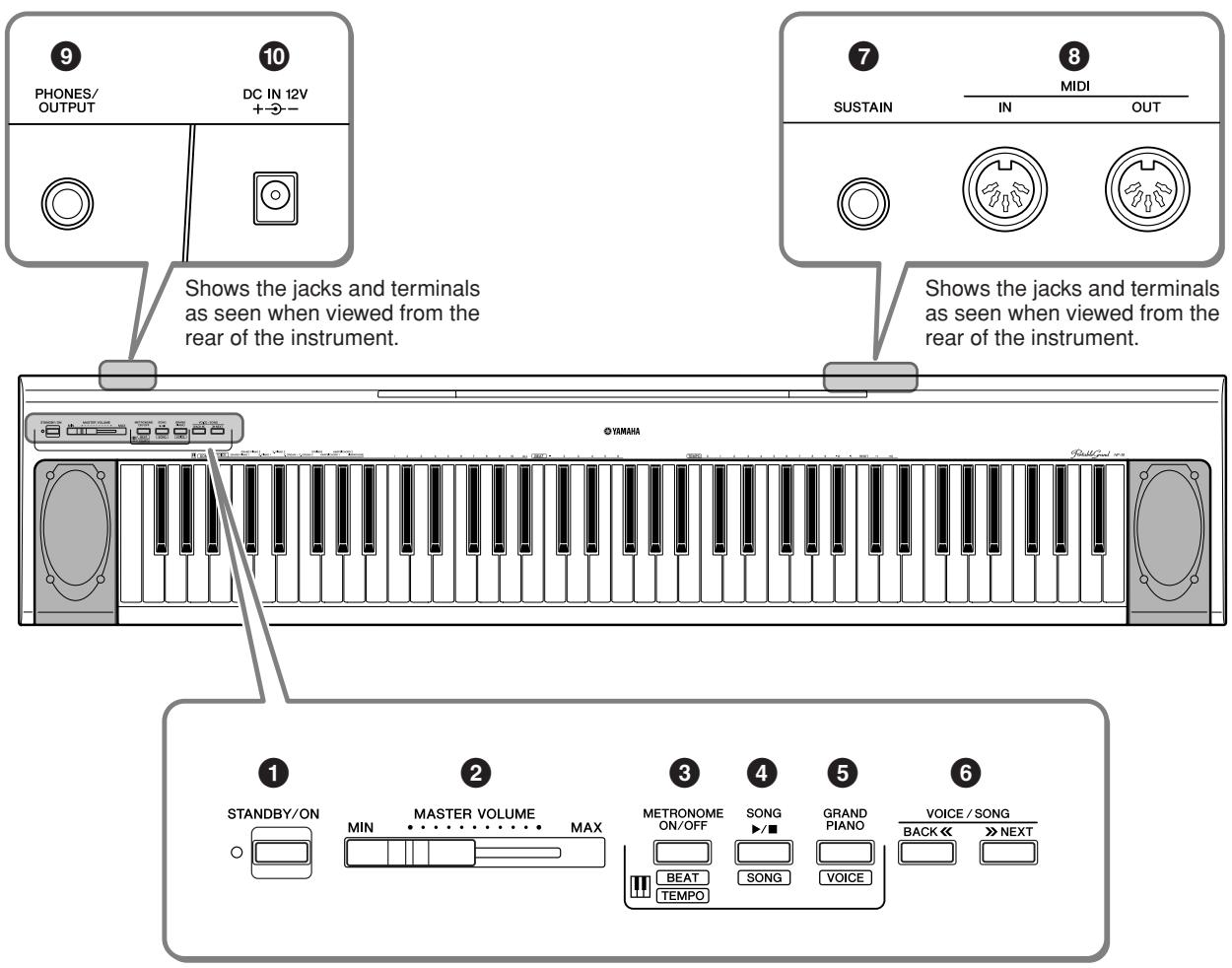
1 [STANDBY/ON] switch ..... page 11
For turning the power on or off.
2 [MASTER VOLUME] slider ..... page 13
For adjusting the volume level of the entire sound.
[METRONOME ON/OFF] button
page 16
For using the metronome.
[SONG▶/■] button...... page 14, 15
For playing the demo songs and the piano preset songs.
[GRAND PIANO] button
page 18-20, 22
For selecting voices from 10 internal sounds including Grand Piano 1 and 2 (page 18). You can also combine two voices (page 19) or add reverb effects to the selected voice for your keyboard performance (page 20).
⑥ VOICE/SONG [BACK<<], [>>NEXT]
button pages 14, 15, 18
While playing a voice demo or piano preset song, pressing these buttons can be selected next or previous song. These buttons can be also changed a voice.
SUSTAIN] jack.. page 13
For connecting an optional pedal (FC5), FC3 foot pedal or FC4 foot switch.
MIDI [IN] [OUT] terminals......page 23
For connecting external MIDI devices, allowing the use of various MIDI functions.
[PHONES/OUTPUT] jack......page 13
For connecting a set of standard stereo headphones, allowing private practice.
[DC IN 12V] jack.... page 11
For connecting the power adaptor.
Be sure to do the following operations BEFORE turning on the power.
Power Requirements
Although the instrument will run either from an optional AC adaptor or batteries, Yamaha recommends use of an AC adaptor whenever possible. An AC adaptor is more environmentally friendly than batteries and does not deplete resources.
Using an AC Power Adaptor.
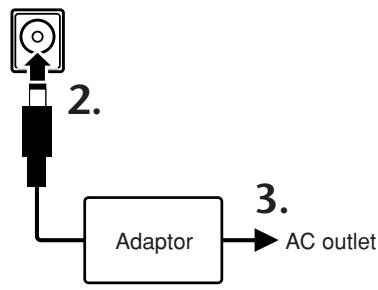
- Make sure that the [STANDBY/ON] switch of the instrument is set to STANDBY.

WARNING
Use the specified adaptor (PA-5D, PA-150, or an equivalent recommended by Yamaha) only. The use of other adaptors may result in irreparable damage to both the adaptor and the instrument.
- Connect the AC adaptor to the power supply jack.
- Plug the AC adaptor into an AC outlet.

CAUTION
Unplug the AC Power Adaptor when not using the instrument, or during electrical storms.

CAUTION
Even when the instrument is turned off, electricity is still flowing to the instrument at the minimum level.
When you are not using the instrument for a long time, make sure you unplug the AC power adaptor from the wall AC outlet.
DC IN 12V +-
Using Batteries
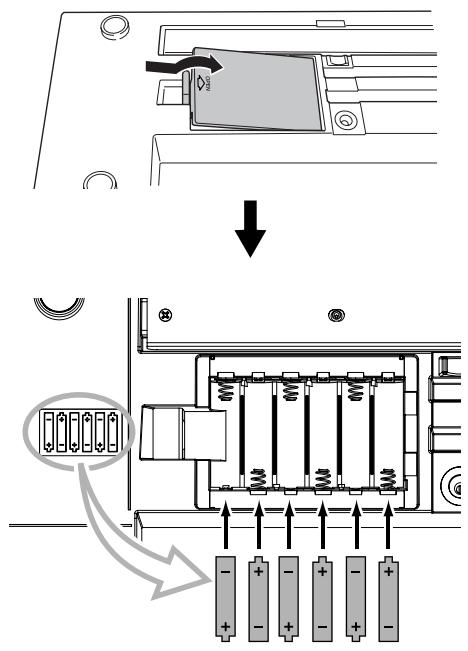
- Open the battery compartment cover located on the instrument's bottom panel.
- Insert the six new alkaline batteries, being careful to follow the polarity markings on the side of the compartment.
- Replace the compartment cover, making sure that it locks firmly in place.

Never connect or disconnect the AC power adaptor when the power is on and the batteries are installed. Doing so will turn the power off.
For battery operation the instrument requires six 1.5V "AA" size, LR6 or equivalent batteries. (Alkaline batteries are recommended.) When battery power becomes too low for proper operation, the volume may be reduced, the sound may be distorted, and other problems may occur. When this happens, make sure to replace all batteries, following the precautions listed below.
CAUTION
Use alkaline batteries for this instrument. Other types of batteries (including rechargeable batteries) may have sudden drops of power when battery power becomes low.
Make sure to install the batteries with the proper orientation, maintaining the correct polarity (as shown). Incorrect battery installation may result in heat, fire and/or leaking of corrosive chemicals.
When the batteries run down, replace them with a complete set of six new batteries. NEVER mix old and new batteries. Do not use different kinds of batteries (e.g. alkaline and manganese) at the same time.
If the instrument is not to be in use for a long time, remove the batteries from it, in order to prevent possible fluid leakage from the battery.
Turning the Power On
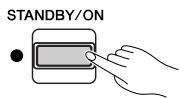
Press the [STANDBY/ON] switch to turn on the power.
The power indicator located to the left of the [STANDBY/ON] switch lights up.
Pressing the switch again turns the power off.
CAUTION
When using a power adaptor, even when the power is off, a small amount of electricity is still being consumed by the instrument. When you are not using the instrument for a long time, make sure to unplug the AC power adaptor from the wall AC outlet, and/or remove the batteries from the instrument.
STANDBY/ON
Setting the Volume
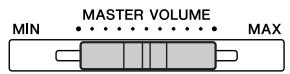
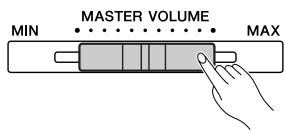
Initially set the [MASTER VOLUME] slider about halfway between the "MIN" and "MAX" settings. Then, when you start playing, re-adjust the [MASTER VOLUME] slider to the most comfortable listening level.
TERMINOLOGY
MASTER VOLUME:
The volume level of the entire keyboard sound


The level decreases.
The level increases.
Using the Pedal
[SUSTAIN] jack
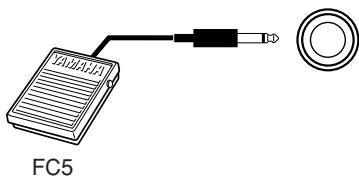
This jack is for connecting an optional pedal.
The pedal functions in the same way as a damper pedal on an acoustic piano. Connect an optional pedal to this jack and press the pedal to sustain the sound.
Do not press the footswitch while turning the power on. Doing this changes the recognized polarity of the footswitch, resulting in reversed footswitch operation.
If you connect an optional pedal of FC3, the half pedal function* can be used.
* half pedal function
While you playing the piano with SUSTAIN and if you need to delete the cloudy sound, release the foot from pedal to half position.

Make sure that power is OFF when connecting or disconnecting the pedal.
SUSTAIN
Using Headphones
Connect a set of headphones to the [PHONES/OUTPUT] jack.
CAUTION
To protect your hearing, avoid listening to the NP-30/YNP-25 at a high volume level for long periods of time.
Music Rest
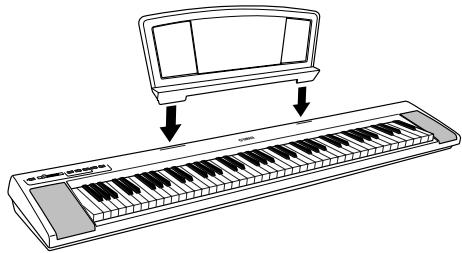
The NP-30/YNP-25 includes a music rest that can be attached to the instrument by inserting it into the slot at the top of the control panel.
CAUTION
Since speakers are built into the instrument you should be careful to never leave any video tapes, cassette tapes, floppy disks or any kind of magnetic storage media on the panel—doing so may result in data loss or damage to the items. Also avoid using the instrument near a television or computer monitor, since interference may result.
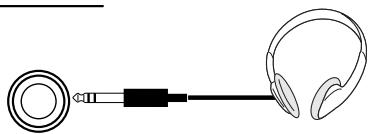
PHONES/ OUTPUT
Listening to the Demo Songs
Demo songs are provided that effectively demonstrate each of the voices.
1. Press the [STANDBY/ON] switch to turn the power on.
When the power is turned ON, the power indicator located to the left of the [STANDBY/ON] switch lights up.
2. Adjust the volume.
Initially set the [MASTER VOLUME] slider about half way between the "MIN" and "MAX" settings. Then, when you start playing, re-adjust the [MASTER VOLUME] slider to the most comfortable listening level.
3. Press the [SONG ] button to listen to the demo songs.
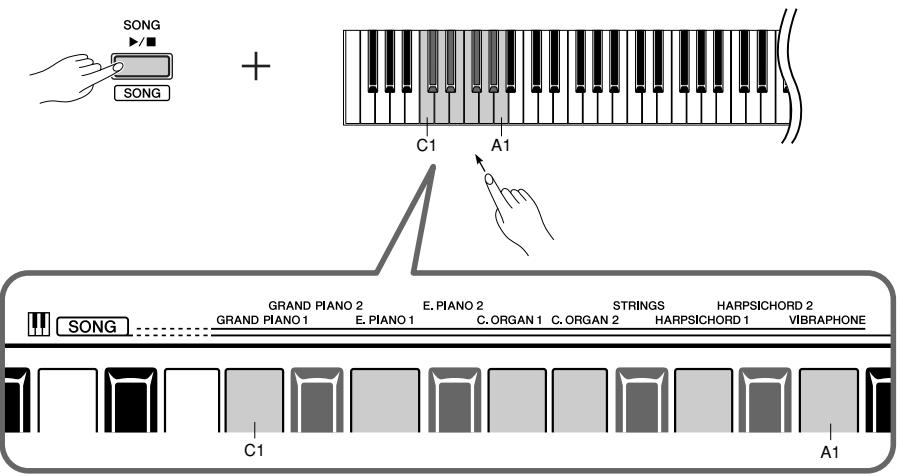
The GRAND PIANO 1 demo song will start. Demo songs provided for each voice and the piano preset songs will play back in sequence until you press the [SONG /■] button.
Changing a Demo Song
You can change to another demo song during playback by pressing the VOICE/SONG [BACK<] or [>>NEXT] button. For selecting a demo song using the keyboard, press one of the C1-A1 keys while holding down the [SONG▶] button.
Demo Song List
| Key | Voice Name | Title | Composer |
| G1 | HARPSICHORD 1 | Gavotte | J.S. Bach |
| G#1 | HARPSICHORD 2 | Invention No. 1 | J.S. Bach |
- The demonstration pieces listed above are short rearranged excerpts of the original compositions.
- All other songs are original © 2005 Yamaha Corporation).
4. Press the [SONG ] button to stop the voice demo.
![YAMAHA YNP-25 - Press the [SONG ] button to stop the voice demo. - 1](/content/2025/01/115115/images/7dc0cafc41bff1ab091c892ae0c4248e7b0e44d158d0a73ff46ec5354ad2d12a.jpg)
![YAMAHA YNP-25 - Press the [SONG ] button to stop the voice demo. - 2](/content/2025/01/115115/images/a6e23a440a5713425370411690152609955a422c19f50d2480beaa8ab2411158.jpg)
Refer to the voice list on page 18 for more information on the characteristics of each preset voice.
![YAMAHA YNP-25 - Press the [SONG ] button to stop the voice demo. - 3](/content/2025/01/115115/images/e0310ccc249879b9ff18c2166fbccf470b4810b87e15c43269864b8026a31b2f.jpg)
The demo songs will not be transmitted via MIDI.
Listening to the Piano Preset Songs
The NP-30/YNP-25 provides performance data for piano songs as well as voice demo songs, for your listening pleasure.
1. While holding down the [SONG /■] button, press one of the C2-A2 keys to select a song to play back.
The number of each piano preset song is assigned to the C2-A2 keys.
While holding down the [SONG▶■] button, press the A#2 key to play all preset songs consecutively in sequence.
![YAMAHA YNP-25 - While holding down the [SONG /■] button, press one of the C2-A2 keys to select a song to play back. - 1](/content/2025/01/115115/images/a4db00c5b3f6ff8fb9b08443a429104994a48e435c6f6b0be3f7a61d8b3c75ce.jpg)
Piano Preset Song List
| No. | Title | Composer |
| 1 | Menuett G dur BWV.Anh.114 | J.S. Bach |
| 2 | Turkish March (Piano Sonate No.11 K.331) | W.A. Mozart |
| 3 | Für Elise | L.v. Beethoven |
| 4 | Valse op.64-1 “Petit chien” | F.F. Chopin |
| 5 | Träumerei | R. Schumann |
| 6 | Dolly's Dreaming and Awakening | T. Oesten |
| 7 | Arabesque | J.F.F. Burgmüller |
| 8 | Humoresque | A. Dvořák |
| 9 | The Entertainer | S. Joplin |
| 10 | La Fille aux Cheveux de Lin | C.A. Debussy |
Press the VOICE/SONG [BACK<] or [>>NEXT] button to change to the next piano song.
![YAMAHA YNP-25 - While holding down the [SONG /■] button, press one of the C2-A2 keys to select a song to play back. - 2](/content/2025/01/115115/images/b0ab72eb80d26af07cb9747fa65df560709505223a3ad19afed660464de2addf.jpg)
![YAMAHA YNP-25 - While holding down the [SONG /■] button, press one of the C2-A2 keys to select a song to play back. - 3](/content/2025/01/115115/images/c76d3c507e48f4019df6dcb570f5e91447e4fd1e9bab86296caf8caec41f5638.jpg)
2. Press the [SONG ] button to stop playback.
To continue playing other songs, see step 1 above.
TERMINOLOGY
Song:
On the NP-30/YNP-25, performance data is called a "Song." This includes demonstration tunes and piano preset tunes.
Preset:
Preset Data supplied with the internal memory of the NP-30/YNP-25 shipped from the factory.

You can play the keyboard along with the preset song. You can change the voice playing on the keyboard.

When you select a different song (or a different song is selected during chained playback), an appropriate reverb type will be selected accordingly.

The piano preset songs are not transmitted via MIDI.
Using the Metronome
This instrument features a built-in metronome (a device that keeps an accurate tempo) that is convenient for practicing.
1. Press the [METRONOME ON/OFF] button to turn on the metronome.
Start the metronome.
![YAMAHA YNP-25 - Press the [METRONOME ON/OFF] button to turn on the metronome. - 1](/content/2025/01/115115/images/269c7b3c04fca8733f4238eae2d4439d992384b089d007ddf73551e646585768.jpg)
Determine the time signature
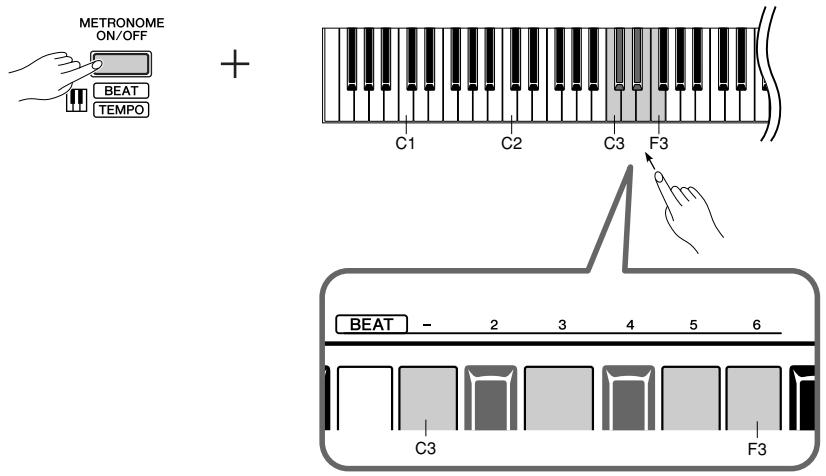
While holding down the [METRONOME ON/OFF] button, press one of the C3-F3 keys.
The first beat is accented with a bell sound and the rest with clicks.
Default set is 0/4 (C3). In this setting, clicks sound in all beats.
| Key | Time signature |
| C3 | 0/4 |
| C#3 | 2/4 |
| D3 | 3/4 |
| D#3 | 4/4 |
| E3 | 5/4 |
| F3 | 6/4 |
Adjust the Tempo
The tempo of the metronome and song playback can be set from 32 to 280 beats per minute.
A number is assigned to each of the following keys.
While holding down the [METRONOME ON/OFF] button, press a sequence of C4-A4 keys to specify a three-digit number.
Select a number starting from the left-most digit. For example, to set the tempo "95," press the C4 (0), A4 (9) and F4 (5) keys in sequence.
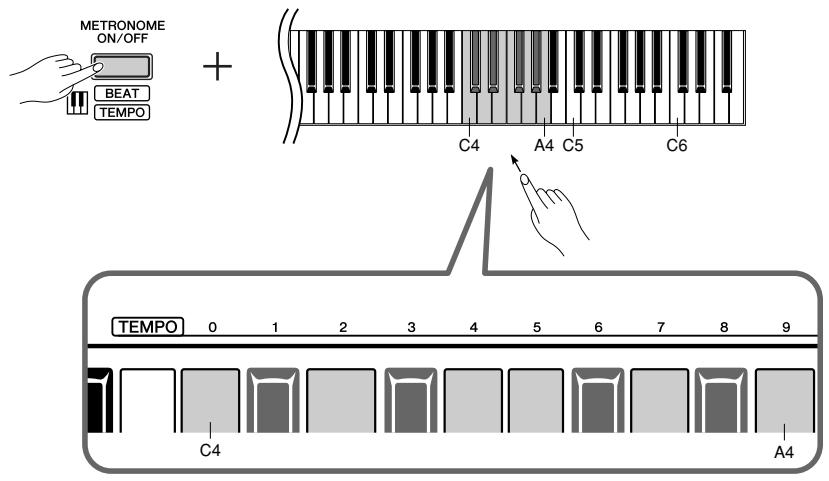
Increasing the tempo value in steps of one:
While holding down the [METRONOME ON/OFF] button, press the C#5 key.
Decreasing the tempo value in steps of one:
While holding down the [METRONOME ON/OFF] button, press the B4 key.
Increasing the tempo value in steps of ten:
While holding down the [METRONOME ON/OFF] button, press the D5 key.
Decreasing the tempo value in steps of ten:
While holding down the [METRONOME ON/OFF] button, press the A#4 key.
Resetting the tempo to default:
While holding down the [METRONOME ON/OFF] button, press the C5 key.

Adjusting the volume
You can change the volume of the metronome sound.
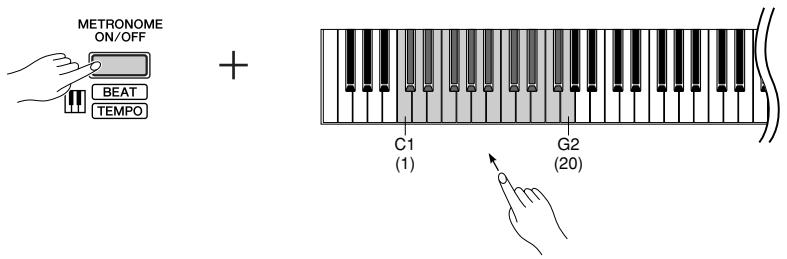
While holding down the [METRONOME ON/OFF] button, press one of the C1-G2 keys to determine the volume.
Pressing a higher key in the key range results in a higher volume, while pressing a lower key results in lower volume.
2. Press the [METRONOME ON/OFF] button to stop the Metronome.
![YAMAHA YNP-25 - Press the [METRONOME ON/OFF] button to stop the Metronome. - 1](/content/2025/01/115115/images/36bacd2eec287e139ebacd332d7c3cfbbdbfa054946ca443c6dba68470a25056.jpg)
![YAMAHA YNP-25 - Press the [METRONOME ON/OFF] button to stop the Metronome. - 2](/content/2025/01/115115/images/2e4166c41a159366b8b397ce94d3dc61f84222f2f23048abc579a91deea03bad.jpg)
Metronome volume range:
C1 (1)-G2 (20)
Default setting: A1 (10)
Selecting & Playing Voices
Selecting Voices
1. While holding down the [GRAND PIANO] button, press one of the C1-A1 keys to select a voice.
![YAMAHA YNP-25 - While holding down the [GRAND PIANO] button, press one of the C1-A1 keys to select a voice. - 1](/content/2025/01/115115/images/7e355822d95305f3900f59b695797c014870d7cdeee6e7d184e9aa011a10ed9e.jpg)
Pressing the VOICE/SONG [BACK< <] or NEXT] button switches among the following ten voices.
![YAMAHA YNP-25 - While holding down the [GRAND PIANO] button, press one of the C1-A1 keys to select a voice. - 2](/content/2025/01/115115/images/f9f5571daed2439c215819ea3e1f1ffe31a58d172d9c58b390c4da093d5e33e6.jpg)
| Key | Voice Name | Description |
| C1 | Grand Piano 1 | Recorded samples from a full concert grand piano. Perfect for classical compositions as well as any other style that requires acoustic piano. |
| C#1 | Grand Piano 2 | Clear piano with bright reverb. Good for popular music. |
| D1 | E. Piano 1 | An electronic piano sound created by FM synthesis. Good for popular music. |
| D#1 | E. Piano 2 | The sound of an electric piano using hammer-struck metallic “tines.” Soft tone when played lightly, and an aggressive tone when played hard. |
| E1 | Church Organ 1 | This is a typical pipe organ sound (8' + 4' + 2'). Good for sacred music from the Baroque period. |
| F1 | Church Organ 2 | This is the organ's full coupler sound, often associated with Bach's “Toccata and Fugue.” |
| F#1 | Strings | Spacious and large-scale string ensemble. Try combining this voice with piano in DUAL. |
| G1 | Harpsichord 1 | The definitive instrument for baroque music. Since the strings of a harpsichord are plucked, there is no touch response. |
| G#1 | Harpsichord 2 | Mixes the same voice an octave higher for a more brilliant tone. |
| A1 | Vibraphone | The sound of a vibraphone played with relatively soft mallets. |
2. Adjust the volume.
Re-adjust the [MASTER VOLUME] slider for the most comfortable listening level during your performance.

To familiarize yourself with the characteristics of the voices, listen to the demo songs for each voice (page 14).
TERMINOLOGY
Voice:
On the NP-30/YNP-25, the term "voice" means "instrument sound."

When you select a voice, an appropriate reverb type will be selected automatically (page 20).
Combining Voices (Dual)
You can play voices simultaneously across the entire range of the keyboard. In this way, you can combine similar voices to create a thicker sound.
1. While holding down the [GRAND PIANO] button, press two keys in the range of C1 through A1 simultaneously (or press one key while holding another) to engage Dual.
Refer to "Selecting Voices" on page 18 for more information on the voices that are assigned to the keys.
![YAMAHA YNP-25 - While holding down the [GRAND PIANO] button, press two keys in the range of C1 through A1 simultaneously (or press one key while holding another) to engage Dual. - 1](/content/2025/01/115115/images/b27ebf8dbdef6cf0e60a311f63198d967ed88edafdeb200204550b3b3f32df2c.jpg)
The voice assigned to the lower key will be designated as Voice 1, and the voice assigned to the higher key will be designated as Voice 2.
You can make the following settings for Voices 1 and 2 in Dual:
Setting the Octave
You can shift the pitch up and down in octave steps for Voice 1 and Voice 2 independently. Depending on which voices you combine in Dual, the combination may sound better if one of the voices is shifted up or down an octave.
While holding down the [GRAND PIANO] button, press one of the C4-F4 keys.
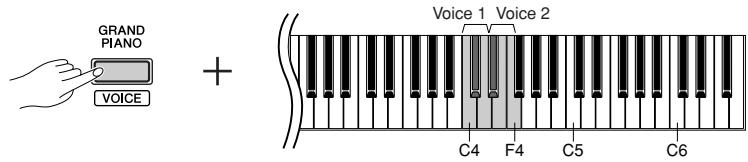
| Voice 1 | C4 | -1 |
| C#4 | 0 | |
| D4 | +1 |
| Voice 2 | D#4 | -1 |
| E4 | 0 | |
| F4 | +1 |
Setting the Balance
You can adjust the volume balance between two voices. For example, you can set one voice as the main voice with a louder setting, and make the other voice softer. While holding down the [GRAND PIANO] button, press one of the F#4-F#5 keys.
A setting of "0" produces an equal balance between the two Dual voices. Settings below "0" increase the volume of Voice 2 in relation to Voice 1, and settings above "0" increase the volume of Voice 1 in relation to Voice 2.
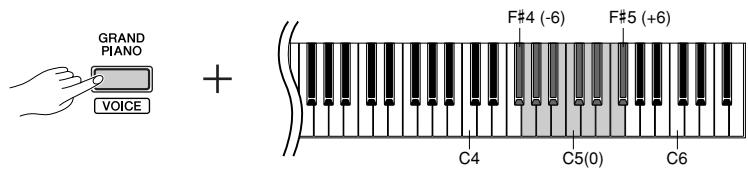
2. While holding down the [GRAND PIANO] button, press one of the C1-A1 keys (or press the [GRAND PIANO/VOICE] button) to exit Dual and return to the normal single-voice play.
![YAMAHA YNP-25 - While holding down the [GRAND PIANO] button, press one of the C1-A1 keys (or press the [GRAND PIANO/VOICE] button) to exit Dual and return to the normal single-voice play. - 1](/content/2025/01/115115/images/2c77401cb28d2ece8253d1d6a1c3cbdb3824733acfb2d357d1d38917aff792e9.jpg)
Reverb in Dual
The reverb type assigned to Voice 1 will take priority. If the reverb assigned to Voice 1 is set to OFF, the reverb assigned to Voice 2 will be in effect.
Adding Variations to the Sound – Reverb
This control enables you to select four different types of reverb effect that add extra depth and expression to the sound to create a realistic acoustic ambience.
| Key | Reverb Type | Description |
| C2 | Room | This setting adds a continuous reverb effect to the sound, similar to the acoustic reverberation you would hear in a room. |
| C#2 | Hall1 | For a “bigger” reverb sound, use the HALL 1 setting. This effect simulates the natural reverberation of a small-size concert hall. |
| D2 | Hall2 | For a truly spacious reverb sound, use the HALL 2 setting. This effect sim-ulates the natural reverberation of a large concert hall. |
| D#2 | Stage | Simulates the reverb of a stage environment. |
| E2 | Off | No effect is applied. |
Selecting a Reverb Type
While holding down the [GRAND PIANO] button, press one of the C2-E2 keys to select a reverb type.
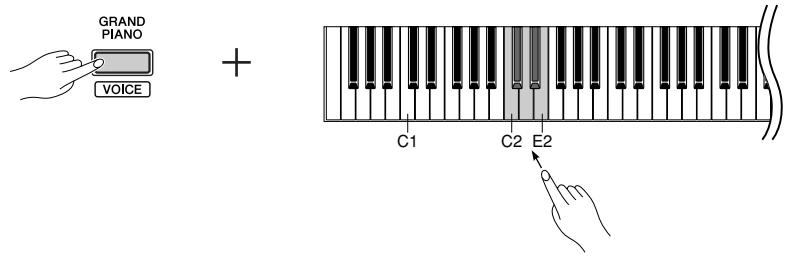
Adjusting Reverb Depth
While holding down the [GRAND PIANO] button, press one of the C3-A#3 keys to adjust the reverb depth for the selected voice.
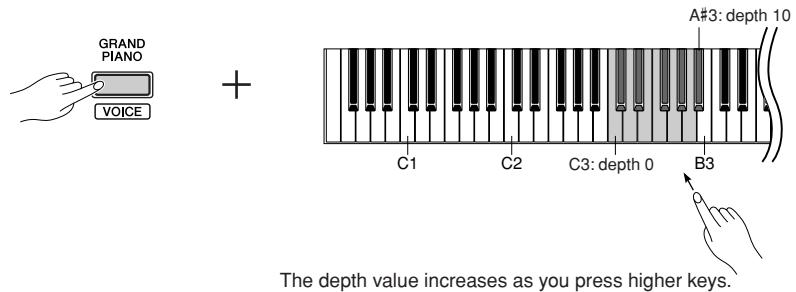
While holding down the [GRAND PIANO] button, press the B3 key to set the reverb to the depth most suitable for the selected voice.

Reverb depth range:
0 (no effect)- 10 (maximum depth)

The default reverb type (including OFF) and depth settings are different for each voice.
Transposition
The Transpose function makes it possible to shift the pitch of the entire keyboard up or down in semitone intervals to facilitate playing in difficult key signatures, and to let you easily match the pitch of the keyboard to the range of a singer or other instruments. For example, if you set the transposition amount to +5 , "playing key C produces pitch F. In this way, you can play a song as though it were in C major, and the NP-30/YNP-25 will transpose it to the key of F.
Setting the amount of transposition
While holding down the [SONG▶/■] and [GRAND PIANO] buttons, press one of the F#2-F#3 keys to set the desired amount of transposition.
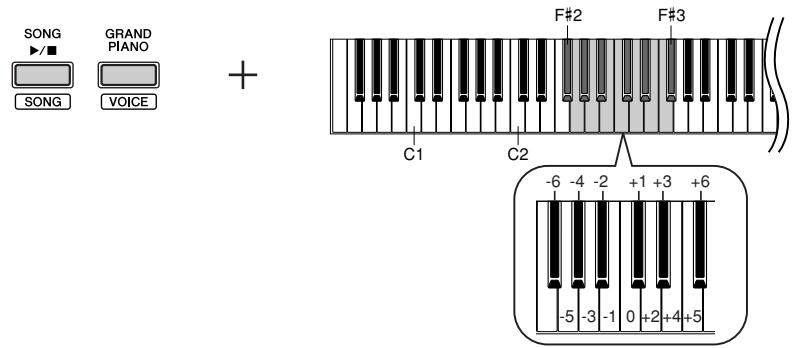
To transpose the pitch down (in semitone steps)
While holding down the [SONG /■] and [GRAND PIANO] buttons, press any key between F#2 and B2.
To transpose the pitch up (in semitone steps)
While holding down the [SONG▶/■] and [GRAND PIANO] buttons, press any key between C#3 and F#3.
To restore the normal pitch
While holding down the [SONG▶/■] and [GRAND PIANO] buttons, press the C3 key.
TERMINOLOGY
Transpose:
Changing the key signature. On the NP-30/YNP-25, transposing shifts the pitch of the entire keyboard.

Transposition range:
F#2 (-6 semitones)-C3 (normal pitch)-F#3 (+6 semitones)
Fine tuning of the Pitch
You can fine tune the pitch of the entire instrument. This function is useful when you play the NP-30/YNP-25 along with other instruments or CD music.
Setting the Pitch
To raise the pitch
in about 1cent steps (100 cents = 1 semitone):
Hold down the E0, F0 and G0 keys simultaneously and press any key between C3 and B3.
To lower the pitch
in about 1cent steps (100 cents = 1 semitone):
Hold down the E0, F0 and F#0 keys simultaneously and press any key between C3 and B3.
To restore standard pitch:
Hold down the E0, F0, F#0 and G0 keys simultaneously and press any key between C3 and B3.
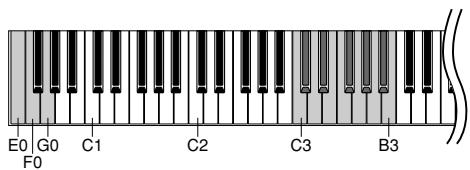
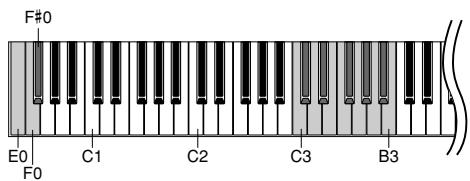
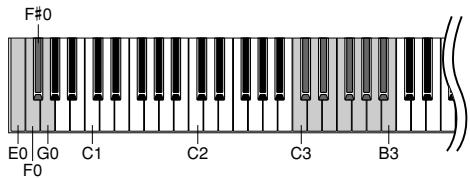

Setting range: -65 + 65 cents
The default setting (0 cent) is A3=440Hz. In the 440Hz region, 1Hz=approximately 4 cents. Pressing the key 8 times for example, will set A3 at approximately 442Hz.
TERMINOLOGY
Default setting:
The "Default setting" refers to the factory setting obtained when you first turn on the power to the NP-30/YNP-25.
Touch Sensitivity
You can adjust the volume level that changes depending on how fast or strong you hit the keys. The following four settings are available.
| Key | Touch Sensitivity | Description |
| A5 | FIXED | The volume level does not change at all regardless of whether you play the keyboard soft or hard. |
| A#5 | SOFT | The volume level does not change much when you play the keyboard soft or hard. |
| B5 | MEDIUM | This is the standard piano touch response (default setting). |
| C6 | HARD | The volume level changes very widely from pianissimo to fortissimo to facilitate dynamic and dramatic expression. You have to hit the keys hard to produce a loud sound. |
Setting the Touch Sensitivity Type
While holding down the [GRAND PIANO] button, press one of the A5–C6 keys to select the desired touch sensitivity.
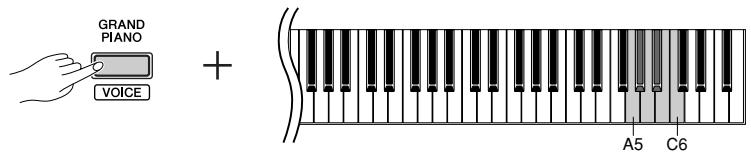

The touch sensitivity settings may have little or no effect with Church Organ 1, 2 and Harpsichord 1, 2 voices that are not normally responsive to keyboard dynamics.
Default setting: B5
Connecting MIDI Instruments
The NP-30/YNP-25 features MIDI IN/OUT terminals, allowing you to connect the NP-30/YNP-25 to other instruments and devices—including computers—and take advantage of the various performance and recording capabilities in MIDI applications.
Connecting MIDI [IN] [OUT] terminals
MIDI [IN] [OUT] terminals
Use MIDI cables to connect external MIDI devices to these connectors.
![YAMAHA YNP-25 - MIDI [IN] [OUT] terminals - 1](/content/2025/01/115115/images/cadff3f656ee27cf4a969bb6e8c7810a1cd3923e290d04321d8c26caca71290e.jpg)
About MIDI
MIDI (Musical Instrument Digital Interface) is a standard format for data transmission/reception. It enables the transfer of performance data and commands between MIDI devices and personal computers. Using MIDI, you can control a connected MIDI device from the NP-30/YNP-25, or control the NP-30/YNP-25 from a connected MIDI device or computer.

Since MIDI data that can be transmitted or received varies depending on the type of MIDI device, check the "MIDI Implementation Chart" to find out what MIDI data and commands your devices can transmit or receive. The MIDI Implementation Chart appears on page 32.
MIDI's Capability
MIDI functions enable you to transfer performance data between MIDI devices.
CAUTION
Before connecting the instrument to other electronic components, turn off the power of all the components.
- Transferring performance data to and from another MIDI device

- Transferring MIDI data to and from a computer
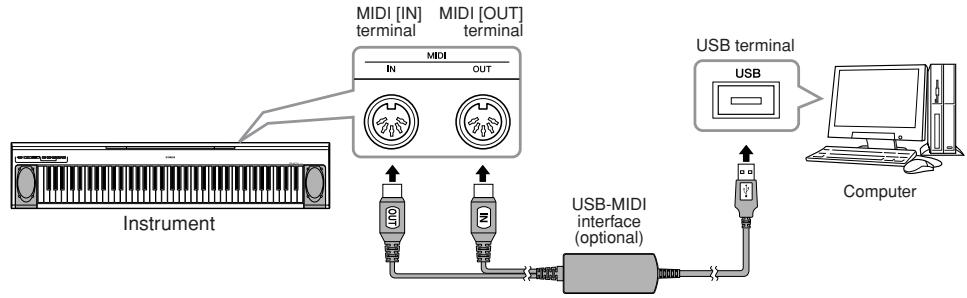

You cannot transmit the voice demo songs and the piano preset songs from the NP-30/YNP-25 to another MIDI device.
For MIDI connections, use a standard (optional) MIDI cable, available at most musical instrument stores.
Connecting a Personal Computer
By connecting a computer to the MIDI terminals, you can transfer data between the NP-30/YNP-25 and the computer via MIDI.
CAUTION
When connecting the NP-30/YNP-25 to a computer, first turn off the power to both the NP-30/ YNP-25 and the computer before connecting any cables. After making connections, turn on the power to the computer first, then to the NP-30/YNP-25.
Connecting the USB port on the computer to the NP-30/YNP-25 via an optional USB-MIDI interface (such as the Yamaha UX16)
Use a USB-MIDI interface device to connect the USB port on your computer to the NP-30's/YNP-25's MIDI terminals. You must install the USB-MIDI interface (such as the UX16) driver. For more information, refer to the user's manual that came with the USB-MIDI interface device.
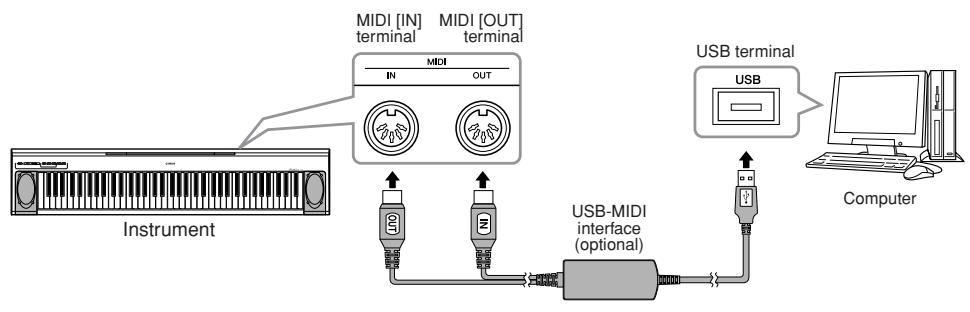

When the NP-30/YNP-25 is used as a tone module, performance data with voices that are not found on the NP-30/YNP-25 will not be played correctly.

You must install a software application on the computer to be able to transfer MIDI data between the NP-30/YNP-25 and a computer.
MIDI Functions
You can make detailed adjustments to MIDI settings.
MIDI Transmit/Receive Channel Selection
In any MIDI control setup, the MIDI channels of the transmitting and receiving devices must be matched for proper data transfer.
This parameter enables you to specify the channel on which the NP-30/YNP-25 transmits or receives MIDI data.
Setting the Transmit Channel
While holding down the [SONG /■] and [GRAND PIANO] buttons, press one of the C1-E2 keys.
Setting the Receive Channel
While holding down the [SONG▶/■] and [GRAND PIANO] buttons, press one of the C4-F5 keys.
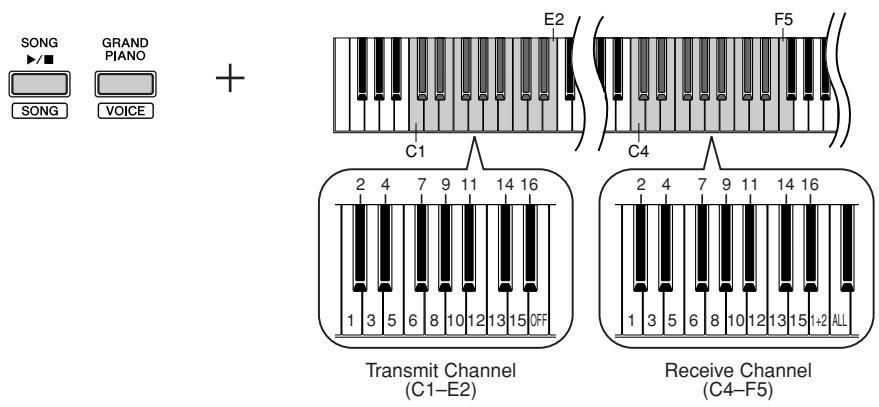

In Dual, Voice 1 data is transmitted on its specified channel and Voice 2 data is transmitted on the next greater channel number relative to the specified channel. In this case, no data is transmitted if the transmit channel is set to "OFF."
ALL:
"Multi-timbre" Receive. This allows simultaneous reception of different parts on all 16 MIDI channels, enabling the NP-30/YNP-25 to play multi-channel song data received from a music computer or sequencer.
1+2:
1 + 2 Receive. This allows simultaneous reception on channels 1 and 2 only, enabling the NP-30/ YNP-25 to play 1 and 2 channel song data received from a music computer or sequencer.
Program change and other like channel messages received will not affect the NP-30's/YNP-25's panel settings or the notes you play on the keyboard.
Data for the demo song and piano preset songs cannot be transmitted via MIDI.
Local Control ON/OFF
"Local Control" refers to the fact that, normally, the NP-30/YNP-25 keyboard controls its internal tone generator, allowing the internal voices to be played directly from the keyboard. This situation is "Local Control On," since the internal tone generator is controlled locally by its own keyboard. Local control can be turned OFF, however, so that the NP-30/YNP-25 keyboard does not play the internal voices, but the appropriate MIDI information is still transmitted via the MIDI OUT terminal when notes are played on the keyboard. At the same time, the internal tone generator responds to MIDI information received via the MIDI IN terminal.
While holding down the [SONG▶/■] and [GRAND PIANO] buttons, press the C6 key. Pressing the C6 key repeatedly toggles between Local Control On and Off.
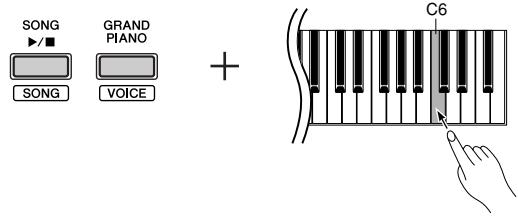
Default setting: ON
Program Change ON/OFF
Normally the NP-30/YNP-25 will respond to MIDI program change numbers received from an external keyboard or other MIDI device, causing the same numbered voice to be selected on the corresponding channel (the keyboard voice does not change). The NP-30/YNP-25 will normally also send a MIDI program change number whenever one of its voices is selected, causing the same numbered voice or program to be selected on the external MIDI device if the device is set up to receive and respond to MIDI program change numbers. This function makes it possible to cancel program change number reception and transmission so that voices can be selected on the NP-30/YNP-25 without affecting the external MIDI device.
While holding down the [SONG▶/■] and [GRAND PIANO] buttons, press the C#6 key. Pressing the C#6 key repeatedly toggles between Program Change On and Off.
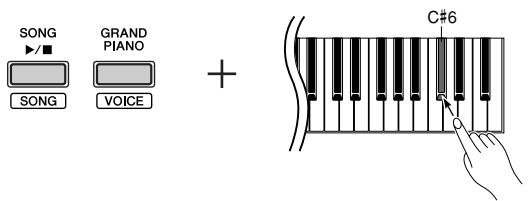

For information on program change numbers for each of the NP-30's/YNP-25's voices, refer to MIDI Data Format on page 28.
Default setting: ON
Control Change ON/OFF
Normally the NP-30/YNP-25 will respond to MIDI control change data received from an external MIDI device or keyboard, causing the voice on the corresponding channel to be affected by pedal and other "control" settings received from the controlling device (the keyboard voice is not affected). The NP-30/YNP-25 also transmits MIDI control change information when the pedal or other appropriate controls are operated.
This function makes it possible to cancel control change data reception and transmission so that, for example, the NP-30's/YNP-25's pedal and other controls can be operated without affecting an external MIDI device.
While holding down the [SONG▶/■] and [GRAND PIANO] buttons, press the D6 key. Pressing the D6 key repeatedly toggles between Control Change On and Off.
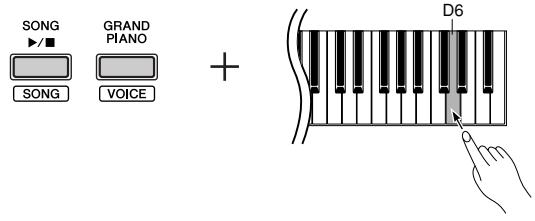

For information on control changes that can be used with the NP-30/YNP-25, refer to MIDI Data Format on page 28.
Default setting: ON
Troubleshooting
| Problem | Possible Cause and Solution |
| The NP-30/YNP-25 does not turn on. | The NP-30/YNP-25 has not been plugged in properly. Securely insert the female plug into the jack on the NP-30/YNP-25, and the male plug into a proper AC outlet (page 11). |
| The batteries are low or dead. Replace all six batteries with completely new alkaline ones, or use the optional AC adaptor. | |
| Noise is heard from the speakers or head-phones. | The noise may be due to interference caused by the use of a mobile phone in close proximity to the NP-30/YNP-25. Turn off the mobile phone, or use it further away from the NP-30/YNP-25. |
| The batteries are low or dead. Replace all six batteries with completely new alkaline ones, or use the optional AC adaptor. | |
| The overall volume is low, or no sound is heard. | The Master Volume is set too low; set it to an appropriate level using the [MASTER VOLUME] control. |
| Make sure a pair of headphones is not connected to the headphones jack (page 13). | |
| Make sure that Local Control (page 25) is ON. | |
| The batteries are low or dead. Replace all six batteries with completely new alkaline ones, or use the optional AC adaptor. | |
| The sound is distorted. | If you are using manganese batteries with the instrument, try replacing them with a set of new alkaline batteries. Alternately, you could use the AC adaptor instead, or try turning down the volume. |
| The sustain pedal has no effect. | The pedal cable/plug may not be properly connected. Make sure to securely insert the pedal plug into the SUSTAIN jack (page 13). |
Optional Equipment
Foot Pedal (FC3/FC4/FC5)
Keyboard Stand (L-2C)
USB-MIDI interface (UX16)
Headphones (HPE-150/HPE-30)
If you're already very familiar with MIDI, or are using a computer to control your music hardware with computer-generated MIDI messages, the data provided in this section can help you to control the NP-30/YNP-25.
1. NOTE ON/OFF
Data format: [9nH] -> [kk] -> [vv]
9nH = Note ON/OFF event (n = channel number)
kk = Note number (Transmit: 09H-78H = A-2-C8 / Receive: 00H-7FH = C-2-G8)
vv = Velocity (Key ON = 01H-7FH, Key OFF = 00H)
Data format: [8nH] -> [kk] -> [vv] (reception only)
8nH = Note OFF event (n = channel number)
kk = Note number: 00H-7FH = C-2-G8)
vv = Velocity
2. CONTROL CHANGE
Data format: [BnH] -> [cc] -> [vv]
[ \text{BnH} = \text{Control change (n = channel number)} ]
[ \text{cc} = \text{Control number} ]
[ \text{vv} = \text{Data Range} ]
(1) Bank Select
ccH Parameter Data Range (vvH)
00H Bank Select MSB 00H:Normal
20H Bank Select LSB 00H...7FH
Bank selection processing does not occur until receipt of next Program Change message.
(2) Main Volume ccH Parameter Data Range (vvH) 07H Volume MSB 00H...7FH
(3) Expression (reception only)
ccH Parameter Data Range (vvH)
0BH Expression MSB 00H...7FH
(4) Sustain ccH Parameter Data Range (vvH) 40H Sustain MSB 00H...7FH
(5) Sostenuto (reception only)
ccH Parameter Data Range (vvH)
42H Sostenuto 00H...3FH:off, 40H...7FH:on
(6) Soft Pedal (reception only)
ccH Parameter Data Range (vvH)
43H Soft Pedal 00H...3FH:off, 40H...7FH:on
(7) Effect1 Depth (Reverb Send Level)
ccH Parameter Data Range (vvH)
5BH Effect1 Depth 00H...7FH
Adjusts the reverb send level.
(8) Effect4 Depth (Variation Effect Send Level)
ccH Parameter Data Range (vvH)
5EH Effect4 Depth 00H...7FH
(9) RPN
65H RPN MSB
64H RPN LSB
06H Data Entry MSB
26H Data Entry LSB
60H Data Increment
61H Data Decrement
* Parameters that are controllable with RPN:
• Coarse Tune
• Fine Tune
• Pitch Bend Range
3. MODE MESSAGES
Data format: [BnH] -> [cc] -> [vv]
[ \text{BnH} = \text{Control event (n = channel number)} ]
[ \text{cc} = \text{Control number} ]
[ \text{vv} = \text{Data Range} ]
(1) All Sound Off
ccH Parameter Data Range (vvH)
78H All Sound Off 00H
(2) Reset All Controllers
ccH Parameter Data Range (vvH)
79H Reset All Controllers 00H
Reset controllers as follows.
Controller Value
Expression 127 (max)
Sustain Pedal 0 (off)
Sostenuto 0 (off)
Soft Pedal 0 (off)
(3) Local Control (reception only) ccH Parameter Data Range (vvH) 7AH Local Control 00H (off), 7FH (on)
(4) All Notes Off
ccH Parameter Data Range (vvH)
7BH All Notes Off 00H Switches OFF all the notes that are currently ON of ifed channel. Any notes being held by the sustain nuto pedal will continue to sound until the pedal is
(5) Omni Off (reception only)
ccH Parameter Data Range (vvH)
7CH Omni Off 00H Same processing as for All Notes Off.
(6) Omni On (reception only)
ccH Parameter Data Range (vvH)
7DH Omni On 00H Same processing as for All Notes Off.
(7) Mono (reception only) ccH Parameter Data Range (vvH) 7EH Mono 00H Same processing as for All Sound Off.
(8) Poly (reception only)
ccH Parameter Data Range (vvH)
7FH Poly 00H Same processing as for All Sound Off.
- When Control Change is turned OFF, Control Change messages will not be transmitted or received.
- Local on/off, OMNI on/off are not transmitted. (The appropriate note off number is supplied with "All Note Off" transmission).
- When a voice bank MSB/LSB is received, the number is stored in the internal buffer regardless of the received order, then the stored value is used to select the appropriate voice when a program change message is received.
- Poly mode is always active. This mode will not change when the instrument receives a MONO/POLY mode message.
4. PROGRAM CHANGE
Data format: [CnH] -> [ppH]
CnH = Program event ( = channel number)
ppH = Program change number
P.C.#=Program Change number
| NP-30/YNP-25 | MSB | LSB | P.C.# |
| Grand Piano 1 | 0 | 122 | 1 |
| Grand Piano 2 | 0 | 112 | 1 |
| E. Piano 1 | 0 | 122 | 6 |
| E. Piano 2 | 0 | 122 | 5 |
| Church Organ 1 | 0 | 123 | 20 |
| Church Organ 2 | 0 | 122 | 20 |
| Strings | 0 | 122 | 49 |
| Harpsichord 1 | 0 | 122 | 7 |
| Harpsichord 2 | 0 | 123 | 7 |
| Vibraphone | 0 | 122 | 12 |
- When program change reception is turned OFF, no program change data is transmitted or received.
- When you specify a program change as a number in the range of 0–127, specify a number that is one less than the program change number listed above. For example, to specify program change number 1, you would specify a value of 0.
5. Pitch Bend Change (reception only)
[EnH] -> [ccH] -> [ddH]
ccH = LSB
ddH = MSB
6. SYSTEM REALTIME MESSAGES
[rrH]
F8H: Timing clock
FAH: Start
FCH: Stop
FEH: Active sensing
| Data | Transmission | Reception |
| F8H | Transmitted every 96 clocks | Received as 96-clock tempo timing when MIDI clock is set to External. |
| FAH | Song start | Song start Not received when the MIDI clock is set to Internal. |
| FCH | Song stop | Song stop Not received when the MIDI clock is set to Internal. |
| FEH | Transmitted every 200 milliseconds | If a signal is not received via MIDI for more than 400 milliseconds, the same processing will take place for All Sound Off, All Notes Off and Reset All Controllers as when those signals are received. |
- If an error occurs during MIDI reception, the Sustain, Sostenuto, and Soft effects for all channels are turned off and an All Note Off occurs.
7. SYSTEM EXCLUSIVE MESSAGES
(Universal System Exclusive)
(1) Universal Realtime Message
Data format: [FOH] -> [7FH] -> [XnH] -> [04H] -> [01H] ->
[ \left[\mathrm{III}\mathrm{H}\right] \rightarrow \left[\mathrm{mmH}\right] \rightarrow \left[\mathrm{F7H}\right] ]
MIDI Master Volume
- Simultaneously changes the volume of all channels.
- When a MIDI master volume message is received, the volume only has affect on the MIDI receive channel, not the panel master volume.
FOH = Exclusive status
7FH = Universal Realtime
7FH = ID of target device
04H = Sub-ID #1=Device Control Message
01H = Sub-ID #2=Master Volume
//H = Volume LSB
mmH = Volume MSB
F7H = End of Exclusive
or
FOH = Exclusive status
7FH = Universal Realtime
XnH = When received, n=0-F.
X = irrelevant
04H = Sub-ID #1=Device Control Message
01H = Sub-ID #2=Master Volume
llH = Volume LSB
mmH = Volume MSB
F7H = End of Exclusive
(2) Universal Non-Realtime Message (GM On)
General MIDI Mode On
Data format: [FOH] -> [7EH] -> [XnH] -> [09H] -> [01H] -> [F7H]
F0H = Exclusive status
7EH = Universal Non-Realtime
7FH = ID of target device
09H = Sub-ID #1=General MIDI Message
01H = Sub-ID #2=General MIDl On
F7H = End of Exclusive
or
FOH = Exclusive status
7EH = Universal Non-Realtime
XnH = When received, n=0-F.
X = irrelevant
09H = Sub-ID #1=General MIDI Message
01H = Sub-ID #2=General MIDI On
F7H = End of Exclusive
When the General MIDI mode ON message is received, the MIDI system will be reset to its default settings.
This message requires approximately 50ms to execute, so sufficient time should be allowed before the next message is sent.
8. SYSTEM EXCLUSIVE MESSAGES (XG Standard)
(1) XG Native Parameter Change
Data format: [F0H] -> [43H] -> [1nH] -> [4CH] -> [hhH] -> [mmH] -> [/H] -> [ddH] -> [F7H]
[ \text{F0H} = \text{Exclusive status} ]
[ 43H = \text{YAMAHA ID} ]
[ 1nH = \text{When received, n=0-F.} ]
[ \text{When transmitted, n=0.} ]
[ 4CH = \text{Model ID of XG} ]
[ hhH = \text{Address High} ]
[ mmH = \text{Address Mid} ]
[ l/H = \text{Address Low} ]
[ ddH = \text{Data} ]
[ F7H = \text{End of Exclusive} ]
Data size must match parameter size (2 or 4 bytes).
When the XG System On message is received, the MIDI system will be reset to its default settings.
The message requires approximately 50ms to execute, so sufficient time should be allowed before the next message is sent.
(2) XG Native Bulk Data (reception only)
Data format: [F0H] -> [43H] -> [OnH] -> [4CH] -> [aaH] -> [bbH] -> [hhH] -> [mmH] -> [llH] -> [ddH] -> ...-> [ccH] -> [F7H]
[ \text{FOH} = \text{Exclusive status} ]
[ 43H = \text{YAMAHA ID} ]
[ 0nH = \text{When received, n=0-F.} ]
[ \text{When transmitted, n=0.} ]
[ 4CH = \text{Model ID of XG} ]
[ aah = \text{ByteCount} ]
[ bbH = \text{ByteCount} ]
[ hhH = \text{Address High} ]
[ mmH = \text{Address Mid} ]
[ l/H = \text{Address Low} ]
[ ddH = \text{Data} ]
[ | | ]
[ | | ]
[ ccH = \text{Check sum} ]
[ F7H = \text{End of Exclusive} ]
- Receipt of the XG SYSTEM ON message causes reinitialization of relevant parameters and Control Change values. Allow sufficient time for processing to execute (about 50 msec) before sending the NP-30/YNP-25 another message.
- XG Native Parameter Change message may contain two or four bytes of parameter data (depending on the parameter size).
- For information about the Address and Byte Count values, refer to Table 1 below. Note that the table's Total Size value gives the size of a bulk block. Only the top address of the block (00H, 00H, 00H) is valid as a bulk data address.
9. SYSTEM EXCLUSIVE MESSAGES (Digital Piano MIDI Format)
Data format: [F0H] -> [43H] -> [73H] -> [01H] -> [nnH] -> [F7H]
F0H = Exclusive status
43H = Yamaha ID
73H = Digital Piano ID
01H = Product ID (digital piano common)
nnH = Substatus
02H Internal MIDI clock
03H External MIDI clock
F7H = End of Exclusive
10. SYSTEM EXCLUSIVE MESSAGES (Special Control)
Data format: [F0H] -> [43H] -> [73H] -> [7FH] -> [4BH] -> [11H] -> [0nH] -> [ccH] -> [vvH] -> [F7H]
[ \begin{array}{l} \text{FOH} = \text{Exclusive status} \\ 43\text{H} = \text{Yamaha ID} \\ 73\text{H} = \text{Digital Piano ID} \\ 7\text{FH} = \text{Extended Product ID} \\ 4\text{BH} = \text{Product ID} \\ 11\text{H} = \text{Special control} \\ 0\text{nH} = \text{Control MIDI change (n=channel number)} \\ \text{cc} = \text{Control number} \\ \text{vv} = \text{Value} \\ \text{F7H} = \text{End of Exclusive} \end{array} ]
Control Channel ch:00H-0FH 43H (Sets the Detune value for each channel) 00H-7FH Voice Reserve ch:00H-0FH 45H 00H:Reserve off 7FH :on\*
- When Volume, Expression is received for Reserve On, they will be effective from the next Key On. Reserve Off is normal.
11. SYSTEM EXCLUSIVE MESSAGES (Others)
Data format: [FOH] -> [43H] -> [1nH] -> [27H] -> [30H] -> [00H] -> [00H] -> [mmH] -> [l/H] -> [ccH] -> [F7H] Master Tuning (XG and last message priority) simultaneously changes the pitch of all channels.
FOH = Exclusive Status
43H = Yamaha ID
1nH = When received, n=0-F.
When transmitted, n=0.
27H = Model ID of TG100
30H = Sub ID
00H =
00H =
mmH = Master Tune MSB
l/H = Master Tune LSB
ccH = irrelevant (under 7FH)
F7H = End of Exclusive
| MIDI Parameter Change table (SYSTEM) | |||||
| Address (H) | Size (H) | Data (H) | Parameter | Description | Default value (H) |
| 00 00 00 | 4 | 020C-05F4(*1) | MASTER TUNE | -50-+50[cent] | 00 04 00 00 |
| 01 | 1st bit 3-0 → bit 15-12 | 400 | |||
| 02 | 2nd bit 3-0 → bit 11-8 | ||||
| 03 | 3rd bit 3-0 → bit 7-4 | ||||
| 4th bit 3-0 → bit 3-0 | |||||
| 04 | 1 | 00-7F | MASTER VOLUME | 0-127 | 7F |
| 7E | 00 | XG SYSTEM ON | 00=XG sytem ON | ||
| 7F | 00 | RESET ALL PARAMETERS | 00=ON (receive only) | ||
| TOTAL SIZE 07 | |||||
| Address (H) | Size (H) | Data (H) | Parameter | Description | Default value (H) |
| 02 01 00 | 2 | 00-7F | REVERB TYPE MSB | Refer to Effect MIDI Map | 01 (=HALL1) |
| 00-7F | REVERB TYPE LSB | 00 : basic type | 00 | ||
| 02 01 40 | 2 | 00-7F | VARIATION TYPE MSB | Refer to Effect MIDI Map | 00 (=Effect off) |
| 00-7F | VARIATION TYPE LSB | 00 : basic type | 00 |
| MIDI Parameter Change table (MULTI PART) | |||||
| Address (H) | Size (H) | Data (H) | Parameter | Description | Default value (H) |
| 08 nn 11 | 1 | 00-7F | DRY LEVEL | 0-127 | 7F |
| REVERB | ||
| MSB | LSB | |
| ROOM | 02H | 10H |
| HALL 1 | 01H | 10H |
| HALL 2 | 01H | 11H |
| STAGE | 03H | 10H |
| OFF | 00H | 00H |
| EFFECT | ||
| MSB | LSB | |
| CHORUS | 42H | 10H |
| PHASER | 48H | 10H |
| TREMODO | 46H | 10H |
| ROTARY SP | 47H | 10H |
| OFF | 00H | 00H |
| Function | Transmitted | Recognized | Remarks | |
| Basic Channel | Default Changed | 1 1 - 16 | 1 - 16 1 - 16 | |
| Mode | Default Messages Altered | 3 × **** **** | 3 × × | |
| ********** | × × | |||
| Note Number : True voice | 0 - 127 **** **** | 0 - 127 0 - 127 | ||
| Velocity | Note ON Note OFF | ○ 9nH, v=1-127 × | ○ 9nH, v=1-127 × | |
| After Touch | Key's Ch's | × × | × × | |
| Pitch Bend | × | ○ 0 - 24 semi | ||
| Control Change | 0,32 1 7 10 11 6,38 64 66,67 84 91,94 96-97 100-101 | ○ × ○ × × × × ○ × × × | ○ ○ ○ ○ ○ ○ ○ ○ | Bank Select Modulation Main Volume Panpot Expression Data Entry Sustain Portamento Control Effect Depth RPN Inc, Dec RPN LSB,MSB |
| Prog Change : True # | ○ 0 - 127 *** **** | ○ 0 - 127 | |
| System Exclusive | ○ | ○ | |
| Common : Song Pos. : Song Sel. : Tune | × × × | × × × | |
| System : Clock Real Time : Commands | ○ ○ | ○ ○ | |
| : All Sound Off Aux : Reset All Cntrls : Local ON/OFF Mes- : All Notes OFF sages: Active Sense : Reset | ○ ○ × ○ | ○ (120,126,127) ○ (121) ○ (122) ○ (123-125) ○ × | |
| Notes: | |||
| Mode 1 : OMNI ON , POLY Mode 2 : OMNI ON ,MONO O : Yes Mode 3 : OMNI OFF, POLY Mode 4 : OMNI OFF, MONO X : No | |||
Specifications
| Keyboard | 76 keys (Graded Touch) |
| Sound Source | AWM Stereo Sampling |
| Polyphony (Max.) | 32 |
| Voice Selection | 10 |
| Effect | Reverb |
| Volume | Master Volume |
| Controls | Dual, Metronome, Transpose, Tuning, Touch (Hard/Medium/Soft/Fixed) |
| Pedal | SUSTAIN PEDAL* |
| Demo Songs | 10 Voice Demo Songs, 10 Piano Preset Songs |
| MIDI | Local On/Off, Transmit/Recieve channel, Program change On/Off, Control change On/Off |
| Jacks/Connectors | MIDI (IN/OUT), PHONES/OUTPUT, DC IN 12V, SUSTAIN |
| Main Amplifiers | 6 W + 6 W |
| Speakers | (12 cm × 6 cm) × 2 |
| Dimensions (W × D × H) | 1,244mm × 259mm × 100mm [49" × 10-1/4" × 4"] |
| Weight | 5.4 kg (11 lbs., 14 oz.) |
| Power Supply | Adaptor: PA-5D, PA-150, or an equivalent recommended by Yamaha Batteries: Six AA size, LR-6 or equivalent |
| Power Consumption | 20 W |
| Accessories | Owner's Manual, Music Rest |