RS6500 - Car radio Manta - Free user manual and instructions
Find the device manual for free RS6500 Manta in PDF.


| Product type | Car stereo with CD/MP3 player |
| Brand | Manta |
| Model | RS6500 |
| Dimensions (L x W x H) | 178 mm x 50 mm x 150 mm |
| Weight | 2.5 kg |
| Power supply | 12 V DC, negative ground |
| Fuse | 10 A |
| Speaker impedance | 4 - 8 ohms |
| Frequency response | 20 Hz - 20 kHz (±3 dB) |
| Signal-to-noise ratio (radio) | 70 dB |
| Channel separation | > 45 dB |
| D/A converter | 16-bit dual |
| Radio bands | FM1, FM2, FM3, AM1, AM2 |
| Playback media | CD, CD-R, CD-RW, MP3, USB, SD card |
| AUX input | 3.5 mm jack (front or rear) |
| Equalizer presets | Rock, Pop, Classic, Off |
| Audio adjustments | Bass, Treble, Balance, Fader |
| Remote control | Yes, with CR2025 battery |
| Clock display | Yes, adjustable |
| Faceplate | Detachable |
| Safety features | Auto shut-off on ignition, brake detection wire |
| Installation | DIN slot, support strap, half sleeve with tabs |
Frequently Asked Questions - RS6500 Manta
User questions about RS6500 Manta
0 question about this device. Answer the ones you know or ask your own.
Ask a new question about this device
Download the instructions for your Car radio in PDF format for free! Find your manual RS6500 - Manta and take your electronic device back in hand. On this page are published all the documents necessary for the use of your device. RS6500 by Manta.
USER MANUAL RS6500 Manta
To ensure proper use of this product please read this User's Manual carefully and keep for future reference.
MM621 GT Racing Wheel
natural_image
Black and white photo of a car steering wheel with flip base and control panel (no visible text or symbols)natural_image
Black and white photo of a multi-tiered audio amplifier with speakers, a speaker chamber, and a remote control unit (no visible text or symbols)natural_image
Silver handheld electronic device with a lever handle and control buttons (no visible text or symbols)natural_image
Two electronic devices with visible screens and a remote control, no text or symbols present.Safety precautions....12
Electric Connection....12
Installation....13
Install the unit 13
Remove the unit 13
General Features 13
Power 13
Volume 13
Eject 13
Relese 13
Mode 13
Mute 14
Clock 14
EQ 14
Speaker mode 14
Volume set mode....14
Bass set mode....14
Treble set mode....14
Balance set mode.... 14
Fader set mode 14
Play control 14
Play....14
Pause 14
Scan 15
Repeat....15
Shuf 15
10-,10+:.... 15
SD/AUX operation....15
USB/SD mode....15
Play operation 15
Repeat....15
SHUF 15
Radio operation....15
Selecting band....16
AF(Alternative Frequency)....16
Tuner 16
TA(Traffic announcement) 16
PTY(Program type)....16
Remote control 16
Loading and replacing the battery 16
Traubleshooting....17
Technical Parameters ...... 17
Instrukcja obsługi
(FM1-FM2-FM3-AM1-AM2)
flowchart
graph TD
    A["AM1"] --> B["FM1"]
    B --> C["FM2"]
    C --> D["FM3"]
    D --> E["AM1"]
    E --> F["AM2"]
    F --> G["FM1"]
    G --> H["FM2"]
    H --> I["FM3"]
    I --> J["AM1"]
natural_image
Pure mechanical component diagram without any text, numbers, or symbolsWyciągnąć
W razie kłopotów
To prevent injury or fire, please take the following precautions:
● Do not operate when driving.
● To prevent electrocution, etc. please do not let the metal goods (silver,coin,tools..) fall into the installation.
- If you smell or see smoke, turn off the power immediately and consult the place of purchase.
● Be careful not to drop or shock the unit strongly.
- Do not touch the liquid crystal to avoid hurting yourself. If your clothes are stained by it, please clean them with soap immediately.
- For your driving safety, please link your brake detecting wire with low power level, and keep it controlled by manual brake switch. wire should be high power level and the unit can not play DVD or VCD disc.
WARNING
● To prevent damage to the machine, take the following precautions:
- Be sure the unit is connected to a 12VDC power with a Negative Ground.
- Do not install the unit in places whereit is exposed to direct sunlight, high heater humidity, water splash or dust.
● To change fuse, please use the same one in specification and capacity. - When changing fuse, please do it after pulling down power wires to avoid short circuit.
- If the unit does not seem to be working properly, please press the reset button to resume the function.
PRECAUTIONS
- When driving a car, reduce the volume to be more aware of the road traffic.
● Avoid getting the speakers and disc wet from water or dampness while cleaning the car. - Do not park your car in the direct sunlight and turn on the unit after it is cooling down in the car.
- Protect your mechanism, and do not put it close to magnet, screwdriver or other cohere stuff. If you do not comply with the above items, it may cause abnormal running and system trouble.
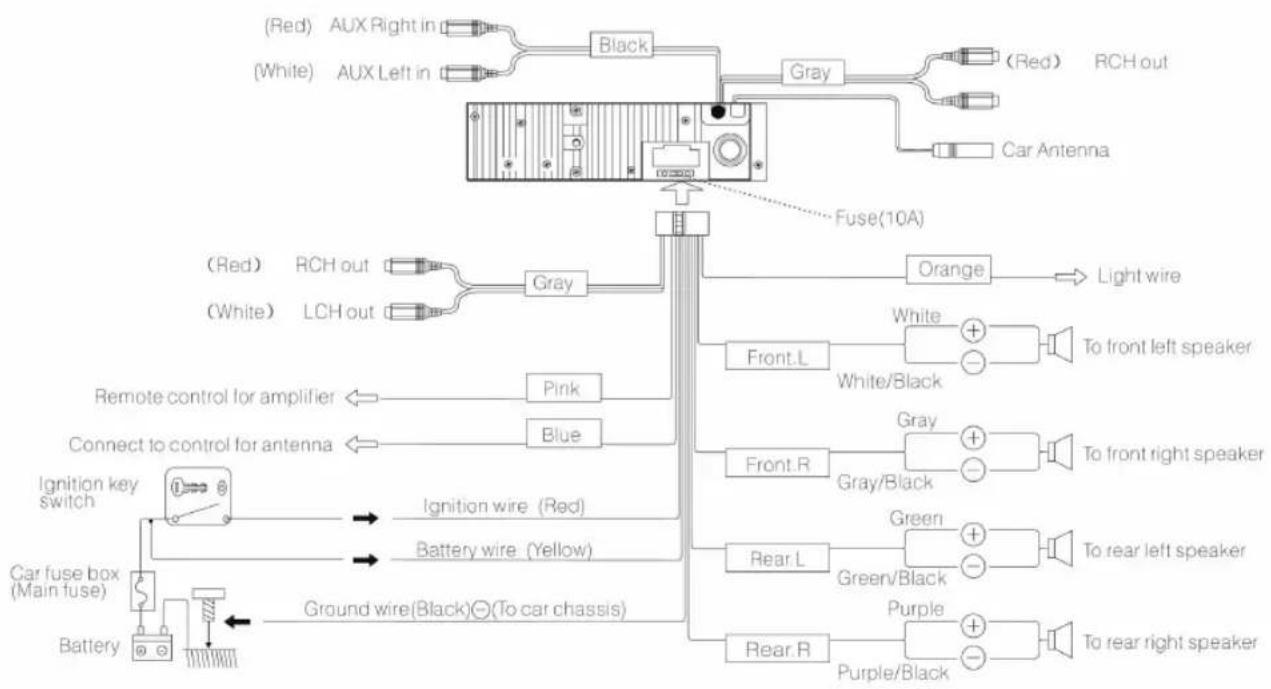
Electric Connection
flowchart
graph TD
    A["Car fuse box (Main fuse)"] --> B["Ignition key switch"]
    B --> C["Ground wire(Black)⊗(To car chassis)"]
    C --> D["Rear R"]
    D --> E["Blue"]
    E --> F["Remote control for amplifier"]
    F --> G["Gray"]
    G --> H["Fuse(10A)"]
    H --> I["Orange"] --> J["Light wire"]
    H --> K["Front L"] --> L["White/Black"] --> M["To front left speaker"]
    H --> N["Front R"] --> O["Gray/Black"] --> P["To front right speaker"]
    H --> Q["Green"] --> R["To rear left speaker"]
    H --> S["Purple"] --> T["To rear right speaker"]
    H --> U["Rear L"] --> V["Green/Black"] --> W["To rear left speaker"]
    H --> X["Rear R"] --> Y["Purple/Black"] --> Z["To rear right speaker"]
    H --> AA["White/White"] --> AB["LCH out"]
    AB --> AC["Gray"]
    AC --> AD["(Red) AUX Right in"]
    AD --> AE["Black"]
    AE --> AF["(Red) AUX Left in"]
    AF --> AG["Car Antenna"]
    AG --> AH["RCH out"]
    AH --> AI["(Red) RCH out"]
Installation
Before installing the receiver permanently, fit it in the approximate place in your car, and connect the equipment according to the speakers and electrical connections. When your system is operated properly, (preferably with the car engine running), follow the instructions for permanent installation of your system.
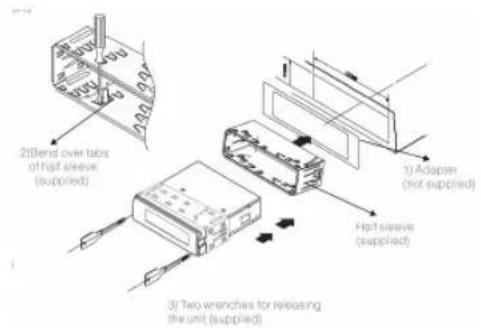
Install the unit
- Install half sleeve, can be with or without adapter. It will fit better with adapter.
- Bend over some tabs to secure the half sleeve inside of dash.
- Support strap to be strutted underdash, secure this strip to avoid skipping of disc.
Remove the unit
Insert removal wrench into the smallgap on the right side of the unit and pullthe unit slightly out on the same sid, then release the wrench. Repeat thesame action for the left side. By now,you can remove the unit and unplugthe wires connector.
General Features
RS6500
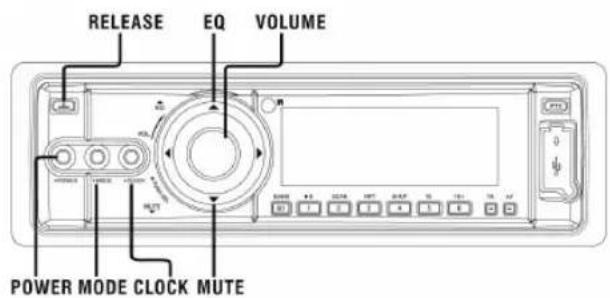
RS6501
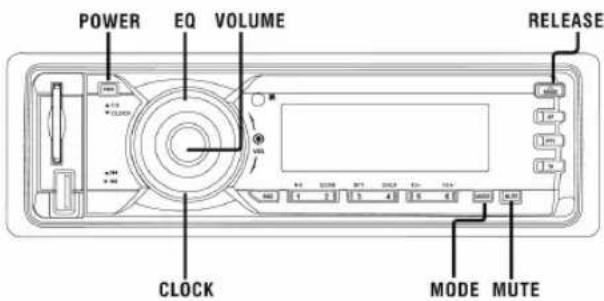
Power
Press the [P] button to turn on/off the unit.
Volume
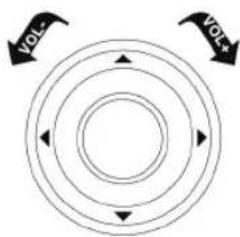
Increasing volume
Rotate the VOL button in clockwise direction.
Decreasing
Rotate the VOL button in anticlockwise direction.
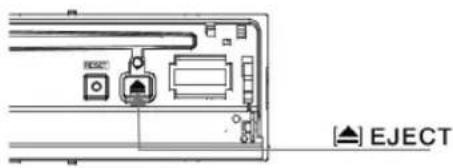
Eject
Out
Press the ▲ button to eject the disc out of the unit
Relese
Press the 📄 button to release faceplate.
Mode
When CD disc in unit, press [MODE], it will switch between:
CAR CD/MP3 PLAYER
RS6500/650
BAND - CD - USB - SD - AUX IN - BAND
USB/SD can be skipped when no external devices are connected.
Mute
Short press this button to mute the sound, short press MUTE button again or press any other button to resume the normal listening.
Clock
Short press CLK can display time even power off.
Long press CLK for 3 seconds will enter set mode.
Hour
Press the [CLOCK] button until the hour number blinking then rotate the VOL button to set the hour.
Minute
Press the [CLOCK] button until the hour number blinking then press the [CLK] until the minute number blinking and rotate the VOL button to set the minute.
Quit clock set mode
There is no operation in 5 seconds, it will quit clock set mode.
EQ
Press the EQ button, can be select sound effect:
ROCK – POPS – CLASSIC – OFF
Speaker mode
When turn off EQ, the BASS and TRE will work.
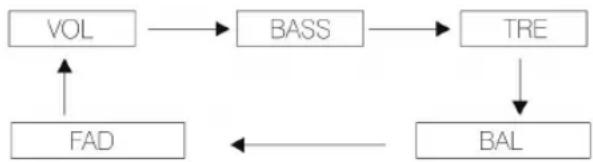
flowchart
graph TD
    VOL --> BASS
    BASS --> TRE
    TRE --> BAL
    BAL --> FAD
    FAD --> VOL
Volume set mode
Press SEL button once, display will show VOL on, then rotate the button in clockwise direction to increase volume level; rotate the button in anticlockwise direction to decrease volume level.
Bass set mode
Press SEL button twice, display will show BAS on, then rotate the button to adjust bass level up/down in different direction.
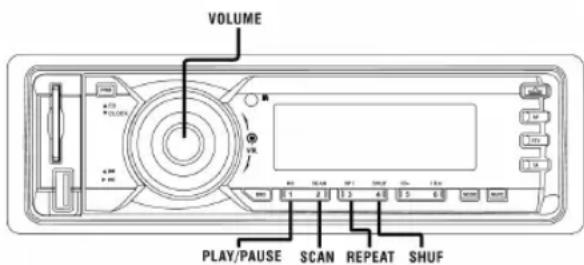
RS6500
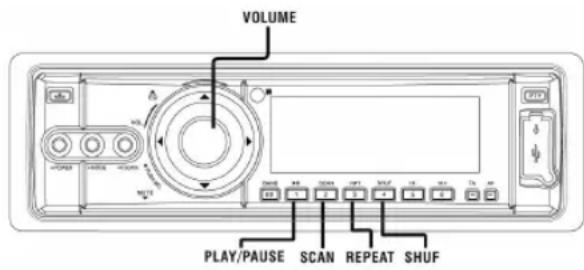
RS6501
Treble set mode
Press SEL button third, display will show TRE on, then rotate the button to adjust treble level up/down in different direction.
Balance set mode
Press SEL button fourth, display will show BAL on, then rotate the button to adjust left and right speakers level up /down in different direction.
Fader set mode
Press SEL button fifth, display will show FAD on, then rotate the button to adjust front and rear speakers level up/down in different direction.
Play control
Play
If with DISC in unit, Press the ▶ to pause music.
Pause
Press the ▶ button again, come back DISC playing.
If a disc is loaded, a sector sign will show on the display.
CAR CD/MP3 PLAYER
RS6500/650
Scan
Press [SCAN] button
In CD/MP3 mode, Press this button once for TRACK
INTRODUCTION
The first 10 seconds of each track on the disc will play. And the track number shows on LCD. To select a desired song, press [SCN] button while it is playing.
Repeat
Press [RPT] button
In CD/MP3 mode, Press the button to repeat the same track continuously, RPT will appear on the LCD display. Press the button again to come back normal playing.
Shuf
Press [SHUF] button
In CD/MP3 mode, Press [SHF] button to play all the track in random order. SHF and playing song number will appear on the LCD. Press [SHF] again will stop random playing.
10-,10+:
In MP3 mode, press 10-, 10+ can selection from No.10
tracks, for example: if you want select No.15 song, press 10+ to skip to No.10, and then press 5 to select No.15 song.
SD/AUX operation
RS6500
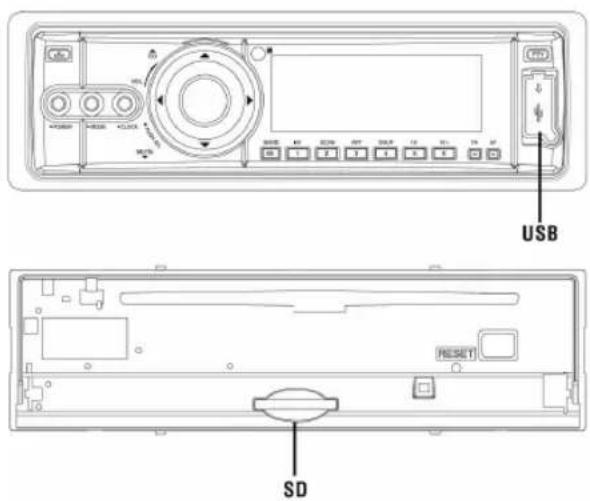
RS6501
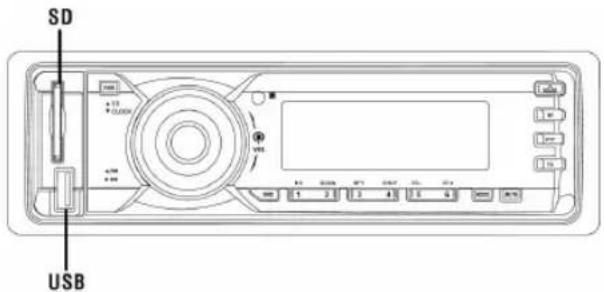
USB/SD mode
Inset USB/SD, the play will to the USB/SD playing mode automatically.
Play operation
Press ▶ button to play or pause.
Under SD/USB play, press ▶ I can select tracks.
Repeat
Press [RPT] button first to repeat the playing track

SHUF
Press [SHUF] button first to random the playing track

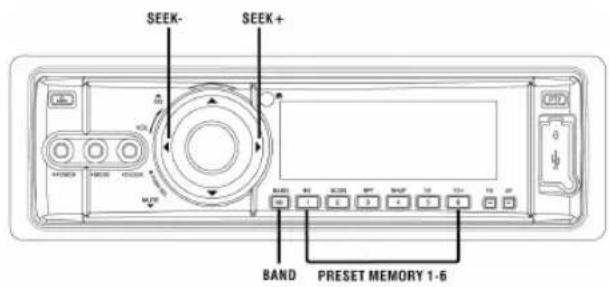
Radio operation
RS6500
RS6501
Selecting band
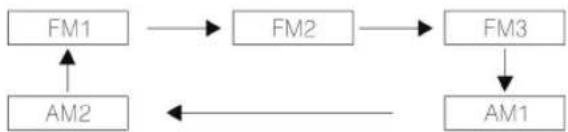
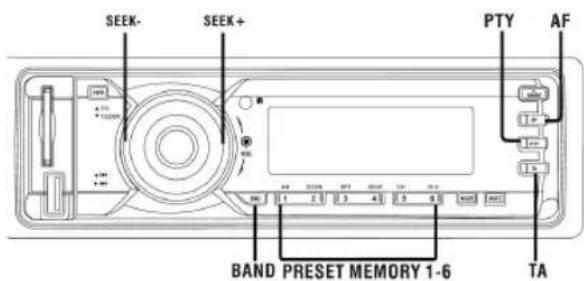
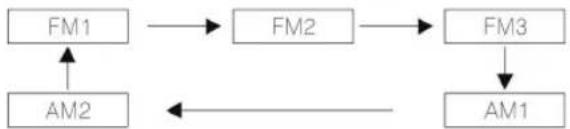
Press BAND button to select among three FM or two AM bands.
(FM1-FM2-FM3-AM1-AM2)
flowchart
graph TD
    A["AM1"] --> B["FM1"]
    B --> C["FM2"]
    C --> D["FM3"]
    D --> E["AM1"]
    E --> F["AM2"]
    F --> A
AF(Alternative Frequency)
Press AF and then press, the machine will scan signal get the best frequency of the local radio station. If meet a stronger signal of the same program, letter TP will appear on LCD, and unit will automatically choose the stronger signal sought.
Tuner
Manual tuning:
Long press ▶ button it can select higher frequency station. Long press I can select lower frequency station.
Automatically:
The short press ▶ button it can automatically select higher frequency station. And the short press ▶ dan automatically select lower frequency station.
TA(Traffic announcement)
Press TA, the unit will prior to seek the traffic information. If the machine receives the traffic information, it will choose this signal and quit other radio signal or CD program. If press TA again, other program will recover and the traffic information program will quit.
PTY(Program type)
Press PTY, the unit will begin to receive program as news, current affairs, music, etc. The units will seek the program
automatically and will quit CD player if it gets the right program. If press PTY again, PTY function will quit and other program will play as before.
Among AF, TA and PTY, TA has the absolute priority to be chosen.
Remote control
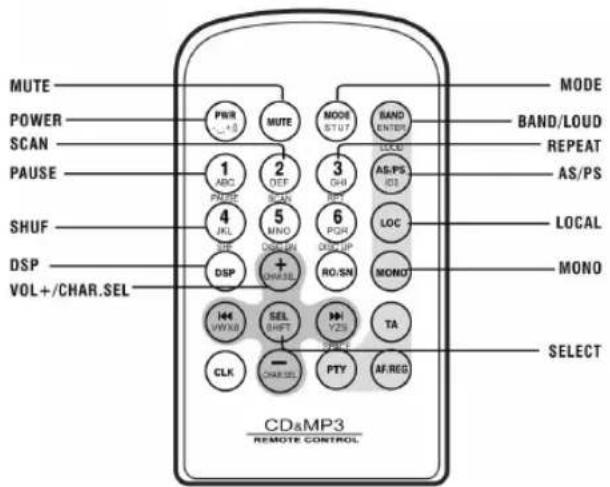
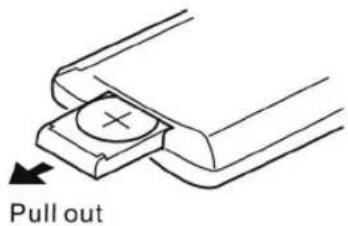
Loading and replacing the battery
Use one lithium battery(CR2025)
insert the batteries with the +and - poles aligned properly.
Following the illustration inside the case.
Traubleshooting
What might seem to be a malfunction in your unit may just be the result of slight misoperation or miswiring. Before calling for service, please check the following tables for possible problems first.
The power does not turn ON
● The fuse has been burned out.
- Confirm whether the fuse is short circuit, then replace the fuse with the same capacity.
NO Sound
● The cable is not connected correctly.
● The Mute is turned on.
- Connect the cable correctly; Turn the Mute off.
Noise on Radio or poor reception
● Antenna and Antenna Cable.
- Adjust the fixed position or reconnect the antenna cable.
Noise on both Radio and CD
- Black wire.
● Clean the black wire and connect it to ground.
No/Poor sound on one or more speakers
● Bad connection of speaker wire, incorrect setting of Volume, Balance and Fader.
- Check the speaker wire, change the loudhailer, check the setting of Volume, Balance and Fader.
CD sound skips
- Adjust the angle of the unit to less than 45 degrees and make sure the unit is good or fixed; Use good quality CD.
● The angle of installation is greater than 45 degree, the unit is not good, or the CD is bad quality.
Unit does not cooperate, no light or sound
- Incorrect wire connection of Power RED/YELLOW or Ground wire, or burn out fuse
- Check the Red wire to +12 Volts with key ignition switch, yellow wire to +12 Volts battery and black wire to ground. Check fuse with red/yellow wire, or check the fuse block on your car.
Technical Parameters
Signal/Noise radio: 70dB
Frequency response: 20Hz-20KHz(+3dB)
Channel separation: >45dB
Dual D/A converter: 16Bit
Operating power: 12 Volts DC, negative ground
%10THD output wiring:
Designed for using four speakers only front and rear channels cannot be combined in use with 2speakers.
Load impedance: Compatible 4 to 8 ohm speakers
Fuses: 10 amp
Dimensions: 178mm(L) x 50mm (W) x150mm (H)
Weight: 2.5kg
CAR CD/MP3 PLAYER
- RS6500/6501
Note
CAR CD/MP3 PLAYER
- RS6500/6501
Note

INFORMACJA O PRAWIDŁOWYM POSTĘPOWANIU W PRZYPADKU UTYLIZACJI URZĄDZEŃ ELEKRONICZNYCH I ELEKTRYCZNYCH
- MM621 GT Racing Wheel
- Instrukcja obsługi
- W razie kłopotów
- WARNING
- PRECAUTIONS
- Electric Connection
- Installation
- Install the unit
- Remove the unit
- General Features
- Power
- Volume
- Increasing volume
- Decreasing
- Eject
- Relese
- Mode
- CAR CD/MP3 PLAYER
- RS6500/650
- Mute
- Clock
- Hour
- Minute
- Quit clock set mode
- EQ
- Speaker mode
- Volume set mode
- Bass set mode
- Treble set mode
- Balance set mode
- Fader set mode
- Play control
- Play
- Pause
- Scan
- INTRODUCTION
- Repeat
- Shuf
- 10-,10+:
- SD/AUX operation
- USB/SD mode
- Play operation
- Radio operation
- Selecting band
- AF(Alternative Frequency)
- Tuner
- Manual tuning:
- Automatically:
- TA(Traffic announcement)
- PTY(Program type)
- Remote control
- Loading and replacing the battery
- Traubleshooting
- The power does not turn ON
- NO Sound
- Noise on Radio or poor reception
- Noise on both Radio and CD
- No/Poor sound on one or more speakers
- CD sound skips
- Unit does not cooperate, no light or sound
- Technical Parameters
- - RS6500/6501
- Note
- INFORMACJA O PRAWIDŁOWYM POSTĘPOWANIU W PRZYPADKU UTYLIZACJI URZĄDZEŃ ELEKRONICZNYCH I ELEKTRYCZNYCH
Brand : Manta
Model : RS6500
Category : Car radio