RIO09AC230V1AH - Air-conditioner GREE - Free user manual and instructions
Find the device manual for free RIO09AC230V1AH GREE in PDF.


| Product Type | Split System Air Conditioner |
| Model | RIO09AC230V1AH |
| Cooling Capacity (BTU/h) | 9000 |
| Heating Capacity (BTU/h) | 9000 (Heat Pump) |
| Power Supply | 230V/60Hz |
| Rated Cooling Power (W) | 750 |
| Rated Heating Power (W) | 720 |
| Energy Efficiency Ratio (EER) | 12.0 |
| Refrigerant | R410A |
| Indoor Unit Dimensions (WxHxD) | 28.3 x 10.8 x 7.7 in |
| Outdoor Unit Dimensions (WxHxD) | 30.3 x 22.0 x 11.4 in |
| Indoor Unit Weight | 20.5 lbs |
| Outdoor Unit Weight | 60.0 lbs |
| Air Flow (CFM) | 400 |
| Noise Level Indoor (dB) | 25 - 40 |
| Noise Level Outdoor (dB) | 52 |
| Remote Control | Included |
| Timer Function | Yes, 24-hour |
| Sleep Mode | Yes |
| Auto Swing | Yes, vertical/horizontal |
| Filter | Washable anti-bacterial |
| Maintenance | Clean filter every 2 weeks; professional service annually |
| Safety Features | Auto restart, overheat protection |
| Installation | Requires professional installation; clearance: 12 in from walls |
Frequently Asked Questions - RIO09AC230V1AH GREE
User questions about RIO09AC230V1AH GREE
0 question about this device. Answer the ones you know or ask your own.
Ask a new question about this device
Download the instructions for your Air-conditioner in PDF format for free! Find your manual RIO09AC230V1AH - GREE and take your electronic device back in hand. On this page are published all the documents necessary for the use of your device. RIO09AC230V1AH by GREE.
USER MANUAL RIO09AC230V1AH GREE
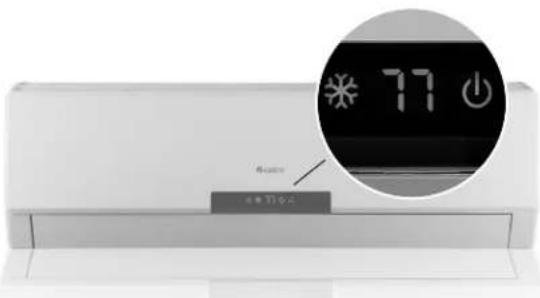
INDOOR UNIT FRONT PANEL DISPLAY:took here for LED display of system status, setpoint, indoor and outdoor temperatures and malfunction codes.
rio HIGH-WALL DUCTLESS AIR CONDITIONING SYSTEM
NOTE: Please read the complete owner's manual carefully before operation.
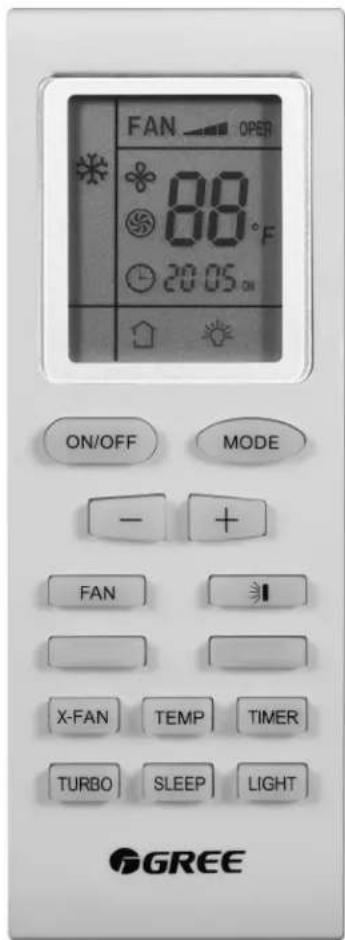
ON/OFF
Press to power the unit on or off.
MODE
Press to select and adjust each mode.

: COOL

DRY

: FAN ONLY
I
Press to control vertical angle of louvers and to redirect airflow.
TURBO
Press to boost cooling or heating capacity. Quickest way to reach preset temperature.
FAN
Press to select fan speed (Auto, Low, Medium or High.) Auto is default.
-
Press to raise or lower settings including temperature and time. Press once for slow adjustment, hold down for fast adjustment.
+
SLEEP
Press to select one of three SLEEP modes, each offering varying levels of comfort control while sleeping. See Owner's Manual for more details.
TIMER
Press to start or stop the timer. (Adjust with "+" and "-" buttons.) See Owner's Manual for more details.
X-FAN
Press to run fan after cooling cycle to dry off coil and help inhibit growth of bacteria and mildew.
LIGHT
Press to turn on lights on the unit's Front Panel Display. Press again to turn off.
TEMP
Press to set desired room temperature. (Adjust with "+" and "-" buttons.)
For complete instructions on these and other functions, as well as important safety information, see the Owners Manual. For more information, visit GreeComfort.com.
RIO09AC115V1A, RIO12AC115V1A
RIO09AC230V1A, RIO12AC230V1A
RIO18CA230V1A, RIO24AC230V1A