GIFL224XAE - Air-conditioner GREE - Free user manual and instructions
Find the device manual for free GIFL224XAE GREE in PDF.


| Product Type | Split-system air conditioner |
| Brand | Gree |
| Model | GIFL224XAE |
| Power Supply | 220-240V ~ 50Hz |
| Cooling Capacity | 2.5 kW (approx. 9000 BTU/h) |
| Heating Capacity | 2.8 kW (approx. 9500 BTU/h) |
| Energy Efficiency (Cooling) | EER: 3.2 (A+ class) |
| Energy Efficiency (Heating) | COP: 3.4 (A+ class) |
| Refrigerant | R32 |
| Indoor Unit Dimensions (W x H x D) | 845 x 289 x 209 mm |
| Outdoor Unit Dimensions (W x H x D) | 732 x 553 x 330 mm |
| Indoor Unit Weight | 10.5 kg |
| Outdoor Unit Weight | 28.5 kg |
| Noise Level (Indoor) | 22 - 46 dB(A) |
| Noise Level (Outdoor) | 52 dB(A) |
| Airflow Volume | 550 m³/h |
| Functions | Cooling, heating, dehumidification, fan, turbo, sleep mode, timer, auto restart |
| Control | Remote control with LCD display |
| Filter Type | Washable antibacterial filter |
| Maintenance | Clean filter every 2 weeks; professional service annually |
| Safety Features | Overheat protection, compressor delay, self-diagnosis |
| Spare Parts | Filters, remote control (optional), mounting brackets |
| Repairability Index | 7.5 (easy access to main components) |
| Installation Type | Wall-mounted indoor unit, outdoor unit on bracket or ground |
Frequently Asked Questions - GIFL224XAE GREE
User questions about GIFL224XAE GREE
0 question about this device. Answer the ones you know or ask your own.
Ask a new question about this device
Download the instructions for your Air-conditioner in PDF format for free! Find your manual GIFL224XAE - GREE and take your electronic device back in hand. On this page are published all the documents necessary for the use of your device. GIFL224XAE by GREE.
USER MANUAL GIFL224XAE GREE
Original Instructions
Split Type Floor-standing Air Conditioner
Model: GIFL224XA / GIFL248XA
Thank you for choosing our product.
Please read this Owner's Manual carefully before operation and retain it for future reference.
GIFL224XA
GIFL248XA
Content
Operation Notices
Precautions ...... 1
Clean and maintenance 6
Installation Notice
Installation dimension diagram.... 8
Safety precautions for installing and relocating the unit.... 10
Tools for installation 11
Selection of installation location 11
Requirements for electric connection 12
Installation
Installation of indoor unit 13
Installation of outdoor unit 17
Vacuum pumping 20
Leakage detection 20
Check after installation 21
Test operation 21
Installation instructions of anti-collapse chain 22
Operation Guide
Parts' Name 23
Button's Name and Function 25
Introduction for icons on display screen of air conditioner 25
Button's introduction 26
Buttons on remote controller 28
Introduction for icons on display screen 28
Introduction for buttons on remote controller 29
Function introduction for combination buttons 33
Operation guide 34
Replacement of batteries in remote controller 34
Malfunction
Malfunction 35
Attachment
Configuration of connection pipe 39
Pipe expanding method 41
This appliance is not intended for use by persons (including children) with reduced physical, sensory or mental capabilities or lack of experience and knowledge, unless they have been given supervision or instruction concerning use of the appliance by a person responsible for their safety.
Children should be supervised to ensure that they do not play with the appliance.
If it needs to install, move or maintain the air conditioner, please contact dealer or local service center to conduct it at first. Air conditioner must be installed, moved or maintained by appointed unit. Otherwise, it may cause serious damage or personal injury or death.
Explanation of Symbols

DANGER
Indicates a hazardous situation that, if not avoided, will result in death or serious injury.

WARNING
Indicates a hazardous situation that, if not avoided, could result in death or serious injury.

CAUTION
Indicates a hazardous situation that, if not avoided, may result in minor or moderate injury.

Indicates important but not hazard-related information, used to indicate risk of property damage.
Indicates a hazard that would be assigned a signal word WARNING or CAUTION.
Exception Clauses
Manufacturer will bear no responsibilities when personal injury or property loss is caused by the following reasons.
- Damage the product due to improper use or misuse of the product;
2.2. Alter, change, maintain or use the product with other equipment without abidi by the instruction manual of manufacturer; - After verification, the defect of product is directly caused by corrosive gas;
- After verification, defects are due to improper operation during transportation product;
- Operate, repair, maintain the unit without abiding by instruction manual or relat regulations;
- After verification, the problem or dispute is caused by the quality specification performance of parts and components that produced by other manufacturers;
- The damage is caused by natural calamities, bad using environment or for majeure.
WARNING
Operation and Maintenance
- This appliance can be used by children aged from 8 years and above and persons with reduced physical, sensory or mental capabilities or lack of experience and knowledge if they have been given supervision or instruction concerning use of the appliance in a safe way and understand the hazards involved.
•Children shall not play with the appliance. - Cleaning and user maintenance shall not be made by children without supervision.
- Do not connect air conditioner to multi-purpose socket. Otherwise, it may cause fire hazard.
- Do disconnect power supply when cleaning air conditioner. Otherwise, it may cause electric shock.
- If the supply cord is damaged, it must be replaced by the manufacturer, its service agent or similarly qualified persons in order to avoid a hazard.
- Do not wash the air conditioner with water to avoid electric shock.
- Do not spray water on indoor unit. It may cause electric shock or malfunction.
•After removing the filter, do not touch fins to avoid injury. - Do not use fire or hair dryer to dry the filter to avoid deformation or fire hazard.

WARNING
- Maintenance must be performed by qualified professionals. Otherwise, it may cause personal injury or damage.
- Do not repair air conditioner by yourself. It may cause electric shock or damage. Please contact dealer when you need to repair air conditioner.
- Do not extend fingers or objects into air inlet or air outlet. It may cause personal injury or damage.
- Do not block air outlet or air inlet. It may cause malfunction.
- Do not spill water on the remote controller, otherwise the remote controller may be broken.
- When below phenomenon occurs, please turn off air conditioner and disconnect power immediately, and then contact the dealer or qualified professionals for service.
• Power cord is overheating or damaged. - There's abnormal sound during operation.
• Circuit break trips off frequently.
• Air conditioner gives off burning smell. - Indoor unit is leaking.
- If the air conditioner operates under abnormal conditions, it may cause malfunction, electric shock or fire hazard.
- When turning on or turning off the unit by emergency operation switch, please press this switch with an insulating object other than metal.
- Do not step on top panel of outdoor unit, or put heavy objects. It may cause damage or personal injury.
WARNING
Attachment
• Installation must be performed by qualified professionals. Otherwise, it may cause personal injury or damage.
- Must follow the electric safety regulations when installing the unit.
- According to the local safety regulations, use qualified power supply circuit and circuit break.
- Do install the circuit break. If not, it may cause malfunction.
- An all-pole disconnection switch having a contact separation of at least 3mm in all poles should be connected in fixed wiring.
- Including an circuit break with suitable capacity, please note the following table. Air switch should be included magnet buckle and heating buckle function, it can protect the circuit-short and overload.
• Air Conditioner should be properly grounded. Incorrect grounding may cause electric shock.
- Don't use unqualified power cord.
- Make sure the power supply matches with the requirement of air conditioner. Unstable power supply or incorrect wiring may result in electric shock, fire hazard or malfunction. Please install proper power supply cables before using the air conditioner.
- Properly connect the live wire, neutral wire and grounding wire of power socket.
- Be sure to cut off the power supply before proceeding any work related to electricity and safety.

WARNING
- Do not put through the power before finishing installation.
- If the supply cord is damaged, it must be replaced by the manufacturer, its service agent or similarly qualified persons in order to avoid a hazard.
- The temperature of refrigerant circuit will be high, please keep the interconnection cable away from the copper tube.
- The appliance shall be installed in accordance with national wiring regulations.
- Installation must be performed in accordance with the requirement of NEC and CEC by authorized personnel only.
- The air conditioner is the first class electric appliance. It must be properly grounding with specialized grounding device by a professional. Please make sure it is always grounded effectively, otherwise it may cause electric shock.
- The yellow-green wire in air conditioner is grounding wire, which can't be used for other purposes.
- The grounding resistance should comply with national electric safety regulations.
- The appliance must be positioned so that the plug is accessible.
- All wires of indoor unit and outdoor unit should be connected by a professional.
- If the length of power connection wire is insufficient, please contact the supplier for a new one. Avoid extending the wire by yourself.

WARNING
- For the air conditioner with plug, the plug should be reachable after finishing installation.
- For the air conditioner without plug, an circuit break must be installed in the line.
- If you need to relocate the air conditioner to another place, only the qualified person can perform the work. Otherwise, it may cause personal injury or damage.
- Select a location which is out of reach for children and far away from animals or plants. If it is unavoidable, please add the fence for safety purpose.
- The indoor unit should be installed close to the wall.
- Instructions for installation and use of this product are provided by the manufacturer.
Working temperature range
| Indoor side DB/WB(°C) Outdoor side DB/WB( °C ) | |
| Maximum cooling 32 | /23 43/26 |
| Maximum heating 27 | /- 24/18 |
NOTICE:
- The operating temperature range (outdoor temperature) for cooling only unit is 18^ 43^ ; for heat pump unit is -15^ 43^ .
Clean and maintenance

Note:
■ Turn off the air conditioner and disconnect the power before cleaning the air conditioner to avoid electric shock.
■ Do not wash the air conditioner with water to avoid electric shock.
■ Do not use volatile liquid to clean the air conditioner.
■ Do not use liquid or corrosive detergent clean the appliance and do not splash water or other liquid onto it, otherwise, it may damage the plastic components, even cause electric shock.
Clean surface of indoor unit
When the surface of indoor unit is dirty, it is recommended to use a soft dry cloth or wet cloth to wipe it.
Note:
- Do not remove the panel when cleaning it.
Clean filter
-
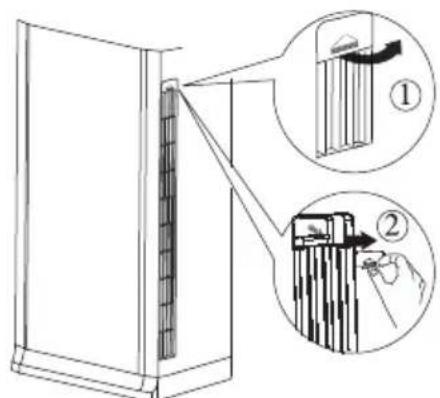
Remove screws of air-in panel Open screw caps at both sides according to direction ① in fig. 1. Remove the screws at both sides of air-in panel with screwdriver.
-
Open the air-in panel According to the arrow direction ① in fig. 2. Draw out the filter according to arrow direction ②.
-
Clean filter
-
Use dust catcher or water to clean the filter.
-
When the filter is very dirty, use water (below 45°C) to clean it, and then put it in a shady and cool place to dry.
-
Install filter and air-in panel After installing the filter, buckle the air-in panel. Use screwdriver to tighten the screws at both sides of air-in panel, and then install the screw cap.
Note:
■ The filter should be cleaned every three months. If there is much dust in the operation environment, cleaning frequency can be increased.
■ Do not use fire or hair dryer to dry the filter to avoid deformation or fire hazard.
text_image
Diagram showing a door panel being inserted into a rack, with two labeled parts (① and ②) indicating different components.Fig. 1

text_image
Air filter ② ① Air-in panelFig. 2

NOTICE: Checking before use-season
- Check whether air inlet and air outlet are blocked.
- Check whether air switch, plug and socket are in good condition.
- Check whether filter is clean.
- Check whether the remote controller is installed with batteries.
- Check whether mounting bracket for outdoor unit is damaged or corroded. If yes, please contact dealer.
- Check whether drainage pipe is damaged.

natural_image
Line drawing of a refrigerator with two boxes and a water drop (no text or symbols)NOTICE: Checking after use-season
- Disconnect power supply.
- Clean filter and indoor unit's panel.
- Clear dust and obstructions from the outdoor unit.
- Check whether mounting bracket for outdoor unit is damaged or corroded. If yes, please contact dealer.
Notice for recovery
- Many packing materials are recyclable materials. Please dispose them in appropriate recycling unit.
- If you want to dispose the air conditioner, please contact local dealer or consultant service center for the correct disposal method.
Installation dimension diagram

text_image
GIFL224XA Away from wall (30cm at least for piping side) 10cm above Away from ceiling Away from obstacles 200cm above 10cm above Away from wall (30cm at least for piping side) Away from back side 5cm above Space to the obstruction At least 50cm Space to the obstruction At least 30cm Drainage pipe At least 30cm Space to the wall At least 200cm Space to the obstruction At least 50cm Space to the obstruction Space to the obstructionInstallation dimension diagram

text_image
GIFL248XA Away from wall (30cm at least for piping side) 10cm above 30cm Away from ceiling Away from obstacles 200cm above 10cm above Away from wall (30cm at least for piping side) Away from back side 5cm above Away from obstacle 60cm above Away from wall 10cm above 10cm above Away from obstacles 200cm above Away from obstacles 60cm above Away from obstaclesTo ensure safety, please be mindful of the following precautions.
⚠ Warning
- When installing or relocating the unit, be sure to keep the refrigerant circuit free from air or substances other than the specified refrigerant.
Any presence of air or other foreign substance in the refrigerant circuit will cause system pressure rise or compressor rupture, resulting in injury.
- When installing or moving this unit, do not charge the refrigerant which is not comply with that on the nameplate or unqualified refrigerant.
Otherwise, it may cause abnormal operation, wrong action, mechanical malfunction or even series safety accident.
- When refrigerant needs to be recovered during relocating or repairing the unit, be sure that the unit is running in cooling mode. Then, fully close the valve at high pressure side (liquid valve). About 30-40 seconds later, fully close the valve at low pressure side (gas valve), immediately stop the unit and disconnect power. Please note that the time for refrigerant recovery should not exceed 1 minute.
If refrigerant recovery takes too much time, air may be sucked in and cause pressure rise or compressor rupture, resulting in injury.
- During refrigerant recovery, make sure that liquid valve and gas valve are fully closed and power is disconnected before detaching the connection pipe. If compressor starts running when stop valve is open and connection pipe is not yet connected, air will be sucked in and cause pressure rise or compressor rupture, resulting in injury.
- When installing the unit, make sure that connection pipe is securely connected before the compressor starts running.
If compressor starts running when stop valve is open and connection pipe is not yet connected, air will be sucked in and cause pressure rise or compressor rupture, resulting in injury.
- Prohibit installing the unit at the place where there may be leaked corrosive gas or flammable gas.
If there leaked gas around the unit, it may cause explosion and other accidents.
- Do not use extension cords for electrical connections. If the electric wire is not long enough, please contact a local service center authorized and ask for a proper electric wire.
Poor connections may lead to electric shock or fire.
- Use the specified types of wires for electrical connections between the indoor and outdoor units. Firmly clamp the wires so that their terminals receive no external stresses.
Electric wires with insufficient capacity, wrong wire connections and insecure wire terminals may cause electric shock or fire.
Tools for installation
| 1 Level meter 2 Screw driver 3 Impact drill | ||
| 4 Drill head 5 Pipe expander 6 Torque wrench | ||
| 7 Open-end wrench 8 Pipe cutter 9 Leakage detector | ||
| 10 Vacuum pump 11 Pressure meter 12 Universal meter | ||
| 13 Inner hexagon spanner 14 Measuring tape | ||
Note:
- Please contact the local agent for installation.
- Don't use unqualified power cord.
Selection of installation location
Basic requirements
Installing the unit in the following places may cause malfunction. If it is unavoidable, please consult the local dealer:
- The place near strong heat sources vapors, flammable or explosive gas, or volatile objects spread in the air.
- The place with high-frequency devices (such as welding machine, medical equipment).
- The place near coast area.
- The place with oil or fumes in the air.
- The place with sulfureted gas.
- Other places with special circumstances.
- Please try your best to keep way from fluorescent lamp.
- It's not allowed to be installed on the unstable or motive base structure (such as truck) or in the corrosive environment (such as chemical factory).
Outdoor unit
- Select a location where the noise and outflow air emitted by the outdoor unit will not affect neighborhood.
- The location should be well ventilated and dry, in which the outdoor unit won't be exposed directly to sunlight or strong wind.
- The location should be able to withstand the weight of outdoor unit.
- Make sure that the installation follows the requirement of installation dimension diagram.
- Select a location which is out of reach for children and far away from animals or plants. If it is unavoidable, please add fence for safety purpose.
- The height difference between indoor unit and outdoor unit should be within 5m. The length of connection pipe should be within 10m.
Indoor unit
- Avoid installing the indoor unit in a place where generated or leaked inflammable gas will stay.
- Avoid installing the indoor unit in a moist place or in a place where oil may be splashed on the unit.
- Select a location where outlet air may reach each corner of the room.
- Select a location where connection pipe can be led to outdoor conveniently.
- Select a location where air inlet and outlet won't be blocked.
- Select a location with least affection of outdoor air.
- Select a location with firm and flat floor.
- Retain sufficient space for maintenance and installation.
- Ensure the installation meets the requirement of installation dimension diagram.
- Do not use the unit in the immediate surroundings of a laundry a bath a shower or a swimming pool.
Requirements for electric connection
Safety precaution
- Must follow the electric safety regulations when installing the unit.
- If the supply cord is damaged, it must be replaced by the manufacturer or its service agent or a similarly qualified person in order to avoid a hazard.
- According to the local safety regulations, use qualified power supply circuit and air switch.
- A air switch having a contact separation of at least 3mm in all poles should be fixed in fixed wiring.
- The appliance shall be installed in accordance with national wiring regulation.
- The air switch must have the functions of magnetic tripping and heat tripping in order to prevent short circuit or overload. Please install the air switch with suitable capacity according to the sheet below.
- Make sure the power supply matches with the requirement of air conditioner. Unstable power supply or incorrect wiring may result in electric shock, fire hazard or malfunction. Please install proper power supply cables before using the air conditioner.
- Properly connect the live wire, neutral wire and grounding wire of power socket.
- Be sure to cut off the power supply before proceeding any work related to electric safety.
- Do not put through the power before finishing installation.
- To be in compliance with EN 61000-3-11, impedance value of power-supply system connected to product must be less than or equal to the allowable maximum value of |Zsys| in the following sheet: models max |Zsys| unit:ohms
| models | max |Zsys| unit:ohms |
| GIFL224XA | 0.036 |
| GIFL248XA | 0.082 |
Before connecting the product to public power network, please consult your local power supply authority to ensure that the power network has met the above requirements. No requirement for the unlisted product's impedance value of power-supply system.
Grounding requirement
- The air conditioner is first class electric appliance. It must be properly grounded with specialized grounding device by a professional. Please make sure it is always grounded effectively, otherwise it may cause electric shock.
- The yellow-green wire in air conditioner is grounding wire, which can't be used for other purposes.
- The grounding resistance should comply with national electric safety regulations.
- Including an air switch with suitable capacity, please note the following table. Air switch should be included magnet buckle and heating buckle function, it can protect the circuit-short and overload. (Caution: please do not use the fuse only
for protect the circuit)
| Air-conditioner | Air switch capacity |
| 24 48K | 25A |
Installation of indoor unit
Step one: choosing installation location
Recommend the installation location to the client and then confirm it with the client.
Step two: open piping hole
- Choose the position of piping hole according to the direction of outlet pipe.
- Open a piping hole with the diameter of 70 on the selected outlet pipe position. In order to drain smoothly, slant the piping hole on the wall slightly downward to the outdoor side with the gradient of 5 - 10^ .
Note:
- Pay attention to dust prevention and take relevant safety measures when opening the hole.
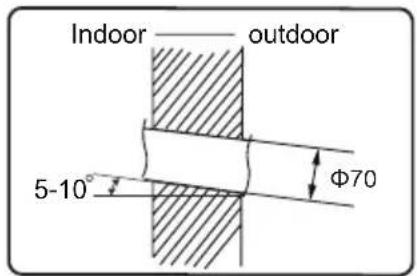
text_image
Indoor——— outdoor 5-10° Φ70Step three: outlet pipe
- The pipe can be led out in the direction of left, right or rear.

left back

natural_image
Simple line drawing of a container with a small labeled object inside (no text or symbols)
right
- After confirming the direction of outlet pipe, loosen the screws at the upper and lower adjusting baffle to let the connection pipe /drain pipe connects the indoor unit.

text_image
left back rightupper and lower adjusting baffle
Step four: connect the pipe of indoor unit
- Take out the left and right screw cover and then remove the screws on air-inlet panel to remove the panel. screw
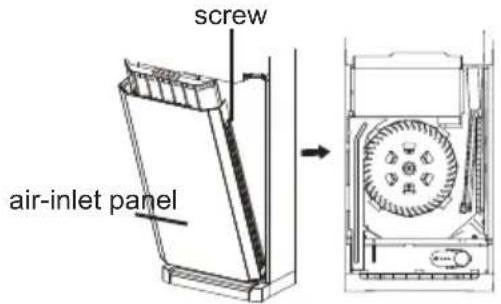
text_image
screw air-inlet panelInstallation of indoor unit
- Aim the pipe joint at the corresponding bellmouth.
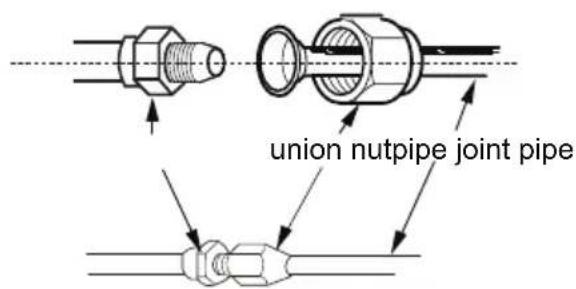
text_image
union nutpipe joint pipe- Pretighten the union nut with hand.
- Adjust the torque force by referring to the following sheet. Place the open-end wrench on the pipe joint and place the torque wrench on the union nut. Tighten the union nut with torque wrench.
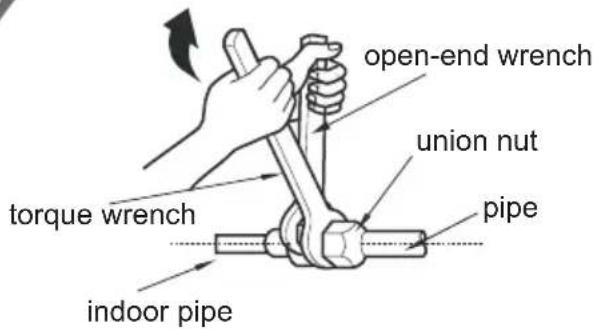
text_image
open-end wrench union nut torque wrench pipe indoor pipe| Hex nut diameter(mm) | Tightening torque (N ·m) |
| Φ 6.35 (1/4") | 15.7 (1.6kg.m) |
| Φ 9.52 (3/8") | 29.4 (3.0kg.m) |
| Φ 12.70 (1/2") | 49.0 (5.0kg.m) |
| Φ 15.88 (5/8") | 73.6 (7.5kg.m) |
- Wrap the indoor pipe and joint of connection pipe with insulating pipe, and then wrap it with tape.

text_image
insulating pipeStep five: install drain hose
- Connect the drain hose to the outlet pipe of indoor unit.

text_image
drain hose outlet pipe- Bind the joint with tape.

text_image
outlet pipe drain hose tapeNote:
- Add insulating pipe in the indoor drain hose in order to prevent condensation.

text_image
drain hose insulating pipeStep six: connect wire of indoor unit
- Make the power connection wire go through the cable-cross hole of indoor unit and then pull it out.
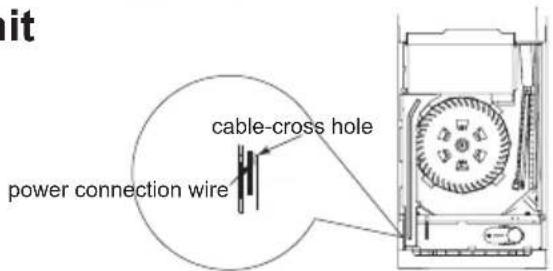
text_image
cable-cross hole power connection wireInstallation of indoor unit
- Remove the wire clip; connect the power connection wire to the wiring terminal according to the color; tighten the screw and then fix the power connection wire with wire clip.

text_image
24K: Outdoor unit connection yellow- green blue black brown L N N POWER 48K 55K: L1 L2 L3 N brown black violet blue yellow- green Outdoor unit connection- Adjust the position of upper and lower adjusting baffle; clamp the connection pipe and drain pipe as firm as possible.
- Tighten the screws.
Note:
All wires of indoor unit and outdoor unit should be connected by a professional.
- If the length of power connection wire is insufficient, please contact the supplier for a new one. Avoid extending the wire by yourself.
- For the air conditioner with plug, the plug should be reachable after finishing installation.
- For the air conditioner without plug, an air switch must be installed in the line. The air switch should be all-pole parting and the contact parting distance should be more than 3mm.
Step seven: bind up pipe
- Bind up the connection pipe, power cord and drain hose with the band.

text_image
indoor unit gas pipe indoor and outdoor power cord band liquid pipe drain hoseInstallation of indoor unit
- Reserve a certain length of drain hose and power cord for installation when binding them. When binding to a certain degree, separate the indoor power and then separate the drain hose.
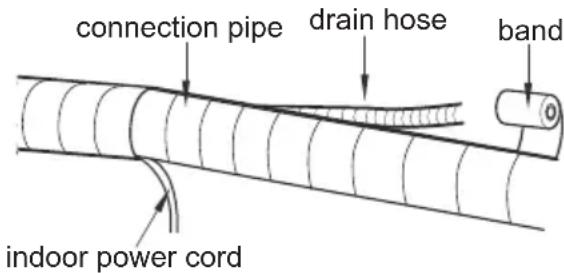
text_image
connection pipe drain hose band indoor power cord- Wrap it evenly, and rolling width should be 1/3 of bandaging belt. Do not wrap it too tight or too loose.
- The liquid pipe and gas pipe should be bound separately at the end.
Note:
- The power cord and control wire can't be crossed or winding.
- The drain hose should be bound at the bottom.
Step eight: place the indoor unit
- Put the bound pipes in the wall pipe and then make them pass through the wall hole.
- Stuff the gap between pipes and wall hole with sealing gum.
- Fix the wall pipe.

text_image
indoor outdoor- wall pipe sealing gumNote:
- Do not bend the drain hose too excessively in order to prevent blocking.
Installation of outdoor unit
Step one: fix the support of outdoor unit
(select it according to the actual installation situation)
- Select installation location according to the house structure.
- Fix the support of outdoor unit on the selected location with expansion screws.
Note:
• Take sufficient protective measures when installing the outdoor unit.
- Make sure the support can withstand at least four times of the unit weight.
- The outdoor unit should be installed at least 3cm above the floor in order to install drain joint. (for the model with heating tube, the installation height should be no less than 20cm.)
- For the unit with cooling capacity of 2300W \~5000W, 6 expansion screws are needed; for the unit with cooling capacity of 6000W \~8000W, 8 expansion screws are needed; for the unit with cooling capacity of 10000W \~16000W, 10 expansion screws are needed.
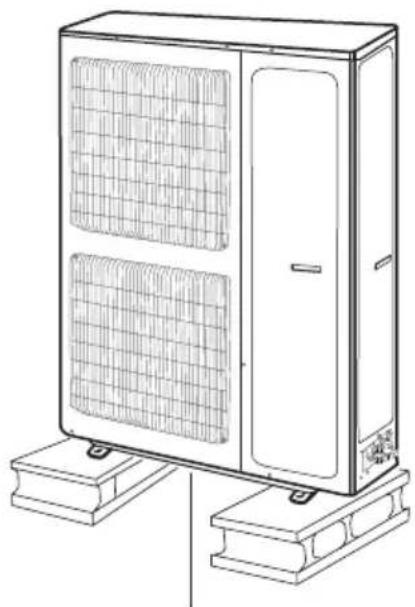
natural_image
Line drawing of a server rack unit with mesh ventilation panels and base platforms (no text or symbols)at least 3cm above the floor
Step two: install drain joint (Only for some models)
- Connect the outdoor drain joint into the hole on the chassis, as shown in the picture below.
- Connect the drain hose into the drain vent.
NOTE: As for the shape of drainage joint, please refer to the current product. Do not install the drainage joint in the severe cold area. Otherwise, it will be frosted and then cause malfunction.
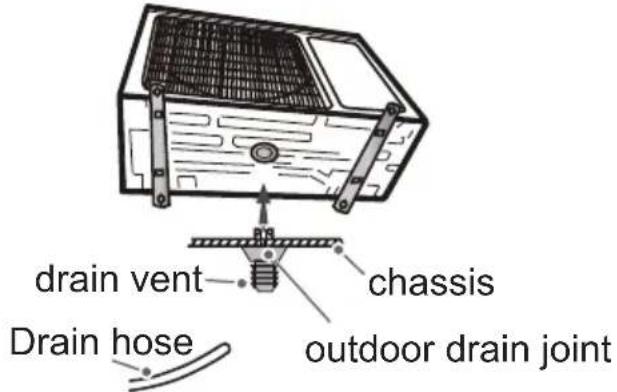
text_image
drain vent chassis drain hose outdoor drain jointStep three: fix outdoor unit
- Place the outdoor unit on the support.
- Fix the foot holes of outdoor unit with bolts.

text_image
foot holesfoot holes
Installation of outdoor unit
Step four: connect indoor and outdoor pipes
- Remove the front side plate or handle.

text_image
handle- Remove the screw cap of valve and aim the pipe joint at the bellmouth of pipe.

text_image
pipe. liquid pipe liquid valve gas pipe gas valve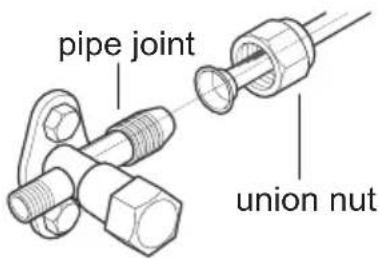
text_image
pipe joint union nut-
Pretighten the union nut with hand.
-
Tighten the union nut with torque wrench by referring to the sheet below.
| Hex nut diameter(mm) | Tightening torque (N·m) |
| Φ 6.35 (1/4") | 15.7 (1.6kg.m) |
| Φ 9.52 (3/8") | 29.4 (3.0kg.m) |
| Φ 12.70 (1/2") | 49 (5.0kg.m) |
| Φ 15.88 (5/8") | 73.6 (7.5kg.m) |
Step five: connect outdoor electric wire
- Remove the wire clip; connect the power connection wire and signal control wire (only for cooling and heating unit) to the wiring terminal according to the color; fix them with screws.

text_image
24K: N(1) 2 3 yellow- green blue brown black Indoor unit connection 48K, 55K: NL1 L2 L3 brown black violet blue yellow- green brown black violet blue yellow- green NL1 H2 L3 POWER Indoor unit connectionInstallation of outdoor unit
- Fix the power connection wire and signal control wire with wire clip (only for cooling and heating unit).
Note:
- After tightening the screw, pull the power cord slightly to check if it is firm.
- Never cut the power connection wire to prolong or shorten the distance.
Step six: neaten the pipes
- The pipes should be placed along the wall, bent reasonably and hidden possibly. Min. semidiameter of bending the pipe is 10cm.
- If the outdoor unit is higher than the wall hole, you must set a U-shaped curve in the pipe before pipe goes into the room, in order to prevent rain from getting into the room.
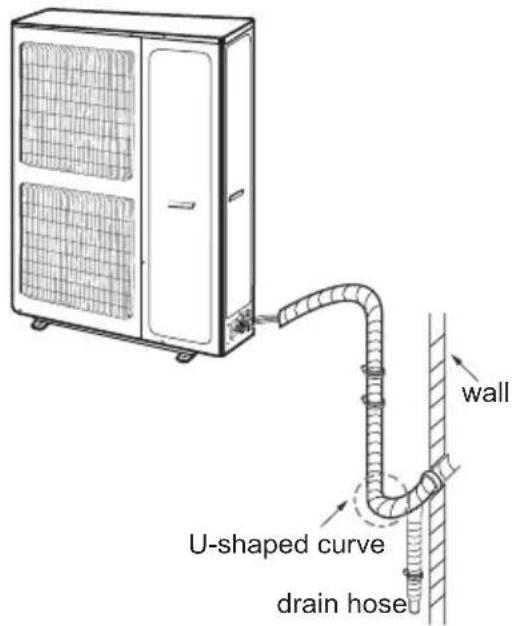
text_image
wall U-shaped curve drain hoseNote:
- The through-wall height of drain hose shouldn't be higher than the outlet pipe hole of indoor unit.
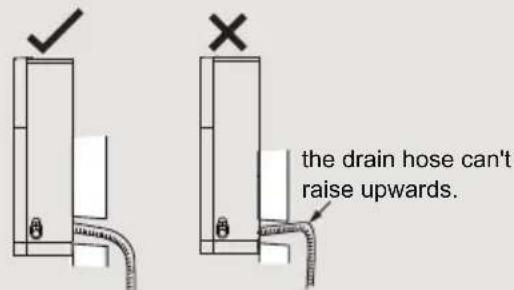
text_image
the drain hose can't raise upwards.- The water outlet can't be placed in water in order to drain smoothly.

text_image
The water outlet can't be placed in water- Slant the drain hose slightly downwards. The drain hose can't be curved, raised and fluctuant, etc.
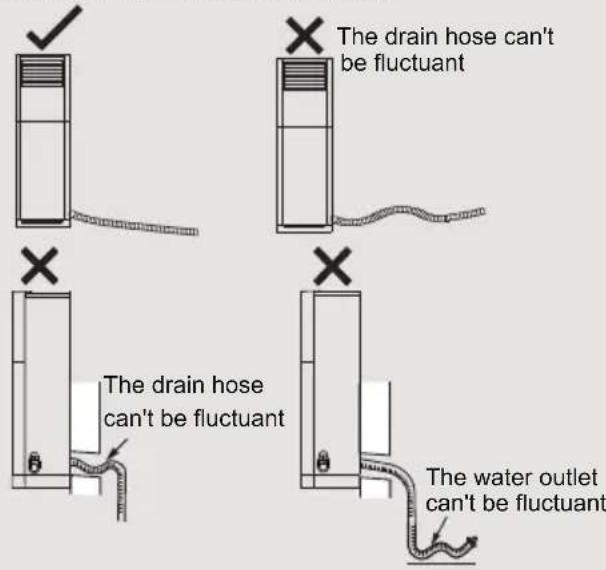
text_image
The drain hose can't be fluctuant The drain hose can't be fluctuant The water outlet can't be fluctuantVacuum pumping
Use vacuum pump
- Remove the valve caps on the liquid valve and gas valve and the nut of refrigerant charging vent.
-
Connect the charging hose of piezometer to the refrigerant charging vent of gas valve and then connect the other charging hose to the vacuum pump.
-
Open the piezometer completely and operate for 10-15min to check if the pressure of piezometer remains in -0.1MPa.
-
Close the vacuum pump and maintain this status for 1-2min to check if the pressure of piezometer remains in -0.1MPa. If the pressure decreases, there may be leakage.
-
Remove the piezometer, open the valve core of liquid valve and gas valve completely with inner hexagon spanner.
-
Tighten the screw caps of valves and refrigerant charging vent.
-
Reinstall the handle.

text_image
liquid of zo- rent luid refrigerant charging vent nut of refrigerant charging vent liquid valve gas valve valve cap valve cap vacuum pump piezometer Inner hexagon spanner close open contain this pressure of the leakage. e valveLeakage detection
-
With leakage detector
Check if there is leakage with leakage detector. -
With soap water If leakage detector is not available, please use soap water for leakage detection. Apply soap water at the suspected position and keep the soap water for more than 3min. If there are air bubbles coming out of this position, there's a leakage.
Check after installation
- Check according to the following requirement after finishing installation.
| Items to be checked Possible malfunction | |
| Has the unit been installed firmly? | The unit may drop, shake or emit noise. |
| Have you done the refrigerant leakage test? | It may cause insufficient cooling (heating) capacity. |
| Is heat insulation of pipeline sufficient? | It may cause condensation and water dripping. |
| Is water drained well? | It may cause condensation and water dripping. |
| Is the voltage of power supply according to the voltage marked on the nameplate? | It may cause malfunction or damaging the parts. |
| Is electric wiring and pipeline installed correctly? | It may cause malfunction or damaging the parts. |
| Is the unit grounded securely? It may cause electric leakage. | |
| Does the power cord follow the specification? | It may cause malfunction or damaging the parts. |
| Is there any obstruction in the air inlet and outlet? | It may cause insufficient cooling (heating) capacity. |
| The dust and sundries caused during installation are removed? | It may cause malfunction or damaging the parts. |
| The gas valve and liquid valve of connection pipe are open completely? | It may cause insufficient cooling (heating) capacity. |
| Is the inlet and outlet of piping hole been covered? | It may cause insufficient cooling (heating) capacity or waster electricity. |
Test operation
1. Preparation of test operation
- The client approves the air conditioner.
- Specify the important notes for air conditioner to the client.
2. Method of test operation
- Put through the power, press ON/OFF button on the remote controller to start operation.
- Press MODE button to select AUTO, COOL, DRY, FAN and HEAT to check whether the operation is normal or not.
- If the ambient temperature is lower than 16^ C , the air conditioner can't start cooling.
Installation instructions of anti-collapse chain
- In order to prevent accidental collapse of indoor unit, please install the anti-collapse chain.
Installation steps:
- Remove the screw of anti-collapse hole at the top cover of indoor unit (see fig. 3);
- Take out the anti-collapse chain and put it into the anti-collapse hole, and then tighten it with screw (see fig. 4);
- Fix the other end of anti-collapse chain on the wall with screw (ST4.2X38) (see fig. 4).

text_image
Remove the screw at the top cover Fix the other end on the wall with screw Put this end into the hole and then tighten it with screw Anti-collapse hole Wall Indoor unit Fig. 3 Fig. 4- The above fig may be different from the actual products; please refer to the actual products.
Parts' Name
Indoor Unit
display and button
text_image
111 111 FAN ON/OFF FUNC. MODE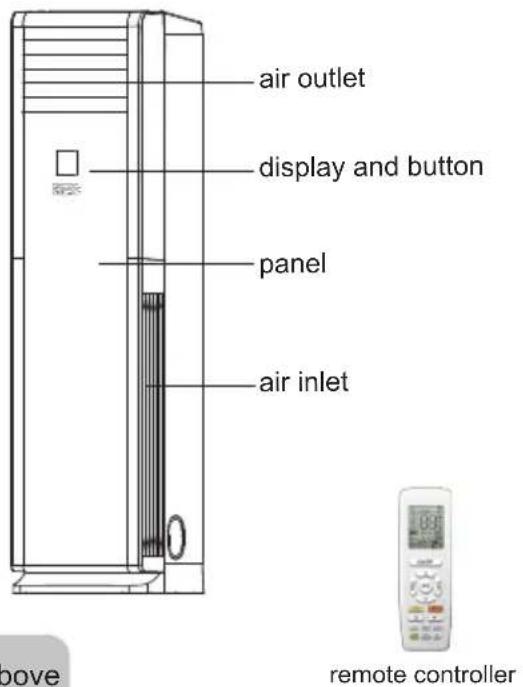
text_image
air outlet display and button panel air inlet above remote controller(Display content or position may be different from above graphics, please refer to actual products)
remote controller
Outdoor Unit
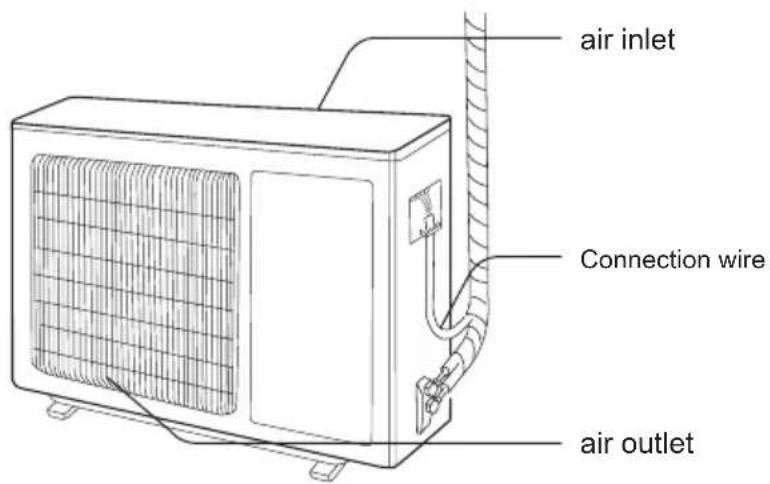
GIFL224XA
text_image
air inlet Connection wire air outletNOTICE:
Actual product may be different from above graphics, please refer to actual products.
Parts' Name
Indoor Unit
display and button

text_image
111 111 FAN ON/OFF FUNC. MODE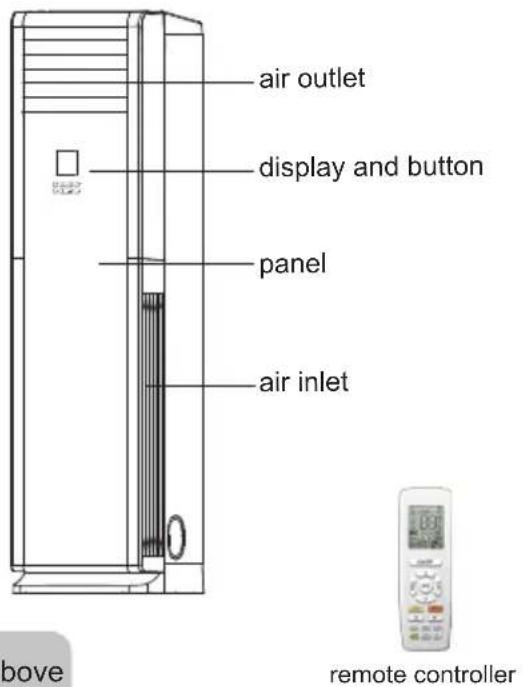
text_image
air outlet display and button panel air inlet above remote controller(Display content or position may be different from above graphics, please refer to actual products)
Outdoor Unit
GIFL248XA
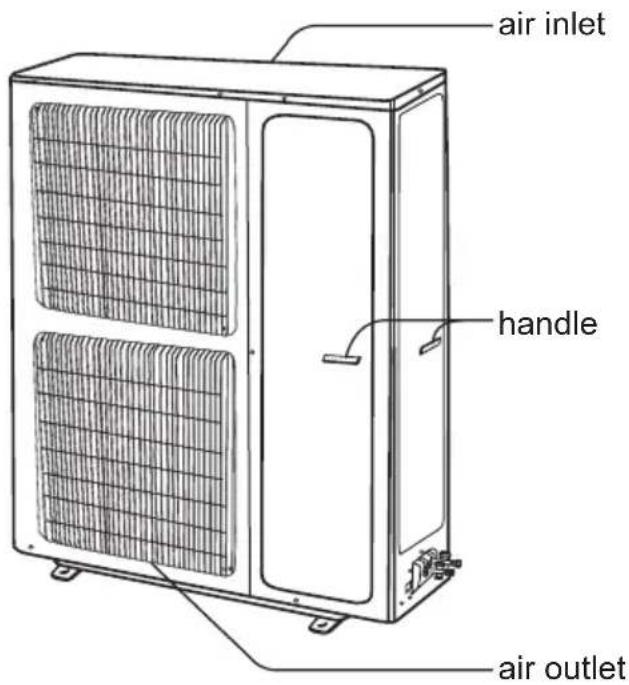
text_image
air inlet handle air outletNOTICE:
Actual product may be different from above graphics, please refer to actual products.
Button's Name and Function
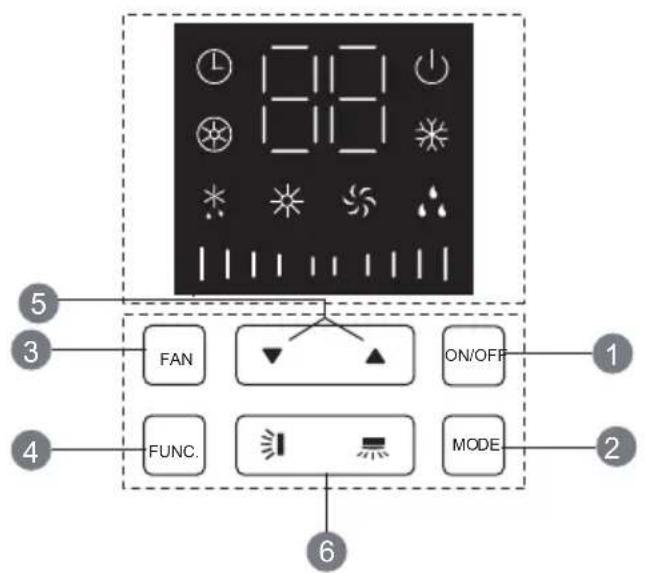
text_image
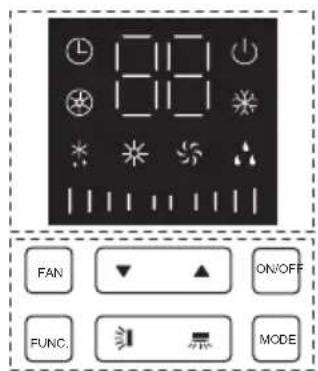
12:15 12:16 FAN ON/OFF FUNC. MODE 5 3 4 1 2 61 ON/OFF button
2 MODE button
3 FAN button
4 FUNCTION button
5 ▼/▲ button
6 / button
Introduction for icons on display screen of air conditioner

text_image
Timer display Ambient temperature or set temperature display or others Operation display E-Heater display Cooling display Defrosting display Dry display Heating display Fan display Fan speed displayButton's introduction
Note:
This series unit adopts touch buttons. You only need to touch the buttons slightly.
1 ON/OFF button
- Press this button to turn on or turn off the unit.(Note: Under X-FAN mode, press this button to turn on the unit directly.)
2 MODE button
- Every time press this button, the mode will switchover in cycle among.

flowchart
graph LR
    A["COOLING"] --> B["DRY"]
    C["HEATING"] <--_D["FAN"]
    B --> C
(Note: Cooling only unit won't accept heating operation signal. For cooling only unit, pressing MODE button under FAN mode will skip heating mode and enter cooling mode.)
3 FAN button
- Press this button and then fan speed can be selected and displayed in the sequence as below:

text_image
| | | | (low) → | | | | | (medium) (high) | | | | | | → | | | | | | | | | (turbo)(Note: Only low fan speed is available for dry mode. Fan speed can't be adjusted under dry mode. Turbo cannot be set in FAN mode.)
4 FUNCTION button
- Under on status, press Function button to switch between timer and auxiliary heating function setting (auxiliary heating can be set only in heating mode). When timer or auxiliary heating icon is blinking, it means this function can be set. Press "▲" or "▼" button to set function. If there's no operation change within 5s after setting is finished, the function setting will be confirmed. Or press Function button again to exit or confirm the function. When the function is selected through Function button, if the unit is not turned off and no remote control signal is received within 2min, pressing Function button again to circulate from the previous set function. After 2min or the unit is turned off or remote control signal is received, pressing Function button again to circulate from timer icon. (Note: Only when the unit is under heating mode and with auxiliary heating function, auxiliary heating function can be turned on or off through Function button.)
- Under off status, if the unit is in X-FAN status, press Function button to turn off the unit directly; if the unit is not in X-FAN status, press Function button to set timer ON.
Button's introduction
5

button
- After each pressing of "▲" or "▼" button, set temperature will increase or decrease 1°C. Temperature adjustment range is 16°C\~30°C. This button is invalid under auto mode. Timer setting can be set in 1h increment among 0\~24h. When it is adjusted to auxiliary heating function setting through Function button, press this button to turn on or turn off auxiliary heating. (Note: auxiliary heating is valid only for the model with this function.)
- Hold "▲" and "▼" buttons for 3s and the air conditioner will display "LC", which indicates buttons are locked. Any button under on status or ON/OFF button and function buttons under off status are all invalid. Hold these two button for 3s again to release the lock.
6


button
- Left and right swing: this button controls the left and right swing motor, single press it to switchover between ON and OFF.
- Up and down swing: this button controls the up and down swing motor, single press it to switchover between ON and OFF.
Icon function introduction

Operation display
- It indicates the air conditioner is put through the power. Under on status, this indicator is on; under off status, this indicator is off.

Timer display
- When this indicator is on, it indicates the timer function is turned on.

Heating display
- When this indicator is on, it indicates the heating mode is turned on.

Defrosting display
- When this indicator is on, it indicates the defrosting function is turned on.

Dry display
- When this indicator is on, it indicates the dry mode is turned on.

E-Heater display
- When this indicator is on, it indicates the E-heater function is turned on.

Cooling display
- When this indicator is on, it indicates the cooling mode is turned on.

Fan display
- When this indicator is on, it indicates the fan mode is turned on.
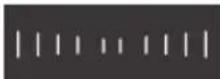
Fan speed display
- Displays the fan speed. The fan speed is displayed as below:
| | | | (low) → (medium) |→ | | | | | | | (high) → (tu|rdo) | | | | | |
Buttons on remote controller

text_image
FAN AUTO OPER WIFI 88°C E-JOY COLD COOL WARM COMFORT HOT 88S HOUR ON/OFF ON/OFF MODE SAVE FAN COOL HEAT QUIET TIMER SLEEP LIGHT X-FAN E-HEATER WIFI 12 13 14 15 1 2 3 4 5 6 7 8 9 10 11 121 ON/OFF button
2 SAVE button
3 FAN button
4 MODE button
5 ▲/ ▼button
6 COOL button
7 HEAT button
8 button
9 🌿 button
10 SLEEP button
11 WiFi button
12 X-FAN/E-HEATER button
13 QUIET button
14 LIGHT button
15 TIMER button
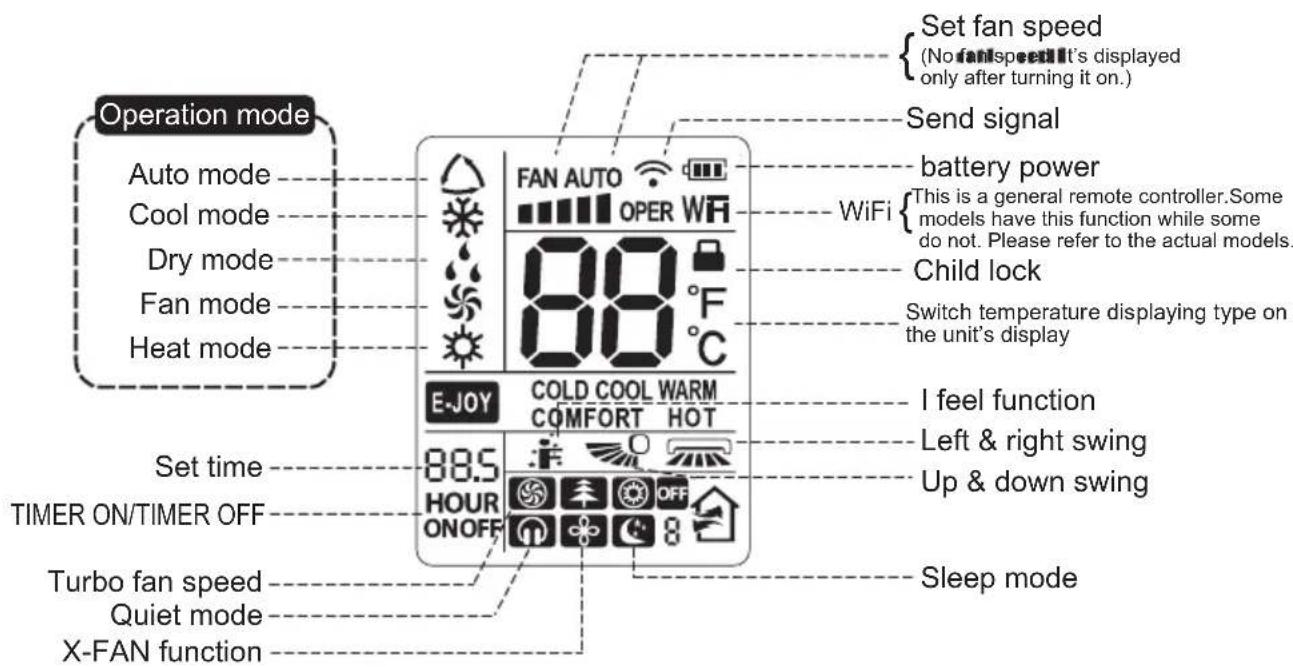
Introduction for icons on display screen
text_image
Set fan speed (No fanspeed it's displayed only after turning it on.) Send signal Battery power WiFi {This is a general remote controller. Some models have this function while some do not. Please refer to the actual models. Child lock Switch temperature displaying type on the unit's display I feel function Left & right swing Up & down swing Sleep mode 88.5 HOUR ONOFF E-JOY COLD COOL WARM COMFORT HOT Set time TIMER ON/TIMER OFF Turbo fan speed Quiet mode X-FAN functionIntroduction for buttons on remote controller
Note:
- This is a general use remote controller, it could be used for the air conditioners with multifunction; For some function, which the model doesn't have, if press the corresponding button on the remote controller that the unit will keep the original running status.
- After putting through the power, the air conditioner will give out a sound. Operation indicator "⏻" is ON. After that, you can operate the air conditioner by using remote controller.
- Under on status, pressing the button on the remote controller, the signal icon "⚡" on the display of remote controller will blink once and the air conditioner will give out a "di" sound, which means the signal has been sent to the air conditioner.
1 ON/OFF button
Press this button can turn on or turn off the air conditioner. After turning on the air conditioner, indoor unit will give out a sound.
2 SAVE button
Under cooling mode, press this button to start up or turn off energy-saving function. When energy-saving function is started up, "SE" will be shown on remote controller, and air conditioner will adjust the set temperature automatically according to ex-factory setting to reach to the best energy-saving effect. Press this button again to exit energy-saving function.
3 FAN button
Pressing this button can set fan speed circularly as: auto (AUTO), low(■|), medium (■■), high(■■■), turbo( Ⓜ ).

flowchart
graph LR
    A["Auto"] --> B["1"]
    B --> C["2"]
    C --> D["3"]
    D --> E["4"]
    E --> F["5"]
    F --> G["6"]
    G --> H["7"]
    H --> I["8"]
Note:
- Under AUTO speed, air conditioner will select proper fan speed automatically according to ex-factory setting.
- It's Low fan speed under Dry mode.
- Turbo cannot be set in FAN mode.
4 MODE button
Press this button to select your required operation mode.

flowchart
graph LR
    A["AUTO"] --> B["COOL"]
    B --> C["DRY"]
    C --> D["FAN"]
    D --> E["HEAT"]
- When selecting auto mode, air conditioner will operate automatically according to the sensed temperature. Set temperature can't be adjusted and will not be displayed as well. Press "FAN" button can adjust fan speed. Press "☐" / "☐" button can adjust fan blowing angle.
- After selecting cool mode, air conditioner will operate under cool mode. Cool indicator "❄" on indoor unit is ON(This indicator is not available for some models). Press "▲" or "▼" button to adjust set temperature. Press "FAN" button to adjust fan speed. Press "☐" / "☐" button to adjust fan blowing angle.
- When selecting dry mode, the air conditioner operates at low speed under dry mode. Dry indicator " 🔊" on indoor unit is ON(This indicator is not available for some models). Under dry mode, fan speed can't be adjusted. Press " 🔊" / " 🔊" button to adjust fan blowing angle.
- When selecting fan mode, the air conditioner will only blow fan, no cooling and no heating. Fan indicator "✿" on indoor unit is ON. Press "FAN" button to adjust fan speed. Press"=/ *〃" button to adjust fan blowing angle.
- When selecting heating mode, the air conditioner operates under heat mode. Heat indicator "💡" on indoor unit is ON(This indicator is not available for some models). Press "▲" or "▼" button to adjust set temperature. Press "FAN" button to adjust fan speed. Press "💡" / "💡" button to adjust fan blowing angle. (Cooling only unit won't receive heating mode signal. If setting heat mode with remote controller, press ON/OFF button can't start up the unit).
Note:
- For preventing cold air, after starting up heating mode, indoor unit will delay 1\~5 minutes to blow air (actual delay time is depend on indoor ambient temperature).
- Set temperature range from remote controller: 16\~30°C (61-86°F);
Fan speed: auto, low speed, medium speed, high speed, turbo speed.
5 ▲/▼ button
- Press "▲" or "▼" button once increase or decrease set temperature 1°C (°F). Holding "▲" or "▼" button, 2s later, set temperature on remote controller will change quickly. On releasing button after setting is finished, temperature indicator on indoor unit will change accordingly. (Temperature can't be adjusted under auto mode)
- When setting TIMER ON, TIMER OFF, press "▲" or "▼" button to adjust time. (Refer to TIMER button for details)
Introduction for buttons on remote controller
6 COOL button
- Press this button, unit will operate in cool mode.
7 HEAT button
- Press this button, unit will operate in heat mode.
8 button
- Under simple swing mode, press this button can turn on ("图标" icon is displayed) or turn off ("图标" icon is not displayed) the left&right swing function.
- When the unit is turned off by remote controller, press "▲" button and "■" button can switch between single swing mode and fixed-angle swing mode. "■" on the remote controller will flash twice.
Under fixed-angle swing mode, press this button and then left&right swing status will circulate as shown in the right figure:

flowchart
graph TD
    A["Start"] --> B["Process 1"]
    B --> C["Process 2"]
    C --> D["Process 3"]
    D --> E["End"]
    F["Start"] --> G["Process 4"]
    G --> H["Process 5"]
    H --> I["End"]
    J["No Display"] --> G
    K["No Display"] --> H
- This remote controller is the general type remote controller. When remote controller receives the signal of "☐", swing status is same as "☐"; when remote controller receives "☐", swing status is same as left&right swing OFF.
9 button
- Under simple swing mode, press this button can turn on ("0" icon is displayed) or turn off ("0" icon is not displayed) the up&down swing function.
- When the unit is turned off by remote controller, press "▲" button and "→" button can switch between single swing mode and fixed-angle swing mode.
"0" on the remote controller will flash twice.
Under fixed-angle swing mode, press this button and the up&down swing status will circulate as shown in the right figure:

flowchart
graph TD
    A["0"] --> B["-0"]
    B --> C["0"]
    C --> D["0"]
    E["no display"] --> F["0"]
    F --> G["0"]
    G --> H["1"]
Introduction for buttons on remote controller
10 SLEEP button
Under COOL, or HEAT mode, press this button to start up sleep function.
" ℺" icon is displayed on remote controller. Press this button again to cancel sleep function and " ℺" icon will disappear. After powered on, Sleep Off is defaulted. After the unit is turned off, the Sleep function is canceled.
In this mode, set temperature will be adjusted with the change of time. Under Fan、DRY and Auto modes, this function is not available.
11 WiFi button
Press "WiFi" button to turn on or turn off WiFi function. When WiFi function is turned on, the "WiFi" icon will be displayed on remote controller; Under status of remote controller off, press "MODE" and "WiFi" buttons simultaneously for 1s, WiFi module will restore to factory default setting.
- This function is only available for some models.
12 X-FAN/E-HEATER button
Pressing this button in COOL or DRY mode, the icon " ✧ " is displayed and the indoor fan will continue operation for a few minutes in order to dry the indoor unit even though you have turned off the unit. After energization, X-FAN OFF is defaulted.X-FAN is not available in AUTO, FAN or HEAT mode.
This function indicates that moisture on evaporator of indoor unit will be blown after the unit is stopped to avoid mould.
- Having set X-FAN function on: After turning off the unit by pressing ON/OFF button indoor fan will continue running for about a few minutes. at low speed. In this period, press X-FAN button to stop indoor fan directly.
- Having set X-FAN function off: After turning off the unit by pressing ON/OFF button, the complete unit will be off directly.
- Only under cooling mode and dry mode, press this button can turn on (characters of "X-FAN" are displayed) or turn off (characters of "X-FAN" are not displayed) X-FAN function.
- Under heating mode, press this button and the E-HEATER status will changed circularly as below: Auto E-HEATER (no display)

flowchart
graph TD
    A["E-HEATER OFF (OFF is displayed)"] --> B["Auto E-HEATER (no display)"]
    B --> C["E-HEATER ON (ON is displayed)"]
    C --> A
Note:
- The appliance was tested with the range of external static pressures which is ± 0.2Pa (add-on heat pumps and appliance with supplementary heaters only)
- The type of supplementary heaters is BTP, which power is 3500W and voltage is 380V\~.
- The distance from E-HEATER to the tinder is above 0.1m.
Introduction for buttons on remote controller
13 QUIET button
Press this button can turn on or turn off QUIET function.
- This function is not available for this unit.
14 LIGHT button
Press this button to turn off display light on indoor unit. Press this button again to turn on display light.
15 TIMER button
- At ON status, press this button once can set TIMER OFF. The character of HOUR and OFF will flash. Press "▲" or "▼" button within 5s can adjust the time of TIMER ON. After each pressing of "▲" or "▼" button, time will increase or decrease half an hour. When holding "▲" or "▼" button, 2s later, the time will change quickly until to reach to your required time. After that, press "TIMER" button to confirm it. The character of HOUR and OFF won't flash again.
Cancel TIMER OFF: Press "TIMER" button again under TIMER OFF status.
- At OFF status, press this button once can set TIMER ON. Please refer to TIMER off for detailed operation.
Cancel TIMER ON: Press "TIMER" button again under TIMER ON status.
Note:
• Time setting range: 0.5-24 hours.
- Time interval between two operations can't exceed 5s. Otherwise, remote controller will exit the setting status automatically.
Function introduction for combination buttons
Child lock function
Press "▲" and "▼" simultaneously to turn on or turn off child lock function. When child lock function is on, "☐" icon is displayed on remote controller. If you operate the remote controller, the "☐" icon will blink three times without sending signal to the unit.
Temperature display switchover function
Under OFF status, press "▼" and "MODE" buttons simultaneously to switch temperature display between °C and °F.
Operation guide
- After putting through the power, press "ON/OFF" button on remote controller to turn on the air conditioner.
- Press "MODE" button to select your required mode: AUTO, COOL, DRY, FAN, HEAT.
- Press "▲" or "▼" button to set your required temperature. (Temperature can't be adjusted under auto mode).
- Press "FAN" button to set your required fan speed: auto, low speed, medium speed, high speed, turbo speed.
- Press "→" button to select fan blowing angle.
Replacement of batteries in remote controller
- Lift the cover along the direction of arrow (as shown in Fig 1①).
- Take out the original batteries (as shown in Fig 1 ②).
- Place two 7# (AAA 1.5V) dry batteries, and make sure the position of “+” polar and “-” polar is correct (as shown in Fig 2③).
- Reinstall the cover (as shown in Fig 2 ④).

text_image
Diagram showing two-step assembly of a device with labeled parts and directional arrows indicating process flow.Fig.1 Fig.2
NOTICE
- During operation, point the remote control signal sender at the receiving window on indoor unit.
- The distance between signal sender and receiving window should be no more than 8m, and there should be no obstacles between them.
- Signal may be interfered easily in the room where there is fluorescent lamp or wireless telephone; remote controller should be close to indoor unit during operation.
- Replace new batteries of the same model when replacement is required.
- When you don't use remote controller for a long time, please take out the batteries.
- If the display on remote controller is fuzzy or there's no display, please replace batteries.
General phenomenon analysis
Please check below items before asking for maintenance. If the malfunction still can't be eliminated, please contact local dealer or qualified professionals.
| Phenomenon | Check items Solution | |
| Indoor unit can't receive remote controller's signal or remote controller has no action. | Whether it's interfered severely (such as static electricity, stable voltage)? | Pull out the plug. Reinsert the plug after about 3min, and then turn on the unit again. |
| Whether remote controller is within the signal receiving range? | Signal receiving range is 8m. | |
| Whether there are obstacles? | Remove obstacles. | |
| Whether remote controller is pointing at the receiving window? | Select proper angle and point the remote controller at the receiving window on indoor unit. | |
| Is sensitivity of remote controller low; fuzzy display and no display? | Check the batteries. If the power of batteries is too low, please replace them. | |
| No display when operating remote controller? | Check whether remote controller appears to be damaged. If yes, replace it. | |
| Fluorescent lamp in room? | Take the remote controller close to indoor unit. | |
| Turn off the fluorescent lamp and then try it again. |
| Air conditioner can’t operate | Power failure? | wait until power recovery. |
| Is plug loose? | Reinsert the plug. | |
| Air switch trips off or fuse is burnt out? | Ask professional to replace air switch or fuse. | |
| Wiring has malfunction? | Ask professional to replace it. | |
| Unit has restarted immediately after stopping operation? | Wait for 3min, and then turn on the unit again. | |
| Whether the function setting for remote controller is correct? | Reset the function. | |
| Phenomenon | Check items Solution | |
| Mist is emitted from indoor unit's air outlet | Indoor temperature and humidity is high? | Because indoor air is cooled rapidly. After a while, indoor temperature and humidity will be decrease and mist will disappear. |
| No air emitted from indoor unit | Air inlet or air outlet of indoor unit is blocked? | Eliminate obstacles. |
| Under heating mode, indoor temperature is reached to set temperature? | After reaching to set temperature, indoor unit will stop blowing out air. | |
| Heating mode is turned on just now? | In order to prevent blowing out cold air, indoor unit will be started after delaying for several minutes, which is a normal phenomenon. | |
| Set temperature can't be adjusted | Unit is operating under auto mode? | Temperature can't be adjusted under auto mode. Please switch the operation mode if you need to adjust temperature. |
| Your required temperature exceeds the set temperature range? | Set temperature range: 16°C~30°C. | |
| Cooling (heating) effect is not good. | Voltage is too low? | Wait until the voltage resumes normal. |
| Filter is dirty? | Clean the filter. | |
| Set temperature is in proper range? | Adjust temperature to proper range. | |
| Door and window are open? | Close door and window. | |
| Odours are emitted | Whether there's odour source, such as furniture and cigarette, etc. | Eliminate the odour source. |
| Clean the filter. |
Malfunction
| Phenomenon | Check items Solution | |
| Air conditioner operates normally suddenly | Whether there's interference, such as thunder, wireless devices, etc. | Disconnect power, put back power, and then turn on the unit again. |
| Outdoor unit has vapor | Heating mode is turned on? | During defrosting under heating mode, it may generate vapor, which is a normal phenomenon. |
| "Water flowing" noise | Air conditioner is turned on or turned off just now? | The noise is the sound of refrigerant flowing inside the unit, which is a normal phenomenon. |
| Cracking noise | Air conditioner is turned on or turned off just now? | This is the sound of friction caused by expansion and/or contraction of panel or other parts due to the change of temperature. |
Error code
- When air conditioner status is abnorma I, temperature indicator on indoor unit will blink to display corresponding error code. Please refer to below list for identification of error code.
| Error code | Troubleshooting |
| E1 | It can be eliminated after restarting the unit. If not, please contact qualified professionals to deal with it. |
| E3 | It can be eliminated after restarting the unit. If not, please contact qualified professionals to deal with it. |
| E4 | It can be eliminated after restarting the unit. If not, please contact qualified professionals to deal with it. |
| E5 | It can be eliminated after restarting the unit. If not, please contact qualified professionals to deal with it. |
| E6 | It can be eliminated after restarting the unit. If not, please contact qualified professionals to deal with it. |
| E8 | It can be eliminated after restarting the unit. If not, please contact qualified professionals to deal with it. |
| e6 | It can be eliminated after restarting the unit. If not, please contact qualified professionals to deal with it. |
| C4 | It can be eliminated after restarting the unit. If not, please contact qualified professionals to deal with it. |
| F0 | Please contact qualified professionals to deal with it. |
| F1 | Please contact qualified professionals to deal with it. |
| F2 | Please contact qualified professionals to deal with it. |
| F3 | Please contact qualified professionals to deal with it. |
| F4 | Please contact qualified professionals to deal with it. |
| F5 | Please contact qualified professionals to deal with it. |
Note: If there're other error codes, please contact qualified professionals for service.

WARNING
■ When below phenomenon occurs, please turn off air conditioner and disconnect power immediately, and then contact the dealer or qualified professionals for service.
- Power cord is overheating or damaged.
- There's abnormal sound during operation.
• Air switch trips off frequently.
• Air conditioner gives off burning smell. - Indoor unit is leaking.
■ Do not repair or refit the air conditioner by yourself.
■ If the air conditioner operates under abnormal conditions, it may cause malfunction, electric shock or fire hazard.
Configuration of connection pipe
- Standard length of connection pipe
- 5m, 7.5m, 8m.
- Min. length of connection pipe is 3m.
3.Max. length of connection pipe.
Max. length of connection pipe Unit: m
| Cooling capacity | Max. length of connection pipe | Cooling capacity | Max. length of connection pipe |
| 5000Btu/h (1465W) | 15 25 | 24000Btu/h (7032W) | |
| 7000Btu/h (2051W) | 15 30 | 28000Btu/h (8204W) | |
| 9000Btu/h (2637W) | 15 30 | 36000Btu/h (10548W) | |
| 12000Btu/h (3516W) | 20 30 | 42000Btu/h (12306W) | |
| 18000Btu/h (5274W) | 25 30 | 48000Btu/h (14064W) |
- The additional refrigerant oil and refrigerant charging required after prolonging connection pipe
- After the length of connection pipe is prolonged for 10m at the basis of standard length, you should add 5ml of refrigerant oil for each additional 5m of connection pipe.
- The calculation method of additional refrigerant charging amount (on the basis of liquid pipe):
Additional refrigerant charging amount = prolonged length of liquid pipe × additional refrigerant charging amount per meter
- Basing on the length of standard pipe, add refrigerant according to the requirement as shown in the table. The additional refrigerant charging amount per meter is different according to the diameter of liquid pipe. See the following sheet.
Configuration of connection pipe
Additional refrigerant charging amount for R22, R407C, R410A and R134a
| Diameter of connection pipe | Outdoor unit throttle | ||
| Liquid pipe(mm) | Gas pipe(mm) | Cooling only(g/m) | Cooling and heating(g/m) |
| Φ6 | Φ9.52 or Φ12 | 15 | 20 |
| Φ6 or Φ9.52 | Φ16 or Φ19 | 15 | 50 |
| Φ12 | Φ19 or Φ22.2 | 30 | 120 |
| Φ16 | Φ25.4 or Φ31.8 | 60 | 120 |
| Φ19 | - | 250 250 | |
| Φ22.2 | - | 350350 | |
- If the outdoor unit is higher than the indoor unit for more than 5m, an oil return bend is needed.

text_image
indoor unit outdoor unitBelow 5m
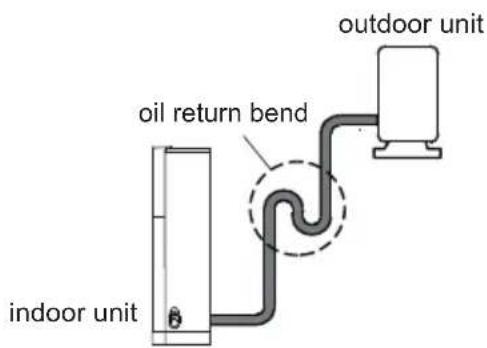
text_image
oil return bend indoor unit outdoor unitAbove 5m
Pipe expanding method
Note:
Improper pipe expanding is the main cause of refrigerant leakage. Please expand the pipe according to the following steps:
A: Cut the pipe
- Confirm the pipe length according to the distance of indoor unit and outdoor unit.
- Cut the required pipe with pipe cutter.
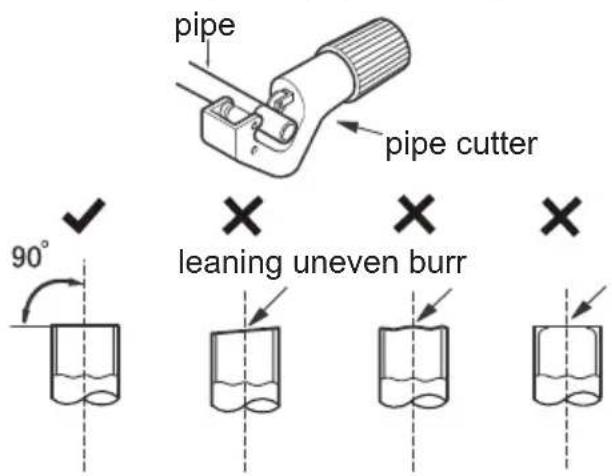
text_image
pipe pipe cutter 90° × leaning uneven burr ×B: Remove the burrs
- Remove the burrs with shaper and prevent the burrs from getting into the pipe.
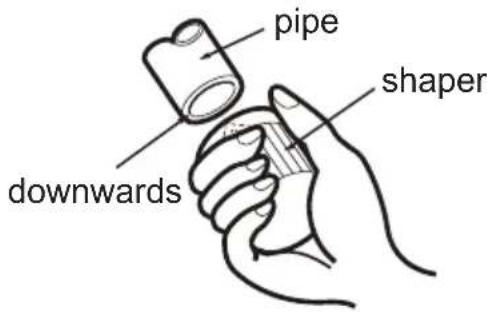
text_image
pipe shaper downwardsC: Put on suitable insulating pipe
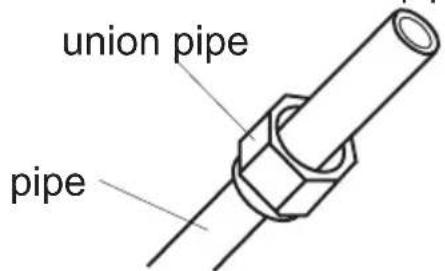
D: Put on the union nut
- Remove the union nut on the indoor connection pipe and outdoor valve; install the union nut on the pipe.
text_image
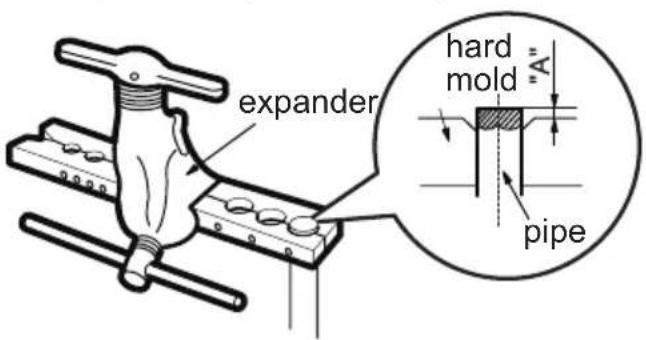
union pipe pipeE: Expand the port
- Expand the port with expander.
text_image
expander hard mold "A" pipeNote:
- "A" is different according to the diameter, please refer to the sheet below:
| Outer diameter (mm) | A(mm) | |
| Max Min | ||
| Φ6-6.35(1/4") | 1.3 | 0.7 |
| Φ9.52(3/8") | 1.6 | 1.0 |
| Φ12-12.7(1/2") | 1.8 | 1.0 |
| Φ15.8-16(5/8") | 2.4 | 2.2 |
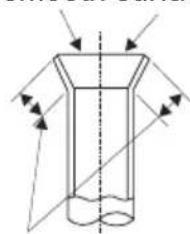
F: Inspection
- Check the quality of expanding port. If there is any blemish, expand the port again according to the steps above.
smooth surface
natural_image
Pure diagram of a cylindrical object with internal flow arrows, no text or symbols presentthe length is equal
improper expanding

leaning

damaged surface

crack uneven
thickness
請記錄下列產品資料
Proudly Serviced by:
text_image
ToolBoxa Gilman Group Company
太平家庭電器
text_image
Black and white barcode image with vertical lines on both sides600005000882