DS 73 - Phone UNIDEN - Free user manual and instructions
Find the device manual for free DS 73 UNIDEN in PDF.


User questions about DS 73 UNIDEN
0 question about this device. Answer the ones you know or ask your own.
Ask a new question about this device
Download the instructions for your Phone in PDF format for free! Find your manual DS 73 - UNIDEN and take your electronic device back in hand. On this page are published all the documents necessary for the use of your device. DS 73 by UNIDEN.
USER MANUAL DS 73 UNIDEN
provides the longest range,
the clearest sound
and the best privacy.
OWNER'S
text_image
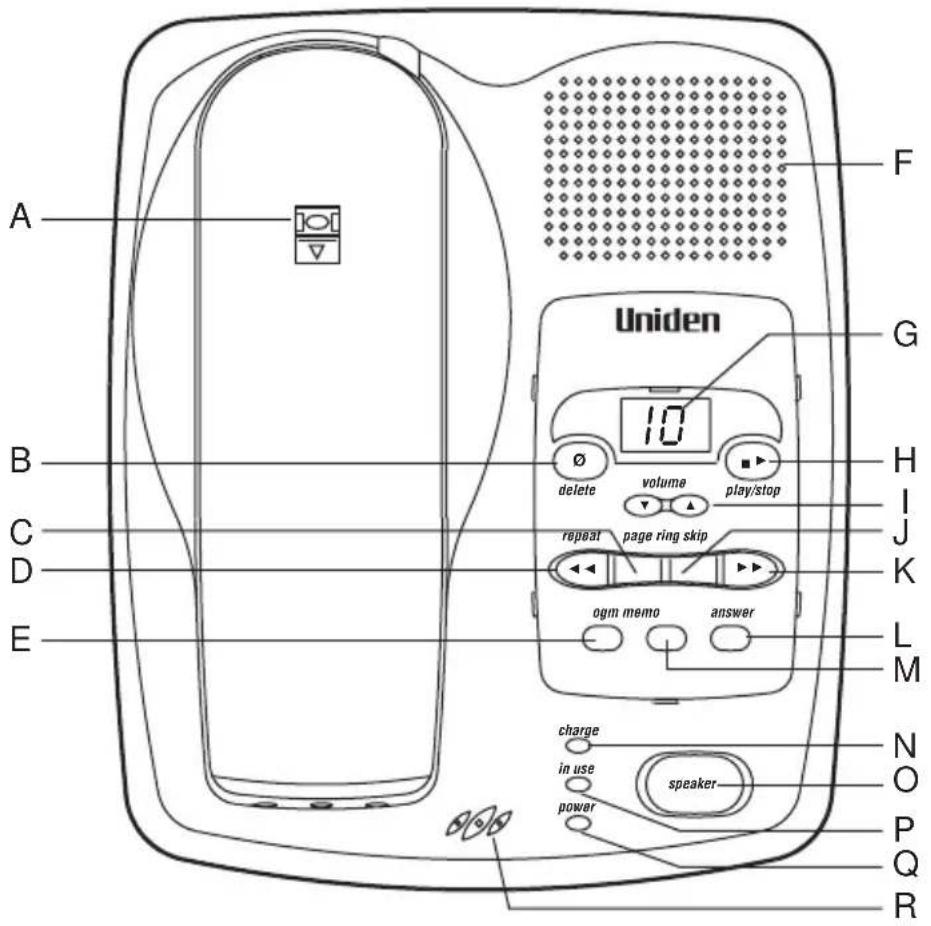
A B C D E F G Uniden 10 delete volume play/stop repeat page ring skip ogm memo answer charge in use speaker power N O P Q RA. Handset Retainer
B. Delete Button
C. Page Button
D. Repeat Button
E. OGM Button
F. Speaker
G. Message Counter
H. Play/Stop Button
I. Volume Up/Down Button
J. Ring Button
K. Skip Button
L. Answer Button
M. Memo Button
N. Charge LED
O. Speaker Key
P. In use LED
Q. Power LED
R. Base Microphone

text_image
1 2 3 6 7 4 5 c.wait/tah Uniden 900MHz DIGITAL SPREAD SPECTRUM talk batt low redial/p 1 2 abc 3 def 4 ghi 5 jkl 6 mno 7pqrs 8 tuv 9wxyz 16 10 * 0 # mem muteflash vol 15 11 12 13 14 17 18- Headset Jack
- Battery Compartment
- Handset Antenna
- Talk Button
- Redial/Pause Button
- Talk LED
- Battery Low LED
- Call Waiting Button
-
Numeric Keypad
-
Flash Button
- Mute Button
- Mem Button
- Volume Up/Down Button
- Handset Microphone
- Hash Button
- Star Button
- 9V DC
- Tel Line
CONTENTS
Controls and Functions ..... Inside Front Cover
Precautions 1
Important Safety Instructions 2
Important Electrical Considerations 3
Introduction
Welcome 5
Features 5
Included In Your Package 6
Installing and Adjusting your Phone
Installation Considerations 7
Desk/Tabletop Installation 8
Wall Installation 9
Installing the Handset Battery Pack 12
Charging the Battery Pack 13
Cleaning the Battery Contacts 14
Adjusting the Volume Controls 14
Adjusting the Ringer Tone 14
Installing the Beltclip 15
Headset Installation 16
Automatic Digital Code Security 16
Using Your New Phone
Making and Receiving Calls 17
Call Waiting 18
Mute 19
Call Transfer 19
Storing a Phone Number in Memory 20
Dialing a Number In Memory 20
Erasing a Stored Number from Memory 20
Chain Dialing 21
Travelling Out-Of-Range 21
PABX Connection 21
Integrated Digital Answering Device 22
Features 22
Turning the Answering System On/Off .....22
Recording your Outgoing Message .....23
Setting the Ring Time .23
Playing your Messages .....24
Repeating or Skipping a Message .....24
Deleting a Message 25
Recording a Voice Memo 25
Remote Access 25
Troubleshooting
Quick Reference Chart 27
Specifications 30
Warranty 31
PRECAUTION
Before you read anything else, please observe the following:
Warning!
UNIDEN DOES NOT represent this unit to be waterproof.
To reduce risk of fire, electrical shock or damage to the unit, DO NOT expose this unit to rain or moisture.
Rechargeable Nickel-Metal Hydride Battery Warning
- This equipment contains a rechargeable Ni-MH battery.
- The rechargeable Ni-MH battery contained in this equipment may explode if disposed of in fire.
- Do not short-circuit the battery.
- Do not charge the rechargeable Ni-MH battery used in this equipment in any charger other than the one designed to charge this battery as specified in this the owner's manual. Using another charger may damage the battery or cause the battery to explode.

The exclamation point within an equilateral triangle is intended to alert the user of the presence of important operating and maintenance (servicing) instructions in the literature accompanying the appliance.
IMPORTANT SAFETY INSTRUCTIONS
When using your telephone equipment, these basic safety precautions should always be followed to reduced the risk of fire, electrical shock, and injury to persons:
- Read and understand all instructions.
- Follow all warnings and instructions marked on the product.
- Unplug this product from the wall outlet before cleaning, and use a dry cloth, without liquid or aerosol cleaners.
- Do not use this product near water; for example, near a bathtub, washbowl, kitchen sink or laundry tub, in a wet basement or near a swimming pool.
- Do not place this product on an unstable cart, stand or table. The telephone may fall, causing serious damage to the unit.
- This product should be operated only from the type of power source indicated on the marking label. If you are not sure of the type of power supply to your home, consult your dealer or local power company.
- Do not allow anything to rest on the power cord. Do not locate this product where the cord will be damaged by persons walking on it.
- Do not overload wall outlets and extension cords, as this can result in the risk of fire or electrical shock.
- Never push objects of any kind into this product through cabinet slots, as they may touch dangerous voltage points or short out parts that could result in a risk of fire or electric shock. These slots and openings are provided for ventilation. Never spill liquid of any kind on the product.
- To reduce the risk of electric shock, do not disassemble this product. Take it to qualified service personnel when service or repair work is required. Opening or removing covers may expose you to dangerous voltages or other risks. Incorrect reassembly can cause electric shock when the appliance is subsequently used.
- Unplug this product from the wall outlet and refer servicing to qualified service personnel under the following conditions:
A. If the power supply cord is damaged or frayed.
B. If liquid has been spilled into the product.
C. If the product has been exposed to rain or water.
D. If the product does not operate normally when following the operating instructions. (Adjust only those controls that are covered by the operating
instructions. Improper adjustment of other controls may result in damage, and will often require extensive repair work by a qualified technician).
E. If the product has been dropped, or the cabinet has been damaged.
F. If the product exhibits a distinct change in performance.
- Do not use the telephone to report a gas leak in the vicinity of the leak.
Additional Battery Safety Precautions
Caution! To reduce the risk of fire or injury to persons by the battery, read and follow these instructions.
- Use only the appropriate type and size battery pack specified in the owner's manual.
- Do not dispose of the battery pack in a fire. The cell may explode.
- Do not open or mutilate the battery pack. Release electrolyte is corrosive and may cause damage to the eyes or skin. It may be toxic if swallowed.
- Exercise care in handling the battery in order not to short the battery with conducting materials such as rings, bracelets and keys.
- Charge the battery pack provided with or identified for use with this product only in accordance with the instructions and limitations.
- Observe proper polarity orientation between the battery pack and battery charger.
IMPORTANT ELECTRICAL CONSIDERATIONS
Unplug all electrical appliances when you know an electrical storm is approaching. Lighting can pass through your household wiring and damage any device connected to it. This phone is no exception.

Please do not attempt to unplug any appliance during an electrical storm.
Range
Your new phone is designed to achieve the maximum possible range by transmitting and receiving according to the highest specifications. We have rated this phone to operate at a maximum distance with the qualification that the range depends upon the environment in which the telephone is used. Many
factors limit range, and it would be impossible to include all the variables in our rating. The Maximum Range rating of this phone is meant to be used as a means of comparison against other range claims.
Telephone Line Problems
If you are having trouble with your telephone service, you must first disconnect your phone to determine if it is the cause of your problem. If you determine that it is the cause, you must leave it disconnected until the trouble has been corrected.
Under power failure, this telephone may not operate. Please ensure that a separate phone, not dependent on local power is available during emergencies.
Radio Interference
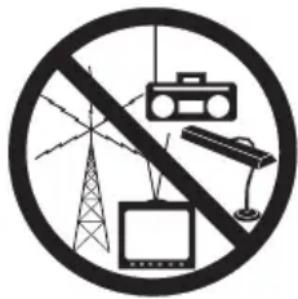
Radio interference may occasionally cause buzzing and humming in your cordless handset, or clicking noises in the base. This interference is caused by external sources such as TV, refrigerator, vacuum cleaner, fluorescent lighting or electrical storm. Your unit is NOT DEFECTIVE. If these noises continue and are too distracting, please check around your home to see what appliances may be causing the problem. In addition, we recommend that the base not be plugged into a circuit that also powers a major appliance because of the potential for interference. Be certain that the antenna on the unit is raised vertically.
Finally, it should be noted that some cordless telephones operate at frequencies that may cause interference to nearby TV's or VCR's. To minimise or prevent such interference, the base of the cordless telephone should not be placed near or on top of a TV or VCR. If interference is experienced, moving the cordless telephone farther away from the TV or VCR will often reduce or eliminate the interference.
More Than One Phone
Each telephone device that you connect draws power from the phone line. We refer to the power drawn as the device's Ringer Equivalence Number (REN). The REN is shown at the bottom part of your telephone. If you are using more than one phone or other device on the line, add up all the RENs. If the total is more than 3, your phones might not ring.
WELCOME
Congratulations on your purchase of the Uniden DS73 cordless telephone. This phone is designed for reliability, long life, and outstanding performance utilising the latest in 900 MHz Digital Spread Spectrum Technology.
FEATURES
• 15 channels (Aust), 7 channels (NZ)
• 900 Digital MHz Spread Spectrum Technology
• Integrated Digital Telephone Answering Device (ITAD)
• Speakerphone
• 20 Enhanced Memory Dial Locations (16 digits maximum per memory)
• Speakerphone Volume
• 32 Digit Redial
• Redial, Flash, Pause and Mute
• Tone Dialing
- Call Waiting Button
- Base to Handset Page
• 14-Day Standby Battery Time
• 4-Hour Talk Time
• Handset Earpiece and Ringer Volume Control
• Hearing Aid Compatible
• Auto Talk
• Auto Standby
• Any Key Answer
Digital Spread Spectrum Technology utilises a digital transmission and a “wider frequency band” compared to a “single narrow band” 30/39 Standard Analogue transmission. The result is a more secure conversation with the clarity of digital sound, extended range, and minimal interference from other cordless phones.
Random Code ^™ digital security automatically selects one of over 16 million codes for the handset and base. This feature prevents unauthorised calls as a result of your phone being activated by other equipment.

To get the most from your phone, please read this owner's manual thoroughly. Be sure to complete and mail the product registration form.

If any of these items are missing or damaged, contact your place of purchase.
INCLUDED IN YOUR PACKAGE
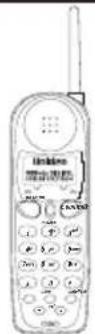
Handset

text_image
Line drawing of a mobile phone with labeled control panel and speaker interfaceBase

natural_image
Simple line drawing of three cylindrical objects with a curved handle (no text or symbols)Rechargeable Battery
natural_image
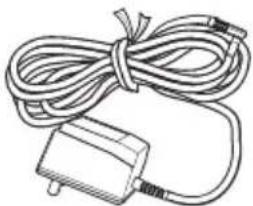
Simple line drawing of a cord tied with a small plug (no text or symbols)AAD 973S
AC Adaptor
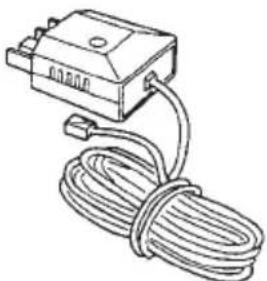
natural_image
Line drawing of a cable-wrapped electronic device with connectors and a connector block (no text or symbols)Long Telephone Cord/Plug
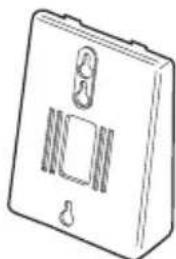
natural_image
Line drawing of a rectangular electronic device with a handle and internal compartments (no text or symbols)Wall Mount Adaptor
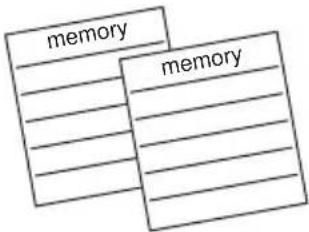
text_image
memory memory2 x Memory Stickers

Wall Mounting Screws
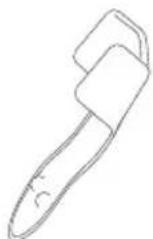
Belt Clip
- This Owner's Manual
- Registration Card
. and other printed materials
INSTALLATION CONSIDERATIONS
▼ Selecting a Location
Before choosing a location for your new phone, here are some important guidelines you should consider:
• The location should be close to both a phone jack and a power outlet.
- Keep the base and handset away from sources of electrical noise such as motors and fluorescent lighting.
- Be sure there is sufficient space to rotate the base antenna fully vertical.
• The base can be placed on a desk, tabletop or mounted on a standard wall plate.
- You should charge the battery in your handset for 15-20 hours before connecting the phone line.
- Most phone equipment available now uses modular jacks. Phone cords are fitted with a molded plastic connector which plugs into this type of jack. If you do not have a modular phone jack, contact your local telephone company for information about their installation.
text_image
Prohibition sign with symbols for radio, TV, lamp, and power grid, crossed out by a diagonal line▼ Connecting the Telephone Cords
Consider these safety guidelines before connecting the telephone cord.
Caution!
- Never install telephone wiring during a lightning storm.
- Never touch uninsulated telephone wires or terminals unless the telephone line has been disconnected.
- Use caution when installing or modifying telephone lines.

Before connecting your phone line, fully charge the Nickel-Metal Hydride battery pack for 15-20 hours.

Place the power cord so that it does not create a trip hazard or where it could become chafed and create a fire or electrical hazard.

Use only the Uniden AC adaptor supplied with this phone plugged to uninterrupted power supply.
DESK/TABLETOP INSTALLATION
text_image
DC IN 9V TEL LINE ① ② AC Adaptor Line in From Telephone Jack ③ ④-
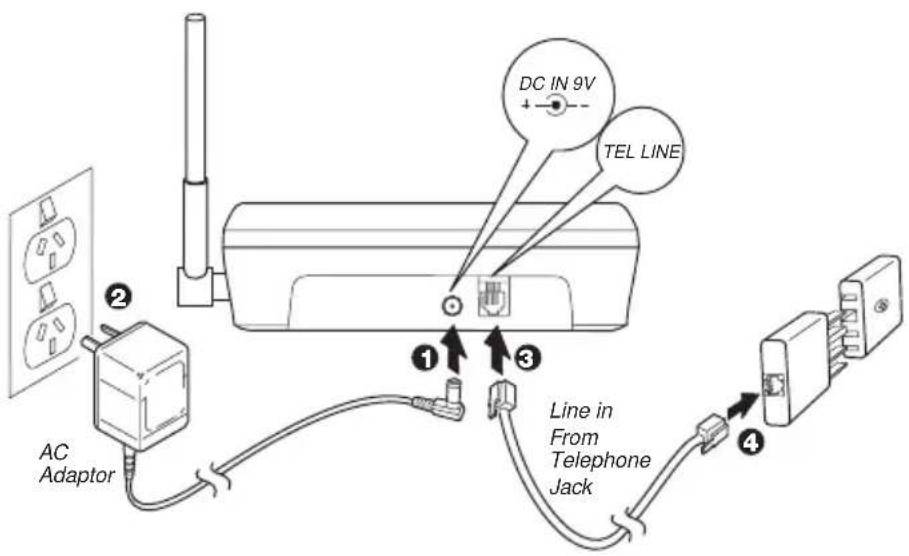
Plug the AC adaptor cord into the 9V DC input jack on the back of the base.
-
Plug the AC adaptor into a standard 240V AC wall outlet.
-
Plug one end of the telephone cord into the TEL LINE jack on the back of the base.
-
Plug the other end of the cord into the telephone jack on the wall.
-
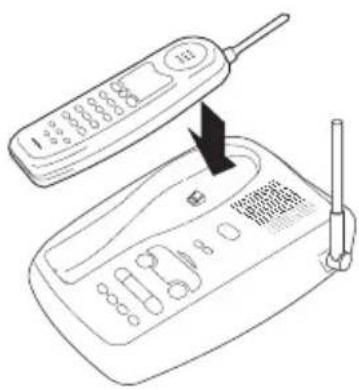
Set the base on a desk or tabletop with the keypad facing up or down then place the handset into the base. Raise the antenna to a vertical position.
-
Place handset on base to charge the batteries (See page 13 for CHARGING THE BATTERY PACK)
text_image
Diagram showing a mobile phone with an attached device and a hand pointing to the screen, indicating a function or operation.
Place the power cord so that it does not create a trip hazard or where it could become chafed and create a fire or electrical hazard.

Use only the Uniden AC adaptor supplied with this phone plugged to uninterrupted power supply.
WALL INSTALLATION
▼ Standard wall plate mounting
This phone can be mounted on any standard wall plate.
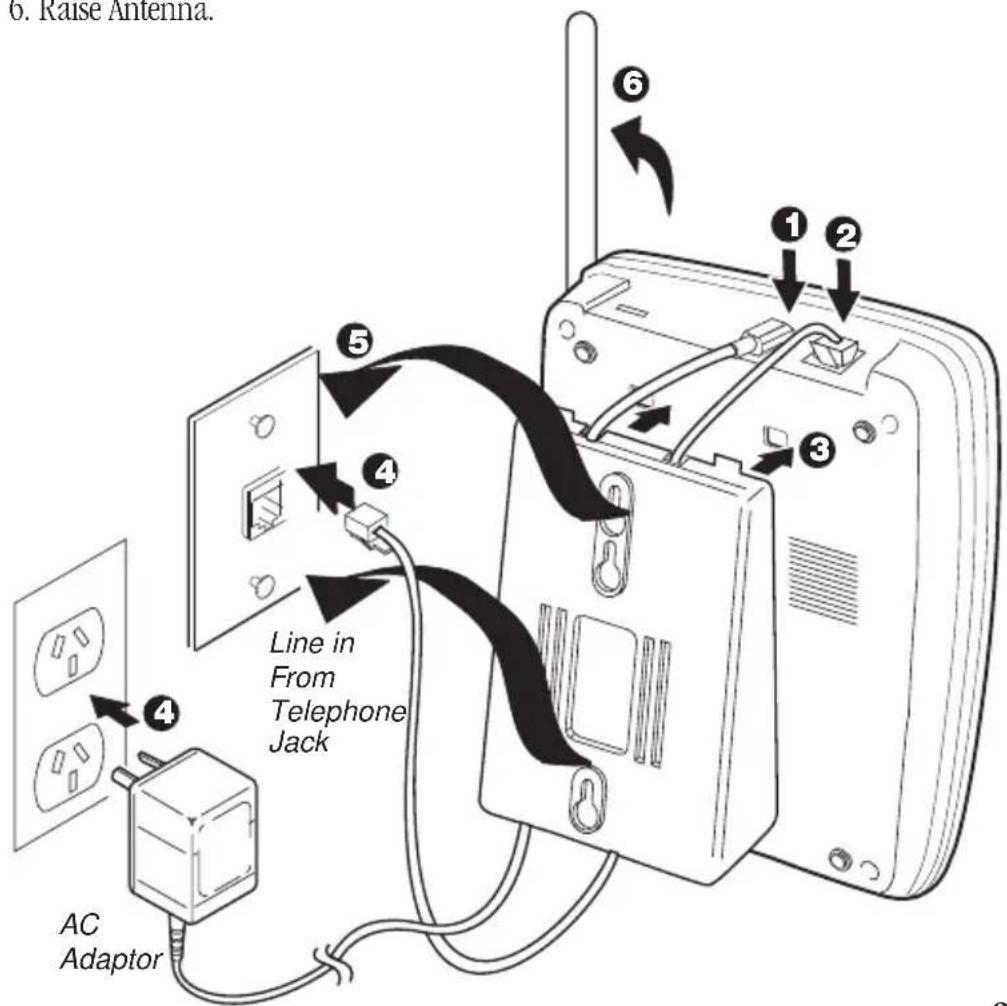
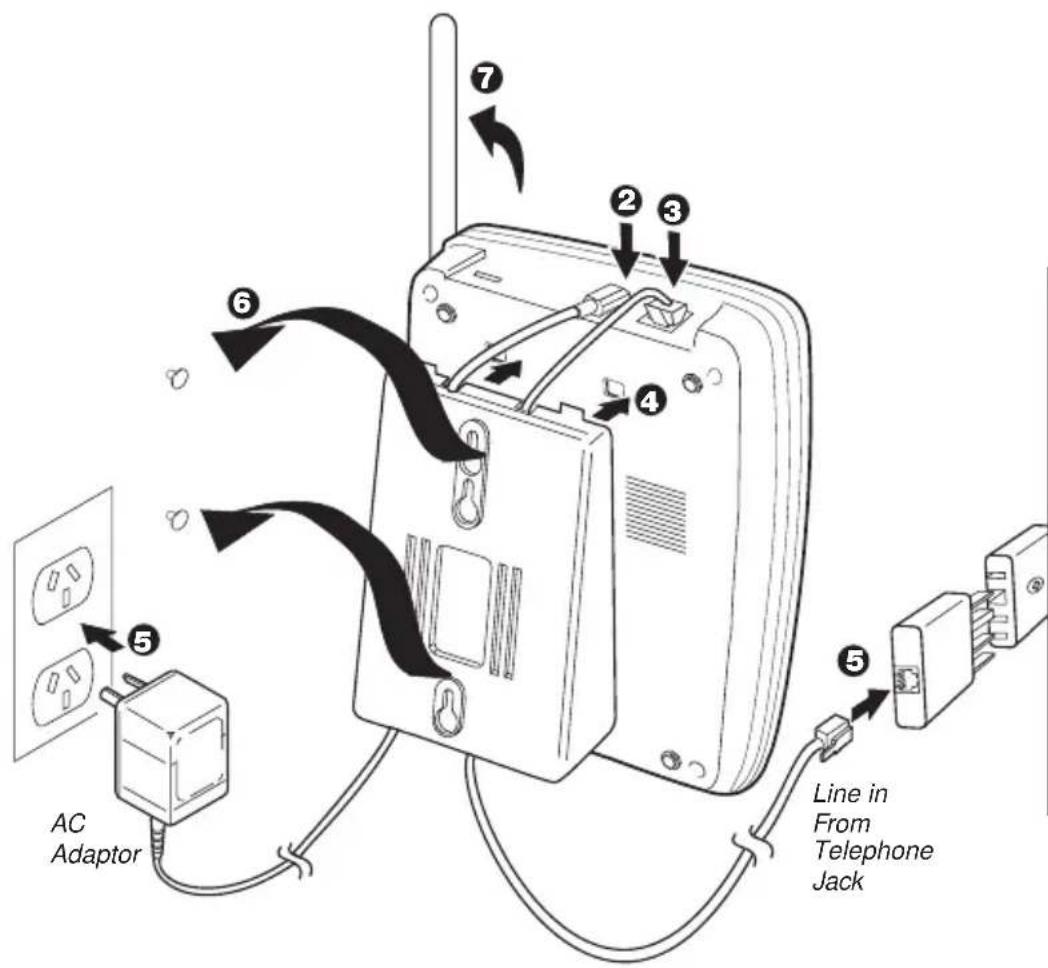
- Plug the AC adaptor into the base.
- Plug one end of the telephone line cord into the TEL LINE jack at the back of the base.
- Snap the wall mount adaptor into the bottom of the base as shown, making sure that the cords are aligned into the slots provided.
- Plug the AC adaptor into a standard 240V AC wall outlet. Plug the other end of the telephone cord into a standard telephone jack on the wall.
-
Align the mounting slots on the base with the mounting posts on the wall. Push in and down until the phone is firmly seated.
-
Raise Antenna.
text_image
6. Raise Antenna. Line in From Telephone Jack AC Adaptor
Before you plug the other end of the telephone cord into the modular jack on the wall, charge the battery (See CHARGING THE BATTERY PACK, page 15).

Be careful not to insert the mounting screws into possible electrical hazards such as cables, wiring, or pipes.
-
On the base, pull the handset retainer out of the slot. Rotate clockwise 180^ .
-
Flip the retainer from front to back. Slide it back into the slot so that the lip of the retainer is (arrow on the retainer must be pointing down). The retainer holds the handset in place.

natural_image
Simple line drawing of a door with a hanging device and directional arrows (no text or symbols)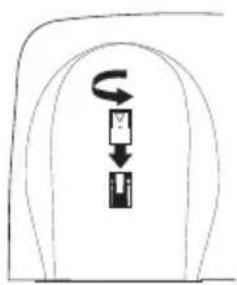
text_image
Diagram showing a device with a curved arrow and a vertical component, possibly indicating rotation or movement.▼ Direct wall mounting
If you don't have a standard wall plate, you can mount your phone directly to the wall. Before doing this, consider the following:
- Select a location away from electrical cables, pipes, or other items behind the mounting location that could cause a hazard when inserting the screws into the wall.
-
Mount your phone near a working phone jack to avoid excessive cord lengths
• Make sure the wall material is capable of supporting the weight of the base and the handset. -
Insert two mounting screws (with their appropriate anchoring device) into the wall 100mm apart. Allow about 5mm between the wall and screw heads for mounting the phone.

text_image
TOP 5mm 100mm- Plug the AC adaptor cord into the 9V DC input jack on the back of the base.
- Plug one end of the telephone cord into the TEL LINE jack on the back of the base.
- Snap the desktop/wall mount adaptor into the bottom of the base as shown, making sure that the cords are aligned into the slots provided.
- Plug the AC adaptor into a standard 240 AC wall outlet. Plug the other end of the telephone cord to a telephone jack.
- Align the mounting slots on the base with the mounting screws on the wall. Push in and down until the phone is firmly seated.
- Raise the antenna
text_image
AC Adaptor Line in From Telephone Jack
Use only Uniden Battery supplied with your phone.
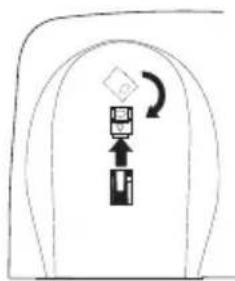
- On the base, pull the handset retainer out of the slot. Rotate clockwise 180^ .
natural_image
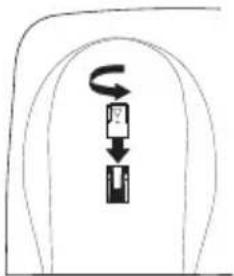
Simple line drawing of a device with an arrow indicating rotation (no text or symbols)- Flip the retainer from front to back. Slide it back into the slot so that the lip of the retainer is up (arrow on the retainer clip must be pointing down). The retainer holds the handset in place.
flowchart
graph TD
    A["开始"] --> B["中间框"]
    B --> C["向下箭头"]
INSTALLING THE HANDSET BATTERY PACK
- Press battery cover release. Slide cover off.
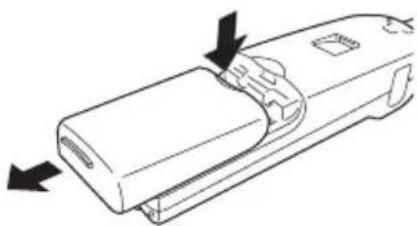
natural_image
Diagram of a mechanical component with directional arrows indicating movement or force (no text or symbols)- Align the plastic connector of the Nickel Metal Hydride battery with it's socket and plug it in.
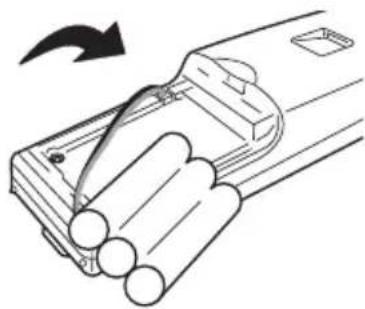
natural_image
Diagram of a battery pack with an arrow indicating rotation (no text or symbols present)- Place the battery pack inside. Please observe how the lead is positioned.

natural_image
Simple line drawing of a container with internal compartments and a handle (no text or symbols)- Slide the battery cover forward until it snaps into place

natural_image
Diagram showing a battery pack being inserted into a tray, with an arrow indicating the process (no text or symbols present)CHARGING THE BATTERY PACK
▼ Initial battery charging
Before using your the phone for the first time, fully charge the rechargeable battery pack for 15-20 hours without interruption.
- Place the handset on the base (facing up or down).
- Make sure that charge LED lights. If the LED doesn't light, be sure the AC adaptor is plugged in and the handset makes good contact with the base charging contacts.
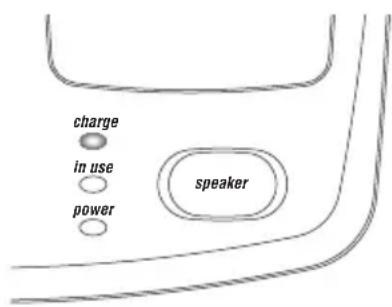
text_image
charge in use power speaker▼ Low battery indicator
The low battery indicator shows when the battery pack is very low and needs to be charged.
At a Low Battery Condition:
- If the phone is not in use, the batt low LED flashes every four seconds.
- If the phone is in use, the batt low LED flashes every four seconds and the handset beeps. Complete your conversation as quickly as possible and return the handset to the base for charging.

text_image
batt lowCLEANING THE BATTERY CONTACTS
To maintain a good charge, clean all charging contacts on the handset and base about once a month. Use a pencil eraser or other contact cleaner. DO NOT use liquids or solvents; you may damage your phone.
ADJUSTING THE VOLUME CONTROLS
▼ Handset ringer volume
Press the vol ▲ or ▼ key on the handset to set the handset ringer volume. There are two ringer volume settings: high and low.
▼ Handset earpiece volume
There are four volume settings for the handset earpiece; max., high, low and min. The handset earpiece volume can be adjusted only during a call.

text_image
MOV △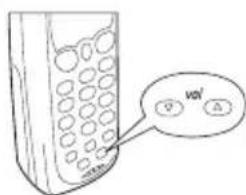
text_image
vol △To lower the volume, press vol ▼. To raise the volume, press vol ▲.
The volume will remain on the same setting when you hang up.
ADJUSTING RINGER TONE
-
Press flash. button.
-
Press 1, 2, 3 or 4 on the keypad to select ringer tone.
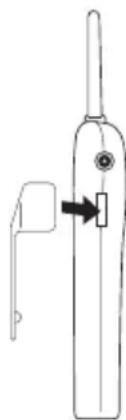
INSTALLING THE BELTCLIP
▼ To attach the beltclip.
Insert the beltclip into the empty slot and press down until it clicks.
natural_image
Line drawing of a handheld electric toothbrush with a handle and arrow indicating the grip (no text or symbols)
▼ To remove the beltclip
Pull back on the release tab and lift the beltclip up.
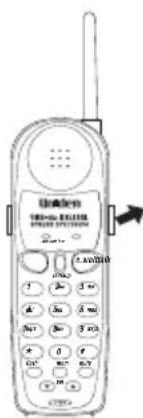
Note: If a belt clip is installed onto your DS73 handset, make sure you place the handset face side down on the base when charging.

Use only the Uniden HS910/HS900 headset.

Keep the headset wire away from handset and base antennas.
HEADSET INSTALLATION
Your phone may be used with an optional headset, the Uniden HS910/HS900. To use this feature, simply plug the headset plug into the headset jack. Your phone is ready for hands-free conversations.
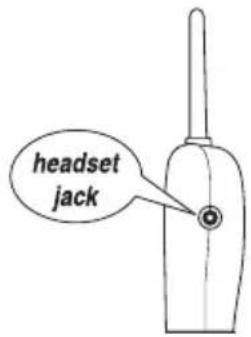
text_image
headset jack
If you are using an optional headset, you must still use the handset keypad for phone operations.
AUTOMATIC DIGITAL CODE SECURITY
To prevent other parties from making unauthorised calls on your phone line, a digital code was added to the DS73. Your phone's handset and base share this code. This code is randomly set each time you place the handset in the base. If the phone experiences a power failure, you must reset the digital security code by placing the handset on the base.
▼ To reset the digital security code
- Restore power to the base.
- Place the handset on the base. talk LED (on the handset) momentarily blinks. The digital security code is reset.
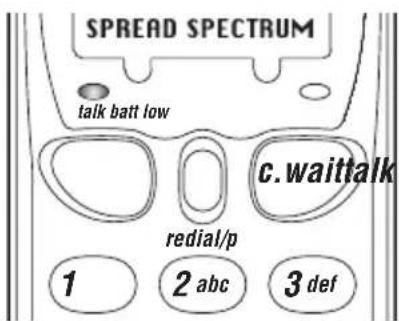
text_image
SPREAD SPECTRUM talk batt low c.waittalk redial/p 1 2 abc 3 defRefer to the CONTROLS & FUNCTIONS diagram at the front of this Owner's Manual.
YOUR NEW PHONE
MAKING AND RECEIVING CALLS
▼ Basic phone operation
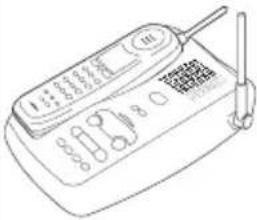 | Handset Off Base Base OnlyHandset On Base  | 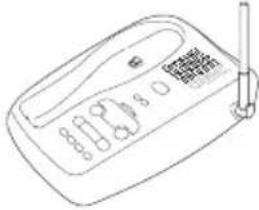 | |
| To answer a call | Pick up handset. | 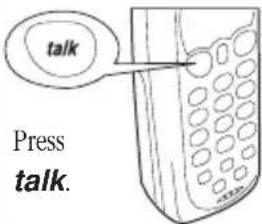 | 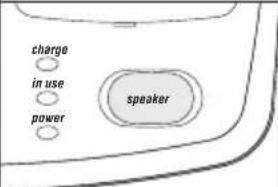 Press speaker. Press speaker. |
| To make a call | 1. Pick up the handset.2. Press talk.3. Listen for the dial tone.4. Dial the number. | 1. Press talk.2. Listen for the dial tone.3. Dial the number. | |
| To hang up | Press talk, or return the handset to the base (AutoStandby). | Press speaker. | |
| To redial | 1. Pick up the handset.2. Press talk.3. Listen for the dial tone.4. Press redial.Note:If any key is pressed before redial, the last number dialed will not redial. | 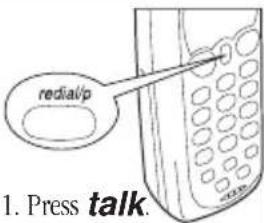 2. Listen for the dial tone.3. Press redial. 2. Listen for the dial tone.3. Press redial. | |

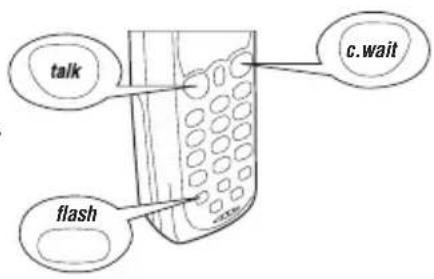
The c.wait procedure toggles between the incoming and original call (vice versa). The c.wait procedure will drop the current call and pick up the incoming call or call on hold.

The flash + 2 call waiting procedure toggles between the incoming and original call (and visa versa).
The flash + 1 procedure will drop the current call connection and pick up the incoming call on hold.

In New Zealand you must subscribe to Telecom's Call Waiting Service before you can use this feature.
CALL WAITING
▼ For Australian Version
Using the c.wait feature
Please call your local telephone service provider to check the availability of this service in your area.
-
While talking you hear the Call Waiting signal.
-
Press c.wait button.
-
The existing call is placed on hold.
-
Talk to the second caller.
-
Press talk button to end the current call.
-
The phone will ring back indicating that the first caller is still on hold.
-
Press talk button to answer this call.
-
Press talk button to end the call.
text_image
talk c.wait flashUsing the Flash Key
To access Telstra's Call Waiting Service, you can either use the c.wait button or the flash key.
-
While talking you hear the Call Waiting signal.
-
Press flash then 2 to switch call and put the current call on hold, or press flash then 1 to drop the current call and pick up the call on hold.
▼ For New Zealand Version
Using the c.wait or flash key
-
While talking you hear the Call Waiting beep signal.
-
Press c.wait or the flash key. This feature sends a 600ms timed "hook-flash" on the telephone line for accessing services such as Call Waiting etc.

During 3 way conference, make sure that the handset is located away from the base unit to avoid feed back effect.
MUTE
To use the mute feature during a conversation, press mute. The other party will not be able to hear you although you can hear them. To disable the mute feature, press mute again.

text_image
* 0 # mem muteflash vol mutePAGE
To locate the handset when it is off the base, press page on the base. The handset beeps for about 15 seconds.
Press talk on the handset twice to stop the beeping and turn handset OFF.
CALL TRANSFER (3 WAY CONFERENCE)
▼ Transferring a call from the Handset to the Base Unit
When a phone call is answered using the handset, you can transfer the call to the base unit.
-
During a call, press speaker on the base. You can start communicating with the calling party at the base unit. You can still communicate with calling party using handset (3 way conference is established automatically).
-
Press talk on the handset to hang up the call on the handset. Thus, communication is through the base only.
▼ Transferring a call from the Base Unit to the Handset
When a phone call is answered at the base unit. You can transfer the call to the handset.
-
During a call, press talk on the handset, you can start communicating with the calling party at the handset. You can still communicate with calling party at the base unit (3 way conference is established automatically).
-
Press speaker on the base to hang up the call on the base unit. Thus, communication is through the handset only.
NOTE
The pause button count as one digit. Pressing redial/p more than once increases the length of pause between numbers.
STORING A PHONE NUMBER IN MEMORY
- Remove the handset from the base.
- Press mem. The talk LED blinks.
- Enter the phone number, up to 16 digits. If a pause is needed during dialing to access long distance service, press redial/p to insert a pause.
- Press mem again.
- Enter the memory location (01-20) on the keypad. A tone indicates that the number is stored.

text_image
talk redial/p memDIALING A NUMBER FROM THE MEMORY
- Press talk on handset.
- Press mem.
- Enter the memory location (01-20). The number automatically dials.
ERASING A STORED NUMBER FROM MEMORY
- Remove the handset from the base unit.
- Press mem button twice.
- Press the memory location (01-20) to be erased. A tone indicates that the stored number is erased from memory.
CHAIN DIALING
On certain occasions after dialing a number, you may be requested by the party or service you are calling to enter a special access code, such as when performing a banking transaction. To store this number, refer to “Storing Memory Dial Numbers” on page 21.
For example, if your bank's telephone number is stored in handset memory location 3, and your account number is stored in handset memory location 4:
- Press talk on the handset.
- Press mem on the handset and number Ⓧ on the handset keypad.
- At the appropriate time, press mem and number on the handset keypad.
- Your handset dials the number and you may proceed with your transaction.
TRAVELLING OUT-OF-RANGE
As you begin to move too far from the base, you will first hear a clicking sound. As you travel further, the noise increases. If you travel out-of-range, your call terminates.
PABX CONNECTION
The DS73 telephone may work with a 2-wire Analogue PABX network. However, with the DS73 hook-flash timing fixed at 100msec, some PABX equipment that uses a different hook flash timing may have its special feature (i.e. placing a call on hold or transferring a call) inaccessible.
NOTE
Check with your PABX supplier if you are not sure whether your PABX network uses Analogue or Digital interface.
INTEGRATED DIGITAL ANSWERING DEVICE
The DS73 has a built-in answering system to answer and record your incoming calls. You can use your answering system to record a conversation, leave a memo message for others who use the phone, or to answer the phone with your personalised message when you are away.
FEATURES
• Digital Tapeless Recording
- Remote Access
• 15 minutes Recording Time
- Toll Saver
- Call Screening
Digital Tapeless Recording allows you to quickly review, save, or delete messages. You'll never worry about a tape wearing out, jamming, or resetting improperly. The Integrated Answering System is easy and convenient to use., However, please read all instructions carefully before using your answering system.
TURNING THE ANSWERING SYSTEM ON/OFF
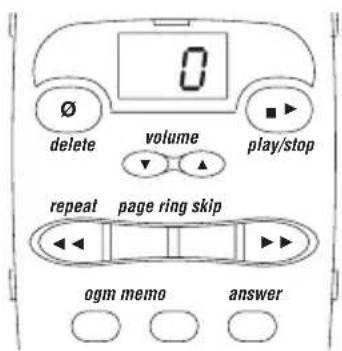
- To turn the answering system on, press answer. A tone sounds. An outgoing message plays on the base speaker. A second tone sounds after the message plays. The message counter LED turns on to indicate the unit is ready to answer calls.
text_image
0 delete volume play/stop repeat page ring skip ogm memo answer- To turn the answering system off, press answer again. A tone sounds and the message counter LED turns off.

Your DS73 will automatically turn ON after 15 rings.
When you receive a call, the answering system automatically plays your own personal greeting.
▼ Recording your personal Outgoing Message (ogm)
- Press answer to turn the answering system ON.
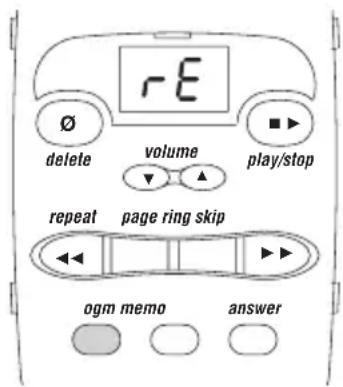
- Press and hold ogm until you hear a short tone.
- After the message counter LED displays, 'rE.' release ogm. Record your message by speaking within 30cm of the base microphone.
- When you finish recording your message, press
text_image
rE delete volume play/stop repeat page ring skip ogm memo answerogm or again. A tone sounds. Your
message plays back for your review, then the answering machine goes to standby.
SETTING THE RING TIME
The ring switch sets your answering system to answer after four or eight rings.
Your DS73 answering device has a default ring time of four. However you have the option to select 8 as well.
To select the ring time to eight, press ring button continuously until the desired ring time shows on the LED display.
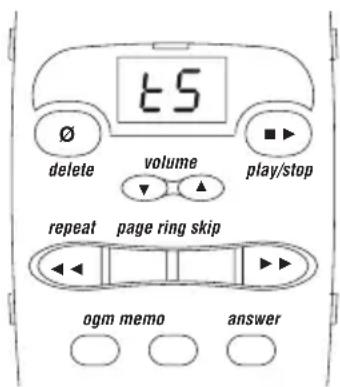
In the TS (Toll Saver) mode, if you have new messages, the answering system answers after two rings. If there are no new messages, the system answers after four rings. This way, when you call long distance to check your messages, and have no messages, you can hang up after the second ring to save a charge.
text_image
15 delete volume play/stop repeat page ring skip ogm memo answerPLAYING YOUR MESSAGES
The caller can leave a message up to a maximum of 60 secs in length (per call). The base LED displays the total number of messages. If the display is blinking, you have new messages. When the message centre is full, the LED displays FL.
1. Press play/stop.
The system plays your new messages first. After each message, a tone sounds. The message counter LED displays the number of current messages. After all incoming messages (ICM) is completely reviewed, the message counter LED stops flashing.
- After reviewing your new messages, you can review your old messages. Press play/stop.
- When all messages have played, a tone sound to indicate end of messages.
To stop playing your message at any time, press play/stop again. The system automatically returns to Standby when all messages have played.
REPEATING OR SKIPPING A MESSAGE
-
Press play/stop to review your messages.
-
After a message plays for a few seconds, press to play or to skip the message.

- You may press play/stop at any time to stop reviewing and return to Standby. The message counter LED shows the total number of messages still on the system.
If you have several messages, press repeat until you return to the message you want replayed.
Each time skip is pressed, the system scans forward one message. If you have several messages, press skip to find the message you want to replay.
DELETING A MESSAGE
- Press play/stop to review your messages.
-
If you decide to delete a message, press and release delete. The system beeps and goes to the next message.
-
After you have played all of your messages, a tone sounds. To delete all your messages, press and hold delete more than 4 seconds. When all messages are deleted, a tone sounds. When you press delete, you are permanently deleting the message. Once deleted, the message cannot be replayed.
RECORDING A VOICE MEMO
The Voice Memo function allows the user to record a message on the base for others who use your phone.
- Press and hold memo. A tone sounds and the message counter LED displays 'rE'.
- Release memo. To record your message, speak within 30cm of the base microphone.
- When you have finished your message, press memo to stop recording. The system returns to Standby.
The Voice Memo function is completely independent of the outgoing message. It's handy for leaving other family members quick messages when you are unavailable. A Voice Memo is treated as an incoming recorded message.
REMOTE ACCESS AWAY FROM HOME
▼ Remote Switch On
In the event that you forgot to turn on your answering machine before you leave home, you can switch it on from a remote location using a touch-tone phone.
- Call your telephone number.
- Wait for 15 rings.
- The answering system announces the ogm.
- Hang up. Your answering machine is ready to receive messages.
▼ Other Functions
You can access other functions such as checking recorded messages, playing or deleting messages, etc. remotely using a touch-tone phone.
- Call your telephone number.
- While the outgoing message is playing, press *55.
-
Message playback automatically begins.
-
You may listen to your messages, or you may select a command from the following chart:
| FUNCTION PRESS |
| Repeat 4 |
| Play 2 |
| Skip 6 |
| Delete # |
| Stop 0 |
| Answer On/Off 1 |
| Ogm Record/Stop 3 |
| Exit * |
- After all of your messages have played, intermittent beeps indicate that your system is in Command Waiting mode. At this time, you may enter another command from the chart above.
- When you are finished, hang up to exit the system. The answering system automatically returns to Standby.
QUICK REFERENCE CHART
If your phone is not performing to your expectations, please try these simple steps first before calling Uniden customer service.
| PROBLEM | SUGGESTION |
| The charge light won't come on when the handset is placed on the base. | Make sure the AC adaptor is plugged into the base and wall outlet.Make sure the handset is properly seated in base.(Face down if the belt clip is installed)Make sure the charging contacts on the handset and base are clean. |
| The audio sounds weak and/or scratchy | Make sure that the base antenna is in a vertical position.Move the handset and/or base to a different location away from metal objects or appliances and try again. |
| Can't make or receive calls. | Check both ends of the base telephone line cord.Make sure the AC adaptor is plugged into the base and wall outlet.Disconnect the AC adaptor for a few minutes, then reconnect it.Place the handset back on the charging cradle for a few seconds. ThetalkLED blinks momentarily indicating that the phone has been reset. |
| The handset doesn't ring or receive a page. | The Ni-MH battery pack may be weak. Charge the battery for 15-20 hours.Be sure the antenna is in a vertical position.The handset may be too far away from the base. Place the base away from appliances or metal objects.Place the handset back on the charging cradle for a few seconds. Thein useLED lights indicating that the phone has been reset.You may have exceeded the REN limit. See MORE THAN ONE PHONE on page 5. |
| No dial tone. | Check the telephone line cord connectors at both ends that they are pushed in firmly until they click.If you had a power failure or had unplugged the base unit, replace the handset on the base unit for two to five second to reset the system. |
| No power on handset unit | Check the Ni-MH battery pack connection inside the main battery compartment on the handset.The handset rechargeable Ni-MH battery pack may need to be charged. |
| Does not charge | Make sure the charging contacts on both the base unit and the handset are in contact during charging.The charging contacts may need to be cleaned. Refer to page 3 or page 14.The Ni-MH battery pack may need to be discharged first before a full charge. |
| Range is limited | Raise or reposition the antenna on the base or handset.Move the base unit so that it is centrally located in your residence or office and make sure that the base unit is not located near appliances. |
| Calls received flutters or fades | The handset rechargeable Ni-MH battery pack may need charging.You may be out of normal operating range. Move closer to the base unit. |
| Cannot store or recall phone numbers from memory | When storing phone numbers, make sure that the handset is in the standby position.When recalling stored phone numbers, check first for a dial tone.Always use two digits when entering/recalling memory index numbers. |
| The answering system does not work. | Make sure the base unit is plugged in.Make sure the answering system is turned on. |
| The answering system does not answer the calls. | The memory may be full. Delete some or all of the saved messages. |
| Messages are incomplete. | The incoming messages may be too long. Remind callers to leave a brief message.The memory may be full. Delete some or all of the saved messages. |
| No sound on the base unit speaker during call monitoring or message playback. | Adjust the speaker volume on the base unit. |
| Cannot access remote call-in features from another touch-tone phone. | Make sure that the touch-tone you're using can transmit the tone for at least two seconds. If it cannot, you may have to use another phone to access your messages. |
GENERAL
Australian Specification: The DS73 complies with TS001, TS002, TS004, AS/NZS 3260 and FCC Part 15 (as per ACA Radio Communications Class Licensing Requirements).
New Zealand Specification: The DS73 complies with PTC200, RFS 29.
Frequency control: PLL
Modulation: Direct Sequence Spread Spectrum; DBPSK
Operating temperature: 0^ to +50^
BASE UNIT
Frequency: 917.4 to 925.8 MHz (15 channels: Australia)
Frequency: 923.4 to 927.0 MHz (7 channels: New Zealand)
Power requirements: 9V 300mA (from AC adaptor)
Size: 152mm (W) x 183mm (H) x 53.5mm (D)
Weight: Approx. 400g
HANDSET
Frequency: 917.4 to 925.8 MHz (15 channels: Australia)
Frequency: 923.4 to 927.0 MHz (7 channels: New Zealand)
Power requirements: Rechargeable NiMH battery pack
Size (without antenna): 50mm (W) x 154mm (H) x 27.5mm (D)
Weight: Approx. 136g (including battery)
Battery: Capacity 550 mAH, 3.6V
Talk mode 4 hours
Standby mode 14days
Specifications, features, and availability of optional accessories are all subject to change without prior notice.
WARRANTY
One Year Limited Warranty
Important: Evidence of original purchase is required for warranty service.
Warrantor: Uniden Australia Pty Limited ACN 001 865 498
Uniden New Zealand Limited
ELEMENT OF WARRANTY: Uniden warrants to the original retail owner for the duration of this warranty, its DS73 (herein after referred to as the Product), to be free from defects in materials and craftsmanship with only the limitations or exclusions set out below.
WARRANTY DURATION: This warranty to the original retail owner only, shall terminate and be of no further effect 12 months after the date of original retail sale. This warranty will be deemed invalid if the product is; (A) Damaged or not maintained as reasonable and necessary, (B) Modified, altered or used as part of any conversion kits, subassemblies, or any configurations not sold by Uniden, (C) Improperly installed, (D) Repaired by someone other than an authorised Uniden Repair Agent for a defect or malfunction covered by this warranty, (E) Used in conjunction with any equipment or parts or as part of a system not manufactured by Uniden.
PARTS COVERED: This warranty covers for one (1) year, the Base/Charging Unit and Handset only. All accessories (AC Adaptor, Wall mount bracket etc) are covered for 90 days only.
STATEMENT OF REMEDY: In the event that the product does not conform to this warranty at any time while this warranty is in effect, the warrantor at its discretion, will repair the defect or replace the product and return it to you without charge for parts or service. THIS WARRANTY DOES NOT COVER OR PROVIDE FOR THE REIMBURSEMENT OR PAYMENT OF INCIDENTAL OR CONSEQUENTIAL DAMAGES. THIS GUARANTEE IS IN ADDITION TO AND DOES NOT IN ANY WAY AFFECT YOUR RIGHTS UNDER THE CONSUMER GUARANTEE ACT.
WARRANTY CARD: If a warranty card has been included with this product then please fill it in and return to us within 14 days of purchase. Your name and the Serial number of the product will then be registered in our database and this will help us process your claim with greater speed and efficiency should you require warranty service.
PROCEDURE FOR OBTAINING PERFORMANCE OR WARRANTY: In the event that the product does not conform to this warranty, the Product should be shipped or delivered, freight pre-paid, with evidence of original purchase (eg. a copy of the sales docket), to the warrantor at:
UNIDEN AUSTRALIA PTY LIMITED UNIDEN NEW ZEALAND LIMITED
SERVICE DIVISION SERVICE DIVISION
345 Princes Highway, 150 Harris Road,
Rockdale NSW 2216 East Tamaki, Auckland
Ph (02) 9599 3577 Fx (02) 9599 3278 Ph (9) 273 8383 Fx (9) 274 4253
Toll Free 1300 366 895 Toll Free 0800 4 UNIDEN
4 864 336
Customers in other States should ship or deliver the Product freight pre-paid to their nearest Uniden Authorised Repair Centre (Contact Uniden for the nearest Warranty Agent to you)
THANK YOU
FOR PURCHASING A UNIDEN PHONE!
Uniden
© 2000 Uniden Australia Pty Limited Uniden New Zealand Limited