CHN-TP8B - Toaster HYUNDAI - Free user manual and instructions
Find the device manual for free CHN-TP8B HYUNDAI in PDF.


User questions about CHN-TP8B HYUNDAI
0 question about this device. Answer the ones you know or ask your own.
Ask a new question about this device
Download the instructions for your Toaster in PDF format for free! Find your manual CHN-TP8B - HYUNDAI and take your electronic device back in hand. On this page are published all the documents necessary for the use of your device. CHN-TP8B by HYUNDAI.
USER MANUAL CHN-TP8B HYUNDAI

GENLINE PRODUCT OF HYUNDAI CORPORATION
natural_image
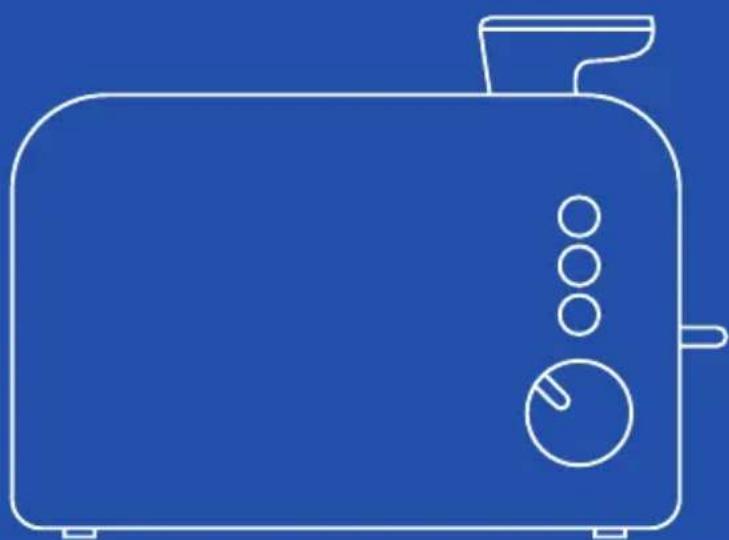
Line drawing of a modern toaster with three buttons and a handle (no text or symbols)
natural_image
Black Hyundai 500 tätigler with control panel and side grates (no visible text or symbols on device body)Thank you for purchasing the CHN-TP8B toaster with tongs to make toasting easier and make it easier for you to put toast in and out.
Before use, carefully read all warnings and instructions for use and keep this manual for future reference.
SAFETY STANDARDS AND WARNINGS
When using electrical appliances, certain safety precautions should always be followed, including the following:
- Before using the appliance, carefully read the instructions for use and in particular the safety warnings and comply with them.
- Keep this manual, for the entire life of the appliance, for consultation purposes.
- Failure to follow the instructions could cause accidents and void the guarantee, relieving the manufacturer from any liability
- This appliance must be used only for the purpose for which it was designed, i.e. as a TOASTER for domestic use but it should be used in cooking areas reserved for staff in shops, offices and other workplaces, on farms, by clients in hotels, motels, bed and breakfasts and other professional environments and similar places. Any other use is considered improper and therefore dangerous.
- The packing elements (plastic bags, cardboard, polystyrene, etc.) must not be left within the reach of children as they are potential sources of danger and must be disposed of according to required by current regulations.
- After removing the appliance from the packaging, check for any transport damage and the integrity of the supply based on the drawing. In the event of damage or doubts as to its actual integrity, do not use the appliance and contact the authorized assistance service.
- Do not use the appliance if the cable or plug are damaged.
- Before connecting the appliance, check that the mains voltage data shown on the data label correspond to those of the available electricity network. The data label is located on the appliance itself.
- Never immerse the appliance in water or other liquids.
- Close supervision is necessary when the product is used in the presence of children.
- Do not leave the product unattended when it is in operation.
- Use the toaster by placing it on a flat, stable and dry surface.
- Do not use the appliance outdoors.
- Only use specially pre-cut bread for the toaster.
- The use of small slices of bread (dimensions less than 85x85mm) can cause a risk of burns.
- Do not put food of excessive dimensions, aluminum foil or containers or metal utensils into the toaster. This could cause an electric shock.
- Make sure to disconnect the product from the mains when not in use and before proceeding with any cleaning operation and maintenance.
- Do not let cord hang over edge of work table or touch hot surfaces. Let the unit cool down before wrapping the cord around the base for storage.
- On first use, the toaster may emit a slight smoke which will fade and disappear within 5-10 minutes. This is completely normal. Before using the toaster for the first time, it is advisable to operate the appliance for a few minutes without inserting the bread inside.
- WARNING: The temperature of accessible metal surfaces can be high when the appliance is in operation. Don't touch the hot surfaces, use pot holders or heat insulating materials.
- Bread can burn, so do not use the toaster near curtains, upholstery or other fabrics, which could easily catch fire.
- Do not place the product near electric or gas burners or heated ovens.
- Do not use in the presence of flammable or explosive gases.
- Do not remove food from the toaster when the lift lever is in the down position.
- Do not use accessories other than those supplied.
- Do not use the product if it has been dropped, if there are visible signs of damage.
- Do not pull the power cable to lift, carry or remove the plug from the socket.
• Make sure that the cable has no knots or bends.
- Check the condition of the electric cable, damaged or knotted cables increase the risk of electric shock.
- Do not use the plug or cord with wet or damp hands or feet.
- This product has been designed for DOMESTIC use only, it has not been designed for industrial or professional use.
- Do not use the toaster without the crumb tray in position. The crumb tray should be cleaned regularly. Do not let crumbs accumulate in the tray.
- Do not put foods with a high sugar content or products containing jams or preserves inside the toaster.
- If the power cable is damaged, it must be replaced by the manufacturer or its authorized technical assistance service or a similarly qualified person in order to avoid risks.
- In the event of a breakdown or malfunction of the appliance switch it off and do not tamper with it. For any repairs, contact the service of authorized technical assistance.
- This appliance can be used by children aged 8 and over and by people with reduced physical sensory or mental capabilities or lack of experience and knowledge if they are supervised or if they have received instructions regarding the safe use of the appliance and if they understand the dangers involved. Cleaning and maintenance operations must not be carried out by children unless they have over 8 years old and are under supervision.
Keep the appliance and its cord out of the reach of children under the age of 8.
- This product is not a toy. Make sure that children do not play with the appliance. Keep the product out of their reach.
- Do not turn the product upside down while it is in operation or connected to the network.
- Store in a dry, dust-free environment away from direct sunlight and direct heat sources.
- This appliance is not intended to be operated via external timers or remote control systems.
- The appliance must be connected to a socket with an earth conductor. The appliance plug must fit snugly into the socket. Do not alter the plug in any way. Do not use adapters.
ATTENTION: If the toast has stuck to the internal sides, unplug the toaster from the mains and let it cool down.
DO NOT USE METAL TOOLS TO REMOVE THE BREAD.
Product description
natural_image
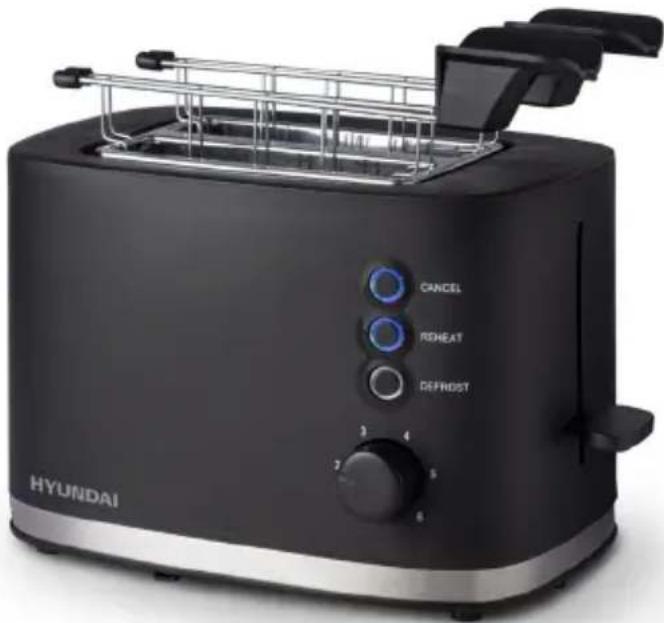
Hyundai Hyundai 20-tea toaster with control panel and side grates (no visible text or symbols on device body)DEFROST button
Set the preferred browning level, insert the frozen bread, lower the tongs handle, then press the button.
The light will turn on. The time will automatically adjust to give the same level of browning as unfrozen bread.
CANCEL button
Press the CANCEL button, the toaster will stop heating immediately.
REHEAT button
Use the lowest setting and reheat only plain, unbuttered bread.
Using the toaster for the first time
If you are using the toaster for the first time, make sure you:
- Carefully unpack the appliance and check for damaged or missing parts.
-
CAUTION: It is important to carefully remove all packing and shipping materials (in the slots and under the gripper lever) as well as any price tags, but do not remove any warning labels from the equipment. Make sure that there are no foreign objects (e.g. packing materials) in the gaps before using the appliance.
-
Clean the outside of the toaster with a damp cloth.
-
Insert the removable crumb tray into the slot provided.
-
Make sure the tongs lever is in the highest position before plugging in the toaster's power cord.
-
Select a location for the toaster. The location should be:
-
A flat, heat resistant and non-flammable surface.
- At least 10 cm away from walls or the back of shelves.
- At least 30cm away from any cabinet or shelving that may be on top of the toaster.
- Away from flammable materials, such as curtains and fabrics.
-
Away from the flame of a gas stove or electrical elements.
-
Plug in the power cord.
-
Connect the toaster without inserting food, push the lever all the way until it locks. (The lever will not lock if the toaster is not plugged in.) The first toasting process will preheat the new components and burn away any dust that may have accumulated during storage or manufacturing. It is normal for this process to create odors.
Using the toaster
Browning level: 1-6 levels
Functions: CANCEL: Cancel, REHEAT: Reheat, DEFROST: Defrost
- Place the toaster upright on a flat, heat-resistant surface free from other combustible materials. Do not place it on or near objects that could be damaged even by moderate heat sources.
- Plug it into a power outlet (turn on the outlet if necessary).
- Use the knob to adjust the browning. The number will indicate the browning level chosen.
- Put the bread centrally into the bread slots (suitable bread size: 100*100*10mm to 120*120*10mm)
- Push the lever all the way down - it will not lock unless the toaster is plugged in.
- The light around the button will turn on and the components will warm up.
- When finished, the lever will lift and the components will shut off.
How to toast bread:
Inserting the bread into the appropriate slots and toasting:
- Prepare the toaster as described in the section "Using the toaster for the first time".
- Using a sharp knife, cut the food (bread, cake, pastry, etc.) into slices of suitable size. It is recommended to get a smooth cut and remove the crumbs.
- Place the slices of bread in the appropriate slots.
-
Set the desired browning with the knob. Level 1 is a minimum toast, level 6 is the maximum toast. For the first use, we recommend selecting a medium browning level (example: 3-4).
-
Press the lever down until it locks into place. The "CANCEL" light comes on (red light) and the toaster starts toasting.
- When the bread has been toasted it is automatically ejected. The appliance switches off automatically.
Warning: the lever will not move if the toaster is not connected to the power supply.
Tips for use:
- It is possible to interrupt the browning cycle at any time by pressing the "CANCEL" button.
- The browning level required depends on your tastes and the freshness of the bread. For example: a short toasting time (low browning level) is sufficient for toasting raisin pastry and fine white bread, but for toasting rye bread, you need to select a higher browning level to get the best result, similar.
- Smaller slices of bread can be removed more easily by lifting the lever (approx. 2 cm above the middle position).
- Make sure you are cutting evenly and smoothly. Use a sharp knife to cut. Remove crumbs and protruding edges, especially when heating sandwiches.
- When toasting two slices of bread, place one slice in the center of each slot.
- When toasting a slice of bread, place the slice in the center of one of the slots.
To toast frozen food:
The defrost function first defrosts the bread and then toasts it, which means that the cycle takes a little longer than the normal toasting cycle.
- Place the slices of bread in the slots.
- Select the desired browning level.
- Press the lever down until it locks. Then the button indicator lights up (CANCEL button).
- The following browning level is recommended:
- Low for bread from the refrigerator or thin.
- Medium for frozen slices of bread.
-
High for thicker slices of frozen bread and sandwiches.
-
Then immediately press the "DEFROST" button. The indicator light will turn on.
- The bread is defrosted and toasted.
- It is possible to interrupt the cycle by pressing the CANCEL button.
- At the end of the defrost cycle, the bread is automatically ejected and the lights go off. The appliance switches off automatically.
CAUTION: Never insert your fingers or metal utensils into the bread slots. Food from the toaster oven can be very hot. Handle with Care.
Removing crumbs
Remove crumbs frequently, they are unhygienic and could cause a fire hazard. Unplug the toaster and allow it to cool completely. Remove and empty the crumb tray. Wipe it clean with a damp cloth, dry it, and place it back in the toaster. Do not use the toaster unless the crumb tray is in place and closed.
Useful tips
If two slices are toasted, it is recommended that they be of similar size, thickness and freshness.
Non-fresh bread contains less moisture, so it makes the toast crispier. Stale or thin bread cooks faster than fresh bread so use a lower setting. Pastries (cakes etc.) brown much faster than regular bread.
Cleaning and maintenance
- Always let the appliance cool down before cleaning it.
- Before cleaning, always turn off the appliance and unplug it from the power supply.
- Do not immerse the appliance and the power cord in water or any other liquid, do not wash them in the dishwasher.
- Clean the toaster with a damp cloth and a little washing-up liquid. Do not use abrasive agents, detergents, disinfectants as they can damage the appliance.
- To remove jammed slices of bread, unplug the toaster and give it a gentle shake. Never try to remove jammed slices of bread with sharp or pointed tools.
- Regularly remove crumbs and all small pieces of bread from the crumb tray. To do this, clean the crumb tray with a damp cloth, then dry it thoroughly and place it back in the appliance.
Warning: crumbs accumulate in the tray and could catch fire if you don't empty it periodically.
The appliance must be completely dry before using it again.
General warnings:
To remove food stuck in the slots unplug the toaster and remove the food once it has cooled.
Do not place food on top of the toaster while it is heating up.
Do not try to force the food out with the lift lever. This could damage the toaster.
Storage
Keep the appliance on a clean and dry surface, where it cannot tilt or fall and no other objects could fall on it and where it is safe from external influences (electric shocks, heat, humidity, direct sunlight). Keep out of reach of children. Do not place
heavy objects on the appliance or on its parts.
Always turn off the appliance by pressing the CANCEL button and unplug the power cord when not in use.
If the appliance is not in use for a long time, clean it before using it.
Troubleshooting
Nothing happens when I press the lever or buttons:
- Make sure the power cord is securely plugged into the electrical outlet.
- Make sure the power cord is not damaged in any way.
- Make sure the electrical outlet is working by plugging in another appliance. If not, check the circuit breakers or fuses in your home.
RATING LABEL
HYUNDAI
The product is made conforming with all the applicable European regulations
Food contact
Read carefully the user manual
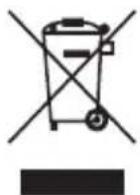
INFORMATION TO USERS according to Legislative Decree No. 49 of March 14, 2014 “2012/19/UE Implementation of the Directive on Waste Electrical and Electronic Equipment (WEEE) “ The crossed-out dustbin symbol indicates that the product at the end of its life must be collected separately from other waste. The user should, therefore, take the equipment with the essential components at the end of its useful life to the separate collection center of electronic and electrical waste, or return it to the retailer when purchasing new equipment of equivalent type, in ratio of one to one, or one to zero for devices with larger side less than 25 CM. The separate collection for the decommissioned equipment for recycling, treatment and environmentally compatible disposal contributes to avoid possible negative effects on the environment and human health and promotes recycling of the materials. Improper disposal of the product by the user entails the application of administrative sanctions according to Legislative Decree No. 49 of 14 March 2014
REV. 10.2023
HYUNDAI
HYUNDAI
MADE IN CHINA
Email: info@hyundai-electronics.it
Sito Web: www.hyundai-electronics.it
