NPB-240 - Pregnant Naxa - Free user manual and instructions
Find the device manual for free NPB-240 Naxa in PDF.


User questions about NPB-240 Naxa
0 question about this device. Answer the ones you know or ask your own.
Ask a new question about this device
Download the instructions for your Pregnant in PDF format for free! Find your manual NPB-240 - Naxa and take your electronic device back in hand. On this page are published all the documents necessary for the use of your device. NPB-240 by Naxa.
USER MANUAL NPB-240 Naxa
THE NEW GENERATION IN TECHNOLOGY
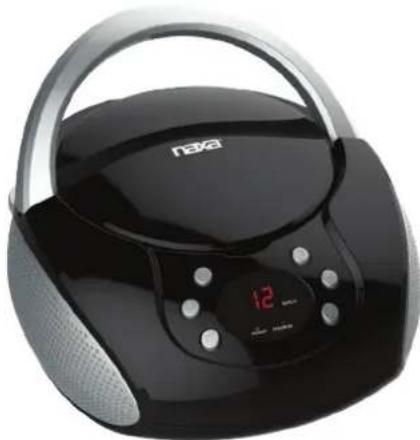
Portable CD Player with AM/FM Stereo Radio
NPB-240
natural_image
Black and silver Lenovo portable radio with a digital display showing 12 o'clock (no visible text or symbols on device body)Instruction Manual
Please read carefully before use and keep for future reference.
Table of Contents
Thank You 3
In the Box 3
Before You Start 4
At a Glance 5
Connect Power 7
AC Power....7
Battery Power....7
Basic Functions......8
Turning the Unit On and Off 8
Adjusting the Volume 8
Using the Radio 8
Using the CD Player 9
About Compact Discs 9
Loading a Disc....9
Playing a Disc....10
Repeat Playback 10
Programming a Playlist 11
Using the AUX Input 12
Warnings and Precautions....13
Specifications 17
Support 17
Thank You
We know you have many choices when it comes to technology; thank you for choosing us here at Naxa Electronics. Established in 2001 in Los Angeles, California, we are dedicated to delivering products that entertain and delight.
We trust that you will be happy with your purchase. Please read this manual carefully and save it for reference. You may also find the latest FAQ, documentation, and other product material at our website. Come visit us on the web at www.naxa.com and see all that we have to offer!
In the Box
Please take a moment to make sure that you have everything in the list below. Although we make every effort to ensure that each Naxa device is securely packed and sealed, we know a lot can happen in between us and you. If anything is missing, check back with your local retailer to get immediate assistance. If they cannot help you, please contact our Naxa Support team at www.naxa.com/naxa_support.
• NB-240 portable CD player
- AC power cable
- User manual
Before You Start
Please take note of the following before you start.
- Do not block the ventilation openings or holes.
- Avoid installing the unit in locations described below:
- Places exposed to direct sunlight or close to heat radiating appliances (such as electric heaters, or on top of other stereo equipment that radiate heat).
- Places lacking ventilation or dusty places.
- Places subject to constant vibration.
- Places that are humid or moist.
- Operate turning controls and switches as instructed in manual.
- Before turning on the power for the first time, make sure that the power cord is properly installed.
- Store your tapes or CD in a cool area to avoid damage from heat.
CAUTION: TO REDUCE THE RISK OF ELECTRIC SHOCK, DO DOT REMOVE COVER (OR BACK). NO USER SERVICEABLE PARTS INSIDE, REFER SERVICING TO QUALIFIED SERVICE PERSONNEL.
WARNING: Remove batteries if exhausted or if they will not be used again for a long period. The incorrect use of batteries can cause electrolyte leakage and will corrode the compartment or cause the batteries to burst, therefore:
- Do not mix battery types, e.g. alkaline with zinc carbonate.
- When inserting new batteries, replace all batteries at the same time.
At a Glance
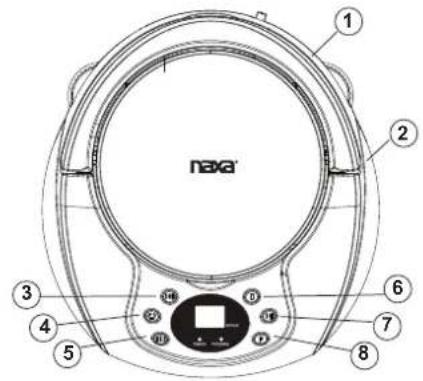
1 Handle Raise the handle to transport the unit safely and easily.
2 Speakers Full-range drivers deliver powerful stereo sound.
3 ▶ Next: Press to skip to the next track. Next/Fast Forward Fast Forward: Press and hold to scan quickly forward through the current track.
4 ☐ Press to change the repeat playback mode. Repeat
5 Previous: Press to skip to the previous track. Reverse: Press and hold to scan quickly in reverse through the current track.
6 ■ / Stop Press to stop playback.
7 ▶ Play/Pause Press to start, pause, or resume playback.
8 Program Press to enter Program mode in order to create a custom playlist.
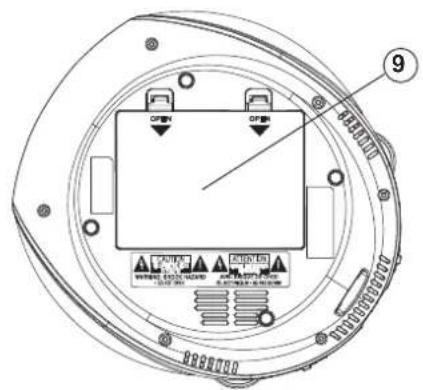
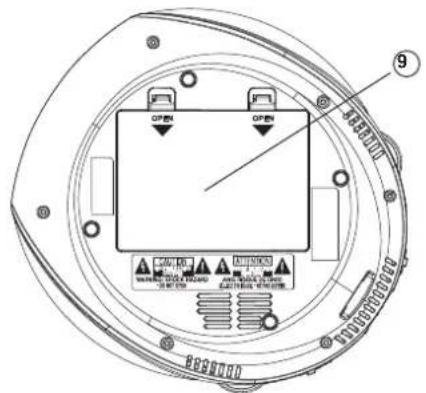
9 Battery compartment Load 6 UM-2 "C" size batteries into the compartment for portable power.
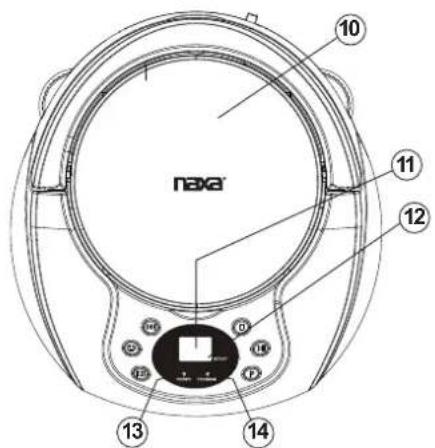
| 10 CD compartment | Load compact discs here. The label side should face up.Never open the compartment while a CD is playing or spinning! |
| 11 LED screen Displays player status information. | |
| 12 Repeat indicator | Lights up when the player is in repeat playback mode.Blinking: Repeat the current track.Steady: Repeat all tracks |
| 13 Power indicator | Lights up when power is connected. |
| 14 Program indicator | Lights up when a program playlist is playing. |
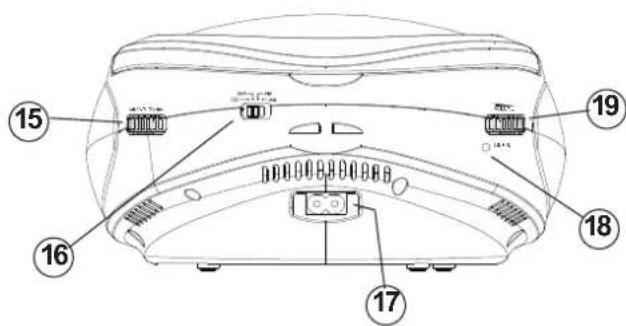
| 15 Radio Tuning dial | Turn the dial to tune to a radio station.The frequency scale is printed on the dial. |
| 16 FUNCTION switch | Set the switch to the position of the desired function mode (CD, FM, AM). Set the switch to OFF to turn the player off. |
| 17 AC power socket | Connection for the included AC power cable. |
| 18 AUX Input jack | Play audio from a device that is connected to this 3.5mm input jack. |
19 Volume dial Turn the dial to adjust the volume level.
Connect Power
The unit can be powered by AC household power, or by batteries.
AC Power
This unit operates on AC 120 V \~60 Hz power.
With the included AC power cable, connect the AC power socket [17] found on the rear of the player to a wall power outlet that provides AC 120V \~60Hz power.
Please be sure the power outlet you plug this unit into is working and receives constant (unswitched) power.
Contact your local power utility if you are not sure which type of power you have.
Do not attempt to operate the radio on any other power source. You could cause damage to the unit and void your warranty.
Battery Power
Install 6 UM-2 "C" size batteries to enjoy music wherever you are.
-
Remove the lid from the battery compartment [9] found on the bottom of the main unit.
-
Load six "C" size batteries, taking care to match the polarities marked on the inside of the compartment.
Remove the batteries if they are exhausted or will not be used for a long time.
Do not mix old and new batteries.
Do not mix alkaline, standard (carbon-zinc) or rechargeable (nickel-cadmium) batteries.
Batteries contain chemicals that may be regulated by your local government. Dispose of them properly according to regulations.
Basic Functions
Turning the Unit On and Off
To turn the unit on, set the FUNCTION switch [16] to one of the function positions (e.g., CD, AM, FM). The LED screen [11] will light up.
To turn the unit off, set the FUNCTION switch [19] to the OFF position.
Adjusting the Volume
Turn the VOLUME dial [17] clockwise or counter clockwise to increase or decrease the volume level, respectively.
Using the Radio
Set the FUNCTION switch [16] to the AM or FM position to start using the radio.
-
Select a frequency band.
-
To listen to AM stations, set the FUNCTION switch [16] to the AM position.
-
To listen to FM stations, set the FUNCTION switch [16] to the FM position.
-
Turn the Radio Tuning dial [15] to tune to a radio station; the current station can be seen on the frequency scale printed on the dial.
-
Optimize radio reception:
- The antenna is built into the player. Adjust the orientation and position of the player itself to optimize radio reception.
Using the CD Player
Set the FUNCTION switch [16] to the CD position to start using the CD player.
About Compact Discs
This player is compatible with all digital audio CDs, digital audio CD-Recordable discs (CD-R) and CD-Re-writable discs (CD-RW) that have been finalized, and CD-DA format digital audio CDs.

Only handle a CD by its edge. Avoid touching the label or the playable side with your hands or any other object.
Loading a Disc
- Open the CD compartment [10]. Lift up from the CD door latch found towards the front of the player.
- Load a compatible disc. Place the CD into the compartment with its label facing up.
- Close the CD compartment [10]. Lower the door; the spring hinge will help close the compartment securely.
- The player will attempt to read the disc once the compartment is closed.
- The LED screen [11] will show the amount of playable tracks on the disc.

To ensure good system performance, wait until the player recognizes and reads the disc before proceeding.
Playing a Disc
With a compatible disc in the CD compartment [10]:
- Press [7] to start playback.
- Play will start from track 1.
- To pause playback, press ▶ [7] while a disc is playing.
- The LED screen [11] will flash the track number.
- Press▶[7] again to resume playback.
- To stop playback, press [6].
• To select a track to play:
- Press ▶ [3] to skip to the next track. The LED screen [11] will change tracks accordingly.
- Press [5] to skip back to the previous track. The LED screen [11] will change tracks accordingly.
• To scan through a track at high speed:
- Press and hold ▶[3] during playback. Play will advance quickly through the current track; release the key to resume playback at normal speed.
- Press and hold [5] during playback. Play will reverse quickly through the current track; release the key to resume playback at normal speed.
Repeat Playback
You can change the order in which the tracks of a CD are played by pressing the Ckey [4]. To cancel these special playback modes, press C[4] until the Repeat indicator [10] turns off.
- To repeat a single track, press ⬇ [11] until the Repeat indicator [12] flashes. The current track will replay repeatedly until play is stopped.
- To repeat all the tracks, press the press [4] until the Repeat indicator [12] lights steadily. The player will replay all tracks on the CD until play is stopped.
Programming a Playlist
When the CD is stopped, you can select up to 20 CD tracks to play in any order that you choose.
- Press the ■ey [6] to make sure that playback has stopped.
- Press [8]. The LED screen [11] will flash "01" and the Program indicator [9] will flash.
- Use the REW or FF keys [5, 3] to choose a track to enter into the playlist.
- Press [8] to save the track into the playlist. The LED screen [11] will then flash the next playlist track number (e.g., "02").
-
Repeat steps 3 and 4 until your playlist is complete. You can save up to 20 tracks.
-
Press [7]. Play will start from the first track in the playlist and the Program indicator [14] will flash. Play will stop once all of the programmed tracks have been played.
- Press ■[6] to stop the programmed playlist, then press ■[6] a second time to clear the playlist from Program memory.

Opening the CD compartment [10] will clear the playlist from Program memory.
Using the AUX Input
Set the FUNCTION switch [16] to the CD position to play devices connected to the AUX Input jack [18].
- Connect the audio source to the player. Use an optional audio patch cable to connect the 3.5mm headphone or line-out jack of the audio source to the 3.5mm AUX Input jack [18] found on the rear of the player.
- Prepare the player. Set the FUNCTION switch [16] to the CD position. Turn the VOLUME dial [19] to lower the volume level.
- Prepare the audio source. Start playback on the device. Set the volume level of the device to approximately 80% of its maximum.
- Adjust the final volume. Turn the VOLUME dial [19] of the player to set the volume to a comfortable level.

Use the audio source to control playback (e.g., stop, play, next). Use the player to control the volume.
Warnings and Precautions
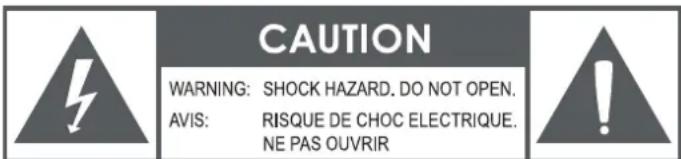
CAUTION: TO REDUCE THE RISK OF FIRE AND ELECTRIC SHOCK, DO NOT REMOVE THE COVER (OR BACK) OF THE UNIT. REFER SERVICING ONLY TO QUALIFIED SERVICE PERSONNEL.
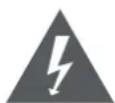
The lightning flash with arrowhead symbol within an equilateral triangle is intended to alter the user to the presence of uninsulated "dangerous voltage" within the product's enclosure that may be of significant magnitude to constitute risk of electric shock

The exclamation point within an equilateral triangle is intended to alert the user to the presence of important operation and servicing instructions in the literature accompanying the appliance.
CLASS 1 LASER PRODUCT
CLASS 1 LASER PRODUCT APPAREIL LASER DE CLASSE 1 PRODUCTO LASER DE CLASE 1
CAUTION INVISIBLE LASER RADIATION WHEN OPEN AND INTERLOCKS DEFEATED. AVOID EXPOSURE TO BEAM
This product contains a low power laser device.

On Protection Against Laser Energy Exposure
- As the laser beam used in this product is harmful to the eyes, do not attempt to disassemble the casing.
- Stop operation immediately if any liquid or solid object should fall into the cabinet.
- Do not put anything in the safety slot. If you do, the laser diode will be ON when the disc compartment door is still open.
- If the unit is not to be used for a long period of time, make sure that all power sources are disconnected from the unit. Remove all batteries from the battery compartment, and unplug the AC-DC adapter from the wall outlet. Make it a practice to remove the AC-DC adapter by grasping the main body and not by pulling the cord.
- This unit employs a laser. The use of controls or adjustment or performance of procedures other than those specified here may result in exposure to hazardous radiation.
CAUTION
- Do not block the ventilation openings or holes.
- Do not place any naked flames (such as lighted candles) on the apparatus.
- When discarding batteries, follow all local rules and laws governing the disposal of batteries. Consider the environmental impact of your actions!
- Invisible laser radiation when open and interlock has failed or been defeated. Avoid direct exposure to beam.
- To prevent fire or shock hazard, do not expose this appliance to rain or moisture.
Important Safety Information
- Read Instructions: All the safety and operating instructions should be read before the product is operated.
- Retain Instructions: The safety and operating instructions should be retained for future reference.
- Heed Warnings: All warnings on the product and in the operating instructions should be adhered to.
- Follow Instructions: All operating and usage instructions should be followed.
- Cleaning: Unplug this product from the wall outlet before cleaning. Do not use liquid cleaners or aerosol cleaners. Use a damp cloth for cleaning.
- Attachments: Use only attachments recommended by the manufacturer. Use of other attachments may be hazardous.
- Water and Moisture: Do not use this product near water (e.g., near a bathtub, washbowl, kitchen sink, laundry tub, in wet basements, or near a swimming pool and the like).
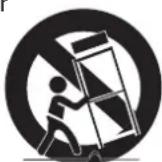
- Accessories: Do not place this product on an unstable cart, stand, tripod, bracket, or table. Use only with carts, stands, tripods, brackets, or tables recommended by the manufacturer or
sold with the product. Any mounting of the product should follow the manufacturer's instructions and should use a mounting accessory recommended by the manufacturer. A product and cart combination should be moved with care. Quick stops, excessive force, and uneven surfaces may cause the product and cart combination to overturn.
- Ventilation: Slots and openings in the cabinet are provided for ventilation to ensure reliable operation of the product and to protect it from overheating. These openings should never be blocked by placing
the product on a bed, sofa, rug, or other similar surface. This product should not be placed in a built-in installation such as a bookcase or rack unless proper ventilation is provided or the manufacturer instructions have been adhered to.
-
Power Sources: This product should be operated only from the type of power source indicated on the rating label. If you are not sure of the type of power supply to your home, consult your product dealer or local power company. For products intended to operate from battery power or other sources, refer to the operating instructions.
-
Grounding or Polarization: This product may be equipped with a polarized alternating-current line plug that has one blade wider than the other. This plug will only fit into the power outlet in one direction. This is a safety feature. If you are unable to insert the plug fully into the outlet, try reversing the direction of the plug. If the plug should still fail to fit, contact an electrician to replace the obsolete outlet. Do not defeat the safety purpose of the polarized plug.
-
Power-Cord Protection: Power supply cords should be routed so that they are not likely to be walked on or pinched by items placed upon or against them, paying particular attention to cords at plugs, convenience receptacles, and at the point which they exit from the product.
-
Protective Attachment Plug: The product may be equipped with an attachment plug with overload protection. This is a safety feature. See the operating instructions for replacement or directions to reset the protective device. If replacement of the plug is required, be sure the service technician has used a replacement plug that has the same overload protection as the original plug as specified by the manufacturer.
-
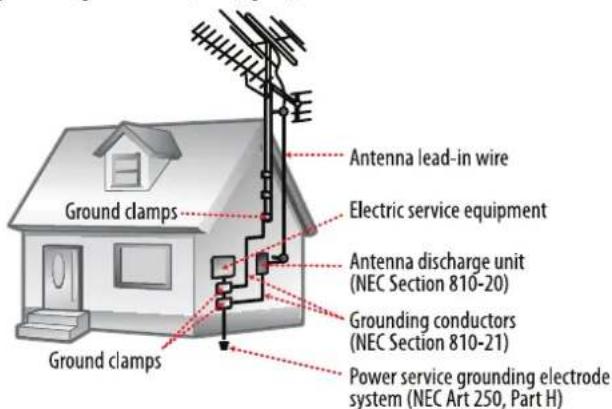
Outdoor Antenna Grounding: If an outside antenna is connected to the product, be sure the antenna system is grounded so as to provide some protection against voltage surges and built-up static charges. Article 810 of the National Electrical Code, ANS/NFPA70 provides information with regard to proper grounding of the mast and support-
ing structure, grounding of the lead-in wire to an antenna-discharge unit, size of groundingconductors, location of antenna-discharge unit, connection to groundingelectrodes, and requirements for the grounding electrode (see figure).
-
Lightning: For added protection for this product, unplug it from the walloutlet and disconnect the antenna or cable system during a lightning stormor when it is left unattended and unused for long periods of time. This will prevent damage to the product due to lightning or power-line surges.
-
Power Lines: An outside antenna system should not be located in the vicinity of overhead power lines or other electric light or power circuits, or where it can fall into such power lines or circuits. When installing an outside antenna system, extreme care should be taken to keep from touching such power lines or circuits, as contact with them might be fatal.
-
Overloading: Do not overload wall outlets, extension cords, or integral conveniencereceptacles as this can result in a risk of fire or electric shock.
-
Object and Liquid Entry: Never push objects of any kind into this product through openings as they may touch dangerous voltage points or shout-outparts that could result in a fire or electric shock. Never spill liquid of any kindon the product.
-
Servicing: Do not attempt to service this product yourself as opening or removing covers may expose you to dangerous voltage or other hazards. Refer all servicing to qualified service personnel.
-
Damage Requiring Service: Unplug this product from the wall outlet and referservicing to qualified service personnel under the following conditions:a) when the power-supply or plug is damaged; b) if liquid has been spilled or if objects have fallen into the product; c) if the product has been exposed to rain or water; d) if the product does not operate normally by following the operating instructions. Adjust only those controls that are covered by the operating instructions as improper adjustment of other controls may result in damage and will often require extensive work by a qualified technician to restore the product to its normal operation; e) if the product has been dropped or damaged in any way; f) when the product exhibits a distinct change in performance—this indicates a need for service.
-
Replacement Parts: When replacement parts are required, be sure that your service technician has used replacement parts specified by the manufacturer or have the same characteristics as the original part. Unauthorized substitutions may result in fire, electric shock, or other hazards.
-
Safety Check: Upon completion of any service or repairs to this product, ask the service technician to perform safety checks to ensure that the product is in proper operating condition.
-
Wall or Ceiling Mounting: The product should be mounted to a wall or ceiling only as recommended by the manufacturer.
- Heat: The product should be situated away from heat sources such as radiators, heat registers, stoves, or other products (including amplifiers) that produce heat.
FCC NOTICE
This device complies with Part 15 of the FCC Rules. Operation is subject to the following two conditions: (1) this device may not cause harmful interference, and (2) this device must accept any interference received, including interference that may cause undesired operation.
Note: This equipment has been tested and found to comply with the limits for a Class B digital device, pursuant to Part 15 of the FCC Rules. These limits are designed to provide reasonable protection against harmful interference in a residential installation. This equipment generates, uses and can radiate radio frequency energy and, if not installed and used in accordance with the instructions, may cause harmful interference to radio communications. However, there is no guarantee that interference will not occur in a particular installation. If this equipment does cause harmful interference to radio or television reception, which can be determined by turning the equipment off and on, the user is encouraged to try to correct the interference by one or more of the following measures:
- Reorient or relocate the receiving antenna.
- Increase the separation between the equipment and receiver.
- Connect the equipment into an outlet on a circuit different from that to which the receiver is connected.
- Consult the dealer or an experienced radio/TV technician for help.
CAUTION ON MODIFICATIONS
Any changes or modifications not expressly approved by the grantee of this device may void the authority granted by the FCC to operate the equipment.
WARNING
This product contains lead, a chemical known to the State of California to cause cancer and birth defects or other reproductive harm. Wash hands after handling.
CAUTION
This product is equipped with a polarized plug (one blade is wider than the other blade) as a safety feature to reduce the risk of electrical shock. This plug will fit into a polarized outlet only one way. This is a safety feature. If you are unable to insert the plug into the electrical outlet, try reversing the plug. If the plug still does not fit, contact a qualified electrician. Never use the plug with an extension cord unless the plug can be fully inserted into the extension cord. Do not alter the plug. Do not attempt to defeat the safety purpose of the polarized plug.
NEC NATIONAL ELECTRICAL CODE
Dot not apply oil or petroleum products to this product.
GRAPHIC SYMBOLS WITH SUPPLEMENTARY MARKINGS ARE LOCATED ON THE BOTTOM OF THE UNIT. USE OF ANY CONTROLS OR ADJUSTMENTS OR PERFORMANCE OF PROCEDURES OTHER THAN THOSE HEREIN SPECIFIED MAY RESULT IN HAZARDOUS RADIATION EXPOSURE.
Specifications
Power requirements AC 120 V \~60 Hz
DC 9 V (6 x UM-2 "C" batteries)
Dimensions 8.0 x 9.0 x 5.0 in (LWH)
Disc Support CD, CD-R/RW
Media Formats CD-audio (CDDA)
Receiving Bands AM, FM
Audio output Max 1.2 W x 2 (2.4 W total)
Input 3.5mm AUX audio
Note: Product are improved continuously. We reserve the right to modify the product and specifications without prior notice.
Support
If you have problems with your device, please consult the instructions in this manual. Please also visit us on the web at www.naxa.com to get up to the minute news, alerts, and documentation for your device. For additional assistance, please contact Naxa Technical Support.
NAXA Technical Support
2320 East 49th St.
Vernon, CA 90058
http://www.naxa.com/naxa_support/
MADE N CHINA

natural_image
Black and silver Lenovo portable radio with a digital display showing 12 o'clock (no visible text or symbols on device body)Manual de Operación
NAXA Technical Support
2320 East 49th St.
Vernon, CA 90058
http://www.naxa.com/naxa_support/
HECHO IN CHINA