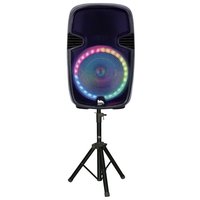
Naxa Sound Pro NDS-1521 - Loudspeaker

Sound Pro NDS-1521 - Loudspeaker Naxa - Free user manual and instructions

Find the device manual for free Sound Pro NDS-1521 Naxa in PDF.

📄 12 pages English EN Download 💬 AI Question 10 questions ⚙️ Specs
Notice Naxa Sound Pro NDS-1521 - page 1
Pick your language and provide your email: we'll send you a specifically translated version.
Product Type Portable Bluetooth Speaker
Brand Naxa
Model Sound Pro NDS-1521
Color Black
Dimensions (W x H x D) 7.5 x 3.5 x 3.0 inches
Weight 1.5 lbs
Power Source Rechargeable lithium-ion battery via USB
Battery Capacity 1200 mAh
Playback Time Up to 6 hours
Bluetooth Version 5.0
Bluetooth Range 33 ft (10 m)
Audio Output Stereo 3W x 2
Supported Audio Formats MP3, WAV, WMA
FM Radio Yes, with automatic scanning
USB/SD Card Playback Yes (USB port and microSD card slot)
Hands-free Calling Yes, built-in microphone
Controls Buttons for power, volume, play/pause, mode, next/previous track
Care and Cleaning Wipe with a soft, dry cloth; avoid liquids
Safety Precautions Do not expose to water, heat, or flammable materials
Spare Parts / Repairability Contact Naxa support for service; not user-repairable
What's Included Speaker, USB charging cable, audio cable, user manual

Frequently Asked Questions - Sound Pro NDS-1521 Naxa

How do I pair my phone with the Naxa Sound Pro NDS-1521?
Turn on the speaker and enable Bluetooth on your phone. Search for devices and select NDS-1521. If prompted, enter the PIN 0000. The speaker will confirm with a tone.
How do I charge the speaker?
Use the included USB charging cable to connect the speaker to a USB power source (e.g., computer, wall adapter). The LED indicator will show red while charging and turn off when fully charged.
Can I play music from a USB drive or SD card?
Yes, insert a USB drive or microSD card (FAT32 formatted) into the respective slot. The speaker will automatically switch to that mode and play supported audio files (MP3, WAV, WMA).
How do I use the FM radio?
Press the Mode button until you reach FM mode. Then press and hold the Play/Pause button to auto-scan and save stations. Use Next and Previous to navigate saved stations.
Why is there no sound from the speaker?
Check that the speaker is turned on and volume is not muted. Ensure the audio source is connected properly via Bluetooth or cable. Also verify that the source device volume is not too low.
How do I answer a call with the speaker?
When connected via Bluetooth, an incoming call will ring through the speaker. Press the Play/Pause button to answer. Press it again to hang up. The built-in microphone allows hands-free conversation.
What is the Bluetooth range?
The effective Bluetooth range is up to 33 feet (10 meters) in open space. Walls and obstacles can reduce the range.
Can I use the speaker while charging?
Yes, you can use the speaker while it is connected to a USB power source. However, charging time may be longer if using it simultaneously.
How do I reset the speaker?
If the speaker is unresponsive, press and hold the Power button for 10 seconds until it powers off. Then turn it on again. For a full reset, remove all cables and wait 1 minute.
Is the speaker waterproof?
No, the Naxa Sound Pro NDS-1521 is not waterproof. Avoid exposure to rain, splashes, or liquids. Use it only in dry environments.

User questions about Sound Pro NDS-1521 Naxa

0 question about this device. Answer the ones you know or ask your own.

Ask a new question about this device

The email remains private: it is only used to notify you if someone responds to your question.

No questions yet. Be the first to ask one.

Download the instructions for your Loudspeaker in PDF format for free! Find your manual Sound Pro NDS-1521 - Naxa and take your electronic device back in hand. On this page are published all the documents necessary for the use of your device. Sound Pro NDS-1521 by Naxa.

USER MANUAL Sound Pro NDS-1521 Naxa

Manual de Operación

FAVOR DE LEER EL MANUAL COMPLETAMENTE ANTES DE OPERAR ESTE PRODUCTO.

CONSERVAR EL MANUAL PARA FUTURAS REFERENCIAS

ADVERTENCIAS
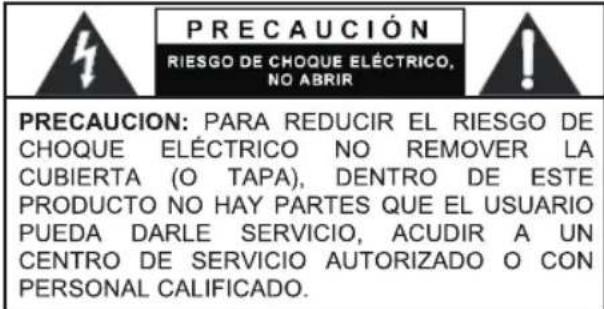
PRECAUCIÓN RIESGO DE CHOQUE ELÉCTRICO, NO ABRIR PRECAUCION: PARA REDUCIR EL RIESGO DE CHOQUE ELÉCTRICO NO REMOVER LA CUBIERTA (O TAPA), DENTRO DE ESTE PRODUCTO NO HAY PARTES QUE EL USUARIO PUEDA DARLE SERVICIO, ACUDIR A UN CENTRO DE SERVICIO AUTORIZADO O CON PERSONAL CALIFICADO.

9 11 13 12 8 14 10 13 3 FOLI-PRE TRIMBER 5 6 7 Light Switch POWER 2 1 BEANS PACS PDS-1001 Temperature: 1200 Power: 1200 Battery: 1200 LED Light: MAX. INPUT: MAX. POWER: FM Power Radio: LED-Low: HiFi SPEAKER CAUTION MAX. OF ELECTRIC SWITCH DO NOT OPEN PDC to Computer/TPM/RESET This device is supplied…

http://www.naxa.com/supportcenter/

Hecho en China

Table of contents Click a title to access it
Manual assistant
Powered by Anthropic
Waiting for your message
Product information

Brand : Naxa

Model : Sound Pro NDS-1521

Category : Loudspeaker