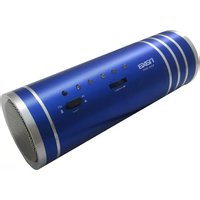
NAS-3055 - Loudspeaker Naxa - Free user manual and instructions
Find the device manual for free NAS-3055 Naxa in PDF.


| Product Type | Portable Tube Speaker |
| Brand | Naxa |
| Model | NAS-3055 |
| Power Output | 1 × 3W |
| Frequency Response | 75 Hz – 50 kHz |
| Signal-to-Noise Ratio | > 90 dB |
| Power Input | DC 5V (via mini USB) |
| Battery Type | Built-in rechargeable lithium battery |
| Battery Capacity | 3.7V, 600mAh |
| Charging Time | Approximately 4 hours with 5V/1000mA charger |
| Music Formats Supported | MP3, WMA |
| Playback Sources | USB flash drive, Micro SD card, AUX input, FM radio |
| FM Radio | Yes (built-in) |
| Colored LED Light | Yes (built-in) |
| Controls | Power button, Toggle switch (volume, track navigation, mode selection, play/pause), Mode button (via hold toggle) |
| Inputs | Micro SD slot, USB slot, AUX (3.5mm), DC 5V mini USB |
| Output | 3.5mm earphone jack |
| Included Accessories | Mini USB cable, AUX cable, user manual |
| Dimensions | Approximately 6.3 x 3.0 x 3.0 inches (estimated from tube shape) |
| Weight | Approximately 0.6 lbs (estimated) |
| Recommended Use | Indoor/outdoor portable listening |
| Care Instructions | Clean with dry cloth; avoid contact with liquids; unplug when not in use |
| Safety Warning | Do not disassemble or open the unit |
Frequently Asked Questions - NAS-3055 Naxa
User questions about NAS-3055 Naxa
0 question about this device. Answer the ones you know or ask your own.
Ask a new question about this device
Download the instructions for your Loudspeaker in PDF format for free! Find your manual NAS-3055 - Naxa and take your electronic device back in hand. On this page are published all the documents necessary for the use of your device. NAS-3055 by Naxa.
USER MANUAL NAS-3055 Naxa
Portable Tube Speaker with USB/SD/MMC Inputs, FM Radio, and Colored LED Light

natural_image
Three NEXA NEX-3005 mobile speakers with blue, red, and black models (no visible text or symbols on the devices themselves)INSTRUCTION MANUAL
Controls and Inputs:
Power ON/Power Off button
Toggle switch (+/- volume control, Channel +/- scan button for Radio function, Mode, skip/reverse and Play/Pause.)
Micro SD card Slot
USB Slot
DC-5V power input (mini USB slot)
LINE-IN/AUX-IN
Earphone input jack
Technical Specs:
Output power: 1*3W
Frequency Response: 75Hz-50KHz
SNR>90dB
Power input: DC 5V
Battery: Built-in 3.7V 600mAh lithium battery
LINE-IN/AUX-IN input: 3.5mm AUX cable
Music Format: MP3/WMA
Instructions:
- Charging the unit – Connect the mini USB cable (included with the unit) to the DC 5V input on the back of the unit and connect the other end to the USB slot your computer to charge the unit.
- Press the power button to turn on the unit.
- Insert a micro SD card or a USB flash drive – make sure that the music file format that you are trying to play are in MP3 or WMA file format.
- Toggle switch functions:
a. Slide/turn switch to the left or right to select next or previous music.
b. Slide/turn and hold it to the left or right to reduce or increase the volume.
c. Press toggle switch to play or pause music.
d. Press and hold toggle switch for 3 seconds to change modes - USB→Micro SD→LINE/AUX IN (external audio input) →Radio.
Note:
- Do not disassemble or open the unit.
- When using a DC-5V-1000MA charger, unit will be fully charged within 4 hours. a charger that is less than 500mAh is not recommend
- Connecting the mini USB cable into the DC-5V input slot can enhance signal reception.
- Please power off the unit when not in use and unplug any USB flash drive or SD card.
Statement: We reserve the right to modify this product without prior notice.
Packing Accessories:
- 1 PC NAS-3055
- 1PC Mini USB cable (for charging)
- 1PC AUX cable
- English and Spanish manual
Brand : Naxa
Model : NAS-3055
Category : Loudspeaker