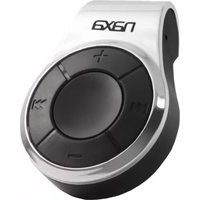
NM-107 - Mp3 player Naxa - Free user manual and instructions
Find the device manual for free NM-107 Naxa in PDF.


| Product Type | MP3 Player |
| Brand | Naxa |
| Model | NM-107 |
| Display | LCD screen with backlight |
| Internal Memory | 8 GB |
| Expandable Memory | microSD card slot (up to 32 GB) |
| Audio Formats Supported | MP3, WMA, WAV |
| Battery Type | Rechargeable Lithium-ion |
| Battery Capacity | 300 mAh |
| Playback Time | Up to 8 hours |
| Charging Method | USB cable (5V, 500mA) |
| Dimensions (H x W x D) | 90 x 40 x 10 mm (3.5 x 1.6 x 0.4 in) |
| Weight | 28 g (1.0 oz) |
| FM Radio | FM tuner with presets and auto-scan |
| Voice Recording | Built-in microphone, WAV format |
| Equalizer | Preset modes (Normal, Pop, Rock, Jazz, Classic) |
| Connectivity | USB 2.0 for data transfer and charging |
| Included Accessories | Earphones, USB cable, User Manual |
| Maintenance | Keep dry; clean with soft, dry cloth |
| Safety | Avoid extreme temperatures; do not disassemble |
| Spare Parts & Repairability | Contact Naxa service center; not user-serviceable |
Frequently Asked Questions - NM-107 Naxa
User questions about NM-107 Naxa
0 question about this device. Answer the ones you know or ask your own.
Ask a new question about this device
Download the instructions for your Mp3 player in PDF format for free! Find your manual NM-107 - Naxa and take your electronic device back in hand. On this page are published all the documents necessary for the use of your device. NM-107 by Naxa.
USER MANUAL NM-107 Naxa
MP3 Player with 4GB Built-In Flash Memory

natural_image
Close-up of a naxa brand rotary knob with black and orange casing (no visible text or symbols beyond branding)INSTRUCTION MANUAL
Table of Contents
Key Features.... 3
What your Digital MP3 Music Player includes.... 3
Computer System Requirements 3
Getting to Know Your MP3 Player 3
How to Transfer MP3 Songs to Your Player (PC)....4
How to remove/disconnect the player from the computer....4
Using Your MP3 Digital Music Player 4
Charging Your MP3 Digital Music Player 4
Technical Specifications 4
Troubleshooting 5
Introduction
Thank you for purchasing the digital mp3 music player and USB memory device. This small, portable and light weight device can store up to 4GB allowing you to enjoy hours of your favorite MP3 songs on the go.
Please read this manual carefully before using your new player.
We reserve the right to make changes to this manual without prior notice.
Caution: Please use caution when using the Digital MP3 Player with the supplied Earphones while Riding a Bicycle, motor cycle, a motor vehicle, operating machinery, etc. as this can be extremely dangerous. Please check your Laws & use your discretion, to ensure proper safe usage, & to avoid accidents and/or injury.
Key Features
• Supports WMA/MP3 audio format
• USB disk with no driver required
• 4GB of internal memory
• Small, Portable and light weight
- Adjustable Clip
• Rechargeable Lithium Battery
What your Digital MP3 Music Player includes
- MP3 Player
- Earphones
- USB cable
- User Manual
Computer System Requirements
Microsoft Windows 2000/XP/Vista
- Pentium® 4, Celeron® AMD, Athlon® processor or higher
• 128MB RAM
• 100MB free hard drive space
• Available USB Port
Macintosh OS
- Mac G3 or higher
• 128 MB RAM (256 MB recommended)
• 100 MB free disk space
• Available USB port
Getting to Know Your MP3 Player
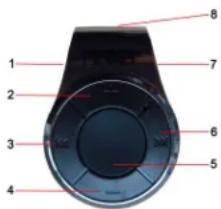
- Reset;
- Volume +
- Previous Song
- Volume -
- Play / Pause Button
- Next Song
- Headphones input & USB port
- Adjustable Clip
How to Transfer MP3 Songs to Your Player (PC)
-
Plug the small end of the provided USB cable to the USB port of your MP3 player, and plug the other end to an available USB port on your computer.
-
The player will light up with the blue flashing light flashing to indicate that the device is recognized and ready for data transfer.
-
Wait for the computer to recognize the player.
-
Open the Disk folder (Your MP3 Player)
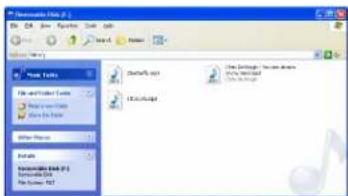
- Simply 'Drag & Drop' or copy and paste up to 4GB of the MP3 songs saved on your computer to this removable disk folder. The blue LED will flash quicker while the files are transferring to the player. When the LED stops flashing this indicates that the songs have been transferred.
Note: To remove songs simply delete them from this folder.
- Congratulations! You can now unplug the USB cable and begin to listen to the songs you have transferred to your MP3 player.
How to remove/disconnect the player from the computer.
Failure to correctly disconnect/remove any USB device from your computer may lead to Computer malfunctions, hardware problems, computer crashes etc., & may damage your MP3 player. Please read your Computer User Guide for instructions on how to remove external USB Devices.
Using Your MP3 Digital Music Player
- Plug the earphone included in the package into the earphone slot on the side of the player.
- Push the middle button "Play" for a while
- Play - The blue LED will begin to flash, indicating that the first song has begun to play.
- Pause - To pause the song, press the middle 'Play/ Pause' button once.
• The blue LED will stop flashing, but the light still on
• After 1 or 2 minute the blue LED will turn off and the player will go into standby mode
- Press the 'Play/Pause' button again to resume playing the selected song.
- Hold the device with the + sign in the up direction.
- Next song - Press the Right button to select and begin playing the next song.
- Previous song - Press the Left button to select and begin playing the previous song.
- Increase Volume - Press the '+' button to increase the playback volume.
- The blue LED will flash quickly
- Decrease Volume – Press the '-button to decrease the playback volume.
• The blue LED will flash quickly
Charging Your MP3 Digital Music Player
If you push the player and no LED lights begin to flash or no songs begin to play, this indicates that the player's power supply is low.
To recharge the built in Lithium battery, connect your MP3 player to an available USB port on your computer.
This player is also a standard USB drive on Windows 2000, XP, Vista. This player supports USB power supply.
Technical Specifications
| Memory capacity | 4GB |
| Charging time | 4 hours |
| Playing time | Approx. 3 hours |
| Music format | MP3 |
| Operating system | Windows 2000, XP and Vista |
*Storage capacity (available memory) is 3.6GB. 200MB is used for Data Management functions
| Format | Quality | with 4GB Memory |
| MP3 | 128 kbps | 1000 Songs |
Based on 4 minutes per song
Actual Storage Capacity may vary.
Troubleshooting
| No Power | Plug the player into the USB port of your computer to recharge the built-in rechargeable lithium battery |
| No sound heard from headphone. | Press the ‘+’ Volume button and connect the headphone plugs firmly.Check whether the headphone plug is dirty.Corrupted MP3 may make a static noise and the sound may cut off.Make sure that the music files are not corrupted. |
| Download of music files fails. | Check whether USB cable is damaged and is connected properly.Check whether the player’s memory is full.Make sure that only WMA/MP3 files have been transferred. Other file formats will not be heard on this player. |

- Table of Contents
- Introduction
- Key Features
- What your Digital MP3 Music Player includes
- Computer System Requirements
- Getting to Know Your MP3 Player
- How to Transfer MP3 Songs to Your Player (PC)
- How to remove/disconnect the player from the computer.
- Using Your MP3 Digital Music Player
- Charging Your MP3 Digital Music Player
Brand : Naxa
Model : NM-107
Category : Mp3 player