WA-35 - Sound system Monacor - Free user manual and instructions
Find the device manual for free WA-35 Monacor in PDF.


User questions about WA-35 Monacor
0 question about this device. Answer the ones you know or ask your own.
Ask a new question about this device
Download the instructions for your Sound system in PDF format for free! Find your manual WA-35 - Monacor and take your electronic device back in hand. On this page are published all the documents necessary for the use of your device. WA-35 by Monacor.
USER MANUAL WA-35 Monacor
- Precautions 1
- Features 2
- Specification 3
3-1 All-in-One portable wireless active speaker // WA-35 3
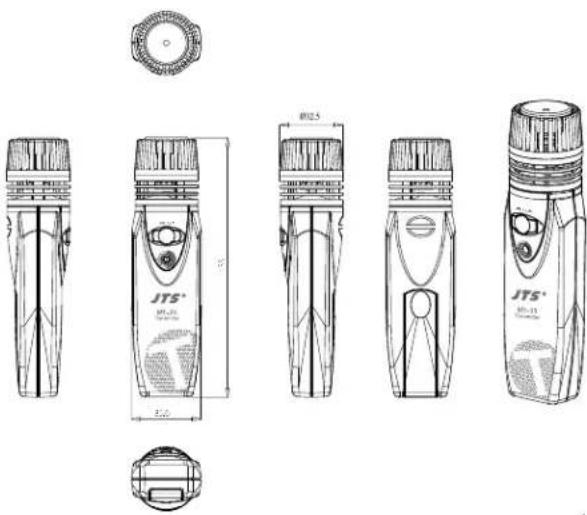
3-2 UHF PLL Handheld Transmitter // Mh-35 4
- Function Description 5
4-1 Multi-functional Wireless Portable Loud Speaker System //WA-35 5
4-2 Handheld transmitter // Mh-35 7
4-3 Accessories 8
- Connection 9
- Operation 10
- Important notice on product 15
- Important Notice 16
Thank you for choosing the JTS wireless system. In order to obtain the best efficiency from the system, you are recommended to take a few minutes to read this instruction manual carefully.
1. Precautions
Please read the User Instructions carefully before use.
Please keep the User Instructions properly.
Never place the device near a heat source, such as an oven, electric
heater or other heating facility, so as to avoid the hazard of fire.
Never let the device in a moist, dusty environment of use for
prolonged period; otherwise, it is likely to cause short circuit in the
device.
Do not continue to use the product under weather with lightning
in order to prevent lightning strike which would cause injuries to
persons or damages to the device.
Store the device in appropriate places, preventing from accidental
drop, which would cause injuries to persons or damages to the device.
Never continue to operate the device when an anomaly arises in its
operation. Turn off the power immediately and contact the distributor
as soon as possible.
-
Smoke or smell of burn comes from the device;
-
Water or any liquid flows into the device;
3.The device actuates abnormally due to accidental damage;
- The device operates with abnormal noises or the speaker does not
sound:
5.The sound is distorted out of tune.
Keep the socket or plug of the device clean at all time to avoid excessive
built-up dust, which would otherwise tend to cause poor contact in the
device or lead to fire from wire overload.
Careful use of cord
- Do unplug the plug by holding its head instead of the lead to
prevent broken cord, which would result in a fire.
- Do not cut or wind the cable, as such behavior tends to damage
the cord. Place the cord flat in a ventilated place with flammable
objects at a distance.
Go green. Do not dispose of the battery indiscrectly. Make a habit
of recycling
WARNING NOTICE
| In order to reduce the risk of fire or device damage, do not put the device in high-temperature or moist environment for prolonged period. Also, do not use this product under weather with lightning. | To reduce the risk of electric shock, do not remove the housing from the device without permission. Users are requested to seek assistance from a qualified technician or the dealer, in case of need. |
2. Features
• Technique of Class D Audio Power Amplifier
The amplifier of WA-35 uses the up-to-date technique of Class D Audio Power Amplifier, able to provide higher efficiency in power use for the system as well as offer outstanding audio output.
Powered by Lithium battery
The system incorporates 14.8V lithium battery*1, able to provide the system with higher output power and reduce the unit weight by about 30% , enabling the use by carrying for long hours. Continuous music playback can last 7 hours; continuous voice speech can last 10 hours*2.
Splash-proof design, * enables use in severe environment*3.
UPS design: when power supply in DC is inputted/removed, the unit switches to DC/Battery supply mode automatically without affecting the system operation.
- Energy conserving device: when the sound source devices are not in use*4, the system automatically switches off the amplifying circuit, which saves 60% of the energy, effectively lengthening the standby time of the system.
* Wireless microphone system: incorporates a built-in wireless microphone system with UHF band, which works with Mh-35 handheld wireless microphones (powered by one single AA cell) to provide 100M non-interfered transmission and 16 channels to choose from.*5, *6
• Built-in alarm sound and LED lighting
Provides SOS visual call for help, lighting and two types of pre-recorded alarm sound which is suitable for use in school or other application in emergency evacuation.
Built-in audio: supports music playback via USB/SD, and 20 programmable channels of FM radio stations.
※Notes:
-
The system operates on 14.8V power supplied by lithium battery which is 16.8V fully charged. When the battery is below 12V, the system switches off forcibly to avoid over-discharge.
-
The above-stated time of device use are for reference only. They vary according to the volume adjustment.
-
The description refers to spills which may happen in everyday life.
-
Sound source devices refer to "wireless microphone system", "built-in audio" and "input from microphone with cord".
-
The low power radio device has passed the type approval; any firm, vendor or user may not tamper with by changing its frequency, amplifying its power or altering its originally designed features and functions without permission.
-
The use of low power radio device may not affect aviation safety or interfere with legal telecommunication. The use should be stopped immediately when any interference is found; no use may be resumed until interference is eliminated by improvement. The above-mentioned legal telecommunication refers to radio communication operated under telecom regulations. The low power radio device tolerates interference from legal telecommunication or radioactive devices for industrial, scientific and medical use.
3. Specification
3-1 All-in-One portable wireless active speaker // WA-35
Frequency Preparation..... PLL Synthesized Control
Carrier Frequency Range..... 502-960MHz
LED Display.... 0\~F
DC power.... 19-20V (48Wor above is recommend)
Li-od Battery.... 14.8V/2300mAh (Averaging of 4 hours charging time)
Speaker 4° [4Ω full range driver]
Buid-in Audio.....【USB/SD】MP3/FM
MIC input impedance..... 10KΩ
THD+N .... <0.1% (1KHz@1W)
Power Output(RMS).... 35W(4Ω@THD10%)
S/N Ratio >98 dB
T.H.D. ±8dB @ 1KHz
Frequency Response..... 50-20,000Hz
Dimension(m/m).... 145.5mm(W)*179.4mm(H)*223mm(D)
Weight 1.75Kg
Others.... Alarm \~ LED light
natural_image
Technical line drawing of a mechanical component with mounting holes and internal channels (no text or symbols)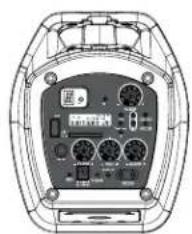
natural_image
Top-down view of a device rear panel with labeled ports and connectors (no readable text or symbols)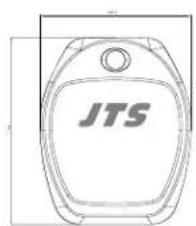
text_image
JTS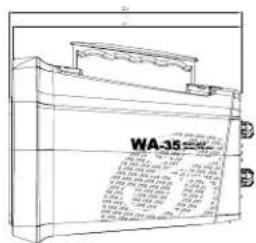
text_image
WA-35 100 GB 1.0 GB 100 GB 2.0 GB 100 GB 3.0 GB 100 GB 4.0 GB 100 GB 5.0 GB 100 GB 6.0 GB 100 GB 7.0 GB 100 GB 8.0 GB 100 GB 9.0 GB 100 GB 10.0 GB 100 GB 11.0 GB 100 GB 12.0 GB 100 GB 13.0 GB 100 GB 14.0 GB 100 GB 15.0 GB 100 GB 16.0 GB 100 GB 17.0 GB 100 GB 18.0 GB 100 GB 19.0 GB 100 GB 20.0 GB 100 GB 21.0 GB 100 GB 22.0 GB 100 GB 23.0 GB 100 GB 24.0 GB 100 GB 25.0 GB 100 GB 26.0 GB 100 GB 27.0 GB 100 GB 28.0 GB 100 GB 29.0 GB 100 GB 30.0 GB 100 GB 31.0 GB 100 GB 32.0 GB 100 GB 33.0 GB 100 GB 34.0 GB 100 GB 35.0 GB 100 GB 36.0 GB 100 GB 37.0 GB 100 GB 38.0 GB 100 GB 39.0 GB 100 GB 40.0 GB 100 GB 41.0 GB 100 GB 42.0 GB 100 GB 43.0 GB 100 GB 44.0 GB 100 GB 45.0 GB 100 GB 46.0 GB 100 GB 47.0 GB 100 GB 48.0 GB 100 GB 49.0 GB 100 GB 50.0 GB 100 GB 51.0 GB 100 GB 52.0 GB 100 GB 53.0 GB 100 GB 54.0 GB 100 GB 55.0 GB 100 GB 56.0 GB 100 GB 57.0 GB 100 GB 58.0 GB 100 GB 59.0 GB 100 GB 60.0 GB 100 GB 61.0 GB 100 GB 62.0 GB 100 GB 63.0 GB 100 GB 64.0 GB 100 GB 65.0 GB 100 GB 66.0 GB 100 GB 67.0 GB 100 GB 68.0 GB 100 GB 69.0 GB 100 GB 70.0 GB 100 GB 71.0 GB 100 GB 72.0 GB 100 GB 73.0 GB 100 GB 74.0 GB 100 GB 75.0 GB 100 GB 76.0 GB 100 GB 77.0 GB 100 GB 78.0 GB 100 GB 79.0GB 1,55%3-2 UHF PLL Handheld Transmitter // Mh-35
Frequency Preparation..... P.I. Synthesized Control
Carrier Frequency Range..... 502-960MHz
Number of Channels.... 16
RF Outputs.... Max : 10mW
Stability.... ±10KHz
Frequency Deviation.... ±48KHz
LED Display..... Power · Low Battery
Controls..... Power On/Off, CH,Al' Level
Spurious Emissions.... < -60 dBc
Audio Frequency Response... 50-16,000Hz
Battery..... UM3 · AA 1.5V*1
Dimension(m/m).... 35.6(W)*133mm(H)*32.5mm(D)
text_image
JTS® JTS® JTS®4. Function Description
4-1 Multi-functional Wireless Portable Loud Speaker System //WA-35
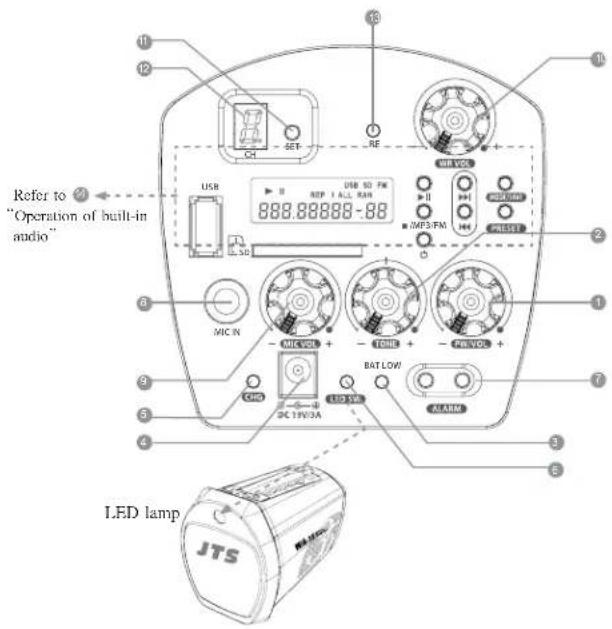
1. Function description of system panel
① Power switch/Volume
System power switch: the power switch on the main unit that controls the power to system; when it is turned Off, the other devices all are inoperable.
■ ON : turn clockwise to switch on the power to main unit.
■ OFF: turn counterclockwise all the way till a 'click' sound. With the voltage indicator lamp out, the switching off is complete.
System volume: turn clockwise to increase volume and counterclockwise to reduce volume.
② Tone adjustment: allows the user to adjust the pitch as preferred; by default, the knob in middle position indicates 0dB.
■ Turning to the right all the way; +8dB at 1KHz
■ Turning to the left all the way: -8dB at 1KHz
3 Battery indication
By the indicator lamp, the user can determine the current battery status and whether to recharge.
When the battery is being recharged, the system switches automatically to DC power supply.
■ Green lamp lit: the battery is in safe working range
■ Red lamp lit intermittently: low battery
■ Red lamp lit: the system battery should be recharged immediately ※Important: When the red lamp warning is given for prolonged time, the system forcibly turns off if it is used continuously, in order to avoid over-discharge, which affects the service life of the battery.
4 DC input port:
Plug the power supply kit, which is supplied as accessory to the main unit, to the DC port on the main unit and the system recharges the battery immediately.
⑤ Recharge indicator lamp: continuous red light: recharging / continuous green light: recharge completed.
6 Lighting switch:
Pressing once: Continuously lit
Pressing twice: SOS signal
Pressing three times: Blinking
Pressing four times: Turning off
※Remarks: International code for SOS is expressed by 3 short, 3 long and 3 short strokes.
7 Alarm button

ALARM
6 Microphone socket: for use of microphone with Φ6.3 plug and cord
9 Microphone volume: independent control of volume of wired microphone
⑩ Receiver switch/volume :
receiver power switch and independent volume control are provided.
Channel setting :
Hold the button down till the 'Dot' blinks. Then, press the setting button to set the channel of use one by one between 0 to 1.
12 Channel indication: indicates the current set channel for use.
15 RF indicator lamp:
this lamp is lit to show that the RF signals of an effective channel are received.
14 Refer to the section "6-1.2 Operation of built-in audio" of User Instructions (p.10)
text_image
Refer to 2 "Operation of built-in audio" JTS4-2 Handheld transmitter // Mh-35
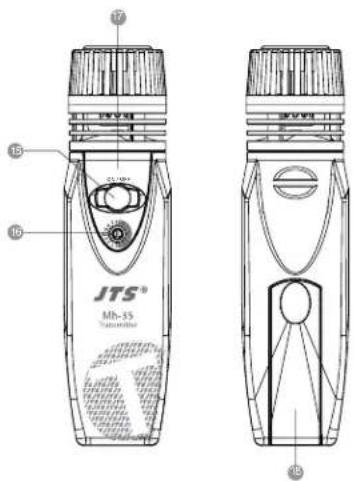
15 Power switch ;
Press once to switch on. Press again for 3 seconds to switch off.
⑥ Channel select knob : Turn this rotational knob to point the arrow at the desired channel.
⑰ Battery status indicator lamp :
Green - battery full
Red - low battery; battery change is needed.
18 Battery compartment
text_image
JTS® Mh-55 Thermal/Thermal 17 16 15 144-3 Accessories
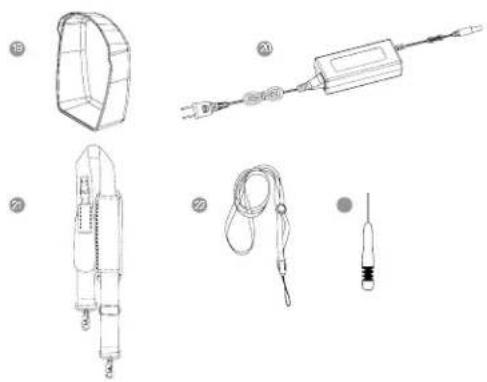
19 Waterproof cover
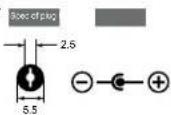
20 AC/DC adapter (with AC power cord): /Spec of
plug/ /Polarity/
AC IN: AC100-240V, 1.5A 50/60Hz
DC OUT: 19V, 2.52A
Strap
Neck Strap
2 Flat head screwdriver
natural_image
Technical line drawings of electrical components including a fuse, plug, and cable (no text or labels)※Note:
If to use any other poweradapter, while the spec of plug and polarity should be consistent, the rated output power is recommended over 48W in order to ensure of the proper system operation.
5. Connection
5-1 System connection
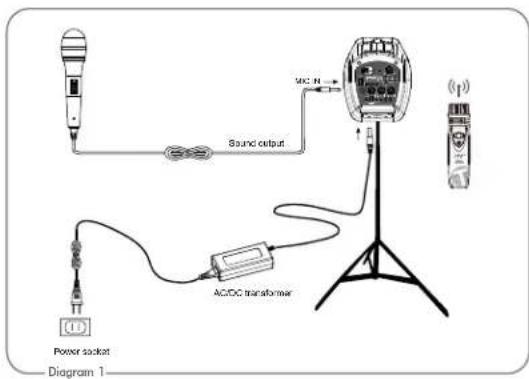
1.WA-35 wireless microphone system:
Provides 16 preset UHI channels; built-in noise mute and tone key squelch, working with Mh-35 Handheld transmitter, able to operation distance of 100M.
- Microphone wired:
When the microphone with 6.3 plug is plugged in mode, an auto-detection device enables the system to enter from satand by mode into working mode automatically.
- Connect the AC/DC transformer:
Connect one end to the "DCV Input socket" on the receiver ④ first, and connect the other to an AC power socket.
text_image
Sound output MCC N AC/DC transformer Power socket Diagram 1※Note:
Standby mode:
When the system is switched on and the sound source devices, including microphone system, built-in audio and alarm, are not in use, the system enters Standby mode automatically.
Working mode:
When the use of any sound source device begins, the amplifier of the main unit is awaked and the system enters working mode.
6. Operation
6-1 WA-35 System settings
-
For basic operations, refer to the section "4-1.1 Function description of system panel" (p.5).
-
Operation of built-in audio
(1) Turning on/off the player
Turning On - In the status of main power switch ① being On, press the Power key ⑦. When the back light of the LCD display ⑩ is illuminated, the turning on of the player is complete.
Turning Off-In the turned-on status, press the Power key; when the back light of the LCD display is out, the player is turned off.
※Note: In order to avoid the user from mistaken touch which starts/closes the player, the Power key takes certain time to actuate for safety.
(2) Description of operation
The player starts in the music playback mode by default; through audio source switching, reception of 1M broadcast is enabled.
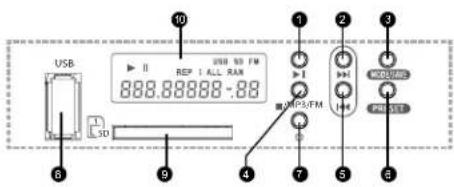
text_image
USB 10 USB 50 FM REP I ALL RAN 888.88888-88 1 2 3 4 5 6 7 9 USB 23/FM USB 23/FM USB 23/FM USB 23/FM USB 23/FM USB 23/FMFind out the detailed message
descriptions by the operation mode
Play/Pause [▶] key
② Next/Forward【▶】key
PlayMode/Save key
4 Stop/MP3/FM key
5 Prev/Reverse【】key
6 Preset key
⑦ Power [○] key
8 USB connection port
9 SD connection port
10 LCD display
Music playback mode
In the Music playback mode, the playback of music files in USB/SD storage devices is supported, providing the user with handy selection.
USB connection port ①: supports portable storage devices of Type-A USB port. SD card connection port ②: supports standard-size SD/MMC multimedia memory cards.
- Device selection
The priority for the player is to read from USB. When no such device is present, the program reads from SD card automatically.
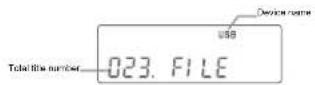
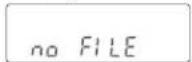
The screen displays 'NO FILE' when neither device is detected.
When both connection ports are connected by storage device: Press ■/MP3/FM button ④ to switch from USB to SD.
- Title Playback/Pause/Stop
Press 1 and the playback of the title begins.
The screen displays▶ during playback and || when paused.
Stop title playback: Press 4 to stop playback of the current title.
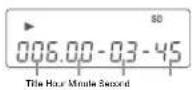
Remarks: If the storage device contains multiple music folders, pressing ⑥ during playback can skip to the title at the beginning of a next folder.
- Playback settings
Title select/Fast forward - During playback,
press ② : to a next title
press ⑤: to the previous title
hold ② down : fast forward
hold ⑤ down : fast reverse
Repeated playback — Pressing MODE/SAVE key 3 repeatedly can select repeated playback modes in the order, by display, of
REP 1 ; to repeat the current title
REP ALL: to repeat all titles
RAN : to play the titles at random
- Playback of preset titles
The player has a function of playback of preset titles, which allows the user to fast select the titles desired.
When the playback is stopped,
(1)press 6: the three digits on the left of the screen display '001' by default, with the digit for the hundreds blinking; at this point, press 2 or 5 to select the digit of the hundreds place of the desired title number.
(2) Then press ⑥, and follow Step (1) to set the digits for the tens and the ones one by one.
(3)When the setting is complete, press ① and the program starts to play the preset titles automatically.
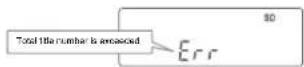
(4) If the set value exceeds the total title number in the device, the screen displays Err (Error) indicating an error message.
Broadcast listening mode
With the built-in FM tuner, you can save your preferred radio stations in the pre-set channels for ease of listening to your desired stations subsequently.
×Tuner bands: 87-108MHz in areas other than Japan; 76-90MHz in Japan
- Using the tuner :
In the state of Stop in music mode :
press ■/MP3/FM button ④ on the tuner to switch signal sources in the order of: USB→SD→FM.
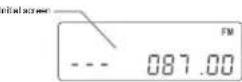
At current frequency of reception :
In manual modulating mode: increase or decrease the frequency at 100KHz increment.
Press Next/Forward key 2: to increase frequency
Press Prev/Reverse key 5: to decrease frequency
In Auto-tuning mode: the tuner moves forward/reverse automatically to search for radio stations. When a valid station is found, the screen stops at the corresponding frequency.
Hold Next/Forward key ② down : to increase the frequency Hold Prev/Reverse key ⑤ down : to decrease the frequency
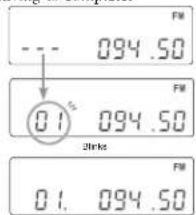
- Saving stations: the user can save 20 preferred radio stations as preset channels.
(1)Tune to a radio station which is desired to save.
(2)Hold MODE/SAVE key ③ down and the channel number blinks on the left of the screen.
(3)Press ② or ⑤ key to freely choose the channel numbers to be saved. (4)Hold key ③ down again till the dot indicator appears and the channel number blinks for three seconds. The channel saving is complete.
Remarks: When Save key is pressed, the system automatically shows a preset channel last selected.
text_image
FM 094.50 01 094.50 Strike FM 01. 094.50Station eating complete
- Select a preset channel :
To listen to preset channels, the user can press PRESET key⑥ repeatedly to select a radio station in a repeatable cycle from 01 to 20.
※ Note:
-
If no radio stations are saved, the initial frequency of each preset channel is the lowest frequency in the tunable range.
-
To save a radio station, it is necessary to press the Save key twice. Though a station desired to be saved as a specific channel is selected and the user press the Save key only once, after a while, the saving process cancels the selection automatically and the channel returns to the original status.
6-2 Mh-35 Setting of Handheld transmitter
For basic operation, please refer to the section "4-2 Handheld transmitter // Mh-35" (p.7).
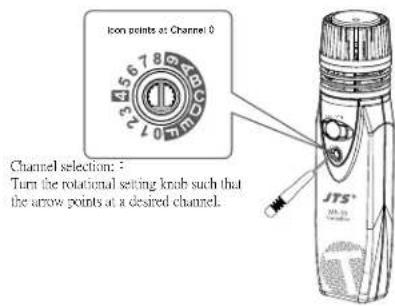
text_image
Icon points at Channel 0 Channel selection: : Turn the rotational setting knob such that the arrow points at a desired channel. JTS®7. Important notice on product
WA-35
Please make sure to recharge the battery for 8 hours before the initial use. It is advised to keep the battery in workable condition at all times in order to avoid recharging a dead battery. To ensure best function and optimal time of use, it is recommended to recharge the device before using each time. If the device is not in use for a prolonged period, recharge the battery on regular basis (or every 3 months) to prevent reducing its service life.
Please remove the battery (Fig.2-4) and contact the dealer of the device in case of battery anomalies, such as impossible to recharging effectively or obvious reduced time of service, which may be a result of defective battery. Do not put the speaker too close to a person's ears when operating the device in fear of impairing his hearing with high volume.
Use soft cloth with clean water or mild detergent to clean the device. To avoid causing damage to the device's surface or printed characters falling off, do not use alcohol or any other chemical solvent. Use the transformer supplied as accessory to the product when drawing on DC power, or it is recommend to use a transformer of the same specification and safety certified as power supply kit.
When using the LED lighting, do not look directly at the light emitted, as the light intensity is high.
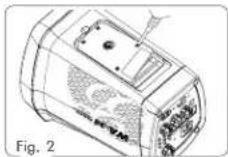
To begin with, unscrew the battery cover at the bottom.
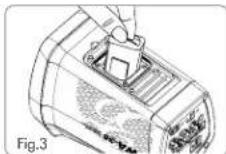
Remove the battery from its cavity.
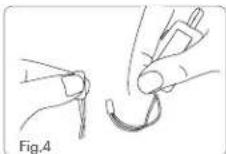
Remove the PVC wire of the battery from the terminal.
Mh-35
- Remove the battery if the device will not be used for a prolonged period, so as to prevent battery fluid leakage which would damage the transmitter.
To avoid howl from the device due to feedback, do not place the transmitter close to the main unit or the speaker when the main unit is set at high level of volume.
Make sure to adjust the transmitter and the main unit at the same frequency when using the device.
8. Important Notice
(1) JTS offers wireless systems in a selection of bands that conform to the different government regulations of specific nations or geographic regions. These regulations help limit radio frequency (RF) interference among different wireless devices and prevent interference with local public communications channels, such as television and emergency broadcasts.
(2) For information on bands available in your area, consult your local dealer or phone JTS. More information is also available at JTS's website (www.jts.com.tw).
(3) This Radio apparatus may be capable of operating on some frequencies not authorized in your region. Please contact your national authority to obtain information on authorized frequencies and RF power levels for wireless microphone products.
(4) The changes or modifications not expressly approved by the party responsible for compliance could void the user's authority to operate the equipment.
(5) To comply with the FCC RF exposure compliance requirements, no change to the antenna or the device is permitted. Any change to the antenna or the device could result in the device exceeding the RF exposure requirements and void user's authority to operate the device.