DS-GTC-302-3 - Computer accessory Havis - Free user manual and instructions
Find the device manual for free DS-GTC-302-3 Havis in PDF.


| Product Type | Docking Station for Getac V110 Fully Rugged Convertible Notebook |
| Brand | Havis |
| Model | DS-GTC-302-3 |
| Dimensions (H x W x D) | 2.8" x 11.8" x 11.0" (7.1 cm x 29.9 cm x 27.9 cm) |
| Weight | 5.1 lbs (2.3 kg) |
| Power Input | 19V DC-In (requires certified 95W power supply, e.g., Havis LPS-116) |
| Operating Temperature | -20°C to 60°C (-4°F to 140°F) |
| Storage Temperature | -40°C to 71°C (-40°F to 160°F) |
| Port Replication | Rearward facing ports (specific ports not detailed; refer to manual) |
| Antenna Pass-Through (DS-GTC-302-3) | WLAN/WiFi and 4G/Cellular-GPS antenna ports |
| Mounting | Compatible with Havis and most competitor motion devices; uses 1/4"-20 screws |
| Security | Key lock for theft deterrence |
| Included Accessories | Mounting bracket, 6 zip ties, 2 keys, 9 button head screws (1/4"-20 x 5/8") |
| Power Supply Compatibility | Havis LPS-116 or equivalent certified automotive-grade 95W, 19VDC power supply |
| EC Declaration | Conforms to EN 50498, RoHS 2011/65/EU |
| Cleaning & Maintenance | Wipe with a dry cloth; avoid liquids and moisture |
| Replacement Parts | Keys, screws, power supply (LPS-116) available from Havis |
| Warnings | Do not dock/undock while computer is on; do not mount in airbag deployment zone; use only specified power supply |
Frequently Asked Questions - DS-GTC-302-3 Havis
User questions about DS-GTC-302-3 Havis
0 question about this device. Answer the ones you know or ask your own.
Ask a new question about this device
Download the instructions for your Computer accessory in PDF format for free! Find your manual DS-GTC-302-3 - Havis and take your electronic device back in hand. On this page are published all the documents necessary for the use of your device. DS-GTC-302-3 by Havis.
USER MANUAL DS-GTC-302-3 Havis
Havis Docking Station for
Getac V110 Convertible Notebook
DS-GTC-300 Series
DS-GTC-301
DS-GTC-301-3
DS-GTC-302
DS-GTC-302-3
DS-GTC-303
natural_image
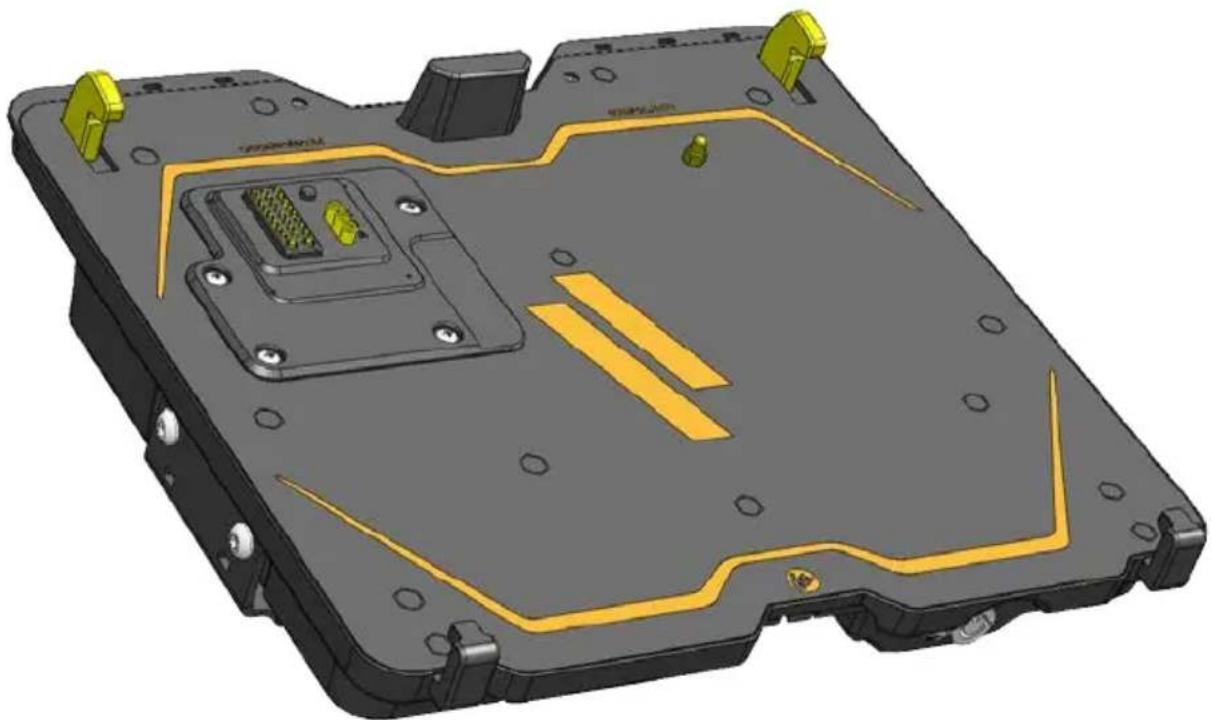
3D CAD model of a mechanical housing with yellow and black components, no visible text or symbolsHavis is pleased to provide this Owner's Manual to aid in the proper installation and use of the DS-GTC-300 Series Docking Station for Getac V110 Fully Rugged Convertible Notebooks
For questions regarding the set-up of your DS-GTC-300 Series Docking Station, please contact Havis at 1-800-524-9900 or visit www.havis.com for additional product support and information.
This Owner's Manual applies to the following Part Numbers:
DS-GTC-301
DS-GTC-302
DS-GTC-303
DS-GTC-301-3
DS-GTC-302-3
WARNING
- NEVER STOW OR MOUNT THE DOCKING STATION DIRECTLY IN A VEHICLE AIRBAG DEPLOYMENT ZONE.
• DO NOT USE COMPUTER WHILE DRIVING.
CAUTION
- READ ALL INSTRUCTIONS THOROUGHLY BEFORE BEGINNING INSTALLATION.
- DO NOT DOCK OR UNDOCK YOUR COMPUTER UNLESS IT IS POWERED OFF. DOCKING OR UNDOCKING WITH YOUR COMPUTER IN ON, STANDBY, HIBERNATION, OR SLEEP MODES CAN CAUSE PERMANENT DAMAGE.
- FOR THE DS-GTC-301, DS-GTC-301-3, DS-GTC-302, & DS-GTC-302-3 DOCKING STATIONS: DO NOT CONNECT DIRECTLY TO VEHICLE VOLTAGE SOURCE: This product requires a certified, automotive grade, Getac approved 95W power source rated for a continuous, regulated 19VDC output (Havis Part Number LPS-116 or equivalent). Failure to comply with this requirement will cause product damage that is NOT repairable and is NOT covered under warranty.
- FOR THE DS-GTC-303 DOCKING STATION: DO NOT CONNECT DIRECTLY TO VEHICLE VOLTAGE SOURCE: The Getac V110 notebook requires a certified, Getac approved power source rated for a continuous, regulated 19VDC output. Failure to comply with this requirement will cause product damage that is NOT repairable and is NOT covered under warranty.
NOTICE
- FOR DOCKING STATION MODELS EQUIPPED WITH A BUNDLED POWER SUPPLY (DS-GTC-302, DS-GTC-302-3) REFER TO THE SUPPLIED LIND POWER SUPPLY REFERENCE GUIDE.
- WHEN NOTEBOOK IS DOCKED, THE BATTERY WILL ONLY CHARGE BETWEEN 0°C to 50°C (32°F to 122°F). PLEASE REFER TO GETAC V110 OWNER'S MANUAL FOR MORE INFORMATION.
Table of Contents
Specifications 3
Parts Included 4
Port Replication Capability 5
Antenna Identification 5
Installation 6
Cable Management 7
Operation - Docking 8
Operation - Undocking 9
Precautions
- Do not place metal objects or containers of liquid on top of the Docking Station
- If a malfunction occurs, immediately unplug the Power Supply and remove the laptop
- Use only the specified Power Supply (Part # LPS-116) with this Docking Station
- Do not store the Docking Station where water, moisture, steam, dust, etc. are present
- Do not connect cables into ports other than what they are specified for
- Do not leave the Docking Station in a high temperature environment (greater than 85^ C, 185^ F ) for a long period of time
Specifications
| Power Supply Input 19V DC-In |
| Dimensions 2.8” (7.1 cm) H x 11.8” (29.9 cm) W x 11.0” (27.9 cm) D |
| Weight 5.1 lbs (2.3 kg) |
| Operating Environment -20°C to 60°C (-4°F to 140°F) |
| Storage Environment -40°C to 71°C (-40°F to 160°F) |
EC DECLARATION OF CONFORMITY in accordance with EN 50498
Manufacturers Name: Havis, Inc.
Manufacturers Address: 47801 Anchor Court, Plymouth Twp, MI 48170 USA
Declares under our sole responsibility that the product:
Product name: Havis Docking Station For Getac V110 Fully Rugged Convertible Notebook
Model: DS-GTC-30X, where 'X' may be any alphanumeric character and which describes product options.
May be followed by any alphanumeric characters which describe product options.
Product Options: This declaration covers all options of the above product which bear the CE Marking.
Is in conformity with the following standards or other normative documents:
Automotive EMC Directive EN 50498:2010, Electromagnetic compatibility (EMC) -
2004/108/EC: Product family standard for aftermarket electronic equipment in vehicles
Directive 2011/65/EU Restriction of the use of certain hazardous substances (RoHS)
Supplementary Information:
The product herewith complies with the requirements of the Automotive EMC Directive 2004/108/EC, Annex I, 6.5, 6.6, 6.8, and 6.9. This product requires the use of a recommended e-Marked automotive power supply when used within vehicles.
Plymouth twp, MI, USA July 30, 2014
Bruce Jonik, Director of Engineering, Havis, Inc.
Docking Station
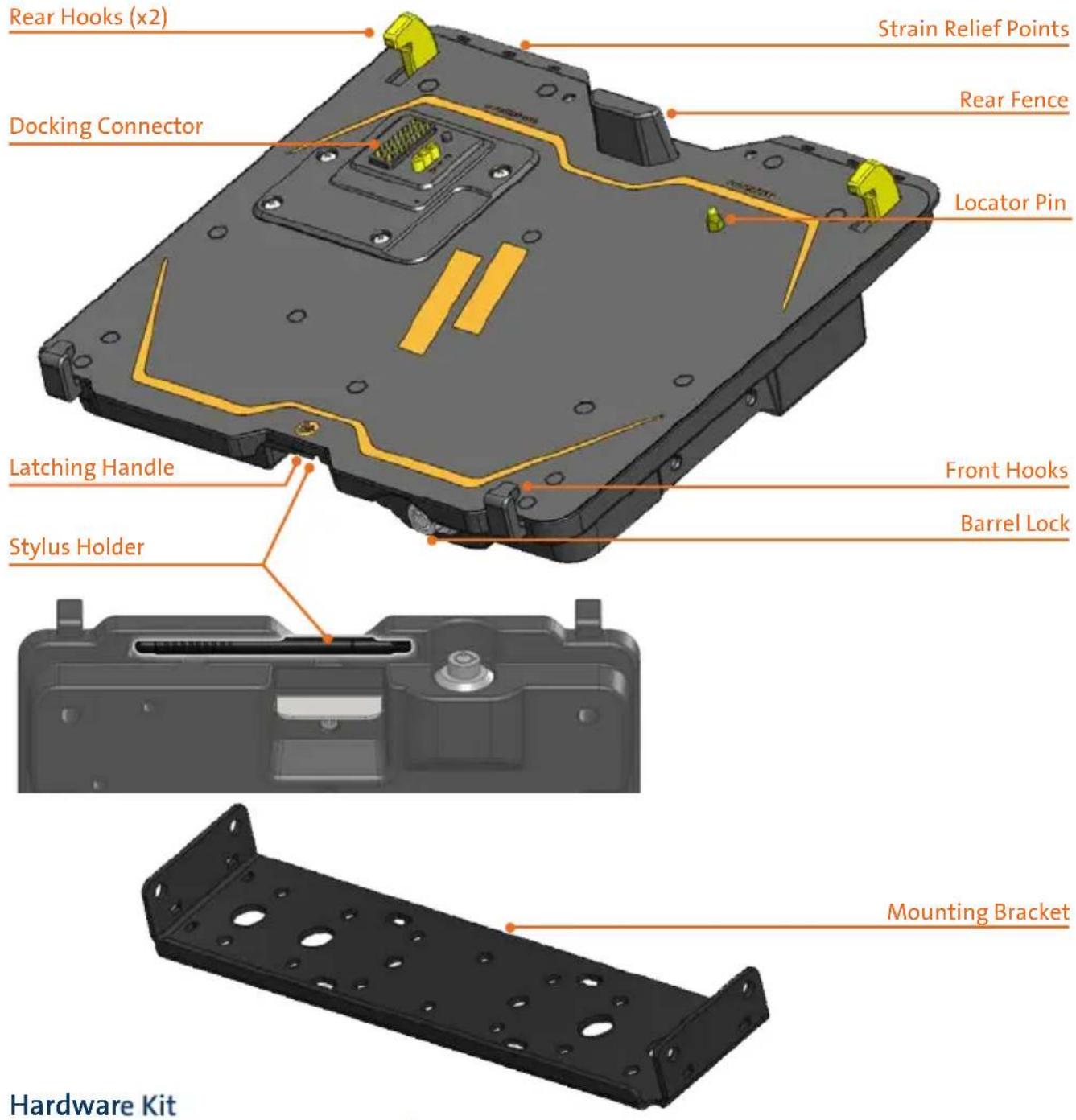
This Hardware Kit includes:
- Zip Ties (6)
- Keys (2)
- 1/4"-20 x 5/8" long Button Head Screws (9)

natural_image
Illustration of three types of screw fasteners: bundled, two pin headers, and four screws arranged in a row (no text or symbols)Tools required for installation:
- 5/32" Hex Drive
(For attaching Mounting Bracket to Motion Device with Button Head 1/4"-20 Screws)
Rearward Facing Ports
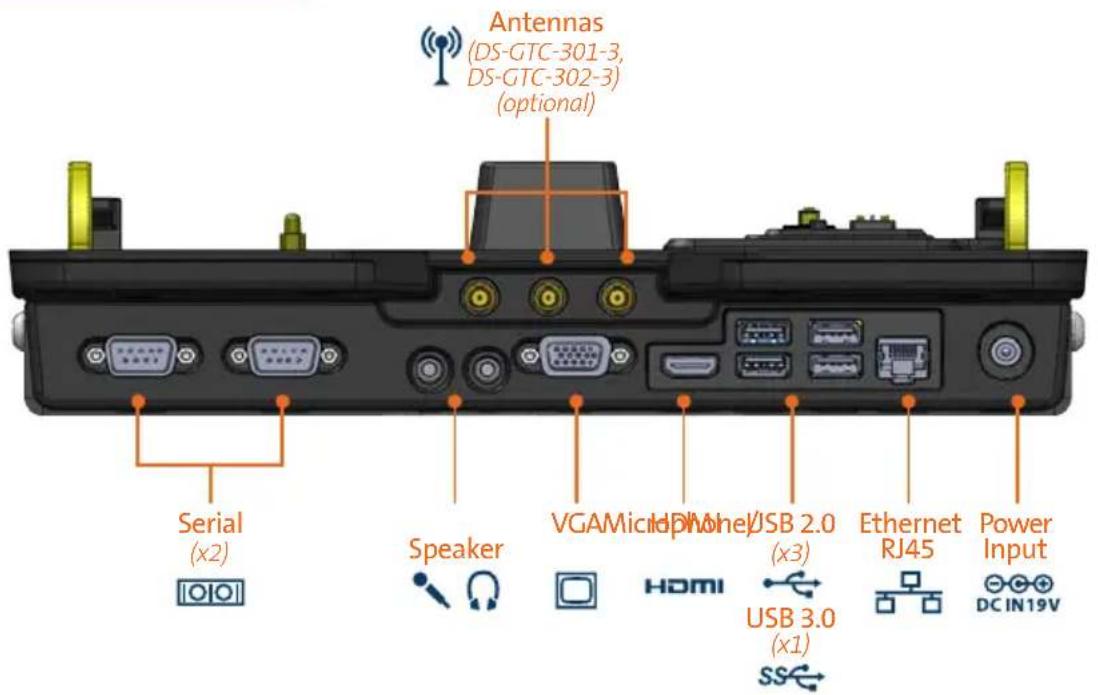
Antenna Identification (DS-GTC-301-3, DS-GTC-302-3)
A
B - WLAN/WIFI - 4C/CELLULAR-GPS
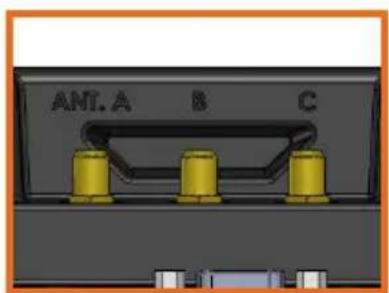
Laptop InterfaceRearward Facing Antenna

1) Remove the Mounting Bracket from the packaging. Install the Mounting Bracket to the Motion Device using (3) 1/4"-20 x 5/8" long screws (Hardware Kit Item 3). Torque screws to 80 in-lbs (9.0Nm) ± 10%.
NOTE: Numerous hole patterns present in Mounting Bracket will accommodate Havis Motion Devices as well as most competitors'
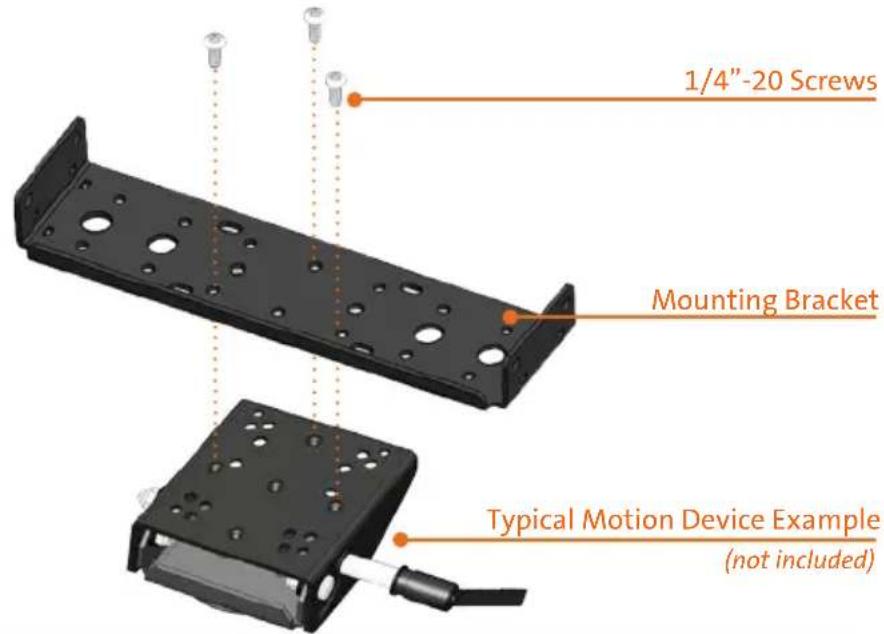
NOTE: We recommend applying a drop of medium strength (blue) thread locking adhesive to the threads of all fasteners.
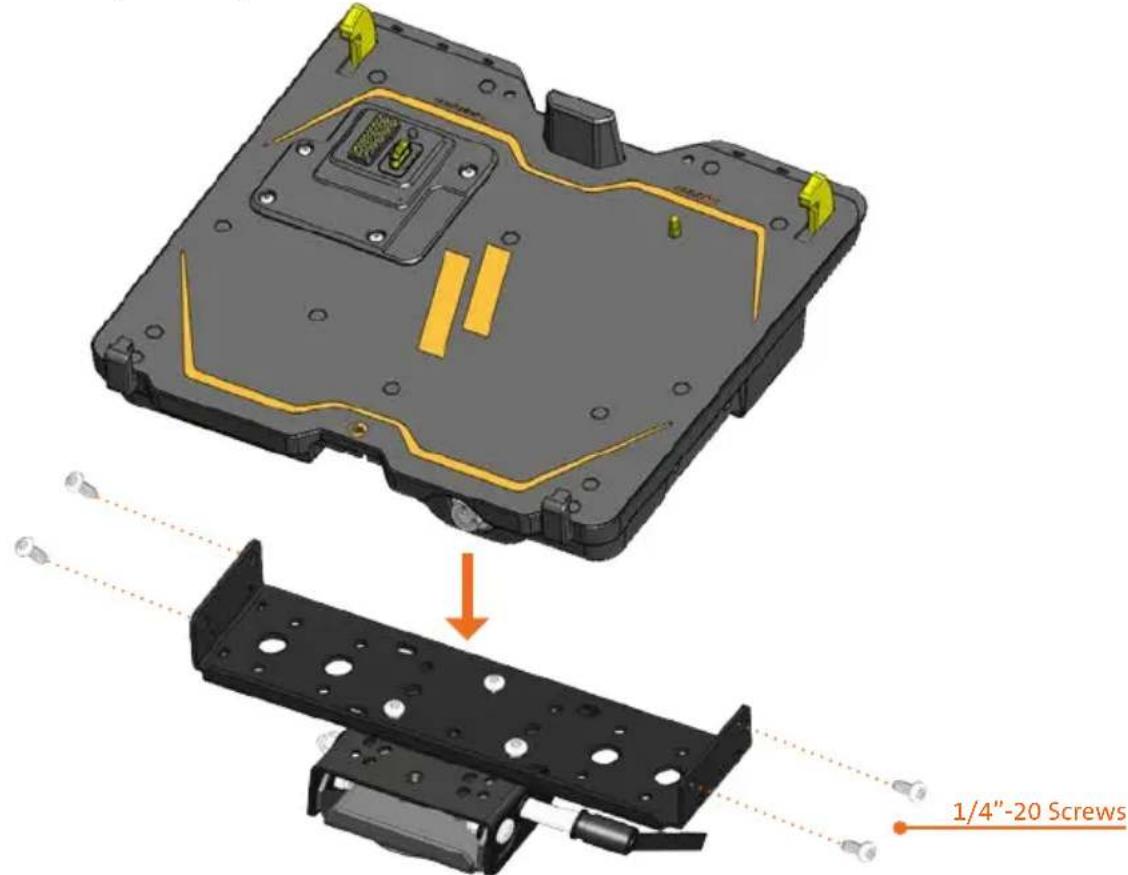
2) Lower the Docking Station to the Mounting Bracket as shown and secure with (4) 1/4"-20 x 5/8" long screws (Hardware Kit Item 3). Torque screws to 80 in-lbs (9.0 Nm) ± 10%.
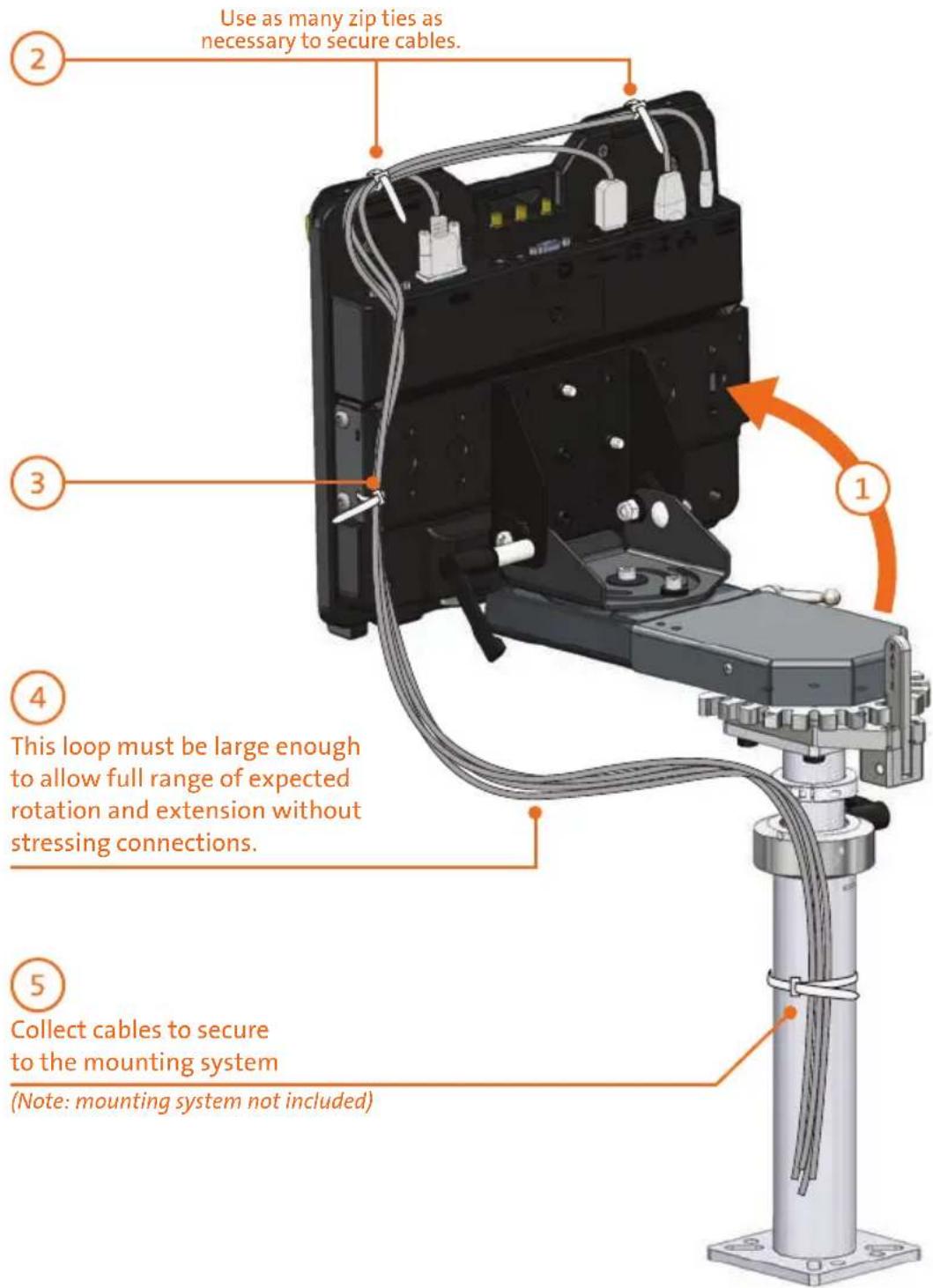
1) Orient the Docking Station in a position that is comfortable to work with.
2) Install all cables that are necessary for computing needs. Use Zip Ties (Hardware Kit Item 1) to strain relieve cables to the Strain Relief Points, routing all cables together to the front of the Docking Station.
3) Secure cable bundle to the Mounting Bracket with a supplied Zip Tie.
4) Create a service loop with cable bundle to ensure that no tension is on the connectors and to enable intended motion.
5) Tie off cables onto a stationary part of the mounting system. (Mounting system not included with Docking Station)
CAUTION
DO NOT FORCE NOTEBOOK ONTO DOCKING STATION. IF THERE IS RESISTANCE, CHECK THE ALIGNMENT OF NOTEBOOK ON DOCKING STATION.
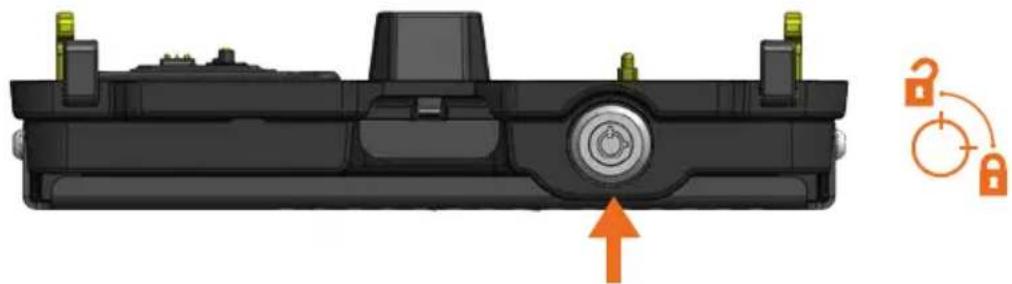
1) Ensure the Docking Station is unlatched by pushing the Lock to release.
natural_image
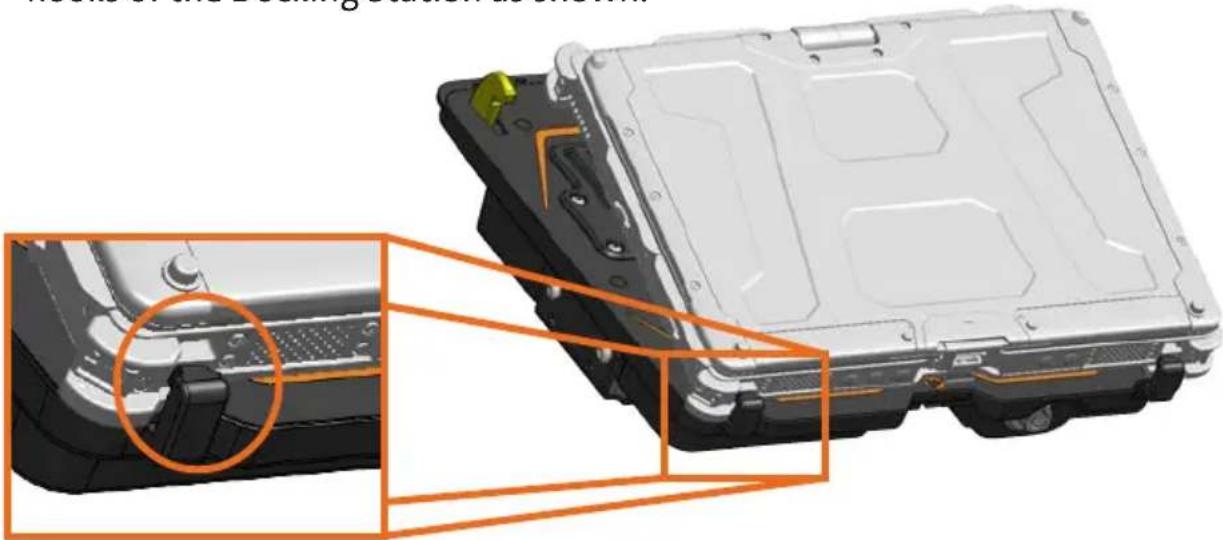
3D mechanical component diagram with highlighted internal features and a circular lock mechanism symbol (no text or labels)2) With rear of computer elevated, load front of computer into Docking Station ensuring the computer's front hook pockets align with the front hooks of the Docking Station as shown.
natural_image
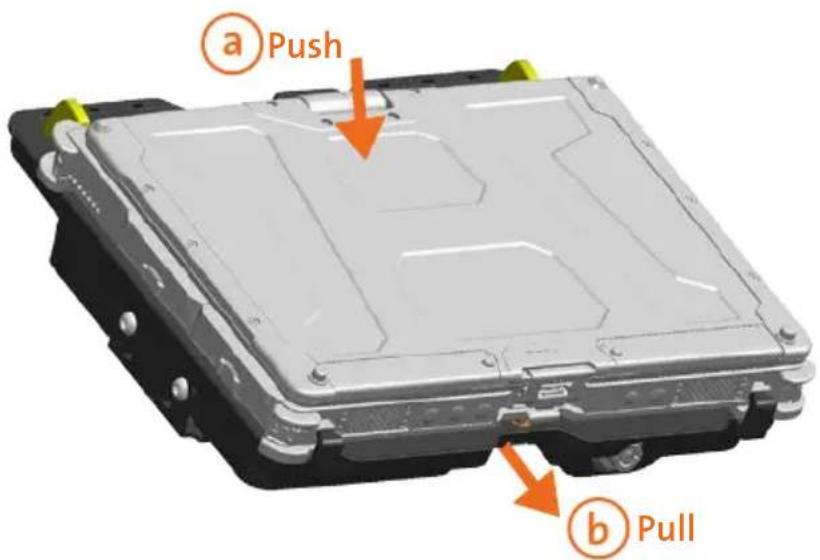
3D rendering of an electric vehicle chassis showing internal components and a close-up view of the chassis (no text or symbols visible)3) Lower back of computer onto Docking Station, ensuring computer properly aligns with the Locator Pin on the Docking Station. With computer seated on Docking Station, a apply light downward pressure to the rear of computer and, b pull the Front Latching Handle forward until latched.
4) For theft deterrence, secure computer by locking Docking Station with supplied key (Hardware Kit Item 2).

natural_image
3D mechanical component diagram with orange arrow indicating rotation and lock icons (no text or symbols)Operation - Undocking
1) If previously locked, unlock Docking Station using supplied key.

natural_image
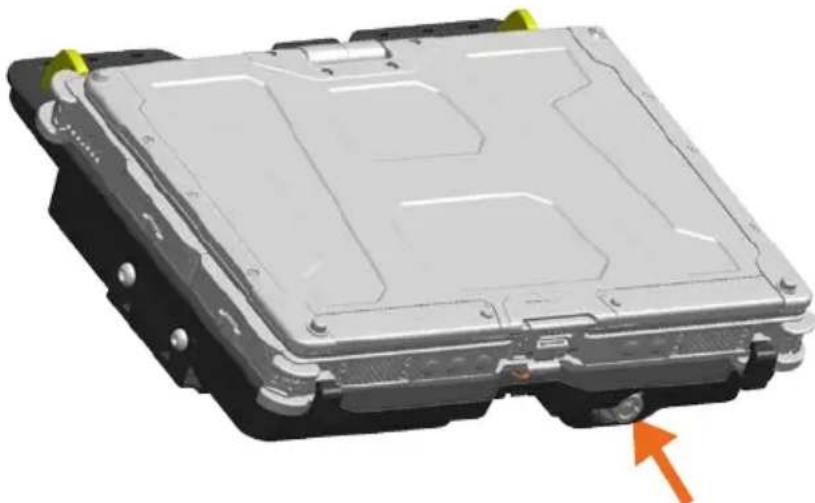
3D mechanical component diagram with orange arrow indicating rotation and lock icons (no text or symbols)2) Depress Barrel Lock to unlatch Docking Station from computer.
natural_image
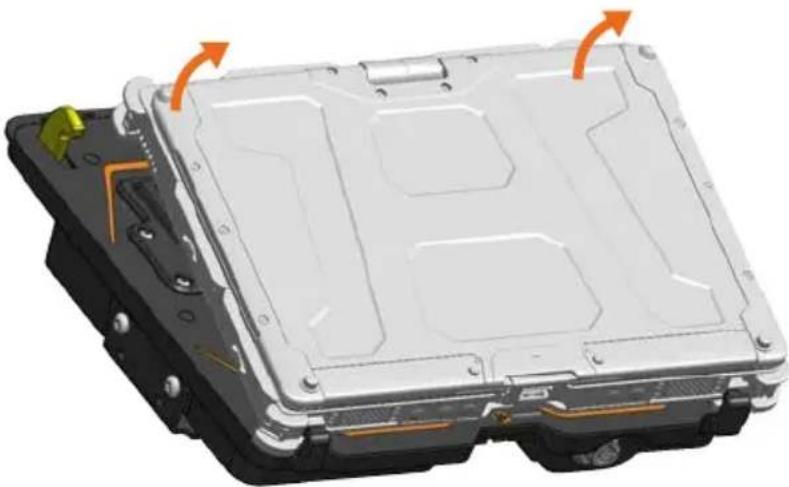
3D rendering of a mechanical component with mounting holes and internal structure, showing no visible text or symbols.3) Once unlatched grab both sides of computer and carefully lift out of Docking Station, rear end first.
natural_image
3D rendering of an electric vehicle chassis with mounting hardware and highlighted components (no text or symbols)Havis offers a wide variety of accessory products specifically for use with the DS-GTC-300 Series Docking Station. For more information or to order, please visit www.havis.com.

natural_image
Black electronic device with two cables and a power adapter (no visible text or symbols)LPS-116
95W Power Supply
External power supply and cable for Getac Notebooks with cigarette lighter adaptor.

natural_image
Simple curved line drawing with a looped end, no text or symbols presentDS-DA-102
Night Eyes II
In-vehicle night time viewing from six long lasting, soft true, red LED lights on a flexible steel gooseneck.

natural_image
Black mechanical bracket component with mounting feet (no visible text or symbols)DS-DA-413
Screen Stiffener
Secure your laptop screen to prevent excess wear and reduce vibration while in use.
Havis, Inc.
75 Jacksonville Road
Warminster, PA 18974
www.havis.com 1-800-524-9900
- Havis Docking Station for
- Getac V110 Convertible Notebook
- DS-GTC-300 Series
- WARNING
- CAUTION
- NOTICE
- Table of Contents
- Precautions
- EC DECLARATION OF CONFORMITY in accordance with EN 50498
- Docking Station
- This Hardware Kit includes:
- Tools required for installation:
- Operation - Undocking
- 95W Power Supply
- Night Eyes II
- Screen Stiffener
Brand : Havis
Model : DS-GTC-302-3
Category : Computer accessory