
PKG-DS-GTC-611-3 - Computer accessory Havis - Free user manual and instructions
Find the device manual for free PKG-DS-GTC-611-3 Havis in PDF.


| Product Type | Docking Station for Getac S410 Notebooks |
| Brand | Havis |
| Model | PKG-DS-GTC-611-3 (part of DS-GTC-610 Series) |
| Dimensions | 2.4 in (6.17 cm) H x 14.1 in (35.7 cm) W x 11.8 in (30.0 cm) D |
| Weight | 5.1 lbs (2.3 kg) |
| Power Supply Input | 19V DC-In |
| Operating Temperature | -21°C to 60°C (-6°F to 140°F) |
| Storage Temperature | -40°C to 85°C (-40°F to 185°F) |
| Port Replication | Rearward and Forward facing ports; includes antenna connectors (SM) |
| Remote Power Button | Yes (on some models) – replicates Getac S410 power button settings |
| Locking Mechanism | Key lock for theft deterrence (2 keys included) |
| Included Accessories | Hardware Kit (HWK-0046) with screws, zip ties, and 2 keys |
| Mounting | Requires mounting bracket (included) – compatible with Havis motion devices and most competitors' |
| Required Power Source | Certified automotive grade Getac approved 120W power supply (19VDC) – Havis LPS-140 or equivalent |
| Certifications | CE marked (EN 50498:2010), RoHS compliant (2011/65/EU) |
| Safety Precautions | Do not dock/undock while computer is on; avoid moisture; use only specified power supply |
| Cleaning and Maintenance | Keep dry; clean with soft cloth; do not use liquids or abrasives |
| Spare Parts Availability | Replacement keys (DS-DA-503), Remote Power Cable & Button (DS-DA-318), Power Supply (LPS-140), Mounting Brackets (LPS-208, LPS-209, LPS-211), Card Reader Brackets, Screen Stiffener (DS-DA-418), Blank-it Solution (DS-DA-809) |
| Warranty | Damage from improper power source not covered under warranty |
Frequently Asked Questions - PKG-DS-GTC-611-3 Havis
User questions about PKG-DS-GTC-611-3 Havis
0 question about this device. Answer the ones you know or ask your own.
Ask a new question about this device
Download the instructions for your Computer accessory in PDF format for free! Find your manual PKG-DS-GTC-611-3 - Havis and take your electronic device back in hand. On this page are published all the documents necessary for the use of your device. PKG-DS-GTC-611-3 by Havis.
USER MANUAL PKG-DS-GTC-611-3 Havis
Owner's Manual Havis Docking Station for Getac S410 Notebooks
DS-GTC-610 Series
DS-GTC-611
DS-GTC-614
DS-GTC-617
DS-GTC-611-3
DS-GTC-614-3
DS-GTC-617-3
DS-GTC-613
DS-GTC-615
DS-GTC-618
DS-GTC-613-3
DS-GTC-615-3
DS-GTC-618-3
natural_image
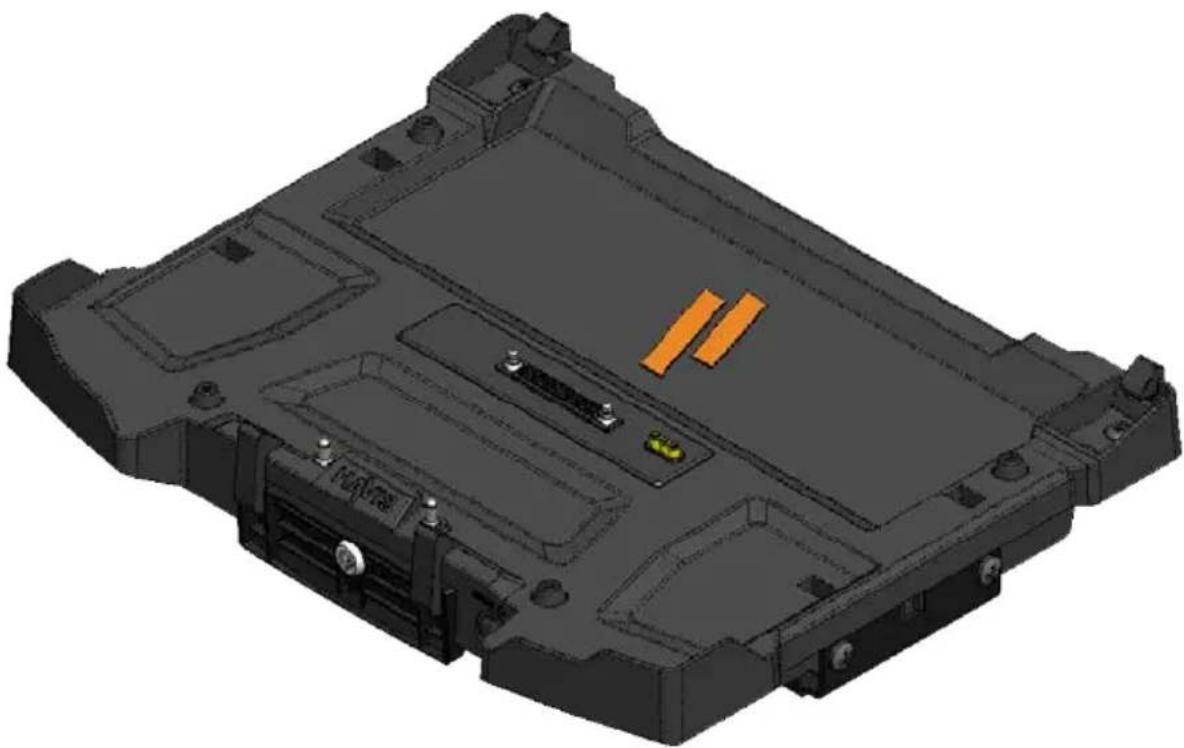
3D CAD model of a mechanical housing component with mounting holes and internal compartments (no text or symbols visible)Havis is pleased to provide this Owner's Manual to aid in the proper installation and use of the DS-GTC-610 Series Docking Station for Getac S410 Notebooks.
For questions regarding the set-up of your DS-GTC-610 Series Docking Station, please contact Havis at 1-800-524-9900 or visit www.havis.com for additional product support and information.
This Owner's Manual applies to the following Part Numbers:
- READ ALL INSTRUCTIONS THOROUGHLY BEFORE BEGINNING INSTALLATION.
- DO NOT STORE, INSTALL, OR OPERATE THE DOCKING STATION WHERE WATER, MOISTURE, STEAM, DUST, ETC. ARE PRESENT
- DO NOT DOCK OR UNDOCK YOUR COMPUTER UNLESS IT IS POWERED OFF. DOCKING OR UNDOCKING WITH YOUR COMPUTER IN ON, STANDBY, HIBERNATION, OR SLEEP MODES CAN CAUSE PERMANENT DAMAGE.
- FOR THE DS-GTC-611, DS-GTC-611-3, DS-GTC-612, DS-GTC-612-3, DS-GTC-615, DS-GTC-615-3, DS-GTC-617, & DS-GTC-617-3 DOCKING STATIONS: DO NOT CONNECT DIRECTLY TO VEHICLE VOLTAGE SOURCE: This product requires a certified, automotive grade, Getac approved 120W power source rated for a continuous, regulated 19VDC output (Havis Part Number LPS-140 or equivalent). Failure to comply with this requirement will cause product damage that is NOT repairable and is NOT covered under warranty.
- FOR THE DS-GTC-613, DS-GTC-613-3, DS-GTC-618, & DS-GTC-618-3 DOCKING STATIONS: DO NOT CONNECT DIRECTLY TO VEHICLE VOLTAGE SOURCE: The Getac S410 notebook requires a certified, Getac approved power source rated for a continuous, regulated 19VDC output. Failure to comply with this requirement will cause product damage that is NOT repairable and is NOT covered under warranty.
NOTICE
- FOR DOCKING STATION MODELS EQUIPPED WITH A BUNDLED POWER SUPPLY (DS-GTC-615/615-3/617/617-3/618/618-3) REFER TO THE SUPPLIED GETAC POWER SUPPLY REFERENCE GUIDE.
- WHEN NOTEBOOK IS DOCKED, THE BATTERY WILL ONLY CHARGE BETWEEN 0^ to 50^ (32°F to 122°F).
PLEASE REFER TO GETAC S410 OWNER'S MANUAL FOR MORE INFORMATION.
Table of Contents
Specifications 3
Parts Included 4
Port Replication Capability 5
Antenna Identification 5
Installation 6
Cable Management 7
Operation - Docking 8
Operation - Undoing 9
Precautions
- Do not place metal objects or containers of liquid on top of the Docking Station
- If a malfunction occurs, immediately unplug the Power Supply and remove the laptop
- Use only the specified Power Supply (Part # LPS-140) with this Docking Station
- Do not connect cables into ports other than what they are specified for
- Do not leave the Docking Station in a high temperature environment (greater than 85^, 185^ ) for a long period of time
Specifications
| Power Supply Input 19V DC-In |
| Dimensions 2.4” (6.17 cm) H x 14.1” (35.7 cm) W x 11.8” (30.0 cm) D |
| Weight 5.1 lbs (2.3 kg) |
| Operating Environment -21°C to 60°C (-6°F to 140°F) |
| Storage Environment -40°C to 85°C (-40°F to 185°F) |
EC DECLARATION OF CONFORMITY in accordance with EN 50498
Manufacturers Name: Havis, Inc.
Manufacturers Address: 75 Jacksonville Road, Warminster, PA 18974 USA
Declares under our sole responsibility that the product:
Product name: Havis Docking Station For Getac S410 Fully Rugged Convertible Notebook
Model: DS-GTC-61X, where 'X' may be any alphanumeric character and which describes product options.
May be followed by any alphanumeric characters which describe product options.
Product Options: This declaration covers all options of the above product which bear the CE Marking.
Is in conformity with the following standards or other normative documents:
Automotive EMC Directive EN 50498:2010, Electromagnetic compatibility (EMC) -
2004/108/EC: Product family standard for aftermarket electronic equipment in vehicles
Directive 2011/65/EU Restriction of the use of certain hazardous substances (RoHS)
Supplementary Information:
The product herewith complies with the requirements of the Automotive EMC Directive 2004/108/EC, Annex I, 6.5, 6.6, 6.8, and 6.9. This product requires the use of a recommended e-Marked automotive power supply when used within vehicles.
Warminster, PA, USA June 1, 2016
Bruce Jonik, Director of Engineering, Havis, Inc.
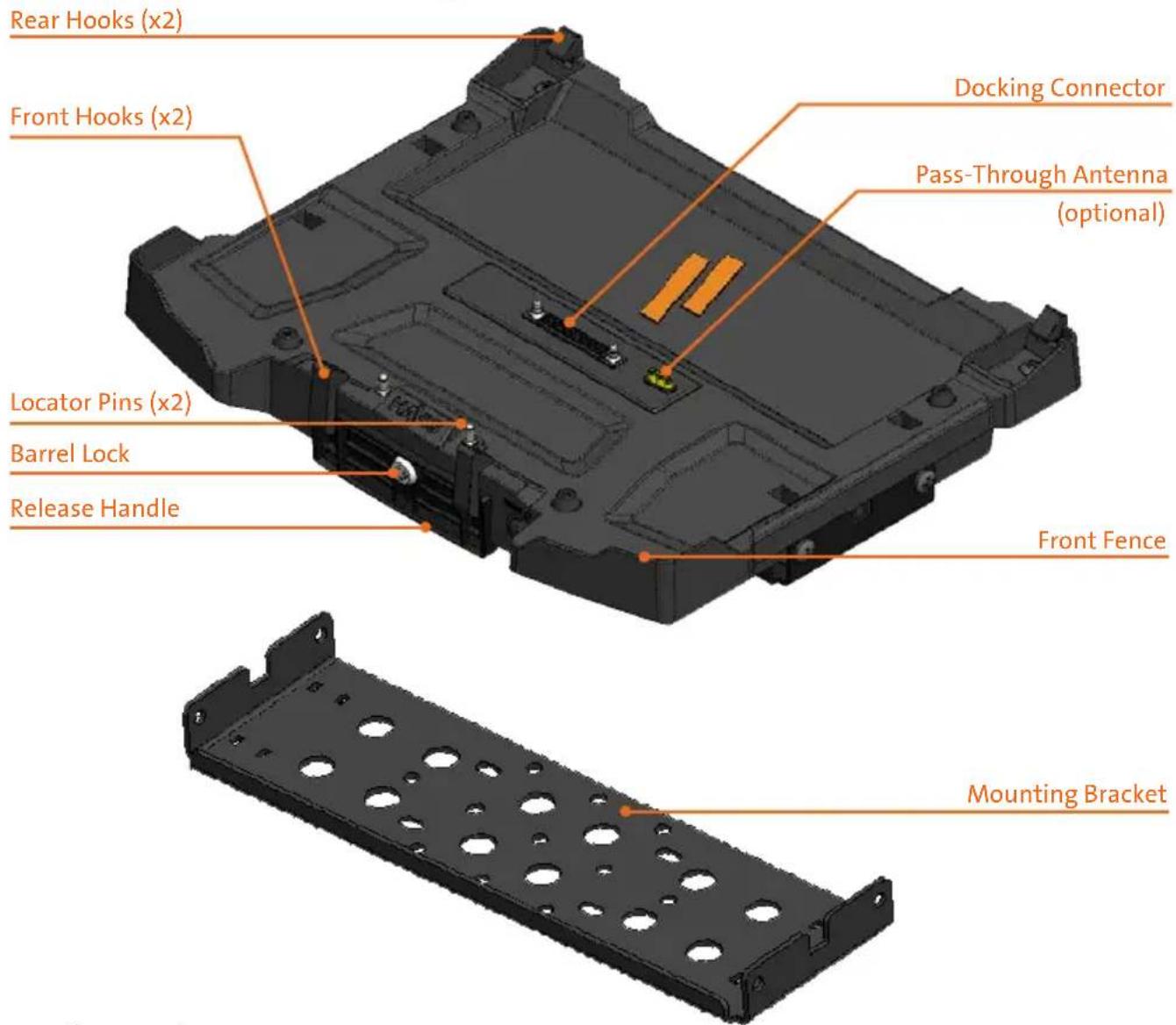
Docking Station
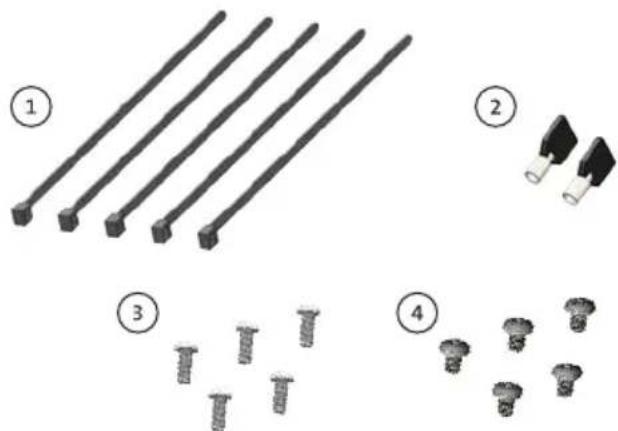
Hardware Kit (HWK-0046)
This Hardware Kit includes:
- Zip Ties (5)
- Keys (2)
- 1/4"-20 x 5/8" long Button Head Screws (5)
- Phillips 1/4"-20 x 3/8" long Screws (5)
natural_image
Illustration of four types of screw fasteners: straight rods, two clamps, and three screws (no text or symbols)Tools required for installation:
- 5/32" Hex Drive
(For attaching Mounting Bracket to Motion Device with Button Head 1/4"-20 Screws)
- #3 Phillips
(For attaching Docking Station to Mounting Bracket with Button Head 1/4"-20 Screws)
Rearward Facing Ports
Forward Facing Ports
(DS-GTC-615, DS-GTC-615-3)
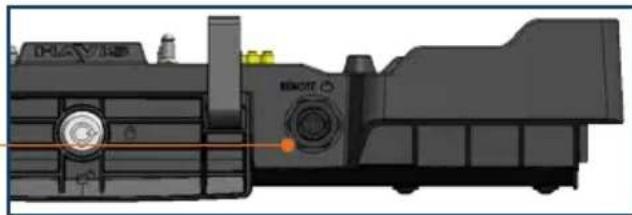
Remote Power

natural_image
3D mechanical component diagram showing internal components and a highlighted orange line (no text or symbols)NOTICE
The Remote Power button replicates the Getac S410 Notebook power button settings configured by the user.
Laptop InterfaceAntenna Connectors (SM)


1) Remove the Mounting Bracket from the packaging. Install the Mounting Bracket to the Motion Device using (4) 1/4"-20 x 5/8" long screws (Hardware Kit Item 3). Torque screws to 80 in-lbs (9.0Nm) ± 10%.
NOTE: Numerous hole patterns present in Mounting Bracket will accommodate Havis Motion Devices as well as most competitors'
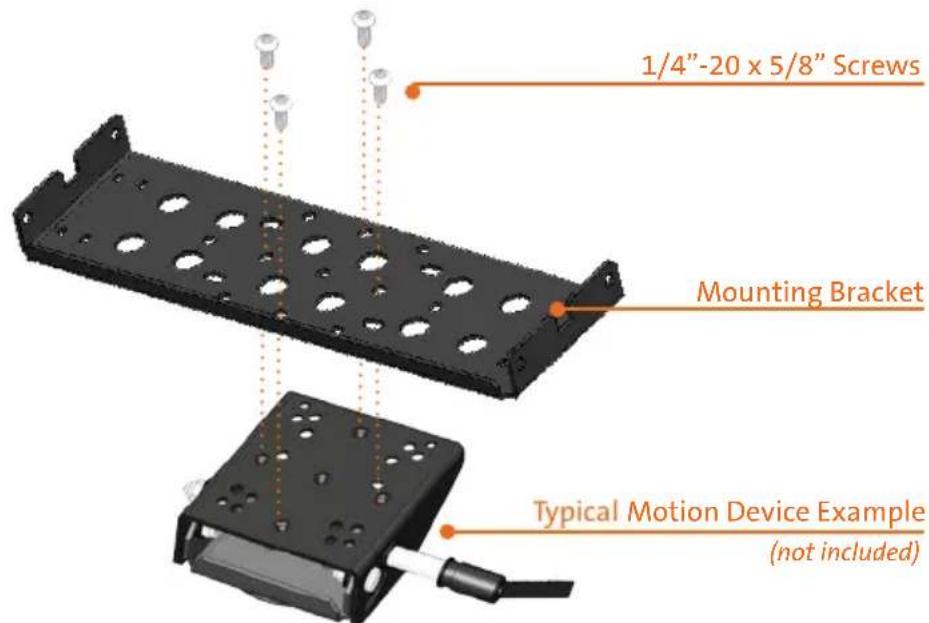
NOTE: We recommend applying a drop of medium strength (blue) thread locking adhesive to the threads of all fasteners.
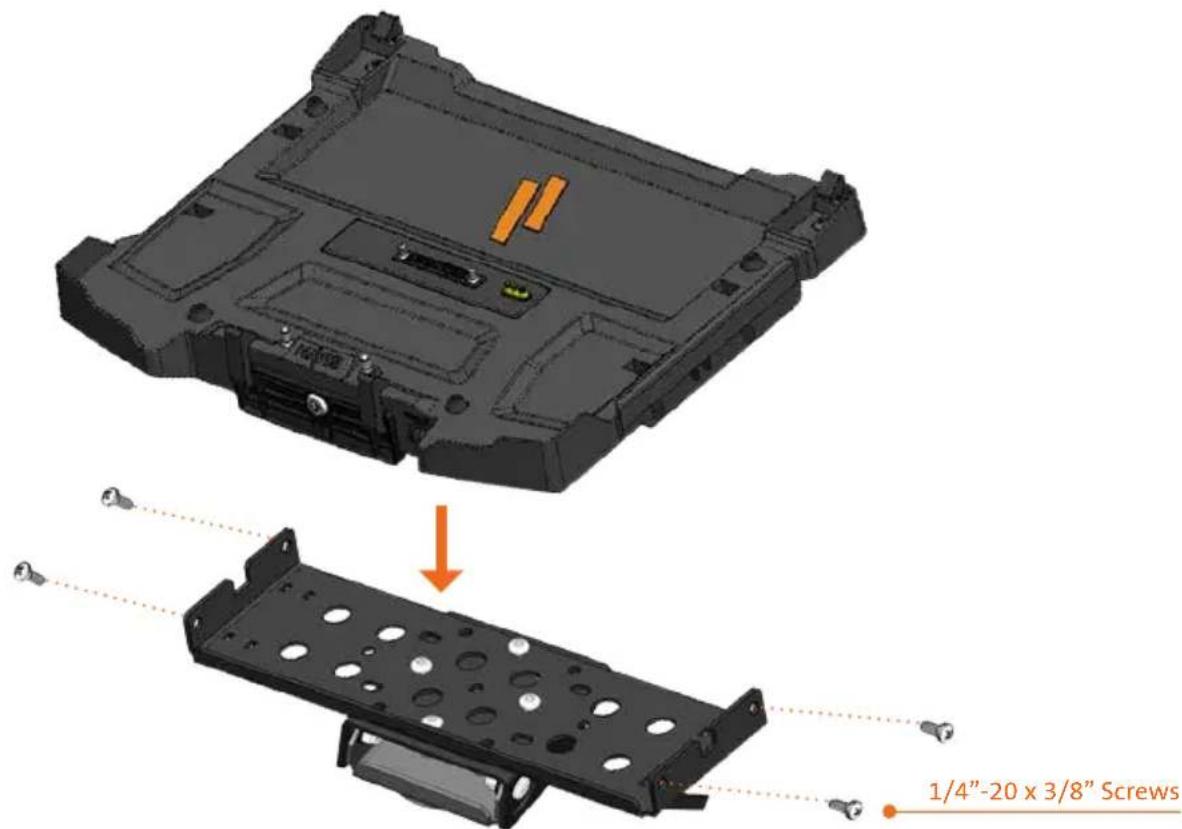
2) Lower the Docking Station to the Mounting Bracket as shown and secure with (4) 1/4"-20 x 3/8" long screws (Hardware Kit Item 4). Torque screws to 80 in-lbs (9.0 Nm) ± 10%.
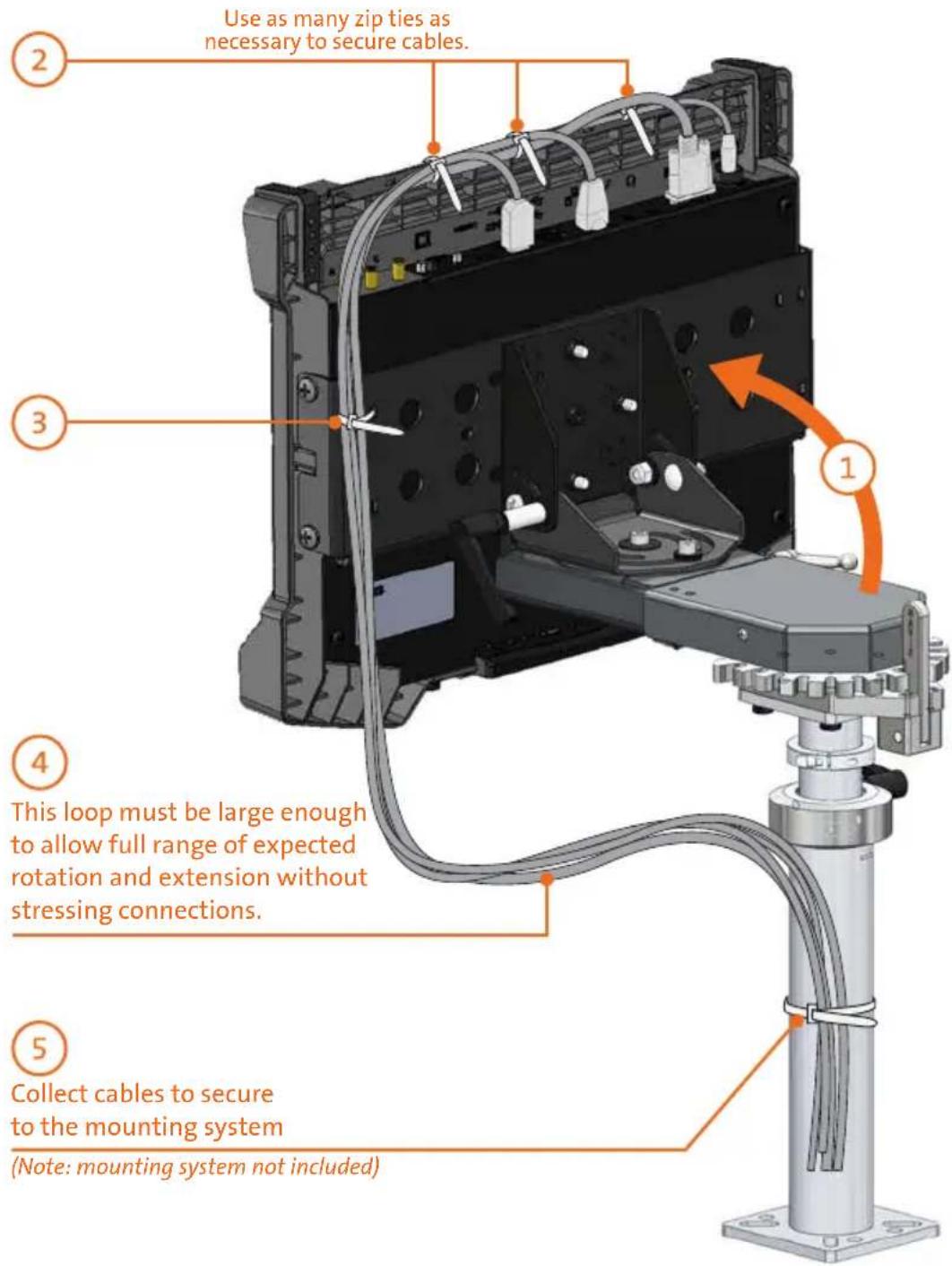
1) Orient the Docking Station in a position that is comfortable to work with.
2) Install all cables that are necessary for computing needs. Use Zip Ties (Hardware Kit Item 1) to strain relieve cables to the Strain Relief Points, routing all cables together to the front of the Docking Station.
3) Secure cable bundle to the Mounting Bracket with a supplied Zip Tie.
4) Create a service loop with cable bundle to ensure that no tension is on the connectors and to enable intended motion.
5) Tie off cables onto a stationary part of the mounting system. (Mounting system not included with Docking Station)
CAUTION
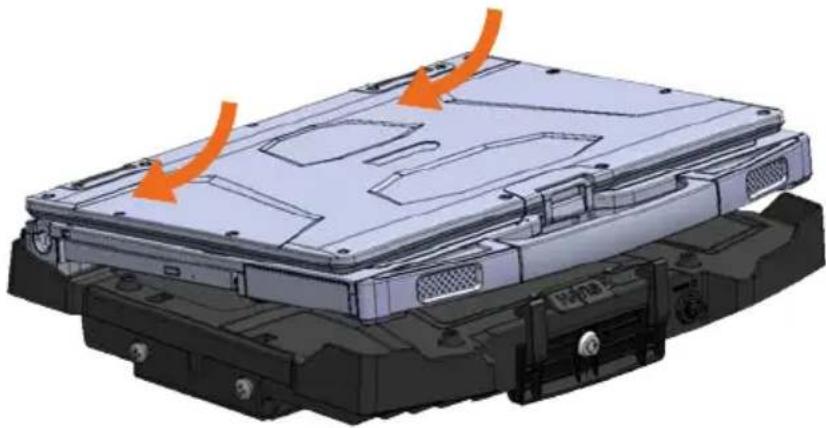
DO NOT FORCE NOTEBOOK ONTO DOCKING STATION. IF THERE IS RESISTANCE, CHECK THE ALIGNMENT OF NOTEBOOK ON DOCKING STATION.
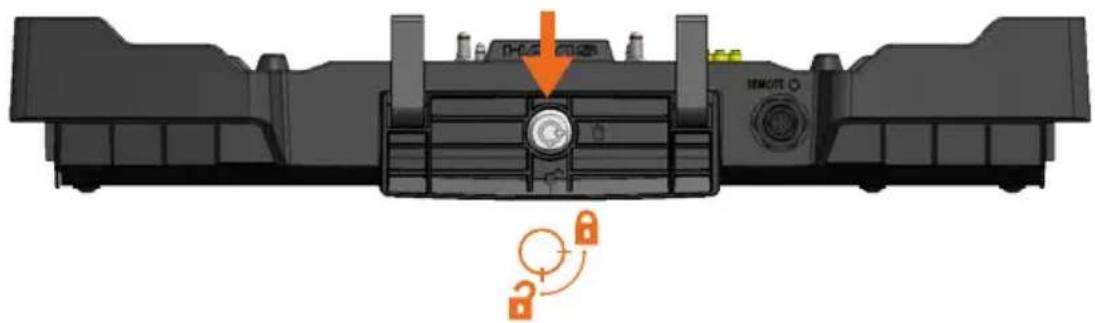
1) Ensure the Docking Station is unlocked.
natural_image
Top-down view of a mechanical component with a lock mechanism and an orange arrow indicating direction (no text or symbols)2) With front of computer elevated, load rear of computer into Docking Station ensuring the computer's rear hook pockets align with the Rear Hooks of the Docking Station as shown.
natural_image
3D mechanical assembly diagram showing internal components with orange arrows indicating motion or force (no text or symbols)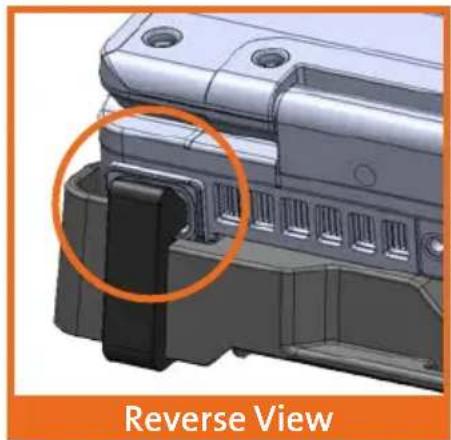
natural_image
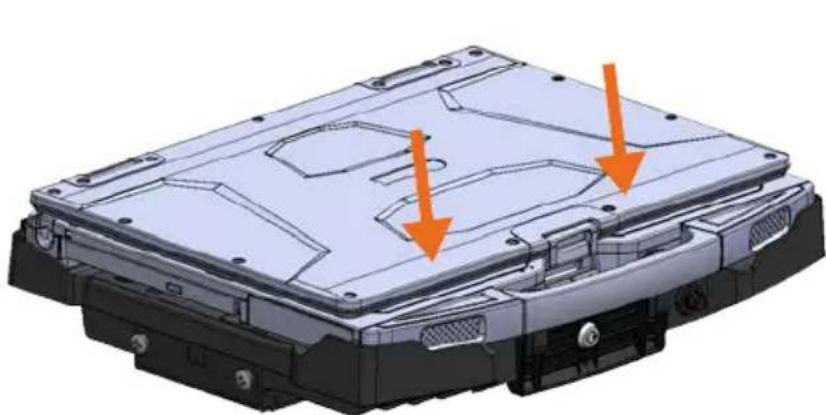
3D mechanical component with a highlighted section and label 'Reverse View' (no other text or symbols)3) Lower front of computer onto Docking Station, ensuring computer properly aligns with the Locator Pins on the Docking Station. Apply light downward pressure to the front of computer, until Front Hooks on Release Handle snap into front hook pockets of computer.
natural_image
3D CAD model of a mechanical housing component with two orange arrows indicating features (no text or symbols present)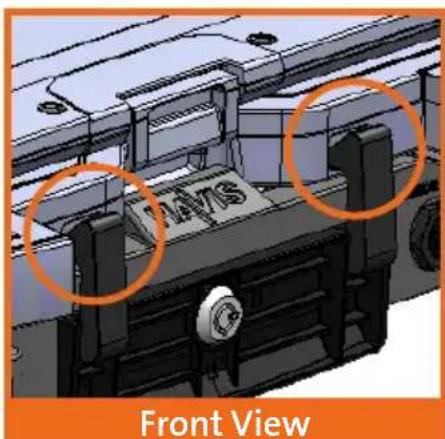
natural_image
3D CAD model of a vehicle front view showing structural components and a labeled section (no readable text or symbols)4) For theft deterrence, secure computer by locking Docking Station with supplied key (Hardware Kit Item 2).
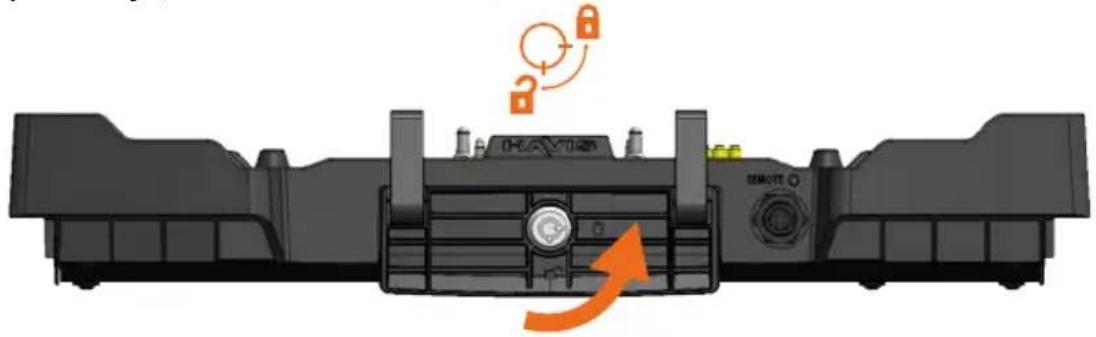
natural_image
Diagram of a vehicle front panel with lock and remote control buttons, showing no text or symbolsOperation - Undocking
1) If previously locked, unlock Docking Station using supplied key.
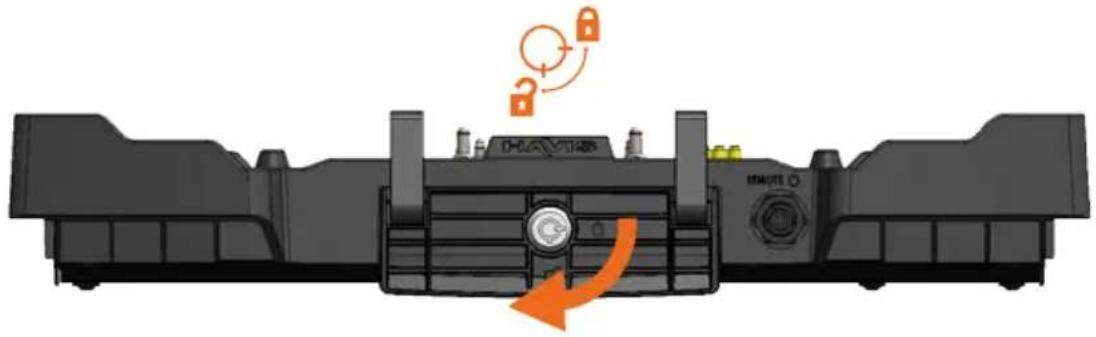
natural_image
Diagram of a vehicle front panel with lock and directional arrow indicating motion (no text or symbols)2) Pull handle to unlatch computer from Docking Station.
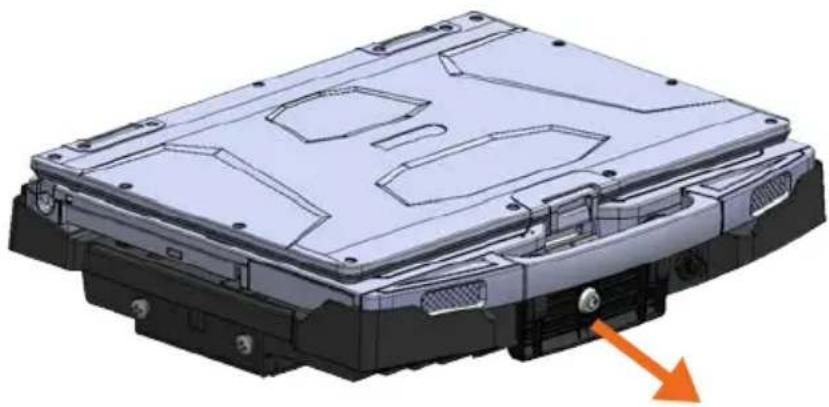
natural_image
3D CAD model of a mechanical housing component with mounting holes and internal compartments, showing no text or symbols.3) Once unlatched grab the handle of the computer and carefully lift out of Docking Station, front end first.
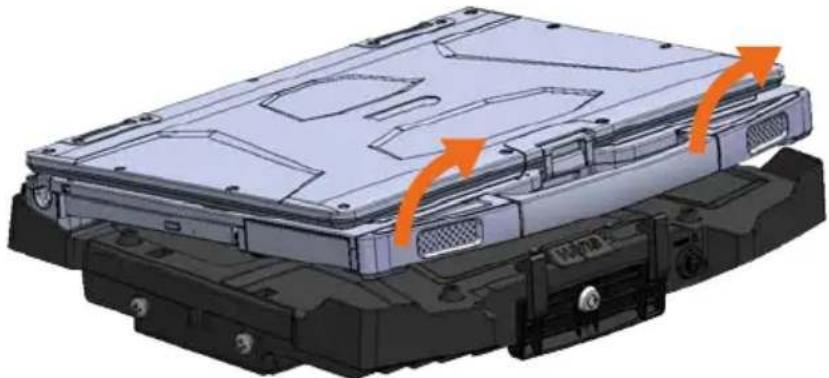
natural_image
3D mechanical assembly diagram showing internal components with orange arrows indicating motion (no text or symbols)Havis offers a wide variety of accessory products specifically for use with the DS-GTC-610 Series Docking Station. For more information or to order, please visit www.havis.com.

natural_image
Three electronic devices with wires and connectors, no visible text or symbolsLPS-140
120W Power Supply
External power supply and cable for Getac Notebookwith LPS-208 accessory bracket and cigarette lighter adaptor.

natural_image
3D rendering of a black electronic component with two circular holes and mounting feet (no text or symbols visible)LPS-211
Multipurpose Mounting Bracket
Mount a Power Supply or USB Hub directly to your Docking Station with this versitle bracket.

natural_image
Black plastic bracket component with two side slots (no text or symbols)LPS-209
Power Supply Mounting Bracket
Mount the LPS-140 Power Supply directly to your Docking Station.

natural_image
Two black metal bracket components with mounting holes, shown against a white background (no text or symbols)Card Reader Mounting Brackets
Mount an E-Seek M250/260 card reader, or Magtek card reader to the side of the Docking Station.

natural_image
Black handheld microphone with a long neck and pointed tip (no text or symbols visible)DS-DA-318
Remote Power Cable & Button
Remote power cable and power button for DS-GTC-615 and DS-GTC-615-3 Docking Stations.

natural_image
Black mechanical bracket or bracket component on white background (no text or symbols)DS-DA-418
Screen Stiffener
Secure your laptop screen to prevent excess wear and reduce vibration while in use.

natural_image
Close-up of a metallic key with a handle and metal bracket (no visible text or symbols)DS-DA-503
Replacement Keys
Set of two (2) replacement keys for DS-GTC-610 Series Docking Stations.

natural_image
Black rectangular electronic component with a small hole, shown in isometric view (no text or symbols visible)DS-DA-809
Screen Blanking Solution with Tamperproof Cover
Powered by Blank-it, USB Dongle & Tamperproof Cover for DS-GTC-610 Series Docking Stations.

Havis, Inc.
75 Jacksonville Road
Warminster, PA 18974
www.havis.com 1-800-524-9900


- Owner's Manual Havis Docking Station for Getac S410 Notebooks
- DS-GTC-610 Series
- NOTICE
- Table of Contents
- Precautions
- Specifications
- EC DECLARATION OF CONFORMITY in accordance with EN 50498
- This Hardware Kit includes:
- Tools required for installation:
- Rearward Facing Ports
- Forward Facing Ports
- CAUTION
- Operation - Undocking
- LPS-140
- 120W Power Supply
- LPS-211
- Multipurpose Mounting Bracket
- LPS-209
- Power Supply Mounting Bracket
- Card Reader Mounting Brackets
- DS-DA-318
- Remote Power Cable & Button
- DS-DA-418
- Screen Stiffener
- DS-DA-503
- Replacement Keys
- DS-DA-809
- Screen Blanking Solution with Tamperproof Cover
Brand : Havis
Model : PKG-DS-GTC-611-3
Category : Computer accessory