630UASB - Car Radio BOSS - Free user manual and instructions
Find the device manual for free 630UASB BOSS in PDF.


User questions about 630UASB BOSS
0 question about this device. Answer the ones you know or ask your own.
Ask a new question about this device
Download the instructions for your Car Radio in PDF format for free! Find your manual 630UASB - BOSS and take your electronic device back in hand. On this page are published all the documents necessary for the use of your device. 630UASB by BOSS.
USER MANUAL 630UASB BOSS
FEATURING BUILT-IN SPEAKERS

text_image
BAND ASSON BOSS 630UASB F M I 87.5 MODE USB DISP Push 1 Push 2 Push 3 Push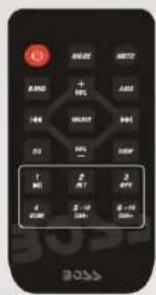
text_image
BOSSE RAND + 90% I/OE SHIFT 90% S1 90% CWP 1 M2 2 P1 3 R7 4 S1/8 5.16 6.16 BOSSE
CONTENTS
Installation & Removal 3
DIN Mount 3
Installing the unit 3
Removing the unit 4
Wiring Connections 5
Operation 6
Location of Keys 6
Powering On/Off 7
Audio Adjustment 7
Time 7
Display....7
Aux-In....7
Reset 7
Radio Operation 7
Switching to Radio Mode 7
Selecting AM/FM 7
Selecting Station 7
Auto Memory Storing & Scanning ...... 7
Reset Stations 8
Station Storing 8
USB/SD Playback 8
Selecting Tracks 8
Play/Pause 8
Direct Track Access 8
BT Playback 9
Remote Control....10
Specifications 11
Troubleshooting 12
- Choose the mounting location where the unit will not interfere with the driver.
- Before finally installing the unit, connect the wiring temporarily and make sure it is all connected properly and the unit and the system work properly.
- Use only the parts included with the unit to ensure proper installation. The use of unauthorized parts can cause malfunctions.
- Consult with your nearest dealer if installation requires the drilling of holes or other modifications of the vehicle.
- Install the unit where it does not get in the driver's way and cannot injure the passenger if there is an emergency stop.
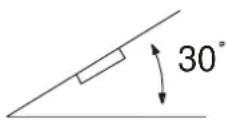
- If installation angel exceeds 30^ from horizontal, the unit might not give its optimum performance and could compromise water resistance.
- Avoid installing the unit where it would be subject to high temperature, such as from direct sunlight, or from hot air, from the heater, or where it would be subject to dust, dirt or excessive vibration.
DIN MOUNT
Installation Opening
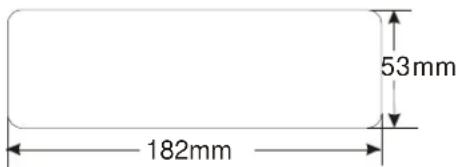
This unit can be installed in any dashboard having an opening as shown below:
text_image
53mm 182mmInstalling the unit
-
Make sure the ignition is turned off, and then disconnect the cable from the vehicle battery's negative (-) terminal.
-
Disconnect the wire harness and the antenna.
-
Mount the sleeve by inserting the sleeve into the opening of the dashboard and bend open the tabs located around the sleeve with a screw driver. Not all tabs will be able to make contact, so examine which ones will be most effective. Bending open the appropriate tabs behind the dashboard to secure the sleeve in place.

text_image
Screwdriver Tabs Dashboard Sleeve-
Reconnect the wire harness and the antenna and be careful not to pinch any wires or cables.
-
Slide the unit into the sleeve until it locks into place.
-
Reconnect the cable to the vehicle battery's negative (-) terminal. Then replace the outer trim ring.
-
Make sure the ignition is turned off, then disconnect the cable from the vehicle battery's negative (-) terminal.
-
Remove the metal strap attached the back of the unit (if attached).
-
Lift the top of the outer trim ring then pull it out to remove it.
-
Insert both of the supplied keys into the slots at the middle left and right sides of the unit, then pull the unit out of the dashboard.

text_image
Diagram illustrating a mechanical assembly or tooling process with labeled components and directional arrows indicating movement.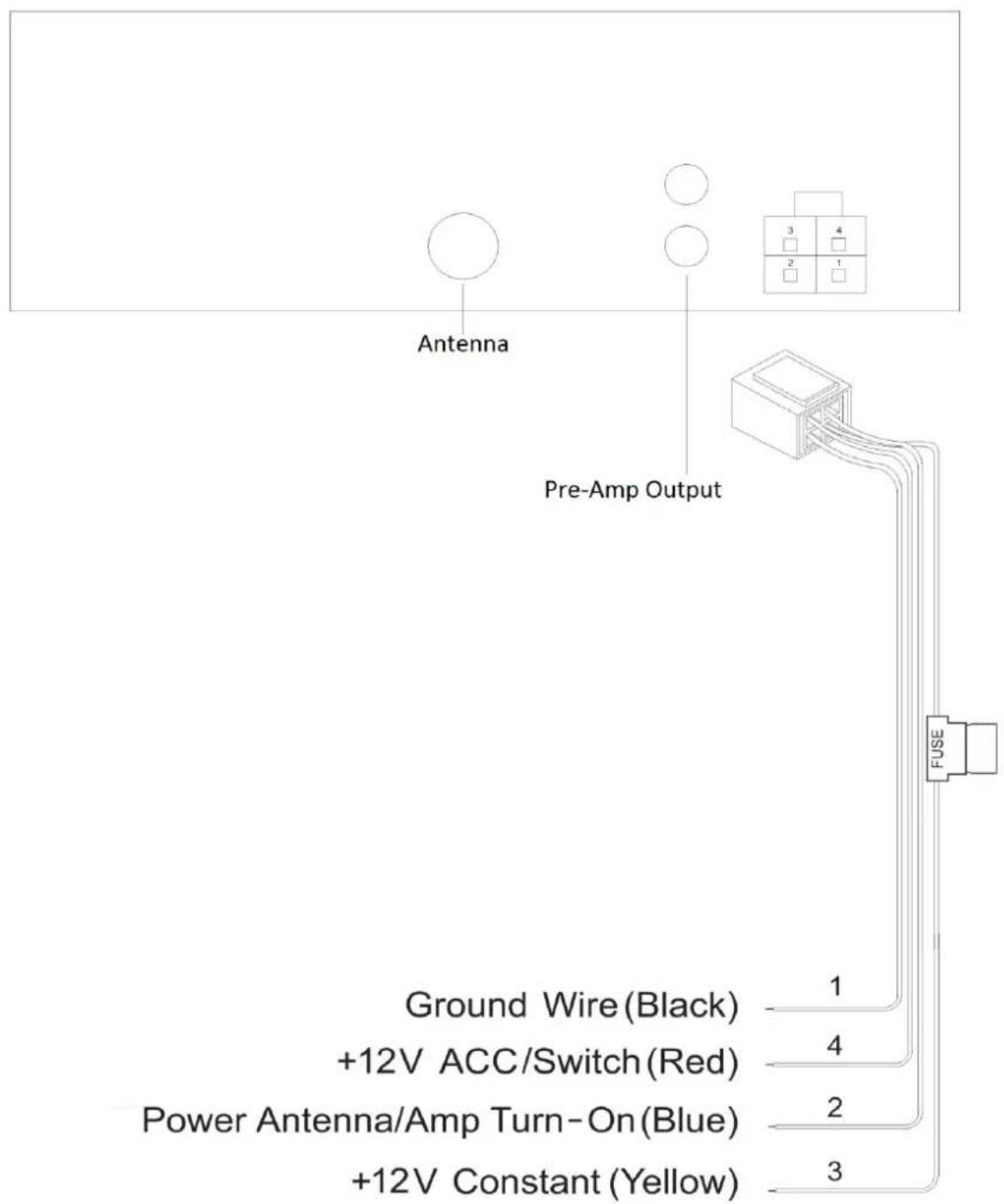
text_image
Antenna Pre-Amp Output Ground Wire (Black) +12V ACC/Switch (Red) Power Antenna/Amp Turn-On (Blue) +12V Constant (Yellow) FUSE 1 4 2 3Button Description

text_image
① ② ③ ④ ⑤ BND AS/CH MODE DISP AUX IN PUSH PWR ⑪ SAVE ⑦ ⑥ ⑧ ⑨ ⑩ ⑪ ⑫- Answer / BND / AS / SCH
- Display
- VOL / SEL / PWR
- Next Track / Seek Up
- (End Call) / MODE
- RESET
-
Play / Pause, Store Preset
-
USB port
- SD Port
- AUX-In
- Prev. Track / Seek Down
- Display clock
- IR Remote Sensor
OPERATION
Powering ON/OFF
Press PWR button (3) to turn on the unit. When the unit is on. Press and hold for 2 seconds to turn off the unit.
Audio Adjustment
Press SEL button to cycle.
→BAS-TRE-BAL -LOUD-EQ-ST-DX-VOL
BAS: Bass
TRE: Treble
BAL: Balance
LOUD: Loudness
EQ: Preset EQ Curves
DX: Distance
LOC: Local
VOL: Volume
Display Time
Press CLK button to display the time.
Clock Adjustments
-Press DISP
-Press and Hold DISP for 2 seconds
“HH” will flash, using the volume, change the hour.
-Press DISP button once more for minuets
“MM” will flash using the volume, change the minutes.
-Press DISP once more to store the time settings
Loudness
This feature has a gentle boost to enhance low and high frequencies.
EQ Presets
Preset audio EQ curves are selectable:
A 3.5mm audio cable is required (not included)
Track Functions, Play/Pause, will not be used for this mode.
RESET FUNCTION
The RESET button is to be activated for the following reasons:
- Initial installation of the unit when all wiring is completed.
- All the function buttons do not operate.
- Error symbol on the display.
Radio
• SWITCHING TO RADIO MODE
Use the MODE button to select Radio
- Radio Band
Press BAND to cycle through tuner:
Press ▶▶ or ◀◀ to activate the automatic seek function.
It will search up/down a station automatically.
Press and hold for 2 seconds until "MANUAL" appears on the display, the manual tuning mode is selected.
In this mode, frequencies are manually tuned.
5 seconds after the last button has been pressed, "AUTO" will default again.
• Auto Memory Store (AMS) & Scanning
- Automatic Memory Store
Press and Hold AS button for 2 seconds, and it will store 18 presets (FM 1-3)
- Selecting Presets
Press the .
You can select the preset station (CH 1-6).
- Manually Store Presets
Press and Hold the SAVE for 2 seconds.
It will show "SAVE CH1".
If you want to store the station to CH2.
Press it again it will show "SAVE CH2".
During this action, Press and Hold the SAVE for 2 seconds.
The current station is stored into the CH2.
- Local Function
Press SEL knob several times till appear "DX". Using the Volume, to choose the LOC (local) mode.
In LOC mode the unit will reduce the receiving sensitivity when you search station.
It will ignore the stations with poor reception.
In DX mode it will increase the receiving sensitivity when you search the station.
STEREO/MONO
Press SEL until "ST" appears.
Using the Volume knob to select STEREO or MONO mode.
In STEREO mode you can receive FM stereo signal.
In MONO mode the stereo signal will be switched to monaural, this can reduce the noise by the signal reception.
USB / SD Playback
Memory up to 32Gb is supported
Note:
MP3 files are only supported. Any other files that are combined with music folder will cause errors and will not play
Selecting Tracks
Press ▶▶/◀◀ buttons to skip tracks
Press and hold ▶▶1 button or ◀◀ button for 2 seconds to fast forward or fast reverse.
The track will play when you release the button.
Play/Pause
If a track is playing, Press to pause playing.
Press it again to resume playing.
Direct Track Access (USB/SD Mode)
Press SCH button to active the file search mode. It will show "TNO---.
Use the VOL knob to select the tracks number, 1'st number. 3 seconds later to select the 2'nd number...
Press "SEL" to confirm.
Bluetooth
- PAIRING
On the mobile phone, select the Bluetooth set up. (Please refer to the instruction manual of your mobile phone on how to operate Bluetooth.)
2) "BOSS AUDIO" should appear in the list on your mobile phone, please select "BOSS AUDIO"
If a passcode is required enter: "0000"
3) When paired and connected successfully paired, the BT icon will illuminate.
Answering / Rejecting an incoming call
During an incoming call, Press → to answer the call.
Press 📞 to reject the call.
- End a Call
Press 🔺 key to end the call.
- Connect/Disconnect Bluetooth
Press and Hold disconnect.
for 3 seconds to
Press and Hold it again to connect the device again.
Audio Streaming (A2DP)
Press MODE to enter BT mode.
Note: BT will only be active when there is a device that has been paired and is connected.
Press to Play/Pause.
Press ▶ button or button to select next/previous song.
text_image
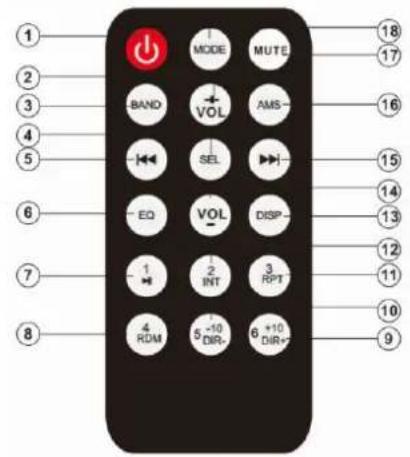
1 2 3 4 5 6 7 8 MODE MUTE BAND VOL AMS SEL EQ VOL DISP 1 2 3 INT RPT 4 5 6 +10 DIR+ DIR+ 18 17 16 15 14 13 12 11 10 9KEY & CONTROL
-
⏻ Power ON/OFF
-
VOL+ Volume Up
-
BAND Band Select (FM1, FM2, etc...)
-
SEL Audio Adjustment/Enter
-
Radio: Seek/Scan
MP3 mode: skip to the previous file or fast reverse.
-
EQ Press it to select desired audio equalization.
-
1/▶II Radio mode: Preset 1
MP3 mode: Play/Pause
- 4/RDM Radio mode: Preset 4
MP3 mode: Random On/Off
- 6/+10/DIR+: Radio mode: Preset 6
MP3 mode: Press for to advance folder
Long press for +10 track function
- 5/-10/DIR-: Radio mode: Preset 5
MP3 mode: Press for previous folder
Long press for -10 track function
- 3/RPT Radio mode: Preset 3
MP3 mode: Repeat one/all
- 2/INT Radio mode: Preset 2
MP3 mode: Turn on/off the INTRO function
-
DISP Press DISP to show the time
-
VOL- Volume Down
-
Radio mode: Seek/Scan
MP3 mode: skip to the next file or fast forward
- AMS Same as the AS/PS function. See page 10
MP3 mode: File search function
-
MUTE Mute
-
MODE Press to change the source
SPECIFICATION
General
Power Supply Requirements : 12 V DC, Negative Ground
Chassis Dimensions : 178 (W) x 64 (D) x 50 (H)
Current Drain : 3 Amp (max.)
Audio
Tone Controls
- Bass (@ 100 Hz) : ±10 dB
- Treble (@ 10 kHz) : ±10 dB
Pre-Amp Output : Full-Range
Radio
FM
Frequency Coverage 87.5 to 107.9 MHz
IF 10.7 MHz
AM
Frequency Coverage 520 to 1710KHz
IF 450 kHz
TROUBLESHOOTING
Before going through the checklist, check wiring connection. If any of the problems persist after checklist has been made, call our Tech Dept. (M-F, 8:30a-5p PST) 805-751-4853
| Symptom | Cause | Solution |
| Does not power on | The car ignition switch is not on. | Turn the key to the “ACC” or “IGN” position |
| The fuse is blown. | Replace the fuse. Always replace with the same type and rating. | |
| No sound | Volume is at minimum | Adjust volume to a desired level. |
| Change the source | Press “MODE” to select radio | |
| Unit is not responsive | Remove any external media.i.e. USB/SD | Press the reset button. |
| 1) Poor Reception2) The AMS does not function. | The antenna cable is not connected. | Insert the antenna cable firmly. |
| The signals are too weak. | Select a station manually. |
USER'S MANUAL
630UASB
BLUETOOTH®-ENABLED | MP3-COMPATIBLE DIGITAL MEDIA
AM/FM RECEIVER
FEATURING BUILT-IN SPEAKERS
BOSS®
AUDIO SYSTEMS
BOSS Audio Systems
3451 Lunar Court • Oxnard, CA 93030
www.bossaudio.com | 805.751.4853
tech support: www.bossaudio.com/technical-support


1214