UTV4B - Car Radio BOSS - Free user manual and instructions
Find the device manual for free UTV4B BOSS in PDF.


| Product Type | All-Terrain Sound System (Bluetooth speaker system) |
| Brand | BOSS Audio Systems |
| Model | UTV4B |
| Power Supply | 12 VDC (allowable 10-16 VDC) |
| Current Draw | Max 6 A |
| Fuse Rating | 10 A AGC type (glass cartridge) |
| Bluetooth Version | 5.0 / EDR |
| Bluetooth Profile | A2DP |
| Transmission Distance | Up to 33 ft / 10 m (line of sight) |
| Speaker Size | 4" (102 mm) |
| Speaker Cone Type | PP carbon + rubber surround |
| Tweeter Size | 1" PEI soft dome |
| Amplifier Class | Class D |
| Input Impedance | 10 kΩ |
| Frequency Response | 65 Hz - 22 kHz |
| Weight | 8.8 lbs / 4.0 kg |
| Weatherproof | Yes (do not submerge) |
| Shockproof | Yes |
| Mounting | Includes mounting straps and zip ties for ATV/UTV roll bars |
| Audio Inputs | Bluetooth, 3.5mm AUX |
| Accessories Included | 12V power port plug with fuse, power port plug adapter, 3.5mm AUX cable, mounting straps, zip ties, user manual, warranty card |
| Safety Precautions | Disconnect vehicle battery negative terminal before installation; avoid high volumes when driving |
| Cleaning | Use lukewarm water and mild soap; do not use abrasive cleaners or immerse |
Frequently Asked Questions - UTV4B BOSS
User questions about UTV4B BOSS
0 question about this device. Answer the ones you know or ask your own.
Ask a new question about this device
Download the instructions for your Car Radio in PDF format for free! Find your manual UTV4B - BOSS and take your electronic device back in hand. On this page are published all the documents necessary for the use of your device. UTV4B by BOSS.
USER MANUAL UTV4B BOSS
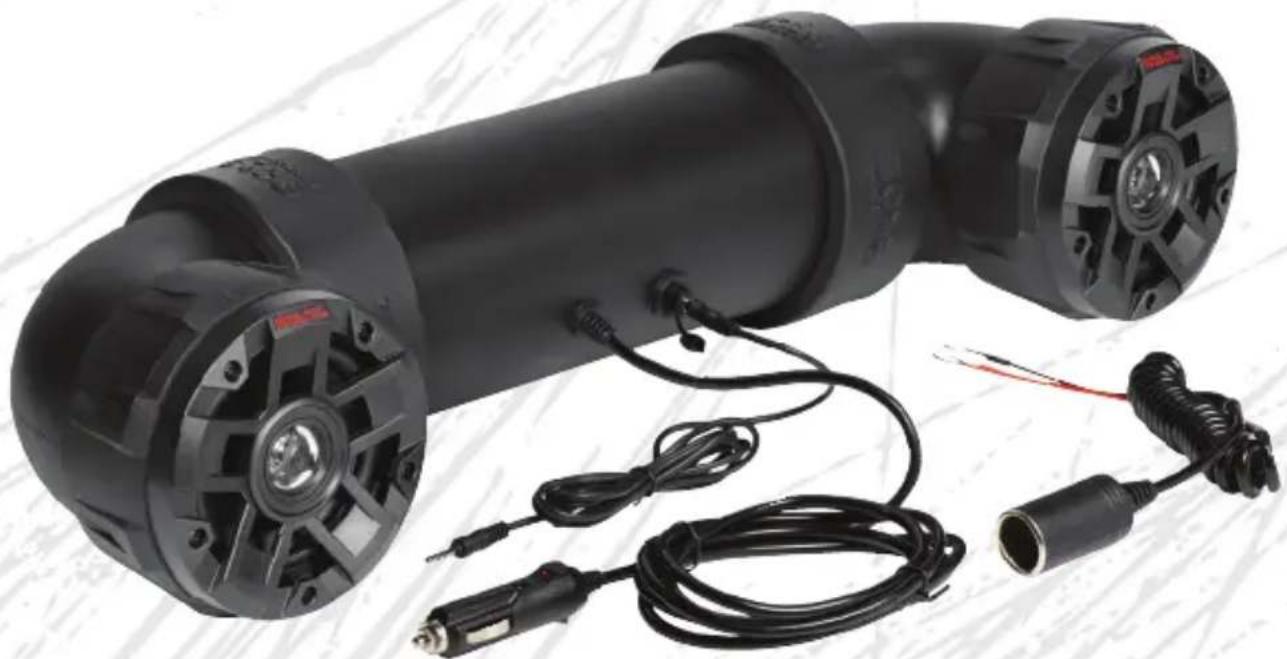
FEATURING 4" MARINE SPEAKERS AND 1" WATERPROOF TWEETERS
natural_image
Black industrial electric shaver with attached cable and connector, no visible text or symbols1
Thank you for purchasing this

AUDIO SYSTEMS
UTV4B All-Terrain Sound System
Please read through these instructions carefully so you will know how to operate your model properly.
After you have finished reading the instructions, keep this document in a safe place for future reference.
THIS PACKAGE CONTAINS
1x All-terrain sound system (with a 12V power port plug)
1x 12V power port plug adapter
1x AUX cable with 3.5 mm plug
2x Mounting straps + 2x Nylon zip ties
1x User manual + 1x Warranty card




IMPORTANT
Please enter below the Serial No. which is located on the exterior of the product. Retain this information for future reference.
Model
Serial No. ____
Date of Purchase ____
2
Before You Start
Read and understand all instructions before you use your product. If you do not follow the instructions in this manual, we are not responsible for injury or damage resulting from improper handling. This will also void the warranty.
Important Safety Precautions
- Be sure to observe the following guidelines:
- Do not increase speaker volume so high that you cannot hear what is around you.
-
Use caution or temporarily discontinue use in potentially hazardous situations.
-
Do not make any adjustment on the product when driving or in other situations where distractions can be hazardous. Responsible and safe driving is your primary responsibility when operating a vehicle.
- Start volume at a low setting then gradually increase the volume until you can hear it comfortably, without sound distortion and ear discomfort.
- In the event of smoke, strange noise or odor emitted from the product or any other abnormal operational signs appearing on the product, disconnect the product from the power supply. Discontinue use and contact your dealer or our technical support. Using the product in this condition may result in permanent damage to the system.
- Servicing must only be carried out by a technician. Contact our technical support for any service questions.
Installation Precautions
- WARNING: Always consult a professional installer.
• Installation must be performed by a professional. Contact our technical support for any installation questions. - Observe the safety and operating instructions of the devices which are connected to the product.
- Only use attachments/accessories specified by the manufacturer for installation.
- Do not modify this product, as this affects the safety of the product and creates a risk of injury.
- Before installation, disconnect the negative terminal of the vehicle battery to prevent damage to the product, fire, and/or possible injury.
Care for Your Product
- DO NOT clean the product in hot weather (e.g. hot sunlight).
- DO NOT use abrasive or highly alkaline cleaner on the product.
• DO NOT use gasoline, acetone, carbon tetrachloride or other aggressive chemical solutions on the product. - DO NOT scrape the product with razor blade or other sharp instrument.
- This product is weatherproof. However, never submerge the product in water.
- Wash the product with lukewarm water and mild soap or detergent, using a clean sponge or soft cloth. Rinse well with clean water.
3
Getting to Know Your ATV6.5B
Introduction
The product is a Bluetooth speaker system which is ideal for installation in a ATV (All Terrain Vehicle) or UTV (Utility Vehicle). You can stream audio from a mobile phone to this product via Bluetooth. You can also play music from an external device (e.g. a mobile phone or MP3 player) via 3.5 mm AUX input jack.
This product is shockproof and weatherproof. This product is operated with 12 VDC vehicle power supply. Never connect this product to any other voltage supply (e.g. 24 VDC).
Please read this manual carefully so you will know how to operate your product properly. After you have finished reading this manual, store it in a safe place for future reference.
Product Overview
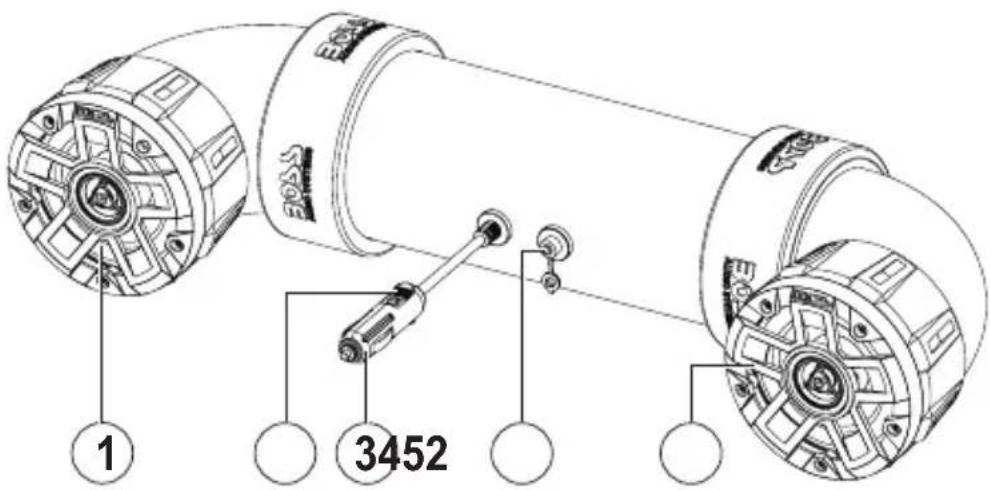
1 Speaker
2 Power LED indicator
3 12V power port plug with 10A fuse
4 3.5mm audio input jack
5 Speaker
4
Mounting
Mounting on ATV or UTV

Always consult an expert when in doubt about the installation.
Use only the supplied accessory for mounting. Using other mounting methods may void the warranty.
To ensure safety of the mounted sound system, always check the mounting conditions (e.g. mounting straps) of the sound system before each vehicle ride.
- Using the two supplied mounting straps and zip ties, secure the sound system on the rails or roll bars of your vehicle, as shown in the figure below. Make sure the sound system is securely attached to your vehicle.

No special tool is required when mounting the sound system on ATV or UTV.
The illustration is for reference only. Your vehicle may vary.

natural_image
Technical line drawing of a vehicle interior with dashboard and steering wheel (no text or symbols)5
Power Connection
Option1: Using Power Port
If your vehicle has a 12V power port, directly connect the sound system to your vehicle for power connection.
- Insert the 12V power port plug of the sound system into your vehicle power port. When the power supply is connected, the power LED indicator illuminates on the power port plug.
Note: To avoid battery drain, unplug the power port cable after each use (if the port power is not switched off with the ignition key).
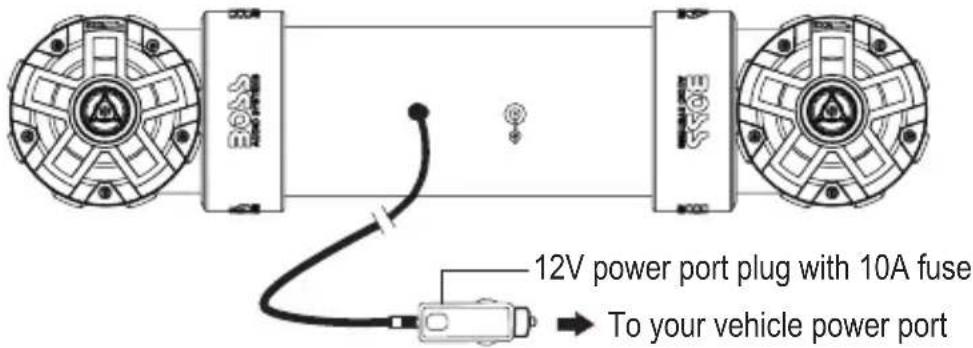
Option 2: Using Power Port Plug Adapter
If your vehicle dose not have a 12V power port, use the supplied power port plug adapter for connection to your vehicle battery.
Important:
- To avoid short circuits and any resulting damage to the sound system, the negative terminal of the vehicle's battery must be disconnected first.
- Connect the black/ground wire of the power port plug adapter to the vehicle's metal frame or to the negative battery terminal. Fasten the ground wire with a bolt/screw on the metal surface. Make sure the metal surface is scraped clean with no paint, rust or dirt.
- Connect the red wire of the power port plug adapter to the positive battery terminal.
If needed, use extension wires of 12-14 gauge for connection to the battery. Remember to install a 15A in-line fuse (not included) and an on-off switch (not included). An on/off switch is not needed if you unplug the power port cable after each use or if the vehicle power port is turned off with the ignition key. Refer to the illustration. - Insert the power port plug of the sound system into the power port plug adapter.
When the power supply is connected, the power LED indicator illuminates on the power port plug.

Option 3: Direct connection to vehicle battery
Important:
- To avoid short circuits and any resulting damage to the sound system, the negative terminal of the vehicle's battery must be disconnected first.
- Remove the plug from the supplied power port plug cable.
- Connect the power port plug's negative wire to the vehicle's metal frame or to the negative battery terminal, and the power port plug's positive wire to the positive battery terminal.
- To prevent electrical damage, you must install 1) a 15A fuse (not included) and 2) an on/off switch (not included) to be in line with the power wire which connects to the positive battery terminal.
- Fasten the ground wire with a bolt/screw on the metal surface. Make sure the metal surface is scraped clean with no paint, rust or dirt.
Note:
To avoid battery drain when the sound system is not used, disconnect the sound system from the battery by unplugging the power port cable or using the inline on/off switch (not included).
7
Bluetooth
Before you can stream music from your mobile device (iOS device or Android device) to this sound system through Bluetooth, pair the sound system with your mobile device.
- Make sure the AUX cable is not connected to the sound system, and connect to power supply.
The power LED indicator illuminates on the power port plug, and the sound system will automatically enter pairing mode. - On your mobile device, enable Bluetooth function and select the device name ("Boss Audio UTV4B") to pair the sound system with the mobile device.
If prompted for password input on your mobile device, input "0000".
Note: Only one device can be paired at a time.
- When successfully paired/connected, confirmation tone can be heard. Play audio on your mobile device, and audio will be streamed to the sound system. Use the volume control on the connected device to adjust volume.
After pairing, the sound system will be automatically connected to your mobile device each time the two are turned on. To change Bluetooth source, disconnect the current Bluetooth connection then repeat the steps above to connect/pair with another mobile device.

Playback control
Use the controls on the connected device to control play (e.g. play/pause, volume and track selection).

To maximize audio performance, set the volume of the connected device to a minimum of 75%. Ideally, on the highest volume setting you can get without distortion.
Operating the sound system consumes the vehicle battery. To avoid battery exhaustion, make sure to run the vehicle engine when operating the sound system.
Operational range can be reduced by any obstacle between the sound system and the device.
If the connected device is out of the effective range from the sound system, the device will be automatically disconnected. The device will be automatically re-connected if it is back to the operational range within three minutes.
8
AUX
You can listen to an external audio device (e.g. MP3 player or a mobile phone) through this sound system.
-
Connect the AUX input (3.5mm) from the sound system to the audio output jack on your mobile phone, using the following audio cable.
-
For a mobile phone with 3.5mm headphone jack, use the supplied 3.5mm audio cable.
- For a mobile phone with USB-C port, use USB-C to 3.5mm cable (not included).
- For an iPhone with lightning connector, use lightning to 3.5mm cable (not included).
If the sound system is currently connected to a mobile device through Bluetooth, Bluetooth connection will be automatically disconnected.
- Select and play audio files on your audio device. Audio from the connected device will be played on this sound system.
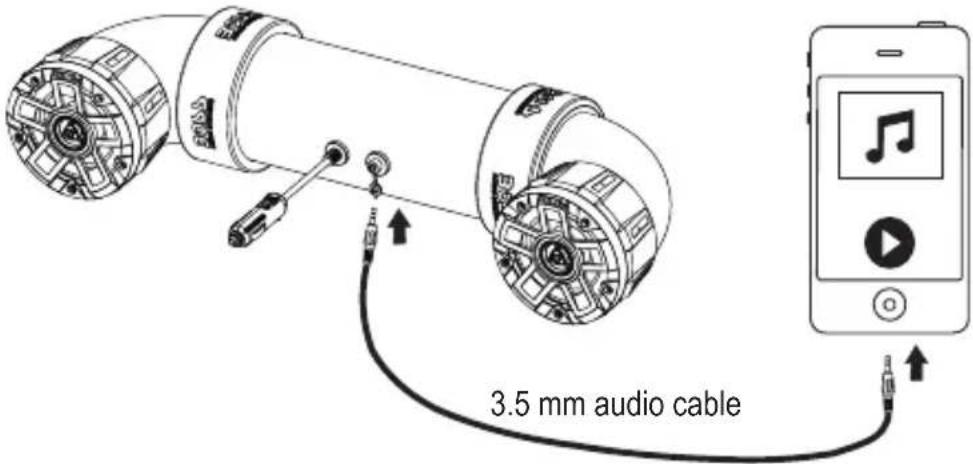
Playback control
Use the controls on the connected device to control play (e.g. play/pause, volume and track selection).

To maximize audio performance, set the volume of the connected device to a minimum of 75% before connection to the audio device.
To resume Bluetooth connection, you must disconnect the AUX cable from the sound system.
Operating the sound system consumes the vehicle battery. To avoid battery exhaustion, make sure to run the vehicle engine when operating the sound system.
9
Fuse Replacement
Fuse replacement of the vehicle power port plug
If the power LED indicator on the power port plug does not illuminate, this indicates the fuse inside the power port plug is blown. Replace the blown fuse with a new 10A AGC fuse (glass cartridge type).
- Locate the screw cap on the front end of the power port plug. Turn counterclockwise the screw cap to open then access the fuse inside.
- Replace with a new fuse (not included). Then replace the power port plug while ensuring the contact head sticks out.

10
Troubleshooting
If you have problems using this product, check the following points before you request service. If you still have a problem, contact our technical support.
| Problem Solution | |
| No power. | Power connection is not made. See the section “Power Connection” for details. |
| The ACC switch of the vehicle is not on. Turn the ACC switch on. | |
| The fuse inside the power port plug is blown. Replace the fuse. | |
| No sound. | Check the connected device for volume level or playback status (e.g. pause or stop). |
| Cannot connect through Bluetooth. | Make sure the AUX cable is not connected to the sound system. |
| Bluetooth function on the device is disabled. Refer to the device's user manual on how to enable Bluetooth function. | |
| Make sure the device is within range. | |
| The sound system is already connected with another Bluetooth device. Disconnect the current Bluetooth connection. | |
| Bluetooth has been disconnected for more than three minutes, manually reconnect Bluetooth through your mobile device. | |
| Audio quality from Bluetooth connection is poor. | Move the device closer to the sound system or remove obstacles or sources of interference that are affecting Bluetooth reception. |
| No response. | Power glitch or interference. Disconnect power for ten seconds then reconnect power. |
Care of the Environment
Do not throw away the product with normal household waste at the end of its life. Follow your local laws if/when disposing of electronic products. By doing this, you help preserve the environment.
Specifications
Bluetooth
Bluetooth version....5.0 / EDR
Bluetooth profile.....A2DP
Transmission distance....up to 33 ft /10 m (line of sight)
Speakers
Dimensions....4" / 102 mm
Cone type....PP carbon + rubber surround
Tweeter size ....1" PEI soft dome
Amplifier
Amplifier class ....Class D
Input impedance....10 kΩ
Frequency response....65 Hz - 22 kHz
General
Input voltage/current.... 12 VDC (allowable 10 - 16 VDC)
Current draw....max. 6 A
Fuse....10 A AGC type
Weight 8.8 lbs / 4.0 kg
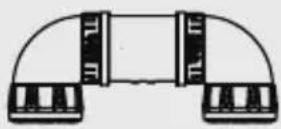
Dimensions drawings

Specifications are subject to change without notice.
BOSS®
AUDIO SYSTEMS
BOSS Audio Systems
3451 Lunar Court · Oxnard, CA 93030
www.bossaudio.com
805-751-4853 Customer Service
Tech Support: www.bossaudio.com/support

CE


0224
V:1X
The Bluetooth ^* word mark and logos are registered trademarks owned by Bluetooth SIG, Inc. and any use of such marks by BOSS Audio Systems is under license. Other trademarks and trade names are those of their respective owners.
- Thank you for purchasing this
- UTV4B All-Terrain Sound System
- THIS PACKAGE CONTAINS
- IMPORTANT
- 2
- Before You Start
- Important Safety Precautions
- Installation Precautions
- Care for Your Product
- 3
- Getting to Know Your ATV6.5B
- Introduction
- Product Overview
- 4
- Mounting
- Mounting on ATV or UTV
- 5
- Power Connection
- Option1: Using Power Port
- Option 2: Using Power Port Plug Adapter
- Important:
- Option 3: Direct connection to vehicle battery
- Note:
- 7
- Bluetooth
- Playback control
- 8
- AUX
- 9
- Fuse Replacement
- Fuse replacement of the vehicle power port plug
- 10
- Troubleshooting
- Care of the Environment
- Specifications
- Speakers
- Amplifier
- General
- BOSS®
- AUDIO SYSTEMS
Brand : BOSS
Model : UTV4B
Category : Car Radio