
AC401B - Air purifier SAMSUNG - Free user manual and instructions
Find the device manual for free AC401B SAMSUNG in PDF.


| Product Type | Air Purifier |
| Model Numbers | AC401B, AC401BR, AC401BG |
| Power Supply | 220-240V~, 50/60Hz |
| Filter System | 11-step: Pre-filter, Ionizer, Electrostatic filter, Anti-bacterial filter (Nano silver), HEPA filter, VOCs filter (TiO), UV Lamp, 2 Photocatalyst filters, Anti-bacterial fan, Anion generator |
| Auto Mode | Automatically adjusts fan speed based on dust and odor contamination levels |
| Pollen Mode | Emphasizes dust/motes removal, air flow blade swings automatically |
| Sleep Mode | Lowest fan speed, display dims, no blade swing |
| Odor Mode | Focuses on odor and VOCs, air flow blade swings automatically |
| Fan Speeds | HH (Turbo), H (High), M (Medium), L (Low) + Auto |
| Anion Generator | Yes, automatically or manually activated |
| Air Flow Control | Swing (Auto in Pollen/Odor modes) or fixed via remote control |
| Display | Contamination Level Indicator (8 levels, green to red) with adjustable brightness (3 levels including off) |
| Sensors | Dust sensor (clean lens every 6 months), Odor sensor (no cleaning needed) |
| Washable Filters | Pre-filter and Washable Filter Section (clean every 3 months or when Wash indicator lights up) |
| Replacement Filter | HEPA filter (replace every 5 years or when Replace indicator lights up) |
| Filter Reset | Press Anion button for 2 sec after cleaning washable filters; press Mode button for 2 sec after replacing HEPA filter |
| Remote Control | Included, requires Lithium Ion battery (CR2032) |
| Remote Control Range | Direct line of sight to sensor on unit |
| Display Brightness | 3 levels: normal, dim, off (via remote Dimmer button) |
| Nano e-HEPA Indicator | Displays clean level by blinking speed; cannot be turned off |
| Safety Features | Auto shut-off when filter box opened, safety precautions for installation and use |
Frequently Asked Questions - AC401B SAMSUNG
User questions about AC401B SAMSUNG
0 question about this device. Answer the ones you know or ask your own.
Ask a new question about this device
Download the instructions for your Air purifier in PDF format for free! Find your manual AC401B - SAMSUNG and take your electronic device back in hand. On this page are published all the documents necessary for the use of your device. AC401B by SAMSUNG.
USER MANUAL AC401B SAMSUNG
OWNER'S INSTRUCTIONS
AC401B
AC401BR
AC401BG
Air Cleaner

natural_image
Abstract geometric composition with overlapping white rectangles and diagonal lines on a gray gradient background (no text or symbols)Safety Precautions
The following safety precautions must be taken into account when using this product.

WARNING
◆ Do not install this product in places where it will come into contact with combustible gases such as sulfuric gas, hydrogen gas, methane gas, etc.
◆ Do not install this product in places that are exposed to direct sunlight, near heating equipments and wet places.
When installing the electric wires, do not bend the wire excessively or place a heavy object on it. The wires may be disconnected or damaged.
◆ Avoid using inflammable spray gases such as insecticides near this product.
◆ Prevent children from inserting their fingers or objects into the air inlet and outlet.
Do not attempt to install or repair this product by yourself. If the product needs repairing, consult an authorized service personnel.

CAUTION
◆ Do not install this product on surfaces that are not even or slant. This may cause the product to malfunction or make a strange noise due to vibration.
◆ Make sure that the product is installed in a location that ensures enough space(at least 5 cm) in front of the air inlet.
◆ Make sure that there are no obstacles near the air inlet and outlet of the product.
If a strange noise, burning smell or smoke come from the product, immediately disconnect the power supply and consult an authorized service personnel.
◆ Do not use this product for other purposes.
◆ Do not spill any kind of liquids into the product.
◆ Do not place containers containing liquid substances on top of the product.
◆ Do not apply excessive impact on the product.
When using this product in a closed area that combustible fuels are fired, make sure to ventilate the air occasionally.
◆ Do not use the product in places that have a high temperature and humidity level, such as a bathroom or a sauna.
◆ Before attempting to clean or repair the product, make sure that the power supply is disconnected and the fan has stopped rotating.
◆ Do not use substances such as benzene, thinner or alcohol to clean the surface of the product.
◆ Do not open the filter box when the product is in operation.
When drying the washable filters, do not expose it to direct sunshine. The powerful sunshine may affect the transformation of the filter case.
Do not touch the filter section with wet hands because the user may be electrocuted. This is especially true for the Washable Filter section where a high voltage current flows.
Contents
◆ PREPARING THE AIR CLEANER
■ Safety Precautions 2
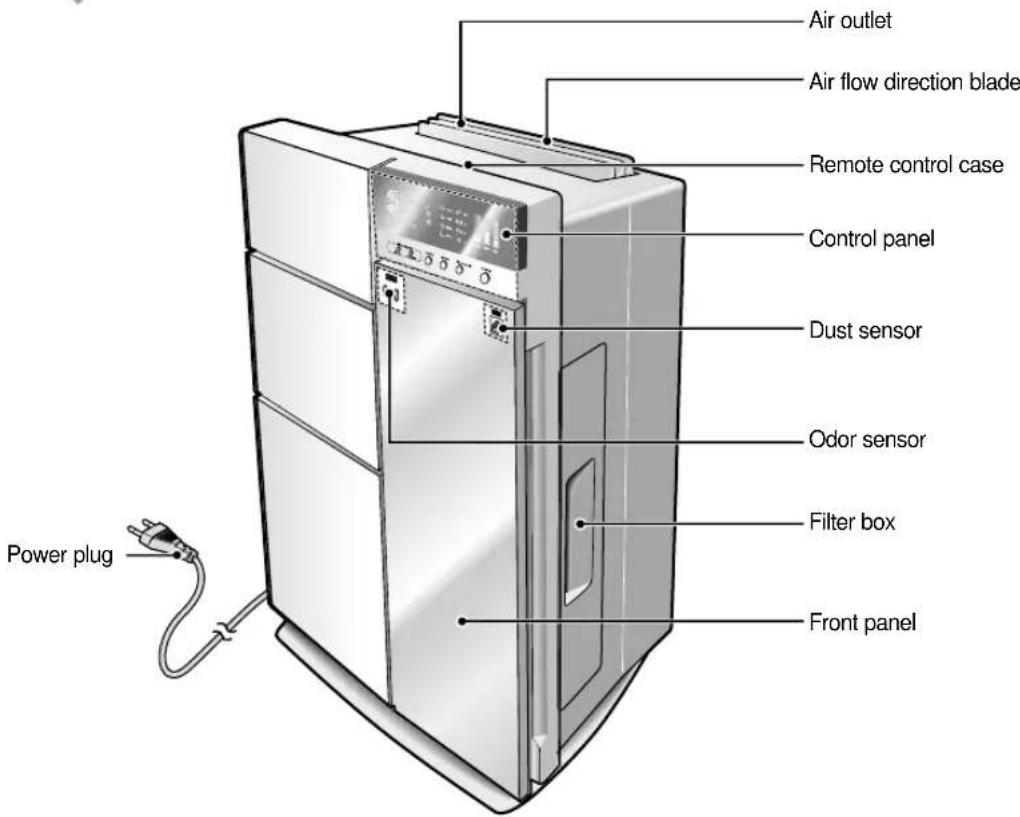
■ View of the Unit 4
■ Remote Control-Buttons 6
- Getting Started 7
- Inserting the Battery into the Remote Control 8
- Keeping the Remote Control 8
JUNING THE CONTROL PANEL
♦ OPERATING THE AIR CLEANER
■ Selecting the Automatic Mode ..... 10
■ Selecting the Pollen Mode 11
■ Selecting the Sleep Mode 12
■ Selecting the Odor Mode 13
♦ OTHER FUNCTIONS
■ Generating Anions 14
■ Adjusting the Clean Level (Fan Speed) 15
SINGTREEMOCO CONTROL
♦ OPERATING THE AIR CLEANER WITH A REMOTE CONTROL
■ Adjusting the Air Flow Direction 17
■ Adjusting the Display Brightness 18
■ Adjusting the Clean Level (Fan Speed) 19
■ Selecting the Operating Mode 20
■ Generating Anions 21
◆ RECOMMENDATIONS FOR USE
■ Operating Recommendations 22
■ Cleaning the Air Cleaner 23
■ Solving Common Problems 26
◆ TECHNICAL SPECIFICATIONS
Main Unit
11 Step Cleaning System
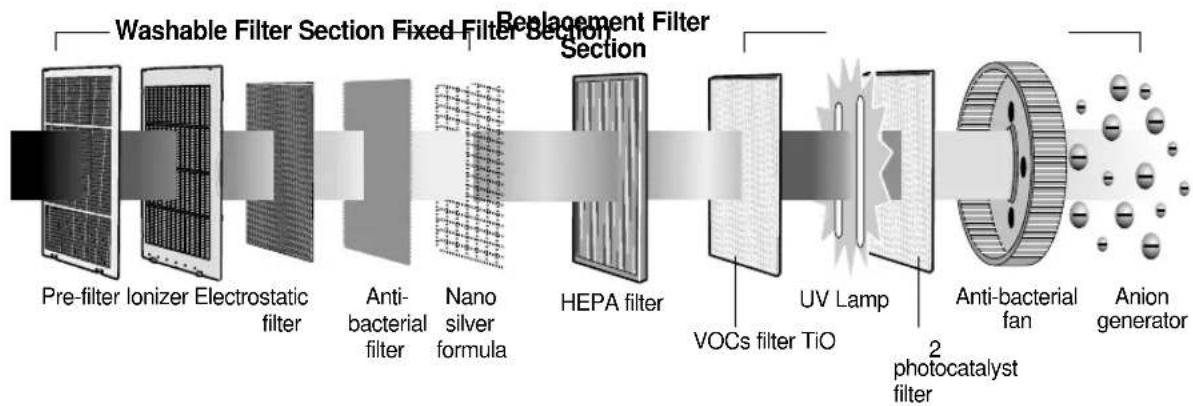
flowchart
graph LR
    A["Pre-filter Ionizer Electrostatic filter"] --> B["Anti-bacterial filter"]
    B --> C["Nano silver formula"]
    C --> D["HEPA filter"]
    D --> E["VOCs filter TiO"]
    E --> F["UV Lamp"]
    F --> G["2 photocatalyst filter"]
    G --> H["Anti-bacterial fan"]
    H --> I["Anion generator"]
    style A fill:#f9f,stroke:#333
    style I fill:#ccf,stroke:#333
The Anti-bacterial filter is coated with the Nano-silver particles.
Control Panel
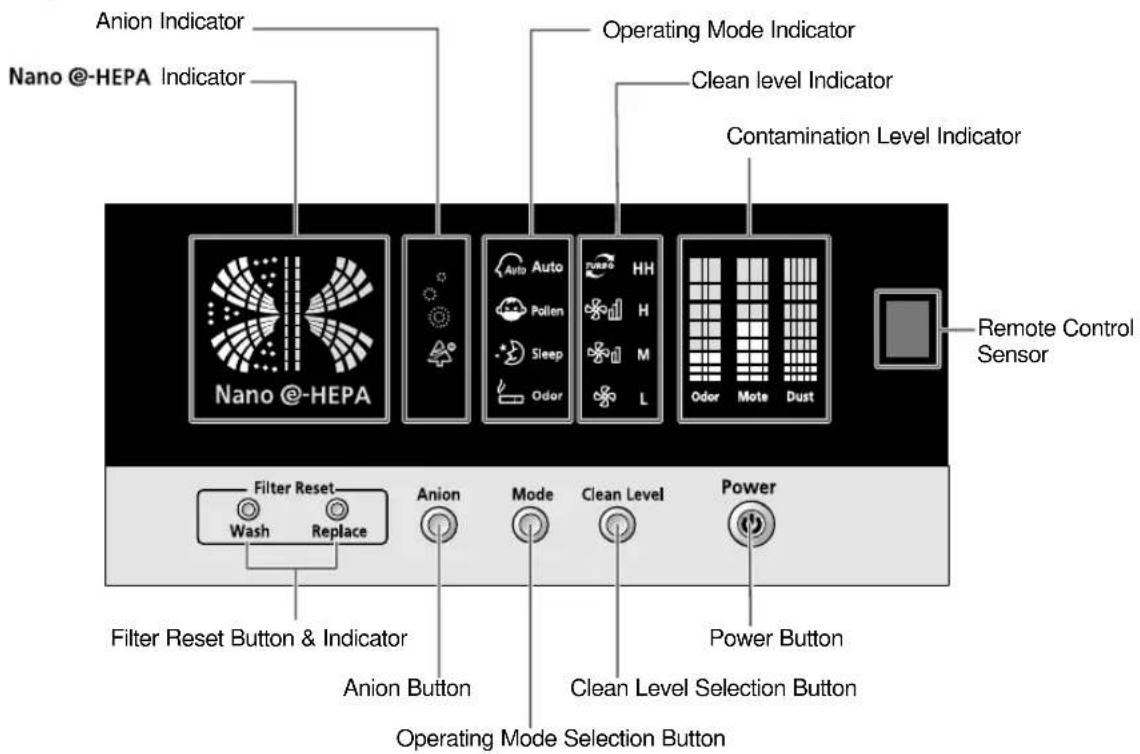
Note
◆ Medicato-HEPA
- Displays the Clean Level by differing its blinking speed.
- If the air cleaner is operating at the Pollen Mode, the Nano @-HEPA Indicator shows the image of big dust particles by blinking.
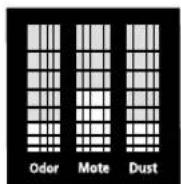
◆ Contamination Level Indicator
- Classifies the various contaminants in the indoor air, as Odor, Mote and Dust, and up to 8 levels can be displayed.
- Green indicates that the indoor air is clean. Red means that the indoor air is contaminated.
- During the first two minutes after the air cleaner is turned on, the contamination level will move up and down because the sensor will be in the
process of analyzing the contamination level of the indoor air. So it is recommended that you check the contamination level in 2 minutes.
Remote Control - Buttons
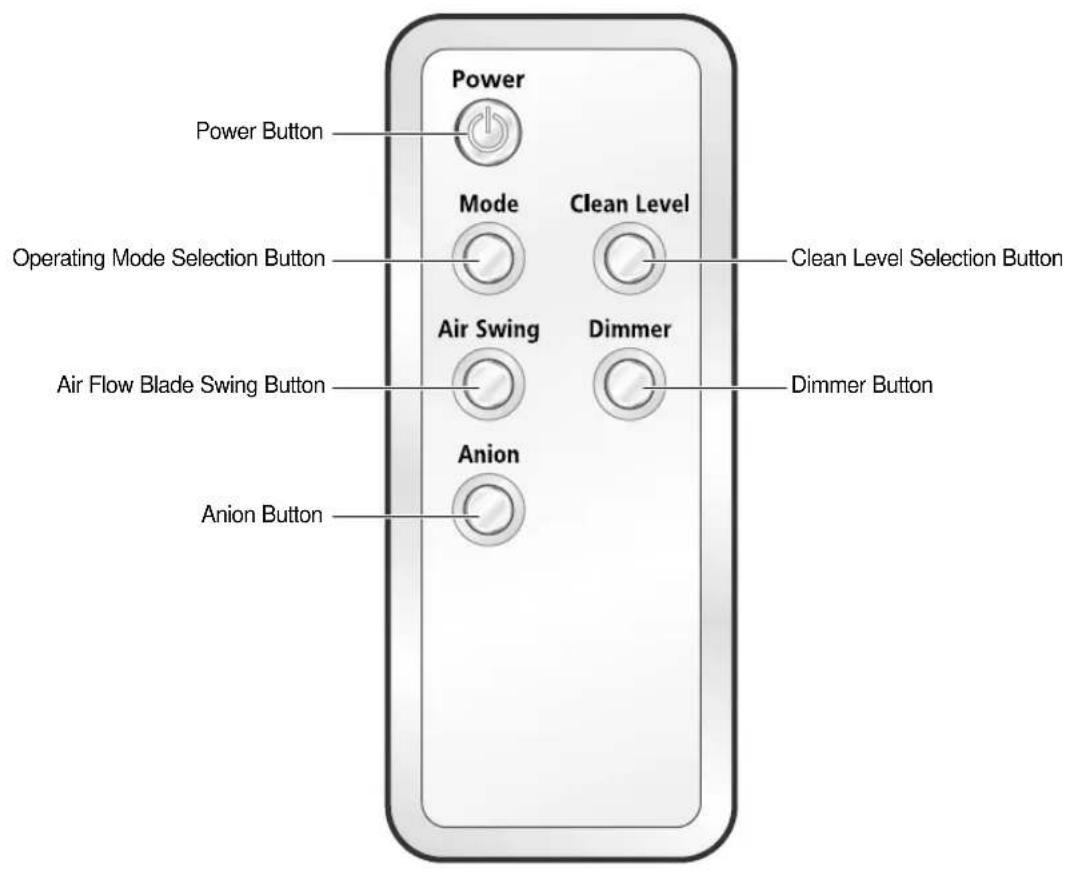
Getting Started
You have just purchased an air cleaner and it has to be installed according to the safety precautions of page 2.
This Owner's Instructions booklet contains important information concerning the use of your air cleaner. Please take some time to read this booklet as it will help you take full advantage of the product's features.
The booklet is organized as follows.
◆ The following figures are shown from page 4 to 6 :
- View of the Unit
- Remote control(buttons)
They will help you find the buttons and understand the symbols that are displayed.
◆ In the manual, you will find a series of step-by-step procedures for each function available.
Three types of symbols are used to help you understand the illustrations in the step-by-step procedures :
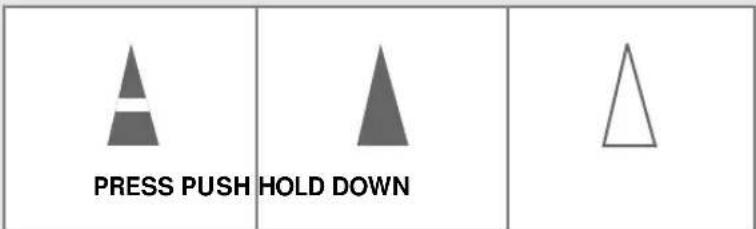
Inserting the Battery into the Remote Control
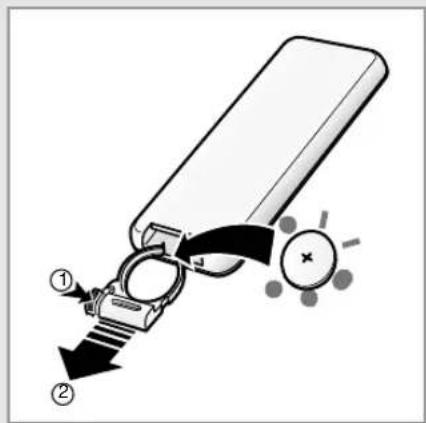
You must insert or replace the remote control battery when:
◆ You purchase the air cleaner.
◆ The remote control does not work properly.
Note
◆ Always direct the remote control towards the Remote Control Sensor on the air cleaner when operating it from a distance.
When you press a button on the remote control and the air cleaner makes a ringing sound, it means the function has been chosen.
◆ If other electric appliances are affected by the remote control, consult an authorized service personnel.
1 Push the section marked with the dotted lines towards the direction of the arrow(①), and then pull out the battery case in the direction of the arrow(②).
2 Insert the battery(Lithium Ion), after confirming polarities of the battery :
◆ + side on the battery with the + side on the remote control.
◆ - side on the battery with the - side on the remote control.
3 Slide back the battery cover until it clicks.
Keeping the Remote Control
natural_image
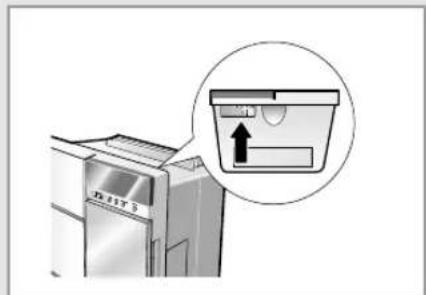
Illustration of a refrigerator with a magnified inset showing a slot (no text or symbols)Keep the remote control in the remote control case of the air cleaner when it is not being used.
As shown in the figure, place the remote control in the remote control case.
USING
THEE
CONTRODL
PANEL
natural_image
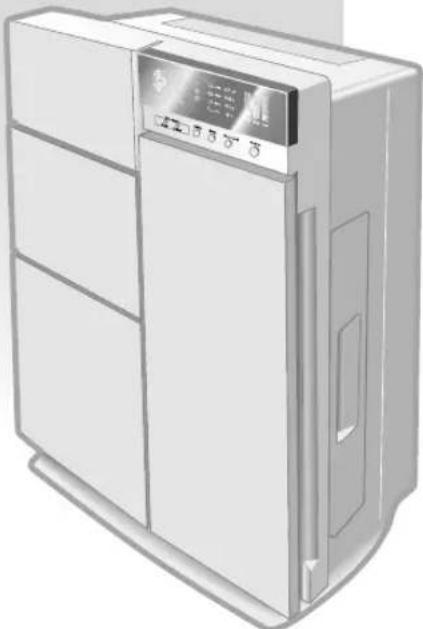
Illustration of a refrigerant appliance with a digital display and control panel (no text or symbols visible)This chapter indicates how to operate your air cleaner with the buttons on the control panel.
Selecting the Automatic Mode
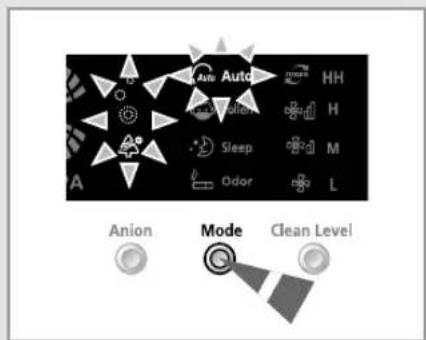
In the Automatic Mode, the air cleaner automatically adjusts the clean level according to the signal of the more contaminated level after comparing the dusts and motes contamination level with the odor contamination level in the indoor air. Anions are generated into an air automatically and the air flow blade does not move.
1 If necessary, press the ⏻ (Power) button.
Result: ◆ The Power indicator on the display comes on.
◆ The air cleaner runs in the Auto Mode.
◆ The air cleaner makes a ringing sound.
2 If the Auto is not displayed on the display, select the Auto mode by pressing the Mode button until it is displayed on the display of the air cleaner.
Result: ◆ The air cleaner beeps.
◆ The air cleaner operates in the Auto mode.
You can change modes at any time.
3 To control the direction of the air flow, refer to page 17.
To adjust the clean level, refer to page 15.
To adjust the generating anions, refer to page 14.
Selecting the Pollen Mode
The Pollen Mode can eliminate pollen and dust particles effectively in the indoor air. In this operating mode, the air cleaner automatically adjusts the clean level according to the dusts or motes contamination level without the odor contamination level in the indoor air. Anions are generated automatically and the air flow blade moves automatically.
1 If necessary, press the ⏻ (Power) button.
Result ◆ The Power indicator on the display comes on.
◆ The air cleaner runs in the Auto Mode.
◆ The air cleaner makes a ringing sound.
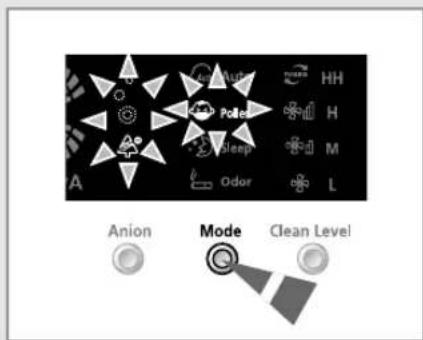
2 If the 📄 is not displayed on the display, select the Pollen mode by pressing the 📋 button until it is displayed on the display.
Result: ◆ The air cleaner beeps.
◆ The air cleaner operates in the Pollen mode.
You can change modes at any time.
3 To control the direction of the air flow, refer to page 17.
To adjust the clean level, refer to page 15.
To adjust the generating anions, refer to page 14.
Selecting the Sleep Mode
If you wish the air cleaner to clean the air in your room quietly, select the Sleep Mode. In this operating mode, the air cleaner runs in "Low Speed" which is the quietest clean level setting. Anions are generated into an air automatically and the air flow blade does not move.
1 If necessary, press the ⏻ (Power) button.
Result: ◆ The Power indicator on the display comes on.
◆ The air cleaner runs in the Auto Mode.
◆ The air cleaner makes a ringing sound.
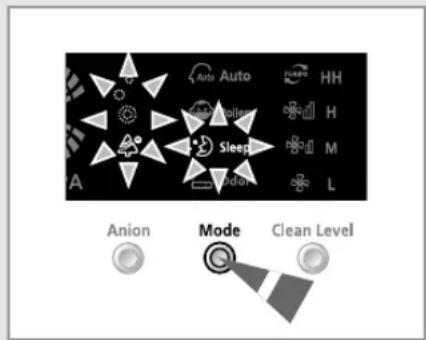
2 If the ⚠️ is not displayed on the display, select the Sleep mode by pressing the ⏻ button until it is displayed on the display.
Result: ◆ The air cleaner beeps.
◆ The air cleaner operates in the Sleep mode.
Note: You can change modes at any time.
3 To control the direction of the air flow, refer to page 17.
To adjust the clean level, refer to page 15.
To adjust the generating anions, refer to page 14.
NOTE The brightness of the display during the Sleep Mode
◆ In the Sleep Mode, the brightness of the display decreases so that it may not disturb your sleep.
◆ If you wish to turn off the display completely, press the Dimmer button on the remote control.
However, the Nano e-HEPA indicator cannot be turned off.
Selecting the Odor Mode
If you select the Odor Mode, the air cleaner can eliminate airborne contaminants and harmful smells effectively in the indoor air. In this operating mode, the air cleaner automatically adjusts the clean level according to the signal of the odor contamination level without the dusts and motes contamination level in the indoor air. Anions are generated automatically and the air flow blade moves automatically.
1 If necessary, press the ⏻ (Power) button.
Result: ◆ The Power indicator on the display comes on.
◆ The air cleaner runs in the Auto Mode.
◆ The air cleaner makes a ringing sound.
2 If the 📁 is not displayed on the display, select the Odor mode by pressing the Mode button until it is displayed on the display.
Result: ◆ The air cleaner beeps.
◆ The air cleaner operates in the Odor mode.
Note: You can change modes at any time.
3 To control the direction of the air flow, refer to page 17.
To adjust the clean level, refer to page 15.
To adjust the generating anions, refer to page 14.
♦ VOCs(Volatile Organic Compounds) are substances which are evaporated easily at the room temperature. Common sources which emit VOCs into the indoor air include housekeeping products, building and furnishing materials. In sufficient quantities, VOCs can have direct adverse effects on human health. Many VOCs have been classified as toxic and carcinogenic substances. Therefore it is harmful to be exposed to these compounds for a long period.
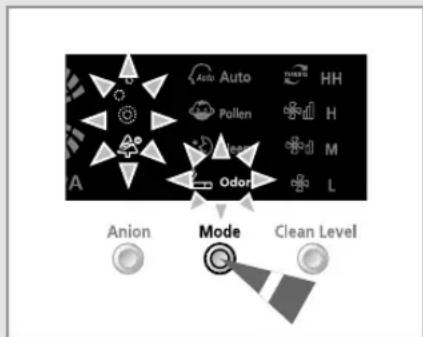
flowchart
graph TD
    A["Anion"] --> B["Mode"]
    C["Clean Level"] --> D["Mode"]
    E["O Air"] --> F["Mode"]
    G["Auto"] --> H["Mode"]
    I["Pollen"] --> J["Mode"]
    K["Odor"] --> L["Mode"]
    M["HH"] --> N["Mode"]
    O["H"] --> P["Mode"]
    Q["M"] --> R["Mode"]
    S["L"] --> T["Mode"]
Generating Anions
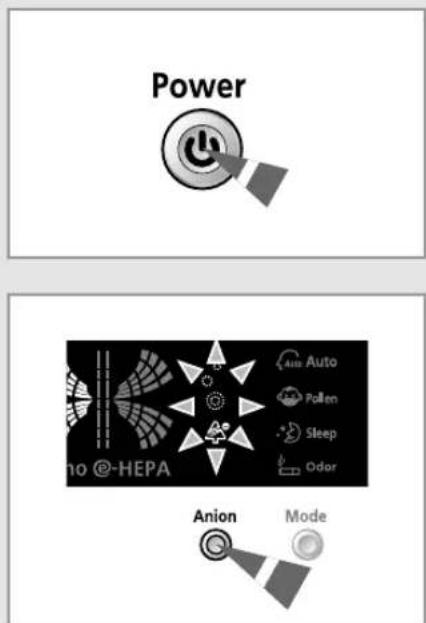
The Anion Generator generates anions, which are beneficial to the human body. Use this function if you want to feel refreshed both physically and mentally, just as if you were in the midst of a forest. If the air cleaner is turned on, anions are generated automatically.
1 If necessary, press the ⏻ (Power) button.
Result: ◆ The Power indicator on the display comes on.
◆ The air cleaner runs in the Auto Mode.
◆ The air cleaner makes a ringing sound.
2 If the Anion Indicator is not displayed on the display, select the Anion Generation function by pressing the Anion button.
Result: ◆ The air cleaner beeps.
◆ The Anion Indicator lights up on the display.
◆ The air cleaner generates anions into the indoor air.
3 If you wish to turn off the Anion Generation function, press the 📄 button again.
Result: ◆ The Anion Indicator disappears on the display.
◆ The air cleaner stops generating anions into the indoor air.
NOTE Anions are ultra-fine particles charged negatively in the air. There are vast quantities of them in nature, for example near waterfalls or in the midst of a forest. When inhaled in sufficient quantities, anions can enhance the metabolism of your blood cells, help you recover from fatigue faster, and calm your nerves. Thus anions are beneficial to you both physically and mentally.
Adjusting the Clean Level (Fan Speed)
The air cleaner automatically adjusts the clean level according to the contamination levels of the indoor air. It is also possible for you to manually select the clean level.
1 If necessary, press the ⏻ (Power) button.
Result: ◆ The Power indicator on the display comes on.
◆ The air cleaner runs in the Auto Mode.
◆ The air cleaner makes a ringing sound.
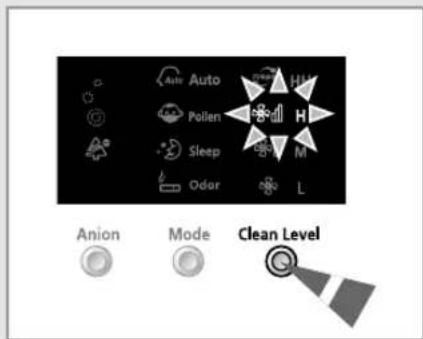
2 If you wish to manually select the clean level, press the Clean Level button one or more times until the desired clean level is selected.
Result: ◆ The air cleaner beeps.
◆ The air cleaner operates in the clean level that was selected.
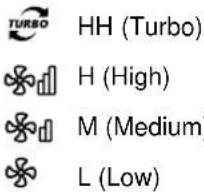
3 If you wish the air cleaner to automatically adjust the clean level for you, press the Mode button until the Auto mode is selected.
Result: ◆ The clean level that was selected is canceled.
◆ The air cleaner operates in the Auto mode.
◆ The air cleaner automatically chooses the appropriate clean level according to the levels of contamination in the indoor air.
USING
THEE
REMOTE
CONTROL
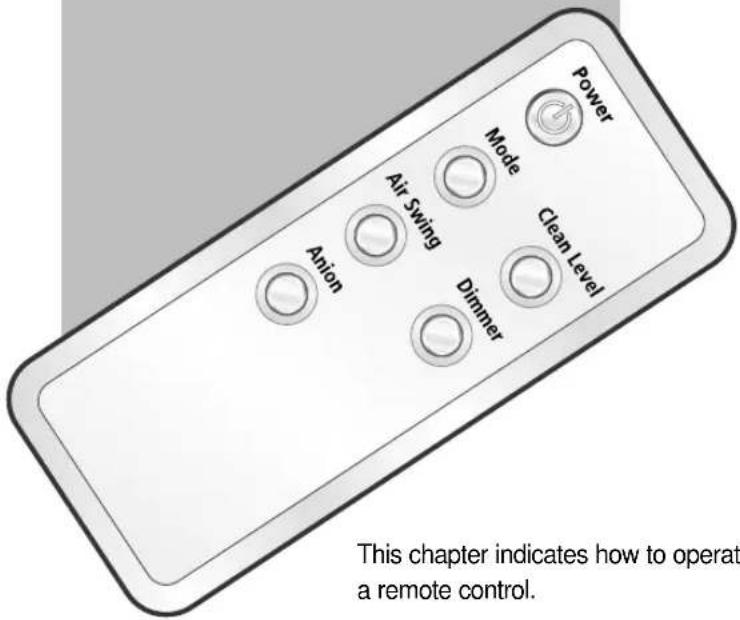
This chapter indicates how to operate your air cleaner with a remote control.
Adjusting the Air Flow Direction
The movement of the air flow blade changes according to the operating modes. The air flow blade swings automatically in the Pollen and Odor mode, but it is fixed in one position in the Auto and Sleep mode. The air flow blade can only be controlled with the remote control.
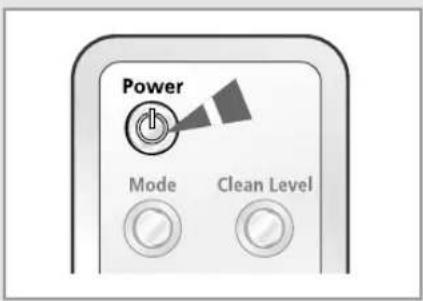
1 If necessary, press the Power (Power) button.
Result: ◆ The Power indicator on the display comes on.
◆ The air cleaner runs in the Auto Mode.
◆ The air cleaner makes a ringing sound.
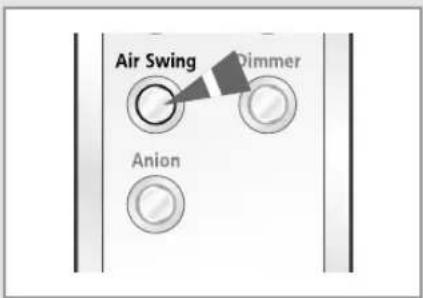
2 Press the Air Swing button on the remote control.
Result: ◆ The blade automatically begins to swing.
◆ The air cleaner beeps.
IMPORTANT When the air cleaner is turned on, the air blade automatically starts to move.
3 To stop the blade from swinging, press the ○ button again. To fix the blade in certain position, press the ○ button again when the blade is in the required position.
Adjusting the Display Brightness
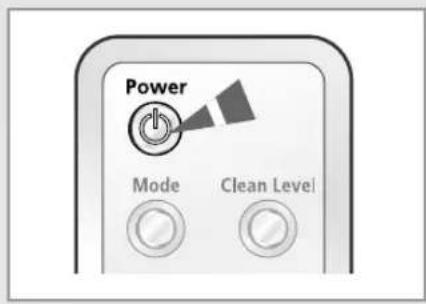
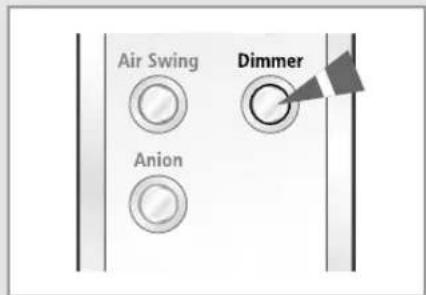
You can adjust the brightness of the display of the air cleaner according to your desire. The brightness can only be controlled with a remote control.
1 If necessary, press the ⏻ (Power) button.
Result: ◆ The Power indicator on the display comes on.
◆ The air cleaner runs in the Auto Mode.
◆ The air cleaner makes a ringing sound.
2 Select the brightness level of the display by pressing the ○ button on the remote control one or more times until the desired brightness is displayed.
There are three brightness levels that you can choose from:
- Press the button once: The display becomes dim.
- Press the button twice: The display turns off.
IMPORTANT The Nano @-HEPA indicator is always lighted brightly.
By simply pressing the Dimmer button, you can check the level of contamination in the room with your eye. This can be done even though the air cleaner is not in operation.
Adjusting the Clean Level (Fan Speed)
The air cleaner automatically adjusts the clean level according to the contamination levels of the indoor air. It is also possible for you to manually select the clean levels.
1 If necessary, press the ⏻ (Power) button.
Result: ◆ The Power indicator on the display comes on.
◆ The air cleaner runs in the Auto Mode.
◆ The air cleaner makes a ringing sound.
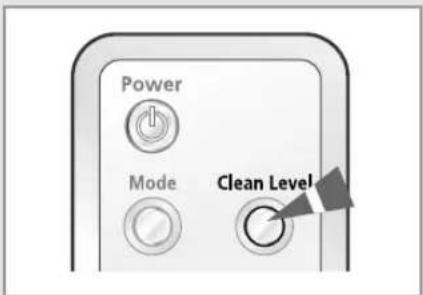
2 If you wish to manually select the clean level, press the Clean Level button one or more times until the desired clean level is selected.
Result: ◆ The air cleaner beeps.
◆ The air cleaner operates in the clean level that was selected.
TURBO HH (Turbo)
H (High)
M (Medium)
L (Low)
3 If you wish the air cleaner to automatically adjust the clean level for you, press the Mode button on the remote control until the Auto mode is selected.
Result: ◆ The clean level that was selected is canceled.
◆ The air cleaner operates in the Auto mode.
◆ The air cleaner automatically chooses the appropriate clean level according to the levels of contamination in the indoor air.
Selecting the Operating Mode
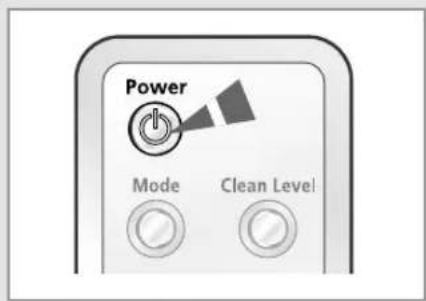
You can select the operating mode with a remote control among the Auto, Pollen, Sleep and Odor mode.
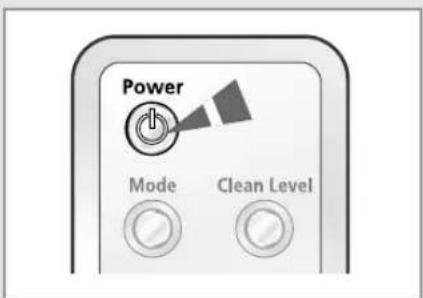
1 If necessary, press the Power (Power) button.
Result ◆ The Power indicator on the display comes on.
◆ The air cleaner runs in the Auto Mode.
◆ The air cleaner makes a ringing sound.
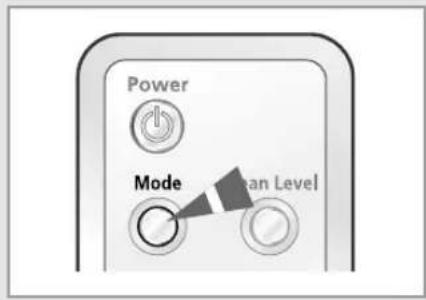
2 If the desired operating mode is not displayed on the display, select an operating mode by pressing the Mode button on the remote control until it is displayed on the display.
Result: ◆ The air cleaner beeps.
◆ The air cleaner operates in the desired operating mode.
Note You can change modes at any time.
Generating Anions
The Anion Generator generates anions, which are beneficial to the human body. Use this function if you want to feel refreshed both physically and mentally, just as if you were in the midst of a forest. If the air cleaner is turned on, anions are generated automatically.
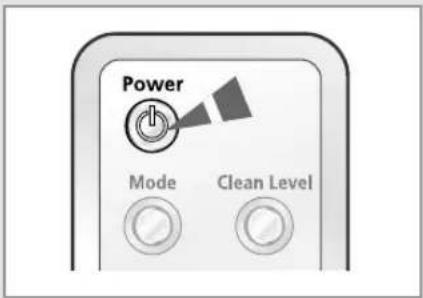
1 If necessary, press the Power (Power) button.
Result: ◆ The Power indicator on the display comes on.
◆ The air cleaner runs in the Auto Mode.
◆ The air cleaner makes a ringing sound.
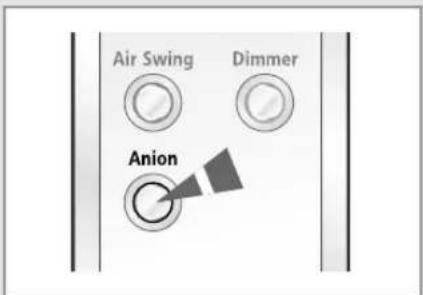
2 If the Anion Indicator is not displayed on the display, select the Anion Generation function by pressing the Anion button on the remote control. Result: ◆ The air cleaner beeps.
◆ The Anion Indicator lights up on the display.
◆ The air cleaner generates anions into the indoor air.
3 If you wish to turn off the Anion Generation function, press the ○ button again.
Result: ◆ The Anion Indicator disappears on the display.
◆ The air cleaner stops generating anions into the indoor air.
Operating Recommendations
Here are a few recommendations that you should follow when using your air cleaner.
Topic Recommendation
| Wash indicator | If the light on the "Wash" indicator comes on, the washable filters must be cleaned. The washable filters must be cleaned more often in environments that include large amounts of dust in the air. |
| Replace indicator | If the light on "Replace" indicator comes on, the replacement filters must be replaced.If the replacement filters are not replaced,the product's air filtering function may decrease. |
| Closing the air flow blade | If you want to close the air flow blade, use the Power button on the control panel or the remote control.Do not close the air flow blade with your hands. |
Cleaning the Air Cleaner
Cleaning the Lens of the Dust Sensor
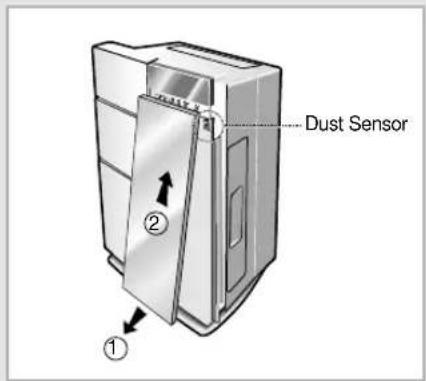
To get the best possible result from your air cleaner, you must clean the lens of the dust sensor regularly. The dust sensor is responsible for sensing the accumulation level of small and big dust particles in the air in your room.
1 Open the front panel.
N_H Slightly pull out the bottom part of the front panel(①), lift it up(②) and then separate it from the unit.
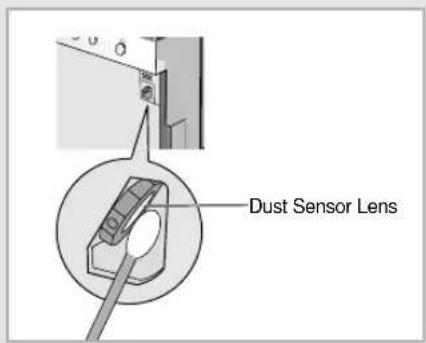
2 Clean the lens of the Dust Sensor thoroughly with a cotton stick.
If the lens of the Dust Sensor is cleaned with a sharp or rough object, the lens is damaged, so the Dust Sensor may not work properly.
3 After you have cleaned the lens of the Dust Sensor, put the front panel back into the place.
Note
You must clean the lens of the Dust Sensor every six months. However, this may vary according to the time and place that the air cleaner was operated. So the air cleaner must be cleaned more often in environments that have a high level of dust accumulation.
◆ The Odor Sensor does not have a lens. So you do not need to clean the Odor Sensor.
Cleaning the Air Cleaner (cont.)
natural_image
Illustration of a closed book with visible pages and cover, placed on a plain background (no text or symbols)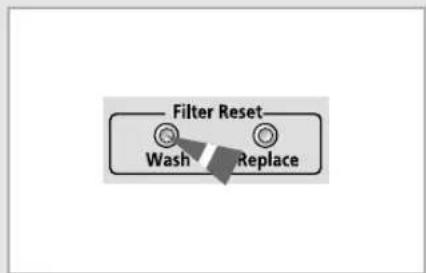
Cleaning the Washable Filters
Washable Filters are responsible for eliminating fine particles of dust, molds and mites in the air that are as small as 0.5 microns. It also has the function of sterilizing virus or bacteria in the air in your room. You must clean the Washable Filters every 3 months or whenever the Wash Indicator comes on. The cleaning frequency of the Washable Filters may vary according to the time and place that the air cleaner is operated.
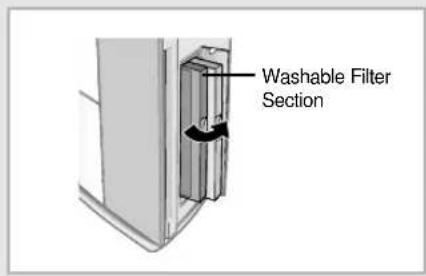
1 Open the Filter Box and pull out the Washable Filter Section towards the direction of the arrow.
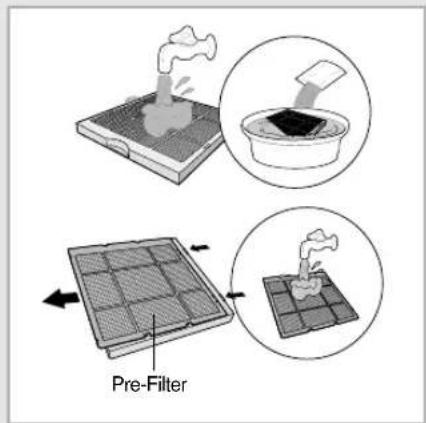
2 Wash the Washable Filter Section under lukewarm tap water.

If the filter is too contaminated, leave it in warm water mixed with neutral detergent for 30 minutes, and brush the contaminants off with a soft brush.
◆ The Pre-Filter is easy to clean because it can be taken out of the Washable Filter Section and washed separately.
3 Leave the Washable Filter Section in the shade to dry for over 12 hours.

During this process, make sure that the filter is not exposed to direct sunlight because the sun's rays may affect the transformation of the filter case.
4 Put the Washable Filter Section back into the place and close the Filter Box.
5 Press the control panel's 📄 button for 2 seconds. Wash
Result: ◆ The Wash Indicator on the control panel turns off. It will light up again when the time for the next filter washing comes.
◆ The air cleaner beeps.
IMPORTANT
Even though the Wash Indicator does not light up, always press the Ⓞ button for 2 seconds after washing the Washable Filter Section.
Replacing the Replacement Filter
The Replacement Filter eliminate finer particles of dust, molds and mites in the air in your room that are as small as 0.3 microns.
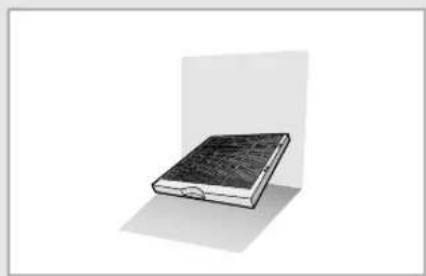
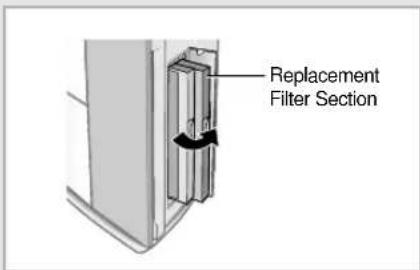
1 Open the Filter Box and pull out the Replacement Filter Section towards the direction of the arrow.
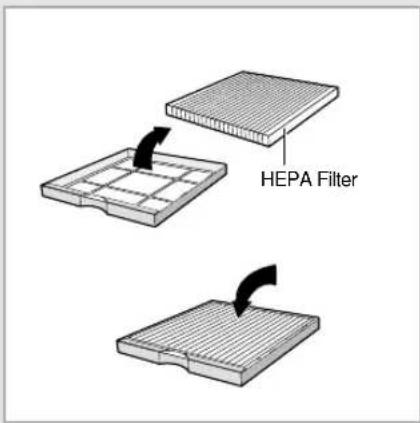
2 Detach the HEPA Filter from the Replacement Filter Section.
3 Replace the old HEPA Filter with new one, and place it back into the Replacement Filter Section.
4 After pushing the Replacement Filter Section back into the place, close the Filter Box.
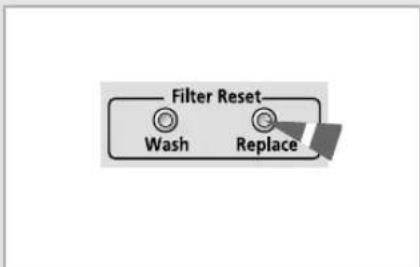
5 Press the control panel's 📋 button for 2 seconds. Replace
Result: ◆ The Replace Indicator on the control panel turns off. It will light up again when the time for the next filter replacement comes.
◆ The air cleaner beeps.
IMPORTANT
Even though the Replace Indicator does not light up, always press the 📍 Replace button for 2 seconds after replacing the Replacement Filter.
B
You only need to replace the Replacement Filter once in five years or when the Replace Indicator lights up. However, the replacing frequency of the Replacement Filter may vary according to the time and place that the air cleaner is operated.
◆ You can purchase new HEPA Filters in an authorized service center.
Solving Common Problems
Before contacting the after-sales service, perform the following simple checks. This may prevent you from making an unnecessary call and wasting your time and money.
| Problem | Explanation/Solution |
| The air cleaner does not operate. | ◆ Check for a power failure.◆ Check that the power plug is plugged in tightly.◆ Check that the power outlet is not of a poor quality.◆ Check that the Filter Box is closed properly. |
| The air cleaner stops its operation abruptly | ◆ Check whether the Filter Box was opened during operation. Press the Power button if you wish to restart the air cleaner. |
| The air flow blade does not move. | ◆ Check that the air cleaner is in the Auto or Sleep Mode.- In the Auto or Sleep Mode, the air cleaner automatically does not move the air flow blade.◆ Make sure that you have pressed the Air Swing button.- Please press the Air Swing button on the remote control to move the air flow blade. |
| The air cleaner cannot be operated with the remote control. | ◆ Check the remote control battery and replace it if it has expired.◆ Check that there are no obstacles between the remote control and the control panel of the air cleaner.◆ Make sure that there are no strong sources of lighting near the air cleaner. The strong light of three way fluorescent lamps or neon signs can obstruct the transmission of data from the remote control to the control panel. |
| Unpleasant odors can be detected coming from the air cleaner. | ◆ Make sure that the air cleaner is used in places that have a high level of odor permeating contaminants in the air. The air cleaner cannot fully function in an environment where the level of contamination is too high.◆ Check whether the source of the unpleasant odor is the unclean filters in the Filter Box. |
| The Display Brightness is too dim. | ◆ Check whether the air cleaner is operating in the Sleep Mode. In the Sleep Mode, the display automatically diminishes its brightness to ensure a comfortable sleeping setting.◆ Check that the brightness of the display has been adjusted. If so, press the Dimmer button and increase the brightness of the display. |
| The Wash and Replace Indicators stay on. | ◆ Make sure that you have pressed the Filter Reset button after you have cleaned the Washable Filters or finished replacing the Replacement Filters. |
| The air flow blade does not close. | ◆ Close the air flow blade by using the Power button on the control panel or the remote control. Do not close the air flow blade with your hands. |
Technical Specifications
| Model | Power Supply |
| AC401B | |
| AC401BR | 220-240V~, 50/60Hz |
| AC401BG |
THIS AIR CLEANER IS MANUFACTURED BY:
ELECTRONICS
- OWNER'S INSTRUCTIONS
- Safety Precautions
- WARNING
- CAUTION
- Contents
- ◆ PREPARING THE AIR CLEANER
- ♦ OPERATING THE AIR CLEANER
- ♦ OTHER FUNCTIONS
- ♦ OPERATING THE AIR CLEANER WITH A REMOTE CONTROL
- ◆ RECOMMENDATIONS FOR USE
- ◆ TECHNICAL SPECIFICATIONS
- Control Panel
- Note
- ◆ Medicato-HEPA
- ◆ Contamination Level Indicator
- Remote Control - Buttons
- Getting Started
- Inserting the Battery into the Remote Control
- Keeping the Remote Control
- USING
- THEE
- CONTRODL
- PANEL
- Selecting the Automatic Mode
- Selecting the Pollen Mode
- Selecting the Sleep Mode
- Selecting the Odor Mode
- Generating Anions
- Adjusting the Clean Level (Fan Speed)
- REMOTE
- CONTROL
- Adjusting the Air Flow Direction
- Adjusting the Display Brightness
- Selecting the Operating Mode
- Operating Recommendations
- Cleaning the Air Cleaner
- Cleaning the Lens of the Dust Sensor
- Cleaning the Air Cleaner (cont.)
- Cleaning the Washable Filters
- IMPORTANT
- Replacing the Replacement Filter
- B
- Solving Common Problems
- Technical Specifications
Brand : SAMSUNG
Model : AC401B
Category : Air purifier