BAU-M2 - Mp3 player BRIGMTON - Free user manual and instructions
Find the device manual for free BAU-M2 BRIGMTON in PDF.


| Product Type | MP3 Player |
| Brand | Brigmton |
| Model | BAU-M2 |
| Dimensions | 90 x 40 x 10 mm |
| Weight | 30 g |
| Display | 1.8-inch TFT LCD |
| Storage Capacity | 8 GB internal (expandable via microSD up to 32 GB) |
| Supported Audio Formats | MP3, WMA, WAV, FLAC |
| Battery Type | Lithium-ion 200 mAh |
| Battery Life | Up to 15 hours of music playback |
| Charging | USB 2.0, 5V DC |
| Connectivity | USB 2.0 |
| FM Radio | Yes |
| Voice Recording | Yes |
| E-book Reader | Yes |
| Photo Viewer | Yes |
| Controls | Physical buttons |
| Operating System | Proprietary |
| Language Support | Multiple languages |
| Material | Plastic |
| Color | Black |
| Accessories Included | USB cable, earphones, user manual |
| Warranty | 1 year |
| Certifications | CE, RoHS |
Frequently Asked Questions - BAU-M2 BRIGMTON
User questions about BAU-M2 BRIGMTON
0 question about this device. Answer the ones you know or ask your own.
Ask a new question about this device
Download the instructions for your Mp3 player in PDF format for free! Find your manual BAU-M2 - BRIGMTON and take your electronic device back in hand. On this page are published all the documents necessary for the use of your device. BAU-M2 by BRIGMTON.
USER MANUAL BAU-M2 BRIGMTON
Sporty Headphone MP3 Operation Manual
Brief introduction
This product is leading of the wireless MP3 headphone with novel design unique and high-fidelity stereo sound, brings you of freedom and enjoyment and also a new fun and passion when you are doing sports.
User range
● Enjoy the MP3 music in office or leisure time to relieve stress and have leisure fun.
● Wear the MP3 when body-building, training outside or traveling bring you good mood.
- Enjoy a more pleasant time and perfect music when you are dancing entertainments.
● Used as a USB disk tor storage files.
Packing list
1、headset 2、USB cable
3、User manual 4、Warranty Card
Button Instruction
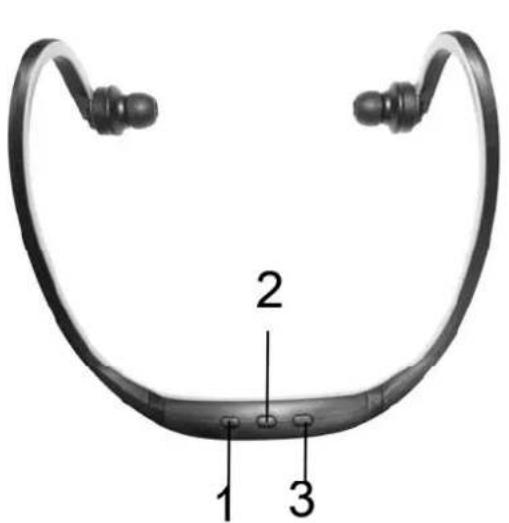
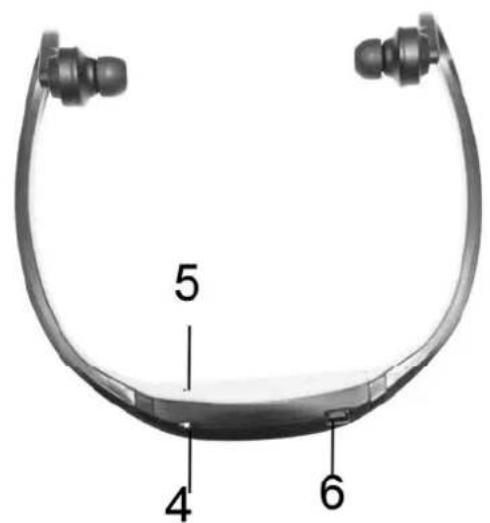
-
Short press – Previous song, Long press, add volume
-
Play/ Pause
- Short press – Next song, Long press, reduce volume
- On/Off
- LED light about on/off
- Mini USB
Charge power
● Battery: The headphone MP3 player use Li-ion chargeable battery, DC3.7V.
● The MP3 charged by USB port of DC5V, both DC 5V travel charger and DC 5V car charger are suitable for it.
- Charging time: in order to last battery using time, it is advised to charge at least three hours at first charging time, and later one or two hours charging time will be acceptable. While charging power, the Blue LED is lighting, when tower is enough, the Blue LED will be put out.
Operate instruction
1、Charge power: Connect USB port to power source
2、Power on: Press S1 key for 3 seconds will start playing music, blue light flash.
3、Press S1 one time for pause, blue LED bright, press S1 again for play music, blue LED flash.
4、Long press S5/S6 key for adjust VOL+/-, long press for continuous adjustment.
5、Short press S2 one time for choose last song.
6、Short press S3 one time for choose next song.
7、Power off: Long press S1 key, blue LED put out.
8、Reset:PressS4 key for one time, reset and power off, blue LED put out.
9、Low voltage inspection: While voltage below 3.3V, blue LED flash quickly, please charge power in time.
Common problems
- Can't Turn on: please charge power, it may run out of power.
- Shut off quickly while turn on: please charge power, it may run out of power.
- Can't play music while turn on: please check if the MP3 input MP3 format music files.
- Can't be recognized by PC:
A. Please pull out then re-connect with PC.
B. Re-connect with another PC USB port.
C. Check if the USB cable can be connect reliable with the MP3 headset.
D. It's better to use back USB port of the host while use desktop.
Attentions
- If headset can't be opened, that might lack of power, please charge power at first.
- In order to last battery usage time, please remember to turn off headset when you finish use and please
take professional charge tools to charge power.
- Please charge power at least 3 hours at first time, later just 1-2 hours that will be enough.
- Please keep the headset in the package if no use for a long time to avoid damage.
- Please charge power at first if the headset hasn't used for long time.
- The battery of headset is original and please don't change it by yourself.
- Please don't put the headset in wet place or rainy place.
- Please don't put the headset in hot place or in higher temperature 45place, and don't put the headset in fire avoid battery blast accidents.
- Please don't pull bracket over 30, and don't twist headset bracket.
- Please don't tear down headset by un-professional person.
Features
- Listen to the MP3 music which in your storage.
● With hands free, lightweight and story design makes you enjoy music freely.
● With Hi-fi sound like CD sound effect
● With large-capacity storage file device.
Specifications
| Item | Specifications |
| Support PC system Windows | 98/ME/2000/XP/Vista;Linux9;Mac OS 10 |
| USB version High speed 2.0 | |
| Support music format MP3 | WMA |
| Support audio sample rate | 8-48KHZ |
| Playing state LED direction | |
| Frequency response 20-20khz | |
| Speaker power output 2*10mw | |
| Power Rechargeable polymer lithium-on battery<3.7V 150mah> | |
| Continuous work time About 6 hours | |
| Charging power PC USB port DC 5V <300MA> charger: car charger | |
| Charging time 1-2hours | |
KVFESA S. COOP.
MIGUEL SERVET, 7
46015 VALENCIA
ESPAÑA