
HB-AC-200 - Memory card reader Sven - Free user manual and instructions
Find the device manual for free HB-AC-200 Sven in PDF.


| Product Type | Memory Card Reader with 3-Port USB Hub |
| Brand | Sven |
| Model | HB-AC-200 |
| Color | White (plastic casing) |
| Dimensions (approx.) | 120 x 60 x 20 mm |
| Weight (approx.) | 60 g |
| Connection Interface | USB 2.0 (compatible with USB 1.1) |
| Supported Memory Cards | MS, MS Pro, MS Duo, MS Pro Duo, MS MagicGate, MS Duo MagicGate, MS Pro MagicGate, MS Pro Duo MagicGate, SD, miniSD, MMC-I/II/4.0, MMC Dual Voltage, RS-MMC, RS-MMC Dual Voltage, RS-MMC 4.0, XD, SM, CF I/II, CF Ultra II, CF Extreme III, MD, Magicstor, T-Flash, Micro SD |
| Card Slots | 5 (TF, MS, XD, CF, SD) |
| USB Hub Ports | 3 (USB 2.0) |
| LED Indicator | Red when connected and card inserted; flashes during read/write |
| Power Supply | Bus-powered via USB (5V up to 500 mA) or optional DC power (not included) |
| DC Power Jack | Yes (7) |
| Operating Systems Supported | Windows 2000/XP/Vista/7 and later |
| Plug & Play | Yes (no driver required for most OS) |
| Package Contents | Card reader, USB cable, user manual, warranty card |
| Safety Precautions | Do not disconnect during read/write to avoid data loss |
| Cleaning | Wipe with a dry, soft cloth; do not use liquids or solvents |
| Storage Temperature | 0°C to 40°C |
| Storage Humidity | 10% to 80% non-condensing |
| Repairability | Not user-serviceable; replace unit if defective |
Frequently Asked Questions - HB-AC-200 Sven
User questions about HB-AC-200 Sven
0 question about this device. Answer the ones you know or ask your own.
Ask a new question about this device
Download the instructions for your Memory card reader in PDF format for free! Find your manual HB-AC-200 - Sven and take your electronic device back in hand. On this page are published all the documents necessary for the use of your device. HB-AC-200 by Sven.
USER MANUAL HB-AC-200 Sven
Thank you for purchasing SVEN PC card reader!
USAGE
Sven HB-AC-200 external card reader is designed for reading/writing memory cards. It can also be used as a USB hub.
SAFETY PRECAUSIONS
- Do not disconnect the device while reading/writing a memory card to avoid data loss.
- Insert a memory card into the slot according to the table below. Use one memory card at a time only!
PACKAGE CONTENTS
- Card reader – 1 pc
- PC connection cable – 1 pc
- User's manual — 1 pc
- Warranty card — 1 pc
SPECIAL FEATURES
- Compatible with USB connectors supporting Plug & Play technology
- Supports most modern memory cards: MS, SD/MMC, XD/SM, CF/MD etc.
SYSTEM REQUIREMENTS
• Available USB 1.1 or 2.0 port.
- OS Windows 2000/XP/Vista/7 or up.
DESCRIPTION
① Micro SD slot
② LED
③ MS slot
④ XD slot
⑤ CF slot
⑥ SD slot
⑦ DC power source connection jack
⑧ Mini USB port
⑨ USB hub ports


Fig. 1. Card reader construction (front, top, rear, side views)
OPERATION MODE LED
- If the device is connected to a USB port and the memory card is inserted into the slot correctly, LED ② will light up red.
- During reading/writing LED ② flashes.
TROUBLE SHOOTING
- If the device does not operate after its connection to a USB port, make sure the memory card is inserted into the slot correctly (see table).
| Slot | Memory cards supported |
| XD Slot | XD |
| MS Slot | MS, MS-DUO, MS Pro, MS PRO-Duo, MS MagicGate, MS Pro MagicGate, MS-Duo MagicGate, MS Pro-DUO MagicGate, etc. |
| CF Slot | CF I/II, CF Ultra II, CF Extreme III, MD, Magicstor, etc. |
| SD Slot | SD, miniSD, MMC-I, MMC-II, MMC4.0, MMC Dual Voltage, RS-MMC, RS-MMC Dual Voltage, RS-MMC 4.0, etc. |
| TF Slot | T-Flash, Micro SD, etc. |
Card Reader with
3-port USB Hub
SVEN®
YOU WANT - WE CAN
Модель: HB-AC-200
Produced under the control of Oy Sven Scandinavia
Ltd. 15, Kotolahdentie, KOTKA, Finland, 48310.
Made in China.
® Registered Trademark of Oy SVEN
Scandinavia Ltd. Finland.
HB-AC-200
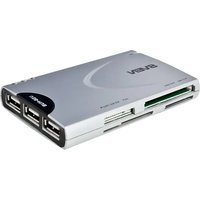
Brand : Sven
Model : HB-AC-200
Category : Memory card reader