
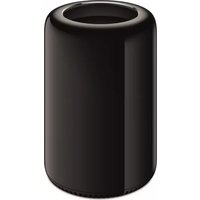
Power Mac G5 - Desktop computer APPLE - Free user manual and instructions
Find the device manual for free Power Mac G5 APPLE in PDF.


| Product Type | Desktop Computer |
| Brand | Apple |
| Model | Power Mac G5 |
| Processor | PowerPC G5 64-bit |
| Memory Type | DDR SDRAM, 240-pin modules |
| Maximum Memory | Up to 8 GB (18 DIMMs) |
| Storage | Up to 500 GB SATA hard drive |
| Optical Drive | SuperDrive (DVD±RW/CD-RW) |
| Dimensions (H x W x D) | 20.8 x 8.2 x 19.0 inches |
| Weight | Approximately 45 lbs (20.4 kg) |
| Connectivity | FireWire 400, FireWire 800, USB 2.0, Gigabit Ethernet, Bluetooth, AirPort Extreme (optional) |
| Graphics | NVIDIA GeForce FX 5200 Ultra or ATI Radeon 9600 Pro (configurable) |
| Power Supply | 600W internal |
| Operating System | Mac OS X Panther (pre-installed) |
| Regulatory Compliance | FCC Class B, ICES-003, ENERGY STAR |
| Laser Safety | Class 1 laser product |
Frequently Asked Questions - Power Mac G5 APPLE
User questions about Power Mac G5 APPLE
0 question about this device. Answer the ones you know or ask your own.
Ask a new question about this device
Download the instructions for your Desktop computer in PDF format for free! Find your manual Power Mac G5 - APPLE and take your electronic device back in hand. On this page are published all the documents necessary for the use of your device. Power Mac G5 by APPLE.
USER MANUAL Power Mac G5 APPLE
Apple Computer, Inc.
- 64-bit, 240-pin modules
- Maximum 18 memory devices per DIMM
Communications Regulation Information
FCC Compliance Statement
This equipment has been tested and found to comply with the limits for a Class B digital device, pursuant to part 15 of the FCC Rules. These limits are designed to provide reasonable protection against harmful interference in a residential installation.
Radio and Television Interference
This equipment generates, uses, and can radiate radio frequency energy and, if not installed and used in accordance with the instructions, may cause harmful interference to radio communications. However, there is no guarantee that interference will not occur in a particular installation. If this equipment does cause harmful interference to radio or television reception, which can be determined by turning the equipment off and on, the user is encouraged to try to correct the interference by one or more of the following measures:
- Reorient or relocate the receiving antenna.
- Increase the separation between the equipment and receiver.
- Connect the equipment to an outlet on a circuit different from that to which the receiver is connected.
- Consult the dealer or an experienced radio/TV technician for help.
If necessary, consult an Apple Authorized Service Provider or Apple. See the service and support information that came with your Apple product. Or, consult an experienced radio/television technician for additional suggestions.
Important: Changes or modifications to this product not authorized by Apple Computer, Inc., could void the EMC compliance and negate your authority to operate the product.
This product has demonstrated EMC compliance under conditions that included the use of compliant peripheral devices and shielded cables between system components. It is important that you use compliant peripheral devices and shielded cables (including Ethernet network cables) between system components to reduce the possibility of causing interference to radios, television sets, and other electronic devices.
Responsible party (contact for FCC matters only):
Apple Computer, Inc. Product Compliance, 1 Infinite Loop M/S 26-A
Cupertino, CA 95014-2084
AirPort Extreme and Bluetooth Wireless Information
FCC Bluetooth Wireless Compliance
The antenna used with this transmitter must not be co-located or operated in conjunction with any other antenna or transmitter subject to the conditions of the FCC Grant.
Bluetooth Industry Canada Statement
This Class B device meets all requirements of the Canadian interference-causing equipment regulations.
Bluetooth Europe–EU Declaration of Conformity
Industry Canada Statement
This Class B device meets all requirements of the Canadian interference-causing equipment regulations.
VCCI Class B Statement
Voluntary Control Council for Interference by Information Technology Equipment (VCCI) Statement
Warning: Making adjustments or performing procedures other than those specified in your equipment's manual may result in hazardous radiation exposure.
Do not attempt to disassemble the cabinet containing the laser. The laser beam used in this product is harmful to the eyes. The use of optical instruments, such as magnifying lenses, with this product increases the potential hazard to your eyes. For your safety, have this equipment serviced only by an Apple-authorized service provider.
Because of the optical disc drive in your computer, your computer is a Class 1 laser product. The Class 1 label, located in a user-accessible area, indicates that the drive meets minimum safety requirements. A service warning label is located in a service-accessible area. The labels on your product may differ slightly from the ones shown here.


Class 1 label Service warning label
Exposure to Radio Frequency Energy
The radiated output power of the optional AirPort Extreme is far below the FCC radio frequency exposure limits. Nevertheless, it is advised to use the wireless equipment in such a manner that the potential for human contact during normal operation is minimized.
Mouse and keyboard
It also complies with the Canadian ICES-003 Class B Specification.
As an ENERGY STAR ® partner, Apple has determined that standard configurations of this product meet the ENERGY STAR ® guidelines for energy efficiency. The ENERGY STAR ® program is a partnership with office product equipment manufacturers to promote energy-efficiency. Reducing energy consumption of office products saves money and reduces pollution by eliminating wasted energy.


- COMMUNICATIONS REGULATION INFORMATION
- FCC COMPLIANCE STATEMENT
- RADIO AND TELEVISION INTERFERENCE
- AIRPORT EXTREME AND BLUETOOTH WIRELESS INFORMATION
- FCC BLUETOOTH WIRELESS COMPLIANCE
- BLUETOOTH INDUSTRY CANADA STATEMENT
- BLUETOOTH EUROPE–EU DECLARATION OF CONFORMITY
- INDUSTRY CANADA STATEMENT
- VCCI CLASS B STATEMENT
- EXPOSURE TO RADIO FREQUENCY ENERGY
- MOUSE AND KEYBOARD
Brand : APPLE
Model : Power Mac G5
Category : Desktop computer