USER MANUAL PST 670 L BOSCH
Robert Bosch GmbH
Power Tools Division
70745 Leinfelden-Echterdingen
Germany
www.bosch-pt.com
2 609 003 718 (2009.04) T / 156 WEU
PST
670 L | 700 PE | 700 PEL

BOSCH
Dr. Egbert Schneider
Senior Vice President
Engineering
Dr. Eckerhard Strötgen
Head of Product
Certification
i.v. Morgen
Robert Bosch GmbH, Power Tools Division
D-70745 Leinfelden-Echterdingen
Leinfelden, 25.03.2009
Assembly
WARNING
Read all safety warnings and all instructions. Failure to follow
the warnings and instructions may result in electric shock, fire and/or serious injury.
Save all warnings and instructions for future reference.
The term “power tool” in the warnings refers to your mains-operated (corded) power tool or battery-operated (cordless) power tool.
1) Work area safety
a) Keep work area clean and well lit. Cluttered or dark areas invite accidents. b) Do not operate power tools in explosive atmospheres, such as in the presence of flammable liquids, gases or dust. Power tools create sparks which may ignite the dust or fumes. c) Keep children and bystanders away while operating a power tool. Distractions can cause you to lose control.
2) Electrical safety
a) Power tool plugs must match the outlet. Never modify the plug in any way. Do not use any adapter plugs with earthed (grounded) power tools. Unmodified plugs and matching outlets will reduce risk of electric shock. b) Avoid body contact with earthed or grounded surfaces, such as pipes, radiators, ranges and refrigerators. There is an increased risk of electric shock if your body is earthed or grounded. c) Do not expose power tools to rain or wet conditions. Water entering a power tool will increase the risk of electric shock. d) Do not abuse the cord. Never use the cord for carrying, pulling or unplugging the power tool. Keep cord away from heat, oil, sharp edges and moving parts. Damaged or entangled cords increase the risk of electric shock.
e) When operating a power tool outdoors, use an extension cord suitable for outdoor use. Use of a cord suitable for outdoor use reduces the risk of electric shock. f) If operating a power tool in a damp location is unavoidable, use a residual current device (RCD) protected supply. Use of an RCD reduces the risk of electric shock.
3) Personal safety
a) Stay alert, watch what you are doing and use common sense when operating a power tool. Do not use a power tool while you are tired or under the influence of drugs, alcohol or medication.
A moment of inattention while operating power tools may result in serious personal injury.
b) Use personal protective equipment. Always wear eye protection. Protective equipment such as dust mask, non-skid safety shoes, hard hat, or hearing protection used for appropriate conditions will reduce personal injuries.
c) Prevent unintentional starting. Ensure the switch is in the off-position before connecting to power source and/or battery pack, picking up or carrying the tool. Carrying power tools with your finger on the switch or energising power tools that have the switch on invites accidents.
d) Remove any adjusting key or wrench before turning the power tool on. A wrench or a key left attached to a rotating part of the power tool may result in personal injury.
e) Do not overreach. Keep proper footing and balance at all times. This enables better control of the power tool in unexpected situations.
f) Dress properly. Do not wear loose clothing or jewellery. Keep your hair, clothing and gloves away from moving parts.
Loose clothes, jewellery or long hair can be caught in moving parts.
g) If devices are provided for the connection of dust extraction and collection facilities, ensure these are connected and properly used. Use of dust collection can reduce dust-related hazards.
a) Do not force the power tool. Use the correct power tool for your application. The correct power tool will do the job better and safer at the rate for which it was designed. b) Do not use the power tool if the switch does not turn it on and off. Any power tool that cannot be controlled with the switch is dangerous and must be repaired. c) Disconnect the plug from the power source and/or the battery pack from the power tool before making any adjustments, changing accessories, or storing power tools. Such preventive safety measures reduce the risk of starting the power tool accidentally. d) Store idle power tools out of the reach of children and do not allow persons unfamiliar with the power tool or these instructions to operate the power tool. Power tools are dangerous in the hands of untrained users. e) Maintain power tools. Check for misalignment or binding of moving parts, breakage of parts and any other condition that may affect the power tool's operation. If damaged, have the power tool repaired before use. Many accidents are caused by poorly maintained power tools. f) Keep cutting tools sharp and clean. Properly maintained cutting tools with sharp cutting edges are less likely to bind and are easier to control. g) Use the power tool, accessories and tool bits etc. in accordance with these instructions, taking into account the working conditions and the work to be performed. Use of the power tool for operations different from those intended could result in a hazardous situation.
5) Service
a) Have your power tool serviced by a qualified repair person using only identical replacement parts. This will ensure that the safety of the power tool is maintained.
Safety Warnings for Jigsaws
Hold power tool by insulated gripping surfaces, when performing an operation where the cutting accessory may contact hidden wiring or its own cord. Cutting accessory contacting a “live” wire may make exposed metal parts of the power tool “live” and could give the operator an electric shock. ▶ Keep hands away from the sawing range. Do not reach under the workpiece. Contact with the saw blade can lead to injuries. ▶ Apply the machine to the workpiece only when switched on. Otherwise there is danger of kickback when the cutting tool jams in the workpiece. ▶ Pay attention that the base plate 5 rests securely on the material while sawing. A jammed saw blade can break or lead to kickback. When the cut is completed, switch off the machine and then pull the saw blade out of the cut only after it has come to a standstill. In this manner you can avoid kickback and can place down the machine securely. ▶ Use only sharp, flawless saw blades. Bent or unsharp saw blades can break or cause kick-back. ▶ Do not brake the saw blade to a stop by applying side pressure after switching off. The saw blade can be damaged, break or cause kickback. ▶ Use suitable detectors to determine if utility lines are hidden in the work area or call the local utility company for assistance. Contact with electric lines can lead to fire and electric shock. Damaging a gas line can lead to explosion. Penetrating a water line causes property damage or may cause an electric shock. - Secure the workpiece. A workpiece clamped with clamping devices or in a vice is held more secure than by hand. ▶ Keep your workplace clean. Blends of materials are particularly dangerous. Dust from light alloys can burn or explode.
▶ Always wait until the machine has come to a complete stop before placing it down. The tool insert can jam and lead to loss of control over the power tool. ▶ Never use the machine with a damaged cable. Do not touch the damaged cable and pull the mains plug when the cable is damaged while working. Damaged cables increase the risk of an electric shock. ▶ Products sold in GB only: Your product is fitted with an BS 1363/A approved electric plug with internal fuse (ASTA approved to BS 1362).
If the plug is not suitable for your socket outlets, it should be cut off and an appropriate plug fitted in its place by an authorised customer service agent. The replacement plug should have the same fuse rating as the original plug.
The severed plug must be disposed of to avoid a possible shock hazard and should never be inserted into a mains socket elsewhere.
Products sold in AUS and NZ only: Use a residual current device (RCD) with a rated residual current of 30 mA or less.
Safety Warnings for Laser Machines (PST 670 L/PST 700 PEL)
Caution – The use of other operating or adjusting equipment or the application of other processing methods than those mentioned here can lead to dangerous radiation exposure. Never make warning signs on the machine unrecognizable. The power tool is provided with a warning label in English (marked with number 18 in the representation of the power tool on the graphics page).
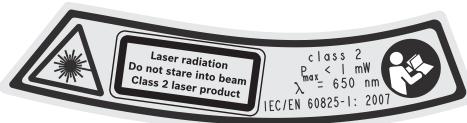
Do not direct the laser beam at persons or animals and do not stare into the laser beam yourself, not even from a distance. This power tool produces laser class 2 laser radiation according to EN 60825-1. This can lead to persons being blinded. Do not use the laser viewing glasses as safety goggles. The laser viewing glasses are used for improved visualization of the laser beam, but they do not protect against laser radiation. Do not use the laser viewing glasses as sunglasses or in traffic. The laser viewing glasses do not afford complete UV protection and reduce color perception. Do not allow children to use the power tool without supervision. They could unintentionally blind other persons. The laser module must be removed from the power tool when used for stationary work or when sawing from below a workpiece.
One can easily be blinded from the laser beam when carrying out such work.
Functional Description

Read all safety warnings and all instructions. Failure to follow the warnings and instructions may result in electric shock, fire and/or serious injury.
Intended Use
The machine is intended for making separating cuts and cut-outs in wood, plastic, metal, ceramic plates and rubber while resting firmly on the workpiece. It is suitable for straight and curved cuts with mitre angles to 45°. The saw blade recommendations are to be observed.
Product Features
The numbering of the product features refers to the illustration of the machine on the graphics page.
1 Lock-on button for On/Off switch 2 On/Off switch 3 Vacuum hose* 4 Vacuum connection 5 Base plate 6 Adjusting lever for orbital action (PST 700 PE/PST 700 PEL) 7 Switch for sawdust blowing device 8 Saw blade holder 9 Guide roller
10 Saw blade* 11 Dust cover for vacuuming* 12 Contact protector 13 Laser line On/Off switch (PST 670 L/PST 700 PEL) 14 Laser module (PST 670 L/PST 700 PEL) 15 Batteries (PST 670 L/PST 700 PEL) 16 Battery lid (PST 670 L/PST 700 PEL) 17 Latch of battery lid (PST 670 L/PST 700 PEL) 18 Laser warning label (PST 670 L/PST 700 PEL) 19 Exit opening for laser beam (PST 670 L/PST 700 PEL) 20 Laser viewing glasses* 21 Splinter guard* 22 Holder for guide roller (PST 670 L) 23 Screw 24 Base plate holder (PST 700 PE/PST 700 PEL) 25 Scale for mitre angle 26 Lead for the parallel guide 27 Locking screw for parallel guide* 28 Parallel guide with circle cutter* 29 Centring tip of the parallel guide*
*Accessories shown or described are not part of the standard delivery scope of the product. A complete overview of accessories can be found in our accessories program.
Noise/Vibration Information
| | PST 670 L | PST 700 PE | PST 700 PEL |
| Measured values determined according to EN 60745. | | | | |
| Typically the A-weighted noise levels of the product are: |
| Sound pressure level | dB(A) | 89 | 87 | 87 |
| Sound power level | dB(A) | 100 | 98 | 98 |
| Uncertainty K= | dB | 1.5 | 3 | 3 |
| Wear hearing protection! | | | | |
| Vibration total values (triax vector sum)determined according to EN 60745: |
| Cutting wood: |
| Vibration emission value ah | m/s2 | 10 | 7.5 | 7.5 |
| Uncertainty K | m/s2 | 1.5 | 1.5 | 1.5 |
| Cutting sheet metal: |
| Vibration emission value ah | m/s2 | 11 | 9.0 | 9.0 |
| Uncertainty K | m/s2 | 3 | 1.5 | 1.5 |
The vibration emission level given in this information sheet has been measured in accordance with a standardised test given in EN 60745 and may be used to compare one tool with another. It may be used for a preliminary assessment of exposure.
The declared vibration emission level represents the main applications of the tool. However if the tool is used for different applications, with different accessories or poorly maintained, the vibration emission may differ. This may significantly increase the exposure level over the total working period. An estimation of the level of exposure to vibration should also take into account the times when the tool is switched off or when it is running but not actually doing the job. This may significantly reduce the exposure level over the total working period.
Identify additional safety measures to protect the operator from the effects of vibration such as: maintain the tool and the accessories, keep the hands warm, organisation of work patterns.
Technical Data
| Jigsaw | | PST 670 L | PST 700 PE | PST 700 PEL |
| Article number | | 3 603 D13 1.. | 3 603 D13 4.. | 3 603 D13 5.. |
| Laser Module | | ● | - | ● |
| Stroke rate control | | - | ● | ● |
| Orbital action | | - | ● | ● |
| Rated power input | W | 500 | 530 | 530 |
| Output power | W | 270 | 290 | 290 |
| Stroke rate at no load n0 | min-1 | 3100 | 500–3100 | 500–3100 |
| Stroke | mm | 20 | 20 | 20 |
| Cutting capacity, max. | | | | |
| - in wood | mm | 67 | 70 | 70 |
| - in aluminium | mm | 10 | 12 | 12 |
| - in non-alloy steel | mm | 3 | 4 | 4 |
| Bevel cuts (left/right), max. | ° | 45 | 45 | 45 |
| Weight according to EPTA-Procedure 01/2003 | kg | 1.9 | 2.0 | 2.0 |
| Protection class | | ☐/II | ☐/II | ☐/II |
The values given are valid for nominal voltages [U] of 230/240 V. For lower voltage and models for specific countries, these values can vary. Please observe the article number on the type plate of your machine. The trade names of the individual machines may vary.
Laser Module (PST 670 L/PST 700 PEL)
| Laser type | nm | 650 |
| mW | <1 |
| Laser class | | 2 |
| Operating and storage temperature | °C | 0...+40 |
| Batteries | | 3 x 1.5 V (LR44) |
PST 700 PE: We declare under our sole responsibility that the product described under “Technical Data” is in conformity with the following standards or standardization documents: EN 60745 according to the provisions of the directives 2004/108/EC, 98/37/EC (until 28 Dec 2009), 2006/42/EC (from 29 Dec 2009).
PST 670 L/PST 700 PEL: We declare under our sole responsibility that the product described under “Technical Data” is in conformity with the following standards or standardization documents: EN 60745, EN 60825-1 according to the provisions of the directives 2004/108/EC, 98/37/EC (until 28 Dec 2009), 2006/42/EC (from 29 Dec 2009).
Technical file at:
Robert Bosch GmbH, PT/ESC,
D-70745 Leinfelden-Echterdingen
Dr. Egbert Schneider
Senior Vice President
Engineering
Dr. Eckerhard Strötgen
Head of Product
Certification
i.v. Mogen
Robert Bosch GmbH, Power Tools Division
D-70745 Leinfelden-Echterdingen
Leinfelden, 25.03.2009
Assembly
Replacing/Inserting the Saw Blade
Before any work on the machine itself, pull the mains plug. When mounting the saw blade, wear protective gloves. Danger of injury when touching the saw blade.
Selecting a Saw Blade
An overview of recommended saw blades can be found at the end of these instructions. Use only T-shank saw blades or saw blades with 1/4" universal shank (U-shank). The saw blade should not be longer than required for the intended cut.
Use a thin saw blade for narrow curve cuts.
Clean the shank of the saw blade before inserting it. An unclean shank cannot be fastened securely.
PST 700 PE/PST 700 PEL: If required, remove the dust cover 11 (see “Dust Cover”).
Push the saw blade holder 8 upward in the direction of the arrow. Insert the saw blade 10 (teeth in cutting direction) to the stop into the saw blade holder.
While inserting the saw blade, pay attention that the back of the saw blade is positioned in the groove of the guide roller 9.
PST 670 L: Precise cuts are only possible when the guide roller 9 faces closely but not too tight against the back of the saw blade (the saw blade 10 may not be bent by the guide roller). If required, loosen screw 23 and move the holder 22 of the guide roller in such a manner that the guide roller faces closely against the back of the saw blade. Tighten screw 23 again.
Check the tight seating of the saw blade.
A loose saw blade can fall out and lead to injuries.
Push the saw blade holder 8 upward in the direction of the arrow and remove the saw blade 10.
Dusts from materials such as lead-containing coatings, some wood types, minerals and metal can be harmful to one's health. Touching or breathing-in the dusts can cause allergic reactions and/or lead to respiratory infections of the user or bystanders.
Certain dusts, such as oak or beech dust, are considered as carcinogenic, especially in connection with wood-treatment additives (chromate, wood preservative). Materials containing asbestos may only be worked by specialists.
- Use dust extraction whenever possible.
- Provide for good ventilation of the working place.
- It is recommended to wear a P2 filter-class respirator.
Observe the relevant regulations in your country for the materials to be worked.
Mount the dust cover 11 before connecting the machine to the dust extraction.
Mount the dust cover 11 onto the machine in such a manner that the centre holder engages on the contact protector 12 and the two outer holders engage in the openings on the casing.
Remove the dust cover 11 for applications without dust extraction as well as when performing mitre cuts. For this, push the dust cover together at the two outer holders and pull it off toward the front.
Place a vacuum hose 3 (accessory) onto the vacuum connection 4. Connect the vacuum hose 3 with a vacuum cleaner (accessory). An overview for the connection of various vacuum cleaners can be found at the end of these instructions.
Switch the sawdust blower off when a dust extraction system is connected (see “Sawdust Blower Device”).
The vacuum cleaner must be suitable for the material being worked.
When vacuuming dry dust that is especially detrimental to health or carcinogenic, use a special vacuum cleaner.
Laser Module (PST 670 L/PST 700 PEL)
Inserting/Replacing the Laser Module Batteries
Insert the supplied batteries 15 into the laser module 14 before starting operation for the first time.
To open the battery lid 16, pull the latch 17 and remove the battery lid. Insert the batteries. Pay attention to the correct polarity according to the representation on the battery lid.
Always replace all three batteries 15 together. Use only LR44 batteries from the same manufacturer and with the same capacity.
Attaching/Removing the Laser Module
Insert the laser module 14 with the inside noses engaging into the notches on the casing of the power tool and push it down to the stop.
To remove the laser module, push it upward and remove it from the casing.
The laser module must be removed from the power tool when used for stationary work or when sawing from below a workpiece.
One can easily be blinded from the laser beam when carrying out such work.
The splinter guard 21 (accessory) can prevent fraying of the surface while sawing wood. The splinter guard can only be used for certain saw blade types and only for cutting angles of 0°. When sawing with the splinter guard, the base plate 5 must not be moved back for cuts that are close to the edge.
Press the splinter guard 21 from the bottom into the base plate 5.
Operation
Operating Modes
▶ Before any work on the machine itself, pull the mains plug.
Orbital Action Settings (PST 700 PE/PST 700 PEL)
The four orbital action settings allow for optimal adaptation of cutting speed, cutting capacity and cutting pattern to the material being sawed.
The orbital action can be adjusted with the adjusting lever 6, even during operation.

No orbital action
Small orbital action
Medium orbital action
Large orbital action
The optimal orbital action setting for the respective application can be determined through practical testing. The following recommendations apply:
- Select a lower orbital action setting (or switch it off) for a finer and cleaner cutting edge.
- For thin materials such as sheet metal, switch the orbital action off.
- For hard materials such as steel, work with low orbital action.
- For soft materials and when sawing in the direction of the grain, work with maximum orbital action.
The base plate 5 can be swivelled by 45° to the left or right for mitre cuts.
PST 700 PE/PST 700 PEL: If required, remove the dust cover 11 (see "Dust Cover").
PST 670 L: Insert a saw blade 10.
Loosen the screw 23 and lightly slide the base plate 5 toward the vacuum connection 4.
For adjustment of precise mitre angles, the base plate has adjustment notches on the left and right at 0° , 22.5° and 45° . Swivel the base plate 5 to the desired position according to the scale 25. Other mitre angles can be adjusted using a protractor.
Afterwards, push the base plate 5 to the stop in the direction of the saw blade 10.
PST 670 L: Position the holder for the guide roller 22 in such a manner that the guide roller 9 faces against the back of the saw blade. Precise cuts are possible only when the guide roller faces tightly against the back of the saw blade.
Tighten the screw 23 again.
The dust cover 11 and the splinter guard 21 cannot be used when performing mitre cuts.
For sawing close to edges, the base plate 5 can be offset to the rear.
PST 670 L/PST 700 PEL: Remove the laser module 14, if required.
PST 670 L: Insert a saw blade 10.
Loosen the screw 23 and slide the base plate 5 toward the vacuum connection 4 to the stop.
PST 670 L: Position the holder for the guide roller 22 in such a manner that the guide roller 9 faces against the back of the saw blade. Precise cuts are possible only when the guide roller faces tightly against the back of the saw blade.
Tighten the screw 23 again.
Sawing with the base plate 5 offset is possible only with a mitre angle of 0° . In addition, the parallel guide with circle cutter 28 (accessory) as well as the splinter guard 21 may not be used.
Sawdust Blower Device
With the air jet of the sawdust blower device 7, the cutting line can be kept free of dust and chips.
Switching on the sawdust blower device: For cuts in materials with high removal rate, such as in wood, plastic, etc., push the switch 7 to position “1”.
Switching off the sawdust blower device: For cuts in metal and when a dust extraction system is connected, push the switch 7 to position “0”.
▶ Observe correct mains voltage! The voltage of the power source must agree with the voltage specified on the nameplate of the machine. Power tools marked with 230 V can also be operated with 220 V.
Switching On and Off
To start the machine, press the On/Off switch 2.
To lock the On/Off switch 2, keep it depressed and push the lock-on button 1 to the right or left.
To switch off the machine, release the On/Off switch 2. When the On/Off switch 2 is locked, press it first and then release it.
PST 700 PE/PST 700 PEL: After longer periods of work at low stroke rate, the machine can heat up considerably. Remove the saw blade from the machine and allow the machine to cool down by running it for approx. 3 minutes at maximum stroke rate.
Controlling the Stroke Rate (PST 700 PE/PST 700 PEL)
Increasing or reducing the pressure on the On/Off switch 2 enables stepless stroke-rate control of the switched-on machine.
When the On/Off switch 2 is locked, it is not possible to reduce the stroke rate.
The required stroke rate is dependent on the material and the working conditions and can be determined by a practical trial.
Reducing the stroke rate is recommended when the saw blade engages in the material as well as when sawing plastic and aluminium.
Starting Operation of the Laser Module (PST 670 L/PST 700 PEL)
▶ Do not point the laser beam at persons or animals and do not look into the laser beam yourself, not even from a large distance.
To switch the laser on, press the top of switch 13 (“on”).
To switch the laser off, press the bottom of switch 13 (“off”).
▶ Immediately switch the laser off again each time after using. When handling the laser module (separately or when mounted), one can be blinded by the laser beam. The laser module must be removed from the power tool when used for stationary work or when sawing from below a workpiece.
One can easily be blinded from the laser beam when carrying out such work.
The laser switches off automatically after an operating period of approx. 10 minutes.
Working Advice
▶ When working small or thin work pieces, always use a sturdy support or a saw table (accessory).
Laser Module (PST 670 L/PST 700 PEL)
Assembling the laser module 14 to the machine is recommended when sawing alongside an already marked cutting line. Attach the laser module onto the machine (see “Attaching/Removing the Laser Module”) and follow the marked cutting line with the laser line while sawing.
When sawing under unfavourable conditions (e.g. intense sun irradiation), the visibility of the laser line can be improved when using the laser viewing glasses 20 (accessory).
▶ Do not use the laser viewing glasses as safety goggles. The laser viewing glasses are used for improved visualisation of the laser beam, but they do not protect against laser radiation. ▶ Do not use the laser viewing glasses as sun glasses or in traffic. The laser viewing glasses do not afford complete UV protection and reduce colour perception.
▶ Plunge cuts may only be applied to soft materials, such as wood, gypsum plaster boards, etc.!
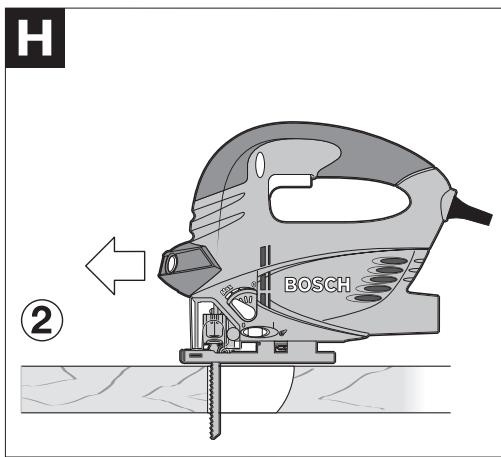
Use only short saw blades for plunge cutting. Plunge cutting is possible only with the mitre angle set at 0° .
Place the machine with the front edge of the base plate 5 on to the workpiece without the saw blade 10 touching the workpiece and
switch on. For machines with stroke rate control, select the maximum stroke rate. Firmly hold the machine against the workpiece and by tilting the machine, slowly plunge the saw blade into the workpiece.
When the base plate 5 fully lays on the workpiece, continue sawing along the desired cutting line.
Parallel Guide with Circle Cutter (Accessory)
For cuts using the parallel guide with circle cutter 28 (accessory), the thickness of the material must not exceed a maximum of 30 mm.
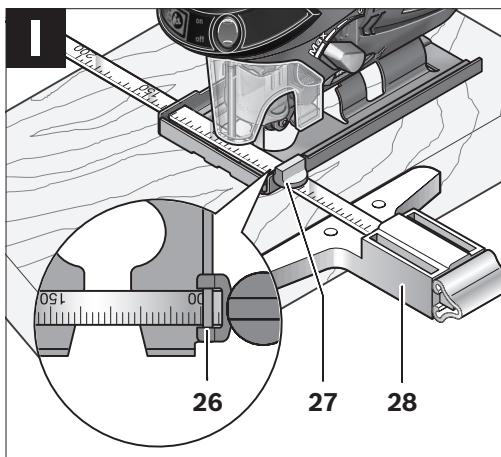
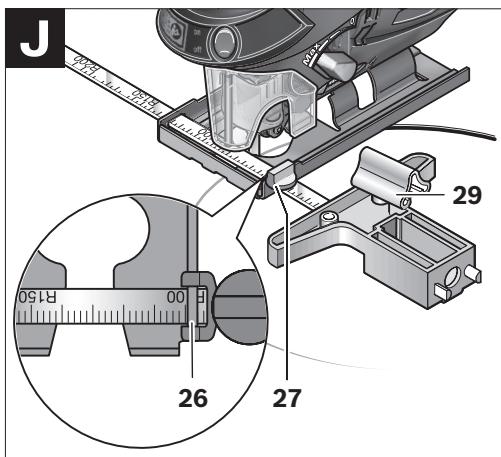
Parallel Cuts (see figure 1): Loosen the locking screw 27 and slide the scale of the parallel guide through the lead 26 in the base plate. Set the desired cutting width as the scale value on the inside edge of the base plate. Tighten the locking screw 27.
Circular Cuts (see figure J): Set the locking screw 27 to the other side of the parallel guide. Slide the scale of the parallel guide through the lead 26 in the base plate. Drill a hole in the workpiece centred in the section to be sawn. Insert the centring tip 29 through the inside opening of the parallel guide and into the drilled hole. Set the radius as the scale value on the inside edge of the base plate. Tighten the locking screw 27.
Coolant/Lubricant
When sawing metal, coolant/lubricant should be applied alongside cutting line because of the material heating up.
Maintenance and Service
Maintenance and Cleaning
▶ Before any work on the machine itself, pull the mains plug. ▶ For safe and proper working, always keep the machine and ventilation slots clean.
Clean the saw blade holder regularly. For this, remove the saw blade from the machine and lightly tap out the machine on a level surface. Heavy contamination of the machine can lead to malfunctions. Therefore, do not saw materials that produce a lot of dust from below or overhead.
In extreme working conditions, conductive dust can accumulate in the interior of the machine when working with metal. The protective insulation of the machine can be degraded. The use of a stationary extraction system is recommended in such cases as well as frequently blowing out the ventilation slots and installing a residual current device (RCD).
Lubricate the guide roller 9 occasionally with a drop of oil.
Check the guide roller 9 regularly. If worn, it must be replaced through an authorised Bosch after-sales service agent.
If the machine should fail despite the care taken in manufacturing and testing procedures, repair should be carried out by an after-sales service centre for Bosch power tools.
In all correspondence and spare parts order, please always include the 10-digit article number given on the type plate of the machine.
After-sales Service and Customer Assistance
Our after-sales service responds to your questions concerning maintenance and repair of your product as well as spare parts. Exploded views and information on spare parts can also be found under:
Our customer consultants answer your questions concerning best buy, application and adjustment of products and accessories.
Great Britain
Robert Bosch Ltd. (B.S.C.)
P.O. Box 98
Broadwater Park
North Orbital Road
Denham
Uxbridge
UB9 5HJ
Tel. Service: +44 (0844) 736 0109
Fax: +44 (0844) 736 0146
Australia, New Zealand and Pacific Islands
Robert Bosch Australia Pty. Ltd.
Power Tools
Locked Bag 66
Clayton South VIC 3169
Customer Contact Center
Inside Australia:
Phone: +61 (01300) 307 044
Fax: +61 (01300) 307 045
Inside New Zealand:
Phone: +64 (0800) 543 353
Fax: +64 (0800) 428 570
Outside AU and NZ:
Phone: +61 (03) 9541 5555
www.bosch.com.au
Republic of South Africa
Customer service
Hotline: +27 (011) 6 51 96 00
Gauteng - BSC Service Centre
35 Roper Street, New Centre
Johannesburg
Tel.: +27 (011) 4 93 93 75
Fax: +27 (011) 4 93 01 26
E-Mail: bsctools@icon.co.za
KZN - BSC Service Centre
Unit E, Almar Centre
143 Crompton Street
Pinetown
Tel.: +27 (031) 7 01 21 20
Fax: +27 (031) 7 01 24 46
E-Mail: bsc.dur@za.bosch.com
Western Cape - BSC Service Centre
Democracy Way, Prosperity Park
Milnerton
Tel.: +27 (021) 5 51 25 77
Fax: +27 (021) 5 51 32 23
E-Mail: bsc@zsd.co.za
Bosch Headquarters
Midrand, Gauteng
Tel.: +27 (011) 6 51 96 00
Fax: +27 (011) 6 51 98 80
E-Mail: rbsa-hq.pts@za.bosch.com
Disposal
The machine, accessories and packaging should be sorted for environmental-friendly recycling.
Only for EC countries:
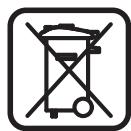
Do not dispose of power tools into household waste!
According to the European Guideline 2002/96/EC for Waste Electrical and Electronic Equipment and its implementation into national right,
power tools that are no longer usable must be collected separately and disposed of in an environmentally correct manner.
Battery packs/batteries:
Do not dispose of battery packs/batteries into household waste, fire or water. Battery packs/batteries should be collected, recycled or disposed of in an environmental-friendly manner.
Only for EC countries:
Defective or dead out battery packs/batteries must be recycled according the guideline 91/157/EEC.
Batteries no longer suitable for use can be directly returned at:
Great Britain
Robert Bosch Ltd. (B.S.C.)
P.O. Box 98
Broadwater Park
North Orbital Road
Denham
Uxbridge
UB 9 5HJ
Tel. Service: +44 (0844) 736 0109
Fax: +44 (0844) 736 0146
Subject to change without notice.
Dr. Egbert Schneider
Senior Vice President
Engineering
Dr. Eckerhard Strötgen
Head of Product
Certification
i.v. Mogen
Robert Bosch GmbH, Power Tools Division D-70745 Leinfelden-Echterdingen Leinfelden, 25.03.2009
Assembly
Robert Bosch (France) S.A.S.
Dr. Egbert Schneider
Senior Vice President
Engineering
Dr. Eckerhard Strötgen
Head of Product
Certification
i.v. Mogen
Robert Bosch GmbH, Power Tools Division D-70745 Leinfelden-Echterdingen Leinfelden, 25.03.2009
Assembly
Senior Vice President
Engineering
Dr. Eckerhard Strötgen
Head of Product
Certification
i.v. Morgen
Robert Bosch GmbH, Power Tools Division
D-70745 Leinfelden-Echterdingen
Dr. Egbert Schneider
Senior Vice President
Engineering
Dr. Eckerhard Strötgen
Head of Product
Certification
Robert Bosch GmbH, Power Tools Division D-70745 Leinfelden-Echterdingen Leinfelden, 25.03.2009
Assembly
Dr. Egbert Schneider
Senior Vice President
Engineering
Dr. Eckerhard Strötgen
Head of Product
Certification
i.v. Mogen
Robert Bosch GmbH, Power Tools Division
D-70745 Leinfelden-Echterdingen
Leinfelden, 25.03.2009
Assembly
Dr. Egbert Schneider
Senior Vice President
Engineering
Dr. Eckerhard Strötgen
Head of Product
Certification
Robert Bosch GmbH, Power Tools Division
D-70745 Leinfelden-Echterdingen
small pendulum adjustment
medium pendulum adjustment
average pendulum adjustment
large pendulum adjustment
Bosch Service Center
Telegrafvej 3
2750 Ballerup
Tel. Service Center: +45 (4489) 8855
Fax: +45 (4489) 87 55
E-Mail: vaerktoej@dk.bosch.com
Disposal
Dr. Egbert Schneider
Senior Vice President
Engineering
Dr. Eckerhard Strötgen
Head of Product
Certification
i.v. Modyen
Robert Bosch GmbH, Power Tools Division
D-70745 Leinfelden-Echterdingen
Leinfelden, 25.03.2009
Assembly
Bosch Service Center
Telegrafvej 3
2750 Ballerup
Denmark
Tel.: +46 (020) 41 44 55
Fax: +46 (011) 18 76 91
Waste disposal
Dr. Egbert Schneider
Senior Vice President
Engineering
Dr. Eckerhard Strötgen
Head of Product
Certification
i.v. Morgen
Robert Bosch GmbH, Power Tools Division D-70745 Leinfelden-Echterdingen Leinfelden, 25.03.2009
Assembly
Dr. Egbert Schneider
Senior Vice President
Engineering
Dr. Eckerhard Strötgen
Head of Product
Certification
i.v. Mogen
Robert Bosch GmbH, Power Tools Division D-70745 Leinfelden-Echterdingen Leinfelden, 25.03.2009
Assembly
Dr. Egbert Schneider
Senior Vice President
Engineering
Dr. Eckerhard Strötgen
Head of Product
Certification
i.v. Mogen
Robert Bosch GmbH, Power Tools Division D-70745 Leinfelden-Echterdingen Leinfelden, 25.03.2009
Assembly
Dr. Egbert Schneider
Senior Vice President
Engineering
Dr. Eckerhard Strötgen
Head of Product
Certification
i.v. Morgen
Robert Bosch GmbH, Power Tools Division
D-70745 Leinfelden-Echterdingen
Leinfelden, 25.03.2009
Assembly
Bosch San. ve Tic. A.S.
Ahi Evran Cad. No:1 Kat:22
Polaris Plaza
80670 Maslak/Istanbul
∅ 19 mm:
2 600 793 009 (3 m)
1 610 793 002 (5 m)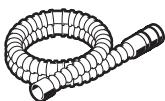
1 609 390 474
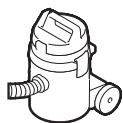
1 609 200 933
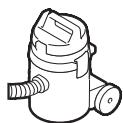
2 607 000 748
PAS 10-20 PAS 850 PAS 11-25 F PAS 11-25 PAS 12-50 F PAS 12-50 PAS 12-27 F PAS 12-27 PAS 11-21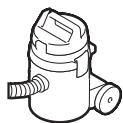



T 144 D
U 144 D



T 244 D



T 144 DP



T 101 B
U 101 B



T 118 B
U 118 B


T 123 X
U 123 X



T 127 D
U 127 D



T 345 XF
U 345 XF