
C61R2AEEP - Oven SAMSUNG - Free user manual and instructions
Find the device manual for free C61R2AEEP SAMSUNG in PDF.


| Product Type | Built-in Electric Oven |
| Brand | Samsung |
| Model | C61R2AEEP |
| Installation | Built-in |
| Energy Source | Electric |
| Voltage | 220-240 V |
| Frequency | 50/60 Hz |
| Power Consumption | ~3000 W |
| Dimensions (H x W x D) | 595 x 595 x 575 mm |
| Oven Capacity | ~70 L |
| Weight (Net) | ~35 kg |
| Functions | Convection, Grill, Defrost, Fan-assisted, Top/Bottom Heat |
| Cleaning Type | Enamel interior, easy-clean |
| Control Type | Knob and Touch (estimated) |
| Display Type | Digital (estimated) |
| Safety Features | Child lock, Automatic shut-off, Cool touch door |
| Spare Parts Availability | Genuine parts via Samsung service centers or authorized dealers |
| Repairability Index | High (modular components, service manuals available) |
| Included Accessories | Oven rack, baking tray, grill grid |
| Warranty | 2 years (standard, check local) |
Frequently Asked Questions - C61R2AEEP SAMSUNG
User questions about C61R2AEEP SAMSUNG
0 question about this device. Answer the ones you know or ask your own.
Ask a new question about this device
Download the instructions for your Oven in PDF format for free! Find your manual C61R2AEEP - SAMSUNG and take your electronic device back in hand. On this page are published all the documents necessary for the use of your device. C61R2AEEP by SAMSUNG.
USER MANUAL C61R2AEEP SAMSUNG
100 % Recycled Paper
natural_image
Line drawing of an open bookshelf with a cable and stand (no text or symbols)
natural_image
Diagram showing a mechanical component with an arrow indicating direction (no text or symbols present)
natural_image
Isometric diagram of a square plate mounted on a base with diagonal lines indicating support (no text or symbols)natural_image
Isometric line drawing of a rectangular frame or panel with no text or symbolsnatural_image
Technical line drawing of two parallel metal bracket components (no text or symbols)natural_image
Simple line drawing of a folded paper or sheet with three evenly spaced pins (no text or symbols)3 Винтове

natural_image
Simple line drawing of a cooking pot with lid and side handles (no text or symbols)Правилно!

natural_image
Two identical cooking pots with black X marks, no text or symbols presentНеправилно!
Управление на температурата

natural_image
Hand pointing at a control panel with battery and lock icons (no text or symbols)natural_image
Illustration of a hand using a power tool to clean or brush a white substance on a curved surface (no text or symbols)natural_image
Abstract diagram with curved lines and scattered gray shapes, no text or symbols presentРамка на плочата

Planet 100 % First Recycled Paper
natural_image
Line drawing of an open laptop with a cable inserted, placed on a stand (no text or symbols)
natural_image
Diagram showing a mechanical component with an arrow indicating direction (no text or symbols present)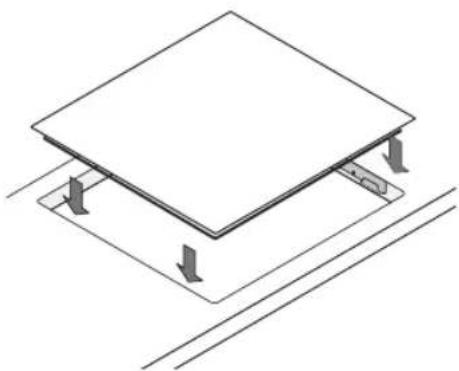
natural_image
Isometric diagram of a square plate mounted on a base with diagonal lines indicating support (no text or symbols)Části a funkce
natural_image
Isometric view of a rectangular electronic component or panel with a flat top and bottom edges (no text or symbols)natural_image
Technical line drawing of two parallel metal profiles with mounting holes (no text or symbols)natural_image
Simple line drawing of a folded paper with three screws (no text or symbols)3
Šrouby
natural_image
Simple line drawing of a cooking pot with lid and side handles (no text or symbols)Správně!

natural_image
Simple line drawing of a cooking pot with a crossed X symbol (no text or labels)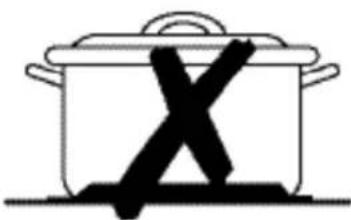
natural_image
Simple line drawing of a cooking pot with an 'X' mark on its side (no text or symbols)Špatně!
Regulace teploty

natural_image
Illustration of a hand pointing at a circular button with a crescent moon in the background (no text or symbols)
natural_image
Hand pointing at a control panel with battery and lock icons (no text or symbols)
natural_image
Illustration of a hand using a power tool to clean or brush a white substance on a curved surface (no text or symbols)CZ

natural_image
Abstract diagram with concentric arcs and scattered gray shapes, no text or symbols presentRám sporáku


100 % Recycled Paper
Ove su upute tiskane na 100 % recikliranom papiru.
zamislite mogućnosti
HRVATSKI
Zahvaljujemo na kupnji ovog proizvoda tvrtke Samsung. Kako bi vam bila dostupna potpunija usluga, registrirajte svoj proizvod na adresi
www.samsung.com/register
SAMSUNG



Sadržaj
HR

natural_image
Line drawing of an open bookshelf with a cable inserted, placed on a stand (no text or symbols)
natural_image
Diagram showing a mechanical component with a downward arrow indicating motion (no text or symbols)
natural_image
Isometric diagram of a square panel mounted on a base with diagonal lines indicating support (no text or symbols)Dijelovi i značajke
natural_image
Isometric view of a square electronic component or panel with no text or symbols1 Staklokeramička ploča za kuhanje

natural_image
Technical line drawing of two parallel metal profiles with slots and holes (no text or symbols)2 Držači za postavljanje
natural_image
Simple line drawing of a folded paper with three evenly spaced pins (no text or symbols)3 Vijci

natural_image
Simple line drawing of a cooking pot with lid and side handles (no text or symbols)Ispravno!
natural_image
Simple line drawing of a cooking pot with a 'X' mark inside, no text or symbols present
natural_image
Simple line drawing of a cooking pot with an X mark on its side (no text or symbols)Pogrešno!
Korištenje ploče za kuhanje (nastavak)
HR
- Posude i lonce uvijek stavite na zonu za kuhanje prije nego što je uključite.
- Prljave zone za kuhanje i prljave posude povećavaju potrošnju energije.
- Kad je to moguće, čvrsto i u potpunosti poklopite posude i lonce.
- Isključite zone za kuhanje prije kraja vremena za kuhanje kako biste preostalu toplinu iskoristili za otapanje hrane ili održavanje hrane toplom.
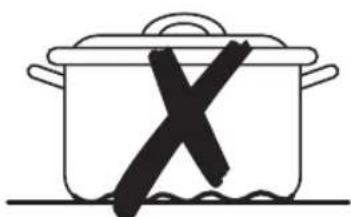
- Dno posude za kuhanje trebalo bi biti iste veličine kao i zona za kuhanje.
- Korištenje ekspres lonca smanjuje vrijeme kuhanja do 50%.
Korištenje senzorskog upravljanja na dodir
Kako biste koristili senzorsko upravljanje na dodir, željenu ploču dotaknite vrhom kažiprsta dok zaslon ne zasvijetli ili se ne ugasi ili dok se ne aktivira željena funkcija.
Prilikom rada s uređajem dodirujte samo jednu ploču odjednom. Ako je vaš prst na ploču položen previše ravno, mogao bi se aktivirati i susjedni senzor.

Korištenje ploče za kuhanje (nastavak)
Upravljanje temperaturom
Kako biste postavili i podesili razinu snage za kuhanje (do) godirnite gumbe za odgovarajuće zone za kuhanje (+) (-)

natural_image
Illustration of a hand pointing upward with a circular symbol above (no text or symbols present)
postavka zagrijavanja na
9 i želite isključiti zonu za kuhanje + senzor možete
natural_image
Hand pointing at a control panel with battery and lock icons (no text or symbols)Korištenje ploče za kuhanje (nastavak)
natural_image
Illustration of a hand using a power tool to clean or smoke from a pipe (no text or symbols)natural_image
Abstract diagram with concentric arcs and scattered gray shapes, no text or symbols presentOkvir ploče za kuhanje


Važno: Ne stavljajte ocat, sok od limuna ili sredstva za uklanjanje kamenca na okvir ploče za kuhanje; mogu se pojaviti mat mrlje.
- Okvir brišite vlažnom krpom.
- Sasušenu nečistoću omekšajte vlažnom krpom. Obrišite i obrišite nasuho.
Maksimalna snaga spajanja 6,0 kW
Težina: Neto 7,5 kg
Bruto 10,0 kg




Napomena
HR


Napomena
HR


SAMSUNG

IMATE LI PITANJE ILI KOMENTAR?
| DRŽAVA | NAZOVITE | ILI NAS POSJETITE NA WEB-ADRESI |
| BOSNIA 05 133 1999 | www.samsung.com | |
| BULGARIA 07001 33 11 , normal tariff | ||
| CROATIA 062 - SAMSUNG (062-726-7864) | ||
| CZECH 800 - SAMSUNG (800-726786) | ||
| HUNGARY 06-80-SAMSUNG (726-7864) | ||
| MACEDONIA 023 207 777 | ||
| MONTENEGRO 020 405 888 | ||
| POLAND +48 22 607-93-33 | 0 801-1SAMSUNG (172-678) | |
| ROMANIA TOLL FREE No. | 08008 SAMSUNG (08008 726 7864) | |
| SERBIA | 0700 SAMSUNG (0700 726 7864) | |
| SLOVAKIA 0800-SAMSUNG (0800-726-786) | ||
| LITHUANIA | 8-800-77777 | |
| LATVIA | 8000-7267 | |
| ESTONIA 800-7267 |
Br. šifre: DG68-00125D-01
C61RA* Sorozatot
C61R2A* Sorozatot
CTR364*B Sorozatot
CTR464*B Sorozatot
Kerámiaüveg főzőlap
használati útmutató
Planet First
100%
Recycled Paper

natural_image
Line drawing of an open laptop with a cable inserted, placed on a stand (no text or symbols)
natural_image
Diagram showing a mechanical component with an arrow indicating direction (no text or symbols present)
natural_image
Isometric diagram of a square plate mounted on a base with diagonal lines indicating support (no text or symbols)natural_image
Isometric view of a square electronic component or panel with no text or symbols1 Kerámia főzőlap

natural_image
Technical line drawing of two parallel metal profiles with mounting holes (no text or symbols)2 Szerelőkengyelek
natural_image
Simple line drawing of a folded paper with three screw holes (no text or symbols)3 Csavarok

natural_image
Simple line drawing of a cooking pot with lid and side handles (no text or symbols)Helyes!
natural_image
Two identical cooking pots with black X marks on their backs, placed side by side (no text or symbols)HeVreveg!
natural_image
Illustration of a hand pointing upward with a circular symbol above (no text or symbols present)
natural_image
Hand pointing at a control panel with battery and lock icons (no text or symbols)natural_image
Illustration of a hand using a power tool to clean or brush a white substance (no text or symbols visible)HU
natural_image
Abstract diagram with concentric circles and scattered gray shapes, no text or symbols presentFőzőlap szegélye


natural_image
Line drawing of an open rectangular frame with a cable inserted, mounted on a table (no text or symbols)
natural_image
Diagram showing a mechanical component with an arrow indicating direction (no text or symbols present)
natural_image
Isometric diagram of a structural platform with support beams and diagonal lines (no text or symbols)Делови и функции
natural_image
Isometric view of a square electronic component or panel stack (no text or symbols)1
Керамичко-стаклена плотна
natural_image
Technical line drawing of two parallel metal plates with slots, no text or symbols presentnatural_image
Simple line drawing of a folded paper or sheet with three evenly spaced screw holes (no text or symbols)3
Завртки
natural_image
Simple line drawing of a cooking pot with lid and side handles (no text or symbols)Правилно!

natural_image
Simple line drawing of a cooking pot with a 'X' mark on its side (no text or symbols)
natural_image
Simple line drawing of a cooking pot with a 'X' mark on its side (no text or symbols)Неправилно!

natural_image
Hand pointing at a control panel with battery and lock icons (no text or symbols)natural_image
Illustration of a hand using a power tool to clean or brush the brush (no text or symbols visible)natural_image
Abstract diagram with concentric circles and scattered gray shapes, no text or symbols presentРамка на плотната


natural_image
Line drawing of an open book or tablet stand with a cable inserted, placed on a table (no text or symbols)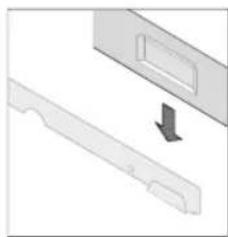
natural_image
Diagram showing a mechanical component with a downward arrow indicating motion (no text or symbols)
natural_image
Isometric diagram of a square panel mounted on a base with diagonal lines indicating support (no text or symbols)natural_image
Isometric view of a rectangular electronic component or panel stack (no text or symbols)natural_image
Technical line drawing of two mechanical components with mounting holes (no text or symbols)2
Suporturi de instalare

natural_image
Simple line drawing of a folded paper with three evenly spaced screw holes (no text or symbols)3
Şuuburi

natural_image
Simple line drawing of a cooking pot with lid and side handles (no text or symbols)Corect!
natural_image
Simple line drawing of a cooking pot with a crossed X symbol inside, no text or symbols present
natural_image
Simple line drawing of a cooking pot with a 'X' mark on its side (no text or symbols)Greşit!
Utilizarea plitei (continuare)
RO
Utilizarea butoanelor tactile
Utilizarea plitei (continuare)
natural_image
Hand pointing at a control panel with battery and lock icons (no text or symbols)Utilizarea plitei (continuare)

natural_image
Illustration of a hand using a power tool to clean or brush a white substance (no text or symbols)natural_image
Abstract diagram with concentric circles and scattered gray shapes, no text or symbols presentRama plitei


Putere maximă 6,0 kW
| Rated current of appliance (A) Nominal cross-sectional area (mm 2 ) | |
| 1N~ | >25 a ≤ 32 ≥ 2.5 |
| 2N~ > 10 a ≤ 16 ≥ 1.5 | |

natural_image
Line drawing of an open laptop with a cable inserted, placed on a stand (no text or symbols)
natural_image
Diagram showing a mechanical component with a downward arrow indicating motion (no text or symbols)
natural_image
Isometric diagram of a square plate mounted on a base with diagonal lines indicating support (no text or symbols)Časti a funkcie
natural_image
Isometric view of a square structural frame with no text or symbolsnatural_image
Technical line drawing of two parallel metal bracket components (no text or symbols)2 Inštalačné svorky

natural_image
Simple line drawing of a folded paper with three screws (no text or symbols)3 Skrutky

natural_image
Simple line drawing of a cooking pot with lid and side handles (no text or symbols)Správne!
natural_image
Simple line drawing of a cooking pot with a 'X' mark inside, no text or symbols present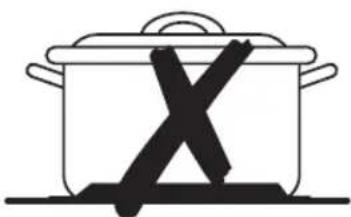
natural_image
Simple line drawing of a cooking pot with an 'X' symbol crossed out, no text or symbols present.Nesprávne!
Nastavenie teploty
natural_image
Illustration of a hand using a power tool to clean or smoke from a pipe (no text or symbols)natural_image
Abstract diagram with concentric circles and scattered gray shapes, no text or symbols presentRám varnej dosky


natural_image
Line drawing of an open laptop with a cable inserted, placed on a stand (no text or symbols)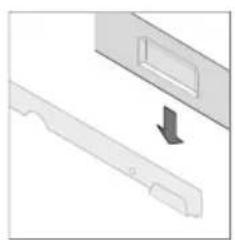
natural_image
Diagram showing a mechanical component with an arrow indicating direction (no text or symbols present)
natural_image
Isometric diagram of a flat-panel installation with support beams and diagonal lines (no text or symbols)natural_image
Isometric view of a square electronic component or panel with no text or symbolsnatural_image
Technical line drawing of two mechanical components with mounting holes (no text or symbols)2 kllapa instalimi
natural_image
Simple line drawing of a folded paper or sheet with three evenly spaced pins (no text or symbols)3 vida

natural_image
Line drawing of a cooking pot with lid and side handles (no text or symbols)E drejtë!
natural_image
Simple line drawing of a cooking pot with a 'X' mark on its side (no text or symbols)
natural_image
Simple line drawing of a cooking pot with a 'X' mark on its side (no text or symbols)E gabuar!

natural_image
Illustration of a hand using a power tool to clean or brush the brush (no text or symbols visible)natural_image
Abstract diagram with concentric curved lines and scattered gray shapes (no text or symbols)m = 311
m = 311
[Non-Text]
[Non-Text]
[Non-Text]
[Non-Text]
[Non-Text]
[Non-Text]
[Non-Text]
0
C6
(1)
[Non-Text]
[Non-Text]
[Non-Text]
[Non-Text]
[Non-Text]
[Non-Text]
[Non-Text]
[Non-Text]
[Non-Text]





Sadržaj
SR
Upotreba priručnika 2
Bezbednost 3


natural_image
Line drawing of an open book or tablet stand with a cable inserted, placed on a table (no text or symbols)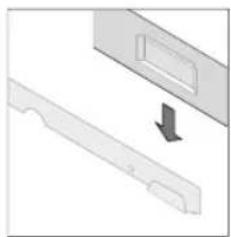
natural_image
Diagram showing a mechanical component with an arrow indicating direction (no text or symbols present)
natural_image
Isometric diagram of a structural platform with support beams and diagonal lines (no text or symbols)Delovi i funkcije
Ringle i kontrolna tabla
SR


natural_image
Isometric view of a square electronic component or panel stack (no text or symbols)1 Keramičko staklena grejna ploča

natural_image
Technical line drawing of two mechanical components with mounting holes (no text or symbols)2 Držači za instalaciju

natural_image
Simple line drawing of a folded paper with three screws (no text or symbols)3 Šrafovi
natural_image
Simple line drawing of a cooking pot with lid and side handles (no text or symbols)Ispravno!

natural_image
Two identical cooking pots with a 'X' mark, placed on different sides of each other (no text or symbols)Pogrešno!
Korišćenje senzora kontrola koji se aktiviraju dodirom
Da biste koristili senzore kontrola koji se aktiviraju na dodir, pritisnite prstom i držite željenu tablu dok se odgovarajući displej ne uključi ili isključi, odnosno dok ne aktivirate željenu funkciju.

Kontrola temperature
Za podešavanje i biranje nivoa snage do )Pa kuvanje, pritiskajte tastere , edgovarajuće ringle.
Kada prvi put pritisnete taster C-stepen zagrevanja je postavljen na .
Kada prvi put pritisnete taster □stepen zagrevanja je postavljen na . 5
Upotrebite taster da biste povećali temperaturu, a taster da biste je smanjili.


Ako je temperatura postavljena na a Vi želite da isključite grejač pritisnite još jednom senzor i temperatura će biti postavljana na nulu.
natural_image
Hand pointing at a control panel with battery and lock icons (no text or symbols)natural_image
Illustration of a hand using a power tool to clean or brush a white substance (no text or symbols visible)natural_image
Abstract diagram with concentric arcs and scattered gray shapes, no text or symbols presentOkvir grejne ploče


Ceramic Glass Hob user manual
Planet First
100%
Recycled Paper
This manual is made with 100 % recycled paper.
imagine the possibilities
ENGLISH
Thank you for purchasing this Samsung product.
To receive more complete service, please register your product at
www.samsung.com/register
SAMSUNG



Contents
EN
Using This Manual 2
Safety....3
Electrical safety 3
Child safety 3
Safety during use 4
Safety when cleaning 4
Disposal Instructions 4
Installing the Hob 5
Regulations and compliance 5
Safety instructions for the installer 5
Connecting to the mains power supply 6
Installing into the countertop. 7
Parts and Features 9
Cooking zones and control panel 9
Components 10
The key features of your appliance....11
Safety shutoff....12
Residual heat indicator....12
Before You Begin 13
Initial cleaning....13
Hob Use....13
Using suitable cookware 13
Using the touch control sensors....14
Switching the appliance on 15
Temperature control....15
Switching the appliance off. 16
Switching a cooking zone off 16
Using the child safety lock 17
Locking and unlocking the control panel. 19
Suggested settings for cooking specific foods 19
Cleaning and Care 20
Hob 20
Hob Frame....21
To avoid damaging your appliance....21
Warranty and Service 22
FAQs and troubleshooting 22
Service....23
Technical Data 24
Using This Manual
EN
Please take the time to read this owner's manual, paying particular attention to the safety information contained in the following section, before using your appliance. Keep this manual for future reference. If transferring ownership of the appliance, please remember to pass the manual on to the new owner.
The following symbols are used in the text
This is the safety alert symbol. Warning indicates information concerning your personal safety. Important indicates information on avoiding damage to the appliance.


symbol indicates useful information and practical tips.
symbol refers to measures that can be taken to help protect the environment.
- Numbers like these indicate step - by - step instructions for using the appliance.
- ...
- ...
This manual contains information on steps you can take yourself to diagnose and resolve problems that may arise. Refer to the section “Troubleshooting.”


CORRECT DISPOSAL OF THIS PRODUCT (WASTE ELECTRICAL & ELECTRONIC EQUIPMENT)
(Applicable in countries with separate collection systems)
This marking on the product, accessories or literature indicates that the product and its electronic accessories (e.g. charger, headset, USB cable) should not be disposed of with other household waste at the end of their working life. To prevent possible harm to the environment or human health from uncontrolled waste disposal, please separate these items from other types of waste and recycle them responsibly to promote the sustainable reuse of material resources.
Household users should contact either the retailer where they purchased this product, or their local government office, for details of where and how they can take these items for environmentally safe recycling.
Business users should contact their supplier and check the terms and conditions of the purchase contract. This product and its electronic accessories should not be mixed with other commercial wastes for disposal.
Safety

safety aspects of this appliance comply with accepted technical standards and the German Appliance Safety Law. However, as manufacturers we also believe it is our responsibility to familiarise you with the following safety instructions.
EN
Electrical safety
- Be sure the appliance is properly installed and grounded by a qualified technician.
- The appliance should be serviced only by qualified service personnel. Repairs carried out by unqualified individuals may cause injury or serious malfunction. If your appliance is in need of repair, contact your local service centre. Failure to follow these instructions may result in damage and void the warranty.
- Flush - mounted appliances may be operated only after they have been installed in cabinets and workplaces that conform to the relevant standards. This ensures sufficient protection against contact for electrical units as required by the VDE [Association of German Electrical Engineers].
- If your appliance malfunctions or if fractures, cracks or splits appear:
- switch off all cooking zones;
- disconnect the hob from the mains supply; and
- contact your local service centre.
- If the cooktop cracks, turn the appliance off to avoid the possibility of electric shock. Do not use your hob until the glass surface has been replaced.
- Do not use the hob to heat aluminium foil, products wrapped in aluminium foil or frozen foods packaged in aluminium cookware.
Child safety

This appliance is not intended for use by young children or infirm persons without the adequate supervision of a responsible adult.
Young children should be supervised to ensure that they do not play with the appliance.
The cooking zones will become hot when you cook. Always keep small children away from the appliance.
Safety (continued)
EN
Safety during use
- This appliance is to be used only for normal cooking and frying in the home. It is not designed for commercial or industrial use.
- Never use the hob for heating the room.
- Take care when plugging electrical appliances into mains sockets near the hob. Mains leads must not come into contact with the cooktop.
• Overheated fat and oil can catch fire quickly. Never leave surface units unattended when preparing foods in fat or oil, for example, when cooking chips. - Turn the cooking zones off after use.
• Always keep the control panels clean and dry. - Never place combustible items on the hob. It may cause fire.
Safety when cleaning
• Always turn the appliance off before cleaning.
- For safety reasons do not clean the appliance with a steam jet or high - pressure cleaner.
- Clean the hob in accordance with the cleaning and care instructions contained in this manual.
Disposal Instructions
Disposing of the packaging material
- All materials used to package the appliance are fully recyclable. Sheet and hard foam parts are appropriately marked. Please dispose of packaging materials and old appliances with due regard to safety and the environment.
Proper disposal of your old appliance

Warning: Before disposing of your old appliance, make it inoperable so that it cannot be a source of danger.
this, have a qualified technician disconnect the appliance from the mains supply and remove the mains lead.
- The appliance may not be disposed of in the household rubbish.
- Information about collection dates and public refuse disposal sites is available from your local refuse department or council.
Installing the Hob

Important: Be sure the new appliance is installed and grounded only by qualified personnel. Please observe this instruction. The warranty will not cover any damage that may occur as a result of improper installation. Technical data is provided at the end of this manual.
EN
Regulations and compliance
This appliance meets the following standards:
- EN 60 335 - 1 and EN 60 335 - 2 - 6, relating to the safety of electrical appliances for household use and similar purposes;
- EN 60350, or DIN 44546 / 44547 / 44548, relating to the operating features of electric cookers, hobs, ovens, and grills for household use;
• EN 55014 - 2;
• EN 55014;
• EN 61000 - 3 - 2; and
• EN 61000 - 3 - 3, relating to basic requirements for electromagnetic compatibility (EMC).
This appliance complies with the following EU Directives:
73/23/EWG dated 19.02.1973 (Low Voltage Directive);
- 89 / 336 / EWG dated 03.05.1989 (EMC Directive including Amending Directive 92 / 31 / EWG); and
• 93 / 68 / EWG CE Labeling Directive.
Safety instructions for the installer
- A device must be provided in the electrical installation that allows the appliance to be disconnected from the mains at all poles with a contact opening width of at least 3 mm. Suitable isolation devices include line protecting cut - outs, fuses (screw type fuses are to be removed from the holder), earth leakage trips and contactors.
- With respect to fire protection, this appliance corresponds to EN 60 335 - 2 - 6. This type of appliance may be installed with a high cupboard or wall on one side.
- Drawers may not be fitted underneath the hob.
- The installation must guarantee shock protection.
- The kitchen unit in which the appliance is fitted must satisfy the stability requirements of DIN 68930.
- For protection against moisture, all cut surfaces are to be sealed with a suitable sealant.
- On tiled work surfaces, the joints in the area where the hob sits must be completely filled with grout.
- On natural, artificial stone, or ceramic tops, the snap action springs must be bonded in place with a suitable artificial resin or mixed adhesive.
- Ensure that the seal is correctly seated against the work surface without any gaps. Additional silicon sealant must not be applied; this would make removal more difficult when servicing.
- The hob must be pressed out from below when removed.
Installing the Hob (Continued)
EN
Connecting to the mains power supply
Before connecting, check that the nominal voltage of the appliance, that is, the voltage stated on the rating plate, corresponds to the available supply voltage. The rating plate is located on the lower casing of the hob.
Shut off power to circuit before connecting wires to circuit.
The heating element voltage is AC 230 V\~. The appliance also works perfectly on older networks with AC 220 V\~.
The hob is to be connected to the mains using a device that allows the appliance to be disconnected from the mains at all poles with a contact opening width of at least 3 mm, eg. automatic line protecting cut - out, earth leakage trips or fuse.
A type H05SS - F (180°C) cable or one of a higher grade must be used as the mains connecting cable.
| Rated current of appliance (A) Nominal cross-sectional area (mm 2 ) | |
| 1N~ | >25 and ≤32 ≥2.5 |
| 2N~ > 10 and ≤16 ≥1.5 |
The connection must be carried out as shown in the diagram. The connecting links should be fitted according to the appropriate connection diagram.
The earth lead is connected to terminal. The earth lead must be longer than leads carrying electric current.
The cable connections must be made in accordance with regulations and the terminal screws tightened securely.
The connecting cable is to be secured with the mains cable cleat and the covering closed by pressing firmly (locking into place). Before switching on for the first time, any protective foil or stickers must be removed from the ceramic glass surface.

he hob is connected to the mains supply, check that all cooking zones are ready for use by briefly switching each on in turn at the maximum setting.

the hob is powered on for the first time, all displays light and the child safety lock is activated.

L: Brown
N: Blue
PE: Green

Warning: Pay attention (conformity) to phase and neutral allocation of house connection and appliance (connection schemes); otherwise, components can be damaged.
Warranty does not cover damage resulting from improper installation.
Installing the Hob (Continued)
Installing into the countertop
EN

e a note of the serial number on the appliance rating plate prior to installation. This number will be required in the case of requests for service and is no longer accessible after installation, as it is on the original rating plate on the underside of the appliance.
Pay special attention to the minimum space and clearance requirements.
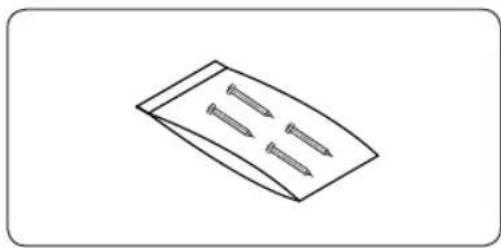
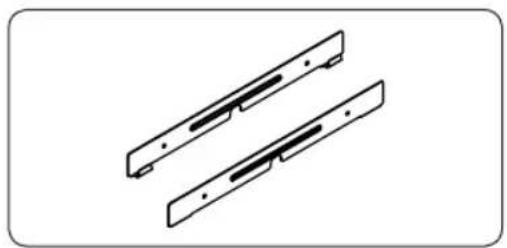
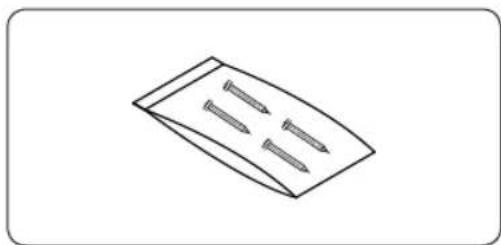
Secure the brackets at both sides with the provided screws before mounting the hob onto the brackets.


Installing the Hob (Continued)
EN


natural_image
Line drawing of an open laptop with a cable inserted, placed on a stand (no text or symbols)
natural_image
Diagram showing a mechanical component with an arrow indicating direction (no text or symbols present)
natural_image
Isometric diagram of a flat-panel installation with support beams and diagonal lines (no text or symbols)Parts and Features
Cooking zones and control panel
EN

Single cooking zone 1800 W


"On/Off" control sensor
Parts and Features (Continued)
EN
Components

natural_image
Isometric view of a square electronic component or panel with no text or symbols1
Ceramic Glass Hob

natural_image
Technical line drawing of two parallel metal bracket components (no text or symbols)2
Installation Brackets

natural_image
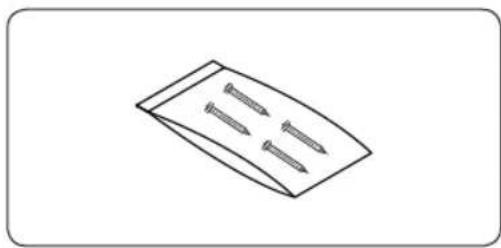
Simple line drawing of a folded paper or sheet with three evenly spaced screw holes (no text or symbols)3
Screws
Parts and Features (Continued)
The key features of your appliance
EN
- Ceramic glass cooking surface: The appliance has a ceramic glass cooking surface and four rapid - response cooking zones. The hob's powerful radiant heater elements significantly shorten the amount of time required for the zones to heat up.
- Touch control sensors: Your appliance is operated using touch control sensors.
- Easy cleaning: The advantage of the ceramic glass cooking surface and the control sensors is their accessibility for cleaning. The smooth, flat surface is easy to clean.
- On/Off sensor: The "On/Off" control sensor provides the appliance with a separate mains switch. Touching this sensor switches the power supply on or off completely.
- Control and function indicators: Digital displays and indicator lights provide information about settings and activated functions, as well as the presence of residual heat in the various cooking zones.
- Safety shutoff: A safety shutoff ensures that all cooking zones switch off automatically after a period of time if the setting has not been changed.
- Residual heat indicator: An icon for residual heat appears in the display if the cooking zone is so hot that there is a risk of burning.
Digital displays: The four display fields are assigned to the four cooking zones.
They show the following information:
-
- the appliance has been switched on,
- 10 Elected heat settings,
- Hesidual heat,
- the child lock is activated; and
- 5F error message, the sensor has been touched for longer than 10 seconds.
- error message, when the Hob is overheated because of abnormal operation.

Parts and Features (Continued)
EN
Safety shutoff
If one of the cooking zones is not switched off or the heat setting is not adjusted after an extended period of time, that particular cooking zone will automatically switch itself off.
Any residual warmth will be indicated with Ⓗ (for "hot") in the digital displays corresponding to the particular cooking zones.
The cooking zones switch themselves off at the following times.
| Cooking setting 1 - 2 After 6 hours |
| Cooking setting 3 - 4 After 5 hours |
| Cooking setting 5 - 6 After 3 hours |
| Cooking setting 7 - 9 After 1 hour |

Hob is overheated because of abnormal operation, And the Hob will be switched off.
will be displayed.

d one or more of the cooking zones switch off before the indicated time has elapsed, see the section "Troubleshooting."
Other reasons why a cooking zone will switch itself off
All cooking zones will immediately switch themselves off if liquid boils over and lands on the control panel.
The automatic shutoff will also be activated if you place a damp cloth on the control panel. In both of these instances, the appliance will need to be switched on again using the main power sensor after the liquid or the cloth has been removed (!)
Residual heat indicator
When an individual cooking zone or the hob is turned off, the presence of residual heat is shown with an H (for "hot") in the digital display of the appropriate cooking zones. Even after the cooking zone has been switched off, the residual heat indicator goes out only after the cooking zone has cooled.
You can use the residual heat for thawing or keeping food warm.

tant: As long as the residual heat indicator tant: If the power supply is interrupted, the
H symbol will go out and information
about residual heat will no longer be available. However, it may still be possible to burn yourself. This can be avoided by always taking care when near the hob.
Before You Begin
Initial cleaning
EN
Wipe the ceramic glass surface with a damp cloth and ceramic cooktop glass cleaner.

Important: Do not use caustic or abrasive cleaners. The surface could be damaged.
Hob Use
Using suitable cookware
Better pans produce better results.
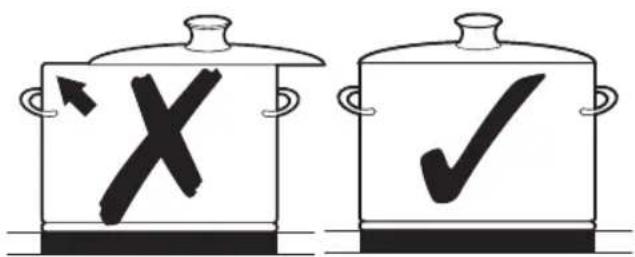
- You can recognise good pans by their bases. The base should be as thick and flat as possible.
- When buying new pans, pay particular attention to the diameter of the base. Manufacturers often give only the diameter of the upper rim.
- Pots with aluminium or copper bases can cause metallic discolouration on the ceramic glass surface. The discolouration is very difficult or impossible to remove.
- Do not use pans made of cast iron or which have damaged bases with rough edges or burrs. Permanent scratching can occur if these pan are slid across the surface.
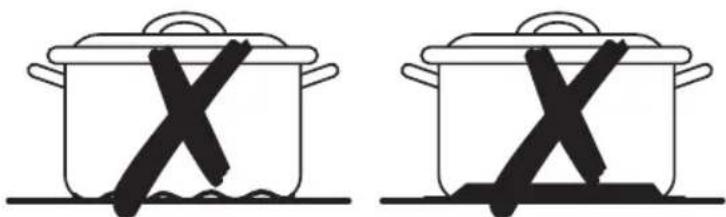
- When cold, pan bases are normally bowed slightly inwards (concave). They should never be bowed outwards (convex).
- If you wish to use a special type of pan, for example, a pressure cooker, a simmering pan, or a wok, please observe the manufacturer's instructions.
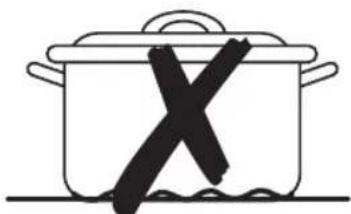
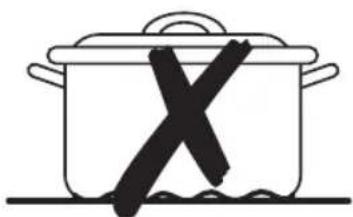
Energy saving tips

can save valuable energy by observing the following points.

natural_image
Simple line drawing of a cooking pot with lid and side handles (no text or symbols)Right!

natural_image
Simple line drawing of a cooking pot with a 'X' mark inside, no text or symbols present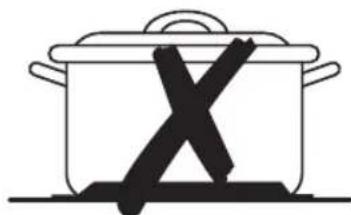
natural_image
Simple line drawing of a cooking pot with an 'X' mark on its side (no text or symbols)Wrong!
Hob Use (Continued)
EN
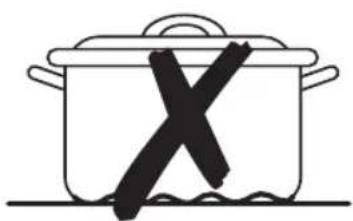
• Always position pots and pans before switching on the cooking zone.
- Dirty cooking zones and pan bases increase power consumption.
- When possible, position the lids firmly on the pots and pans to cover completely.
- Switch the cooking zones off before the end of the cooking time to use the residual heat for keeping foods warm or for thawing.
- The base of the pan should be the same size as the cooking zone.
• Using a pressure cooker reduces cooking times by up to 50 %

Using the touch control sensors
To operate the touch control sensors, touch the desired panel with the tip of your pointed finger until the relevant displays illuminate or go out, or until the desired function is activated.
Ensure that you are touching only one sensor panel when operating the appliance. If your finger is too flat on the panel, an adjacent sensor may be actuated as well.

Hob Use (Continued)
Switching the appliance on
EN
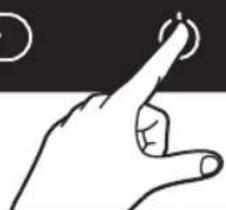
Touch the "Lock 🔒 sensor for approximately 3 seconds.
The appliance is switched on using the "On/Off ⚙ control sensor.
Touch the "On/Off 🔊 sensor.
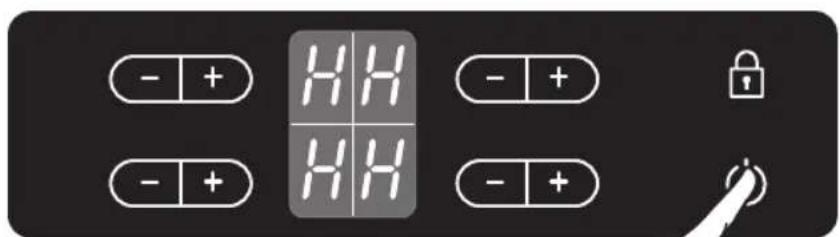
The digital displays will show

the "On/Off" sensor has been actuated to switch on your appliance, a heat setting must be selected within approximately 10 seconds. Otherwise, the appliance will switch itself off for safety reasons.

Temperature control
For setting and adjusting the power level (☐ to ☐) for cooking, touch the corresponding cooking zone's ☐ keys.
The first time ☐ is pressed, the heat level is set to ☐
The first time ⊕ is pressed, the heat level is set to 5
Use the ☐ key to increase the heat setting and the Ⓗ key to decrease.

Hob Use (Continued)
EN
Switching the appliance off
To completely switch off the appliance, use the "On/Off" control sensor. Touch the "On/Off" sensor.

switching off a single cooking zone or the entire cooking surface, the presence of residual heat will be indicated in the digital displays of the corresponding cooking zones in the form of an H (for "hot").

natural_image
Illustration of a hand pressing a button with a circular symbol above (no text or symbols present)
heat setting is at and 9 you want to turn the + burner off, the sensor can be touched one additional time, and the heat setting will go to zero.
For faster adjustment, keep your finger on the is obtained.
+ or -sensor until the required value
If more than one sensor is pressed for longer than 10 seconds, heat setting display. To reset, touch the "On/Off" sensor.
SE will show in the
Switching a cooking zone off
To switch off a cooking zone, return the setting to buy using the control panel's heat setting and touch sensors or .

Hob Use (Continued)
Using the child safety lock
EN
You can use the child safety lock to safeguard against unintentionally turning on a cooking zone and activating the cooking surface. The lock control sensor can be used only when the power is on.
Switching the child safety lock on
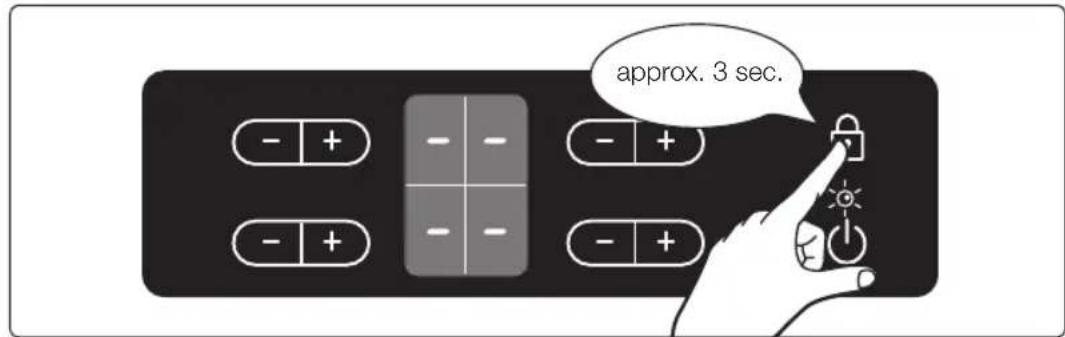
- Touch the control sensor for approximately 3 seconds. An acoustic signal will sound as confirmation.

- Touch any heat setting control sensor. w# appear in the displays, indicating the child safety lock has been activated.

Switching the child safety lock off
- Touch the control sensor for approximately 3 seconds. An acoustic signal will sound as confirmation.

After switching off the appliance, child safety lock will be activated automatically within some minutes for safety reasons.
Hob Use (Continued)
EN
Locking and unlocking the control panel
At any stage during the cooking process, the control panel, with the exception of the "On/Off ⏻" control sensor, can be locked in order to prevent the settings from being changed unintentionally, for example, by wiping over the panel with a cloth.
- Touch the lock control sensor for approximately 3 seconds.
The indicator light in the lock control sensor will illuminate. The control sensors are now locked. - To unlock the control sensor, touch the lock control sensor again for approximately 3 seconds.
The indicator light in the lock control sensor will extinguish.

Suggested settings for cooking specific foods
The figures in the table below are guidelines. The heat settings required for various cooking methods depend on a number of variables, including the quality of the cookware being used and the type and amount of food being cooked.
Switch setting Cooking method Examples for use
| 9 | Warming Sautéing Frying | Warming large amounts of liquid, boiling noodles, searing meat, (browning goulash, braising meat) |
| 8 | Intensive Frying | Steak, sirloin, hash browns, sausages, pancakes/ griddle cakes |
| 7 | ||
| 6 Frying Schnitzel/chops, liver, fish, rissoles, fried eggs | ||
| 5 | Boiling | Cooking up to 1.5 l liquid, potatoes, vegetables |
| 4 | ||
| 3 Steaming | Stewing Boiling | Steaming and stewing of small amounts of vegetables, boiling rice and milk dishes |
| 2 | ||
| 1 Melting | Melting butter, dissolving gelatine, melting chocolate | |
Note
- The heat settings indicated in the table above are provided only as guidelines for your reference.
- You will need to adjust the heat settings according to specific cookware and foods.
Cleaning and Care
Hob

Important: Cleaning agents must not come into contact with a heated ceramic glass surface: All cleaning agents must be removed with adequate amounts of clean water after cleaning because they can have a caustic effect when the surface becomes hot. Do not use any aggressive cleaners such as grill or oven sprays, scouring pads or abrasive pan cleaners.
EN

the ceramic glass surface after each use when it is still warm to the touch. This will prevent spillage from becoming burnt onto the surface. Remove scales, watermarks, fat drippings and metallic discolouration with the use of a commercially available ceramic glass or stainless steel cleaner.
Light Soiling
- Wipe the ceramic glass surface with a damp cloth.
- Rub dry with a clean cloth. Remnants of cleaning agent must not be left on the surface.
- Thoroughly clean the entire ceramic glass cooking surface once a week with a commercially available ceramic glass or stainless steel cleaner.
- Wipe the ceramic glass surface using adequate amounts of clean water and rub dry with a clean lint - free cloth.

Stubborn Soiling
- To remove food that has boiled over and stubborn splashes, use a glass scraper.
- Place the glass scraper at an angle to the ceramic glass surface.
- Remove soiling by scraping with the blade.

scrapers and ceramic glass cleaners are available from specialty retailers.

natural_image
Illustration of a hand using a power tool to clean or absorb a substance from a curved surface (no text or symbols)Cleaning and Care (Continued)
EN
Problem Dirt
- Remove burnt-on sugar, melted plastic, aluminium foil or other materials with a glass scraper immediately and while still hot.

Important: There is a risk of burning yourself when the glass scraper is used on a hot cooking zone:
- Clean the hob as normal when it has cooled down.

cooking zone on which something has melted has been allowed to cool, warm it up again for cleaning. Scratches or dark blemishes on the ceramic glass surface, caused, for example, by a pan with sharp edges, cannot be removed. However, they do not impair the function of the hob.

natural_image
Abstract diagram with concentric curved lines and scattered gray shapes, no text or symbols presentHob Frame


Important: Do not use vinegar, lemon juice or scale remover on the hob frame; otherwise dull blemishes will appear.
- Wipe the frame with a damp cloth.
- Moisten dried debris with a wet cloth. Wipe and rub dry.
To avoid damaging your appliance
- Do not use the cooktop as a work surface or for storage.
- Do not operate a cooking zone if there is no pan on the cooktop or if the pan is empty.
- Ceramic glass is very tough and resistant to temperature shock, but it is not unbreakable. It can be damaged by a particularly sharp or hard object dropping onto the cooktop.
- Do not use pans made of cast iron or which have damaged bases with rough edges or burrs. Scratching may occur if these pans are slid across the surface.
- Do not place pans on the hob frame. Scratching and damage to the finish may occur.
- Avoid spilling acidic liquids, for example, vinegar, lemon juice and descaling agents, onto the hob frame, since such liquids can cause dull spots.
- If sugar or a preparation containing sugar comes into contact with a hot cooking zone and melts, it should be cleaned off immediately with a kitchen scraper while it is still hot. If allowed to cool, it may damage the surface when removed.
- Keep all items and materials that could melt, for example, plastics, aluminium foil and oven foils, away from the ceramic glass surface. If something of this nature melts onto the cooktop, it must be removed immediately with a scraper.

Warranty and Service
FAQs and troubleshooting
EN
A fault may result from a minor error that you can correct yourself with the help of the following instructions. Do not attempt any further repairs if the following instructions do not help in each specific case.

Warning: Repairs to the appliance are to be performed only by a qualified service technician. Improperly effected repairs may result in considerable risk to the user. If your appliance needs repair, please contact your customer service centre.
What should I do if the cooking zones are not functioning?
Check for the following possibilities:
- The fuse in the house wiring (fuse box) is intact. If the fuses trip a number of times, call an authorised electrician.
• The appliance is properly switched on. - The control indicators in the control panel are illuminated.
- The cooking zone is switched on.
- The cooking zones are set at the desired heat settings.
What should I do if the cooking zones will not switch on?
Check for the following possibilities:
- A period of more than 10 seconds has elapsed between when the On/Off button was actuated and the desired cooking zone switches on (see the section “Switching the appliance on”).
- The control panel is partially covered by a damp cloth or liquid.
What should I do if the display except for the residual warmth indicator suddenly disappears?
This could be a result of one of two possibilities:
- The On/Off sensor was accidentally actuated.
- The control panel is partially covered by a damp cloth or liquid.
What should I do if, after the cooking zones have been switched off, residual warmth is not indicated in the display?
Check for the following possibility:
- The cooking zone was only briefly used and therefore did not become hot enough. If the cooking zone is hot, please call the customer service centre.
What should I do if the cooking zone will not switch on or off?
This could be due to one of the following possibilities:
- The control panel is partially covered by a damp cloth or liquid.
- The child safety lock is on.
What should I do if the 58 display is illuminated?
Check for the following:
- The control panel is partially covered by a damp cloth or liquid. To reset, press the "On/Off" control sensor.
Warranty and Service (Continued)
EN
What does it mean when the burner does not glow red?
- The selected temperature of the cooking zone is maintained by a sensor that cycles the zone on and off, so the surface cooking area will not always glow red. If you select a low heat setting, the heat will cycle on and off more frequently than at higher settings. The heat also cycles on and off at the highest setting.
If you request a service call because of an error made in operating the appliance, the visit from the customer service technician may incur a charge even during the warranty period.
Service
Before calling for assistance or service, please check the section "Troubleshooting." If you still need help, follow the instructions below.
Is it a technical fault?
If so, please contact your customer service centre.
Always prepare in advance for the discussion. This will ease the process of diagnosing the problem and also make it easier to decide if a customer service visit is necessary.
Please take note of the following information.
• What form does the problem take?
• Under what circumstances does the problem occur?

When calling, please know the model and serial number of your appliance. This information is provided on the rating plate as follows:
- Model description
• S/N code (15 digits)
We recommend that you record the information here for easy reference.
Model:
Serial number:
When do you incur costs even during the warranty period?
- If you could have remedied the problem yourself by applying one of the solutions provided in the section "Troubleshooting".
- If the customer service technician has to make several service calls because he was not provided with all of the relevant information before his visit and as a result, for example, has to make additional trips for parts. Preparing for your phone call as described above will save you the cost of these trips.
Technical Data
Appliance dimensions
Width 575 mm
Depth 505 mm
Height 55 mm
Worktop cut - out dimensions
Width 560 mm
Depth 490 mm
Corner radius 3 mm
Cooking rings
| Position Diameter Power | ||
| Front left 183 | mm 1800 W | |
| Rear left 148 | mm 1200 W | |
| Rear right 183 | mm 1800 W | |
| Front right 148 | mm 1200 W | |
Connection voltage 230 V \~ 50 Hz
Maximum connected load power 6.0 kW
Weight: Net 7.5 kg
Gross 10.0 kg
EN


Note
EN





Note
EN


SAMSUNG
QUESTIONS OR COMMENTS
| COUNTRY | CALL | OR VISIT US ONLINE AT |
| BOSNIA 05 133 1999 | www.samsung.com | |
| BULGARIA 07001 33 11 , normal tariff | ||
| CROATIA 062 - SAMSUNG (062-726-7864) | ||
| CZECH 800 - SAMSUNG (800-726786) | ||
| HUNGARY 06-80-SAMSUNG (726-7864) | ||
| MACEDONIA 023 207 777 | ||
| MONTENEGRO 020 405 888 | ||
| POLAND +48 22 607-93-33 | 0 801-1SAMSUNG (172-678) | |
| ROMANIA TOLL FREE No. | 08008 SAMSUNG (08008 726 7864) | |
| SERBIA | 0700 SAMSUNG (0700 726 7864) | |
| SLOVAKIA 0800-SAMSUNG (0800-726-786) | ||
| LITHUANIA | 8-800-77777 | |
| LATVIA | 8000-7267 | |
| ESTONIA 800-7267 |
Code No.: DG68-00125D-01
- Управление на температурата
- Рамка на плочата
- Části a funkce
- Regulace teploty
- Rám sporáku
- Sadržaj
- Dijelovi i značajke
- Korištenje ploče za kuhanje (nastavak)
- HR
- Korištenje senzorskog upravljanja na dodir
- Upravljanje temperaturom
- Okvir ploče za kuhanje
- Napomena
- SAMSUNG
- Kerámiaüveg főzőlap
- használati útmutató
- Főzőlap szegélye
- Делови и функции
- Рамка на плотната
- Utilizarea plitei (continuare)
- RO
- Utilizarea butoanelor tactile
- Rama plitei
- Časti a funkcie
- Nastavenie teploty
- Rám varnej dosky
- Upotreba priručnika 2
- Bezbednost 3
- Delovi i funkcije
- Korišćenje senzora kontrola koji se aktiviraju dodirom
- Kontrola temperature
- Okvir grejne ploče
- Ceramic Glass Hob user manual
- Contents
- Using This Manual 2
- Safety....3
- Disposal Instructions 4
- Installing the Hob 5
- Parts and Features 9
- Before You Begin 13
- Hob Use....13
- Cleaning and Care 20
- Warranty and Service 22
- Technical Data 24
- Using This Manual
- EN
- The following symbols are used in the text
- CORRECT DISPOSAL OF THIS PRODUCT (WASTE ELECTRICAL & ELECTRONIC EQUIPMENT)
- (Applicable in countries with separate collection systems)
- Safety
- Electrical safety
- Child safety
- Safety (continued)
- Safety during use
- Safety when cleaning
- Disposal Instructions
- Disposing of the packaging material
- Proper disposal of your old appliance
- Installing the Hob
- Regulations and compliance
- Safety instructions for the installer
- Installing the Hob (Continued)
- Connecting to the mains power supply
- Installing into the countertop
- Parts and Features
- Parts and Features (Continued)
- Components
- The key features of your appliance
- Safety shutoff
- Other reasons why a cooking zone will switch itself off
- Residual heat indicator
- Before You Begin
- Initial cleaning
- Hob Use
- Using suitable cookware
- Energy saving tips
- Hob Use (Continued)
- Using the touch control sensors
- Switching the appliance on
- Temperature control
- Switching the appliance off
- Switching a cooking zone off
- Using the child safety lock
- Switching the child safety lock on
- Switching the child safety lock off
- Locking and unlocking the control panel
- Suggested settings for cooking specific foods
- Note
- Cleaning and Care
- Hob
- Light Soiling
- Stubborn Soiling
- Cleaning and Care (Continued)
- Problem Dirt
- Hob Frame
- To avoid damaging your appliance
- Warranty and Service
- FAQs and troubleshooting
- What should I do if the cooking zones are not functioning?
- What should I do if the cooking zones will not switch on?
- What should I do if the display except for the residual warmth indicator suddenly disappears?
- What should I do if, after the cooking zones have been switched off, residual warmth is not indicated in the display?
- What should I do if the cooking zone will not switch on or off?
- What should I do if the 58 display is illuminated?
- Warranty and Service (Continued)
- What does it mean when the burner does not glow red?
- Service
- Is it a technical fault?
- When do you incur costs even during the warranty period?
- Technical Data
- Appliance dimensions
- Worktop cut - out dimensions
Brand : SAMSUNG
Model : C61R2AEEP
Category : Oven