
PGX1601E-H - Charger EGO - Free user manual and instructions
Find the device manual for free PGX1601E-H EGO in PDF.


| Product type | Charger hub for EGO batteries |
| Brand | EGO |
| Model | PGX1601E-H |
| Power supply | 220-240 V~, 50/60 Hz, 1600 W |
| Output voltage | 56 V DC, max. 24 A |
| Weight | 5.2 kg |
| Recommended charging temperature | 5 – 40 °C |
| Recommended storage temperature | -20 – 70 °C |
| Compatible battery types | EGO 56 V batteries (list in manual) |
| Compatible docking station | EGO PGX3000D |
| Compatible portable charger | EGO PGX1400PB |
| Main features | Fast charging of multiple batteries, Bluetooth®/Wi-Fi communication, wall or E-Track rail mounting, thermal and error protection |
| Maintenance and cleaning | Unplug before cleaning; dry cloth only; avoid solvents and liquids |
| Safety | Double insulation (class II), indoor use only, protection against overload, overheating and short circuit |
| Spare parts and repairability | Repair by EGO approved center; identical spare parts; replaceable power cord |
| General information | Time-delay fuse T25A; CE and UKCA compliance; do not dispose of with household waste |
Frequently Asked Questions - PGX1601E-H EGO
User questions about PGX1601E-H EGO
0 question about this device. Answer the ones you know or ask your own.
Ask a new question about this device
Download the instructions for your Charger in PDF format for free! Find your manual PGX1601E-H - EGO and take your electronic device back in hand. On this page are published all the documents necessary for the use of your device. PGX1601E-H by EGO.
USER MANUAL PGX1601E-H EGO
PGX1600E-H
56 VOLT PGX™ 1600W HUB
EN 56 VOLT PGX TM 1600W HUB 5
DE 56 VOLT PGX ^TM 1600 W HUB 14
FR HUB 56 VOLTS PGX ^TM 1600W 24
ES HUB DE 56 VOLTIOS PGX ^TM DE 1600 W 34
PT 56 VOLT PGX ^TM 1600W HUB 45
IT HUB 1600 W PGX ™ 56 VOLT 55
NL 56 VOLT PGX ™ 1600W HUB 65
DK 56 VOLT PGX ^TM 1600W HUB 75
SE 56 VOLT PGX ™ 1600W HUB 84
FI 56 VOLTIN PGX ^TM 1600 W:N KESKITIN 94
NO 56 VOLT PGX ^TM 1600W HUB 103
RU ЗАРЯДНАЯ СТАНЦИЯ PGX ™ 56 В 1600 ВТ 112
PL KONCENTRATOR PGX TM 56 V 1600 W 123
CZ 56 VOLTOVÝ PGX™ 1600 W NABÍJECÍ ROZBOČOVAČ 133
SK 56 VOLTOVÝ PGX™ 1600 W NABÍJACÍ ROZBOČOVAČ 143
HU 56 VOLT PGX ^TM 1600 W HUB 153
RO 56 VOLT PGX ^TM 1600W HUB 163
SL 56 VOLT PGX TM1600W HUB 173
LT 56 VOLTU PGX TM 1600 W ŠAKOTUVAS 182
LV 56 VOLTU PGX ™1600W CENTRMEZGLS 192
GR ΔIANOMEAΣ (HUB) 1600 W 56 VOLT PGX ^TM 202
TR 56 VOLT PGX TM 1600W HUB 213
ET 56 VOLT PGX ^TM 1600 W JAOTUR 222
UK 56-ВОЛЬТОВИЙ ХАБ РГХ ™ НА 1600 ВТ 231
BG 56 V PGX ^TM 1600W XББ 241
HR PGX TM ČVORIŠTE OD 56 V I 1600 W 252
KA 56 3m20 PGX TM 1600W HUB 261
SR 56 VOLTI PGX ™1600 W ČVORIŠTE 274
BS PGX ^TM ČVORIŠTE 1600 W, 56 V 284
HE 1600W PGX ^TM VOLT 56 311
AR PGXTM 1600 مركز 302
A1


A2

B1

natural_image
Line drawing of a PGX1600E-H power connector with cable and plug (no text or symbols on the device itself)BA1400, BA2800, BA4200, BA1400T, BA2240T, BA2242T, BA2800T, BA3360T, BA4200T, BA5600T, BA6720T


BA1400, BA2800, BA4200,
BA1400T, BA2240T, BA2242T,
BA2800T, BA3360T, BA4200T,
BA5600T, BA6720T

natural_image
Line drawing of a portable electronic device labeled 'BA5600' and 'PGX1600E-H', showing wiring and connectors (no readable text beyond labels)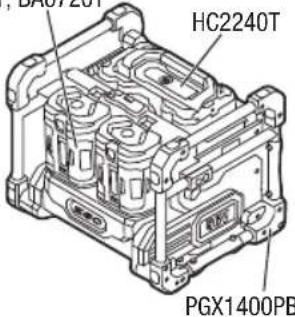
flowchart
graph TD
    A["Engine ①"] --> B["Component ②"]
    B --> C["Component ③"]
    C --> D["Component ④"]
    style A fill:#f9f,stroke:#333
    style B fill:#ccf,stroke:#333
    style C fill:#cfc,stroke:#333
    note1["①"] --> A
    note2["②"] --> B
    note3["③"] --> C
    note4["..."] --> B
    note5["..."] --> C
    note6["..."] --> D
    note7["..."] --> E
    note8["..."] --> F
    note9["..."] --> G
    note10["..."] --> H
    note11["..."] --> I
    note12["..."] --> J
    note13["..."] --> K
    note14["..."] --> L
    note15["..."] --> M
    note16["..."] --> N
    note17["..."] --> O
    note18["..."] --> P
    note19["..."] --> Q
    note20["..."] --> R
    note21["..."] --> S
    note22["..."] --> T
    note23["..."] --> U
    note24["..."] --> V
    note25["..."] --> W
    note26["..."] --> X
    note27["..."] --> Y
    note28["..."] --> Z
    note29["..."] --> AA
    note30["..."] --> AB
    note31["..."] --> AC
    note32["..."] --> AD
    note33["..."] --> AE
    note34["..."] --> AF
    note35["..."] --> AG
    note36["..."] --> AH

EN


READ ALL INSTRUCTIONS!

READ OPERATOR'S MANUAL
NOTICE: These instructions shall also be available in an alternative format, e.g. on a website.
WARNING: To ensure safety and reliability, all repairs should be performed by a qualified service technician.
SAFETY SYMBOLS
The purpose of safety symbols is to attract your attention to possible dangers. The safety symbols and the explanations with them deserve your careful attention and understanding. The symbol warnings do not by themselves, eliminate any danger. The instructions and warnings they give are no substitutes for proper accident prevention measures.
WARNING: Be sure to read and understand all safety instructions in this Operator's Manual, including all safety alert symbols such as "DANGER," "WARNING", and "CAUTION" before using this product. Failure to follow all instructions listed below may result in electric shock, fire, and/or serious personal injury.
SAFETY INSTRUCTIONS
This page depicts and describes safety symbols that may appear on this product. Read, understand, and follow all instructions on the machine before attempting to assemble and operate.
| Safety Alert | Precautions that involve your safety | |
| Read Operator's Manual | To reduce the risk of injury, user must read operator's manual. | |
| Indoor Use Use | this device indoors only | |
| Class II Construction | Double-insulated construction |
| Bluetooth® | Bluetooth® Symbol | |
| T25A | Fuse-links Time-lag miniature fuse-link | |
| CE | CE | This product is in accordance with applicable EC directives. |
| UKCA | UKCA | This product is in accordance with applicable UK legislation. |
| WEEE | Waste electrical products should not be disposed of with household waste. Take to an authorized recycler. | |
| ~ | Alternating Current | Type or a characteristic of current |
| --- | Direct Current | Type or a characteristic of current |
| V Volt | Voltage | |
| A Amperes Current | ||
| Hz Hertz Frequency (cycles per second) | ||
| W Watt Power | ||
| min Minutes Time | ||
| Ah Ampere-hours Battery Capacity | ||
| kg Kilogram Weight | ||
| °C Celsius Temperature | ||
GENERAL SAFETY INSTRUCTIONS
WARNING: Read and understand all instructions. Failure to follow all instructions listed below may result in electric shock, fire and/or serious personal injury.
The term “appliance” in all of warnings listed below refers to corded appliances or battery operated (cordless) appliances.
WARNING: To ensure safety and reliability, all repairs should be performed by a qualified service technician.
WORK AREA SAFETY
- Keep the work area clean and well lit. Cluttered or dark areas invite accidents.
EN
- Do not operate appliances in explosive environments, such as in the presence of flammable liquids, gases, or dust. Appliances create sparks, which may ignite the dust or fumes.
ELECTRICAL SAFETY
- Avoid body contact with grounded surfaces, such as pipes, radiators, ranges, and refrigerators. There is an increased risk of electric shock if your body is grounded.
■ Appliance plugs must match the outlet. Never modify the plug in any way. Do not use any adapter plugs with grounded appliances. Unmodified plugs and matching outlets will reduce the risk of electric shock.
- Do not expose appliances to rain or wet conditions. Water entering an appliance will increase the risk of electric shock.
- Do not abuse the cord. Never use the cord for carrying, pulling, or unplugging the appliance. Keep the cord away from heat, oil, sharp edges, or moving parts. Damaged or entangled cords increase the risk of electric shock.
■ This hub can work with EGO Dock PGX3000D to charge the EGO battery packs listed in Fig. B1.
This hub can work with EGO Power bank PGX1400PB to charge the EGO battery packs listed in Fig. B2.
SERVICE
- Have your appliance serviced by a qualified repair person using only identical replacement parts. This will ensure that the safety of the appliance is maintained.
- When servicing an appliance, use only identical replacement parts. Follow instructions in the maintenance section of this manual. Use of unauthorized parts or failure to follow maintenance instructions may create a risk of shock or injury.
SAFETY INSTRUCTIONS FOR HUB
■ Before using the battery hub, read all instructions and cautionary markings in this manual and on the battery hub, the battery pack and the product using the battery to prevent misuse of the products and possible injury or damage.
This appliance is not intended for use by persons (including children) with reduced physical, sensory or mental capabilities, or lack of experience and knowledge, unless they have been given supervision or instruction concerning use of the appliance by a person responsible for
their safety. Children should be supervised to ensure that they do not play with the appliance.
- If the supply cord is damaged, it must be replaced by the manufacturer, its service agent or similarly qualified persons in order to avoid a hazard.
■ This appliance can be used by children aged from 8 years and above and persons with reduced physical, sensory or mental capabilities or lack of experience and knowledge if they have been given supervision or instruction concerning use of the appliance in a safe way and understand the hazards involved. Children shall not play with the appliance. Cleaning and user maintenance shall not be made by children without supervision. - Do not use the hub outdoors or expose it to wet or damp conditions. Water entering the hub will increase the risk of electric shock.
- Do not handle hub, including the hub plug and hub terminals with wet hands.
■ Use of an attachment not recommended or sold by the battery-hub manufacturer may result in a risk of fire, electric shock, or injury to persons.
■ Recharge only with the hub specified by the manufacturer. A hub that is suitable for one type of battery pack may create a risk of fire when used with another battery pack.
Do not abuse the cord or hub. Never use the cord to carry the hub. Do not pull the hub cord to disconnect the plug from a receptacle. Damage to the cord or hub could occur and create an electric shock hazard. Replace damaged cords immediately. - Make sure that the cord is located so that it will not be stepped on, tripped over, come in contact with sharp edges or moving parts, or otherwise be subjected to damage or stress. This will reduce the risk of accidental falls, which could cause injury and damage to the cord, which could then result in electric shock.
- Keep the cord and hub from heat to prevent damage to housing or internal parts.
- Do not allow gasoline, oils, petroleum-based products, etc. to come in contact with plastic parts. These materials contain chemicals that can damage, weaken, or destroy plastic.
-
Do not operate the hub with a damaged cord or plug, which could cause shorting and electric shock. If damaged, have the hub repaired or replaced by an authorized service technician at an EGO Service Center.
-
Do not operate the hub if it has received a sharp blow, been dropped, or has otherwise been damaged in any way. Take it to an authorized service technician for an electrical check to determine if the hub is in good working order.
- Do not disassemble the hub. Take it to an authorized service technician when service or repair is required. Incorrect reassembly may result in a risk of electric shock or fire.
■ Unplug the hub from the electrical outlet before attempting any maintenance or cleaning to reduce the risk of electric shock.
■ Disconnect hub from the power supply when noSAVE THESE INSTRUCTIONS!
in use. This will reduce the risk of electric shock or damage to the hub if metal items should fall into the opening. It will also help prevent damage to the hub during a power surge.
- Risk of electric shock. Do not touch the uninsulated portion of output connector or uninsulated battery terminal.
■ To reduce the risk of injury, close supervision is necessary when an appliance is used near children.
- To reduce the risk of electrical shock, do not put hub in water or other liquid. Do not place or store appliance where it can fall or be pulled into a tub or sink.
- During charging, the battery packs must be placed in a well-ventilated area (for hubs for battery packs that release gases into the atmosphere during normal charging).
- Save these instructions. Refer to them frequently and use them to instruct others who may use this appliance. If you lend this appliance to someone else, also lend these instructions to them to prevent misuse of the product and possible injury.
EXTENSION CORDS
WARNING: AN EXTENSION CORD SHOULD NOT BE USED UNLESS ABSOLUTELY NECESSARY. Use of an improper extension cord could result in a risk of fire and electric shock. If an extension cord must be used, make sure:
■ The pins on the plug of extension cord are the same number, size and shape as those of the plug on hub.
■ The cord is properly wired and in good electrical condition.
■ The size is large enough for AC ampere rating of hub as specified below:
| Cord Length (Meters) 15 m 30 m | ||
| Cord Size ( mm^2 ) 0.75 mm | ^2 | 0.75 mm^2 |
■ An extension cord is a temporary solution. Move the hub to a standard receptacle as soon as the job has been completed.
■ Never connect more than one hub or other device to an extension cord.
- Never use an extension cord with a wattage rating lower than the wattage on your hub's rating plate.
■ Do not link (chain) extension cords.
SPECIFICATIONS
| Hub Input 220 – 240V~, 50 / 60 Hz, 1600 W | |
| Hub Output | 56 V---, Max. 24 A |
| Compatible Dock PGX3000D | |
| Compatible Power Bank | PGX1400PB |
| Charging Time | Approximately45 mins for 3 x BA2800T (5.0Ah)100 mins for 3 x BA6720T(12.0Ah)170 mins for HC2240T (40.0Ah) +2 x BA4200T (7.5 Ah) |
| Recommended Charging Temperature | 5 – 40 °C |
| Recommended Storage Temperature | -20 – 70 °C |
| Hub Weight 5.2 kg | |
RECOMMENDED ACCESSORIES
WARNING: Use only identical replacement parts listed below. Use of parts that do not meet the original equipment specifications may lead to improper performance and compromised safety.
PART NAME MODEL NUMBER
PGX™ E-Track Mounting Kit AEK1000
EN DESCRIPTION
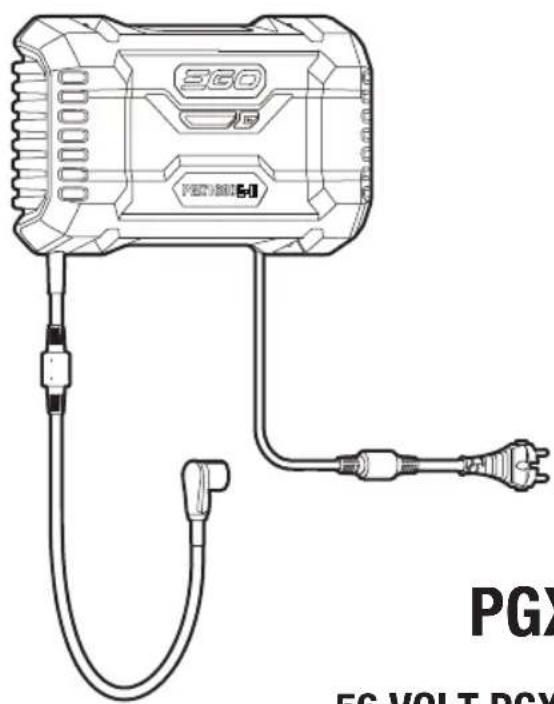
KNOW YOUR HUB (Fig. A)
- Hub Status Indicator
- Bluetooth ® /WI-FI Button
- Bluetooth ^® /WI-FI Indicator
- Power Cord
- Collar
- Connector
- Rubber Block (2)
- Wall-mount Hole (4)
9*. Dock Status Indicator
11*. Power Bank AC Status Indicator
* NOT INCLUDED
10*. Battery-bay Status Indicator for Dock (3)
12*. Battery-bay status Indicator for Power Bank (3)
OPERATION
CHARGING BATTERY PACKS
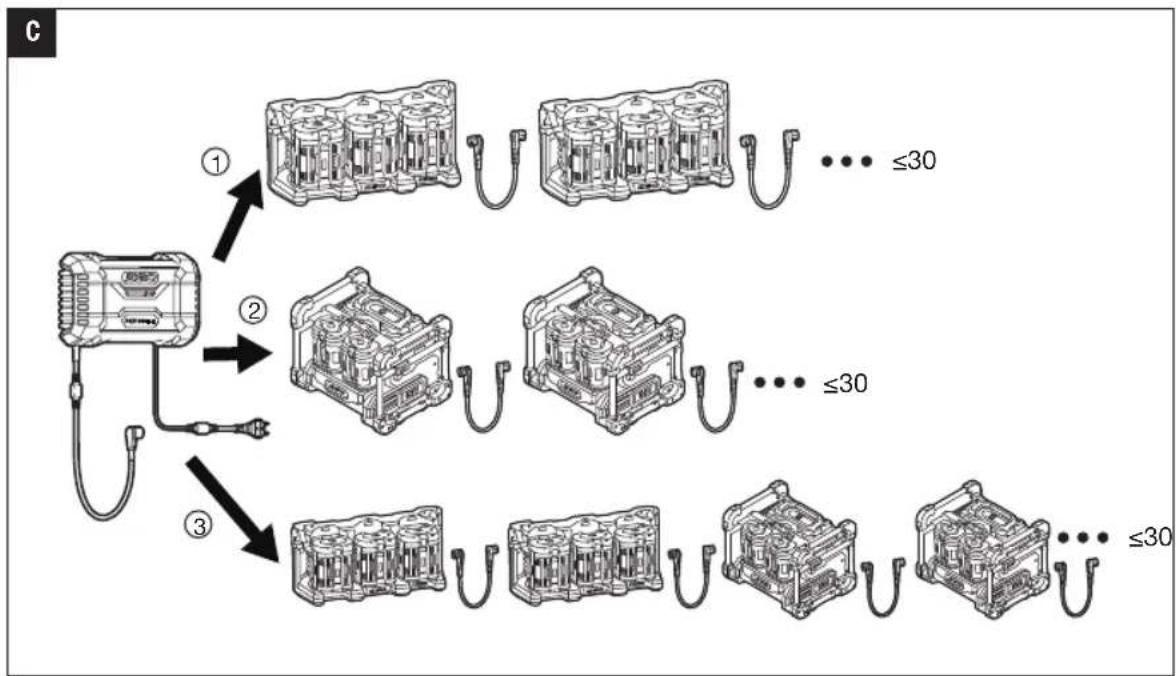
The PGX™ 1600W hub is designed to charge EGO battery packs installed in the EGO PGX™ 3-PORT DOCK PGX3000D and/or charge EGO battery packs installed in the EGO PGX™ POWER BANK PGX1400PB. Read operator's manual included with the dock and power bank.
NOTE: Lithium-Ion battery packs are shipped partially charged. Before using them for the first time, fully charge the battery packs.
■ Ensure that the power outlet fuse or circuit breaker is rated for at least 10 Amps.
■ Avoid using a power outlet with oxidized or damaged pole pieces.
■ During charging, the battery packs must be placed
in a well-ventilated area (for hubs for battery packs that release gases into the atmosphere during normal charging).
Hub Compatibility with Dock and/or Power Bank (Fig. C)
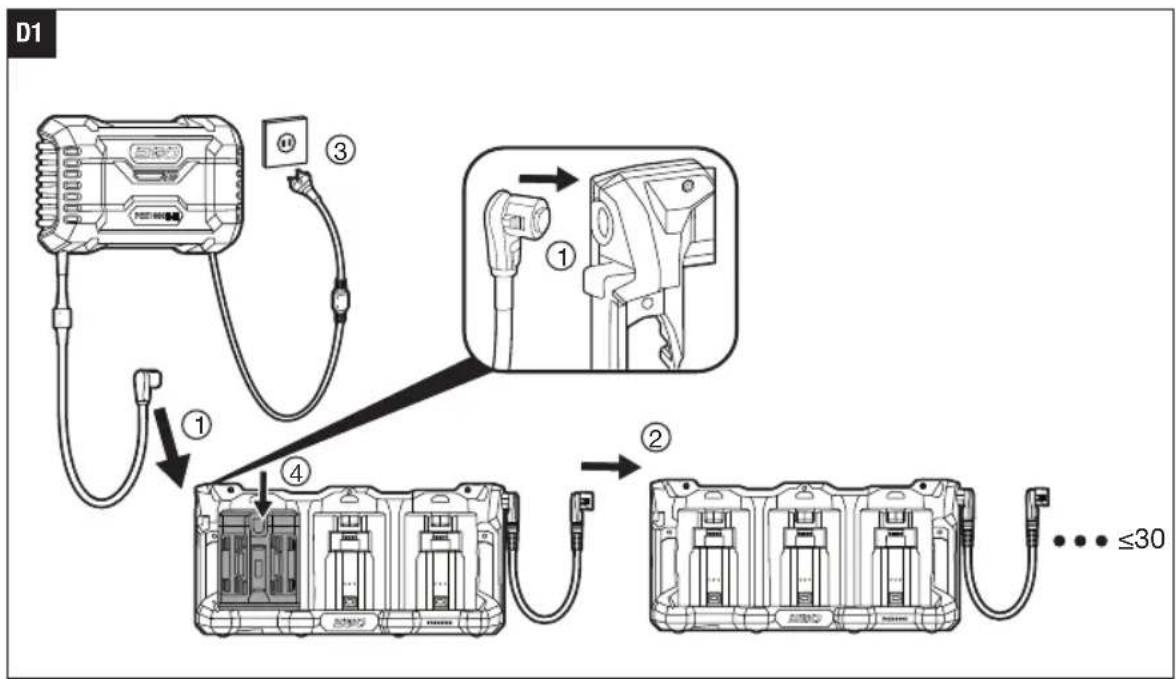
Fig. D1 shows how to charge the battery packs via the docks:
- Push the collar of the hub connector onto the dock until you hear a click as shown in Fig. D1 (step 1).
NOTE: To disconnect the hub from the dock as shown in Fig. D2.
- Connect the dock to the next dock in the same way (step 2).
- Plug the hub into the power supply (step 3). The hub status indicator and dock status indicator will glow green, indicating that the hub and the dock are working properly and can charge the battery packs.
- Align the raised ribs of a battery pack with the mounting slots in one of the dock's battery bay. Slide the battery pack down into the battery bay (step 4). The battery release button will spring up indicating that the battery pack is securely attached.
- The hub will communicate with the battery pack installed on the dock to evaluate the condition of the battery pack. When the battery pack meets the charging conditions, the hub will begin charging the battery pack and the hub status indicator and the battery-bay status indicator (above the inserted battery pack) will flash green.
- Insert more battery packs on the docks.
- When connecting more docks to the hub, the hub will supply power to the docks in the order of proximity – the dock nearest to the hub is powered first. The flashing green battery-bay status helps identify which battery is currently charging.
- When the battery packs are fully charged, the hubstatus indicator and the battery-bay status indicators will glow solid green. The "fuel gauges" on the battery packs will go out. It is recommended to disconnect the hub from the power supply, if it is not going to be used for a long period of time.
NOTE:
■ A significantly reduced run time after fully charging a battery pack indicates that the battery pack is near the end of its usable life and must be replaced.
■ The hub, dock and power bank may get warm during charging. This is part of the normal operation. Charge in a well-ventilated area.
NOTE: For the charging sequence of the battery packs in the same dock/power bank, refer to the operator's manuals of EGO Dock PGX3000D and EGO Power bank PGX1400PB.
Hub, Dock & Power Bank Indicators
| HUB DOCK POWER BANK | |||||
| Hub Status | Hub Status Indicator | Dock Status Indicator | Battery-bay Status Indicator(s) | AC Status Indicator | Battery-bay Status Indicator(s) |
| Standby (no battery to charge) |  Solid green Solid green Solid green Solid green Solid green Solid green | Off Off | ● | ||
| Normal charging |  Flashing green Flashing green | Solid green Flashing green above the battery pack(s) being charged | ● Solid green Flashing green above the battery pack(s) being charged |  | |
| Charging slowly when the hub temperature is 40 - 60°C | Flashing orange | Solid green Flashing green above the battery pack(s) being charged | ● Solid green Flashing green above the battery pack(s) being charged |  | |
| Fully charged | Solid green Solid red | Solid green Solid green above the fully charged battery pack(s) | ● Solid green Solid green above the fully charged battery pack(s) | ||
| Hub is too hot or too cold | Solid red | Off Off Off Off | |||
| Hub error | Flashing red | Off Off Off Off | |||
| Hub operates normally. Charging a hot or cold battery pack | Solid green Solid green | Solid red above the battery pack being charged | ● Solid green | Solid red above the battery pack being charged | |
EN
CHARGING A HOT OR COLD BATTERY PACK
If the battery pack in the charging dock is outside of the normal temperature range, the corresponding battery-bay status indicator will glow solid red and the power indicator on the battery pack will turn off. When the battery pack cools down or warms up to a normal temperature range, the battery pack will resume to charge automatically.
A BATTERY PACK OR DOCK/POWER BANK ERROR
If the battery pack error is detected, the corresponding battery-bay status indicator will flash red and the power indicator on the battery pack will turn off.
- Remove and re-insert the battery pack in the dock/power bank. If the battery-bay status indicator still flashes red, try charging a different battery pack that is known to be functional.
- If the new replacement battery pack can be charged normally, the original battery pack is faulty.
- If the battery-bay status indicator still flashes red after trying to charge a functional battery pack, reset the hub by unplugging the hub from power supply and waiting until the hub status indicator goes out. Then reconnect the plug to the power supply.
- If the battery-bay status indicator still flashes red after step 3, the dock/power bank may be faulty.
MOUNTING THE HUB
Wall-mount Holes
- Make sure the two rubber blocks fit into the upper slots of back of the hub (Fig. E1).
- Use four M5, at least 76 mm length screws and washers (not included) to securely mount the hub to the wall (Fig. E2).
NOTE: Mounting surface should be at least 19 mm thickness to maximize holding the hub.
Mounting onto E-track Rail (kit sold separately)
(Fig. F)
| F-1 E-track Clip (2) |
| F-2 E-track Rail |
| F-3 Rubber Bumper (2) |
| F-4 Bolt and washer set (2) |
EGO E-track mounting kit is required to mount the hub onto an E-Track rail.
- Disconnect the hub from power outlet.
-
Remove the two rubber blocks shown in Fig. E1.
-
Install the E-track clips (included in the kit) into the recessed areas (vacated by the rubber blocks) as shown in Fig. F.
- Secure each E-track clip to the hub using M5 bolt and washer sets by assembling tool (included in the kit).
- Insert two rubber bumpers (included in the kit) into the outer lower slots on back of the hub.
- Snap the hub to the E-track rail using the E-track clips as shown and make sure the hub is secured to the rail.
- To remove the hub from the E-track rail press the release levers on the E-track clips and pull the hub away.
NOTE: The hole in the E-track clip can function as an anti-theft device using a padlock (not included). The shackle diameter range is 5-7 mm.
COMMUNICATION TECHNOLOGY
For information on our full range of connected products and services, including connection instructions, please scan QR Code below or visit www.egopowerplus.eu/connect.

MAINTENANCE
WARNING: To avoid serious personal injury, always disconnect the hub from power outlet and remove the battery pack(s) from the dock when cleaning or performing any maintenance.
WARNING: It is not recommended to use compressed dry air as a cleaning method of the hub. If cleaning with compressed air is the only method to apply, always wear safety goggles or safety glasses with side shields when cleaning the hub. If the operation is dusty, also wear a dust mask.
WARNING: If the power cord is damaged, it must be replaced by the manufacturer,, its service agent or similarly qualified persons in order to avoid a hazard.
GENERAL MAINTENANCE
Avoid using solvents when cleaning plastic parts. Most plastics are susceptible to damage from various types of commercial solvents and may be damaged by their use. Use clean clothes to remove dirt, dust, oil, grease, etc.
WARNING: Do not at any time let brake fluids, gasoline, petroleum-based products, penetrating oils, etc. to come in contact with plastic parts. Chemicals can damage, weaken or destroy plastic which may result in serious personal injury.
WARNING: When servicing, use only identical EGO replacement parts. Use of any other parts may create a hazard or cause product damage. To ensure safety and reliability, all repairs should be performed by a qualified service technician at an EGO Service Center. When not in use, store the machine in door.
PROTECTING THE ENVIRONMENT
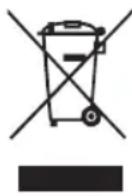
Do not dispose of electrical appliances as unsorted municipal waste, use separate collection facilities.
Contact your local government for information regarding the collection systems available.
If electrical appliances are disposed of in landfills or dumps, hazardous substances can leak into the groundwater and get into the food chain, damaging your health and well-being.
EN TROUBLESHOOTING
| PROBLEM CAUSE SOLUTION | ||
| The hub status indicator flashes orange. | The hub will charge slowly when the hub temperature is 40 – 60 °C, which is normal operation. | No action needed. |
| The hub status indicator flashes red. | 1. Hub output overcurrent. 1. Reset the hub by unplugging the hub from power supply and waiting until the hub status indicator goes out, then reconnect the plug to the power supply. If it does not work, call EGO Service Center.2. The hub's fan is blocked or damaged.3. AC input under-voltage. 3. No action needed. The hub will resume to charge after the AC input voltage is stable. If the AC input voltage is still not stable after many times, unplug the hub from power supply and waiting until the hub status indicator goes out, then reconnect the plug to the power supply. | 2. Unplug the hub, shake the hub slightly, and then reconnect the hub to the power supply to see whether the hub works normally. If it does not work, call EGO Service Center. |
| The hub status indicator glows solid red. | 1. Hub is too hot. 1. Unplug the hub from power supply and wait until the hub cools down, then reconnect the plug to the power supply. If it does not work, call EGO Service Center.2. Hub is too cold. 2. Allow the hub to warm up. Charging will resume when the hub returns to the normal temperature. | 2. Hub is too cold. 2. Allow the hub to warm up. Charging will resume when the hub returns to the normal temperature. |
| The battery-bay status indicator above one of the batteries will glow solid red.The hub status indicator is solid green. | The battery pack is too hot or too cold. | Allow the battery pack to cool down or warm up. Charging will begin when battery pack returns to the normal temperature. |
| The dock/power bank status indicator goes out.The hub status indicator solid green. | 1. Bad connection between the hub and dock/power bank.2. Faulty hub dock/power bank. 2. | 1. Try to disconnect the hub connector and reconnect it to the dock/power bank.Contact EGO Service Center for the dock/power bank replacement. |
| The battery-bay status indicator above one of the batteries is flashing red.The hub status indicator is solid green. | Battery pack or one of three battery-bays of the dock/power bank is faulty. | 1. Remove and re-insert the battery pack in the hub dock/power bank.2. If the battery-bay status indicator still flashes red, try charging a different battery pack. If the new replacement battery pack can be charged normally, the original battery pack is faulty.3. If the battery-bay status indicator still flashes red after replacing the battery pack, reset the hub by unplugging the hub from power supply and waiting until the hub status indicator goes out, then reconnect the plug to the power supply.If the battery-bay status indicator still flashes red after step 3, the dock/power bank may be faulty – call EGO Customer Service. |
| The dock status indicator and all the battery-bay status indicator flash red. | The dock is faulty. | Contact EGO Service Center for the dock replacement. |
| The power bank status indicator flashes red. | The power bank is faulty. | Contact EGO Service Center for the power bank replacement. |
| The power bank's fan is blocked or damaged. | Contact EGO Service Center for service or replacement as needed. | |
WARRANTY
EGO WARRANTY POLICY
Please visit the website egopowerplus.eu for full terms and conditions of the EGO Warranty policy.
The Ground Truth image displays a single, solid horizontal line. According to Rule 2 (UNDERSCORE & LINE RULES), this is a stylistic or background line, not a placeholder underscore. Therefore, the OCR result must ignore it and output nothing or only meaningful text. The provided OCR content is "____", which consists of four underscores. This is an incorrect interpretation of the line as a placeholder, violating the rule that stylistic lines must be ignored. The OCR has hallucinated underscores where none should exist based on the GT's visual context. Hence, the OCR result is inconsistent with the Ground Truth.
ARBEIDSOMRÅDESIKKERHET
GENERELT VEDLIKEHOLD
BEZPIECZEŃSTWO W MIEJSCU PRACY
POLITYKA GWARANCYJNA EGO
CITIȚI MANUALUL DE INSTRUCTIUNI
INSTRUCTIUNI DE SIGURANTĂ PENTRU HUB
ÎNCĂRCAREA UNUI SET DE ACUMULATORI CALD SAU RECE
LUGEGE KASUTUSJUHENDIT
modification of a specific structure
amgboqgo bbgwnooos qsdofbjdwno bsgbjdoi bqws3omgdoush zmbgsjbl, amgmngss dongdo, bsposgmgbdo, fgyngdo qs dsgozfgdo. gngjdfm dmzol dongdo hoizo o'bengds, ony ndzbo bbgwno qsdofbjdwnoos.
amgymdoqomdoi daqgglgmo ygbos dqgsbsdgmqgl zsdmsbgegnbl. sdsmqgl daqgszmcm daqgglgmo. s6 dsdmoygbmo zsqsdyzsbo daqgglgmo olyom bgmsfgymgbg, mndgmonsg sdgm qsdofjds. smdmogzgoqngdwmo qgbol daqgglgmo qs dobo daqlsasdoio hmcgbyou smlgdoms sdgongjols gmygfgm dmzol bolzl.
OPĆA SIGURNOSNA UPUTSTVA
⚠ UPOZORENJE! S razumijevanjem pročitajte sva uputstva. Zanemarivanje svih uputstava navedenih u nastavku može rezultirati strujnim udarom, požarom i/ili teškim tjelesnim povredama.
,הכלההוּרָה,הכלההוּרָה,הכלההוּרָה,הכלההוּרָה,הכלההוּרָה,הכלההוּרָה,הכלההוּרָה,הכלההוּרָה,הכלההוּרָה,הכchia
natural_image
Line drawing of a 360 power supply connected to a terminal outlet (no text or symbols)PGX1600E-H
56 VOLT PGX™ 1600W HUB
1600W PGX™ VOLT 56 τοῦν HE


- PGX1600E-H
- VOLT PGX™ 1600W HUB
- READ ALL INSTRUCTIONS!
- READ OPERATOR'S MANUAL
- SAFETY SYMBOLS
- SAFETY INSTRUCTIONS
- GENERAL SAFETY INSTRUCTIONS
- WORK AREA SAFETY
- EN
- ELECTRICAL SAFETY
- SERVICE
- SAFETY INSTRUCTIONS FOR HUB
- EXTENSION CORDS
- RECOMMENDED ACCESSORIES
- PART NAME MODEL NUMBER
- EN DESCRIPTION
- KNOW YOUR HUB (Fig. A)
- OPERATION
- CHARGING BATTERY PACKS
- Hub Compatibility with Dock and/or Power Bank (Fig. C)
- Fig. D1 shows how to charge the battery packs via the docks:
- NOTE:
- CHARGING A HOT OR COLD BATTERY PACK
- A BATTERY PACK OR DOCK/POWER BANK ERROR
- MOUNTING THE HUB
- Wall-mount Holes
- Mounting onto E-track Rail (kit sold separately)
- COMMUNICATION TECHNOLOGY
- MAINTENANCE
- GENERAL MAINTENANCE
- PROTECTING THE ENVIRONMENT
- EN TROUBLESHOOTING
- WARRANTY
- EGO WARRANTY POLICY
- ARBEIDSOMRÅDESIKKERHET
- GENERELT VEDLIKEHOLD
- BEZPIECZEŃSTWO W MIEJSCU PRACY
- CITIȚI MANUALUL DE INSTRUCTIUNI
- INSTRUCTIUNI DE SIGURANTĂ PENTRU HUB
- ÎNCĂRCAREA UNUI SET DE ACUMULATORI CALD SAU RECE
- LUGEGE KASUTUSJUHENDIT
- modification of a specific structure
- OPĆA SIGURNOSNA UPUTSTVA
Brand : EGO
Model : PGX1601E-H
Category : Charger