USER MANUAL ZIK PARROT
- Listening to music at high volumes for long periods can lead to hearing problems. We do not recommend using these headphones at maximum volume, particularly for long periods of time.
- To protect your hearing, turn down the volume of your music player before connecting your headphones. After putting on the headphones, gradually turn up the volume until you reach a suitable level. Sound levels are measured in decibels (dB). Exposure to sound 85 dB or above may result in gradual loss of hearing. Monitor your use. Hearing loss depends on the intensity of the sound and the duration. The higher the volume, the less your exposure capacity will last. The lower the volume, the longer your exposure period can be.
- Be responsible: pay attention to your environment (acoustic) when you are wearing your headphones and listening to music or the radio.
- Avoid hazardous behavior that may cause an accident for you or somebody else (pedestrians, motorcyclists, drivers, cyclists) or cause damage to property when you are wearing your headphones.
- Parrot would like to inform you that the use of stereo headphones is strictly forbidden when driving a motor vehicle. Parrot also recommends not listening to music or the radio through your headphones when riding a bicycle, a scooter or any other means of transport for which it is not compulsory to wear a helmet. Parrot cannot accept any responsibility if you choose to ignore these warnings.
Content
Getting started. p.6
Music . p.9
Parrot Audio Suite . p.11
Telephone p.12
Troubleshooting p.14
General information p.15
Contents of the packaging
Getting started
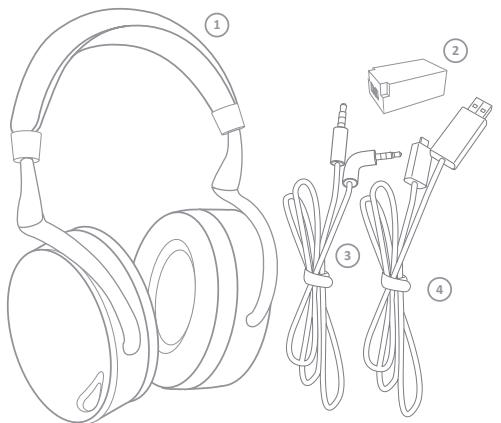
1 Parrot ZIK
2 Battery
3 Jack to Jack cable
4 USB to micro-USB cable
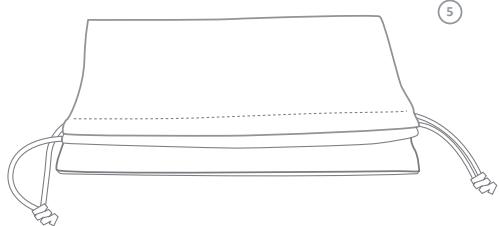
5 Carry pouch
Battery
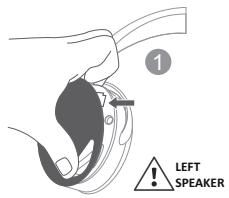
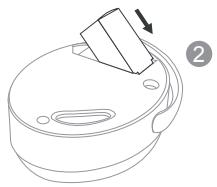
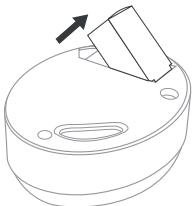
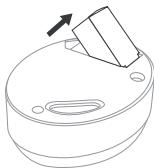
To install the battery, lift up the magnetic cover on the left hand speaker (1) and insert the battery in its compartment (2).
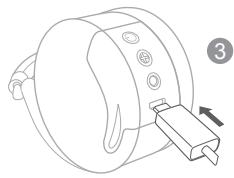
Before you use it for the first time, the Parrot ZIK must be fully charged. To do this, connect the Parrot ZIK to your computer via the USB to micro-USB cable (3). The indicator on the side of the micro-USB connector illuminates with a red light to show that the device is charging. Once charging is complete, the indicator light turns white.
When the battery is flat, you can still use the Parrot ZIK to listen to music if your audio player is connected to the headset via the Jack to Jack cable. Conversely, the telephone and Bluetooth® music transfer functions, audio effects and touch sensitive panel are not available.
Switching the Parrot ZIK on/off
Press the button to switch the product on/off.
You can also use the headset without switching it on by using the Jack to Jack cable (passive mode). In that case, the telephone and Bluetooth® music transfer functions, audio effects and touch sensitive panel are not available.
Wearing the headset
Adjust the band without forcing it, so that the headphones will fit comfortably over your ears, then put the headset on, using the letters (L) and (R) to help you distinguish left and right. These letters can be seen on the headband.
Note : The touch sensitive panel is located on the right speaker.
Downloading the Parrot Audio Suite application
Connect to the App Store or Android Market and download the free Parrot Audio Suite application. This application will allow you to change the settings of the Parrot ZIK.
Bluetooth® Connection
Before the Parrot ZIK can be used with your telephone or Bluetooth® audio player, the two devices must be paired. Once the two devices have detected each other, it is no longer necessary to pair each time.
- From your telephone or Bluetooth® audio player, start a search for Bluetooth® peripherals.
- Select "Parrot ZIK".
- Enter "0000" on your telephone or audio player, if asked to do so. Depending on your model of telephone, it is possible that a PIN code will not be required.
Once your telephone is paired with the Parrot ZIK, the two devices will connect to each other automatically each time that the Parrot ZIK is switched on. It is not possible to simultaneously connect several devices to the Parrot ZIK.
Note : If your telephone has the NFC function, pairing is also possible by touching the Parrot ZIK's left loudspeaker with your telephone.
Note : The touch sensitive panel is located on the right speaker.
Connecting the Parrot ZIK to the audio source
Connect the Jack to Jack cable supplied to the Parrot ZIK's right headache and connect the other end to your audio player. If your telephone / Bluetooth® audio player supports Bluetooth® A2DP, you can also send music to your Parrot ZIK via Bluetooth®.
Volume
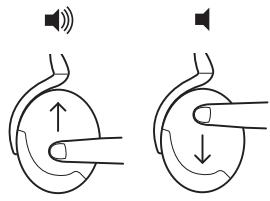
To increase the volume, swipe your finger upward on the touch sensitive panel. To decrease the volume, swipe your finger downward on the touch sensitive panel.
Next / previous
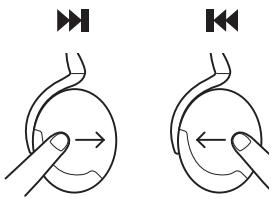
If your audio player is connected to the Parrot ZIK via Bluetooth®:
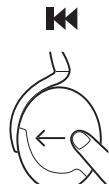
- To return to the previous track, swipe your finger backward on the touch sensitive panel.
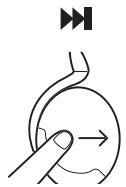
- To move to the next track, swipe your finger forward on the touch sensitive panel.
Pause / Play
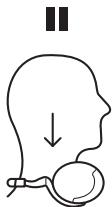
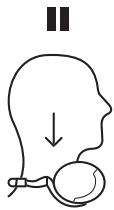
To pause the music, take off the headset. To start playing again, put the headset back on.
Parrot Audio Suite
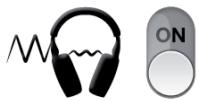
Active noise cancellation
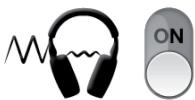
Use the Parrot Audio Suite application to activate/deactivate active noise cancellation.
Parrot Concert Hall audio effect
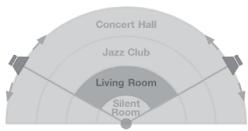
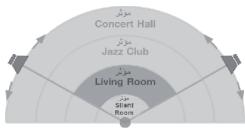
The Parrot Concert Hall audio effect allows you to simulate a musical scene. This effect can be activated and controlled using the Parrot Audio Suite application.
- Touch one of the four zones to select the dimensions of the virtual room and thus the perceived depth of the sound.
- Touch the arrows to adjust the orientation of the loudspeakers and thus the sound spread.
Equalizer
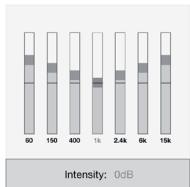
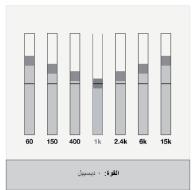
The equalizer allows you to adjust the sound frequencies of your Parrot ZIK. Adjust the bass, tenors and trebles according to your preferences, moving the respective cursors from left to right. You can choose from among the various presets (example: Flat, Deep, Rock...) to adjust the frequencies to the style of music you are listening to.
Telephone
Note : The touch sensitive panel is located on the right speaker.
Receiving a call
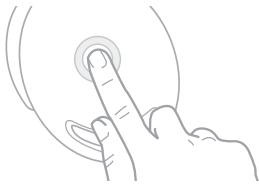
An incoming call is indicated by a ring tone.
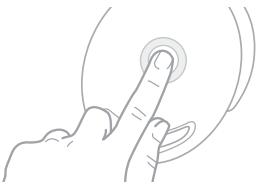
If you want to accept the call, tap the touch sensitive panel.
- If you want to refuse the call, press and hold the touch sensitive panel for two seconds.
Note: If you are not wearing the headset or you are taking it off at the moment the call arrives, it is transferred to your telephone.
Use during a call
To increase the volume during a call, swipe your finger upward on the touch sensitive panel. To decrease the volume during a call, swipe your finger downward on the touch sensitive panel. The volume is saved for future calls.
To transfer a call to your telephone, take the Parrot ZIK off.
To hang up, tap the touch sensitive panel.
Managing a second call
The Parrot ZIK allows you to manage two calls simultaneously, as long as your telephone supports this feature.
- Tap the touch sensitive panel to accept the second incoming call. The first call is automatically put on hold.
- Press and hold the touch sensitive panel for two seconds to refuse the second incoming call. You can also refuse the call from your telephone.
- Swipe the touch sensitive panel forward or backward to switch between calls.
Troubleshooting
Reset
In the event of a problem, you can reset the Parrot ZIK by removing the battery.
Updating
Access your free product update and download directly from our website at www.parrot.com, "Support" section and update the Parrot ZIK software using the provided USB / micro-USB cable. These updates allow you to improve your product's compatibility.
For more information or to contact our technical support team, visit our website at www.parrot.com, "Support" section.
Do not disassemble, open, drop (mechanical abuse), crush, bend, deform, puncture, or shred.
- Do not modify or remanufacture, attempt to insert foreign objects into the battery, immerse or expose to water or other liquids, or expose to fire or excessive heat including soldering irons, or put in microwave.
Only use the battery with the charging system specified by the manufacturer/supplier.
- Do not short-circuit a battery or allow metallic or conductive objects to contact both battery terminals simultaneously.
- Replace the battery only with another battery that has been qualified with same characteristics. Use of an unqualified battery may present a risk of fire, explosion, leakage, or other hazard.
- Dispose of used batteries promptly according to the manufacturer/supplier's instructions.
- Improper battery use may result in a fire, explosion, or other hazard.
Battery usage by children should be supervised.
Warranty
Without prejudice of legal warranty, Parrot products are warranted during 1 year from the date of purchase for defects in materials and workmanship, provided that no deterioration to the product has been made, and upon presentation of proof of purchase (date of purchase, location of sale and product serial number) to the retailer. Warranty does not cover: upgrading of the software items of the Parrot products with Bluetooth® cell phones for compatibility purpose, data recovery, deterioration of the external aspect due to normal use of the product, any damage caused by accident, misuse, misapplication, or non-Parrot products. Parrot is not responsible for storage, loss or damaged to data during transit or repair. Any product wrongfully declared to be defective will be returned to sender and inspection, process and carriage costs will be invoiced to him.
Only use the cigar-lighter adaptable charger provided. Never use a damaged charger. Remember to charge the device before storing for a long period of time. Do not leave your device in hot or cold areas (car in direct sunlight or parked in a garage in winter). Always store in area where temperatures remain stable. The charger and the device can become hot during charging. Do not cover. Do not use your device in the rain or in/near any damp area. Do not disassemble the device. In the event of battery leakage, avoid contact of the liquid with skin and eyes. If contact occurs, rinse affected areas with plenty of water and contact a physician.

Correct disposal of This Product (Waste Electrical & Electronic Equipment)
This marking shown on the product or its literature indicates that it should not be disposed with other household wastes at the end of its working life. To prevent possible harm to the environment or human health from uncontrolled waste disposal, please separate this from other types of
wastes and recycle it responsibly. Reset to promote the sustainable reuse of material resources. Household users should contact either the retailer where they purchased this product, or their local government office for details of where and how they can take this item for environmentally safe recycling. Business users should contract their supplier and the terms and conditions of the purchase contract. This product should not be mixed with other commercial wastes for disposal.
Modifications
The explanations and specifications in this guide are given for information purposes only and may be modified without prior notice. They are deemed to be correct at the time of going to press. The utmost care has been taken when writing this guide as part of the aim to provide you with accurate information. However, Parrot shall not be held responsible for any consequences arising from any errors or omissions in the guide, nor for any damage or accidental loss of data resulting directly or indirectly from the use of the information herein. Parrot reserves the right to amend or improve the product design or user guide without any restrictions and without any obligation to notify users. If so, a later version of this guide might be available in electronic format at Parrot's website at www.parrot.com.
Parrot SA, 174 quai de Jemmapes, 75010 Paris, France, declare under their sole responsibility that the product described in this user guide complies with technical standards EN300328, EN301489-1, EN60065/ A12:2011 following the provision of the Radio Equipment, Telecommunication Equipment directive (1999/5/ EC R&TTE), and of the General Safety directive (2004/108/CE).
http://www.parrot.com/uk/support/parrot-zik/zik_ce_conformity_declaration.pdf
FCC Compliance Statement
This equipment has been tested and found to comply with the limits for a Class B Digital Device, pursuant to Part 15 of the FCC Rules. These limits are designed to provide reasonable protection against harmful interference in a residential installation. This equipment generates, uses and can radiate radio frequency energy and, if not installed and used in accordance with the instructions, may cause harmful interference to radio communications. However, there is no guarantee that interference will not occur in a particular installation. If this equipment does cause harmful interference to radio or television reception, which can be determined by turning the equipment off and on, the user is encouraged to try to correct the interference by one or more of the following measures:
- Reorient or relocate the receiving antenna.
- Increase the distance between the equipment and receiver.
- Connect the equipment to an outlet on a circuit different from that to which the receiver is connected.
IC Compliance Statement
This equipment has been tested and found to comply with the limits for a Class B Digital Device, with Industry Canada Licence-exempt RSS-GEN 7.1.3. These limits are designed to provide reasonable protection against harmful interference in a residential installation. This equipment generates, uses and can radiate radio frequency energy and, if not installed and used in accordance with the instructions, may cause harmful interference to radio communications. However, there is no guarantee that interference will not occur in a particular installation. If this equipment does cause harmful interference to radio or television reception, which can be determined by turning the equipment off and on, the user is encouraged to try to correct the interference by one or more of the following measures:
- Reorient or relocate the receiving antenna.
- Increase the distance between the equipment and receiver.
- Connect the equipment to an outlet on a circuit different from that to which the receiver is connected.
Copyright © 2012 Parrot. All rights reserved.
Licences
Parrot and the Parrot logo are registered trademarks of PARROT SA.
ZIK is a trademark of Parrot SA.
App Store is a trademark of Apple Inc, registered in the USA and in other countries.
Android is a trademark of Google Inc.
The Bluetooth® word mark and logos are owned by the Bluetooth® SIG, Inc. and any use of such marks by
Parrot S.A. is under license. Bluetooth® QDID: Bo17641 Bo17642 Bo19338
All other trademarks mentioned in this guide are protected and are the property of their respective owners.
Parrot
Zik
Mode
d'emploi
Avertissements
Copyright © 2012 Parrot.
Marcas registradas
Copyright © 2012 Parrot.
Marchi depositati
Parrot Concert Hall effect
Copyright © 2012 Parrot.
Paraacularly, the command is to do something or do something else. For example, you may say "I have a good time for you."
Copyright © 2012 Parrot.
Marcas registadas
Parrot Audio Suite Android Market App Store
aill aclaw clllal baiy jayy gubail lla sl caw
Bluetooth
Lagbblg yll bghl 10000000000000000000000000000000000000000000000000000000000000000000000000
aiee eae aee eae eae eae eae eae eae eae eae eae eae eae eae eae eae eae eae eae eae eae eae eae eae eae eae eae eae eae eae eae eae eae eae eae eae eae eae eae eae eae eae eae eae eae eae eae eae
Bllblb0th 0000000000000000000000000000000
. Parrot ZIK " 1
.PIN jor lal sio yll syay sial jal lal gll sia clll gall gals "0000 "g
J . Parrot ZIK a
Parrot ZIK wlll lcln jnn nn n nn
Jlllactowalol jswll jjllactow wad Jdo Jo Cwll oJ LaiSISNFC Aoiis 5ojo sio 1s1:
Parrot ZIK
G
Parrot ZIK
aaiy aaiy aaiy aaiy aaiy aaiy aaiy aaiy aaiy aaiy aaiy aaiy aaiy aaiy aaiy aaiy aaiy aaiy aaiy aaiy aaiy aaiy aaiy aaiy aaiy aaiy aaiy aaiy aaiy aaiy aaiy aaiy aaiy aaiy aal yaaay aaayaaayaaayaaayaaayaaayaaayaaayaaayaaayaaayaaayaaayaaayaaayaaayaaayaaayaaayaaayaaayaaayaaayaaayaaayaaayaaayaaayaaayaaayaaayaaayaaayaaayaaayaaayaaayaaayaaayaaayaaayaaayaaayaaayaaayaaayaaayaaayaaayaaayaaayaaa
y
:Bluetooth 100000000000000000000000000000000000000000000000000000000000000000000000000000000
Jaaa 1 a
Parrot Audio Suite
glagial gai bailil pail
.
Parrot Concert Hall
Jus Jus Jus Jus Jus Jus Jus Jus Jus Jus Jus Jus Jus Jus Jus Jus Jus Jus Jus Jus Jus Jus Jus Jus Jus Jus Jus Jus Jus Jus Jus Jus Jus
Parrot Audio Suite 2000
aaiy aaii jaiiaaii iaiii 1
.
Gall gllgall gall oall paaal y
Cigall Jaleo
a a a a a a a a a a a a a a a a a a a a a a a a a a a a a a a a a a a a a a a a a a a a a a a a a a a a a a a a a a a a a
gai gai gai
a.
aaiy jai gill aaii agl ge bainally gaj aiall all oia jia jia jia
.
Laiy ayalcall alalal yasis lj jolal ae law n gaiy aiesi
S OBC = S ACD = S COD + S BDO
aagaaal aalalal yda aalal al
gss sss ssss
ailllllllll llllllll llllllll llllllll llllllll llllllll llllllll llllllll llllllll llllllll llllllll llllllll llllllll llllllll llllllll llllllll llllllll llllllll llllllll llllllll llllllll
.Parrot ZIK JnJrJrJrJrJrJrJrJrJrJrJrJrJrJrJr
ailll llll lll lll llll llll llll
Gjai
yaiyiyaiyaiyaiyaiyaiyaiyaiyaiyaiyaiyaiyaiyaiyaiyaiyaiyaiyaiyaiyaiyaiyaiyaiyaiyaiyaiyaiyaiyaiyaiyaiyaiyaiyaiyaiyaiyaiyaiyaiyaiyaiyaiyaiyaiyaiyaiyaiyaiyaiyaiyai
solo D:jo
.
a
1
Aclawl jyjllalg jydiParrot ZIK aill Aclaw Ljai sale! kkiakaiia
y
a a a a a a a a a a a a a a a a a a a
aaii aiee iieae eae aeae
aJg jgsjgs Js Jg j 1000000000000000000000000000000000000000000
jbi jai j j kai yie ay bai piai dai wai. cial gali yii gill yni nn (yj ai yj bai aai tll ay jai bai i jai
a
If you have any questions regarding your Parrot product, contact our hotline by phone or using our technical contact form available on our website (support section).
Italy: [+39] 02 59 90 15 97
Spain: [+34] 902 404 202
UK: [+44] (0)844 472 2360
Germany: 0900 1727768
USA: [+1] (877) 9 Parrot (toll free)
China: [+86] 755 8203 3307
Hong Kong: [+852] 2736 1169
France: 0148036069
Europe: [+33] 148036069 (Spoken languages : French, English and Spanish)
Our hotline is at your disposal from Monday to Friday. Refer to our website for more information about the service hours.


Bluetooth


Parrot
Zik