
AC4093-1669 - Connection Base Socket Mobile - Free user manual and instructions
Find the device manual for free AC4093-1669 Socket Mobile in PDF.


| Product Type | Charging Dock/Cradle for DuraCase |
| Brand | Socket Mobile |
| Model | AC4093-1669 |
| Compatible Scanners | Socket Mobile 800 Series Barcode Scanners |
| Compatible Mobile Devices | Most smartphones and tablets (Samsung, Apple, etc.) |
| Input Power | 5V DC (USB powered) |
| Charging Ports | 1 (single dock) or 6 (multi-bay charger, sold separately) |
| Color | Black |
| Material | High-grade plastic |
| Weight | Approximately 0.15 kg (single dock) |
| Dimensions (Single Dock) | Approximately 10 x 8 x 3 cm |
| Special Features | Integrated connector alignment, snap-fit design, fast charge disable recommendation for Samsung |
| Safety Precautions | Do not bend connectors, avoid excessive force |
| Warranty | 1 Year Limited Warranty |
| Included Accessories | DuraCase charging dock, USB cable (if applicable) |
| Certifications | CE, FCC (typical electronic devices) |
Frequently Asked Questions - AC4093-1669 Socket Mobile
User questions about AC4093-1669 Socket Mobile
0 question about this device. Answer the ones you know or ask your own.
Ask a new question about this device
Download the instructions for your Connection Base in PDF format for free! Find your manual AC4093-1669 - Socket Mobile and take your electronic device back in hand. On this page are published all the documents necessary for the use of your device. AC4093-1669 by Socket Mobile.
USER MANUAL AC4093-1669 Socket Mobile
natural_image
Top-down view of a black Sony 3.2 phone case with visible brand logo and control buttons (no text-heavy elements)FOR 800 SERIES BARCODE SCANNERS
DURACASE - USER GUIDE
Follow these instructions for connecting the Socket Mobile 800 Series barcode scanner and the mobile device into the DuraCase.
Caution: *DO NOT BEND the mobile device or barcode scanner forward. DO NOT BEND the connectors.
*On Samsung mobile devices, be sure to disable Fast Charge.
Step 1: Insert scanner into DuraCase

natural_image
Black handheld electronic device with visible ports and label (no readable text or symbols)Step 2: Bend DuraCase to align connector
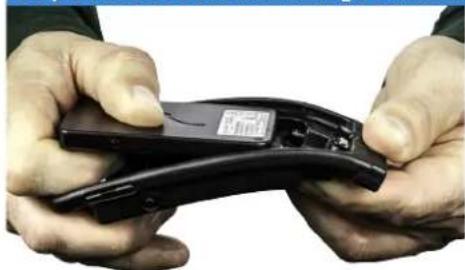
natural_image
Close-up of hands holding a black electronic device with a visible logo (no text or symbols on the device itself)Step 3: Snap down scanner

natural_image
Close-up of hands holding a black handheld device with a small screen (no visible text or symbols)
natural_image
Close-up of hands holding a black handheld device with a small screen (no visible text or symbols)Step 4: Slide mobile device in place

natural_image
Exterior view of a smartphone with black plastic housing and a flat screen (no visible text or symbols)Step 5: Bend DuraCase to align connector

natural_image
Close-up of hands holding a handheld electronic device (no visible text or symbols)Step 6: Snap down mobile device

natural_image
Close-up of hands holding a handheld electronic device with a red and black casing (no visible text or symbols)
natural_image
Close-up of hands holding a small black smartphone with a USB port (no visible text or symbols)

Watch our video https://youtu.be/AJJyV3uYtGY

natural_image
Black plastic object with a dome-shaped top and a small protrusion (no text or symbols visible)DuraCase Charging Dock

natural_image
Close-up of a black plastic electrical connector with a terminal and mounting bracket (no visible text or symbols)DuraCase Charging Adapter

natural_image
Black plastic electronic component with multiple circular slots and ventilation slots (no text or symbols visible)DuraCase 6 Multi-Bay Charger
How to Use Single Charging Dock & 6 Multi-Bay Charger
Step 1: Insert charging cable

natural_image
Close-up of hands installing a black electronic device into a housing (no visible text or symbols)Step 2: Insert DuraCase

natural_image
Close-up of a black IntelliSkin™ scanner device with a display and control panel (no readable text or symbols)Step 3: Device charging

natural_image
Two black electronic devices: a smartphone displaying a green USB flash unit and a row of six pens on top (no visible text or symbols)How to Use Charging Adapter
Step 1: Squeeze the side clips
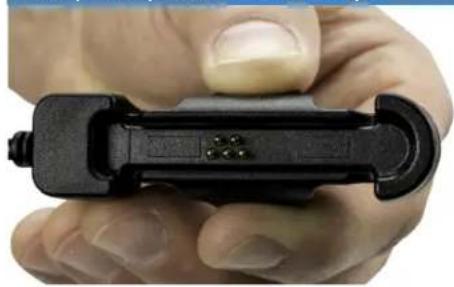
natural_image
Close-up of a hand holding a black mechanical clip or connector (no visible text or symbols)Step 2: Align pins
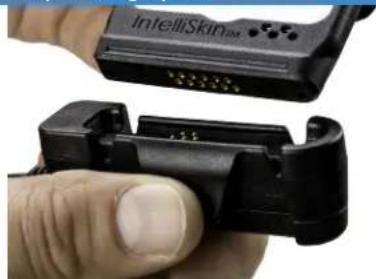
natural_image
Close-up of a hand holding a black hard-shell device with a white cable connector, no visible text or symbols.Step 3: Snap together


GDS ^™ , IntelliSkin ^™ , GDS Tech ^™ , GDS Technology ^™ , GDS Green ^™ and GDS Compatible ^™ are
trademarks or registered trademarks of National Products Inc.
The distinctive D Shape™ of the GDS® connector is a trademark of National Products Inc.
Patented and Trademarks
www.rammmount.com/lp
Warranty: 1 Year Limited Warranty
6430-00368F
socketmobile.com sales@socketmobile.com
UK/Ireland/South Africa:
+44 7787 112109
Toll-Free:
+1 800 552 3300 (USA/Canada)
EMEA & Russia:
+41 62 834 0780
France: +33 970 462 241 Switzerland:
+41 62 834 07 80
Asia Pacific: +1 510 933 3122
Japan:
+8190 9808 0518
Germany:
+49 9401 5299 052
Latin America:
+1 510 933 3153
Technical Support:
Send us a support ticket at support.socketmobile.com or call us at 1 800 279 1390 between the hours of 7:00 AM- 7:00 PM PST.
© 2017 Socket Mobile, Inc. All rights reserved. Socket®, the Socket Mobile logo, SocketScan", DuraScan", Battery Friendly® are registered trademarks or trademarks of Socket Mobile, Inc., Microsoft® is a registered trademark of Microsoft Corporation in the United States and other countries. Apple®, iPad®, iPad Mini®, iPhone®, iPod Touch®, and Mac iOS® are registered trademarks of Apple, Inc., registered in the U.S. and other countries. The Bluetooth® Technology word mark and logos are registered trademarks owned by the Bluetooth SIG, Inc. and any use of such marks by Socket Mobile, Inc. is under license. Other trademarks and trade names are those of their respective owners.
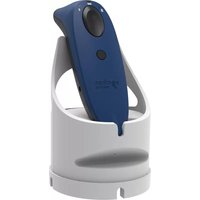
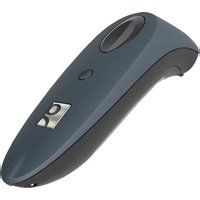
Brand : Socket Mobile
Model : AC4093-1669
Category : Connection Base