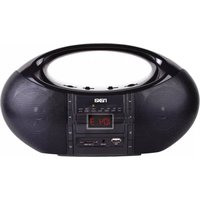
NAS-3044 - Mp3 player Naxa - Free user manual and instructions
Find the device manual for free NAS-3044 Naxa in PDF.


| Product Type | MP3 Player |
| Brand | Naxa |
| Model | NAS-3044 |
| Dimensions | Approx. 4.0 x 2.0 x 0.5 inches |
| Weight | Approx. 2 oz (56 g) |
| Power Source | Built-in rechargeable battery via USB |
| Battery Life | Up to 12 hours of music playback |
| Charging Time | Approx. 2-3 hours |
| Storage | Internal memory + microSD card slot (supports up to 32 GB) |
| Audio Formats Supported | MP3, WMA, WAV |
| Functions | Music playback, FM radio, voice recording, repeat play, EQ settings |
| Display | LED screen (text and icons) |
| Connectivity | USB 2.0 for charging and data transfer |
| Audio Output | 3.5mm headphone jack |
| Controls | Physical buttons: play/pause, volume, skip, mode, record |
| Additional Features | Foldable clip for portability, earphones included |
| Cleaning and Maintenance | Wipe with a soft, dry cloth. Do not use liquids or abrasives. |
| Safety Precautions | Keep away from water and extreme temperatures. Do not disassemble. |
| Spare Parts and Repairability | Battery replacement possible by professional; other parts not user-serviceable. |
| General Information | Portable MP3 player suitable for music and voice recording. |
Frequently Asked Questions - NAS-3044 Naxa
User questions about NAS-3044 Naxa
0 question about this device. Answer the ones you know or ask your own.
Ask a new question about this device
Download the instructions for your Mp3 player in PDF format for free! Find your manual NAS-3044 - Naxa and take your electronic device back in hand. On this page are published all the documents necessary for the use of your device. NAS-3044 by Naxa.
USER MANUAL NAS-3044 Naxa
Portable Wireless Sound System & MP3 Player with Bluetooth®
Model: NAS-3044
INSTRUCTION MANUAL
WARNING
TO PREVENT ELECTRIC SHOCK: DO NOT USE THIS PLUG WITH AN EXTENSION CORD
RECEPTACLE OR OTHER OUTLET UNIFSS THE BIADFS CAN BE FULLY INSERTED TO PREVENT
BLADES EXPLOSURE
TO PREVENT FIRE OR SHOCK HAZARD; DO NOT EXPOSE THIS APPLIANCE TO RAIN OR MOISTURE.
 The lighting flash with arrowhead symbol, with an equilateral triangle is intended to alert the user to the presence of un-insulated dangerous voltage within the producis enclosure that may be of sufficient magnitude to constitute a risk of electric shock to persons. The lighting flash with arrowhead symbol, with an equilateral triangle is intended to alert the user to the presence of un-insulated dangerous voltage within the producis enclosure that may be of sufficient magnitude to constitute a risk of electric shock to persons. | CAUTIONRISK OF ELECTRIC SHOCKDO NOT OPENCAUTION: TO REDUCE THE RISK OF ELECTRIC SHOCK, DO NOT REMOVE COVER (OR BACK). NO USER SERVICEABLE PARTSINSIDE. REFER SERVICING TO QUALIFIED SERVICE PERSONNEL. | The exclamation point within an equilateral triangle is intended to alert the user to the presence of important operating and maintenance (servicing) instruction in the literature accompanying the appliance. |
WARNING
- The ventilation should not be impeded by covering the ventilation openings with items, such as newspapers, tablecloths, curtains, etc.
• No naked flame sources, such as lighted candles, should be placed on the apparatus. - It shall not be exposed to dripping or splashing and that no objects filled with liquids, such as vases, shall be placed on the apparatus.
- Do not place the product in closed bookcases or racks without proper ventilation.
- The batteries (Battery pack or batteries installed) shall not be exposed to excessive heat such as sunshine, fire or the like.
• Excessive sound pressure from earphones and headphones can cause hearing loss. - Where the mains plug or an appliance coupler is used as the disconnect device, the disconnect device shall remain readily operable.
LOCATION OF CONTROLS

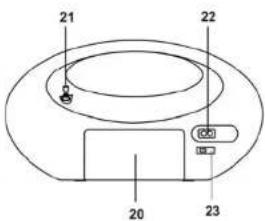
1 DIAL scale 13 ALBUM DOWN button
2 VOLUME dial 14 LCD display
3 FUNCTION switch 15 USB port
4 BAND switch 16 AUX-IN jack
5 TUNING dial 17 SD card slot
6 ▶ II button
7 ■ button 19 ^3 Indicator BLUETOOTH
8 USB/SD button 20 Battery compartment
9 MODE button 21 Antenna
10 button 22 AC socket
11 button 23 VOLTAGE selector
12 ALBUM UP button
CONNECTING THE UNIT TO POWER
AC OPERATION
Before operation, please make sure that the VOLTAGE selector [23] is set to the voltage of your local area. Unwind the AC power cord and then insert one end into the AC socket on the unit and the other end into a standard AC power outlet.
ATTENTION
- Do not plug or unplug the power cable while you have wet hands.
- When planning not to use this unit for a long time, disconnect the power cable from the wall outlet.
- When disconnecting the power cord from the wall outlet, do not pull on the cord in order to avoid shock risks caused by damaged cable.
BATTERY OPERATION
Disconnect the AC cord set completely. Open the battery compartment door and insert 4 pieces UM-2 "C" size batteries into the battery compartment. Make sure the polarity of the batteries match the "+" and "-" markings found inside the battery compartment.
- Set the FUNCTION switch [3] to RADIO position.
- Set the BAND switch [4] to the desired radio band.
- Turn the TUNING dial [5] to your desired radio station.
- Adjust the sound level by turning the VOLUME dial [2].
- To turn the radio off, set the FUNCTION switch [3] to the OFF position.
PLAYING MP3 FILES FROM SD CARDS OR USB MEMORY STICKS
- Slide the FUNCTION switch [3] to USB/SD position
- Insert your SD card into the SD card slot [17] or plug your USB stick into the USB port [15] of the unit.
- The unit will read the MP3 files on your SD/USB memory device and will start playing the first compatible MP3 files it detects.
- Press the button [11] to skip to the next track.
- Press the button [10] to go back to the previous track.
- Press the ALBUM UP button [12] to go to the next folder.
- Press the ALBUM DN [13] button to go back to the previous folder.
- Note: If you insert an SD card while playing MP3s from the USB port, the device will automatically switch to playing MP3s from the SD card slot (and vice versa).
- Press the button [6] to pause playback. Press the ▶II button [6] again to resume playback.
- Press the MODE button to toggle the Repeat Play mode in the following sequence: Repeat ONE ⇔ Repeat ALL ⇔ Repeat FOLDER ⇔ Normal Play.
Note:
MP3 playback quality and performance is dependent on how the file was produced. Naxa™ Electronics cannot guarantee the quality or playback performance of all MP3 files because production is not standardized. Naxa is not responsible for MP3s that cannot be played due to recording conditions such as PC performance, encoding software, media ability, and other factors.
AUX-IN CONNECTION
- Set the FUNCTION switch [3] to the BT/AUX position.
- Connect the headphone or line-out jack of your playback device to the AUX-IN Jack [16] of the unit with an AUX cable (male-to-male 3.5mm stereo plug, not supplied). Typical playback devices include MP3 players, smartphones, tablets, and laptops.
- Turn on the connected device and start playback according to its manufacturer's instructions.
- To turn off this function, set the FUNCTION switch [3] to the OFF position (and/or turn off the playback device).
- EN 3 -
BLUETOOTH OPERATION
Wireless audio streaming via BLUETOOTH ^®
You will need to pair your playback device with the unit before you can stream audio wirelessly. To do so:
- Set the FUNCTION switch [3] to the BT/AUX position. The BLUETOOTH indicator [19] will start flashing blue continuously
- Enable Bluetooth on the device you want to connect and set it to "search for devices". When it finds "NAS-3044", select it from the list of found devices. (Enter "0000" if it asks for a passcode.)
- When the connection is successful, the Bluetooth indicator [19] will flash every few seconds.
- Start playback on the connected device.
- To turn off BLUETOOTH, set the FUNCTION switch [3] to the OFF position.
Note:
After a device has been paired successfully, the unit will connect to it automatically. Simply turn on your device with Bluetooth enabled, and then set the FUNCTION switch [3] to the BT/AUX position.
Different devices with Bluetooth have different ways to enable and search for other Bluetooth devices. Please refer to the instructions of your particular device if you need further help with the connection process.
SPECIFICATIONS
| Frequency Range: | AM: 540 – 1600 kHz | |||
| FM: | 88 | – | 108 MHz | |
| Power Supply: | AC 110V ~ 60Hz / 220V ~ 50Hz | |||
| DC 9V (6 x UM2 °C” size battery) | ||||
| Batteries | are | not | included | |
Specifications are subject to change without prior notice.
SUPPORT
If you have problems with your device, please consult the instructions in this manual, as well as the latest news, alerts, and documentation that can be found by visiting us on the web at www.naxa.com. If you need further assistance, please contact Naxa™ Technical Support.
NAXA Technical Support
2320 East 49th St.
Vernon, CA 90058
http://www.naxa.com/naxa_support/

Brand : Naxa
Model : NAS-3044
Category : Mp3 player