
BAT604-50 - Battery Inovonics - Free user manual and instructions
Find the device manual for free BAT604-50 Inovonics in PDF.


| Product Type | Replacement Battery |
| Brand | Inovonics |
| Model | BAT604-50 |
| Battery Type | CR123A |
| Chemistry | Lithium |
| Voltage | 3V |
| Battery Life | Up to 10 years in climate-controlled environment |
| Low Battery Alert | Yes, transmitted to TapWatch software or application |
| Compatible Transmitters | EchoStream EN1501, EN1501-EXT, EN1550EP; Frequency Agile FA5200M/H, FA5201, FA5202 |
| Package Quantity | 50 batteries per pack |
| Replacement Window | At least one week after low battery alert |
| Installation Steps | Depress housing release tab, remove old battery, install new battery, press reset button, close housing |
| Reset Button | Yes, to initialize transmitter after battery replacement |
| Recycling | Recycle using a certified electronics recycler |
| Contact Information | Email: support@inovonics.com; Phone: (800) 782-2709 or (303) 939-9336 |
| Operating Environment | Indoor, climate-controlled |
| Safety Note | Do not dispose of in household waste; follow local regulations |
Frequently Asked Questions - BAT604-50 Inovonics
User questions about BAT604-50 Inovonics
0 question about this device. Answer the ones you know or ask your own.
Ask a new question about this device
Download the instructions for your Battery in PDF format for free! Find your manual BAT604-50 - Inovonics and take your electronic device back in hand. On this page are published all the documents necessary for the use of your device. BAT604-50 by Inovonics.
USER MANUAL BAT604-50 Inovonics
Changing BAT604 Batteries in Inovonics Submetering Transmitters
Introduction
Replacement BAT604 batteries are available from the Inovonics website in packs of 12, 50 and 400.
Most Inovonics submetering transmitters use a BAT604 CR123A 3V lithium battery, which, in a climate-controlled environment, grants a 10-year battery life. When the battery is low, the transmitter sends an alert to the TapWatch software or application. This alert provides a window of at least one week to replace the lithium battery before it dies.
This battery change procedure applies to the following submetering transmitters:
| Product Line Part Number Product Name | Tab Color (Discontinued) | ||
| EchoStream EN | 1501 Pulse Meter | Transmitter Brown | |
| EchoStream EN | 1501-EXT Pulse Meter | Transmitter Board for Integration | N/A |
| EchoStream EN | 1550EP Encoder | Pulse Transmitter N/A | |
| Frequency Agile (FA) | FA5200M/H TapWatch | ||
| Frequency Agile (FA) | FA5201 TapWatch | ||
| Frequency Agile (FA) | FA5202 TapWatch | ||
Contact Information
For questions, contact your account manager or Inovonics technical support:
• E-mail: support@inovonics.com.
• Phone: (800) 782-2709; (303) 939-9336.
Procedure

natural_image
Diagram of a device with an open lid and colored blocks, showing a red curved arrow indicating rotation (no text or symbols)- Use your thumb to depress the housing release tab on the bottom of the transmitter, separate the housing.

natural_image
Illustration of a battery being unloaded from a tray, with a red arrow indicating the direction (no text or symbols)- Remove the old battery.
natural_image
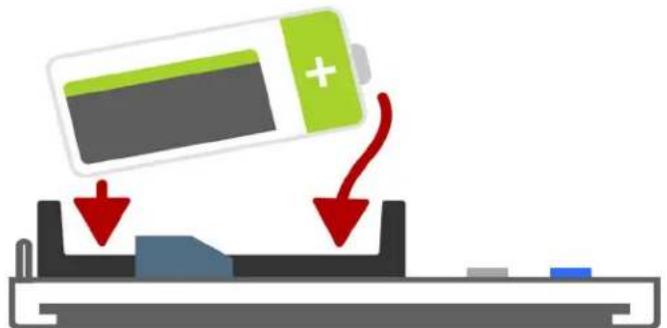
Diagram showing a battery being lowered into a device, with red arrows indicating the process (no text or symbols present)- Install the new battery.

- Press the reset button to initialize the transmitter.

natural_image
Simple line drawing of a rectangular device with a curved arrow indicating rotation or change (no text or symbols)- Close the housing.
Note: Inovonics supports recycling and reuse whenever possible. Please recycle these parts using a certified electronics recycler.

Brand : Inovonics
Model : BAT604-50
Category : Battery