RM60802T - Electronic accessory Arkon - Free user manual and instructions
Find the device manual for free RM60802T Arkon in PDF.


| Brand | Arkon |
| Model | RM60802T |
| Product Type | Electronic accessory - Car mount with smartphone/tablet holder |
| Suction Cup Diameter | 80 mm (heavy-duty) |
| Holder Type | Slim-Grip Ultra universal holder |
| Compatible Devices | Smartphones and midsize tablets, including devices with cases (using long support legs) |
| Mounting Options | Windshield (suction) or dashboard (adhesive disk included) |
| Attachment Mechanism | Dual T-Tabs on pedestal head slide into Dual T-Slots on holder |
| Adjustment | Spring-loaded bottom for device insertion; adjustment knob for angle and position (loosen to adjust, retighten to set) |
| Support Legs | Interchangeable; long legs included for larger devices |
| Package Contents | Heavy-Duty 80mm Suction Mounting Pedestal (RM0802T), Slim-Grip Ultra Holder (SM060-2), adhesive mounting disk, long support legs |
| Suction Lock | Yes, engage to secure pedestal to windshield |
| Adhesive Disk Curing Time | 24 hours before use on dashboard |
| Safety Precautions | Do not install over air bag cover or within air bag deployment zone |
| Country of Origin | Made in Taiwan |
| Designed In | USA |
| Material | Not specified (likely plastic, rubber, metal components) |
| Color | Black (from product image) |
| Dimensions (approx.) | Pedestal height ~160 mm, holder width ~100 mm |
| Weight (approx.) | ~500 g |
| Maintenance | Clean with a soft, damp cloth; avoid harsh chemicals |
| Repairability | Not user-serviceable; contact Arkon for support |
Frequently Asked Questions - RM60802T Arkon
User questions about RM60802T Arkon
0 question about this device. Answer the ones you know or ask your own.
Ask a new question about this device
Download the instructions for your Electronic accessory in PDF format for free! Find your manual RM60802T - Arkon and take your electronic device back in hand. On this page are published all the documents necessary for the use of your device. RM60802T by Arkon.
USER MANUAL RM60802T Arkon
natural_image
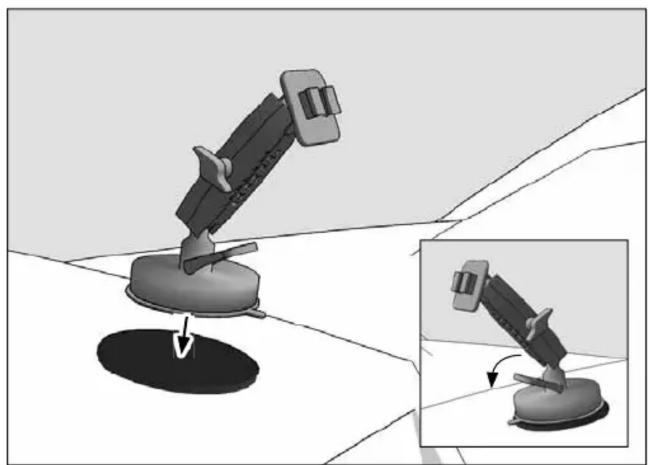
Product photo of a black handheld device with attached clip accessories and a circular base (no text or symbols visible)① Attach pedestal to windshield, engage suction lock to secure.

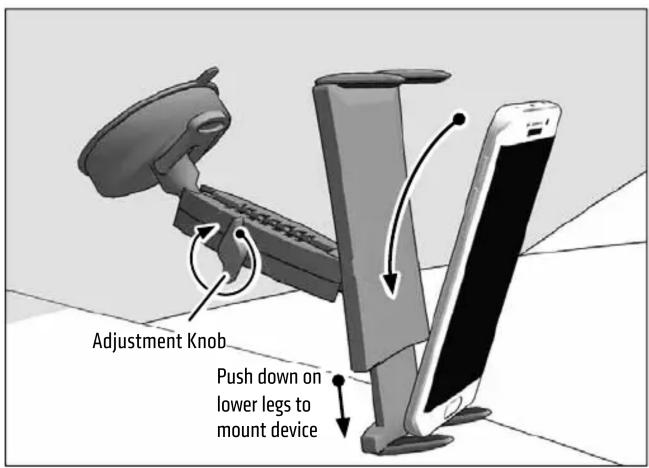
3 Insert smartphone or midsize tablet by placing it on the 2 lower legs and pushing down on the spring-loaded bottom of the holder. Loosen adjustment knob to adjust position and angle. Retighten to set.
Package Contents:
RM0802T – Heavy-Duty 80mm Suction Mounting Pedestal
SM060-2 – Slim-Grip® Ultra™ Universal Smartphone
and Midsize Tablet Holder
IMPORTANT:
Select the appropriate size support legs and install to holder. For large smartphones, midsize tablets, or devices with cases, use included long support legs.
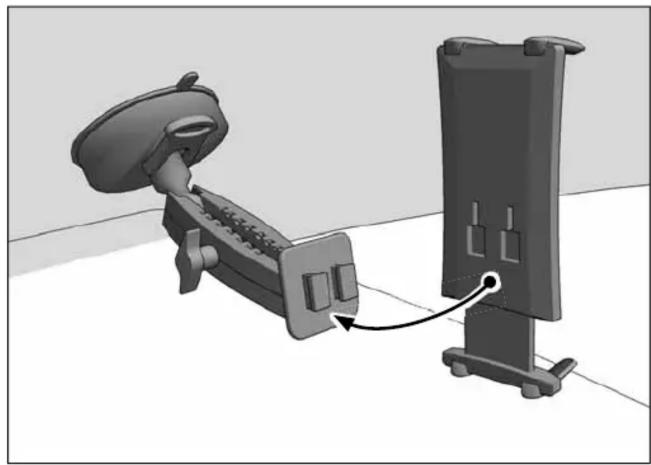
2 Attach Slim-Grip Ultra holder by sliding the Dual T-Tabs on the pedestal head into the Dual T-Slots of the holder.
natural_image
3D diagram of a mechanical device connected to a vertical panel, showing internal components and a directional arrow (no text or symbols)Optional: For dashboard mounting, use the included adhesive mounting disk. NOTE: Make sure surface is dry and clean prior to adhering disk. Allow disk to cure for 24 hours prior to use.
natural_image
Illustration of a mechanical device with a base and mounting point, shown in two views (no text or symbols)
Safety Precautions
Do not install Arkon products over an air bag cover or within the air bag deployment zone. Arkon Resources, Inc. assumes no responsibility of liability for injury or death as a result of car crashes and / or air bag deployment.
Arkon is not responsible for any damages caused to your vehicle, your device, or yourself due to the installation or use of this mount.
ARKON
RESOURCES INC.
The Mobile Mounting Specialists™
Consumer Hotline:
USA (800) 841-0884
INT'L (626) 254-9005
Monday - Friday 9 am - 5 pm, PST
www.arkon.com
Arcadia, CA 91006 USA
Designed in USA | Made in Taiwan
© Copyright 2016 Arkon Resources, Inc.

Brand : Arkon
Model : RM60802T
Category : Electronic accessory