
TT129-SBH - Car kit Arkon - Free user manual and instructions
Find the device manual for free TT129-SBH Arkon in PDF.


| Product Type | Car Mount Kit |
| Brand | Arkon |
| Model | TT129-SBH |
| Mounting Location | Dashboard or Windshield |
| Mounting Type | Suction Cup |
| Arm Type | Adjustable Gooseneck |
| Holding Mechanism | Spring-loaded Clamp |
| Device Compatibility | Smartphones and GPS devices up to 6.5" |
| Rotation | 360-degree |
| Height Adjustment | Yes |
| Material | Plastic and Silicone |
| Dimensions (Approx.) | 10 x 8 x 15 cm |
| Weight (Approx.) | 150 g |
| Package Contents | Mount, Suction Cup, Adhesive Pad |
| Power Source | None (Passive) |
| Features | Quick release, one-hand operation |
| Cleaning | Wipe with damp cloth; avoid solvents |
| Safety | Do not obstruct airbags or driver view |
Frequently Asked Questions - TT129-SBH Arkon
User questions about TT129-SBH Arkon
0 question about this device. Answer the ones you know or ask your own.
Ask a new question about this device
Download the instructions for your Car kit in PDF format for free! Find your manual TT129-SBH - Arkon and take your electronic device back in hand. On this page are published all the documents necessary for the use of your device. TT129-SBH by Arkon.
USER MANUAL TT129-SBH Arkon
TT129-SBH | Removable Air Vent Mount for TomTom GPS
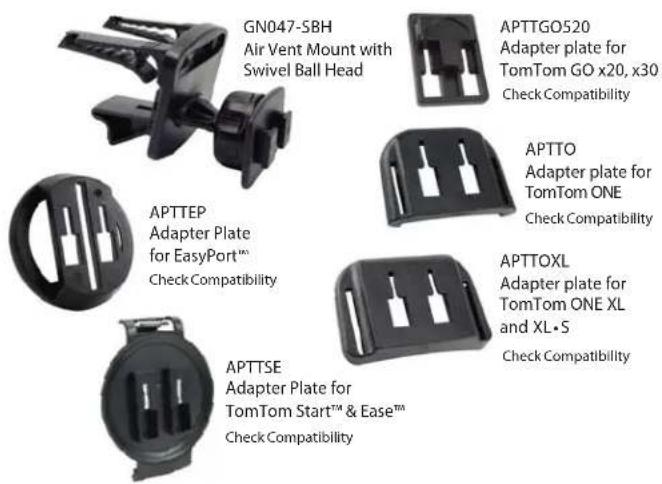
Package Contents:
(1) GN047-SBH Air Vent Mount with Swivel Ball Head
(1) APTTO - Adapter plate for TomTom ONE™ Series
(1) APTTOXI - Adapter plate for TomTom ONE XI™ and XI • S™ Series
(1) APTTGO520 - Adapter plate for TomTom GO™ Series
(1) APTTEP - Adapter plate for TomTom EasyPort™ pattern
(1) APTTSE - Adapter plate for TomTom Start™ and Ease™
TomTom Device Compatibility:
TomTom ONE 125 125-SE (TomTom EasyPort Mount)
TomTom ONE 130, ONE 130-S (TomTom EasyPort Mount)
TomTom ONE 140, ONE 140-S (TomTom EasyPort Mount)
TomTom XL 325, XL 325-S, XL 325-SE (TomTom EasyPort Mount)
TomTom XL 330, XL 330-S (TomTom EasyPort Mount)
TomTom XL 335 Series (TomTom EasyPort Mount)
TomTom XL 340, XL 340-S, XL 340 LIVE Series (TomTom EasyPort Mount)
TomTom XL 350 Series (TomTom EasyPort Mount)
TomTom XXL 530-S, XXL 535-T, XXL 540-S/WTE, XXL 550 Series (TomTom EasyPort Mount)
TomTom ONE (US Edition, US 3rd Edition)
TomTom ONE XL (1st Edition) - TomTom ONE XL-S (1st Edition)
TomTom ONE 22, ONE 22 Regional, ONE 22 Regional Traffic
TomTom XL 22, XL 22 Regional (TomTom EasyPort Mount)
TomTom ONE UK / EUROPE (NEW Edition aka 2nd Edition, 3rd Edition)
TomTom GO 520/530/630/720/730/920/920T/930
Tom Tom Start and Ease
TomTom, ONE, GO, and EasyPort, Start and Ease are product names, trademarks, or registered trademarks of TomTom International NV. Arkon Resources, Inc. is not affiliated with TomTom International b.v.
Air Vent Mount Assembly
Step 1. Attach the vent mounting clips (A) to the back of the pedestal (B) with the vent clips positioned with the flat sides facing up.

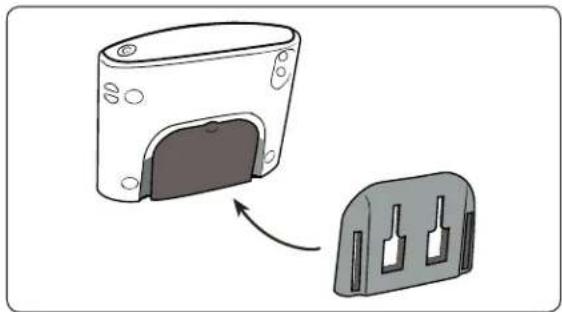
TomTom ONE, ONE XL, and ONE XL • S Plate Installation
Step 1. Slide the adapter plate up into the grooves on the back of the TomTom ONE, ONE XL, or ONE XL·S.
natural_image
Diagram showing a device with a door and a separate plastic housing, no text or symbols presentContinued on next column...

Do not place mount in or near an air bag deployment zone or where it will obstruct view of the road.
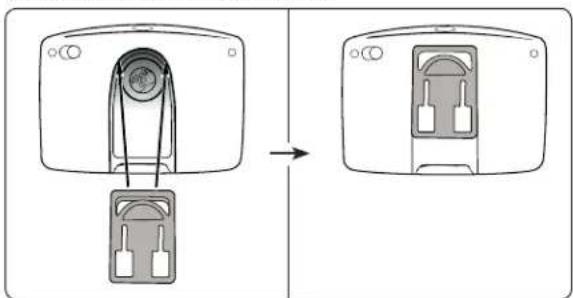
TomTom GO Adapter Plate Installation
Step 1. Attach the adapter plate by sliding it up into the slot on the back of the TomTom GO 520, 530, 630, 720, 730, 920, 920T, and 930 models device as shown below.
natural_image
Diagram showing a device being inserted into a housing, with no visible text or symbolsStep 2. Attach the device with adapter plate to the mount as shown in the diagram above.
TomTom EasyPort Adapter Plate Installation
Step 1. Connect the dual T-slots (A) on adapter plate to the dual T-tabs (B) on the pedestal head. Adjust the angle of the head by tightening the head adjustment knob (C).

Continued on next page...

Safety Precautions
Follow all manufacturer safety guidelines for operating your device. Failure to practice safe usage of GPS device while driving may result in damage, injury, or death.
Arkon is not responsible for any damages caused to your car, your device, or yourself due to the installation or use of this pedestal mount.

RESOURCES INC.
The Mobile Mounting Specialists™
Consumer Hotline:
www.arkon.com
USA (800) 841-0884
Arcadia, CA 91006 USA
INT'L (626) 254-9005
Designed in USA | Made in China
Monday - Friday 9 am - 5 pm, PST
© Copyright 2010 Arkon Resources, Inc.
TT129-SBH | Removable Air Vent Mount for TomTom GPS
TomTom EasyPort Device Insertion
Step 2. While holding the mounted adapter plate, gently insert the device (not included, sold separately) into the adapter plate until an audible click is heard. The device can then be rotated into the desired viewing angle.

natural_image
Diagram showing a mechanical device connected to a circular component with an arrow indicating rotation (no text or symbols present)Attach Device or Cradle to Air Vent Mount
Step 1. Attach your cradle or device (not included, sold separately) to the dual-T head by inserting the dual-T tabs (F) into the dual-T slots (G) on the back of the cradle or device.

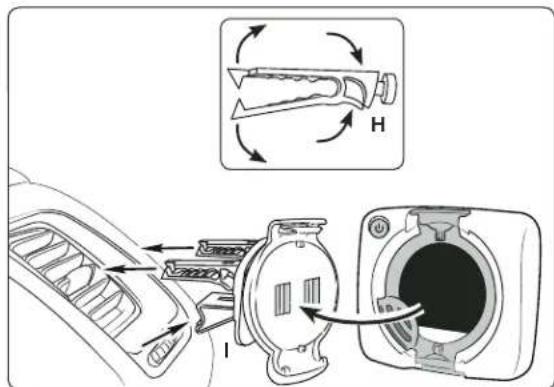
Insertion of Mount Assembly into Air Vent
Step 2. Pinch the vent mounting clips (H) so that the teeth open and gently insert vent pedestal into vent louvres until the mounting clips are attached to the fi n/blade of the vent. Adjust the support leg (I) vertically until it rests firmly along the bottom of the vent or dash surface below the vent.
Continued on next column...
Attaching a TomTom Device to Pedestal
Step 3. While holding the mounted TomTom adapter plate, gently insert the TomTom device (not included, sold separately) into the adapter plate until an audible click is heard.

Safety Precautions
Follow all manufacturer safety guidelines for operating your device. Failure to practice safe usage of GPS device while driving may result in damage, injury, or death.
Arkon is not responsible for any damages caused to your car, your device, or yourself due to the installation or use of this pedestal mount.
ARKON®
RESOURCES INC.
The Mobile Mounting Specialists™
Consumer Hotline:
www.arkon.com
USA (800) 841-0884
Arcadia, CA 91006 USA
INT'L (626) 254-9005
Designed in USA | Made in China
Monday - Friday 9 am - 5 pm, PST
© Copyright 2010 Arkon Resources, Inc.
- TT129-SBH | Removable Air Vent Mount for TomTom GPS
- Package Contents:
- TomTom Device Compatibility:
- Air Vent Mount Assembly
- TomTom GO Adapter Plate Installation
- TomTom EasyPort Adapter Plate Installation
- Safety Precautions
- TomTom EasyPort Device Insertion
- Attach Device or Cradle to Air Vent Mount
- Insertion of Mount Assembly into Air Vent
- Attaching a TomTom Device to Pedestal
- ARKON®
- RESOURCES INC.
Brand : Arkon
Model : TT129-SBH
Category : Car kit