RV180 - Phone holder Arkon - Free user manual and instructions
Find the device manual for free RV180 Arkon in PDF.


| Product Type | Phone Holder |
| Brand | Arkon |
| Model | RV180 |
| Compatible Devices | Smartphones up to 6.5 inches, GPS units |
| Mounting Location | Dashboard or windshield |
| Material | High-quality ABS plastic and silicone |
| Dimensions | 4.5 x 3.2 x 2.8 inches |
| Weight | 0.35 lbs |
| Rotation | 360-degree swivel ball joint |
| Installation | Suction cup or adhesive disc for dashboard |
| Maintenance | Wipe clean with a damp cloth; avoid solvents |
| Safety Features | Secure grip; does not obstruct driver's view when properly installed |
| Spare Parts | Contact Arkon customer service for replacement parts |
| Warranty | Limited lifetime warranty |
Frequently Asked Questions - RV180 Arkon
User questions about RV180 Arkon
0 question about this device. Answer the ones you know or ask your own.
Ask a new question about this device
Download the instructions for your Phone holder in PDF format for free! Find your manual RV180 - Arkon and take your electronic device back in hand. On this page are published all the documents necessary for the use of your device. RV180 by Arkon.
USER MANUAL RV180 Arkon
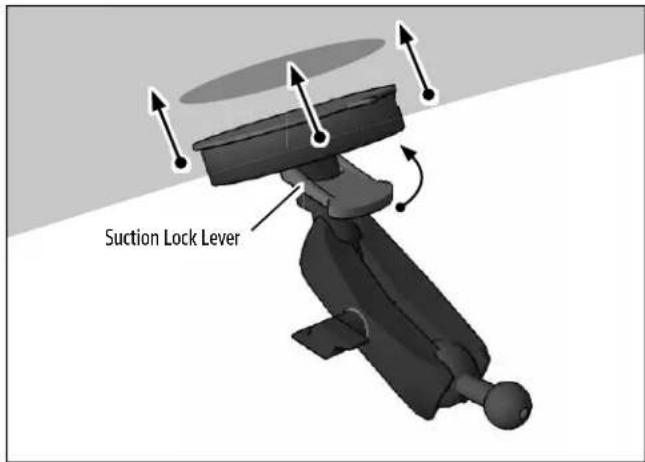
1 Attach pedestal to windshield, engage suction lock.
3 Using two hands, insert the phone into the holder by pushing the device into one of the spring-loaded legs. Expand the other leg and fully insert device until it lays fl at against the blue rubber pad.

Package Contents:
RV001WR - RoadVise™ Premium Universal Smartphone Holder with Ring
RM080 - Robust Mount Shaft with Suction Base
SP25MM17 - 25mm Ball to 17mm Ball Adapter
AP020 - Adhesive Dash Mounting Disk (Optional)
IMPORTANT: Do not overtighten ring. Overtightening ring may damage threads on holder and also make it diffi cult to adjust holder.
Compatibility:
Fits smartphones with cases weighing up to 2 pounds and measuring up to 4" wide.
2 Place adjustment ring over the pedestal ball and snap the RoadVise Holder onto the pedestal.

4 RoadVise Holders work best with smartphones using a case. For maximum grip, make sure to use a ruggedized case while using this product.


Safety Precautions
Do not install Arkon products over an air bag cover or within the air bag deployment zone. Arkon Resources, Inc. assumes no responsibility of liability for injury or death as a result of car crashes and / or air bag deployment.
Arkon is not responsible for any damages caused to your vehicle, your device, or yourself due to the installation or use of this mount.
ARKON
RESOURCES INC.
The Mobile Mounting Specialists™
Consumer Hotline:
www.arkon.com
USA (800) 841-0884
Arcadia, CA 91006 USA
INT'L (626) 254-9005
Designed in USA | Made in USA & Taiwan
Monday - Friday 9am - 5pm, PST
© Copyright 2015 Arkon Resources, Inc.
Brand : Arkon
Model : RV180
Category : Phone holder