MAG195 - Car phone holder Arkon - Free user manual and instructions
Find the device manual for free MAG195 Arkon in PDF.


| Product Type | Car Lighter Socket Mount with Magnetic Phone Holder |
| Brand | Arkon |
| Model | MAG195 |
| Power Input | 12V DC from vehicle lighter socket |
| USB Output | 5V, 1A (for charging device) |
| Magnetic Attachment | Yes, with adjustable ring and adhesive metal plate |
| Gooseneck Shaft | Flexible, adjustable angle |
| Ball Diameter | 17 mm (magnet head attachment) |
| Package Contents | 1x GN095 Lighter Socket Mount, 1x SP-MAGKIT Magnet Head with Adjustment Ring and Adhesive Metal Plates |
| Compatibility | Smartphones with smooth back surface or with adhesive metal plate attached to case |
| Dimensions (Approx.) | Overall length: 10 inches (25 cm) including plug and gooseneck |
| Weight (Approx.) | 4 oz (113 g) |
| Material | Plastic and metal |
| Installation | Plug into lighter socket, bend gooseneck, attach metal plate to phone, mount magnetically |
| Charging | Use device's USB charging cord (not included) into mount's USB slot |
| Maintenance | Wipe with a soft, damp cloth. Do not use harsh chemicals. |
| Safety | Do not mount in a way that obstructs driving. Use metal plate only on non-essential surfaces. |
| Warranty | Not specified in manual; check with manufacturer. |
| Country of Origin | Designed in USA, Made in Taiwan |
Frequently Asked Questions - MAG195 Arkon
User questions about MAG195 Arkon
0 question about this device. Answer the ones you know or ask your own.
Ask a new question about this device
Download the instructions for your Car phone holder in PDF format for free! Find your manual MAG195 - Arkon and take your electronic device back in hand. On this page are published all the documents necessary for the use of your device. MAG195 by Arkon.
USER MANUAL MAG195 Arkon
To attach magnet head to the mount, slide ring over 17mm ball. Adjust angle and tighten adjustment ring to secure. Remove paper backing of adhesive metal plate. Firmly press the adhesive side to clean, back surface of your smartphone or case.
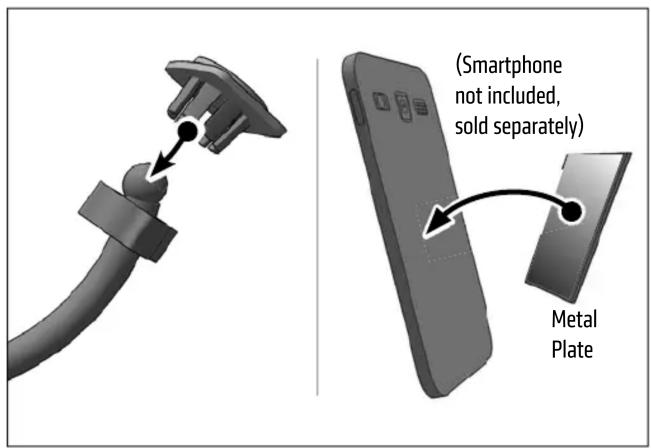
3 Place metal plate on the smartphone in contact with the magnet head on the pedestal to attach. Rotate or adjust angle as needed.

Package Contents:
(1) GN095 - 5V, 1 Amp Lighter Socket Mount
(1) SP-MAGKIT - Magnet Head with Adjustment Ring and Adhesive Metal Plates
NOTE: This lighter socket mount may not be suitable for some vehicles based on the location of the lighter socket / accessory outlet on the console.
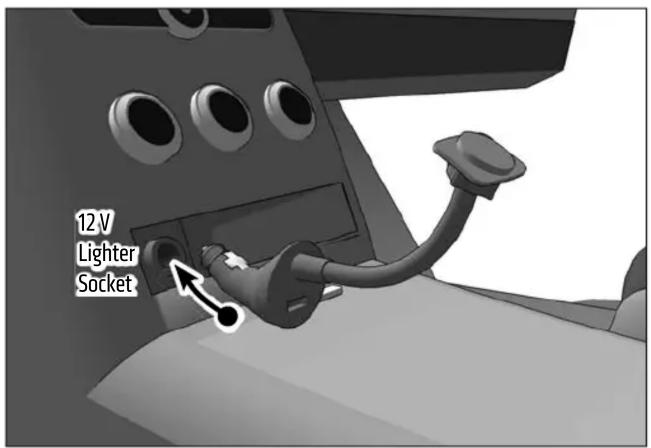
2 Firmly insert mount into vehicle's lighter socket. Adjust the angle of the gooseneck shaft by bending to desired location.
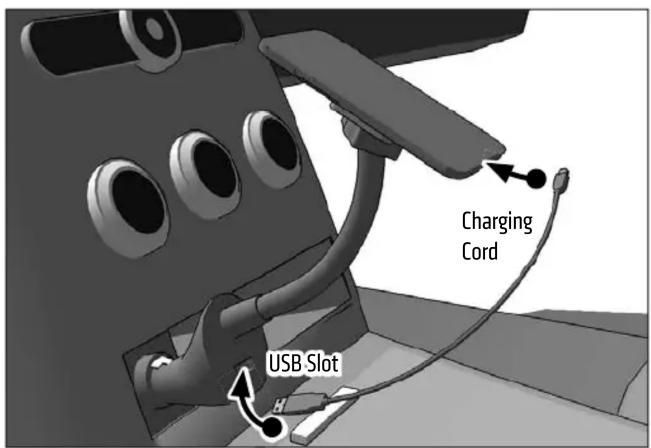
4 Insert device's USB charging cord (not included, sold separately) into the mount's built-in USB slot to charge device.

Safety Precautions
Arkon is not responsible for any damages caused to your vehicle, your device, or yourself due to the installation or use of this mount.
ARKON
RESOURCES INC.
The Mobile Mounting Specialists™
Consumer Hotline:
USA (800) 841-0884
INT'L (626) 254-9005
Monday - Friday 9am - 5pm, PST
www.arkon.com
Arcadia, CA 91006 USA
Designed in USA | Made in Taiwan
© Copyright 2014 Arkon Resources, Inc.
Brand : Arkon
Model : MAG195
Category : Car phone holder